SMD Crystal & Crystal Oscillator Guide: Types, Packages, and How to Choose
29 min
- What Is an SMD Crystal?
- SMD Crystal vs Crystal Oscillator vs Ceramic Resonator: Key Differences
- Types of SMD Crystal Oscillators (XO, TCXO, VCXO)
- Common SMD Crystal/Oscillator Package Sizes
- SMD vs Through-Hole (HC-49) Crystal: Key Differences
- Key Specifications Explained
- How to Choose the Right SMD Crystal or Oscillator for Your Circuit
- SMD Crystal Assembly & PCB Layout Tips
- Common SMD Crystal Problems and How to Fix Them
- Sourcing and Assembling SMD Crystals with JLCPCB
- FAQ about SMD Crystals and Oscillators
Key Takeaways
Crystal or oscillator: a passive crystal runs from the MCU’s oscillator and two load capacitors; an XO has its own supply and drives a clock, so use one when a clock feeds several chips.
Load capacitors are not CL: with C1 = C2, each capacitor is 2 × (CL − Cstray), so a 20 pF crystal with 3 pF of stray needs about 33 pF, not 20 pF.
Check ESR against the MCU: maximum ESR varies with frequency, package and model, so compare it with the MCU’s ESR or Gm_crit limit instead of assuming a typical value.
Orientation matters on 4-pad crystals: a 90° rotation can short XTAL_IN and XTAL_OUT through the lid, so check the crystal in the placement preview before ordering.
32.768 kHz crystals need the right drive: match the MCU’s drive setting to the crystal and keep flux residue off its high-impedance pads.
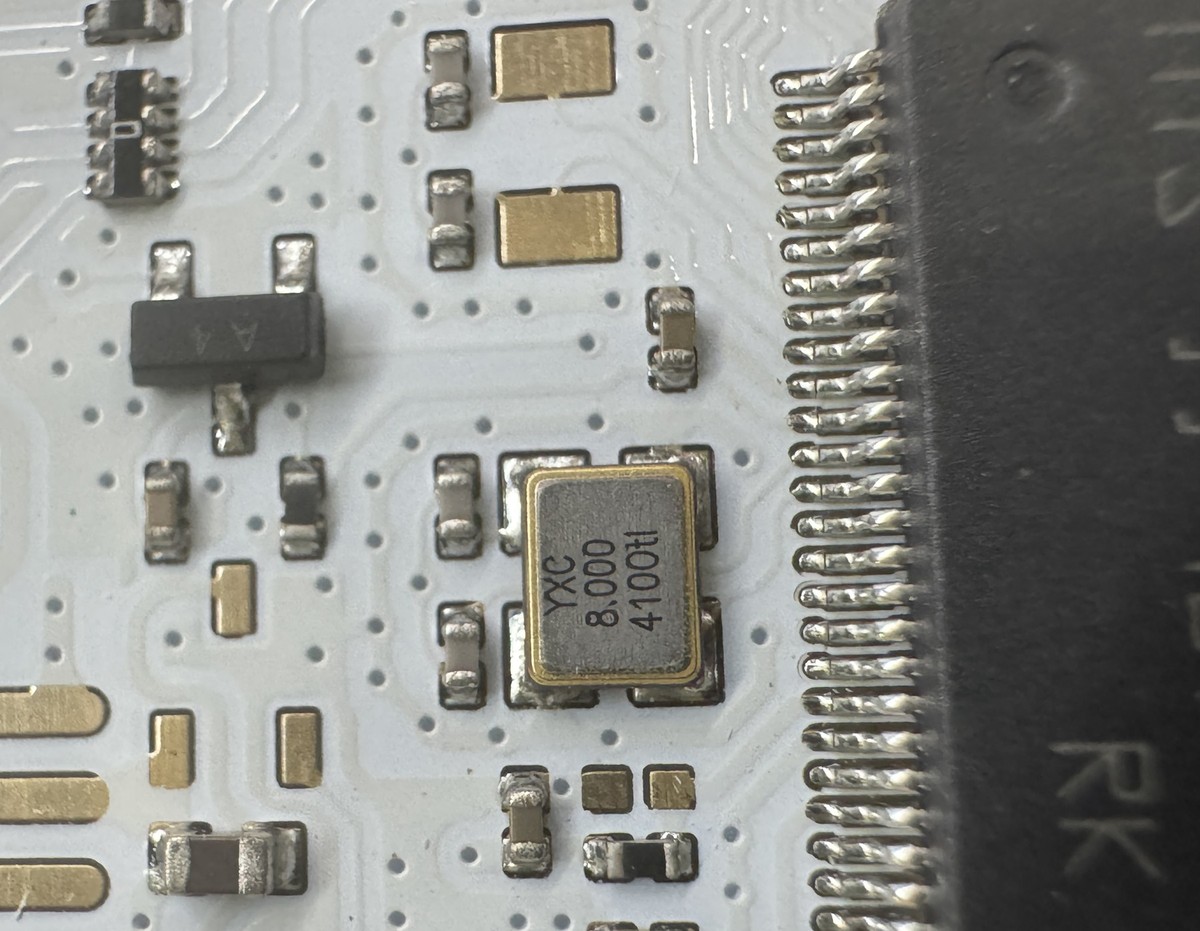
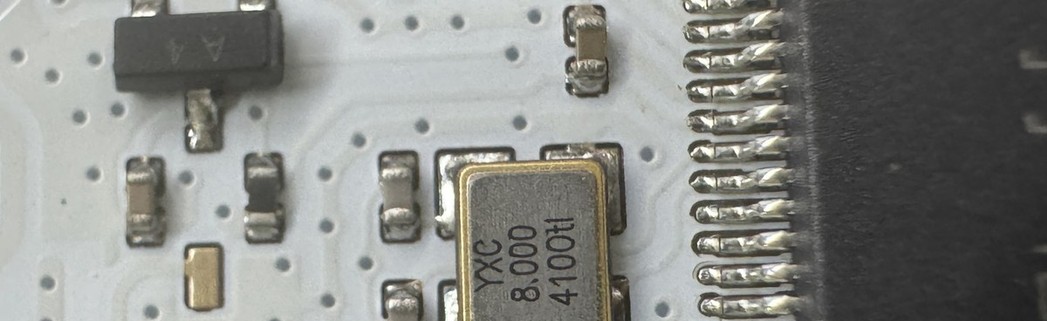
Figure: An 8 MHz SMD crystal next to the IC it clocks, with its two load capacitors on the left and a row of ground vias around the oscillator area.
Almost every board with a microcontroller has an SMD crystal sitting next to the MCU, a small metal-lidded part that's usually the last thing anyone thinks about. It's also the part that can leave an otherwise perfect prototype completely dead. The firmware is fine, the power rails are fine, but the clock never starts, so nothing runs.
Most of those failures come from a handful of practical mistakes rather than anything exotic: load capacitors calculated from the wrong number, a package the MCU can't reliably drive, a footprint or placement rotation that puts the crystal on the wrong pads, or a crystal placed where the board flexes.
One naming note before going further. "SMD crystal oscillator" is used for both a passive crystal, which relies on the MCU's oscillator circuit, and an active oscillator, which generates its own clock. They're different parts with different design rules, and both are covered here, starting with a quick reference.
| If you need… | Start with |
|---|---|
| General MCU clock (8–25 MHz) | 3225 passive crystal, ±20 ppm |
| Real-time clock / low-power timekeeping | 32.768 kHz tuning-fork crystal, 3215 or 2012 |
| Clock for an FPGA or several ICs | XO (active oscillator) |
| GPS, cellular, precise timing | TCXO |
| Accuracy not critical, lowest part cost | Ceramic resonator |
| Lower assembly cost with JLCPCB | Basic-library crystals at common frequencies |
What Is an SMD Crystal?
An SMD crystal is a small piece of quartz sealed inside a surface-mount package. Quartz is piezoelectric: apply a voltage and it flexes slightly, flex it and it produces a voltage. Cut to a precise thickness, a quartz blank vibrates at one very stable frequency, and that vibration becomes the timing reference for your circuit.
A crystal on its own is passive and does nothing. It needs an oscillator circuit, usually an inverting amplifier inside the MCU (the XTAL_IN / XTAL_OUT pins), plus two external load capacitors. Together they form a Pierce oscillator. If any part of that loop is off, whether it's the capacitor values, the crystal's resistance or the amplifier's drive strength, the oscillation may be weak, off-frequency, or never start at all.
Most SMD crystals use one of two quartz designs. AT-cut crystals are used for MHz frequencies (8 MHz, 12 MHz, 16 MHz, 24 MHz and so on). Tuning-fork crystals, shaped like a tiny fork, are used almost exclusively at 32.768 kHz for real-time clocks, and they behave differently enough to get their own section below.
Why Do Most SMD Crystals Have 4 Pads?
Many people assume a crystal has two pins, so an SMD crystal should have two pads. Most ceramic MHz crystals (3225, 2520, 2016) actually have four. Two connect to the quartz. On many 4-pad packages, the other two connect to the metal lid and are meant to be grounded, so the lid shields the crystal from EMI.
The internal connection is vendor-specific, though. On the most common layout the crystal electrodes sit on diagonal pads 1 and 3, but some parts use a different mapping, and some datasheets mark pads 2 and 4 as NC rather than GND. If the datasheet says the extra pads are case ground, ground them. If it says NC, don't connect them to any net, but keep the pads in the footprint and solder them, so all four corners of the package are anchored. And don't reuse a 4-pad footprint from another vendor's part without checking the pinout, which is one of the quieter ways to end up with a board that never oscillates.
Two-pad SMD crystals still exist. Many 5032 crystals come in both 2-pad and 4-pad versions, and 32.768 kHz tuning-fork crystals in 3215 and 2012 packages are almost always 2-pad.
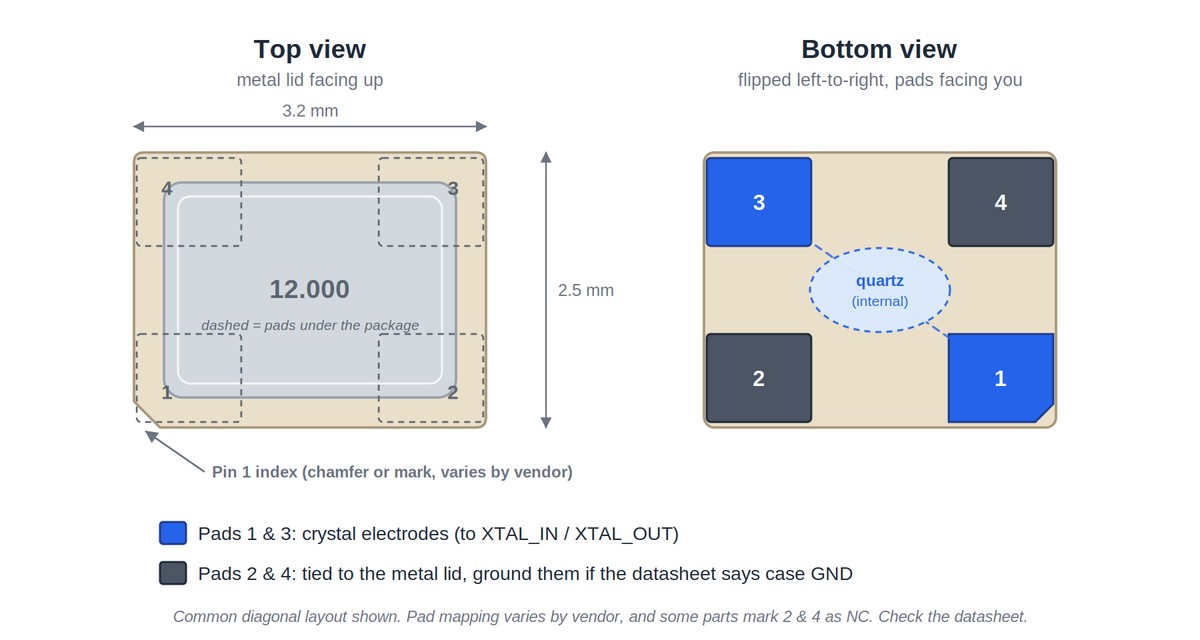
Figure: Pinout of a 4-pad 3225 crystal on the common diagonal layout: pads 1 and 3 are the crystal electrodes, pads 2 and 4 connect to the metal lid.
SMD Crystal vs Crystal Oscillator vs Ceramic Resonator: Key Differences
These three parts get mixed up constantly, partly because people say "crystal" for all of them.
A crystal oscillator (XO) is a crystal plus the oscillator circuit in one package. It needs its own power supply and outputs a ready-made clock signal, with no dependence on the MCU's internal amplifier and none of the load capacitors a passive crystal needs. It still has to be wired the way its datasheet shows, typically with a decoupling capacitor on VCC, the OE or ST pin tied to a defined level, and any coupling or termination its output type calls for (a clipped-sine TCXO output, for example, is usually AC-coupled). SMD oscillators most commonly have four pads: VCC, GND, OUT, and OE (output enable) or ST (standby).
A ceramic resonator uses piezoelectric ceramic instead of quartz. It's cheaper and tolerates shock well, but it's far less accurate. Many resonators come in a 3-pin version with the load capacitors built in.
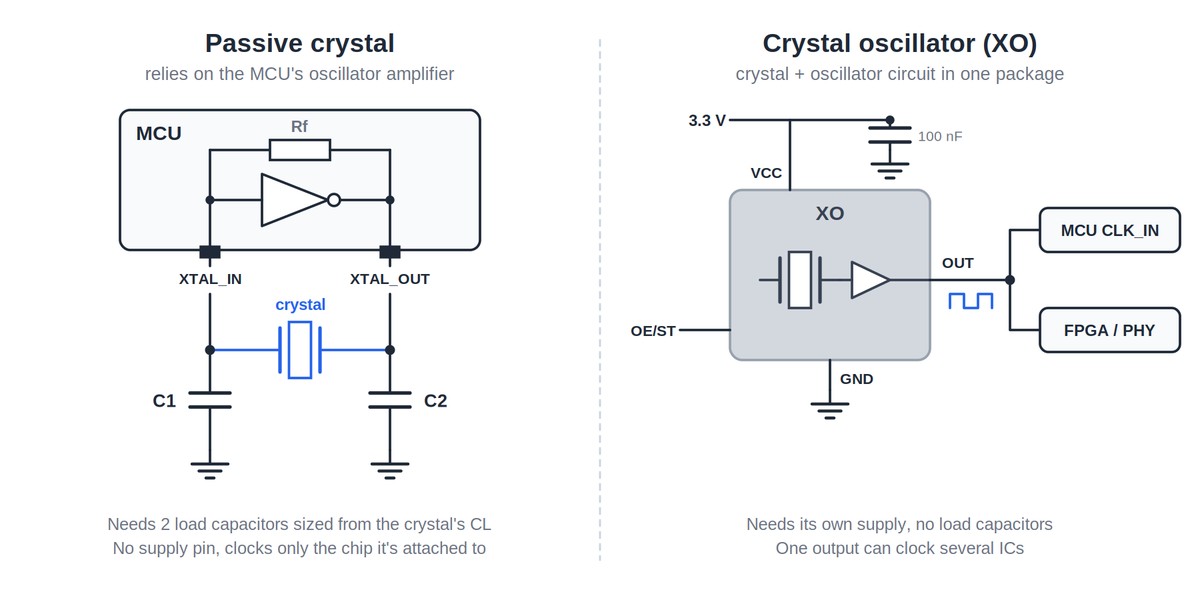
Figure: A passive crystal relies on the MCU's oscillator amplifier and two load capacitors; a crystal oscillator (XO) has its own supply and drives a clock output.
| Ceramic Resonator | SMD Crystal | Crystal Oscillator (XO) | |
|---|---|---|---|
| Active or passive | Passive | Passive | Active |
| External load caps | Often built in (3-pin) | Required (2) | Not needed |
| Typical accuracy | ±0.1% to ±0.5% (1,000–5,000 ppm) | ±10 to ±50 ppm | ±10 to ±100 ppm |
| Power draw | Via MCU oscillator | Via MCU oscillator | Own supply, typically mA range |
| Relative cost | Lowest | Low | Higher |
| Can clock multiple ICs | No | No | Yes |
| Good for | Motor control, basic MCUs, appliances | Most MCU designs, USB, BLE, RTC | FPGAs, high-speed interfaces, shared clocks, chips with only a clock input |
If your MCU has a crystal oscillator circuit and you only need to clock that one chip, a passive crystal is almost always the right answer. If you need to feed several devices, or the chip has only a clock input pin, use an oscillator. Resonators work where a timing error of a fraction of a percent doesn't matter, but they're a poor match for USB, Ethernet or radio.
Types of SMD Crystal Oscillators (XO, TCXO, VCXO)
When you need an active oscillator, the choice usually comes down to how much accuracy you're paying for.
XO (Crystal Oscillator / SPXO): A standard crystal oscillator with no compensation, typically ±10 to ±100 ppm. Used for FPGA clocks, the 50 MHz reference clock in RMII Ethernet designs, and anywhere you need a clean clock without extra circuitry.
TCXO (Temperature-Compensated Crystal Oscillator): Adds a compensation circuit that corrects for temperature drift, reaching roughly ±0.5 to ±2.5 ppm. Worth the cost in GPS/GNSS receivers, cellular modules, LoRa and other narrowband radio links, and precision timekeeping across wide temperature ranges.
VCXO (Voltage-Controlled Crystal Oscillator): Lets you pull the frequency slightly with a control voltage. Used in PLLs, audio and video clock recovery, and telecom systems that lock to an external reference.
OCXOs (oven-controlled, for lab-grade stability) and MEMS oscillators (silicon-based, very shock-resistant) also exist, but most board-level designs never need them.
Common SMD Crystal/Oscillator Package Sizes
SMD crystal package names are dimension codes. The first two digits give the length and the last two the width, in units of 0.1 mm, so 3225 is 3.2 × 2.5 mm and 5032 is 5.0 × 3.2 mm. Crystal codes are metric only, with no imperial equivalent. One trap: 3225 is also the metric name for a 1210 capacitor, but the footprints aren't interchangeable. Our SMD capacitor guide covers capacitor sizing.
| Package | Size (mm) | Pads | Typical use | Commonly available from* | Notes |
|---|---|---|---|---|---|
| 7050 | 7.0 × 5.0 | 4 | Mostly oscillators | Wide range | Easy to hand-solder; common for XO/TCXO |
| 5032 | 5.0 × 3.2 | 2 or 4 | Crystals, oscillators | ~8 MHz | Low ESR, forgiving |
| 3225 | 3.2 × 2.5 | 4 | Crystals, oscillators | ~8 MHz, higher ESR at the low end | Practical default for MCU designs |
| 2520 | 2.5 × 2.0 | 4 | Crystals, oscillators | ~12 MHz | Compact boards, wireless modules |
| 2016 | 2.0 × 1.6 | 4 | Crystals | ~16 MHz | Wearables; higher ESR |
| 3215 | 3.2 × 1.5 | 2 | 32.768 kHz tuning fork | 32.768 kHz | Most common RTC crystal package |
| 2012 | 2.0 × 1.2 | 2 | 32.768 kHz tuning fork | 32.768 kHz | Space-constrained RTC designs |
*Varies between manufacturers. Lower frequencies exist in some packages but are harder to find. Confirm on the datasheet.
Smaller packages leave less room for the quartz blank, so they tend to start at higher frequencies and carry higher ESR. It's a tendency rather than a hard limit, but it explains why an 8 MHz crystal is easy to find in 5032, possible in 3225, and hard to find in 2016, and why a 2016 part can be harder for a weak MCU oscillator to start than a 3225 at the same frequency.
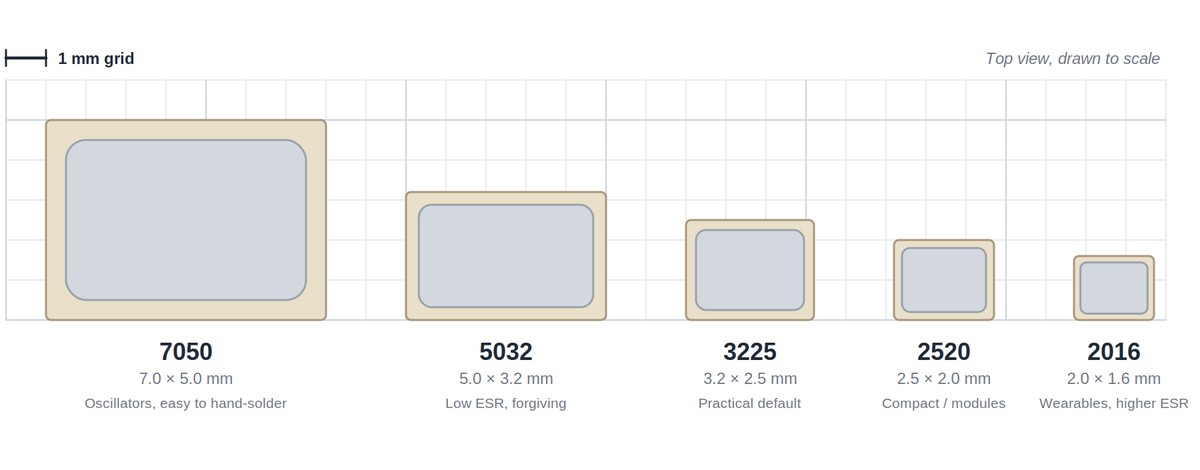
Figure: Common SMD crystal and oscillator packages drawn to scale on a 1 mm grid.
SMD vs Through-Hole (HC-49) Crystal: Key Differences
The HC-49 is the tall metal can you've seen on older boards and dev kits. It's still around, mostly for hand-assembled designs and low frequencies.
| SMD Crystal (e.g. 3225) | HC-49/U (through-hole) | HC-49/S (low profile) | |
|---|---|---|---|
| Footprint | 3.2 × 2.5 mm | ~11 × 4.7 mm | ~11 × 4.7 mm |
| Height | Under ~1 mm | ~13.5 mm | ~3.5 mm |
| Assembly | Reflow, pick-and-place | Hand or wave soldering | Hand or wave soldering |
| Low-frequency reach | Limited by blank size | Down to about 1 MHz | Down to a few MHz |
| ESR | Higher | Lower | Low |
| Mechanical stress | Rigid body, sensitive to board flex | Leads absorb stress | Leads absorb stress |
The larger blank inside an HC-49 gives it lower ESR and lets it reach lower frequencies. For anything going through SMT assembly, an SMD crystal removes a through-hole soldering step and a lot of height. The "HC-49 SMD" package sits in between: the HC-49/S body with bent leads for surface mounting, large but easy to hand-solder and rework.
Key Specifications Explained
Load Capacitance (CL) and How to Calculate Load Capacitors
Load capacitance is the most misunderstood number on a crystal datasheet. It isn't the capacitor value you should place. It's the total capacitance the crystal expects to see across its terminals in order to oscillate at its rated frequency.
That total is your two external capacitors in series, plus the stray capacitance of the MCU pins and PCB traces:
$$C_L = \frac{C_1 \times C_2}{C_1 + C_2} + C_{stray}$$
With C1 = C2 = C, this simplifies to:
$$C = 2 \times (C_L - C_{stray})$$
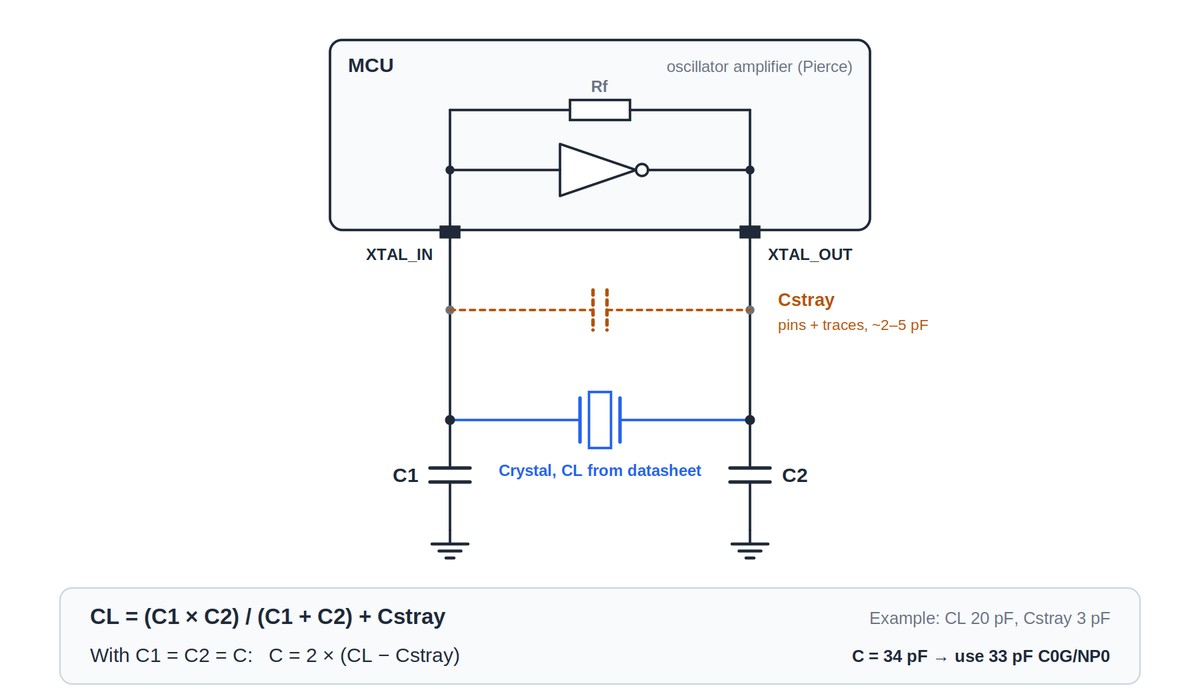
Figure: Pierce oscillator with load capacitors C1 and C2. Cstray is the pin and trace capacitance the crystal also sees.
Cstray is a first-pass estimate, usually 2–5 pF for a compact layout. For production designs, use the pin capacitance from the MCU datasheet and the vendor's recommended calculation if it publishes one.
Worked example: Take a 12 MHz 3225 crystal with CL = 20 pF, such as the YXC X322512MSB4SI (JLCPCB part C9002, a Basic part). Estimate Cstray at 3 pF.
C = 2 × (20 − 3) = 34 pF
34 pF isn't a standard value, so 33 pF is a reasonable starting point. Check: 33 / 2 = 16.5 pF, plus 3 pF stray gives 19.5 pF, close to the 20 pF target. The final value is best confirmed by measuring the frequency on a real board.
The classic mistake is placing two 20 pF capacitors for a 20 pF crystal. That gives about 10 + 3 = 13 pF, well below the specified load, so the frequency shifts higher than nominal. The board may still work, but it will be off by tens of ppm, which matters for USB, radio and timekeeping.
When tuning a real board, larger capacitors pull the frequency down and smaller ones pull it up. Use C0G/NP0 capacitors with ±5% tolerance or better, since X7R and Y5V values shift with temperature and voltage. See ceramic capacitor types for how the dielectrics compare.
ESR (Equivalent Series Resistance)
ESR represents the energy the crystal loses as it vibrates. The MCU's oscillator amplifier has to overcome that loss to keep the crystal running, so lower ESR means an easier, more reliable start.
ESR depends on frequency, the blank design, the package and the specific model, so a single typical figure says little. In the JLCPCB Parts Library, most 12 MHz 3225 crystals are listed at 80–100 Ω maximum, while most 8 MHz parts in the same package are at 200–500 Ω, and 32.768 kHz tuning-fork crystals run in the tens of kilo-ohms. ESR tends to rise as the package shrinks, but the spread between vendors is wide: 12 MHz crystals in 5032 are listed with a maximum ESR anywhere from 30 Ω to 150 Ω, and YXC's 12 MHz part carries the same 80 Ω limit in 5032 as in 3225. Compare the maximum ESR on the datasheets rather than assuming a bigger package is easier to drive.
MCU datasheets set this limit in different ways. Some give a maximum crystal ESR or a list of recommended crystals. STM32 datasheets give a maximum critical transconductance (Gm_crit) instead, which you compare with the crystal's own $g_{m,crit} = 4 \times ESR \times (2 \pi f)^2 \times (C_0 + C_L)^2$, where C0 is its shunt capacitance. Keep your part comfortably inside the limit, especially if the product will run cold.
Frequency Tolerance, Stability, and Aging
These three numbers describe different sources of frequency error. Frequency tolerance is the initial accuracy at 25 °C, for example ±20 ppm. Frequency stability is the drift across the operating temperature range, for example ±30 ppm over −40 to +85 °C. Aging is slow drift over time, typically a few ppm in the first year.
For a worst-case budget, add them: a ±20 ppm tolerance, ±30 ppm stability and ±3 ppm first-year aging can put you up to 53 ppm off nominal. Check the definitions first, though. Many oscillator datasheets quote a single frequency stability figure that already includes initial tolerance and sometimes aging, and adding tolerance on top would count it twice.
In everyday terms, 20 ppm of error on a clock is about 1.7 seconds per day. That's irrelevant for blinking an LED and quite noticeable for a wall clock or data logger.
Drive Level
Drive level is the power dissipated in the crystal while it oscillates, given in microwatts, and the datasheet lists a maximum. MHz crystals typically tolerate somewhere around 100–300 µW. Exceeding the limit can shift the frequency and speed up aging.
Larger MHz crystals rarely get close, but small packages can be rated low enough for a strong oscillator to overdrive them. The usual fix is a series resistor between XTAL_OUT and the crystal, where the MCU's application note allows one. Tuning-fork crystals are where drive level matters most.
32.768 kHz Tuning-Fork Crystals
32.768 kHz crystals are used for RTCs and low-power timers because 32,768 is $2^{15}$: divide by two fifteen times and you get one pulse per second. They look like ordinary crystals but have very different electrical limits. Maximum drive level is often 0.5–1 µW or less, load capacitance is small, typically 6, 7, 9 or 12.5 pF, and maximum ESR is in the tens of kilo-ohms, varying by model and package. In the JLCPCB Parts Library, most 3215 parts are listed at 50–80 kΩ and most 2012 parts at 70–100 kΩ; the Basic C32346 is 70 kΩ. What matters is whether the crystal you pick stays within the limit your MCU's 32.768 kHz oscillator allows, given as a maximum ESR or a maximum Gm_crit.
That leaves a narrow window. Excessive drive, for example from a general-purpose inverter oscillator or an MCU oscillator set well above what the crystal needs, can shift the frequency, speed up aging and, in extreme cases, damage the crystal. Too little drive and a high-ESR crystal may start at room temperature but fail in the cold, or start on some boards and not others.
Many MCUs let you select the drive strength of the 32.768 kHz oscillator (STM32's LSE drive setting is one example). The vendor's oscillator design guide, usually an application note, says which setting suits which crystals, so use it rather than the default, and pick a crystal from the vendor's recommended list if there is one. Some vendors also specify a maximum shunt capacitance (C0) for the crystal, which is worth checking on low-power designs.
Two more quirks. The temperature curve is a parabola centered near 25 °C, so the crystal runs slow whether it's colder or hotter; at 0 °C a typical tuning-fork crystal is already around 20 ppm slow. And the high impedance makes the circuit sensitive to leakage, so flux residue around the pads can be enough to stop oscillation.
How to Choose the Right SMD Crystal or Oscillator for Your Circuit
Step 1: Start from the IC Datasheet
Check the supported frequency range, the recommended CL, the maximum crystal ESR (or Gm_crit), and whether the vendor publishes a list of tested crystals. Some interfaces narrow the frequency further. USB designs need a reference the MCU's PLL can turn into the USB clock, commonly 8, 12, 16 or 24 MHz depending on the chip, and UART-heavy designs sometimes use 11.0592 or 14.7456 MHz because they divide evenly into standard baud rates.
Step 2: Decide Crystal, Oscillator, or Resonator
Work out your accuracy budget. Bluetooth LE specifies ±50 ppm for the radio's main clock (the sleep clock can be much looser), and 100BASE-TX Ethernet also requires ±50 ppm, so they typically call for a crystal, an XO, or a reference clock supplied by another chip. High-speed USB requires ±500 ppm, easily met by a crystal. Full-speed USB allows ±0.25%, loose enough that some MCUs run it without a crystal using clock recovery, but still too tight for a typical ceramic resonator. GPS and cellular usually need a TCXO. If one clock has to feed several chips, use an oscillator.
Step 3: Match CL and Calculate the Load Caps
Choose a crystal whose CL suits your MCU, then calculate C1 and C2 as shown above. For low-power 32.768 kHz designs, a lower CL (6–7 pF) lowers the crystal's gm_crit, so the oscillator can run at a lower drive setting and draw less current, though it also makes the frequency more sensitive to stray capacitance.
Step 4: Pick the Package
3225 is a practical default for most general-purpose MCU designs. It covers a wide frequency range, has moderate ESR, is widely stocked, and is easy to place and inspect. Go smaller when the board needs the space, knowing that it narrows your options and usually raises ESR.
On the assembly side, a 2016 crystal places just as easily as a 3225. What moves the cost is the part itself: its unit price, and whether it's a Basic or Extended part in the JLCPCB library. Our PCB assembly cost breakdown shows how part type changes the quote.
Step 5: Check Stability Over Your Real Temperature Range
A crystal that's ±20 ppm at 25 °C might be ±50 ppm at −40 °C. If the product lives outdoors, in a vehicle, or near a heat source, compare stability across the full operating range, not just the initial tolerance.
Step 6: Confirm Availability Before You Finalize
A part that's perfect on paper but out of stock will stall your build. Check stock in the JLCPCB Parts Library while you're still selecting, not after layout.
SMD Crystal Assembly & PCB Layout Tips
Check Crystal Orientation Before You Order
With a 4-pad crystal on the common diagonal pinout, a 180° rotation is harmless, because the two crystal electrodes simply swap places. A 90° rotation is not. It puts the crystal electrodes on the footprint's ground pads, and if pads 2 and 4 are case ground, the lid now sits across the XTAL_IN and XTAL_OUT pads and shorts them together. The solder joints look normal, but the oscillator never starts.
Active oscillators have no harmless rotation. A 180° turn swaps VCC and GND, and a 90° turn can put the supply on the output pin. Two-pad tuning-fork crystals don't have this problem.
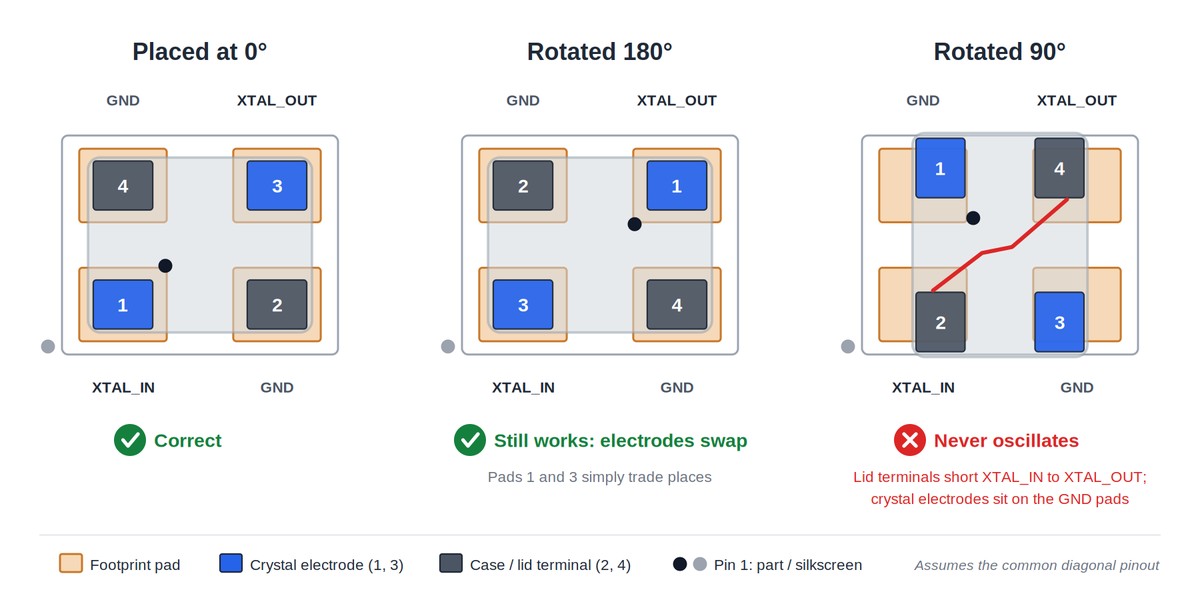
Figure: The same 4-pad crystal placed at 0°, 180° and 90°. Only the 90° rotation breaks the oscillator.
Rotation errors usually start in the placement file rather than the schematic. EDA tools and part libraries define 0° differently, so a correct footprint can still end up rotated in the CPL. Before confirming a PCBA order, open the component placement preview and check that the crystal's pads land where they should: the electrodes on XTAL_IN and XTAL_OUT, the lid terminals on ground. If you want to sign off on the exact placement before assembly starts, the Confirm Parts Placement option lets you review the production file first.
Reflow Sensitivity of SMD Crystals
SMD crystals are sealed packages, typically a ceramic base with a metal lid. Their datasheets specify a peak temperature, ramp rate and maximum number of reflow cycles, and standard lead-free profiles are designed to stay within them. The limits matter most when a board sees extra heat: a second reflow on double-sided boards, rework, or hand soldering with hot air.
Heat damage in a crystal also shows up differently from most passives. A cracked MLCC typically ends in a hard failure, a short or leakage path, even if that takes months to appear. A stressed crystal often never fails that cleanly. It shows up as frequency drift, or as a crystal that starts on some boards and not others, which makes it much harder to trace back to the cause.
If you rework boards yourself, keep hot air localized and brief, and fit a new crystal rather than refitting one that's been removed. Clean off flux by hand with a brush and isopropyl alcohol rather than in an ultrasonic bath: ultrasonic energy can excite the quartz and damage it, particularly in 32.768 kHz tuning-fork crystals, and many crystal datasheets prohibit it. A crystal that's been dropped on a hard floor should also be treated as suspect.
Double-Sided Boards
On double-sided boards, the side reflowed first goes through the oven twice. Crystals are usually rated for more than one reflow, but where the layout allows, placing them on the side reflowed last reduces their heat exposure. On double-sided Standard PCBA orders at JLCPCB, the top side is assembled and reflowed first, so a crystal on the top side goes through the oven twice and one on the bottom side only once.
ESD Handling
A passive quartz crystal is fairly robust against ESD. The parts around it are not. Active crystal oscillators contain a CMOS IC, and the MCU's oscillator pins are high-impedance inputs. Handle oscillators as ESD-sensitive devices, check the ESD rating (usually given as HBM) on the datasheet, and use normal ESD precautions when reworking or probing the oscillator circuit.
Placement: Keep Away from Board Edges and Mounting Holes
Ceramic packages are rigid, and rigid parts crack when the board bends. The main sources of flex are depaneling (V-score breaking, tab snapping), screws in mounting holes, and connectors that see plugging force.
Keep crystals as far from V-score lines and breakaway tabs as the layout allows, and where possible orient the long side parallel to the score line. Keep them clear of mounting holes and heavy connectors too, and away from regulators and power stages. Heat from those parts shifts the crystal's frequency along its temperature curve, and their switching edges can couple noise into the oscillator.
Crystal PCB Layout: Guard Ring and Keepout
Oscillator layout is a broad topic, but two commonly recommended practices cover most of what goes wrong on typical boards.
A ground guard ring. Surround the crystal and its load capacitors with a ground trace or pour connected to the MCU's ground, stitched with vias. This isolates the sensitive oscillator node from nearby switching signals. Placing the crystal and caps close to the MCU keeps the ring small and the traces short.
A keepout beneath the crystal. Don't route other signal traces directly under the crystal, or between the crystal and the MCU on adjacent layers. A clock line or switching trace running underneath couples straight into a high-impedance node.
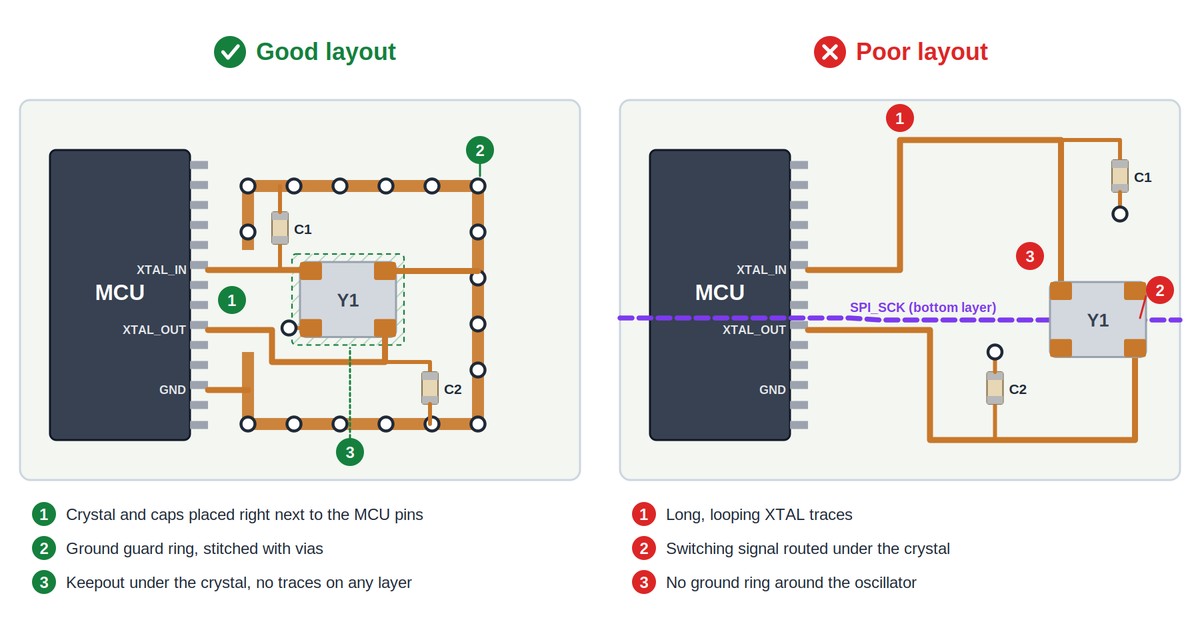
Figure: Good vs poor crystal layout: a guard ring and keepout on the left, long traces and a signal routed under the crystal on the right.
Common SMD Crystal Problems and How to Fix Them
| Problem | Possible causes | Check first |
|---|---|---|
| Crystal doesn't start | Rotated placement, footprint pinout mismatch, wrong load caps, ESR too high for MCU, drive setting too low, flux residue | Orientation and pinout, cap values, MCU drive setting |
| Frequency is off or drifts | Load caps mismatched to CL, wrong dielectric, nearby heat source, board flex | Recalculate caps, confirm C0G/NP0, check placement |
| Intermittent failure | Poorly wetted or fatigued joints, board flex | Land pattern, distance from V-score and mounting holes |
Startup Failure
This is the most common crystal complaint, and the most frustrating, because nothing on the board looks wrong.
Check orientation and pinout first. If the crystal was placed 90° off, or the footprint maps pads differently from the part, the crystal can't oscillate. Next, confirm the load caps against the calculation above; capacitors that are far too large make startup slow or impossible.
Then compare the crystal's maximum ESR with the MCU's limit. If you've switched to a smaller package or a different supplier, ESR may have crept past what the oscillator can drive. For 32.768 kHz circuits, check the drive setting in firmware and the cleanliness of the board. If a board starts after cleaning with isopropyl alcohol, flux residue becomes a strong suspect, especially after hand soldering or rework.
A board that starts at room temperature but fails cold usually points to a marginal ESR or drive-level situation rather than a defective crystal.
When measuring, avoid putting a standard scope probe on the crystal pins. Its capacitance can pull the frequency or stop the oscillation. Route the clock to an output pin through the MCU and measure there.
Frequency Drift or Offset
If every board is off by roughly the same amount in the same direction, look at load capacitance first; recalculate with a realistic stray value and adjust in small steps. If the offset varies from board to board within the crystal's rated tolerance, that's normal initial tolerance rather than a design error.
Drift that changes with temperature points to capacitor dielectric (X7R instead of C0G), a nearby heat source, or the crystal's own temperature characteristic, which is especially pronounced in 32.768 kHz parts. Drift that appears after depaneling or enclosure fitting can point to mechanical stress, most often from a crystal placed near a V-score, a mounting screw or a connector.
Open, Non-Wetted or Cracked Joints
Most ceramic SMD crystals are bottom-terminated, so the solder joints sit underneath the body. That makes the land pattern and board flatness during reflow matter more than they do for leaded parts: if the package or board warps slightly, solder can touch a termination without fully wetting it, a defect similar to head-in-pillow on BGAs.
On the design side, the things you control are a land pattern that matches the crystal manufacturer's recommendation, symmetrical pads on 2-pad tuning-fork crystals (uneven pads or paste volume can cause tombstoning, where one end lifts off), and PCB thickness and panel design, which affect how much the board warps in reflow.
Joints that were good at assembly can also crack over time. Typical alumina ceramic expands at around 7 ppm/°C, while FR-4 is often around 14–17 ppm/°C in-plane depending on the material, so every temperature swing strains the solder between them. The strain grows with the distance across the package, so larger packages see more of it, though actual fatigue life also depends on the land pattern, solder alloy, board construction and temperature range.
Sourcing and Assembling SMD Crystals with JLCPCB
If you're building your board with JLCPCB PCB assembly, crystals are rarely hard to source if you stick to common frequencies and packages.
The JLCPCB Parts Library lets you filter crystals and oscillators by frequency, package, load capacitance and ESR, and shows stock in real time. On Economic PCBA, Basic parts carry no feeder loading fee, which is a practical reason to design around them unless space forces you smaller. At the time of writing, the Basic crystals are 8 MHz (5032 and HC-49S SMD), 12, 16 and 25 MHz (all 3225) and a 32.768 kHz tuning-fork crystal in 3215. Parts are also available through LCSC if you're sourcing for your own assembly.
JLCPCB assembles to your design files, so two things are worth checking before you order: that the footprint pinout matches the specific crystal you selected, and that your load capacitor values match its CL.
FAQ about SMD Crystals and Oscillators
Q: What Does 3225 Mean on an SMD Crystal?
It's the package size in 0.1 mm units: 3.2 mm long by 2.5 mm wide. The same logic applies to 5032 (5.0 × 3.2 mm), 2520 and 2016.
Q: How Accurate Is an SMD Crystal?
A typical MHz SMD crystal is specified at ±10 to ±50 ppm at 25 °C, plus a similar amount of drift across its temperature range and a few ppm of aging per year. For scale, 20 ppm is about 1.7 seconds per day. If you need better than a few ppm overall, use a TCXO.
Q: Do SMD Crystals Have Polarity?
The quartz itself doesn't, so the two crystal pins are interchangeable. On a 4-pad crystal, though, a 90° rotation can land the electrodes on the ground pads, so orientation still matters. Crystal oscillators are fully polarized and must be placed correctly.
Q: Should I Ground the Extra Two Pads on a 4-Pad Crystal?
If the datasheet identifies them as case ground, yes. If it marks them NC, don't connect them to any net, but keep the pads in the footprint and solder them for mechanical strength.
Q: Can I Replace a Passive Crystal with a Crystal Oscillator?
Often, if the MCU supports an external clock input. Connect the oscillator output as the MCU datasheet specifies, which on many MCUs means XTAL_IN with XTAL_OUT left unconnected, and remove the load caps. Then switch the clock source to bypass or external clock mode in firmware, or the MCU won't use it. Also check that the oscillator's output type, CMOS square wave or clipped sine, meets the input requirements.
Q: How Do I Test an SMD Crystal?
A multimeter can't tell you whether a crystal works. Test it in circuit by routing the clock to an MCU output pin and measuring that with a scope or frequency counter.
Q: Why Do RTC Crystals Use 32.768 kHz?
32,768 is $2^{15}$, so a 15-stage binary divider turns it into exactly one pulse per second. The low frequency also keeps the oscillator current small, which suits battery-backed timekeeping.
Q: Why Won't My 32.768 kHz Crystal Start?
The usual causes are load caps that don't match CL, an MCU drive setting too weak for the crystal's ESR, or flux residue around the pads. See the troubleshooting section above.
Q: Can SMD Crystals Go Through Lead-Free Reflow?
Yes, within the datasheet's peak temperature, ramp rate and reflow-cycle limits.
Conclusion: SMD Crystals and Oscillators
Start from the MCU datasheet, calculate the load caps from the crystal's CL rather than copying it, and treat 3225 as the default unless space says otherwise. Check the crystal's orientation in the placement preview before ordering, keep it away from V-scores and mounting holes, and place it close to the chip with a ground ring and nothing routed underneath.
When your design is ready, browse in-stock crystals in the JLCPCB Parts Library and get an instant quote for your PCB and assembly.
Filter crystals by frequency, package, load capacitance and ESR
Basic crystals carry no feeder loading fee on Economic PCBA
Upload your BOM and CPL for an instant PCBA quote
Popular Articles
• SMD Resistor Package Sizes: Complete Size Chart, Footprints & How to Choose
• How to Solder SMD Components Like a Pro [2026 Updated]
• SMD Resistor Codes: How to Read 3-Digit, 4-Digit, and EIA-96 Markings
• SMD Capacitor Codes: Identification, Markings, and Polarity
• SMD Capacitor Sizes: Complete Size Chart and Selection Tips for PCB Design and Assembly
Keep Learning
SMD Crystal & Crystal Oscillator Guide: Types, Packages, and How to Choose
Key Takeaways Crystal or oscillator: a passive crystal runs from the MCU’s oscillator and two load capacitors; an XO has its own supply and drives a clock, so use one when a clock feeds several chips. Load capacitors are not CL: with C1 = C2, each capacitor is 2 × (CL − Cstray), so a 20 pF crystal with 3 pF of stray needs about 33 pF, not 20 pF. Check ESR against the MCU: maximum ESR varies with frequency, package and model, so compare it with the MCU’s ESR or Gm_crit limit instead of assuming a typic......
What Are the Main Relay Types and Which One Should You Use?
Key Takeaways Two Main Types: Relays fall into two main categories: electromechanical relays, which use moving metal contacts to switch a circuit, and solid-state relays, which use electronic components with no moving parts. Choose Based on the Load: The load type determines which relay you need. Consider whether the load uses AC or DC, how much current it draws during normal operation and startup, and how frequently it needs to switch. Coil Behavior: A monostable relay returns to rest when its coil i......
SMD MOSFET Code Guide: How to Identify, Test and Replace a MOSFET
Figure: AO3400A (C20917) in the JLCPCB parts library. The listing gives RDS(on) at 2.5 V gate drive, the number that matters in the replacement example later in this guide. An SMD MOSFET code is the two or three characters printed on top of the package, and on its own it rarely tells you which part you're holding. SMD resistors follow standard marking schemes, such as three- and four-digit codes and EIA-96. MOSFETs don't. The same short code can appear on unrelated parts from different manufacturers, ......
ESP8266 vs ESP32: Which One Should You Use?
Key Takeaways ESP32: Dual-core 240 MHz CPU, Bluetooth Classic and BLE, 520 KB SRAM, and up to 34 GPIOs. ESP8266: Single-core CPU, no Bluetooth, and around 50 KB of free RAM for applications. Lifecycle status: Espressif marks the ESP8266 Not Recommended for New Designs (NRND) and names the ESP32-C2 (ESP8684) as its upgrade, although the ESP8266 remains in production with a longevity commitment. Which ESP32 to use: Choose the ESP32-C2 for simple Wi-Fi or Bluetooth LE firmware, the ESP32-C3 for more memo......
What Is a Thermistor? A Practical Guide to NTC, PTC, Applications, and Circuit Design
Key Takeaways Definition: A thermistor is a thermally sensitive resistor whose resistance changes markedly and predictably with temperature, typically by about 4.4% per °C for a standard 10 kΩ NTC (B25/50 = 3950 K) near 25 °C. NTC vs. PTC: An NTC thermistor's resistance falls as temperature rises, which suits temperature sensing and inrush current limiting; a switching PTC's resistance rises steeply above its switch temperature, which suits circuit protection. Key Specifications: An NTC thermistor is ......
What Is the ESP32-CAM, and How to Wire, Power, and Program It?
Key Takeaways Board, not chip: The ESP32-CAM is an AI-Thinker development board, not an Espressif product. It carries AI-Thinker's ESP32-S module, an OV2640 camera, PSRAM, a microSD slot, and a flash LED. No USB port: The board has no USB connector or USB-to-UART bridge, so you program it via its serial pins using a 3.3 V USB-to-serial adapter, with GPIO0 held low at reset. Few free pins: The camera, PSRAM, and microSD card occupy most GPIOs. With the microSD card unused, GPIO2, GPIO4, GPIO12, GPIO13,......