How to Repair a Burnt Circuit Board (and When to Replace It)
23 min
- Before You Touch It: Power, Capacitors and Fumes
- Find Out Why It Burnt, Not Just Where
- How Deep Is the Damage?
- Can a Burnt Circuit Board Be Repaired?
- How to Repair a Burnt PCB, Step by Step
- Testing the Repair Before Full Power
- Mistakes That Make a Burnt Board Worse
- Preventing It From Happening Again
- FAQ about Repairing a Burnt Circuit Board
Key Takeaways
Find out why the board burnt before you repair anything. The part that charred is often a victim of a fault somewhere else.
Charred FR-4 conducts. A repair only lasts if every trace of carbon is cut out and the area measures as an insulator again.
Heat that went through the board, blistering, or a burn among vias or under a BGA usually means replacing the board.
Rebuild a burnt trace heavier than the original, and keep conductive epoxy off power paths.
Power the repaired board from a current-limited supply first, and test it at full load before you trust it.
If the burn traces back to the layout, fix it in the next revision: trace width, copper weight, thermal design and protection.
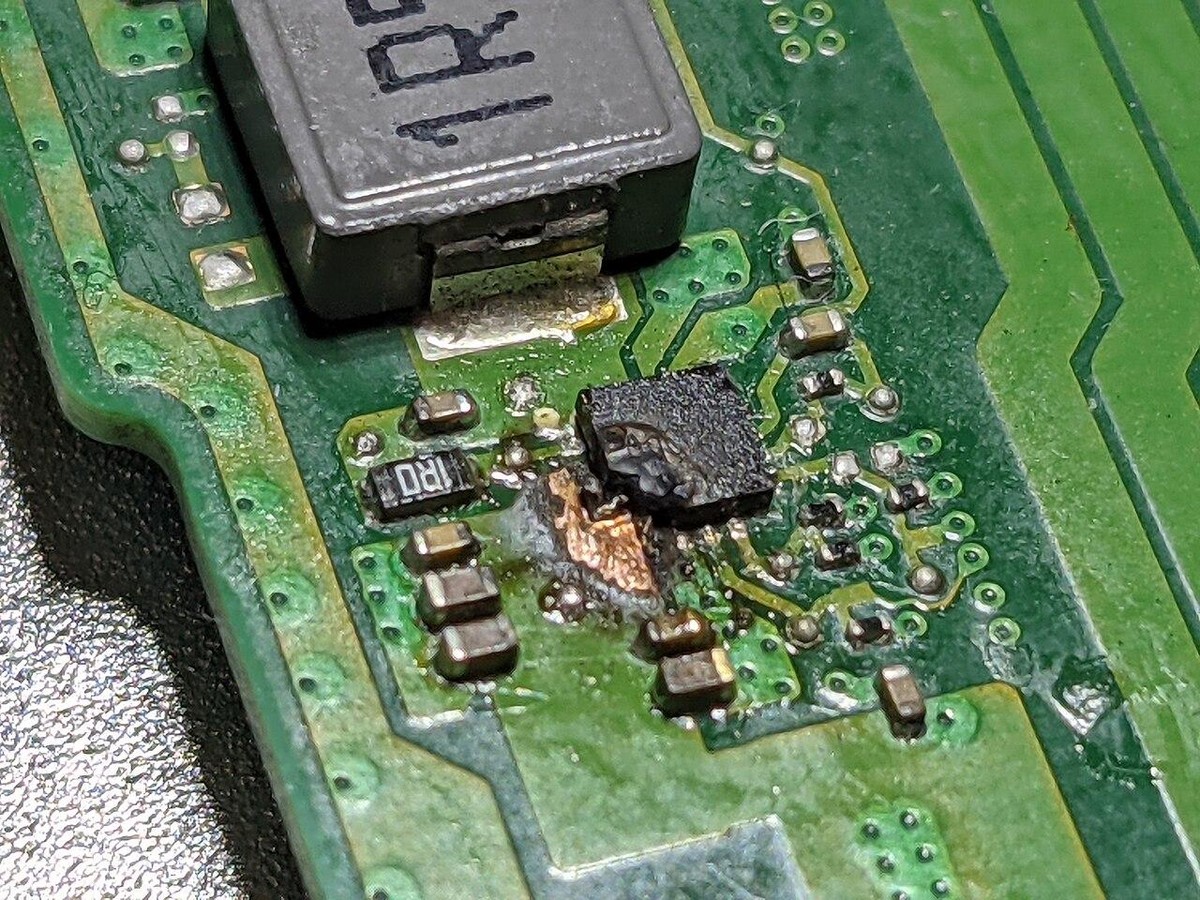
A step-down regulator that failed on a laptop motherboard, with the copper and laminate around it scorched. Photo: Profpcde, CC0, via Wikimedia Commons
Burnt boards tend to come from one of two places. Some are prototypes that burnt during bring-up: a supply set to the wrong voltage, a tantalum capacitor fitted backwards, a trace that looked fine in layout and turned out to carry 3 A. Others come out of a washing machine, an air conditioner or a power supply that ran for years before something gave up.
Either way, a burnt (or burned) PCB is often repairable when the damage is small and stays on the surface, provided you remove all the carbonized material and find out why it burnt in the first place. If the heat went through the board, if you see blistering or layer separation, or if the burn sits among vias or over inner planes, a new board is almost always the better use of your time.
Burn damage is different from a cracked joint or a dead IC, because the board itself has changed. FR-4 is woven glass in epoxy resin. When the resin overheats it carbonizes, and carbon conducts. A repair that looks clean but leaves char underneath has a leakage path built in. The first time you power it up, that path heats, carbonizes further and takes the repair with it.
The steps below work for your own designs and for appliance or product boards you're fixing without design files. Where the two cases differ, such as identifying parts or deciding whether to replace the board, both are covered. For everyday rework such as broken traces, lifted pads, cold joints and corrosion, see our PCB repair guide.
Before You Touch It: Power, Capacitors and Fumes
Unplug the board and disconnect any battery, including coin cells and packs on a connector. Then let it cool. Burnt areas hold heat longer than you'd expect, and hot laminate is easy to damage further if you start prying at it.
Next, discharge the bulk capacitors. On a mains-powered board, the primary-side capacitor charges to about 325 V DC on 230 V mains (about 170 V on 120 V mains), and to around 400 V in supplies with active PFC, and it can hold that charge long after the plug is out. On typical appliance and power-supply boards, bleed it through a resistor of a few kilohms rated at 5 W or more. Never short it with a screwdriver. Larger capacitor banks in industrial equipment need a proper discharge tool and procedure. Confirm with a meter that the voltage has actually dropped before your hands go near the board.
Work somewhere ventilated. Most FR-4 laminates use a brominated flame retardant, burnt laminate can release brominated compounds, and cutting out the damage adds dust and more fumes. Wear eye protection and gloves, and add a dust mask or respirator for the grinding stage. Glass-fiber dust is not something you want in your lungs.
Find Out Why It Burnt, Not Just Where
The burn shows where the energy went. It doesn't always show why. Before you replace anything, work out what pushed that much current into that spot, because the part that burnt is often a victim of a fault somewhere else.
If you only need to know whether an appliance board is worth repairing, skip ahead to the repair-or-replace table below. The rest of this section is about tracking down the fault.
Common causes
- Overcurrent from a shorted load, often a cracked MLCC that failed short after the board was flexed
- A trace too narrow for the current it actually carries
- A polarized part fitted backwards, with tantalum capacitors the classic case
- An upstream regulator that failed and passed its input voltage straight through
- A part that ran hot for long periods because the layout gave it nowhere to shed heat
- The wrong supply voltage, or reversed polarity at the power connector
- Contacts that have degraded with age: connectors, screw terminals, fuse clips and relay contacts whose resistance has crept up until they heat locally and char the laminate around them
- Aged parts in equipment that has run for years, such as dried-out electrolytic capacitors
- Moisture, dust or insect debris bridging high-voltage traces, a common cause of burns on appliance and outdoor-unit boards
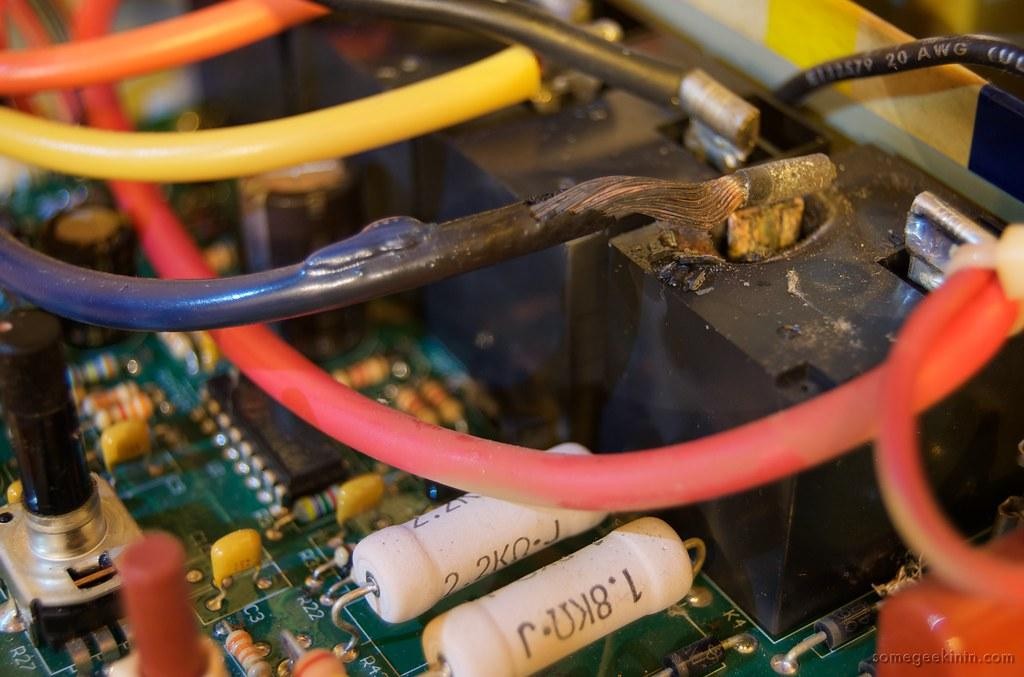
Charring around a wire terminal and relay on a water heater control board. Photo: Casey Fleser, CC BY 2.0, via Flickr
Victim or cause?
If a regulator has burnt, check what it was feeding. If a load IC has burnt, check the regulator above it and the rail voltage it would have seen. Test every part on that rail, including the ones that look perfect, because a part can be stressed without showing it.
Look at the protection parts next. A blown fuse or a TVS diode that has failed short did its job, and it points to an overcurrent or overvoltage event.
Watch for faults that have burnt themselves open. A trace or component can act like a fuse, vaporize and leave the rail reading open. The meter shows no short, the board looks cleared, and the root cause is still there.
Tracing a short with a multimeter
With the board unpowered, measure resistance from each rail to ground and compare the readings with a known-good board. Absolute numbers mean less than you'd think, since a processor core rail can legitimately read a few ohms. A rail that reads close to zero where the good board reads kilohms is your suspect. If you don't have a known-good board, a second unit of the same product or the test-point values in a service manual do the same job.
To narrow it down, feed the shorted rail from a current-limited supply, starting around 1 V with the limit at a few hundred milliamps, and find the part that warms up. A thermal camera, freeze spray, or a drop of IPA that evaporates first on the hot spot will all show it. Keep the current low on a burnt board: the goal is to find the fault without creating a new carbon track.
Identifying a component with no markings left
On your own design, the BOM and schematic answer this in seconds. On an appliance board, start with the service manual and the part number printed on the board. Manufacturers often reuse one board across several models, so photos of an undamaged one may be online. Failing that, look for a duplicate circuit elsewhere on the board. Multi-channel motor drivers, stereo audio stages and multiphase regulators repeat the same parts, and the undamaged channel shows what belongs in the burnt one.
For passives, measure the matching part on the good channel. For ICs, clean the package with IPA and look at it under light from a low angle. Most modern parts are laser-marked, and the marking often survives even when the surface is scorched.
How Deep Is the Damage?
Whether the heat stayed on the surface or went into the board decides most repair-or-replace calls.
Turn the board over and look at the same spot from the back. Discoloration there means the heat went through the full thickness of the board. On a multilayer board it also passed the inner layers on the way, and may have damaged inner copper or the dielectric between layers.
Then look closely around the burn, ideally under magnification:
- Blistering: raised, bubbled areas where the laminate or solder mask has lifted
- Delamination: visible separation between layers, sometimes showing as a lighter band, or as a soft spot when you press gently with a probe
- Measling: small white spots or crosses at the glass weave intersections, where the resin has separated from the glass fibers
Blistering and delamination are the findings that decide the board's fate. Measling on its own is usually treated as acceptable, so take it as proof that the area got hot and keep looking. On high-voltage circuits, be stricter, because any separation inside the laminate weakens the insulation between conductors.
Finally, check the inner layers electrically. Measure between the power and ground planes, or between nets that connect to them, and compare with a known-good board. A plane-to-plane short that wasn't there before means the damage is inside the board, where no amount of surface work will reach it.
Can a Burnt Circuit Board Be Repaired?
A burnt circuit board can usually be repaired when the damage is small, stays on the surface and hasn't reached inner layers or a high-voltage section. Use this table as a first pass. If any row you match says replace, take that as the answer. If the board truly can't be replaced, see the last-resort option at the end of this section.
| What you see | What it usually means | Verdict |
|---|---|---|
| Scorched solder mask, solid laminate underneath, back side clean | Heat stayed on the surface | Repair |
| A burnt trace or pad a few millimeters long, laminate mostly intact | Conductor lost, board structure intact | Repair, with full carbon removal |
| Measling (white spots at the glass weave) with no blistering | The area got hot, but measling alone doesn't fail the board | Keep checking the other rows |
| Charred laminate that is soft or crumbles under a probe | Carbonization well below the surface | Replace |
| Discoloration on the back side at the same spot | Heat went through the full board thickness | Replace in most cases |
| Blistering or layer separation | Delamination, inner layers may be affected | Replace |
| Burn next to vias or under a BGA or fine-pitch part | Via barrels and inner connections may be damaged | Usually replace |
| Power and ground planes no longer isolated | Short inside the board | Replace |
| Damage on a mains, high-voltage or safety-critical section | Creepage and clearance may no longer be reliable | Replace |
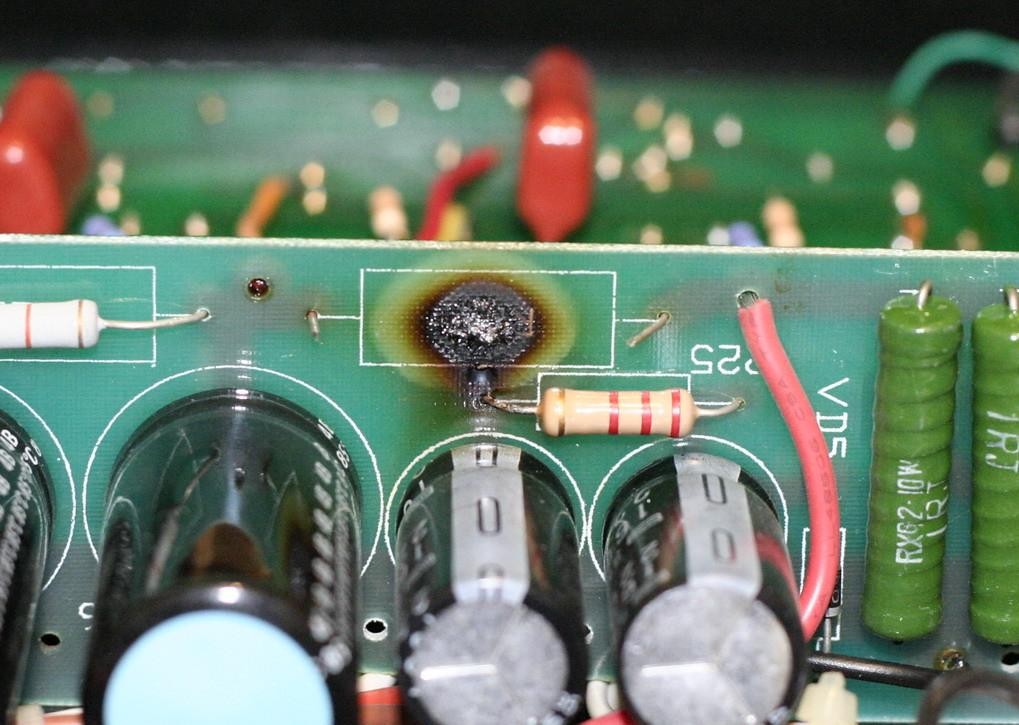
The laminate under a burnt resistor after the part was cut off. Everything black here is carbon and has to be cut out before the board can be repaired. Photo: Critofur, CC BY 2.0, via Flickr
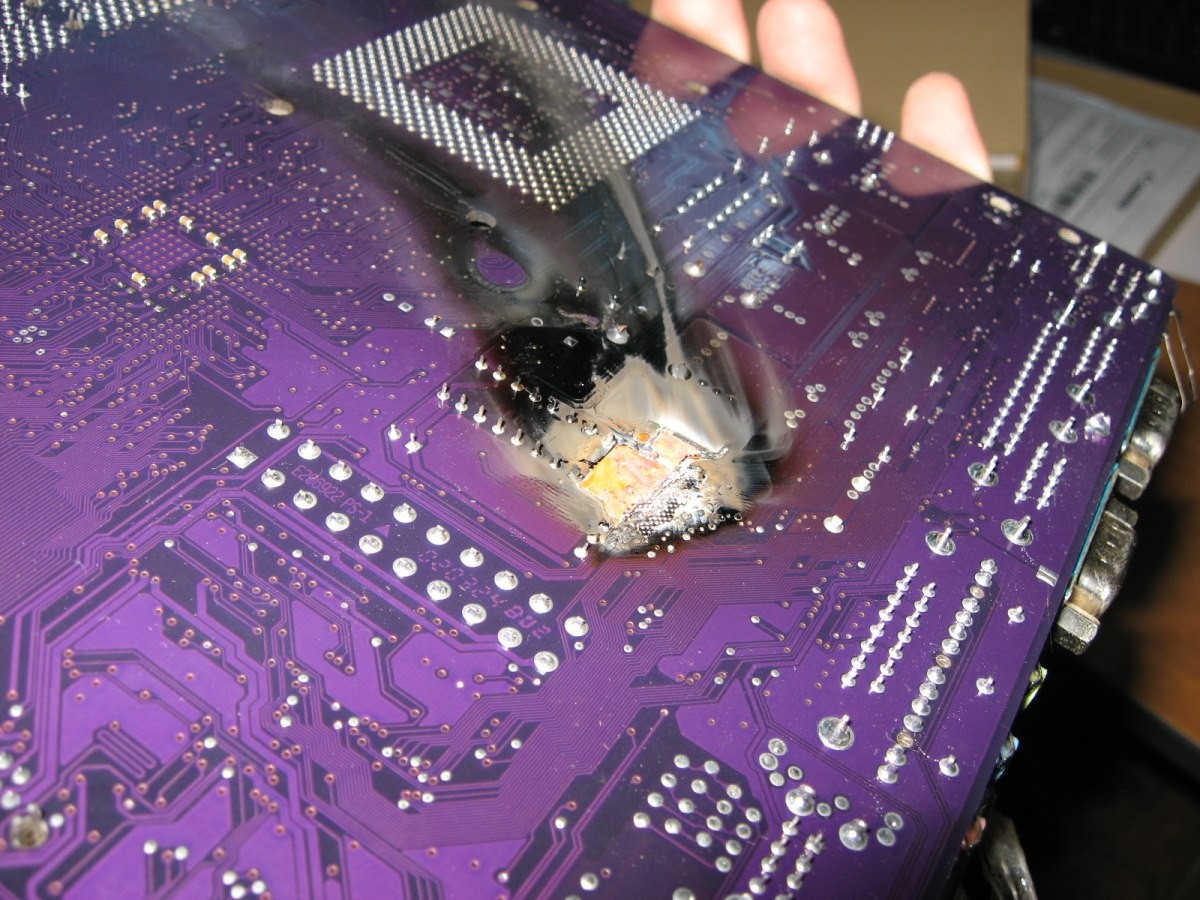
A burn that went through a PC motherboard, seen from the back among dense vias. A board in this state belongs in the replace column. Photo: Punchinello, CC BY-SA 3.0, via Wikimedia Commons
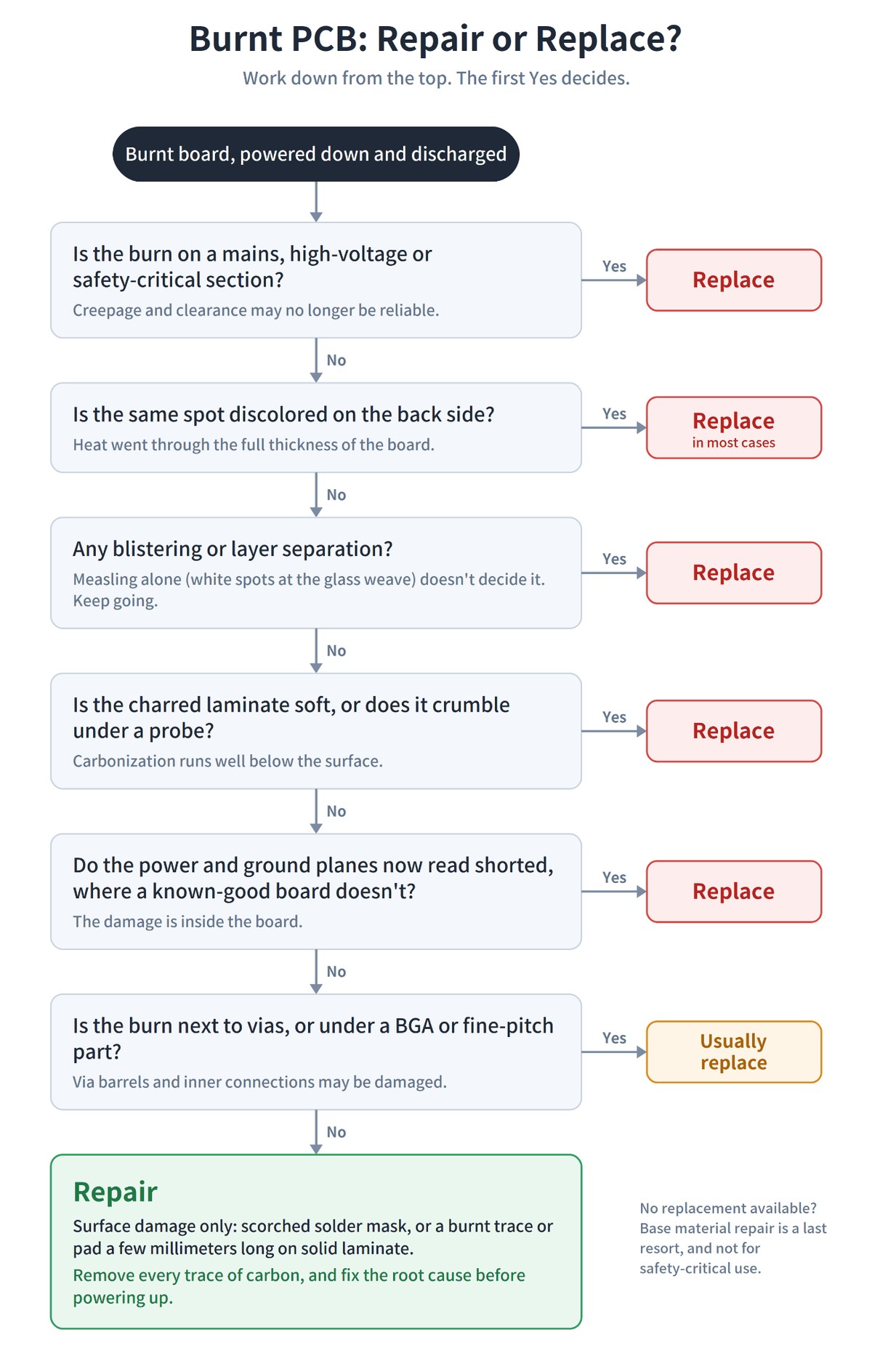
AI-generated flowchart of the checks in the table above
IPC-7721 documents repair procedures for the cases covered here, including jumper wires, replacement pads and base material repair, while IPC-7711 covers component rework and IPC-A-610 defines what an acceptable assembly looks like afterwards. On high-reliability hardware, a repair normally needs sign-off from whoever owns the product, and many teams don't allow laminate repairs on that class of board at all.
For a prototype, compare the hours a careful repair will take, plus the risk that it fails in a test you care about, with the cost and lead time of a fresh board. If you need more than one working unit, or the burn points to a design problem you'll be fixing anyway, a new PCB assembly run is usually the better call.
If JLCPCB assembled the board and you suspect an assembly defect, such as a reversed or wrong part, contact support with photos before you start any rework. The PCBA Repair Service covers assembly defects like these and is free when JLCPCB is responsible.
For an appliance or other product board, weigh the repair against a replacement board. Search the part number printed on the board's label or silkscreen, since spare control boards for common appliances are often sold by the manufacturer or parts suppliers. If the burn is on the section that switches mains power to a heater, compressor or motor, the safety-critical row in the table applies, and the replacement is the safer choice.
If the board can't be replaced
When the damage is beyond what the table allows and no replacement exists, base material repair is the last resort. Cut out all the charred laminate, including anything that runs through to the back. A cut-out wider than a few millimeters needs support: back the hole with tape or a small dam so the epoxy doesn't run through, or glue in a piece of FR-4 cut to fit and fill the seams with epoxy. Once the area is rebuilt and cured, restore each broken connection with wire and seal both faces with solder mask.
This works on single- and double-sided boards. On a multilayer board, any inner-layer connections that ran through the damaged area are gone, and you'd need to know where each one went to rebuild it with wire. Treat the result as a way to keep old equipment running, not as a board to trust in anything safety-critical.
How to Repair a Burnt PCB, Step by Step
These steps assume the damage passed the table above: localized, on the surface, with the root cause already identified.
Tools and materials
- 99% isopropyl alcohol (IPA) and a stiff brush
- Craft knife, fiberglass pen, or a rotary tool with a small burr
- Magnifier or microscope
- Digital multimeter, plus an insulation tester for high-voltage boards
- Current-limited bench supply; for mains boards, an isolation transformer and a dim bulb tester
- Fine-tip soldering iron, flux and desoldering braid
- Solid copper wire sized for the current, either tinned or solderable enameled
- Adhesive-backed replacement pads and a bonding iron, if a pad is damaged
- Two-part non-conductive epoxy rated for the operating temperature
- UV-curable solder mask and a UV lamp, or conformal coating
- Eye protection, gloves and a dust mask or respirator
1Clean the surrounding soot
Scrub the area around the burn with IPA and a stiff brush before you touch the burn itself. Soot spread across the surface hides the real edge of the damage, and it can leave a conductive film between pads. You need to see exactly where the sound board ends.
2Remove the damaged components
Take off every component that sits in or touches the burnt area. A part that has been through a burn should be replaced even if it measures fine: its internals have seen temperatures well past their rating, and reflowing it won't undo that. Use as little heat as you can, because weakened laminate lifts pads easily.
3Remove all carbonized material
This step decides whether the repair survives. Cut or grind out the charred area with a craft knife, fiberglass pen or rotary tool. Keep going until you reach clean, light-colored laminate with the glass weave visible. Stopping when it looks mostly clean isn't enough, because any black residue left behind is a conductive path.
Watch your depth. On a multilayer board, the dielectric between the outer layer and the first inner layer can be 0.1 mm or less: on several of JLCPCB's standard 4- and 6-layer PCB stackups it is 0.076 to 0.1 mm. Grind too far and you expose inner-layer copper or cut into a plane.
Then check the result with a meter, because a thin carbon film is easy to miss by eye. Pick two conductors on either side of the cleaned area. They must be on different nets and not connected through any other part of the circuit, or you'll be measuring that path instead of the laminate.
Clean and dry the area, then measure between them on the highest resistance range, or with the insulation test function if your meter has one. The reading should sit at or near the meter's open-circuit limit. A finite reading that has settled may mean a leakage path is still there. It could be carbon, but it could also be flux residue or moisture, so clean and remeasure before you cut any deeper.
On boards that run at high voltage, a handheld meter's test voltage is too low to prove much. Use an insulation tester at a voltage suited to the circuit.
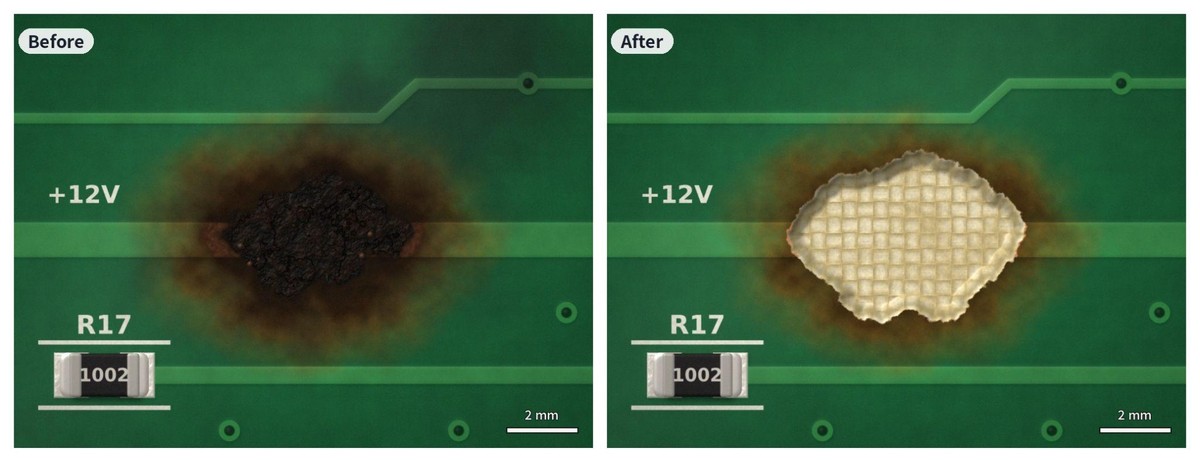
AI-generated before-and-after of carbon removal, with the char cut back until clean laminate and the glass weave show
4Fill the cavity
Fill the ground-out area with a two-part, non-conductive epoxy rated for the board's operating temperature, and build it up flush with the surrounding surface. This restores insulation between neighboring conductors and gives the new trace a solid base. Let it cure fully before soldering near it.
5Rebuild the trace or pad
Scrape the solder mask back a few millimeters onto good copper at each end of the break, tin the exposed copper, and bridge the gap with solid copper wire. Tinned wire is fine here because it will be sealed under solder mask in Step 7. Where the jumper has to cross other copper or can't be sealed, use solderable enameled wire instead. Anchor the wire with a small dab of epoxy so it can't flex against the joints.
Size the wire for the current, and make it heavier than the original trace. For reference, a 1 mm trace in 1 oz copper has a cross-section of about 0.035 mm², roughly the same as 32 AWG wire. A 24 or 26 AWG wire gives you several times that. This compares cross-sections only. How much current a conductor can carry also depends on allowed temperature rise, length and cooling, so check the wire against an ampacity table for the real current. If the trace burnt because it was undersized, restoring it at the same width just rebuilds the defect.
Conductive epoxy can work for short repairs on low-current, low-speed signal traces, provided its resistance and temperature rating suit the circuit. Keep it off power paths. Its resistivity is orders of magnitude higher than copper's, and the trace that burnt was very likely a power path to begin with.
If a pad has burnt or lifted, replace it, because solder won't hold reliably on what's left. Adhesive-backed replacement pads are made for this. Trim the new pad's tail so it overlaps sound copper on the existing trace, position it, and bond it with a heated bonding iron. Then solder the tail to the trace, and follow the kit's cure time before fitting a component to the new pad.
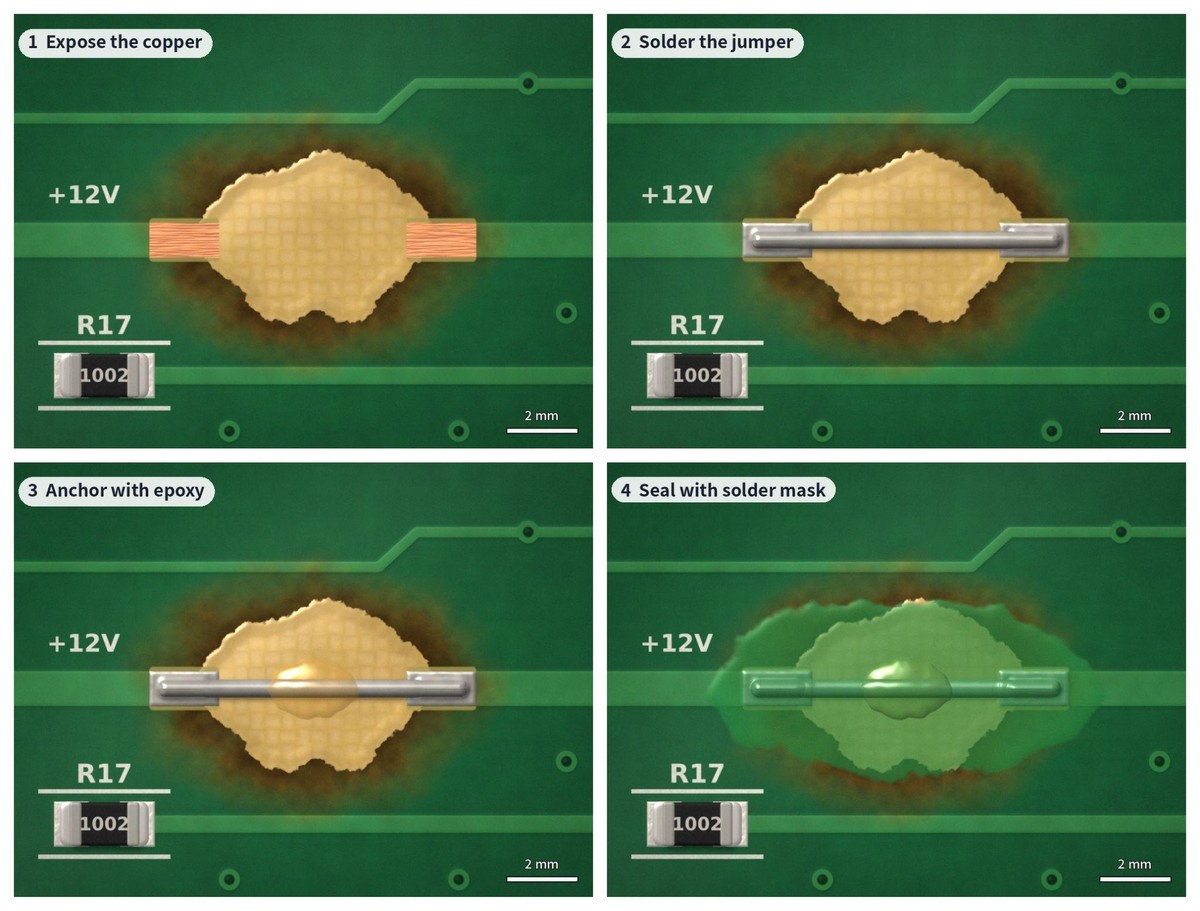
AI-generated sequence of a trace rebuild: copper exposed at both ends, jumper soldered, wire anchored with epoxy, area sealed with solder mask
6Fit the replacement components
Fit new parts matched to the BOM, the service manual or the undamaged channel. Check polarity twice on anything polarized, especially if a reversed part started all this.
7Seal the repair
Cover the repaired area with UV-curable solder mask or conformal coating to insulate the exposed wire and copper and keep them from oxidizing. UV mask cures properly only in thin layers, which is why the cavity was filled with epoxy first. Build it up in several thin coats, following the product's thickness and cure instructions.
Testing the Repair Before Full Power
Don't plug a repaired board straight into its normal supply.
Measure rail-to-ground resistance again and compare it with the known-good board. Then power up from a current-limited bench supply. Set the limit a little above the board's expected idle current and bring the voltage up gradually from zero, watching the current as you go. A sudden jump, or current that keeps climbing while the voltage holds steady, means stop.
For mains-powered boards, power up through an isolation transformer and a dim bulb tester, which is an incandescent lamp in series with the mains input. If a short is still there, the lamp lights up and takes the load instead of your repair.
Warning
The lamp only limits current. It does nothing to protect you from line voltage. Without an isolation transformer, clipping a grounded scope probe onto the primary side can short the mains through the scope. Even with the transformer in place the circuit is live and dangerous to touch, and an RCD or GFCI upstream can no longer detect a shock through the board. Mains-side testing should only be done by someone trained to work on exposed line voltage.
Once the board is at full voltage, let it run for a few minutes and check the temperature at the repair site with a thermal camera. The repair shouldn't run noticeably hotter than the same spot on a good board. On a mains board, keep thermocouples and other contact probes off the primary side while it's powered. Then test at the real operating load, because a repair that passes at idle can still fail at full current.
Mistakes That Make a Burnt Board Worse
Mistakes to Avoid
- Grinding through to inner copper. With 0.1 mm or less of dielectric above the first inner layer, a rotary tool gets through very quickly. Go slowly and stop at clean laminate.
- Holding hot air on a delaminated area. Heat drives the separation further, and a small blister becomes a large one. Use a fine-tip iron where you can, and keep any hot-air work brief.
- Leaving flux residue behind. Rework flux left in freshly ground, porous laminate absorbs moisture and can become a leakage path of its own. Clean the whole area with IPA when you're done.
- Using conductive epoxy on a power trace. It passes a continuity check, then runs hot under load.
Preventing It From Happening Again
A repair gets the board working again. What stops it burning a second time depends on whether you can change the design.
If you can't, look at the environment and the parts around the fault. Boards in kitchens, bathrooms, outdoor units and dusty workshops pick up moisture and debris that bridge high-voltage traces, so clean the enclosure, check its seals and consider conformal coating over the area. Replace aged parts on the same circuit too, such as bulging electrolytic capacitors or a fuse clip that has lost its grip.
If you designed the board and the burn traces back to the layout, the fix belongs in the next revision:
- Trace width: size traces for the current they actually carry, including inrush and fault current as well as the typical load, using IPC-2152 or a calculator based on it. Our guide to PCB trace width covers the method.
- Copper weight: on high-current paths, going from 1 oz to 2 oz copper doubles the cross-section without widening the trace, which helps when routing space is tight. Copper weight is an option you choose when ordering the boards: JLCPCB offers 2 oz outer copper on multilayer boards and up to 4.5 oz on 2-layer boards.
- Thermal design: give hot components enough copper and thermal vias to move heat into the planes, and check that thermal relief spokes on power pads can carry the current.
- Protection: add a fuse on the input, TVS diodes for transients, and reverse-polarity protection on any connector someone could plug in backwards.
Once the design is corrected, build the new revision as a small prototype run and confirm the fix under real load before moving to production. When the root cause is in the layout, reworking a whole batch of the old design rarely makes sense.
FAQ about Repairing a Burnt Circuit Board
Q: What causes a circuit board to burn?
Most burns come from too much current through a small area: a shorted component, a trace too narrow for its load, a reversed polarized part, a failed regulator, or a connector whose contact resistance has crept up. On appliance boards, moisture and debris bridging high-voltage traces cause many burns too. The burnt spot often isn't where the fault started.
Q: Can you fix a burnt trace on a PCB?
Yes, in most cases. Cut away the burnt section and all the carbonized laminate around it, fill any cavity with non-conductive epoxy, bridge the gap with copper wire sized for the current, and seal the area with solder mask. If the trace burnt because it was too narrow, use a heavier conductor than the original.
Q: Can a burnt motherboard be repaired?
Sometimes, if the damage is limited to one component. A regulator or MOSFET that burnt without charring the board around it can be replaced like any other part, once you've found what made it fail. Motherboards are multilayer boards with dense vias and BGA packages, though, so a burn that has reached the laminate in those areas usually can't be repaired reliably, and replacing the board is the realistic option.
Q: Is it safe to use a board after repairing a burn?
It can be, if all the carbon was removed, the root cause was fixed, and the board passed a current-limited power-up and a full-load test. For mains-powered, high-voltage or safety-critical equipment, a repaired board is much harder to trust, and replacement is the safer choice.
Q: Why does a repaired board burn again in the same spot?
Usually for one of two reasons. Carbonized laminate was left under the repair and formed a conductive path, or the original cause, such as an undersized trace, a failed regulator or a reversed part, was never fixed. Check insulation across the repaired area and trace the fault before trying again.
Q: What epoxy should I use on a burnt circuit board?
A two-part, non-conductive epoxy rated above the board's operating temperature, both to fill the cavity and to anchor jumper wires. Avoid hot glue, which softens long before soldering temperature, and keep conductive epoxy to short, low-current signal repairs.
Q: Should I repair or replace a burnt appliance control board?
If the burn is small, stays on the surface and sits away from the mains-voltage section, a careful repair can work. If it's on the mains side, near a relay or heater circuit, or has gone through the board, replace it. The part number printed on the board is the fastest way to find a replacement.
If the board isn't worth saving, upload your Gerber, BOM and CPL files on the quote page to get a new assembled board, and run the corrected layout through a free JLCDFM check before you order.


Upload your Gerber, BOM and CPL files on the quote page; 01005 parts are assembled under Standard PCBA.
Run your files through JLCDFM, our free DFM check, before you order.
Popular Articles
• SMT Assembly Process Explained and Equipment Used: A Step-by-Step Guide to PCBA Manufacturing
• Common PCB Assembly Methods and Soldering Techniques Explained
• SMD Soldering Tools You Need: Complete Guide from Beginner to Pro
• What Is BGA Void? Causes, IPC Limits, and Solutions
• Reflow Soldering: Everything You Need to Know
Keep Learning
How to Repair a Burnt Circuit Board (and When to Replace It)
Key Takeaways Find out why the board burnt before you repair anything. The part that charred is often a victim of a fault somewhere else. Charred FR-4 conducts. A repair only lasts if every trace of carbon is cut out and the area measures as an insulator again. Heat that went through the board, blistering, or a burn among vias or under a BGA usually means replacing the board. Rebuild a burnt trace heavier than the original, and keep conductive epoxy off power paths. Power the repaired board from a cur......
How to Set the Temperature for Wave Soldering and What Are the Soldering Temperature Standards?
Wave soldering is a process used for soldering electronic components by inserting them into the holes on a Printed Circuit Board (PCB) and securing the components to the board using a molten solder wave generated by a wave soldering machine. Temperature is a crucial parameter during the wave soldering process, as it directly affects the quality and efficiency of soldering. Therefore, setting the temperature correctly for wave soldering is essential. Temperature for Wave Soldering Wave soldering machin......
SMD - Revolutionizing PCB Technology with Surface Mount Devices
Surface mount devices (SMDs) refer to electronic components that can be mounted directly onto a PCB without the need for through-holes, which is the traditional method of mounting components on a PCB. This technology has revolutionized the way electronic devices are manufactured, and has led to smaller and more compact devices that are both more reliable and less expensive to produce. The purpose of this article is to provide an overview of SMD technology and its importance in PCB manufacturing. We wi......
01005 Assembly Guide: PCB Design, Stencil, Feeder Static and Reflow
Key Takeaways 01005 (imperial) parts measure 0.4 × 0.2 mm and are called 0402 in metric. Reliable assembly rests on a flat surface finish such as ENIG, symmetrical NSMD pads, a stencil about 3 mil thick with fine paste, static control at the feeder, and 3D SPI before placement. Because 01005 parts are slow and risky to rework, first-pass yield is the number that matters most. Figure: Six SMD capacitors on a fingertip, from left: 01005, 0201, 0402, 0603, 0805 and 1206. Photo: Filip Wahlberg, CC BY-SA 4......
How to Repair a PCB: Traces, Pads, Solder Joints and Corrosion
figure: reworking an SMD joint with a soldering iron and tweezers A cut trace, a lifted pad or a joint that cracked after two years of thermal cycling doesn't mean the board is scrap. Most surface-level circuit board damage can be fixed with an iron, a multimeter and an hour at the bench. This guide covers finding the fault, the five most common repairs, and testing the board before it goes back into service. Each repair is broken into the steps you perform, in order, with the mistakes that most often......
How to Solder Wires to a Circuit Board Properly: Step-by-Step Guide
Learning how to solder wires to a circuit board is a fundamental skill for electronics repair, prototyping, and PCB assembly. Whether you are attaching power leads, signal wires, or test connections, a weak solder joint can cause intermittent failures, lifted pads, or long-term reliability issues. In this step-by-step guide, you'll learn the correct tools, preparation methods, and soldering techniques needed to create strong, clean, and reliable wire-to-PCB connections. From preparing the wire and PCB......