PCBA Repair Service
Last updated on Nov 06, 2026
- What Services Do We Provide?
- Our Repair Capabilities
- Repair Process
- Is There a Repair Fee?
- How to Apply?
- Online Repair Process Guide
- Repair Risk Notice
JLCPCB provides professional after-sales repair services for PCBA products. If your PCBA has soldering defects, component issues, or other related problems, you can contact our after-sales team to request a repair. We will assess the repair options based on the condition of the product to help reduce losses associated with product scrapping and re-production.
What Services Do We Provide?
Our repair service is available to JLCPCB customers for PCBA products. Based on the order information, fault description, and relevant photos you provide, our after-sales team will assess whether the product can be repaired and provide an appropriate solution.
Our Repair Capabilities
We can handle common PCBA soldering issues, including incorrect components, missing components, reversed components, component misalignment, cold solder joints, insufficient solder, solder bridging, and damaged components.
We can also perform component removal, replacement, resoldering, and solder joint repair.
Our repair services cover a range of common package types, including surface-mount components, ICs, and through-hole components.
Whether a product can be repaired will be evaluated by our technical team based on the product and the specific issue.
Repair Process
1. Submit a Repair Request
Contact our after-sales team and provide the order number, product quantity, fault description, and relevant photos.
2. Identify the Issue and Determine Responsibility
We will make a preliminary assessment of the cause of the issue and determine responsibility based on the order information, defect details, and relevant evidence. Responsibility for the repair and material costs will be determined based on the results of this assessment.
3. Confirm the Repair Solution
Based on the fault description you provide, we will assess whether the product is suitable for repair and provide you with a detailed repair plan and cost quotation.
4. Ship the Product to Us
Once the repair solution is confirmed, we will assist you in arranging for the product to be shipped back to us. See the Online Repair Process Guide below for details.
5. Repair and Return
After the repair is completed, we will provide you with the repair results. Once you approve them, we will arrange for the repaired product to be shipped back to you.
Is There a Repair Fee?
If the issue is confirmed to be JLCPCB's responsibility, we will provide the repair service free of charge.
For other cases, you may choose paid repair services. The labor rates are as follows:
- Germany Repair Center: USD 40/hour
- Hong Kong Repair Center: USD 20/hour
If the issue is determined to be the customer's responsibility, the customer will be responsible for the cost of components and other materials required for the repair, round-trip shipping costs, and any applicable customs duties.
The actual costs will be determined based on the product condition and repair solution. Please contact the JLCPCB after-sales team for details. For paid repair services, payment must be completed before the product is shipped to us for repair.
How to Apply?
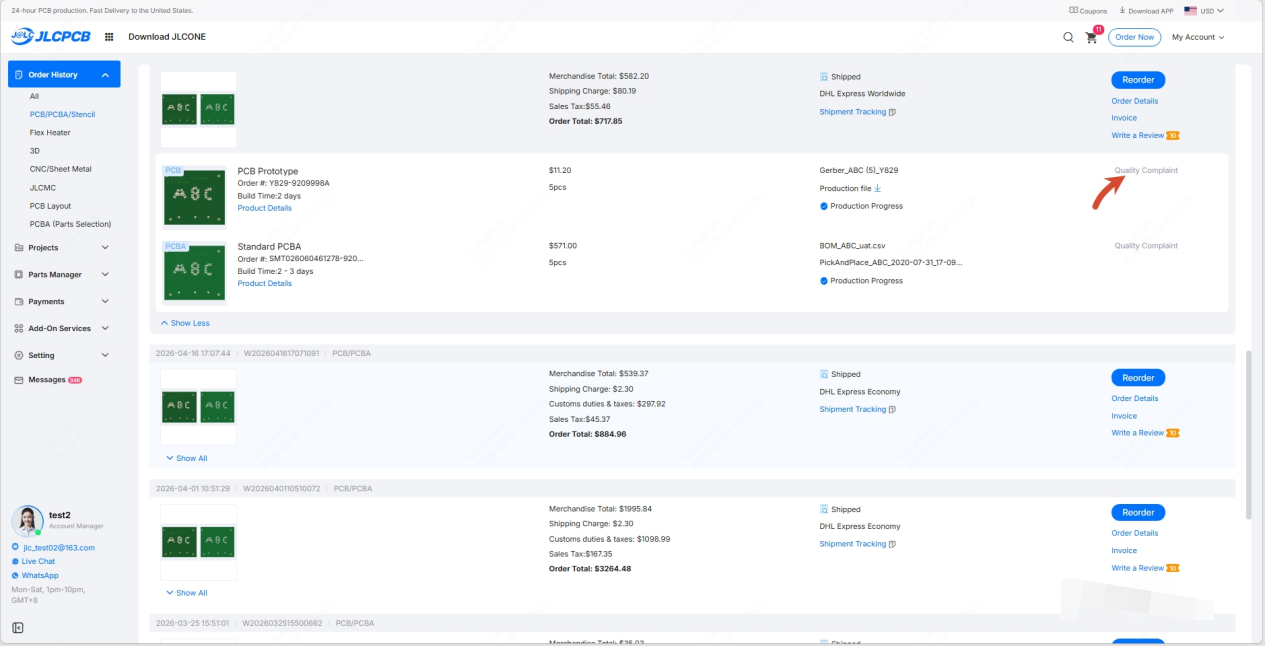
To request a repair, please submit a Quality Complaint in your Order History or contact your sales representative or the JLCPCB after-sales team, and provide the order number, product quantity, reference designators of the defective components, defect quantity, defect details, and relevant photos, videos, or other necessary information.
Complete and accurate information will help us assess the cause of the issue, determine responsibility, and evaluate repair feasibility.
Online Repair Process Guide
After you submit a Quality Complaint and confirm the repair solution with our after-sales team, a repair request will be created in your account.
To view it, log in to your JLCPCB account, go to Order History, click Quality Complaint for the order, and open the Repair Service tab. The process has four stages. The progress bar at the top of the page shows your current status: Ship to Repair Center, Inspect & Repair, Customer Review, and Return to Customer.
1. Ship to Repair Center
Schedule a pickup: On the Repair Service page, review the Repair Summary, then fill in the pickup details:
- Pickup address and return address
- Pickup date and time slot (09:00–18:00 local time; weekends are not available)
- Package information: weight and dimensions of each package (click Add Package if you are shipping more than one box)
Submit the pickup request: Agree to the JLCPCB Repair Service Terms, then click Submit.
Note
Before the waybill is generated, you can change the address or package details on the page, or click Cancel Repair if you no longer want the repair. After the waybill is generated, if you need to change the address, don't hesitate to get in touch with your sales representative promptly. By default, the contact name and phone number are taken from your Address Book. If you need to change them, please contact your sales representative.
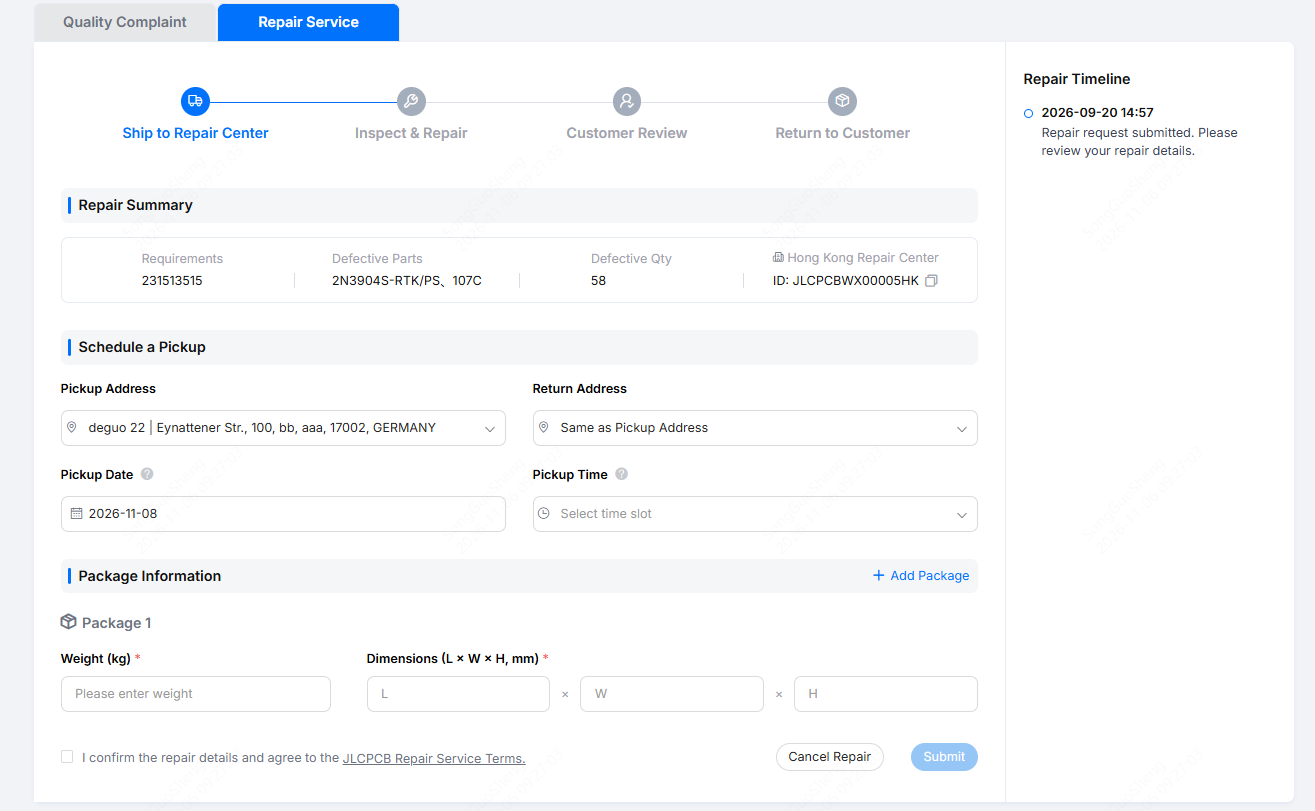
Wait for pickup: After you submit, we will arrange a carrier and generate the waybill. The page will then show the pickup time and tracking number. Please pack your PCBA with anti-static and shock-proof protection, and hand the package to the courier at the pickup time shown on the page.
Track your package: Once the package has shipped, click Track Package to check its delivery status to the repair center. Tracking information may take some time to appear.

2. Inspect & Repair
Check repair progress: After your package arrives at the repair center, it will be scheduled for repair. Once our engineers unpack and inspect it, the repair usually starts shortly after. You can check the current stage, latest updates, and estimated completion date in the progress bar, status banner, and Repair Timeline on the page. The estimated completion date is for reference only.
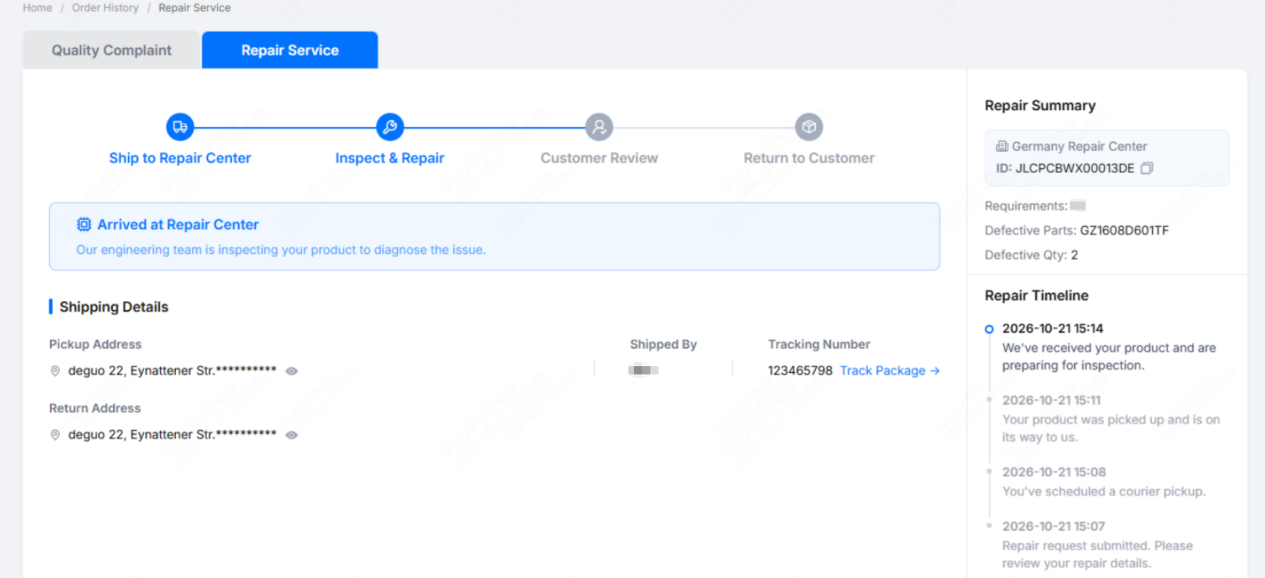
Respond to exceptions: If an issue comes up during receiving inspection or repair, such as shipping damage, a quantity mismatch, or a board too damaged to repair, the page will show a Repair Exception notice. Our after-sales team will contact you by email or through your after-sales ticket to explain the details and discuss the next steps. Click View Ticket to open your after-sales ticket.

3. Customer Review
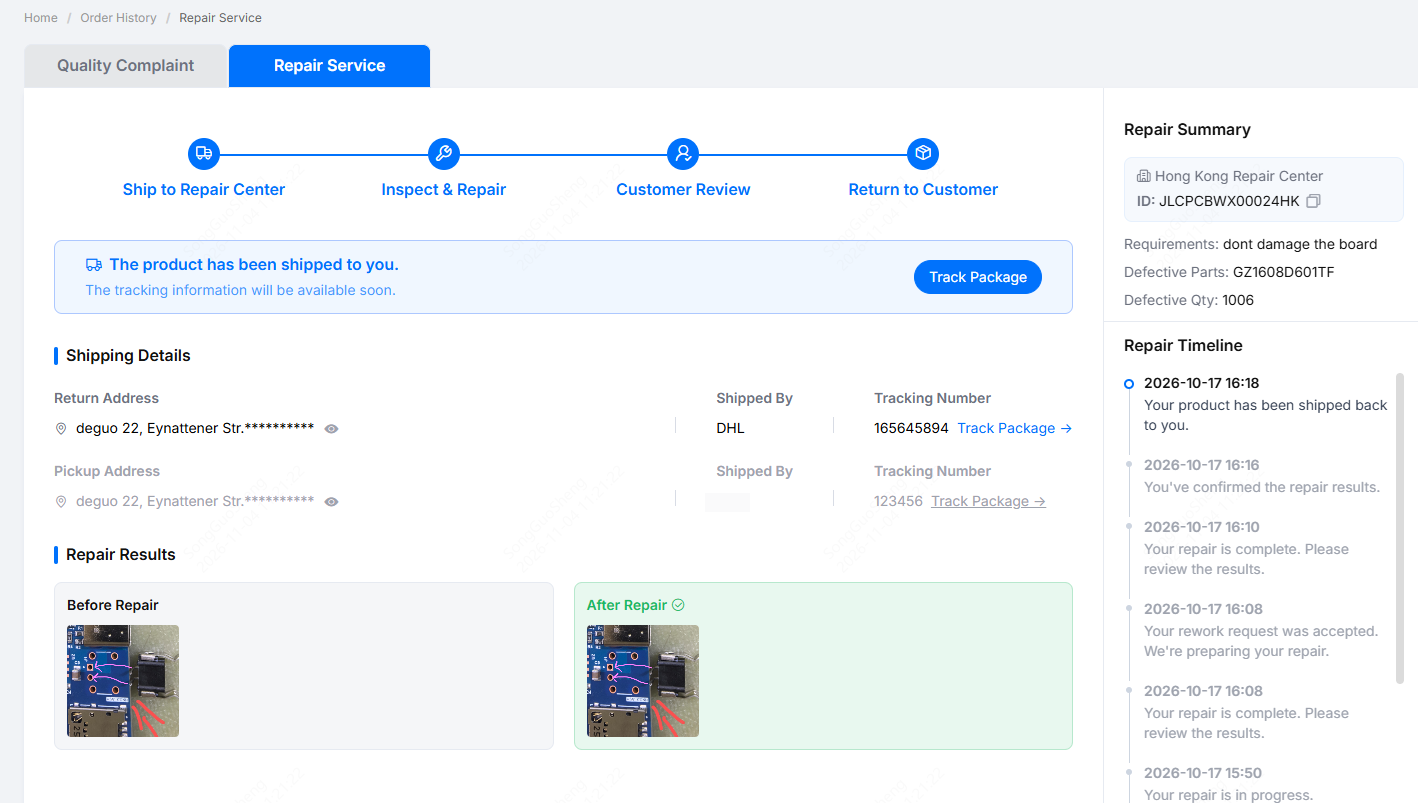
Review the repair results: When the repair is complete, the status changes to Awaiting Customer Review and the Repair Results section shows photos labeled Before Repair and After Repair. Click a photo to enlarge it. Please check the results before we ship the product back:
- If everything looks good: Click Approve & Request Return and we will arrange the return shipment.
- If you have questions: Click Contact support. We will look into it and confirm the next steps with you.
4. Return to Customer
- Return shipment: After you approve the repair results, the repair center will pack your PCBA and ship it to your Return Address.
- Track your return package: Once the package has shipped, the page will show the carrier and tracking number. Click Track Package to follow the delivery.
Repair Risk Notice
PCBA repair involves operations such as inspection, desoldering, heating, and component replacement, which may involve unforeseen risks. Repaired boards may also show minor cosmetic marks.
For paid repair services where the issue is determined to be the customer's responsibility, we will make every effort to complete the repair. If unforeseen damage occurs during the repair process and results in additional losses, our liability for compensation shall be limited to the repair fee paid by the customer for the repair service in question.