How to Repair a PCB: Traces, Pads, Solder Joints and Corrosion
25 min
- Should You Repair the Board or Replace It?
- Safety Before You Start
- PCB Repair Tools
- How to Diagnose a PCB Fault
- How to Desolder and Replace a Component
- How to Repair a Broken PCB Trace
- How to Fix a Cold or Cracked Solder Joint
- How to Repair a Lifted or Damaged PCB Pad
- How to Clean Corrosion Off a Circuit Board
- How to Test a PCB After Repair
- When to Stop Repairing and Order a New Board
- PCB Repair FAQ
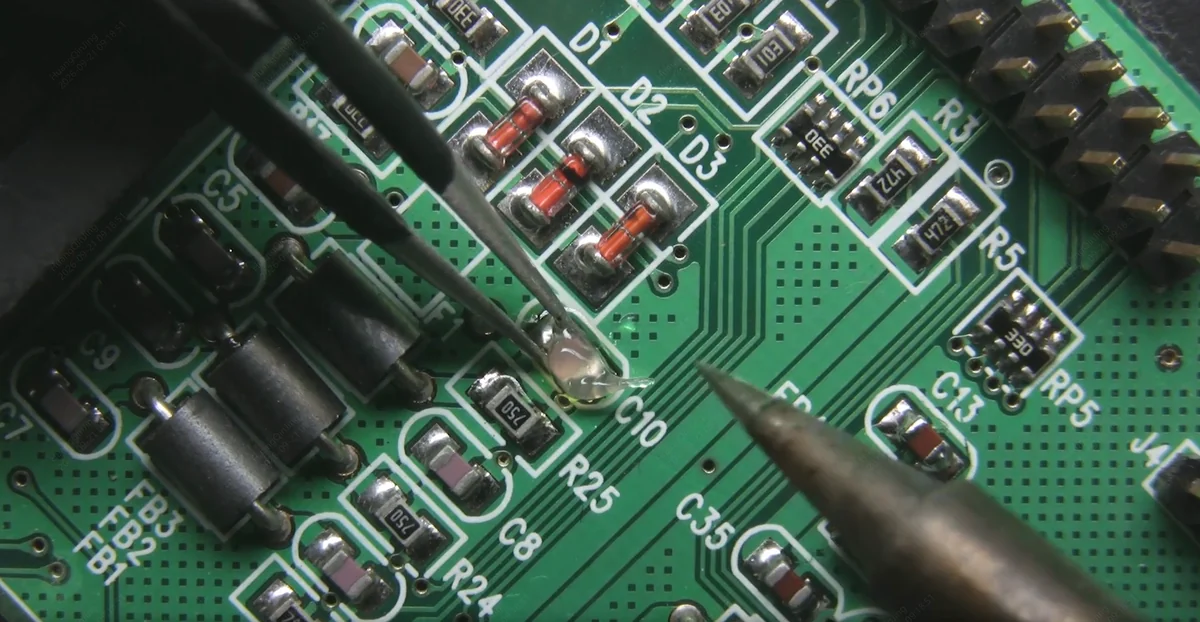
figure: reworking an SMD joint with a soldering iron and tweezers
A cut trace, a lifted pad or a joint that cracked after two years of thermal cycling doesn't mean the board is scrap. Most surface-level circuit board damage can be fixed with an iron, a multimeter and an hour at the bench.
This guide covers finding the fault, the five most common repairs, and testing the board before it goes back into service. Each repair is broken into the steps you perform, in order, with the mistakes that most often undo it. No two repairs go exactly the same way: board thickness, copper weight and layer count, nearby components and the equipment you have all change the details, so treat the temperatures and steps here as a starting point and adjust for each board.
Scope. Outer-layer damage you can see and reach, on boards of any layer count. Inner-layer breaks and BGA pad lift-off can be repaired (IPC-7721 has procedures for both), but not with hand tools, and the equipment usually costs more than the board. Both are out of scope here; for BGA work, see our BGA rework guide.
Should You Repair the Board or Replace It?
How repairable a board is depends mostly on the type of damage:
| Damage | Usually repairable? | What actually decides it |
|---|---|---|
| Broken external trace | Yes | Jumper reliability and strain relief |
| Cold or cracked joint | Yes | Whether the old solder was removed first |
| Lifted SMD pad | Often | Mechanical strength of the jumper and anchor |
| Damaged through-hole barrel | Sometimes | Rebuilding the connection on both layers |
| Scorched FR-4, localized | Depends | Insulation resistance around the burn |
| Carbonized substrate | Often not | Severely charred material forms conductive leakage paths |
| Inner-layer trace | Specialized only | Access to the layer |
| BGA pad damage | Specialized only | Access, package condition and rework capability |
| Widespread corrosion | Depends | Hidden damage under parts and in vias |
Four things decide it in practice: whether you can reach the damage, whether the board's insulation is still intact, whether the repair will hold mechanically, and what the alternative costs. For a prototype that can be rebuilt quickly and cheaply, ordering a replacement from JLCPCB is often more practical than a growing series of jumper repairs. Our PCB repair reality check looks at that trade-off in more detail.
Severely carbonized laminate is the case people underestimate. Charred FR-4 conducts, so a burnt path between two nets keeps leaking current after every component on it has been replaced. It has to be cut out entirely, and once you're routing around a hole in the board, replacing the board makes more sense.
Safety Before You Start
Unplug the board and remove any battery before you touch it. On anything that runs from mains or has a high-voltage stage, the bulk capacitors can hold a dangerous charge long after power is removed: discharge them through a suitable resistor, then confirm with a meter that the voltage is close to zero before you start. Solder and flux fumes are an irritant, so use a fume extractor or at least good ventilation. Leaking or swollen lithium cells need separate handling, covered in the corrosion section below.
PCB Repair Tools
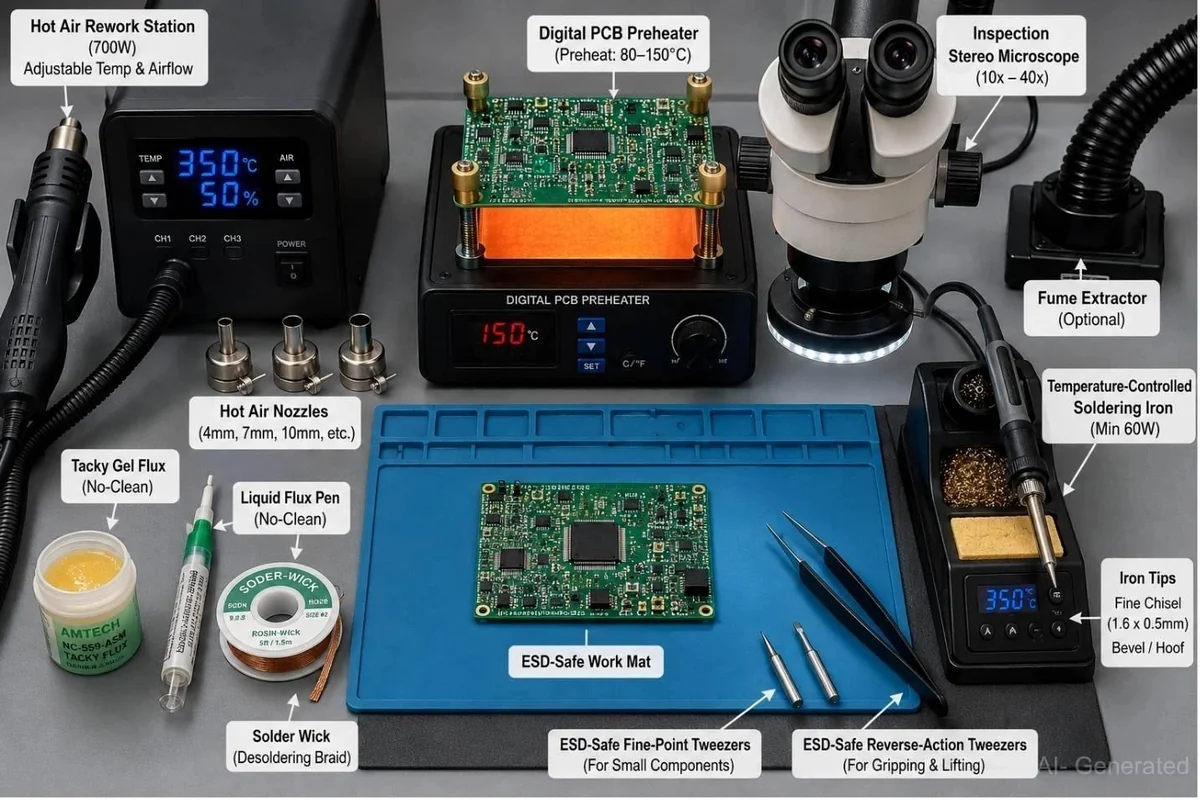
figure: AI-generated image of a typical rework bench: hot air station, board preheater, stereo microscope, temperature-controlled iron, flux, solder wick and ESD-safe tweezers
- Temperature-controlled soldering iron. Around 330–360 °C is a sensible starting point for leaded solder, 350–400 °C for lead-free, and adjust from there. What the dial reads and what the joint reaches are different numbers, and a pad tied into a ground pour will drag a small tip well below its setpoint. A 1.6 mm chisel tip moves more heat than a needle tip and does less damage as a result. For buying advice, see our soldering station guide.
- Solder wire, 0.5–0.8 mm. Keep leaded on the bench alongside whatever the board was built with. Sn63Pb37 hand-reworks better, and mixing it into a lead-free joint lowers the melting point when you're trying to get a part off. That's for removal only: if the product has to stay RoHS-compliant, refit parts with the board's original lead-free alloy. A spool of 0.3 mm is useful for fine-pitch, though it runs out fast on anything with thermal mass.
- Flux paste or flux pen, no-clean rosin. The flux cored into solder wire is spent within a second or two of the joint melting, so anything you rework needs fresh flux put on deliberately. A pen covers touch-ups. Use a syringe of tacky paste for drag-soldering fine-pitch parts and for reflowing anything with a thermal pad.
- Hot air rework station. Adjustable temperature and airflow is all that's required.
- Multimeter with a continuity buzzer and diode test mode.
- Bench power supply with an adjustable current limit. The most useful thing on this list at the testing stage. Powering a freshly repaired board from its own adapter gives you nothing to catch a remaining short with, and a 30 V / 3 A unit is cheap enough that there's no reason to skip it.
- Magnifier or USB microscope. Cracked joints and hairline trace breaks are invisible at arm's length.
- Desoldering pump and flux-loaded solder wick. Wick for pads and fine-pitch parts, pump for through-hole.
- Craft knife or scalpel for scraping solder mask back to bare copper.
- Solderable enameled magnet wire, AWG 30 or 32. The enamel matters: a bare jumper lying across a board will eventually touch something it shouldn't. Buy solderable (polyurethane) enamel, which burns off in a blob of molten solder; polyimide-type enamel survives iron temperatures and has to be scraped off. AWG 30 handles signal work without thinking about it, and as a bench rule of thumb, not a rating, it takes roughly an amp over the few centimeters a board repair spans. That figure drops with a longer run, a sealed enclosure, or a continuous load. For a power rail, go up a size or two, or run two wires in parallel.
- Two-part epoxy or UV-cure adhesive. Every jumper in this guide gets anchored, and every replaced part sitting on a rebuilt pad gets bonded down. Five-minute epoxy is fine. UV-cure sets on demand, which helps when one hand is holding a wire in position.
- Solder mask pen. Scraped-back copper has nothing protecting it. Recoat it, or the repaired spot is the first place to corrode.
- Anti-static precision tweezers, curved and straight.
- Kapton tape. The polyimide film handles rework temperatures; the silicone adhesive is the limit, typically rated around 260 °C, so under sustained direct airflow it will discolor and let go. Use it to block direct airflow and stop small parts drifting. The thin film doesn't insulate much on its own, and heat still travels through the board beneath it, so for heat-sensitive neighbors put a small metal shield under the tape (see SMD removal below).
- 99% isopropyl alcohol and a soft brush. High-purity IPA flashes off fast and leaves almost nothing behind. 70% works in a pinch but dries slower and carries more water onto the board; what actually rules a bottle out is additives: rubbing alcohol sold for skin often contains glycerine or fragrance, and that stays on the board after the alcohol is gone.
- Corrosion cleaning supplies. White vinegar or citric acid powder, baking soda, cotton swabs and distilled water. Which one you reach for depends on what leaked, so keep both. Use distilled water: tap water leaves mineral residue of its own.
- Stainless steel desoldering needles for barrels that wick and fresh solder won't clear. Solder doesn't wet stainless steel, so the needle won't stick in a molten joint. Push it straight through and don't scrape the barrel wall; the plating is easy to damage.
Nice to have: a preheater or hot plate, which brings the whole board to roughly 80–150 °C so the nozzle only has to supply the last stretch and the laminate sees far less shock; low-melt alloy such as Chip Quik, which mixes into existing joints and keeps them molten well below 100 °C, long enough to walk a multi-pin part off with an iron alone (wick every trace of it off the pads before fitting the new part, since any left behind weakens the new joint); conformal coating for anything going back into a damp or outdoor enclosure; and a thermal camera, which turns the post-repair heat check into a glance.
On ESD: a wrist strap and grounded mat cost very little and prevent the failure where a board works on the bench and dies a week later for no visible reason. Static damage rarely leaves a mark you can find. Our ESD guide covers the details.
How to Diagnose a PCB Fault
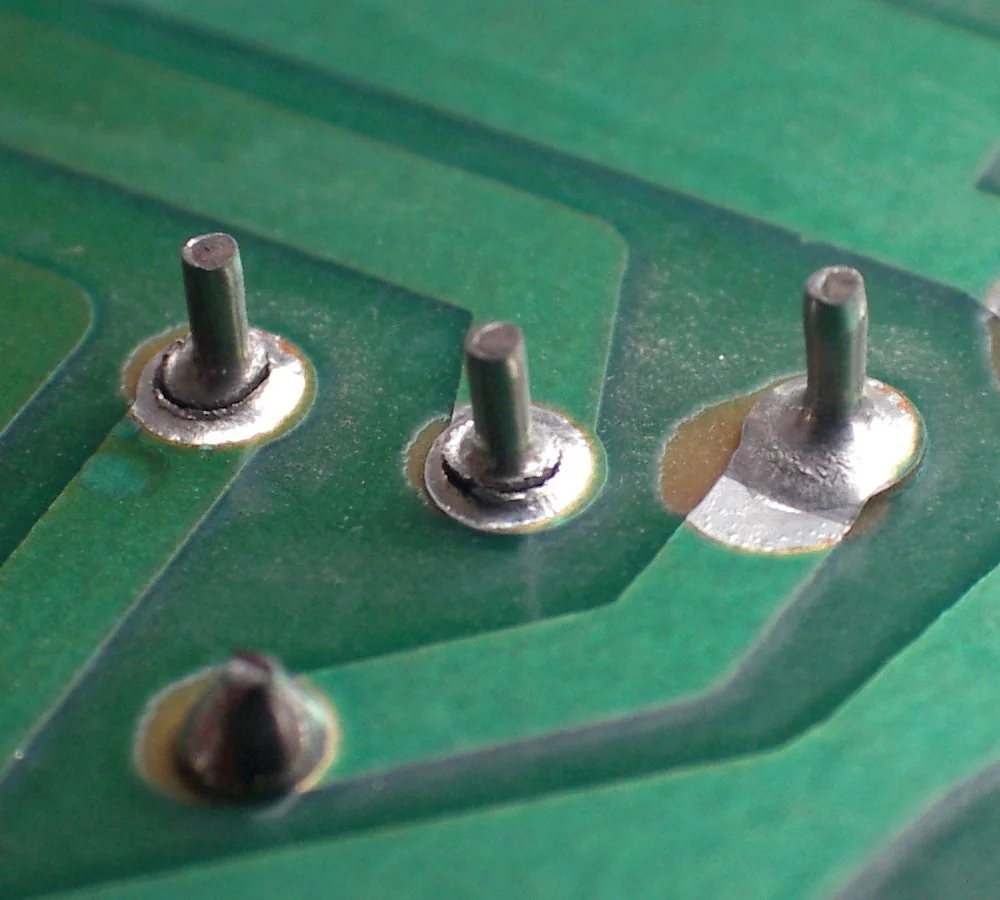
figure: ring cracks around two flyback transformer pins (left) and a lifted, delaminated trace (right). Photo: Coronium, CC BY-SA 3.0, via Wikimedia Commons
- Inspect under magnification. Look for darkened or lifted traces, poorly wetted or cracked joints, swollen or vented capacitors, discolored components, green or white crust around pads, hairline board cracks near mounting holes and connectors, and any solder splash or whisker bridging two pads. Flexing the board slightly while watching a suspect joint will sometimes reveal a crack that closes under no load.
- Locate the break with continuity. Board unpowered, probe from one end of the suspect net to the other. An intact short trace reads very low; how low depends on its length, width and copper weight, and on your test leads, which contribute their own resistance and are often the larger of the two numbers. At this stage you only need to know whether the net is open.
- Bisect. If the net reads open, don't probe at random. Probe the middle, then the middle of whichever half is still broken. Four or five measurements narrow a long trace to a couple of centimeters.
- Separate board faults from component faults. With the board off, check the supply rails against ground. A rail reading a few ohms to ground may be a shorted component (a failed decoupling cap, a blown regulator, a dead MOSFET), but plenty of rails read low by design, particularly low-voltage core rails feeding an MCU or FPGA with a lot of silicon hanging off them. Compare against the schematic or a known-good board before you start pulling parts.
What is unambiguous is the direction of the fault. A break in copper opens a net; it doesn't create a short. So when a net reads open and the parts on both sides test normally, the fault is on the board. (Shorts on the board side come from something added or altered, such as solder splash, a whisker or a carbonized path between conductors.)
Where an identical working board exists, comparing diode-mode readings pin by pin is the fastest way to find the outlier.
| Symptom | First check |
|---|---|
| Board completely dead | Power rail / fuse / connector |
| Intermittent operation | Cracked solder joint / connector / flex |
| One net open | Continuity / trace / via |
| Rail near 0 Ω | Compare with schematic / known-good board |
| Local heating | Current path / short / damaged component |
| Corrosion | Under components / vias / pads |
How to Desolder and Replace a Component
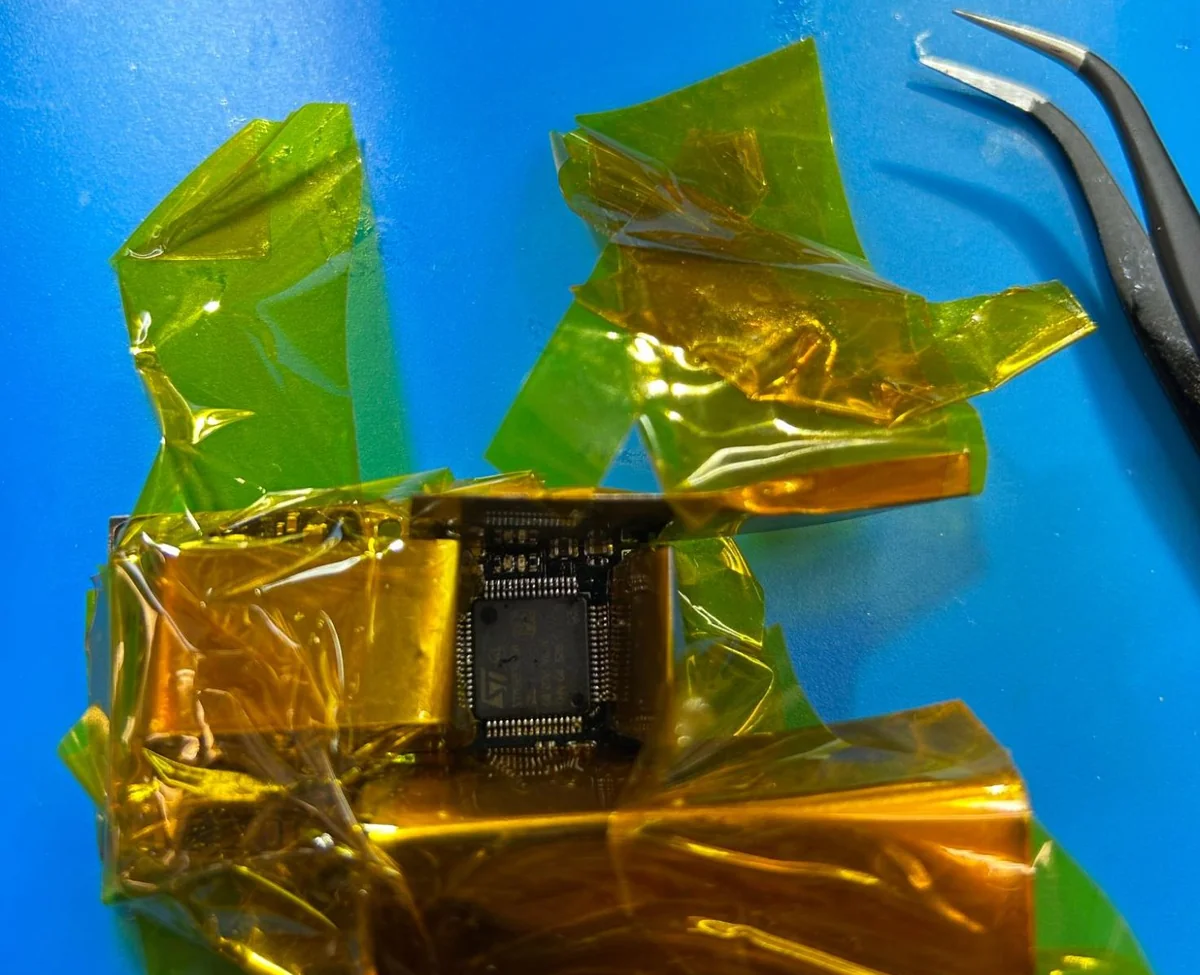
figure: a QFP prepared for hot-air removal: a small homemade metal shield under the Kapton tape protects the neighboring parts, and the tape holds it in place
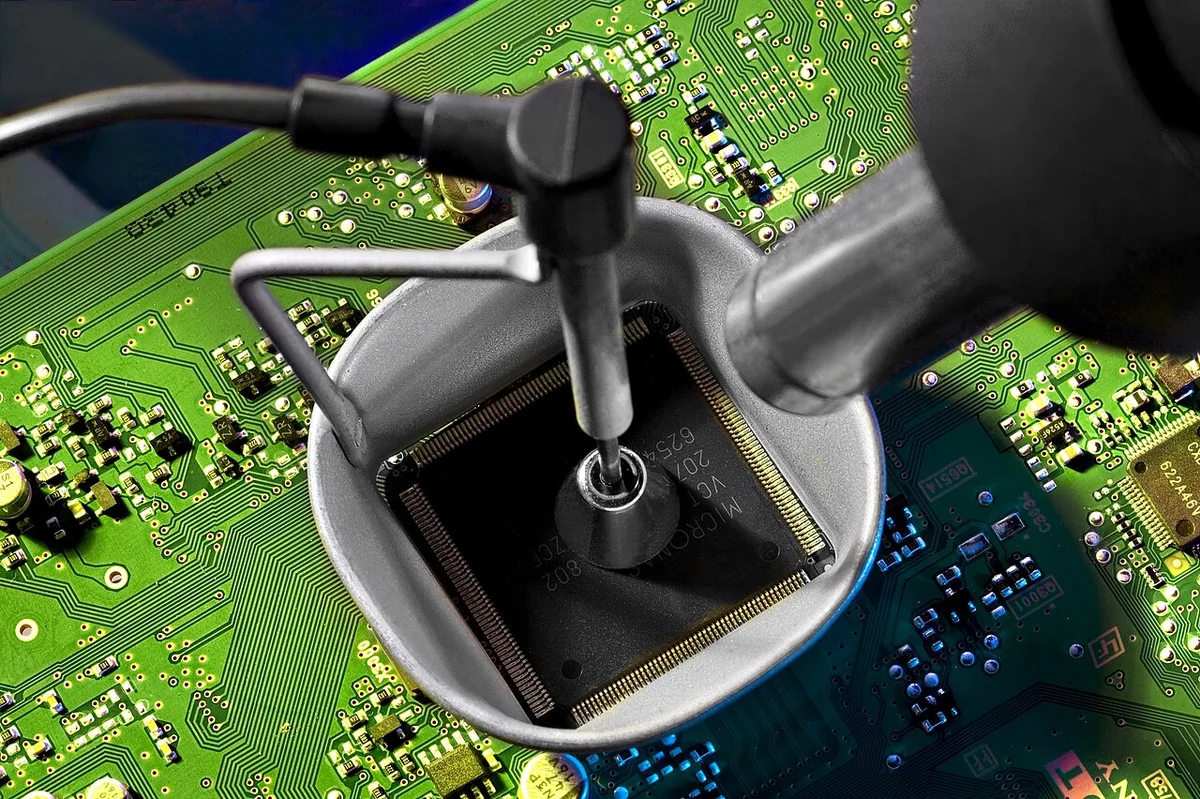
figure: hot-air removal of a QFP using a package-shaped nozzle and a vacuum pick-up. Photo: Aisart, CC BY-SA 3.0, via Wikimedia Commons
Through-hole removal
- Add solder before removing any. Feeding a little fresh solder into the joint reactivates the flux and improves thermal coupling; on a lead-free joint, adding leaded solder also mixes the alloys and drops the melting point.
- Heat and extract. Hit the molten joint with the pump, or draw it off with wick.
- Two or three pins: heat the pins alternately while rocking the part out.
- More pins, dead part: cut the leads at the body first and pull the pins individually. Levering an 8-pin DIP out whole tends to lift pads.
- Confirm the barrel is clear before fitting the replacement. If solder still blocks it, add flux and a little fresh solder and wick it again; use a stainless steel needle only if that fails, and gently, to protect the plating.
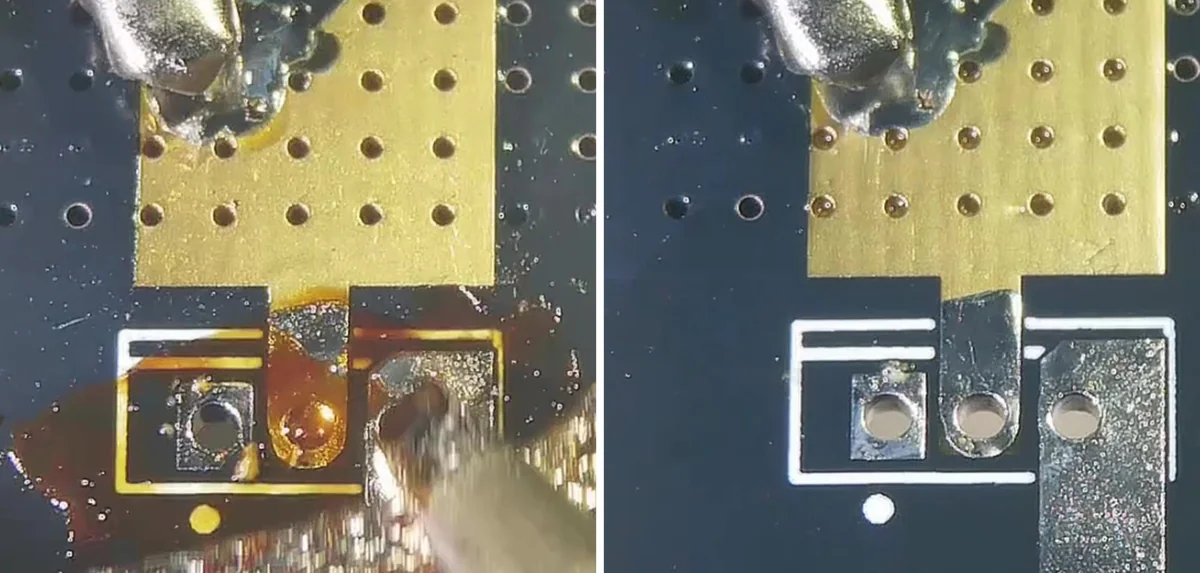
figure: clearing a through-hole footprint with solder wick and flux (left), leaving the pads flat and the plated holes open for the replacement part (right)
SMD removal
- Mask the neighbors. Kapton over adjacent capacitors and connectors takes ten seconds and saves a lot of searching on the floor. Next to heat-sensitive parts such as electrolytic capacitors, crystals or plastic connectors, put a small metal shield (thin sheet metal or folded aluminum foil) under the tape: the metal takes the direct airflow, and the tape holds it in place.
- Start around 300–350 °C with low to moderate airflow, nozzle 10–15 mm off the board. Lead-free solder and larger parts often need more, up to around 400 °C. Nozzle distance, airflow, board thermal mass and preheat all change what the joint actually sees, so adjust for the board and your station.
- Move in small circles around the part so the heat spreads evenly across all the pins.
- Watch the solder, not the clock. When the fillets go liquid, the part shifts if you nudge it with tweezers. Lift it then. If it resists, it isn't ready, and pulling harder tears the pad off.
- If the fillets won't flow, preheat the whole board from underneath before raising the nozzle temperature. Large parts and pads tied into a ground plane need far more heat than they look like they should.
Fitting the replacement
- Wick the pads flat, remove the old flux, apply fresh flux.
- Tack one corner pin and check alignment under magnification — correct it now, while a single joint holds the part.
- Solder the remaining pins. On fine-pitch ICs, heavy flux and a drag-solder pass beats placing each joint individually.
- Clear any bridges with wick, then clean and inspect.
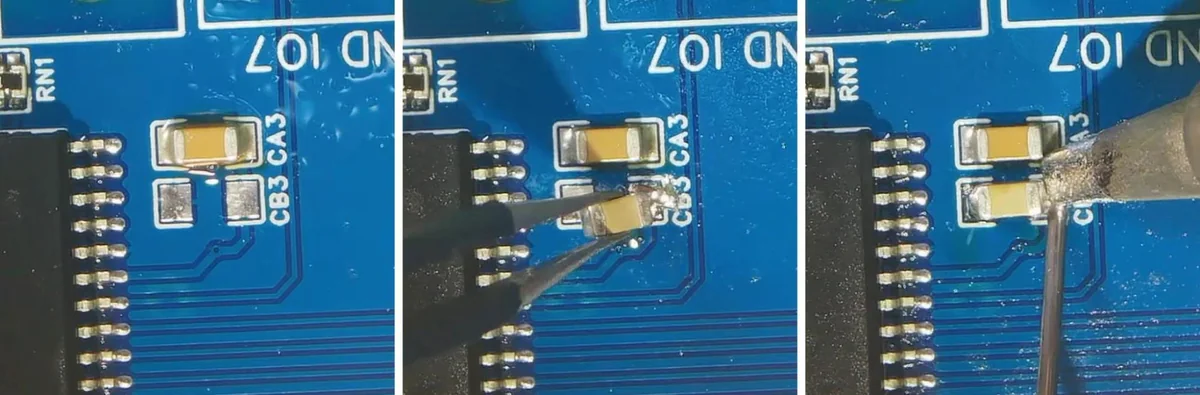
figure: fitting a replacement chip capacitor: pads wicked flat (left), one pad tinned and the part placed with tweezers (center), then the other end soldered (right)
How to Repair a Broken PCB Trace
- Expose copper. Scrape the mask back 2–3 mm each side of the break, blade almost flat against the board. Digging in lifts the trace and turns a small repair into a long one. You want clean, bright copper.
- Tin both exposed sections lightly.
- Prepare the wire. Cut magnet wire slightly longer than the gap. Strip the ends by scraping the enamel with the blade, or by holding each end in a blob of molten solder for a couple of seconds until the coating burns off.
- Tin the ends and solder the wire down flat at both points.
- Verify continuity before doing anything else.
- Anchor and seal. Bond the middle of the wire with a dot of epoxy or UV-cure mask, then cover the exposed copper with a solder mask pen. The solder joints should never be the only thing holding that wire in place.
Conductive ink pens are the other common fix, and many trace repair kits include one. A silver-ink line can bridge a short, low-current signal trace that won't see soldering heat again, but its resistance is far higher than copper and it adheres poorly to scraped laminate, so magnet wire remains the more reliable repair for anything carrying current or sitting next to a joint you may rework.
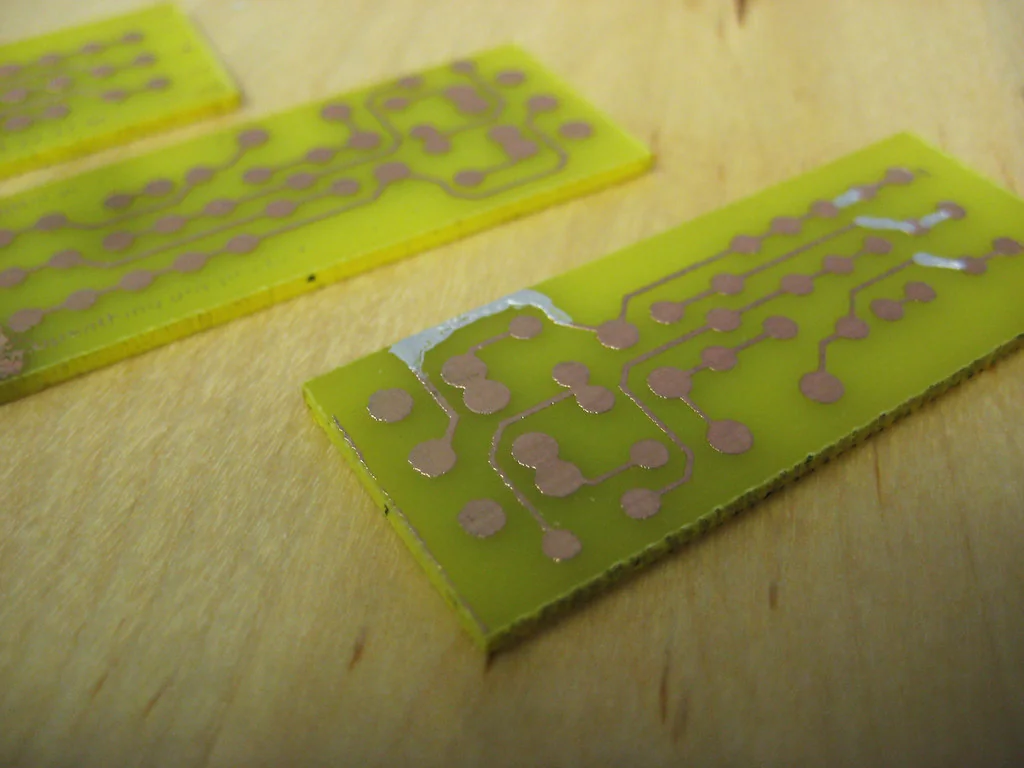
figure: silver conductive paint bridging over-etched traces on a homemade board. Photo: Roy Shearer, CC BY-SA 2.0, via Flickr
Where this goes wrong:
- Bare wire for any jumper longer than a millimeter or two. It will find something to short against eventually.
- A jumper left taut across a gap, or standing proud of the board where an enclosure or cable harness can catch it.
- Bridging a burnt trace without asking why it burnt. Copper doesn't vaporize on its own. Find the overcurrent cause first, and size the jumper for the current the net actually carries.
- Skipping step 5 because the joint looks fine. A wire sitting on enamel that didn't fully burn off looks perfect and conducts nothing.
How to Fix a Cold or Cracked Solder Joint
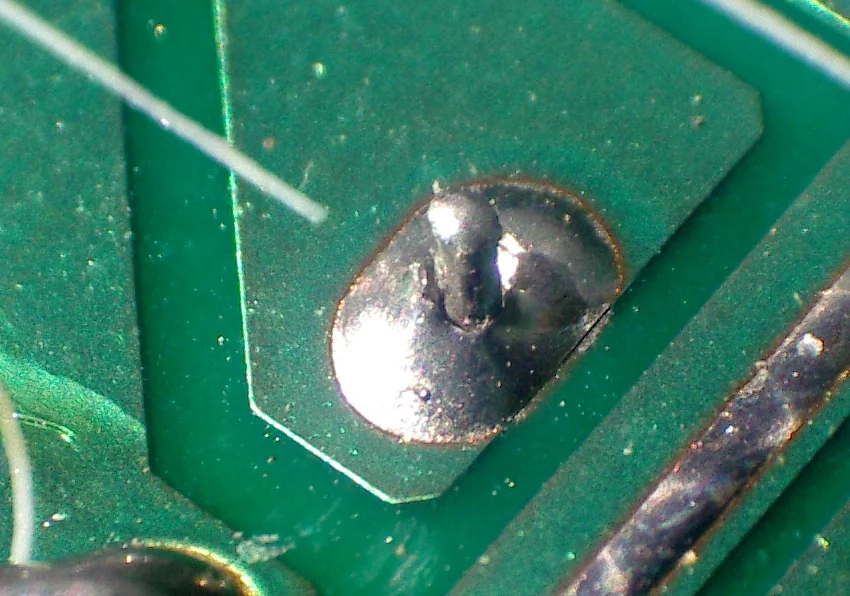
figure: a cold joint: the solder has not wetted the lead, leaving a dark ring around it. Photo: Coronium, CC BY-SA 3.0, via Wikimedia Commons
Touching an iron to a bad joint until it melts, then walking away, is the repair that keeps coming back. The solder is oxidized, the flux is long spent, and without fresh flux the crack faces won't wet back together. On a joint that's only grainy or under-filled, fresh flux and a little fresh solder into the reheated joint is often enough. On anything visibly cracked or corroded, wick the old solder off first, or the joint tends to fail again.
- Wick the old solder off the joint completely.
- Apply fresh flux.
- Heat pad and lead together for two to three seconds, then feed fresh solder into the joint itself — never onto the tip.
- Inspect. A good joint is smooth and concave, and wets up the lead as well as out across the pad. Leaded solder comes out shiny; lead-free joints normally look satin, so judge them by the wetting, not the shine. A ball sitting on top of the pad means the pad never got hot enough.
On joints tied into ground pours, use a broader tip. A fine tip can't deliver heat fast enough, and holding it there longer only cooks the laminate and lifts the pad. Hot air works for reflowing a joint on a part you'd rather not disturb, but step 1 still applies if the joint is visibly cracked or corroded.
How to Repair a Lifted or Damaged PCB Pad
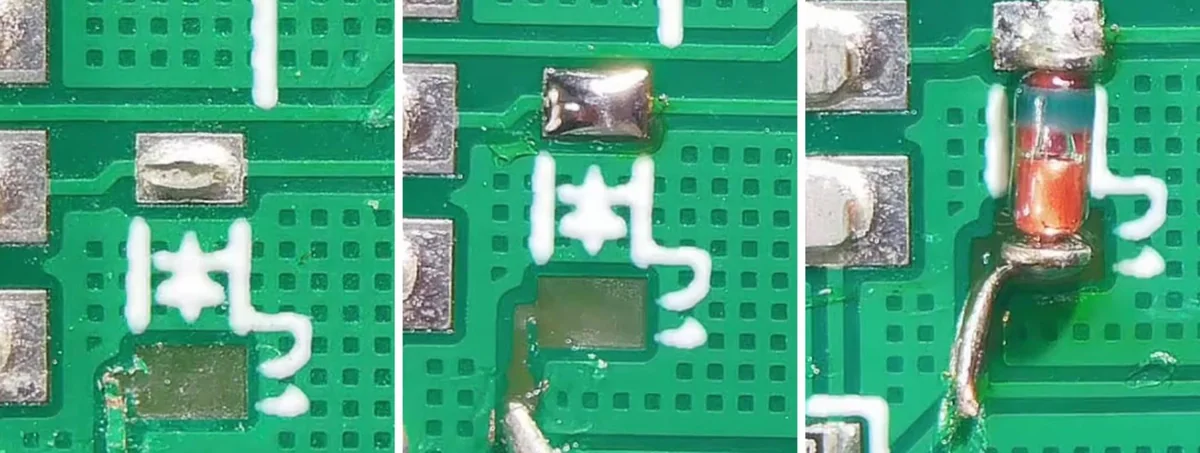
figure: repairing a ripped SMD pad: the pad has torn away (left); the remaining pad and the exposed end of the trace are tinned (center); the part is soldered to the good pad, with a short copper wire jumped to the exposed trace (right)
SMD pad lift
With hand tools, gluing a lifted pad back down rarely survives the next heat cycle: the copper has lost its bond to the laminate, and soldering heat softens most adhesives. IPC-7721 does cover adhesive-based pad repair, both re-bonding a lifted pad and fitting a replacement one, but with specified adhesive systems and controlled curing that a bench repair can't reproduce. The jumper method below needs only what is already on the bench.
- Cut away the lifted pad and any loose length of trace with a scalpel, so it can't flex, snag or short later.
- Find the nearest solid point on the same net, usually a via or another component pad, and scrape the mask back there.
- Run a short magnet wire jumper from that point to the component lead.
- Solder the component's remaining pads normally.
- Anchor the component body with a dot of epoxy, so mechanical stress goes into the epoxy instead of into the single joint carrying the jumper.
Through-hole pad lift with barrel damage
Harder, because a plated through-hole connects two layers and the barrel plating is usually the first casualty.
- Top pad only: solder the lead on the bottom side as normal, then jumper the top-side net to the lead.
- Barrel plating gone: thread the component lead or a separate wire through the hole and solder it on both sides, rebuilding the connection by hand, then jumper each side to its own net wherever the pad is missing. IPC-7721 covers the equivalent eyelet-based procedure if you want a formal reference.
A note on when to stop. If pads keep lifting around the same connector, the laminate underneath has let go, and reordering an assembled board will cost less than more jumpers.
How to Clean Corrosion Off a Circuit Board
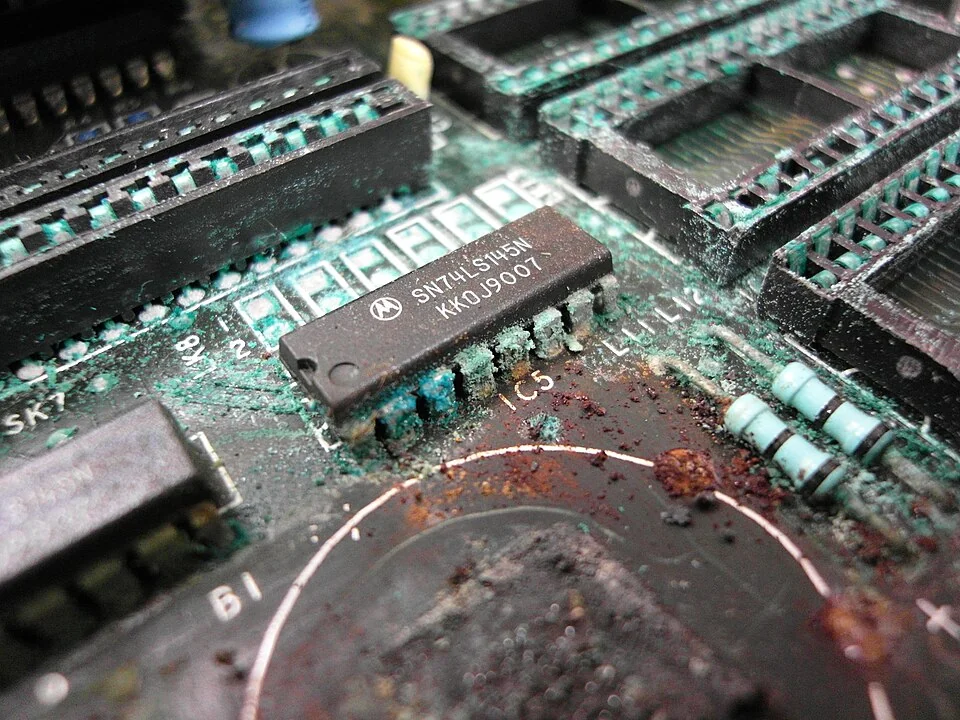
figure: corrosion from a leaking Ni-Cd battery spreading across the board and into the IC socket pins. Photo: Binarysequence, CC BY-SA 3.0, via Wikimedia Commons
Flux and general residue
99% IPA and a soft brush handles flux residue, grease and fingerprints. Keep it away from potentiometers, trimmer caps, mechanical relays and speakers: it washes out their lubricant and carries dissolved flux inside, where you can't clean it off.
Battery and electrolyte damage
Identify what leaked before you put anything on it. Neutralizers only help when they match the chemistry; the wrong one just adds a second contaminant to the first.
- Alkaline leakage — the common case, a white crusty feathery deposit, chemically basic. Neutralize with white vinegar or dilute citric acid on a cotton swab, working it in until the fizzing stops.
- Acidic residue — from lead-acid cells or some vented electrolytics. Weak baking soda solution instead.
- Unidentifiable residue — don't guess from appearance. Clean mechanically with IPA and a soft brush; ten more minutes of residue does less harm than the wrong chemistry.
- Rinse with distilled water, then IPA, and dry thoroughly. Neutralizing leaves salts that dissolve in water but not readily in IPA, so the water rinse removes them and the IPA then displaces the water. Moisture and leftover ionic residue can sustain the electrochemical reactions that drive corrosion, so a board that had liquid on it needs warm airflow and a few hours before power goes near it.
- Go underneath. Corrosion wicks under component bodies and into via barrels. Crust around a component's pads means more of it underneath: remove the part and clean properly. Traces that look intact but read high resistance are corroded through beneath the mask and need the trace repair above.
- Prevent recurrence. A thin conformal coating over the repaired area keeps humidity out.
Lithium cells need different handling. Most lithium-ion and lithium-polymer cells use LiPF₆ as the electrolyte salt, which hydrolyzes on contact with moisture and can produce hydrogen fluoride. That's what makes this different from an alkaline leak: HF burns can be painless at first and keep doing damage below the surface for hours. Don't improvise a neutralizer on leaked lithium electrolyte, don't touch it bare-handed, and don't work on it in a closed room. Nitrile gloves, eye protection and ventilation come before anything else. And if the cell itself is swollen, warm, or still leaking, stop and treat it as a damaged battery.
How to Test a PCB After Repair
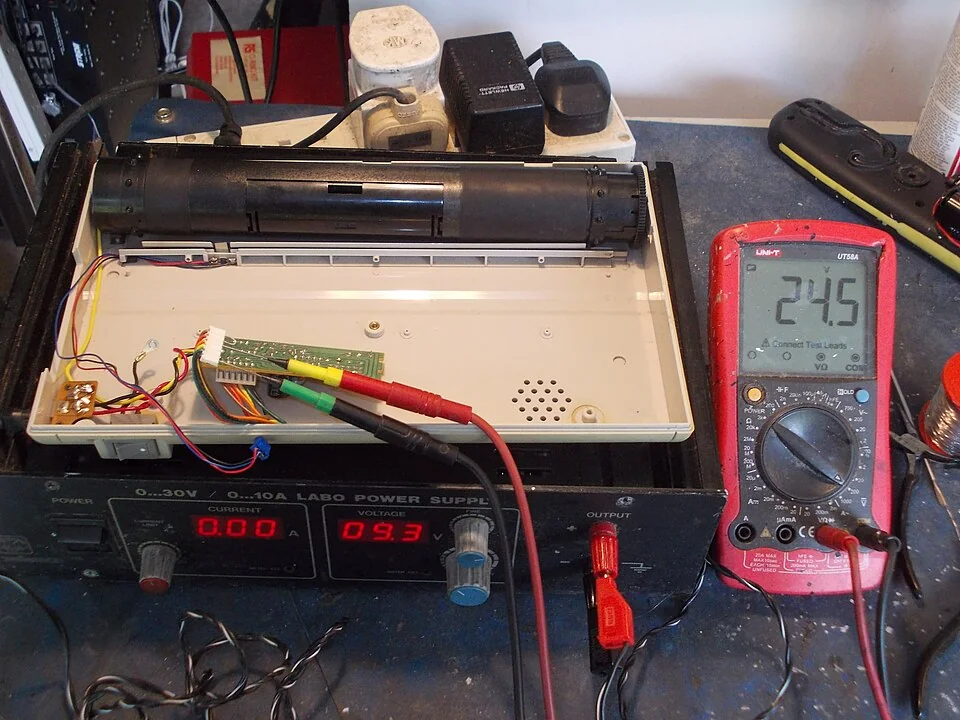
figure: testing a printer power-supply board from a bench supply while a multimeter monitors the printhead supply rail. Photo: tony_duell, CC BY 2.0, via Wikimedia Commons
- Continuity on the repaired net, end to end.
- Continuity against its neighbors. The characteristic failure of a jumper repair is an unintended bridge, not a missing connection.
- Inspect under magnification for solder splash, stray wick strands, and jumpers resting against pads they shouldn't touch.
- Power up on a current-limited bench supply. Leave the original adapter or battery disconnected. Set the rail voltage and a current limit just above expected idle draw. If the supply goes straight into constant-current mode, stop and find out why before raising the limit. It may be a remaining short, but bulk capacitance charging, a soft-start circuit, or a limit set too low for the board's normal inrush all look the same at switch-on. Bring the limit up in steps and watch where the current settles; a real short holds the supply in CC no matter how high you go.
- Check the rails with the meter once current looks normal.
- Check for heating after a few minutes. A thermal camera makes this trivial. Without one, pass the back of a finger quickly just above the components: the back because it pulls away by reflex, and above so you feel the heat before you touch anything. Never do this on anything mains-connected or carrying high voltage: run it, kill the power, discharge it properly (see Safety Before You Start), then check temperatures.
- Only now does the original power source go back on.
When to Stop Repairing and Order a New Board
Hand repair earns its place on prototypes carrying expensive or long-lead-time parts, and on faults confined to one or two nets. A properly anchored jumper and a joint rebuilt on clean pads hold up in service. Most repair failures trace back to unanchored wire, old solder left in the joint, or a jumper routed where something can catch it. Vibration, thermal cycling and a weakened laminate all work against a repair, which is why anchoring and routing matter more on a repaired board than on a new one.
What repair doesn't fix is a board that's been through it several times already, corrosion spread across multiple areas, or laminate that has started to let go. When the damage is somewhere you can't reach, when the pads keep lifting, or when the rework time costs more than a new board, ordering a fresh assembled board from JLCPCB is both the cheaper and the more reliable option.
If JLCPCB assembled the board and the problem is a soldering or component fault, such as wrong, missing or reversed parts, cold joints or solder bridges, the after-sales team can repair it. The FAQ below covers the cost, and the PCBA Repair Service page explains the process.
PCB Repair FAQ
Q: Can a burnt PCB be repaired?
Depends where the heat went. Contained damage (a scorched pad, one component that overheated, some darkened solder mask) is repairable like any other localized fault. What changes the answer is damage to the laminate itself: blistering, layers visibly separating at an edge, warping, or a charred area bridging two conductors. Discoloration alone isn't proof of delamination, but any of those other signs means the board's insulation is compromised, and no amount of trace bridging fixes that.
Q: How do I know if a trace survived overheating even if it looks okay?
Visual inspection isn't enough: heat degrades a trace before it shows. Start with continuity, then measure resistance against a known-good board or the expected value. A bare reading tells you little on its own, since a short, wide trace measures only a few milliohms and probe and contact resistance swamp it on a standard multimeter. For anything carrying real current, test under load: measure the voltage drop across the trace at working current, or run the board and look for a local hot spot. A trace thinned by heat shows up there long before a continuity buzzer notices anything.
Q: Do I need a hot air station, or can I get by with just an iron?
For through-hole work and single-pad SMD touch-ups, an iron is enough. Whether you need hot air depends more on thermal mass and pin pitch than on pin count. A 2-pin power connector soldered into a ground pour can be harder to free than an SOIC-8, and an IC with an exposed thermal pad underneath won't come off with an iron alone, unless you preheat the board from below or flood the joints with low-melt alloy first. Fine-pitch parts, anything with multiple ground connections, and any component you intend to reuse are where hot air stops being a convenience. Heating pins one at a time and levering between them lifts pads.
Q: When should I replace a PCB instead of repairing it?
Replace it when the damage is out of reach (inner-layer or BGA damage, carbonized substrate), spread across several areas, or on a board that has already been reworked several times. Cost decides the rest: hours of rework are worth it on a prototype with long-lead-time parts, but rarely on a board you can reorder assembled within days.
Q: How much does it cost to repair a PCB?
Doing it yourself costs little beyond the tools: the magnet wire, flux and epoxy for a typical repair come to a few dollars, and the real cost is your time. If JLCPCB assembled the board and the fault is a soldering or component problem (wrong, missing or reversed parts, misalignment, cold joints, insufficient solder, bridges or damaged parts), its after-sales team can repair it. When the fault is JLCPCB's, the repair is free. Otherwise, labor is USD 20 per hour at the Hong Kong repair center or USD 40 per hour in Germany, plus parts, round-trip shipping and any customs duties. To request a repair, send the order number, board quantity, the reference designators and number of defects, and photos or video. Details are on the PCBA Repair Service page.


When a repair isn't worth it, upload your Gerber and BOM on the quote page for a new assembled board.
If JLCPCB assembled the board and the fault is in the soldering or parts, the PCBA Repair Service can fix it.
Popular Articles
• SMT Assembly Process Explained and Equipment Used: A Step-by-Step Guide to PCBA Manufacturing
• Common PCB Assembly Methods and Soldering Techniques Explained
• SMD Soldering Tools You Need: Complete Guide from Beginner to Pro
• What Is BGA Void? Causes, IPC Limits, and Solutions
• Reflow Soldering: Everything You Need to Know
Keep Learning
How to Repair a PCB: Traces, Pads, Solder Joints and Corrosion
figure: reworking an SMD joint with a soldering iron and tweezers A cut trace, a lifted pad or a joint that cracked after two years of thermal cycling doesn't mean the board is scrap. Most surface-level circuit board damage can be fixed with an iron, a multimeter and an hour at the bench. This guide covers finding the fault, the five most common repairs, and testing the board before it goes back into service. Each repair is broken into the steps you perform, in order, with the mistakes that most often......
How to Solder Wires to a Circuit Board Properly: Step-by-Step Guide
Learning how to solder wires to a circuit board is a fundamental skill for electronics repair, prototyping, and PCB assembly. Whether you are attaching power leads, signal wires, or test connections, a weak solder joint can cause intermittent failures, lifted pads, or long-term reliability issues. In this step-by-step guide, you'll learn the correct tools, preparation methods, and soldering techniques needed to create strong, clean, and reliable wire-to-PCB connections. From preparing the wire and PCB......
PCB Soldering Basic Techniques and Overview
Soldering means joining metal components with a melted metal called solder, which has a low melting point compared to other metals. Soldering is crucial in the electronics industry and is the primary method of joining electrical components. There are different types of soldering materials based on quality and their melting points. The most common combination is a tin or lead metal alloy mixed with silver or brass. The soldering iron melts the metal so it can be used like glue to connect two pieces. On......
SMT Assembly Process Explained and Equipment Used: A Step-by-Step Guide to PCBA Manufacturing
Today's high-performance electronics, from pocket-sized smartphones and IoT sensors to sophisticated industrial control systems, are made possible by a manufacturing miracle: Surface Mount Technology (SMT). SMT is the backbone of electronics manufacturing, allowing us to have the incredible component density and miniaturization. A bare circuit board is simply a substrate. The process of transforming it into a functional electronic circuit is known as Printed Circuit Board Assembly. This article outlin......
Common PCB Assembly Methods and Soldering Techniques Explained
Whether you're designing your first prototype or scaling up to production, understanding PCB assembly methods and soldering techniques is crucial to achieving reliable, high-performance circuit boards. Modern PCBA primarily relies on Surface Mount Technology (SMT) and Through-Hole Technology (THT)—each offering unique advantages for component density, durability, and manufacturability. In this guide, we'll break down the major PCB assembly methods, key soldering techniques such as reflow and wave sold......
What Is Tombstoning? A Practical Guide to Causes, Reflow Risks, Prevention, and Rework
Key Takeaways Definition: Tombstoning occurs when a small two-terminal component lifts off one pad during reflow and stands upright, leaving one end without a proper solder connection. Root Cause: Unequal solder wetting forces act on the two terminals, often due to differences in pad temperature, solder-paste volume, pad geometry, or thermal mass. Highest Risk: Small passive components, such as 0201 and 0402 resistors and capacitors, are especially susceptible because their low mass and small terminat......