Potentiometer Symbol Guide: Complete Chart, IEC/IEEE Standards, Compare Types and More
13 min
- Potentiometer Symbol Chart
- What Does a Potentiometer Symbol Mean?
- Potentiometer Symbol Pinout: End Terminals and Wiper
- IEC vs. ANSI Potentiometer Symbols: What's the Difference?
- Potentiometer vs. Rheostat vs. Variable Resistor Symbols
- Potentiometer Types and Their Symbols
- What Do Potentiometer Labels Such as B10K and 103 Mean?
- How to Read a Potentiometer Symbol in a Schematic Step by Step
- Conclusion
- FAQs About the Potentiometer Symbol
Key Takeaways
- Find the wiper first: The arrow or bar that touches the resistor body is the wiper, the movable contact, while the two plain leads at the ends of the body are the fixed end terminals.
- Expect two drawing styles: IEC schematics draw the body as a rectangle, and ANSI-style schematics draw a zigzag, but both represent the same component and mark the wiper in the same way.
- Read the arrow's position: An arrow touching the body marks a three-terminal potentiometer. In contrast, an arrow drawn diagonally across the body usually marks a two-terminal variable resistor or rheostat.
- Know which types share one symbol: Rotary, slide, and multi-turn potentiometers usually use the standard symbol, while trimmer, dual-gang, switched, and digital potentiometers have their own recognizable forms.
- Check the datasheet: The symbol does not indicate which terminal is clockwise, and taper markings can vary by manufacturer. Always confirm both in the datasheet before designing the PCB layout.
A potentiometer symbol can appear in several forms in the same project: a rectangle with an arrow in one schematic, a zigzag with an arrow in another, and a short T-shaped bar for a board-mounted trimmer. If you connect the end terminal to the wiper, the output can remain fixed rather than adjustable.
In this guide, you will learn:
- The common potentiometer symbol variants are shown in one chart
- How to identify the two end terminals and the wiper
- How IEC and ANSI potentiometer symbols differ
- How to tell a potentiometer from a rheostat or variable resistor
- Which potentiometer types have their own symbol
Potentiometer Symbol Chart
Most potentiometer symbols show a resistor with an arrow representing the wiper. Each variant changes one detail: the body style, the wiper tip shape, an added mechanical link, or the IC outline.
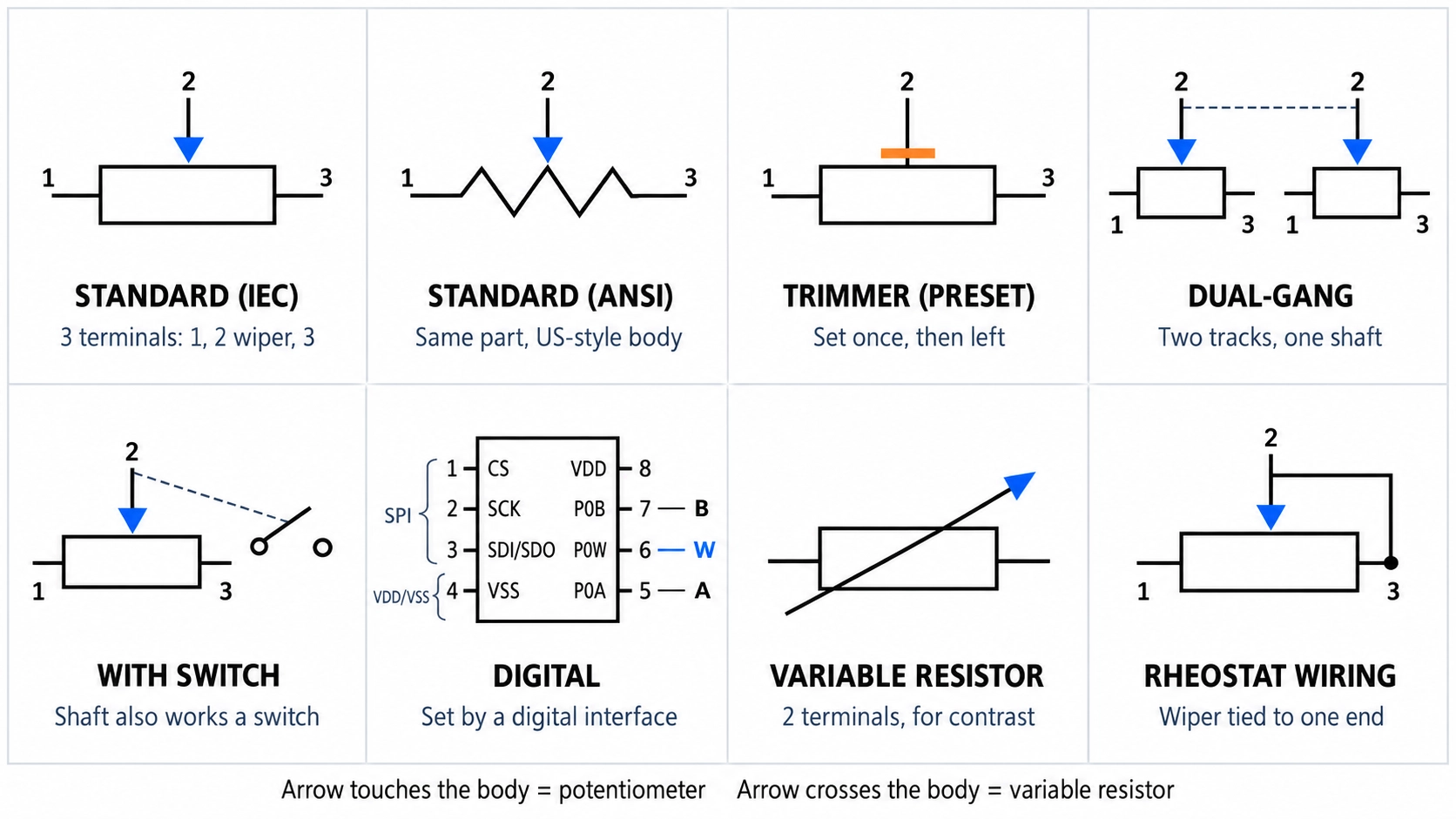
Figure: Potentiometer symbol chart
| Symbol Variant | How It Is Drawn | Terminals | What It Tells You |
|---|---|---|---|
| Standard potentiometer, IEC style | Rectangle with an arrow touching the middle of one long side | 3: two ends and a wiper | An adjustable voltage divider |
| Standard potentiometer, ANSI style | Zigzag with an arrow pointing at it | 3: two ends and a wiper | The same component in US-style schematics |
| Trimmer (preset) potentiometer | The wiper ends in a short bar instead of an arrowhead | 3 | Set once during assembly or calibration |
| Dual-gang potentiometer | Two potentiometer symbols with their wipers joined by a dashed line | 6 | Two tracks turned by one shaft |
| Potentiometer with switch | A potentiometer and a switch joined by a dashed line | 3, plus the switch contacts | The shaft also operates a switch |
| Digital potentiometer | An IC outline with terminal A, wiper W, and terminal B | 3 analog, plus supply and control pins | A resistor network set by a digital interface |
| Variable resistor, for contrast | An arrow drawn diagonally across the body | 2 | An adjustable resistance, not a divider |
What Does a Potentiometer Symbol Mean?
A potentiometer symbol represents a three-terminal resistor with a movable contact. The body is the resistive track, the leads at its two ends are the fixed terminals, and the arrow touching the body is the wiper.
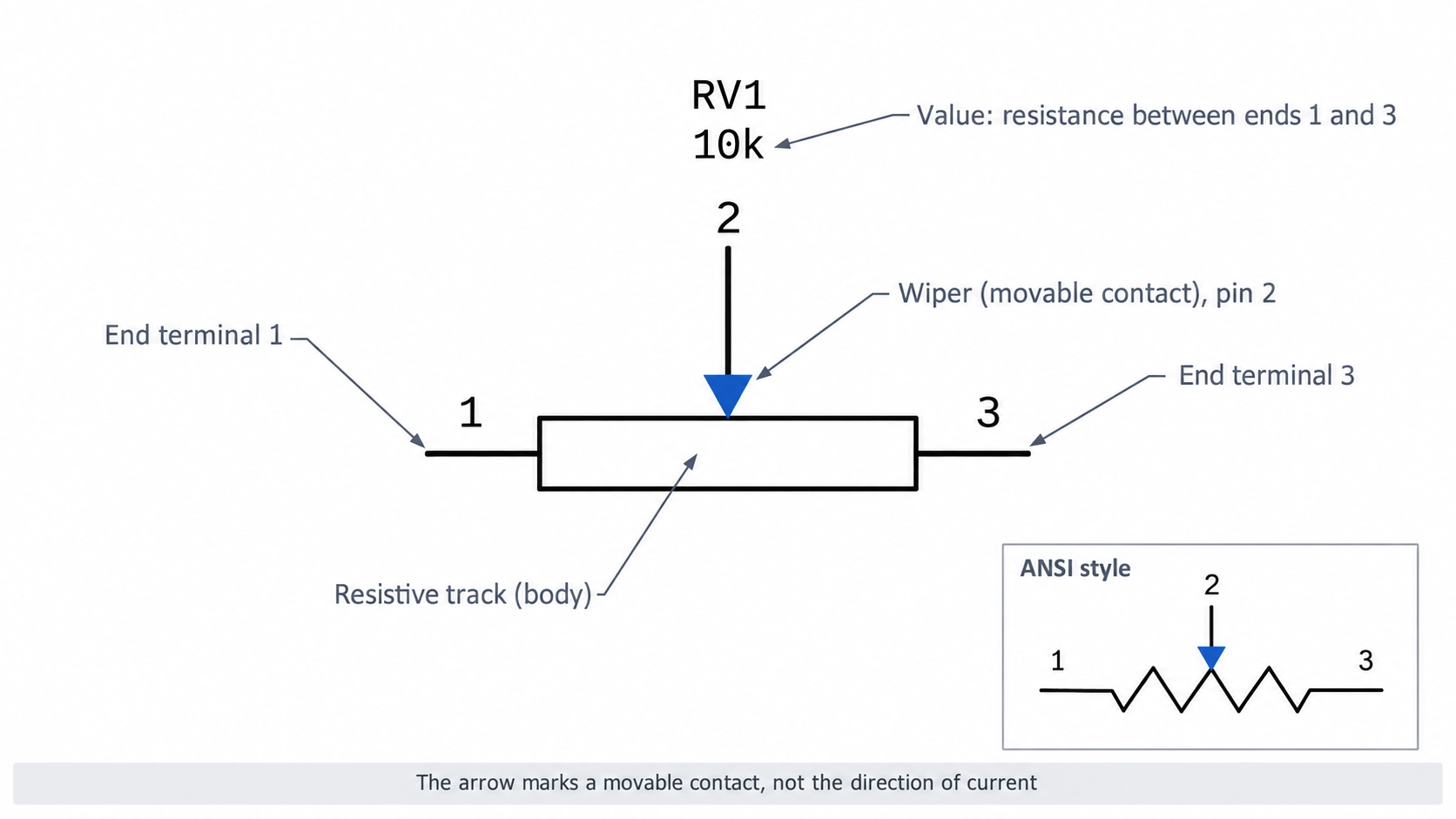
Figure: Potentiometer symbol with end terminals 1 and 3 and the wiper at pin 2
The potentiometer symbol starts from the resistor symbol and adds a third terminal. Each element represents one part of the component:
- Resistor body: The resistive track. The value printed beside it, such as 10k, is the resistance between the two end terminals.
- End terminals: The fixed ends of the track. The resistance between them remains at the rated value within tolerance as the wiper moves.
- Wiper arrow: The movable contact. Its position sets how the track resistance is divided between the wiper and each end terminal.
With a voltage across the end terminals, the wiper delivers an adjustable fraction of that voltage. In an unloaded divider, the fraction equals the share of track resistance between the wiper and the grounded end.
Potentiometer Symbol Pinout: End Terminals and Wiper
On most three-pin potentiometers, the end terminals are numbered 1 and 3, and the wiper is pin 2. On panel potentiometers, the wiper is usually the middle pin, and the datasheet defines which end is clockwise (CW).
| Pin | Symbol Element | Function | Check the Datasheet |
|---|---|---|---|
| 1 | One end of the body | Fixed the end of the track | Whether it is the CW or counterclockwise (CCW) end |
| 2 | Wiper arrow | Movable contact | Its physical position is usually the middle pin on the panel parts |
| 3 | Other end of the body | Fixed the end of the track | Whether it is the CW or CCW end |
Many datasheets show the CW end in a terminal diagram. For example, the Bourns 3296 trimmer datasheet labels terminal 2 as the wiper, terminal 1 as the CCW end, and terminal 3 as the CW end.
Note
Swapping the two end terminals reverses the control direction, so the output rises as the shaft turns counterclockwise. For a volume or level control that should increase clockwise, connect the signal input to the end of the datasheet marked CW and ground to the end marked CCW.
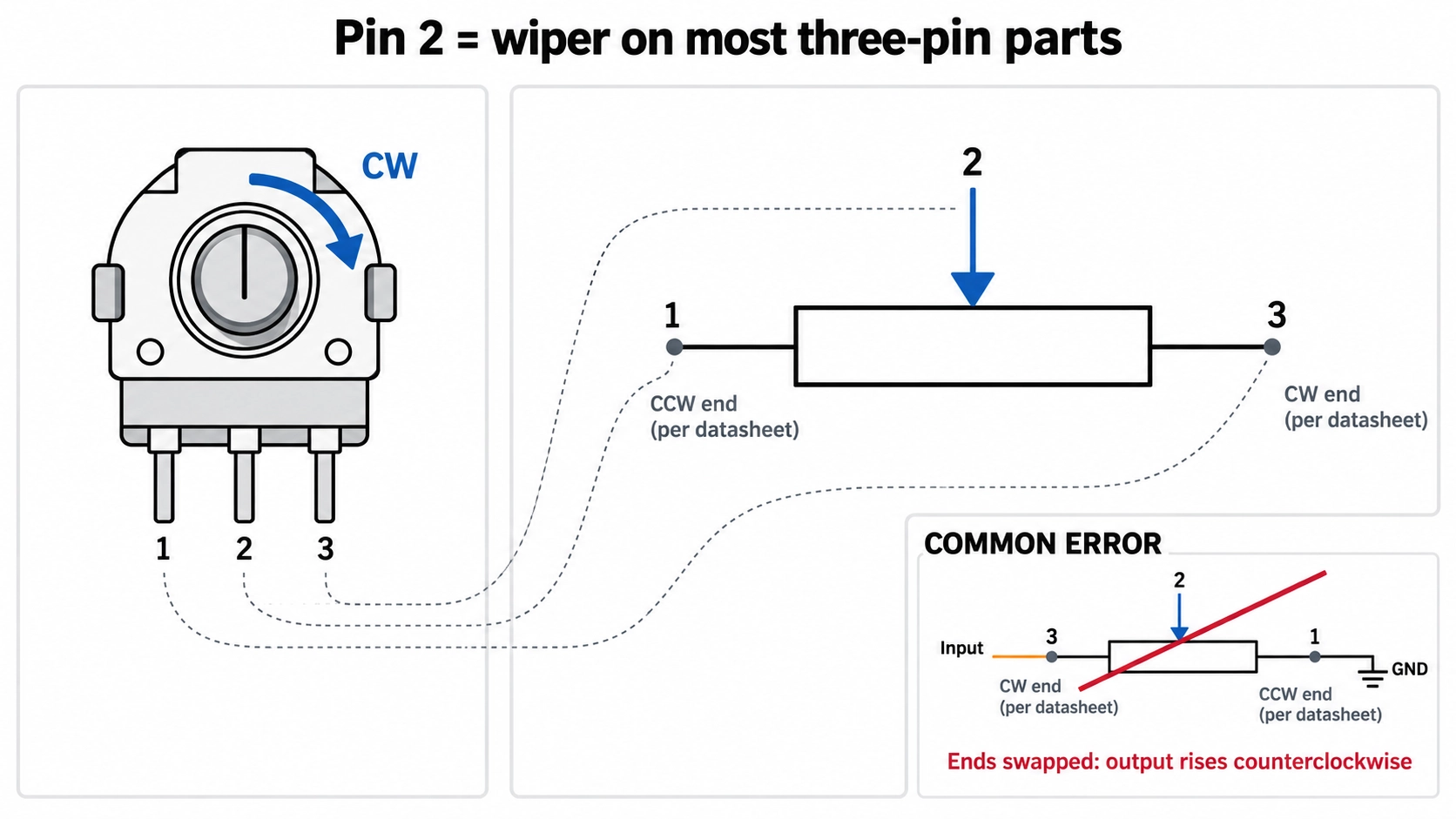
Figure: Rotary potentiometer pins 1, 2, and 3 matched to the potentiometer symbol
Potentiometers usually carry one of these reference designators, followed by a number such as RV1:
- R: The general resistor prefix, used on many schematics for potentiometers and trimmers.
- RV: A common potentiometer prefix, although some schematics also use it for a varistor.
- VR: Short for variable resistor, although some schematics also use it for a voltage regulator.
Identify the part from the symbol and its value, not from the prefix alone. Before finalizing the footprint, you can use the JLCPCB Parts Library to check which potentiometers and trimmers are available and to review their package information.
IEC vs. ANSI Potentiometer Symbols: What's the Difference?
IEC 60617 depicts the potentiometer body as rectangular, whereas ANSI-style schematics per IEEE 315 depict it as zigzag. Both mark the wiper with an arrow touching the body, so the two symbols represent the same component.
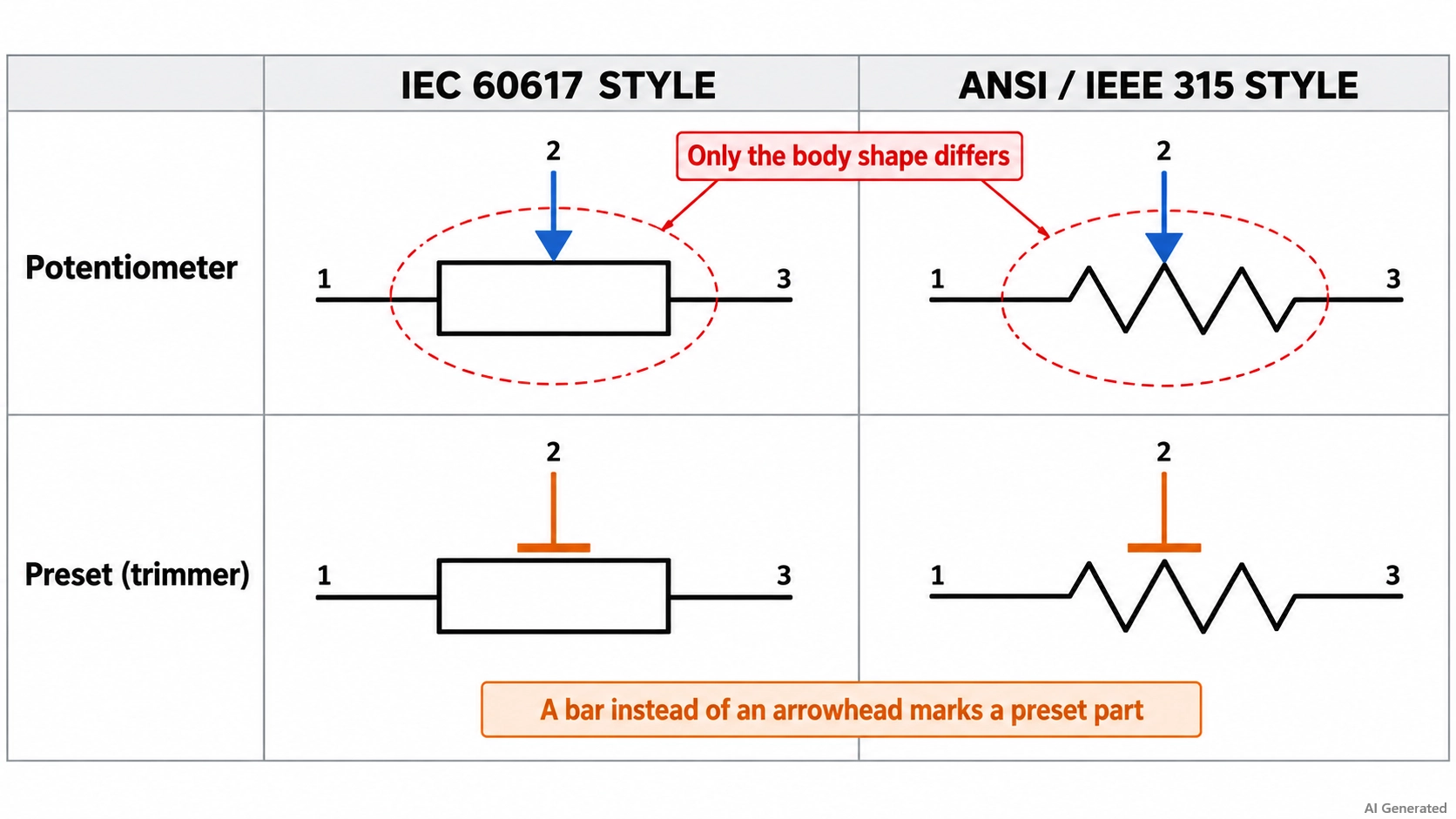
Figure: IEC rectangle and ANSI zigzag potentiometer symbols side by side
| Detail | IEC 60617 Style | ANSI/IEEE 315 Style | What It Means When Reading |
|---|---|---|---|
| Resistor body | Rectangle | Zigzag line | The same resistive track |
| Wiper | Arrow touching the long side of the rectangle | Arrow pointing at the zigzag | The same movable contact |
| Preset (trimmer) form | A separate preset potentiometer symbol is defined | Often drawn with the same T-shaped bar, or with the standard symbol | A bar instead of an arrowhead means a preset part |
| Common in | Europe and most international schematics | North American and older schematics | Neither style is more correct |
Potentiometer vs. Rheostat vs. Variable Resistor Symbols
An arrow that touches the body marks a three-terminal potentiometer. An arrow drawn diagonally across the body marks a two-terminal variable resistor. A rheostat is usually drawn that way, or as a potentiometer with its wiper tied to one end.
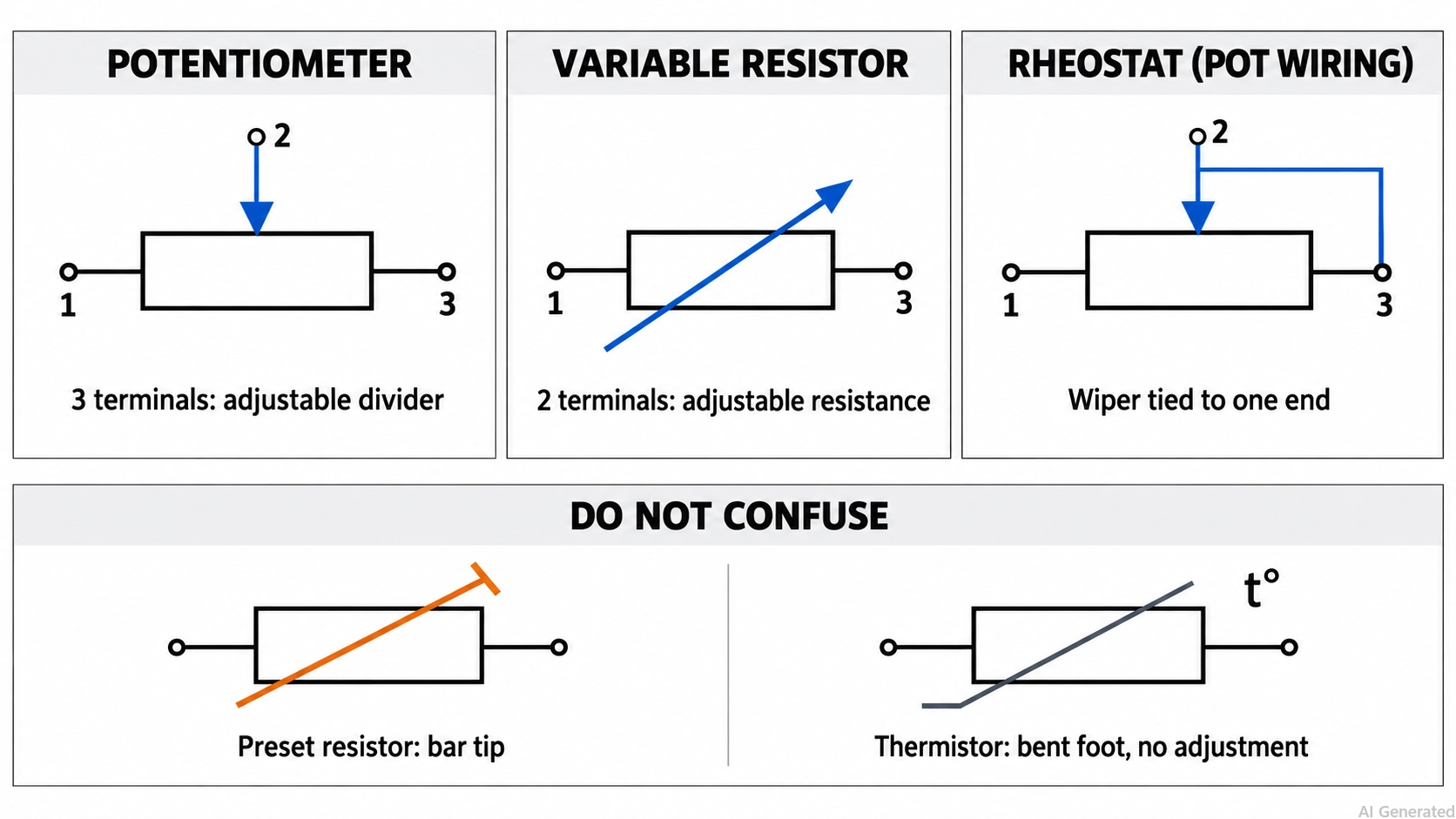
Figure: Potentiometer, variable resistor, and rheostat symbols compared
| Symbol | How It Is Drawn | Terminals | Function in the Circuit |
|---|---|---|---|
| Potentiometer | Arrow touching the body | 3 | Adjustable voltage divider |
| Variable resistor | Diagonal arrow through the body | 2 | Adjustable two-terminal resistance |
| Rheostat | Diagonal arrow, or a potentiometer with the wiper joined to one end | 2 | Adjustable series resistance, often used to set the current |
| Preset resistor | Diagonal line ending in a short bar | 2 | Resistance is set once during calibration |
| Thermistor, for contrast | Diagonal line with a short horizontal foot, labeled t° | 2 | Resistance changes with temperature, not by adjustment |
Potentiometer Types and Their Symbols
Rotary, slide, and multi-turn potentiometers usually share the standard symbol. Trimmer, dual-gang, switched, and digital potentiometers have their own forms because each adds a preset mark, a mechanical link, a switch, or a digital interface.
- Standard symbol: rotary, slide, and multi-turn potentiometers
- Own symbol form: trimmer, dual-gang, switched, and digital potentiometers
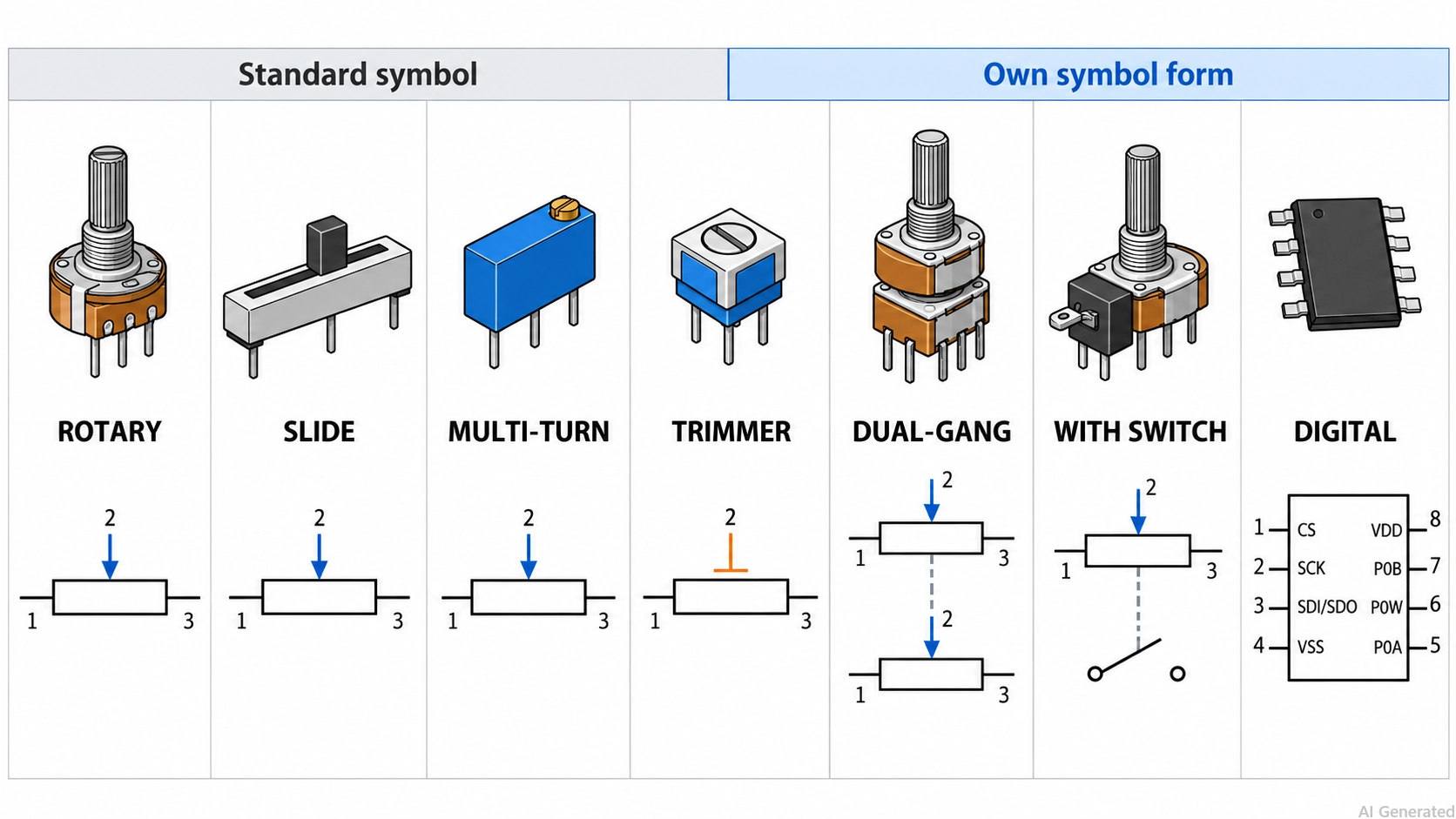
Figure: Potentiometer types and their schematic symbols
1. Rotary and Slide Potentiometer Symbol
A rotary potentiometer moves its wiper with a shaft, and a slide potentiometer moves it along a straight track. The electrical function is the same, so schematics use the standard symbol for both, and the part number identifies the mechanical form. Track material does not change the symbol either. Carbon, cermet (a ceramic-metal composite), conductive plastic, and wirewound parts are all drawn the same way.
2. Multi-Turn Potentiometer Symbol
A multi-turn potentiometer needs several turns of its shaft or screw to move the wiper from one end to the other. The Bourns 3296 trimmer, for example, has about 25 turns of effective travel. Schematics draw it with the standard symbol, or with the trimmer form when the part is a board-mounted trimmer. The number of turns appears in the datasheet, not in the symbol.
3. Trimmer Potentiometer Symbol
A trimmer, or preset, potentiometer is set during assembly or calibration and is not intended for adjustment in normal use. Its symbol usually replaces the wiper arrowhead with a short bar, forming the T-shaped tip that marks preset adjustment. IEC 60617 lists a separate preset potentiometer symbol. Zigzag-style schematics often use the same bar, while some simply use the standard symbol with a trimmer part number such as 3296W-1-103LF.
4. Dual-Gang Potentiometer Symbol
A dual-gang potentiometer has two tracks turned by one shaft, as in a stereo volume control. It is drawn as two potentiometer symbols with their wipers joined by a dashed line, the usual notation for a mechanical link. Some schematics draw the two sections apart, with one shared designator and a unit suffix, such as RV1A and RV1B.
5. Potentiometer With Switch Symbol
A switched potentiometer adds a switch operated by the same shaft, often at the counterclockwise end of rotation, as in a combined power-and-volume knob. The schematic shows a potentiometer and a switch symbol joined by a dashed line, with the switch contacts as separate pins.
6. Digital Potentiometer Symbol
A digital potentiometer, or digipot, replaces the mechanical wiper with a chain of resistors and electronic switches. A digital interface sets the wiper position in steps, for example, 129 steps on the 7-bit Microchip MCP4131.
It is drawn as an integrated circuit symbol whose analog pins mirror a potentiometer: terminal A, wiper W, and terminal B. On the MCP4131, these are P0A (pin 5), P0W (pin 6), and P0B (pin 7), alongside the SPI and supply pins.
What Do Potentiometer Labels Such as B10K and 103 Mean?
The label beside a potentiometer symbol, or printed on the part, gives the resistance between the end terminals and, on many parts, a taper letter. B10K usually means a 10 kΩ linear-taper part, and 103 is a three-digit code for 10 kΩ.
| Label | Meaning | Where You See It |
|---|---|---|
| 10k, 10K, or 10 kΩ | 10 kΩ between the end terminals | Schematic value field |
| B10K | B taper, usually linear, and 10 kΩ | Panel potentiometer body |
| A10K | A taper, usually logarithmic (audio), and 10 kΩ | Volume controls |
| C10K | C taper, usually reverse logarithmic, and 10 kΩ | Less common parts, such as audio controls that turn counterclockwise |
| 103 | 10 × 10³ Ω, which is 10 kΩ | Trimmer body and part numbers |
| 504 | 50 × 10⁴ Ω, which is 500 kΩ | Trimmer body and part numbers |
A linear taper changes resistance in proportion to rotation. A logarithmic taper changes slowly near one end and faster near the other, which suits volume controls.
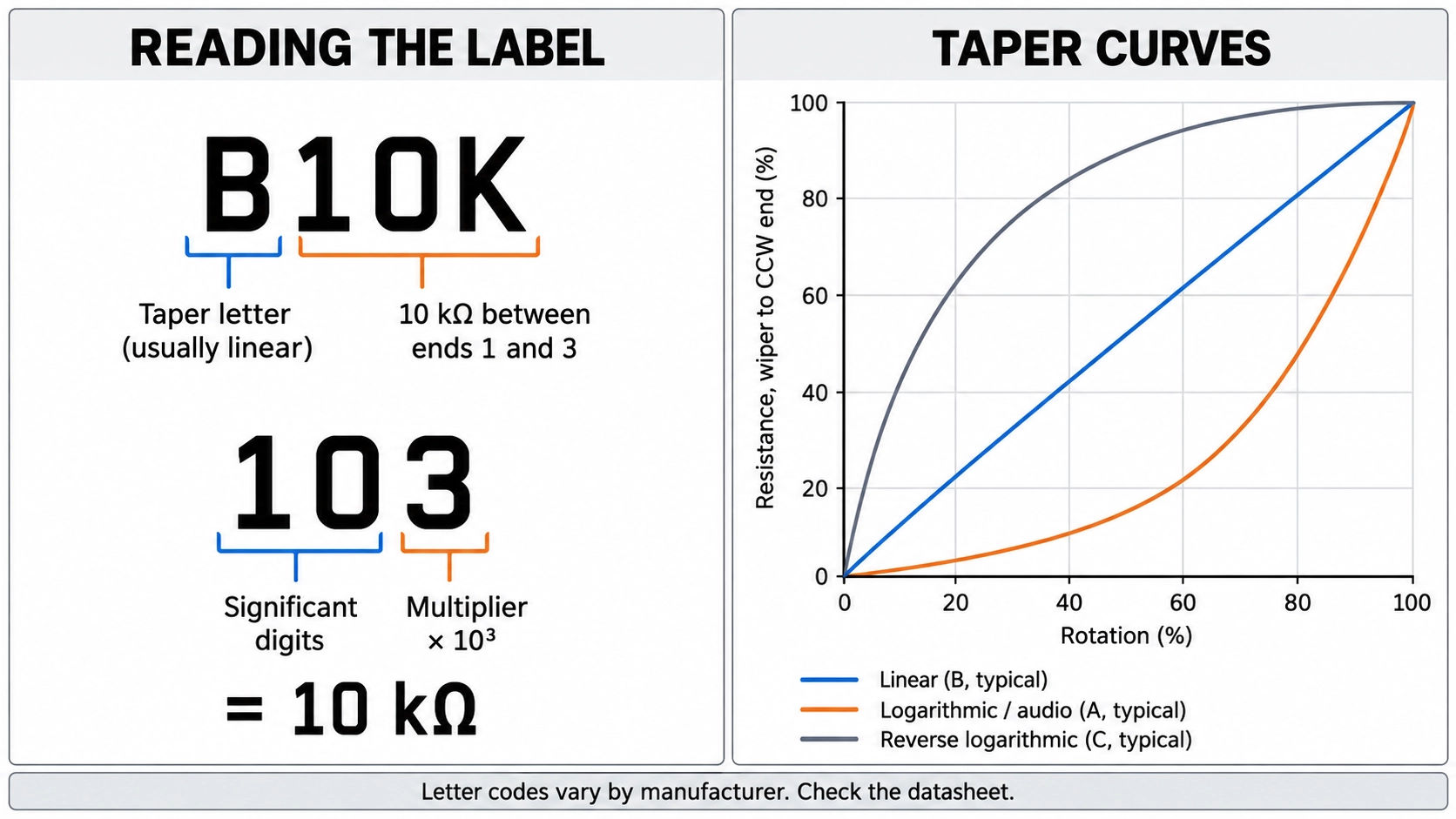
Figure: Potentiometer label decoding for B10K and 103, with linear, logarithmic, and reverse logarithmic taper curves
The three-digit code follows the same rule as fixed resistors: two significant digits, then a multiplier. Our SMD resistor code guide covers the format in detail.
How to Read a Potentiometer Symbol in a Schematic Step by Step
Read a potentiometer symbol in the same order every time: the body, the wiper, the connections, and then the label. The worked schematic contains a panel volume control, a bias trimmer, and a potentiometer wired as a rheostat.
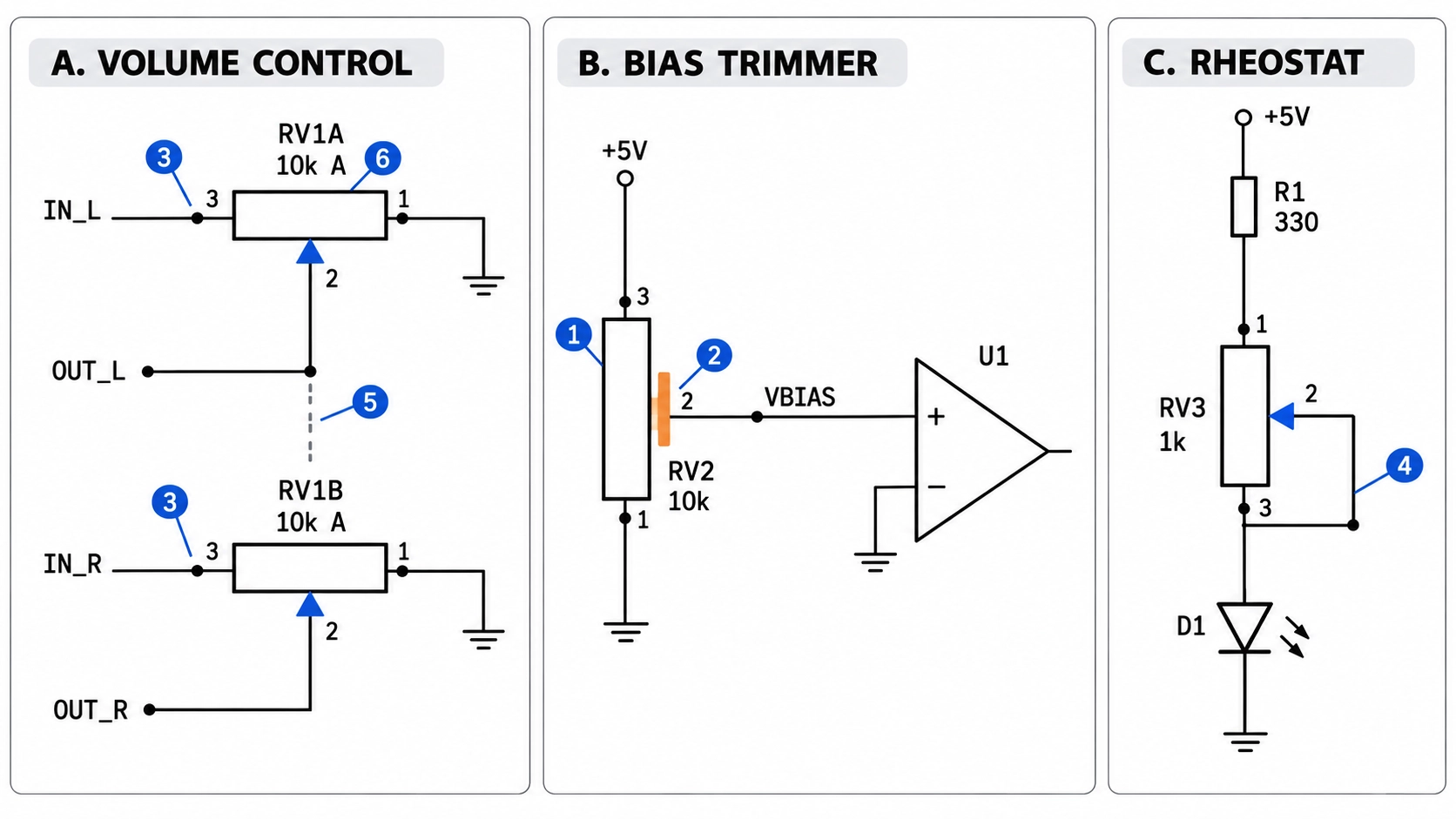
Figure: Worked potentiometer symbol schematic with a volume control, a bias trimmer, and a rheostat-wired potentiometer
- Identify the body: A rectangle or zigzag with three connections is a potentiometer. With two connections, it is a variable resistor or a potentiometer wired as a single unit.
- Find the wiper: The arrow or bar touching the body is the wiper. A short bar instead of an arrowhead marks a trimmer that is set during calibration.
- Trace the end terminals: In a voltage divider, one end connects to the input or supply, the other to ground, and the wiper carries the adjustable output.
- Check for a wiper-to-end link: A wire from the wiper to one end terminal means the part works as a two-terminal rheostat.
- Look for dashed lines: A dashed line to a second track or to a switch means those sections share one shaft.
- Read the label and confirm the pins: Decode the value and taper letter, then match pins 1, 2, and 3, and the CW end, to the datasheet before layout.
In the example, the volume control and the bias trimmer are both potentiometers; the volume control's wiper ends in an arrowhead, and the trimmer's wiper ends in a short bar. The third part shows only two active terminals, so it works as a rheostat. For general conventions such as wires, junctions, and net labels, see our guide to reading circuit diagrams.
Conclusion
A potentiometer symbol is a resistor body with a wiper that touches it: the two ends are the fixed terminals, and the arrow or T-shaped bar is the movable contact.
A potentiometer symbol shows how the component connects in a circuit, but it doesn't tell you everything about the physical part. Identifying the wiper is the first step. Checking the datasheet for the actual pinout, rotation direction, and footprint is just as important, especially when designing a PCB.

Verify the potentiometer footprint and terminal connections, then upload your Gerber files to JLCPCB to get a PCB quote.
FAQs About the Potentiometer Symbol
What Does the Arrow on a Potentiometer Symbol Mean?
It marks the wiper, the movable contact that slides along the resistive track. Its position sets how the track resistance is divided between the wiper and each end terminal.
What Is the Difference Between a Potentiometer and a Rheostat Symbol?
A potentiometer has three terminals, with the arrow touching the body. A rheostat has two terminals and is drawn with a diagonal arrow or as a potentiometer with its wiper tied to one end.
How Is a Trimmer Potentiometer Drawn in a Schematic?
Usually, with a short bar in place of the wiper arrowhead, forming a T-shaped tip. Some schematics simply use the standard symbol together with the trimmer's part number.
Which Pin Is the Wiper on a Potentiometer?
Usually, pin 2 is the middle pin on most panel potentiometers. Confirm it in the datasheet, which also shows which end terminal is clockwise.
What Are the Main Types of Potentiometers?
The main types are rotary, slide, multi-turn, trimmer, dual-gang, switched, and digital potentiometers. Most rotary, slide, and multi-turn parts share the standard symbol, while the others have their own forms.
Popular Articles
• Logic Gate Symbols: The Complete Chart, Truth Tables [2026]
• The Ultimate Guide to Relay Symbol: Coil, Contacts, Diagrams, and Circuit Applications
• How to Design and Assemble a Reliable ESP32 Module PCB on a 2-Layer Board
• How to Identify SMD LED Polarity: Markings, Testing, and PCB Tips
• Power Supply Symbols Chart: A Complete Guide to AC, DC, Ground, Battery, and Source Symbols
Keep Learning
Potentiometer Symbol Guide: Complete Chart, IEC/IEEE Standards, Compare Types and More
Key Takeaways Find the wiper first: The arrow or bar that touches the resistor body is the wiper, the movable contact, while the two plain leads at the ends of the body are the fixed end terminals. Expect two drawing styles: IEC schematics draw the body as a rectangle, and ANSI-style schematics draw a zigzag, but both represent the same component and mark the wiper in the same way. Read the arrow's position: An arrow touching the body marks a three-terminal potentiometer. In contrast, an arrow drawn d......
Logic Gate Symbols: The Complete Chart, Truth Tables [2026]
Note ⬇ Free Download: Logic Gate Symbols PDF Reference Chart Save time when working with digital schematics. This downloadable Logic Gate Symbols PDF includes all basic logic gates, standard symbols, truth tables, Boolean expressions, and common 74xx/4000-series IC references — a practical reference for students, engineers, and PCB designers. When we define digital logic on a schematic, we use logic gate symbols to represent Boolean operations and show how signals are processed in a circuit. A single ......
How to Read a MOSFET Symbol: NMOS, PMOS, Arrows, and Body Diodes
If you have ever opened a schematic and stared at a MOSFET symbol wondering which terminal is the source, why the gate has a gap, or why the arrow points differently on two seemingly identical symbols — you are not alone. The MOSFET schematic symbol packs four independent pieces of information into one small graphic: channel polarity, operating mode, terminal identity, and device type. Read those four cues correctly, and any MOSFET symbol becomes immediately clear, whether you encounter it in a power-......
The Ultimate Guide to Relay Symbol: Coil, Contacts, Diagrams, and Circuit Applications
Think of a standard switch as a drawbridge you lift by hand. Now, imagine a relay symbol diagram as a remote-controlled drawbridge. It allows a tiny, low-power electronic signal to control a high-power electrical load from a distance safely. Understanding how to read relay symbol configurations is the absolute cornerstone of advanced circuit design. By mastering this relay schematic symbol, you move beyond basic electronics and enter the world of professional hardware logic and safe PCB design. What Y......
How to Read Resistor Color Code: Complete Guide with Chart and Examples
4-Band Resistor Color Code Explained A 4-band resistor color code is one of the most common methods used to indicate resistance values in electronic components. It is widely used to help engineers and hobbyists quickly determine resistance values without using a resistor color code calculator. In a standard 4-band resistor: First Band (Digit 1): Represents the first significant digit Second Band (Digit 2): Represents the second significant digit Third Band (Multiplier): Indicates the factor by which t......
Solder Paste vs Flux: What's the Difference and When Should You Use Each?
Solder paste and flux are not interchangeable. Solder paste contains solder alloy powder and flux, while flux contains no solder alloy. This difference matters when choosing materials for SMT, reflow soldering, or manual soldering. Flux removes metal oxides and prevents re-oxidation, allowing molten solder to wet copper pads and component leads properly. Solder paste combines flux with fine solder alloy powder. During reflow, the flux activates to improve wetting while the solder alloy melts to form t......