How to Solder a JST Connector: Through-Hole, SMT, and Board-to-Board Guide
14 min
- Quick Answer: How Do You Solder a JST Connector?
- Know What You're Soldering: JST Series, Pitch, and Mount Type
- What You Need: Tools & Materials
- How to Solder a Through-Hole JST Connector: Step by Step
- How to Solder an SMT JST Connector
- Should You Solder or Crimp JST Wires?
- How to Solder Board-to-Board JST Connectors
- Can JST Connectors Be Reflow Soldered?
- Common JST Connector Soldering Problems and How to Fix Them
- FAQ about Soldering JST Connectors
- Conclusion: How to Solder a JST Connector Successfully
Key Takeaways
Soldering a connector is electrical and mechanical at once: Seat the header flush and square, tack one corner pin, verify alignment, then solder the remaining pins and every mechanical anchor tab, because plugging and cable forces travel through the housing and hold-downs rather than the signal pins.
Match the method to the mount type: Through-hole headers need full barrel fill with a larger tip and flux for heat-sinking power pins, SMT headers need tack-and-align with hold-down tabs fully soldered, board-to-board parts need coplanarity checks, and wire-side JST housings are designed for crimps rather than solder.
Reflow only where the part allows: Many SMT JST headers are reflow-rated and pin-in-paste can solder through-hole connectors in the same cycle as the SMD parts, but always confirm the exact part number’s reflow conditions in the datasheet and control paste volume with a proper stencil.
JST connectors may look simple, but achieving reliable solder joints can be more difficult than expected. A header may sit crooked, a large power pin may form a cold joint, or an SMT connector may look electrically fine yet tear from the board after repeated plugging. If you are learning how to solder JST connector, the key is to think about both electrical continuity and mechanical strength.
Connectors experience cable pull, mating force, and repeated insertion, so full through-hole fill, square alignment, and soldered hold-down tabs matter as much as the signal pins. This guide covers through-hole and SMT JST headers, board-to-board connector soldering, crimp versus solder on the wire side, and reflow or pin-in-paste options.
Quick Answer: How Do You Solder a JST Connector?
Seat the connector flush and square, solder one corner pin first, verify alignment, then solder the remaining pins and all mechanical anchor tabs. Use flux and a larger tip for heat-sinking power pins. For SMT JST headers, tack one pad, align the connector carefully, then finish the remaining pads and hold-down tabs.
Know What You're Soldering: JST Series, Pitch, and Mount Type
JST is a connector manufacturer, not a single connector style. Its catalog includes many families such as PH, XH, SH, and GH, with different pitches, current ratings, mounting styles, and mating arrangements. For example, JST lists PH as a 2.0 mm-pitch wire-to-board family and XH as a 2.5 mm-pitch family, with both through-hole and SMT board-mount options available in parts of those ranges.
This article focuses on soldering the board-side header and board-to-board connector. The wire side of most JST wire-to-board systems uses a housing with crimp contacts, so proper crimping is the intended method. For series selection, pitch details, and housing/contact matching, see JLCPCB's complete guide to JST connectors and their types. Always confirm the exact footprint and soldering or reflow conditions in the connector datasheet before assembly.
JST publishes a product page for each connector family, listing pitch, current rating, and the available through-hole and SMT board-mount options. The PH and XH pages are the ones you will reach for most often.
What You Need: Tools & Materials
- Temperature-controlled soldering iron with a fine-to-medium tip; use a slightly larger tip for power or ground pins that sink heat.
- Fine solder suitable for your assembly process and a quality flux for fast, clean wetting.
- Tweezers, flush cutters, a PCB holder, helping hands, or a small fixture to keep the connector square.
- Solder wick and/or a desoldering pump for clearing bridges or correcting a crooked pin.
- Isopropyl alcohol (IPA) and a suitable brush or swab for post-solder cleanup where appropriate.
- Optional for SMT or production work: hot air, solder paste, hot plate/reflow oven, and a stencil.
If you want a deeper look at flux behavior on connector pins, see how to use solder flux for through-hole soldering.
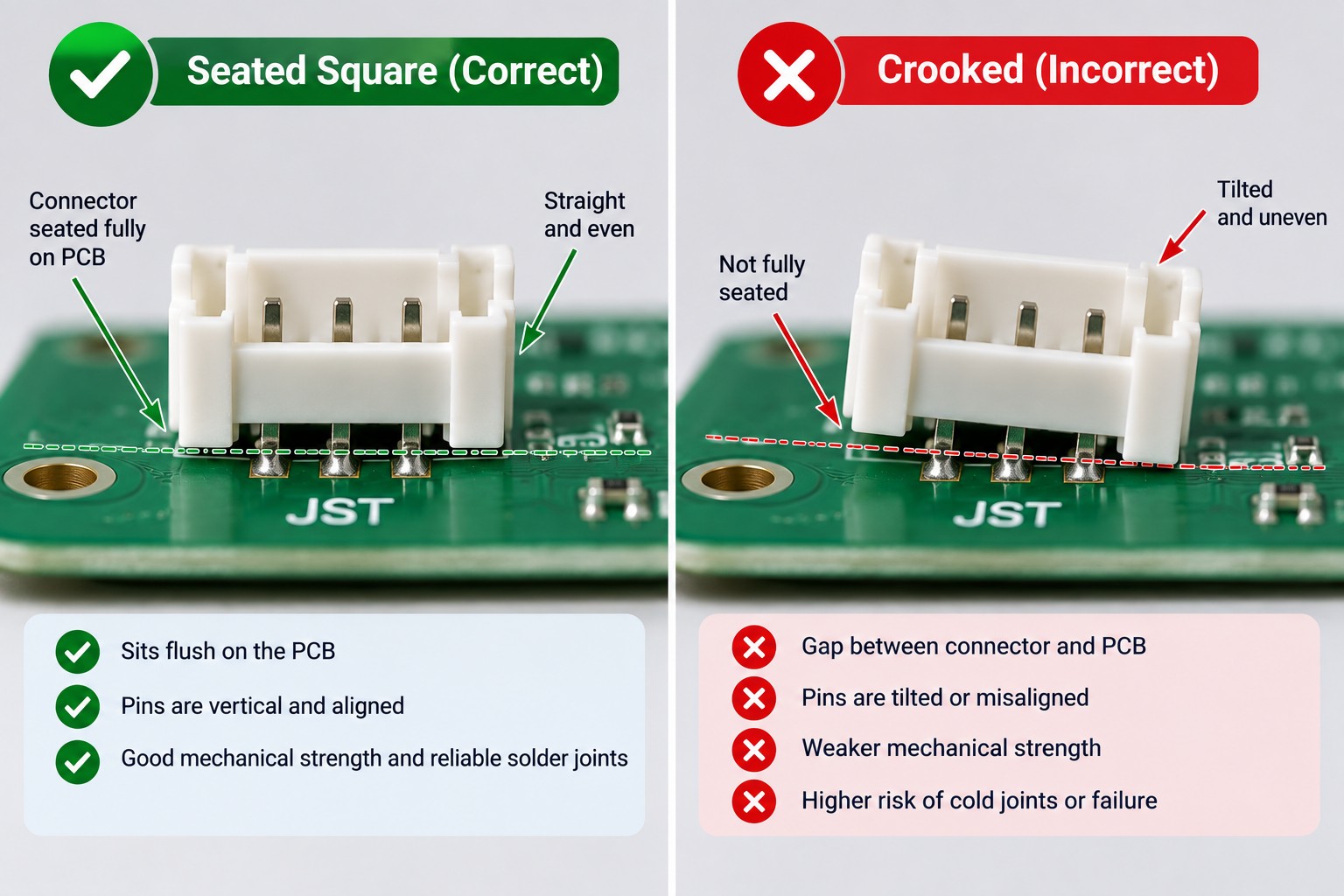
AI-generated
How to Solder a Through-Hole JST Connector: Step by Step
Insert the header flush and square
Insert the board-side header completely into the PCB footprint and make sure it sits flat. If the connector tends to move or lift when you turn the board over, hold it in place with tape, a fixture, or helping hands.
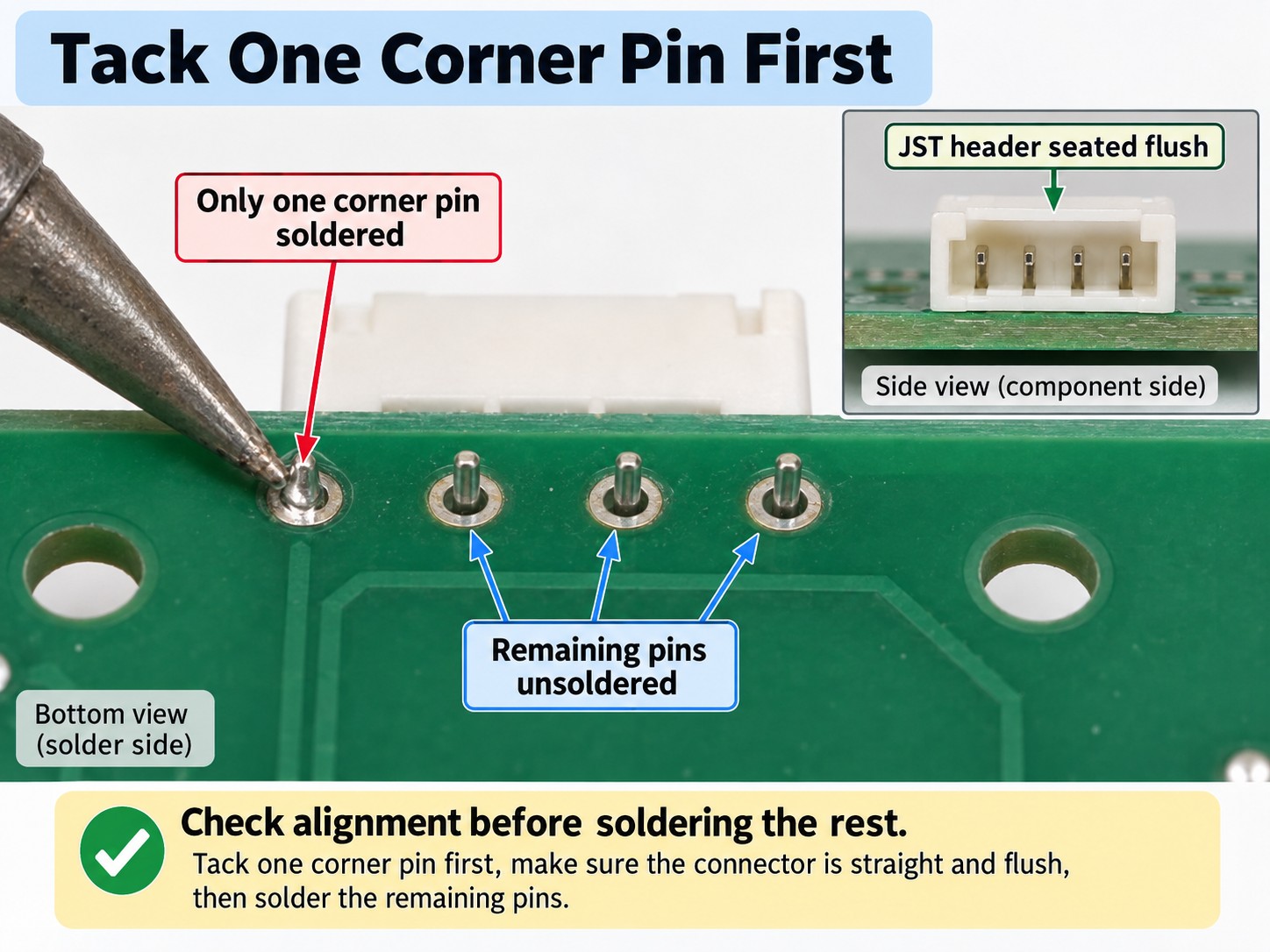
Solder one corner pin only
Use a small amount of solder to tack a corner pin. This single joint holds the connector while still allowing easy correction.
Check alignment before continuing
Look from the side and top. If the housing is tilted or floating above the PCB, reheat the tacked pin and press the connector flat before the solder solidifies.
Solder the remaining signal and power pins
Heat both the pin and plated pad, then feed enough solder to form a smooth fillet. Large power or ground pins may need a larger tip and slightly longer contact because connected copper planes pull heat away.
Solder every mechanical anchor or hold-down tab
These tabs carry insertion and cable forces. Skipping them can leave the connector electrically functional but mechanically weak.
Add flux to stubborn joints
If solder beads up or a large pin does not wet evenly, add flux first. Improve heat transfer with the correct tip before simply increasing iron temperature.
Trim, inspect, and clean
Trim excess leads where required. Check for full wetting, adequate barrel fill, bridges, cold joints, and damage to the plastic housing. Clean residue with IPA when compatible with the flux and assembly.
For workmanship and acceptance context, IPC publishes J-STD-001 for soldered electrical/electronic assemblies and IPC-A-610 for assembly acceptability criteria.
AI-generated
How to Solder an SMT JST Connector
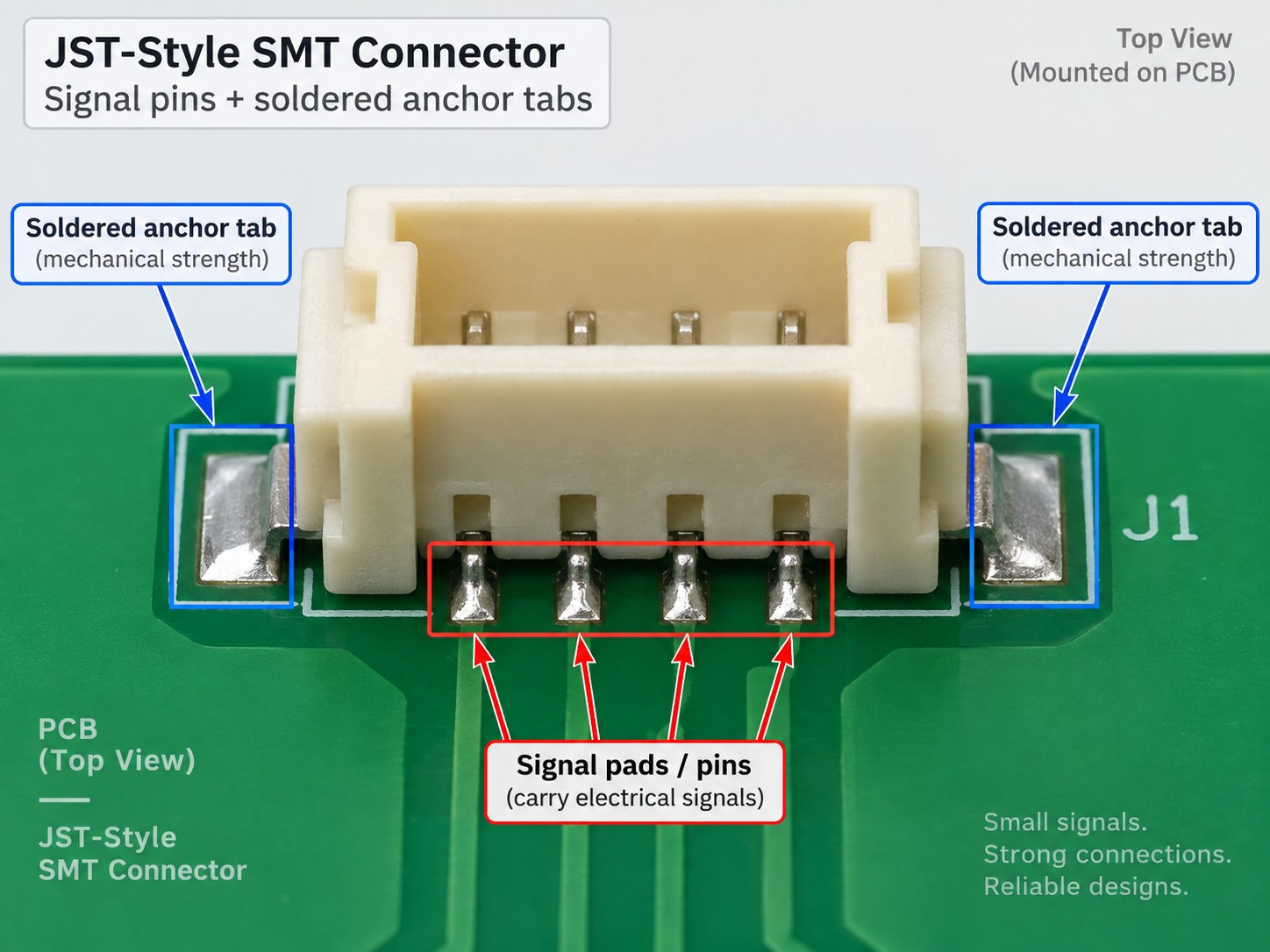
For a surface-mount JST header, start by lightly tinning one pad or one hold-down area. Position the connector with tweezers, reheat that single pad, and let the part settle into the exact footprint location. Once the connector is sitting straight and all pins are properly aligned with the pads, solder the remaining contacts using flux and a fine-tip soldering iron.
Do not treat the signal leads as the only important joints. Many SMT connectors include metal hold-down tabs or anchor pads designed to carry insertion force. Solder these completely so the connector body is mechanically tied to the PCB. Afterward, inspect the fine-pitch pins for bridges, opens, and solder hidden near the body edge.
For repeated small-batch builds, solder paste and reflow are often cleaner and more repeatable than touching every SMT pin by hand. Confirm that the exact JST part number is rated for your reflow process before using that approach.
AI-generated
Should You Solder or Crimp JST Wires?
Use a proper crimp whenever possible. JST wire housings are designed around crimp contacts, and a correct crimp provides electrical contact while preserving conductor flexibility behind the terminal. That flexibility matters because cables move during assembly and use.
Soldering a wire to a contact can be acceptable as a repair or no-tool fallback, but it should not be presented as equivalent to the intended crimp. If solder wicks into the conductor beyond the joint, the wire becomes rigid at the transition point and is more likely to fatigue under repeated bending. Keep any repair joint short, controlled, and mechanically supported.
If your real task is attaching wires directly to PCB pads rather than assembling a JST housing, use JLCPCB's separate guide on how to solder wires to a circuit board properly.
How to Solder Board-to-Board JST Connectors
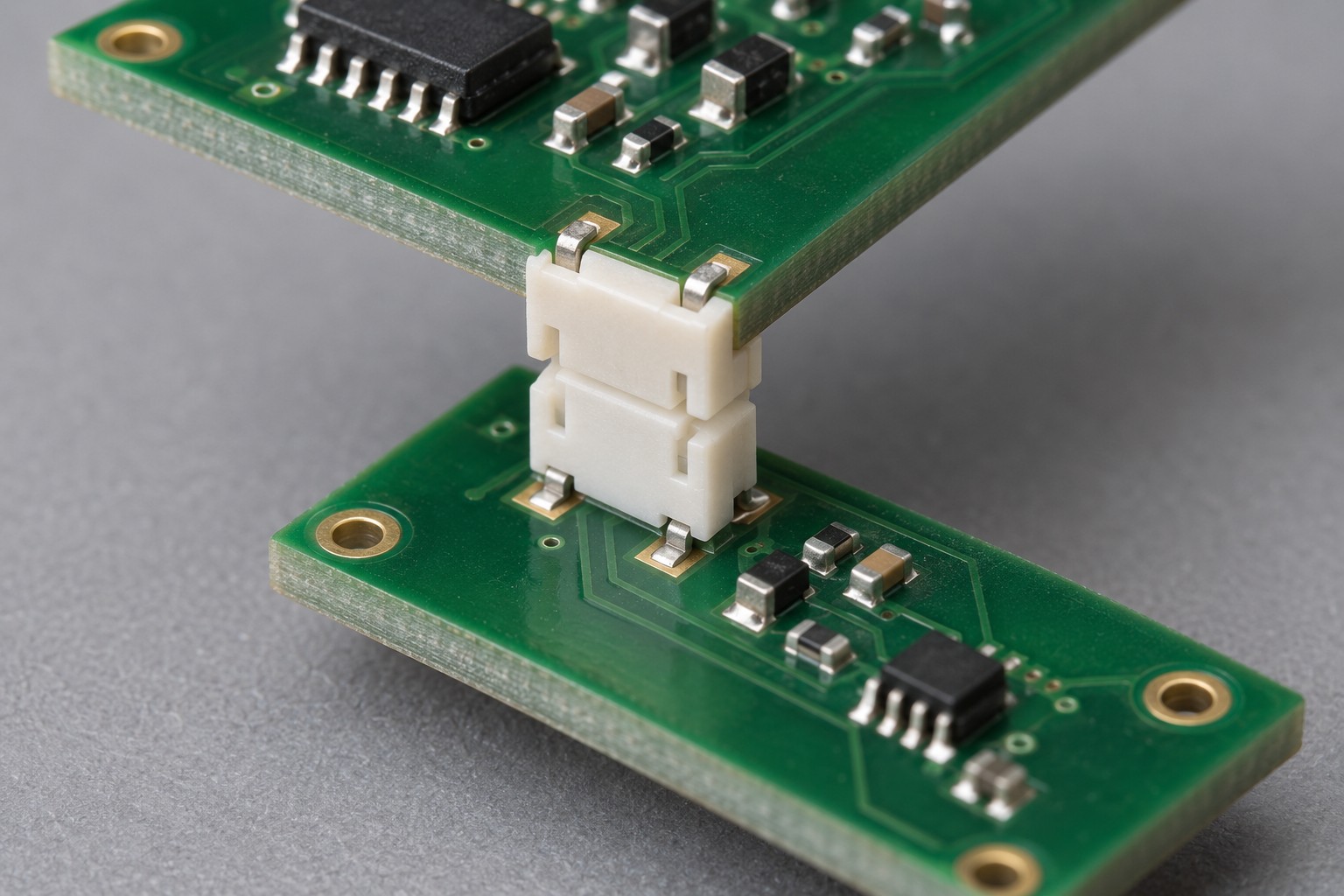
Board to board connector soldering is mainly an alignment problem. The two mating connectors must be coplanar, parallel, and spaced correctly or the boards may not seat even when every joint is electrically sound. Tack one corner first, then verify the connector position before completing the rest.
Test-fit the mating board while only one or two joints are tacked, then remove it before final soldering. Do not solder the pair while mated; heat and fixture stress can distort alignment or damage the connector.
On fine-pitch board-to-board parts, inspect all corners for coplanarity. A lifted corner can leave one row of pins open. Solder any hold-down or shield tabs specified by the connector design; they improve both mechanical strength and, where applicable, shielding continuity.
AI-generated
Can JST Connectors Be Reflow Soldered?
SMT JST Connectors in Reflow
Yes, many SMT JST headers can be reflowed when the exact part is specified for that process. Apply solder paste to the connector pads, place the header with the rest of the SMD parts, and run the board through the approved reflow profile. The benefit is one controlled thermal cycle and repeatable joints across multiple boards.
The connector datasheet defines the allowable soldering and reflow conditions. Housing materials and reflow ratings vary by series and part number, so do not assume every SMT header tolerates the same peak temperature or cycle count.
Through-Hole JST Connectors with Pin-in-Paste
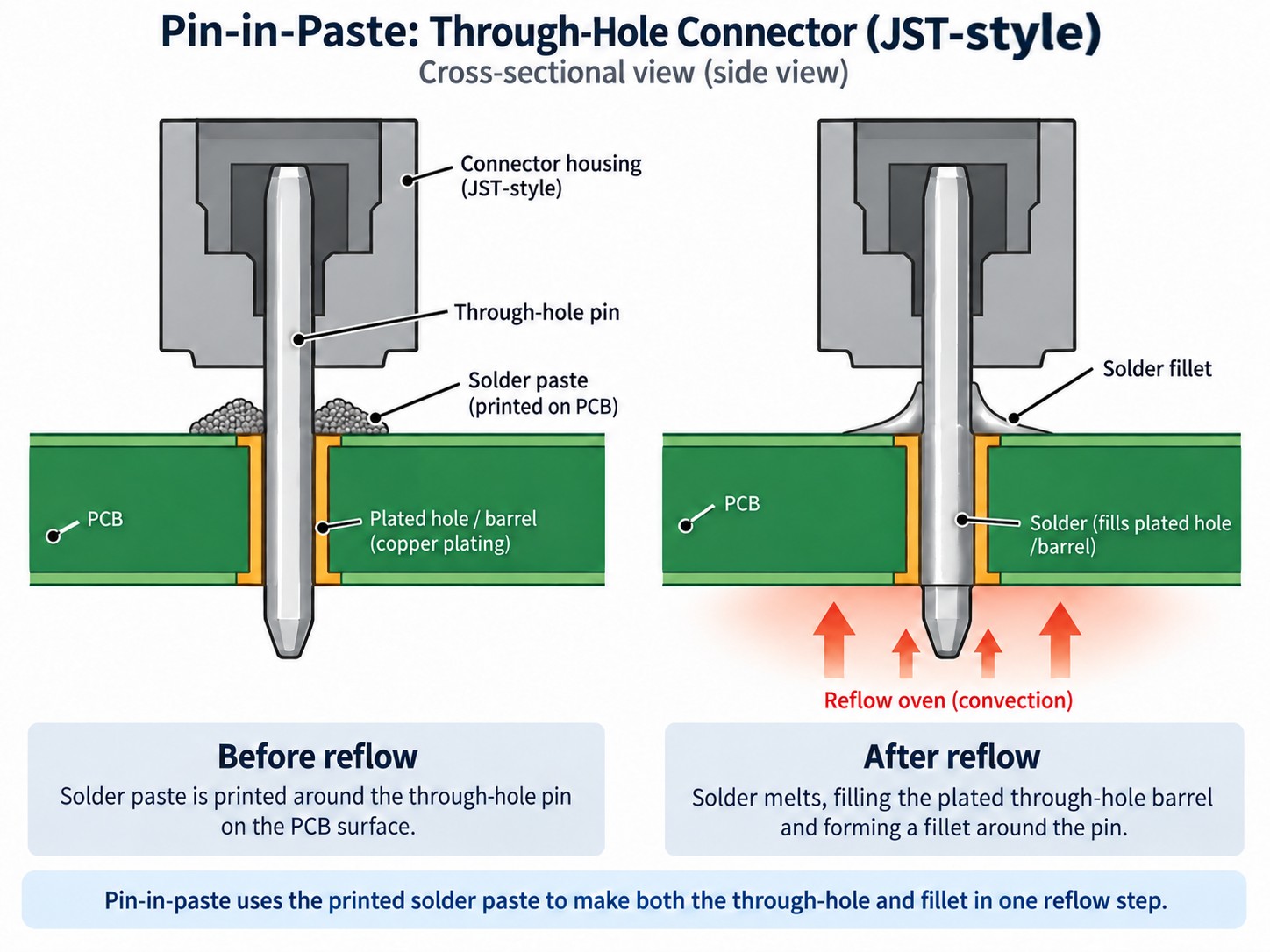
Pin-in-paste, also called intrusive reflow, can sometimes solder a through-hole connector during the same reflow cycle as the SMD parts. Solder paste is printed around the through-hole openings, the connector pins are inserted, and the molten paste is drawn into the plated barrels during reflow.
This method is conditional. Suitability depends on the connector design, pin geometry, PCB thickness, hole size, required solder volume, and the manufacturer's reflow specification. Not every through-hole JST connector should be processed this way. Verify the connector and board design before committing to production.
For the detailed process, see JLCPCB's pin-in-paste through-hole reflow with a stencil guide. Paste volume and clean stencil release become especially important when the stencil must feed both ordinary SMD pads and through-hole barrels.
AI-generated
Common JST Connector Soldering Problems and How to Fix Them
- Problem: Connector sits crooked or lifted off the board. Fix: Tack one pin first, reheat it, and press the housing flush before soldering the rest. Do not lock a tilted connector in place with multiple completed joints.
- Problem: Power or ground pins look dull and will not wet. Fix: Large pins and copper planes pull heat away. Use a larger tip, add flux, increase contact time moderately, and preheat the board if available before raising the set temperature.
- Problem: Through-hole pins are soldered but the barrels are not filled well. Fix: Apply enough heat and solder to wet the pin and plated barrel. Inspect both sides where accessible and correct incomplete fill before the connector sees mechanical load.
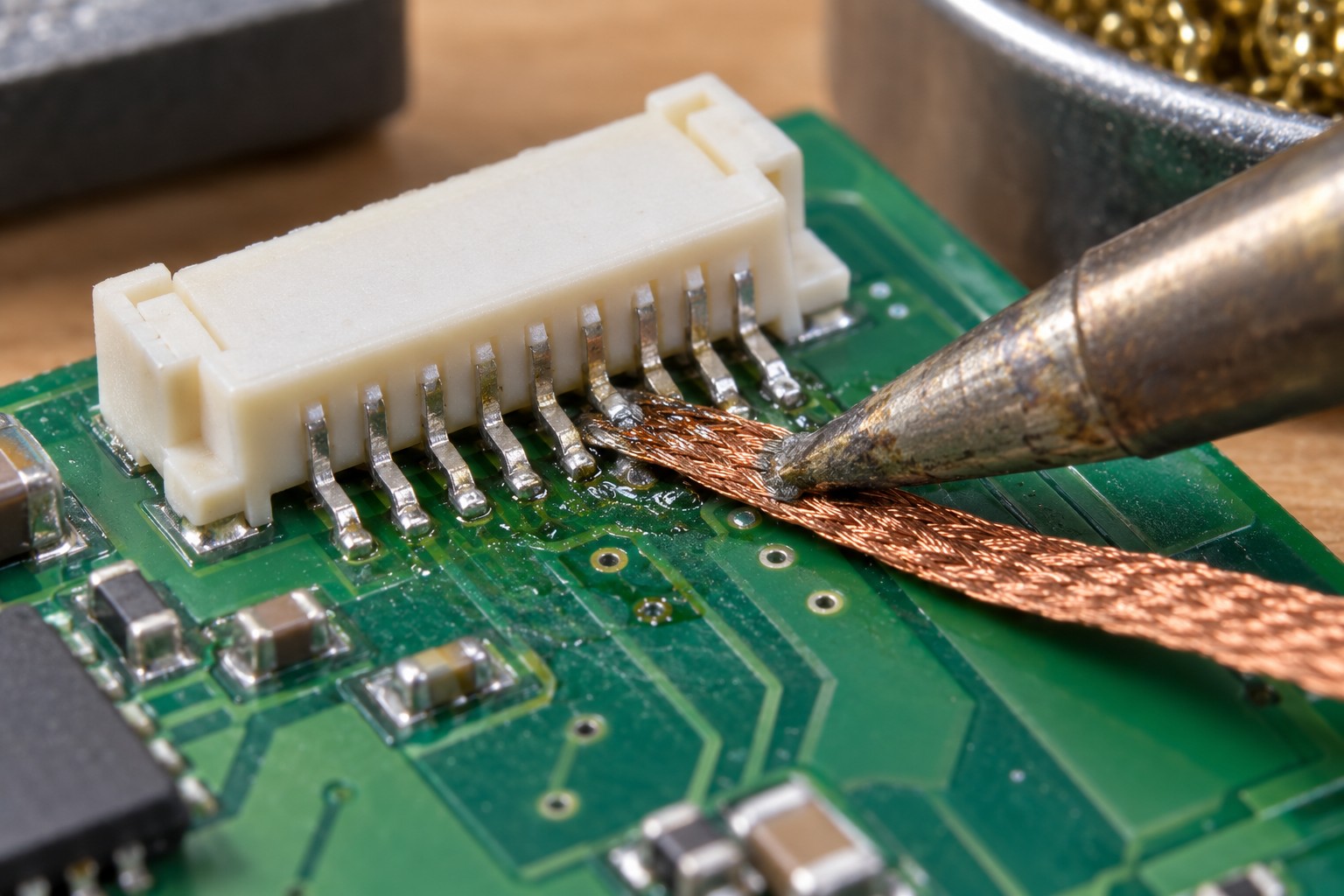
- Problem: Solder bridges form between close pins. Fix: Add flux, then remove excess solder with the iron tip or solder wick. Keep deposits small and inspect under magnification on fine-pitch parts.
- Problem: A board-to-board pair will not mate. Fix: Suspect coplanarity or spacing. Reheat a tacked corner, test-fit the mating board, and correct position before finishing all joints.
- Problem: The connector housing melts or deforms. Fix: Reduce dwell time and avoid using excessive iron temperature to compensate for poor heat transfer. Use the correct tip, work one pin at a time, and let the housing cool.
- Problem: The connector pulls off under cable strain. Fix: Rework the mechanical joints. Solder every hold-down tab, ensure through-hole joints are fully formed, and add strain relief where the product design needs it.
For deeper troubleshooting, use JLCPCB's separate guides on preventing solder bridging and cold solder joints.
AI-generated
FAQ about Soldering JST Connectors
Q: What Soldering Iron Tip Is Best for a JST Connector?
Use a tip large enough to transfer heat efficiently without touching nearby plastic. A medium chisel often works better than a needle tip on through-hole power pins because it couples more heat into the joint. Fine SMT pins still benefit from a smaller tip. Match the tip to the pad and pin size rather than using one tip for every connector.
Q: How Hot Should the Iron Be for JST Connector Soldering?
There is no single universal temperature for every JST connector, solder alloy, PCB, and iron. Start with a normal controlled setting for your solder system and focus first on tip size, cleanliness, and flux. If a large pin still will not wet, increase dwell moderately or preheat before increasing temperature. Never exceed component, PCB, or solder process limits.
Q: Can I Solder a JST Connector Backward and Fix It Later?
You can rework a wrongly oriented connector, but it is far easier to prevent the mistake. Check pin 1, mating direction, board silkscreen, and the datasheet footprint before soldering. If removal is required, clear as much solder as possible with wick or a pump and avoid forcing the connector, which can lift plated holes or pads.
Q: Do JST Connector Anchor Tabs Need Solder?
Yes, if the part includes solderable anchor or hold-down tabs, they should normally be soldered. These tabs are there to transfer plugging and cable forces into the PCB instead of leaving the small signal pins to carry the mechanical load. A connector can pass continuity testing with unsoldered tabs and still fail quickly in real use.
Q: Can I Use Hot Air to Remove an SMT JST Connector?
Hot air can remove many SMT JST headers, but use it carefully because the plastic body may soften before every joint releases. Add flux, heat the joint area evenly, and lift only when all signal pads and anchor tabs are molten. Shield nearby heat-sensitive parts where necessary, and follow the connector temperature limits before reuse.
Q: Why Does My JST Power Pin Need More Heat Than the Signal Pins?
Power and ground pins are often connected to larger copper areas, which act as heat sinks. The iron must heat the pin, pad, plated hole, and connected copper before solder can wet correctly. A larger tip and adequate flux usually solve the problem more safely than simply turning the temperature much higher.
Q: Should I Hand Solder or Reflow an SMT JST Header?
Hand soldering is convenient for prototypes and repairs, while reflow is usually more consistent for repeated builds. Reflow becomes especially attractive when the board already contains many SMD parts and will receive solder paste anyway. The connector must be rated for the intended reflow profile, so check the exact JST datasheet before choosing the process.
Q: How Can I Make a JST Connector Joint More Mechanically Reliable?
Start with correct alignment and complete solder joints, then make sure every anchor tab or through-hole mounting feature is fully soldered. Add cable strain relief if the product will see pulling or vibration. Mechanical reliability comes from sharing force between the housing, mounting features, PCB, and cable—not from relying on the signal pins alone.
Conclusion: How to Solder a JST Connector Successfully
The reliable workflow is simple: identify the correct JST series and mount type, seat the connector flush, tack one pin, check that it is square, then complete the remaining electrical and mechanical joints. For SMT and board-to-board parts, alignment and coplanarity deserve the same attention as solder quality.
The main lesson is that connector soldering is electrical and mechanical at the same time. Full joints, soldered anchor tabs, proper barrel fill, and strain relief are what keep a connector working after hundreds of insertions and cable movements. For production boards, reflow—and pin-in-paste where the exact connector supports it—can be faster and more repeatable than hand-soldering many pins.
For a new board, verify the exact footprint and datasheet first, check the mechanical fit, then choose hand soldering or reflow based on connector type and build volume. That makes learning how to solder JST connector hardware less error-prone.
Keep Learning
How to Solder a JST Connector: Through-Hole, SMT, and Board-to-Board Guide
Key Takeaways Soldering a connector is electrical and mechanical at once: Seat the header flush and square, tack one corner pin, verify alignment, then solder the remaining pins and every mechanical anchor tab, because plugging and cable forces travel through the housing and hold-downs rather than the signal pins. Match the method to the mount type: Through-hole headers need full barrel fill with a larger tip and flux for heat-sinking power pins, SMT headers need tack-and-align with hold-down tabs ful......
How to Tin a Soldering Iron: First Use & Re-Tinning
Key Takeaways Tin from the first heat-up: Bring the iron to roughly 315–370 °C (600–700 °F), wipe the tip on brass wool, and melt fresh flux-cored solder onto every working face until a thin mirror-bright film covers it, then wipe away the excess and lay down one more light coat. Re-tin by condition, not the clock: Keep a film of solder on the tip at all times, re-tin the moment wetting turns patchy, and lay down a generous coat before shutdown so oxidation cannot start while the iron sits idle. Never......
DC Jack Soldering: How to Solder a DC Barrel Jack / Power Connector
Key Takeaways Confirm polarity before the iron touches the board: Check the adapter label, device marking, and jack pinout for center-positive versus center-negative wiring, because reversed polarity can destroy a regulator or microcontroller instantly. Deliver enough heat for the big joints: DC jack terminals are high-mass, so use a larger chisel or bevel tip, more heat or dwell, and flux until solder fills the plated hole and leaves a shiny fillet instead of a dull, grainy surface. Build in mechanic......
How to Solder an Audio Jack to a PCB
Key Takeaways Confirm the exact pinout first: TS, TRS, and TRRS jacks differ in conductor count and PCB terminal numbering, and TRRS wiring follows CTIA or OMTP standards, so always map every pin from the manufacturer datasheet and PCB footprint before soldering. Control heat and solder: Use a fine-tip iron, flux, and a minimal amount of solder, tack one pin to keep the jack flush and square, then solder each contact pin by pin to prevent bridges between closely spaced terminals. Finish and verify: So......
How to Solder SMD LEDs: A Step-by-Step Guide for Iron, Hot Air, and Reflow
Key Takeaways Confirm polarity and orientation first: Identify the anode and cathode before applying any heat, because a reversed SMD LED will not light and correcting it costs another thermal cycle. Match the method to the job: A fine-tip iron suits one or a few LEDs, hot air is best for rework and single-part replacement, and solder paste with reflow is fastest for complete boards. Keep solder and heat minimal: A small, fully wetted fillet and short dwell times protect the LED die, phosphor, and enc......
How to Solder a Potentiometer (PCB, Panel & Guitar Pots)
Key Takeaways Identify the wiper terminal: In most potentiometers, the middle pin is the wiper. Always verify with a multimeter before soldering. Pre-tin surfaces: Tin both the terminals and wires before joining to ensure strong, clean solder joints. Control heat carefully: Use a temperature-controlled iron and keep contact time short (below 260°C for a few seconds) to avoid damaging the internal resistive track. Test after soldering: Always check continuity and sweep the shaft while measuring output ......