DC Jack Soldering: How to Solder a DC Barrel Jack / Power Connector
15 min
- Quick Answer: How Do You Solder a DC Barrel Jack?
- Anatomy of a DC Barrel Jack (and Why Polarity Matters)
- What You Need: Tools & Materials
- How to Solder a PCB-Mount DC Barrel Jack (Step by Step)
- Panel-Mount Barrel Jacks: Soldering the Wires
- High-Current Joints: Heat, Dwell, and Strength
- On a Populated Board: Where a Stencil Actually Helps
- Common DC Jack Soldering Problems (and How to Fix Them)
- FAQ about DC Jack Soldering
- Conclusion: Getting DC Jack Soldering Right the First Time
Key Takeaways
Confirm polarity before the iron touches the board: Check the adapter label, device marking, and jack pinout for center-positive versus center-negative wiring, because reversed polarity can destroy a regulator or microcontroller instantly.
Deliver enough heat for the big joints: DC jack terminals are high-mass, so use a larger chisel or bevel tip, more heat or dwell, and flux until solder fills the plated hole and leaves a shiny fillet instead of a dull, grainy surface.
Build in mechanical strength: Seat the jack flush and square, solder every metal anchor tab to absorb plug-insertion force, add strain relief on panel-mount cables, and hand-solder the jack while a stencil handles the board's SMD parts in one reflow pass.
A DC barrel jack looks like the simplest part on a board. It has three terminals and no firmware, yet it carries every milliamp your project draws. It also takes a push, a twist, and a pull each time someone plugs in an adapter.
That is why DC jack soldering deserves more care than a typical signal pin. A weak or cold joint here causes intermittent power, heat, and tiny arcs at the contact. In the worst case, the jack tears off the board and takes the copper pads with it.
This guide covers jack anatomy and polarity, a step-by-step method for PCB-mount jacks, and wiring for panel-mount jacks. It closes with the failures you are most likely to see and how to fix each one.
Quick Answer: How Do You Solder a DC Barrel Jack?
Confirm the jack's polarity and footprint, then seat it flush and square on the board. Solder each large power terminal until the joint fills completely. Use a bigger tip, more heat, and longer dwell than a signal pin needs. Finally, solder every mechanical anchor tab for strength.
Anatomy of a DC Barrel Jack (and Why Polarity Matters)
Most PCB-mount barrel jacks have three terminals. Each has a specific job, and the pin numbering in the datasheet is the only safe reference.
- Center pin (tip contact): The metal post inside the opening. It mates with the inner contact of the plug and, on most devices, carries the positive supply.
- Sleeve (outer contact): A spring contact that presses against the plug's outer barrel. It is usually the ground or negative return.
- Switch contact: A third terminal that is normally closed to the sleeve. Inserting a plug pushes it open, which lets a design cut off an internal battery when external power arrives.
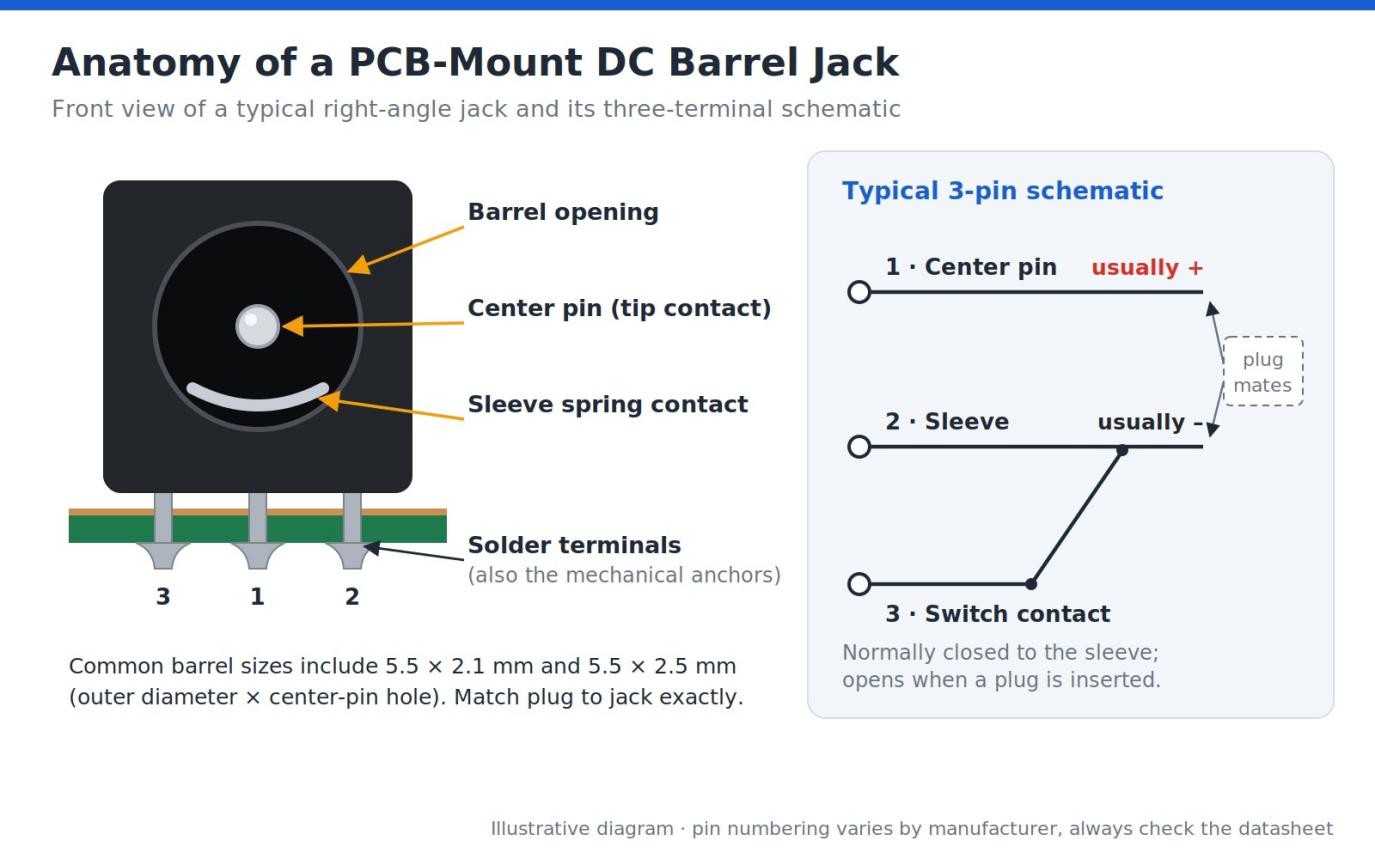
Figure 1: The three terminals of a typical PCB-mount barrel jack and how the switch contact behaves.
As a reference point, the Same Sky PJ-002A datasheet rates that right-angle jack at 24 Vdc and 2.5 A with a 2.0 mm center pin. It also lists a life of 5,000 cycles and a terminal strength of 500 g. Other models differ, so always read the sheet for your exact part.
Center-Positive Polarity Is Common, Not Universal
Most modern devices use center-positive polarity, where the pin carries + and the barrel carries –. Many guitar effects pedals and some older equipment use center-negative instead. The jack itself has no polarity; the circuit you connect to it decides.
Check the polarity symbol on the adapter label and the input marking on the device. Then match both to the jack's pinout before you solder. Reversed polarity can destroy a regulator or microcontroller instantly, especially on boards without reverse-polarity protection.
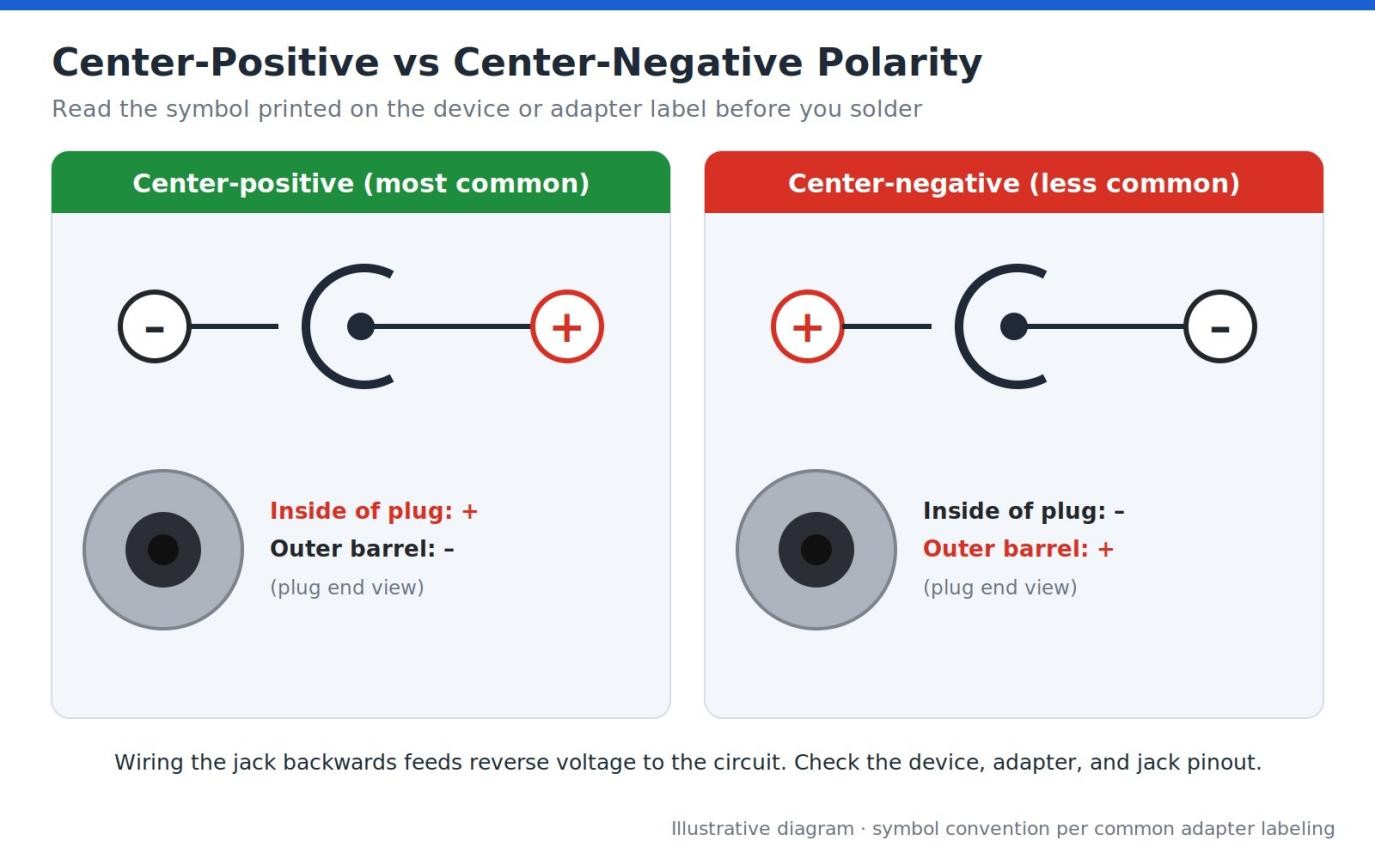
Figure 2: Adapter polarity symbols. The center dot connects to the sign on its side.
PCB-Mount vs Panel-Mount Jacks
A PCB-mount jack solders straight to the board, and its terminals double as mechanical anchors. A panel-mount DC jack bolts through the enclosure wall with a nut, and you solder wires to its lugs instead.
Barrel sizes vary. Common examples include 5.5 × 2.1 mm and 5.5 × 2.5 mm. The first number is the outer diameter, and the second is the center-pin size. If you are still picking a part, the guide to essential PCB connectors covers selection in depth.
Mount style also shapes your enclosure design, so settle it early. The overview of PCB connector types and their applications compares barrel jacks with other power connector options.
What You Need: Tools & Materials
Before you solder power jack terminals, gather a setup built for heat delivery rather than precision:
- Temperature-controlled iron: A station with enough power reserve to recover quickly when the tip meets a large terminal. Higher wattage helps.
- Larger chisel or bevel tip: A flat face contacts both the pad and the blade terminal. It delivers far more heat than a fine conical tip.
- Solder in two sizes: Fine wire for touch-ups and standard wire, such as 0.8–1.0 mm, to fill big joints without endless feeding.
- Flux: A flux pen or no-clean paste flux helps solder flow into the plated slot. This guide on using solder flux for through-hole soldering explains how much to apply.
- Flush cutters: For trimming terminals that protrude too far below the board.
- Helping hands or a PCB vise: Holds the board steady and keeps both hands free.
- Isopropyl alcohol (IPA) and a brush: Removes flux residue after inspection.
- Multimeter: Confirms polarity and continuity before and after soldering.
For high-current jacks, thicker solder and firm tip contact matter more than fine control. A solid thermal path between the tip and the joint does most of the work.
How to Solder a PCB-Mount DC Barrel Jack (Step by Step)
These steps assume a standard three-terminal, right-angle jack with blade terminals in slotted plated holes. Do one action at a time and check your work before moving on.
Confirm polarity and orientation
Compare the jack's pinout with the footprint and schematic. Make sure the center-pin pad connects to the net your design expects.
Insert the jack flush and square
Push it down until the body sits flat and every terminal sits in its hole. The front face should line up with the board edge or enclosure cutout.
Tack one terminal
Solder a single terminal lightly, then check from the side that the jack is not tilted. If it is, reheat that joint, press the body flat, and let it cool.
Solder the power terminals
Place the tip so it touches both the pad and the terminal. Feed solder into the joint, not onto the tip, and hold until it flows through the hole. Expect this to take noticeably longer than a signal pin.
Solder the mechanical anchor tabs
Some jacks add metal mounting tabs beside the terminals. Solder them fully, because they absorb plug-insertion force. Plastic locating pegs are never soldered.
Rework any dull joint
Add flux to a joint that looks grainy or incomplete. Reheat it until the solder flows smooth and bright.
Trim the leads
Cut any terminal that protrudes far enough to snag or short against the enclosure.
Inspect every joint
Look for concave, shiny fillets, solder visible on both sides of each hole, and no bridges.
Clean with IPA
Scrub away flux residue so the joints stay visible and the board stays tidy.
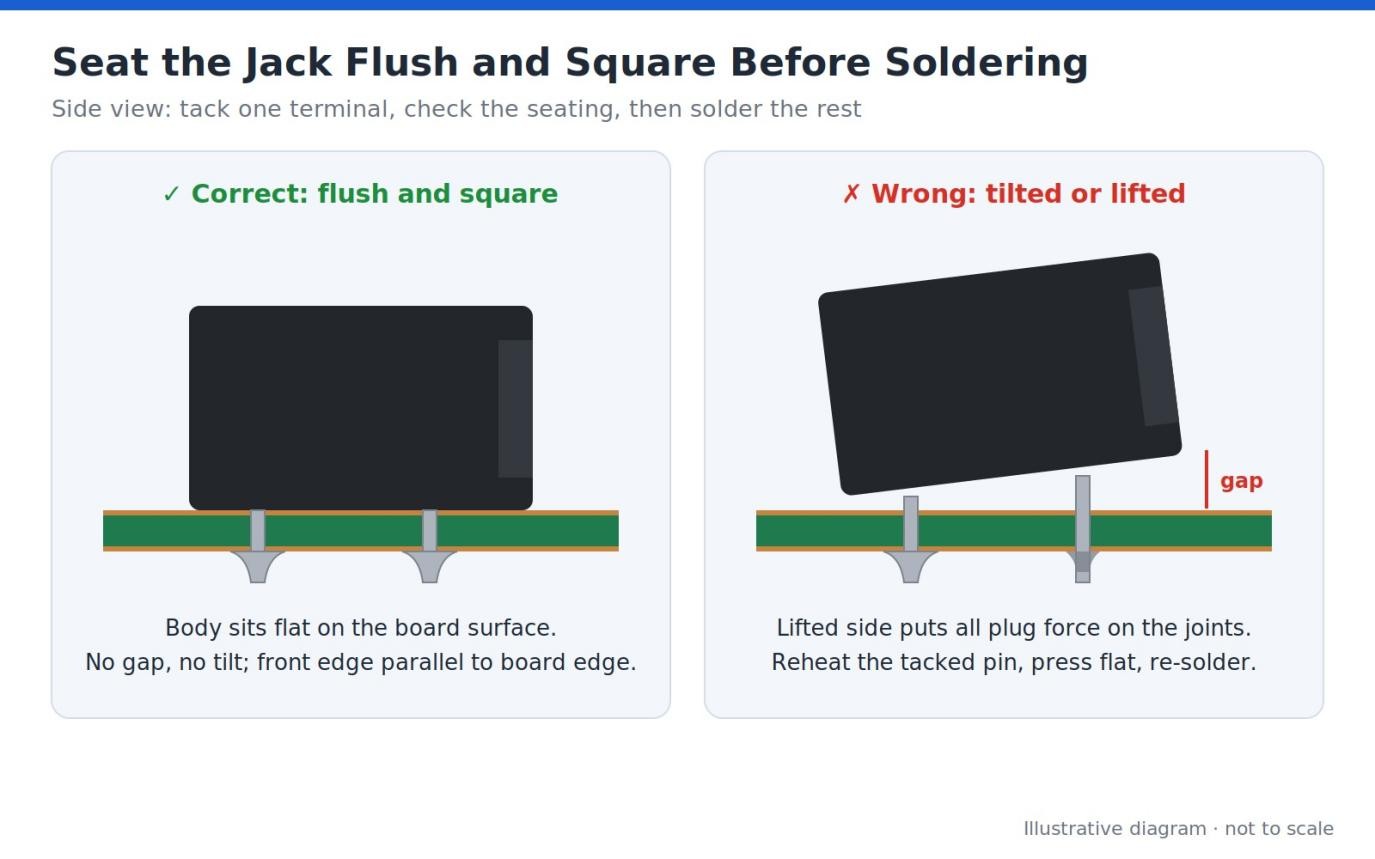
Figure 3: Tack one terminal, then confirm the body sits flat before soldering the rest.
For inspection criteria, IPC-A-610 generally looks for at least 75% vertical solder fill in plated through-holes on Class 2 and Class 3 assemblies. Limited exceptions apply to holes tied to heat-sinking planes. Hobby builds are not bound by it, but it is a useful benchmark.
Panel-Mount Barrel Jacks: Soldering the Wires
A panel-mount jack moves the soldering from the board to the wires. The jack bolts through the enclosure, and two or three wires run from its lugs to the board or supply.
Slide heat-shrink on first
Put a short piece of tubing on each wire before soldering, well away from the heat.
Identify the lugs
Use a multimeter in continuity mode to find the center-pin, sleeve, and switch lugs. Layouts vary between models.
Pre-tin the lugs and wires
Tin each lug and each stripped wire end separately. Then join them with a short burst of heat.
Keep polarity consistent
On a center-positive setup, the center-pin lug gets the positive wire, usually red.
Shrink and secure
Slide the tubing over each joint, shrink it, and anchor the cable close to the jack.
Strain relief matters as much as the joint itself. A cable tie on an adhesive mount, a grommet, or a clamp stops cable movement from flexing the lugs. For the full stripping and tinning method, see how to solder wires to a circuit board properly.
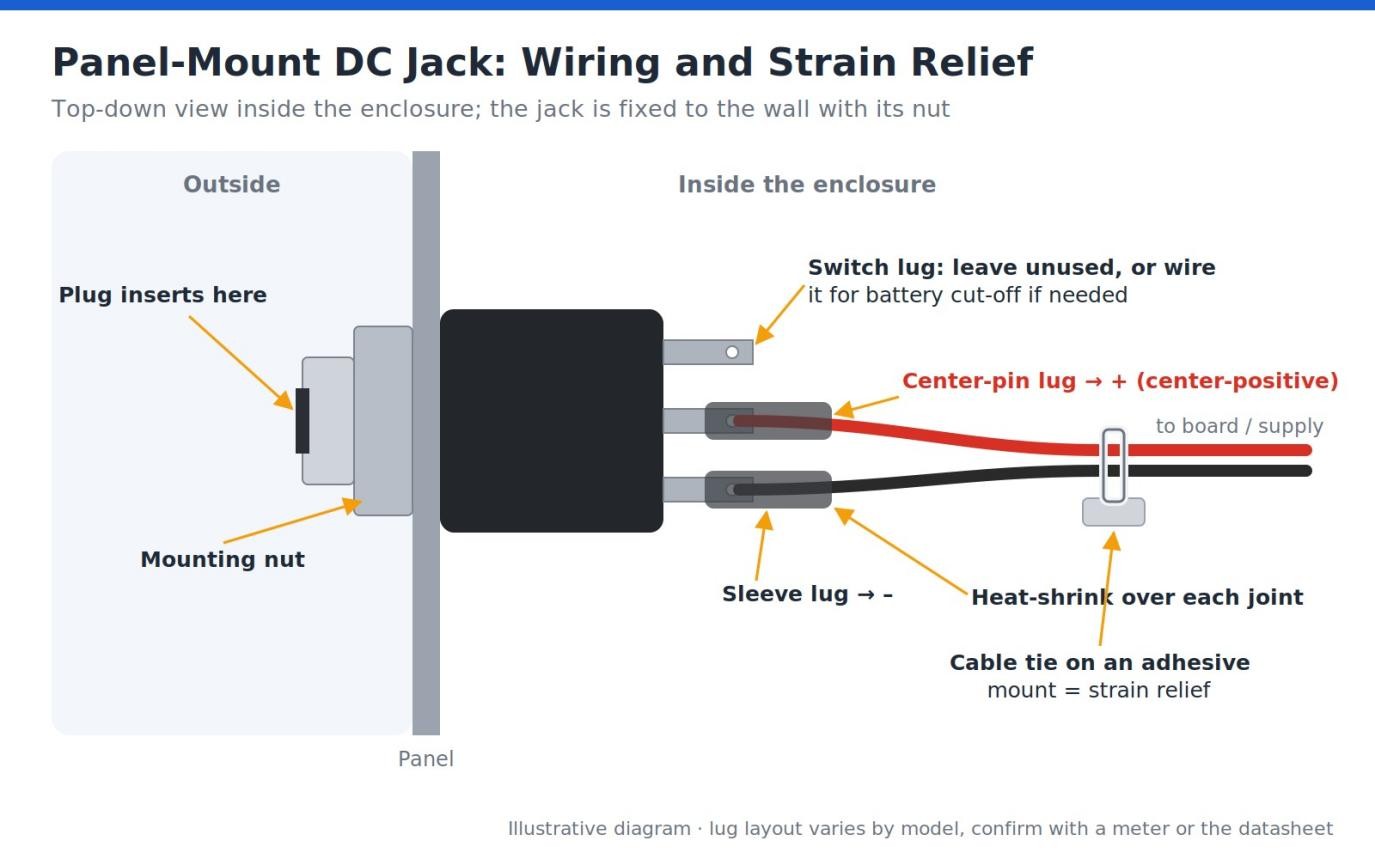
Figure 4: Panel-mount wiring with heat-shrink on each lug and a cable tie for strain relief.
High-Current Joints: Heat, Dwell, and Strength
When you solder power jack pins, expect them to run cold. The jack's brass and copper-alloy terminals hold a lot of heat, and any connected copper pour pulls more away. A tip that melts solder instantly on a resistor lead may barely warm a jack terminal.
When the joint never reaches full temperature, solder sits on top instead of flowing into the hole. The result is a dull, grainy joint with poor fill. It may pass a quick glance, then crack after a few hundred plug cycles.
IPC J-STD-001 treats wetting of both the lead and the barrel wall as a process requirement. A power joint that only wets the pad surface does not meet that intent.
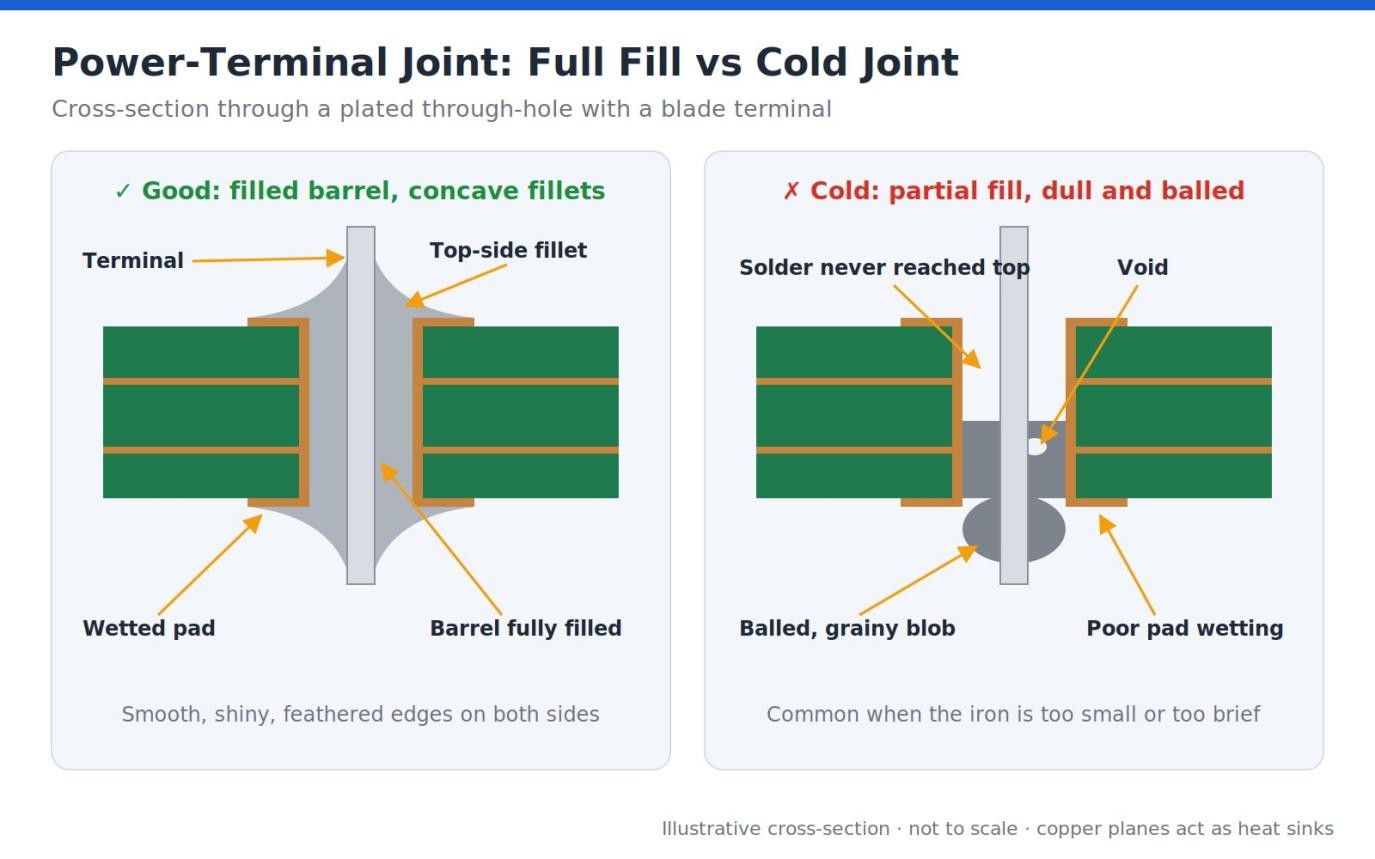
Figure 5: A filled barrel with concave fillets versus a cold, partially filled joint.
Practical Heat Guidance
Use a larger tip and more heat or dwell than you would for signal pins. There is no single correct setting, because tip size, alloy, and copper area all change the answer. A good sign is solder that wets the pad and terminal within a few seconds.
Add flux before the joint, not after it fails. Flux strips oxides and helps heat move from the tip into the terminal. If solder still refuses to flow, switch to a bigger tip or raise the temperature modestly rather than holding the iron longer.
Respect the Housing's Heat Limit
The plastic body sets the ceiling. The PJ-002A housing is PBT, and its datasheet specifies wave soldering at up to 265 °C (509 °F) for about 5 seconds. Treat any published limit as a firm boundary, and let the jack cool between terminals.
If dull joints keep appearing, the cold solder joint guide explains how to diagnose and repair them properly.
For the board side of the problem, the high-current PCB design guide covers trace width and copper sizing on power nets.
On a Populated Board: Where a Stencil Actually Helps
A barrel jack is normally hand-soldered. It is tall, heavy, and often added after the rest of the board has gone through reflow. Some jack datasheets, including the PJ-002A, list a wave-soldering profile but no reflow profile.
A stencil helps with everything else. If your design carries SMD parts, you can print solder paste through a stencil and reflow all of them in one pass. That leaves only the jack and any other heavy through-hole parts for the iron.
Some through-hole parts can join the reflow step through pin-in-paste, where paste is printed into the plated holes before insertion. The jack qualifies only if its datasheet allows reflow temperatures. The pin-in-paste through-hole reflow guide explains the technique and aperture sizing.
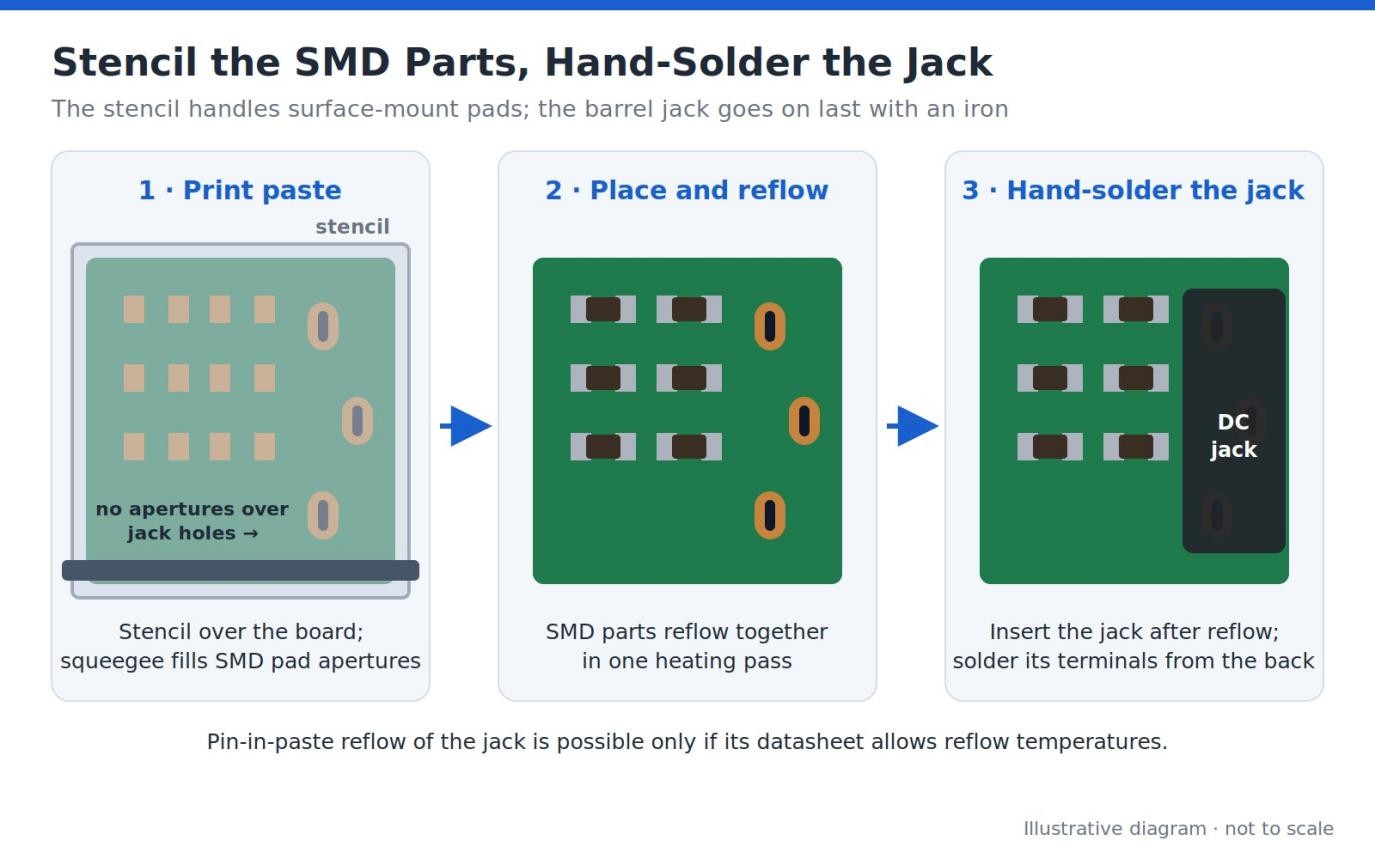
Figure 6: On a mixed board, stencil and reflow the SMD parts, then hand-solder the jack.
Common DC Jack Soldering Problems (and How to Fix Them)
- Problem: Dull, incomplete joints on the power terminals. → Fix: The jack's mass is sinking heat. Switch to a bigger tip, raise the temperature modestly, dwell longer, and add flux until the joint fills and shines.
- Problem: The jack wobbles or rips off under plug insertion. → Fix: The anchor tabs were skipped or under-soldered. Solder every metal tab fully and make sure solder fills each hole. For panel jacks, add strain relief on the cable.
- Problem: The device does not power on or gets damaged. → Fix: The polarity is reversed. Verify center-positive vs center-negative against the device and jack pinout before soldering. If a part failed, check the regulator and input protection first.
- Problem: Bridges near the switched contact. → Fix: The switch and sleeve terminals sit close together, and excess solder spans the gap. Add flux, remove the excess with solder wick, and keep deposits small.
- Problem: A melted or loose plastic body. → Fix: Too much heat or dwell reached the housing. Work efficiently, let the jack cool between terminals, and never park the iron on a pin.
FAQ about DC Jack Soldering
Q: How Can I Check DC Jack Polarity with a Multimeter?
Measure the adapter's plug directly with the meter set to DC volts. Put the red probe inside the plug's center hole and the black probe on its outer barrel. A positive reading means center-positive; a negative reading means center-negative. Then switch to continuity mode and trace which board pad connects to the jack's center pin. Doing this before soldering costs nothing and prevents most polarity failures.
Q: How Much Current Can a DC Barrel Jack Handle?
It depends entirely on the model, so the datasheet's current rating is the number to trust. Small jacks are often rated between 1 A and 2.5 A, while heavy-duty types can reach 5 A or more. Running above the rating heats the contacts and speeds up wear. Leave some margin, and confirm the plug and cable carry the same rating as the jack.
Q: How Do I Remove a Broken DC Jack Without Damaging the Pads?
Add fresh solder and flux to each joint first, because new solder transfers heat better than old, oxidized joints. Then clear each hole with a desoldering pump or wick, one terminal at a time. If a terminal will not release, reheat it while gently rocking the jack; never pry hard. On boards with heavy copper, preheating from below protects the pads.
Q: Why Does My Device Only Power On When I Wiggle the Plug?
Usually a joint has cracked or the contacts are worn. Reflow each terminal with flux and look for a fine ring-shaped crack around the lead. If the joints look solid, the spring contact may be fatigued, or the plug may not match the jack. A 5.5 × 2.5 mm plug on a 2.1 mm pin fits loosely and loses contact easily.
Q: Should I Use Lead-Free Solder for DC Jack Soldering?
Either alloy works, but lead-free solder needs more heat, which matters on a high-mass jack. SAC305 melts at about 217–220 °C (423–428 °F), while Sn63/Pb37 melts at 183 °C (361 °F). Leaded solder flows more easily on big terminals, but most commercial products sold in the EU must be lead-free under RoHS. For rework, remove the old solder before switching alloys.
Q: Can I Solder Wires Directly to a PCB-Mount DC Jack?
You can, but it makes a weak repair rather than a good design. PCB-mount terminals are short and stiff, so a wire joint flexes right at the solder and fatigues quickly. If you need a wired connection, choose a panel-mount jack with proper lugs. For a temporary fix, insulate each joint with heat-shrink and anchor the cable so nothing pulls on the terminal.
Conclusion: Getting DC Jack Soldering Right the First Time
Good DC jack soldering comes down to four habits. Verify polarity before the jack touches the board, and seat it flush and square. Deliver enough heat to fill every big joint, and solder every metal anchor tab for strength.
Keep the division of labor honest, too. Hand-solder the jack, and let a stencil handle the board's SMD parts in a single reflow pass.
When I build a powered board, I treat the jack as the last and most carefully checked joint. If your next build is ready, I recommend ordering the PCBs and a matching stencil from JLCPCB together, then finishing the jack by hand.
Keep Learning
How to Tin a Soldering Iron: First Use & Re-Tinning
Key Takeaways Tin from the first heat-up: Bring the iron to roughly 315–370 °C (600–700 °F), wipe the tip on brass wool, and melt fresh flux-cored solder onto every working face until a thin mirror-bright film covers it, then wipe away the excess and lay down one more light coat. Re-tin by condition, not the clock: Keep a film of solder on the tip at all times, re-tin the moment wetting turns patchy, and lay down a generous coat before shutdown so oxidation cannot start while the iron sits idle. Never......
DC Jack Soldering: How to Solder a DC Barrel Jack / Power Connector
Key Takeaways Confirm polarity before the iron touches the board: Check the adapter label, device marking, and jack pinout for center-positive versus center-negative wiring, because reversed polarity can destroy a regulator or microcontroller instantly. Deliver enough heat for the big joints: DC jack terminals are high-mass, so use a larger chisel or bevel tip, more heat or dwell, and flux until solder fills the plated hole and leaves a shiny fillet instead of a dull, grainy surface. Build in mechanic......
How to Solder an Audio Jack to a PCB
Key Takeaways Confirm the exact pinout first: TS, TRS, and TRRS jacks differ in conductor count and PCB terminal numbering, and TRRS wiring follows CTIA or OMTP standards, so always map every pin from the manufacturer datasheet and PCB footprint before soldering. Control heat and solder: Use a fine-tip iron, flux, and a minimal amount of solder, tack one pin to keep the jack flush and square, then solder each contact pin by pin to prevent bridges between closely spaced terminals. Finish and verify: So......
How to Solder SMD LEDs: A Step-by-Step Guide for Iron, Hot Air, and Reflow
Key Takeaways Confirm polarity and orientation first: Identify the anode and cathode before applying any heat, because a reversed SMD LED will not light and correcting it costs another thermal cycle. Match the method to the job: A fine-tip iron suits one or a few LEDs, hot air is best for rework and single-part replacement, and solder paste with reflow is fastest for complete boards. Keep solder and heat minimal: A small, fully wetted fillet and short dwell times protect the LED die, phosphor, and enc......
How to Solder a Potentiometer (PCB, Panel & Guitar Pots)
Key Takeaways Identify the wiper terminal: In most potentiometers, the middle pin is the wiper. Always verify with a multimeter before soldering. Pre-tin surfaces: Tin both the terminals and wires before joining to ensure strong, clean solder joints. Control heat carefully: Use a temperature-controlled iron and keep contact time short (below 260°C for a few seconds) to avoid damaging the internal resistive track. Test after soldering: Always check continuity and sweep the shaft while measuring output ......
How to Solder QFN Components: A Step-by-Step Guide
Key Takeaways A solder paste stencil is the most reliable way to achieve consistent QFN solder joints. Always use a window-pane paste pattern on the center thermal pad instead of one large paste deposit. Control solder paste volume to prevent floating, bridging, and excessive voiding. Reflow needs a proper soak-then-reflow-then-cool profile Hand soldering is practical only for certain QFN packages and usually cannot solder the center thermal pad effectively. Because QFN solder joints are hidden beneat......