How to Solder an Audio Jack to a PCB
13 min
- Quick Answer: How to Solder an Audio Jack
- 3.5mm Audio Jack Pinout: TS, TRS, and TRRS
- Check the Audio Jack Datasheet Before Soldering
- What You Need: Tools & Materials
- Step-by-Step: Soldering the Jack to the Board
- How to Prevent Solder Bridges When Soldering an Audio Jack
- SMT Audio Jacks: Solder Paste and Reflow
- Do You Need a PCB Stencil for an Audio Jack?
- Common Audio Jack Soldering Problems (and How to Fix Them)
- FAQ about Soldering an Audio Jack
- Conclusion: How to Solder an Audio Jack Reliably
Key Takeaways
Confirm the exact pinout first: TS, TRS, and TRRS jacks differ in conductor count and PCB terminal numbering, and TRRS wiring follows CTIA or OMTP standards, so always map every pin from the manufacturer datasheet and PCB footprint before soldering.
Control heat and solder: Use a fine-tip iron, flux, and a minimal amount of solder, tack one pin to keep the jack flush and square, then solder each contact pin by pin to prevent bridges between closely spaced terminals.
Finish and verify: Solder every specified mechanical mounting tab so plug insertion does not stress the signal joints, inspect the gaps under magnification, clean flux residue, and test both audio channels, ground, and microphone before final assembly.
Learning how to solder an audio jack starts with the correct pinout, PCB footprint, and soldering sequence. A 3.5 mm audio jack has small, closely spaced contacts that can easily be bridged with excess solder. A poor solder joint can cause crackling audio, a dead channel, or intermittent connections, while repeated plug insertion puts mechanical stress on the connector and its solder joints.
Audio jacks that look similar can have different PCB pinouts, switch contacts, and footprints. Before you solder an audio jack, identify the exact connector part number and check its manufacturer datasheet and PCB footprint.
This guide explains how to solder an audio jack to a PCB, with additional guidance for SMT and panel-mount connectors. It covers TS, TRS, and TRRS pinouts, PCB terminal identification, through-hole soldering, solder-bridge prevention, mechanical mounting, and common troubleshooting issues. Always verify the exact part number, datasheet, and PCB footprint before soldering.
Quick Answer: How to Solder an Audio Jack
To solder an audio jack to a PCB, first check the exact connector datasheet and PCB footprint. Insert the jack squarely, tack one pin to hold it in place, then solder each contact with a fine tip, flux, and a controlled amount of solder. Solder the specified mechanical tabs, inspect the joints for bridges, clean the board, and test the audio connection.
3.5mm Audio Jack Pinout: TS, TRS, and TRRS
A 3.5mm audio plug and jack use contact sections called Tip (T), Ring (R), and Sleeve (S). TS, TRS, and TRRS describe the number of contact sections, but the actual PCB terminal numbering depends on the specific jack.
| Type | Conductors | Common Audio Use | Typical Assignment |
|---|---|---|---|
| TS | 2 | Mono audio | Tip = Signal, Sleeve = Ground |
| TRS | 3 | Stereo or balanced audio | Tip = Left, Ring = Right, Sleeve = Ground |
| TRRS | 4 | Headset audio | Left, Right, Ground, and Microphone; assignment depends on the wiring standard |
These are typical audio assignments, not universal PCB pin numbers. Always compare them with the connector's datasheet before soldering.
TRRS adds a second ring, creating four contact sections. A common arrangement supports left, right, ground, and microphone. However, TRRS wiring is not universal. CTIA and OMTP assign the microphone and ground contacts differently, so a headset may play left and right audio correctly while the microphone does not work.
If you are soldering a TRRS jack, check the wiring standard and the exact connector pinout before connecting the microphone and ground contacts. Some jacks also include switched, normally-closed contacts. These contacts can disconnect or reroute a circuit when a plug is inserted. The exact switching arrangement depends on the connector, so treat the switch contacts as part of the component-specific pinout rather than assuming they follow the Tip/Ring/Sleeve order.
Check the Audio Jack Datasheet Before Soldering
Do not solder from a generic internet diagram. Map every PCB pin from the manufacturer’s drawing and compare it with the board footprint. Same Sky (formerly CUI Devices) publishes a good example: in its SJ1-351X through-hole 3.5 mm audio jack datasheet, the SJ1-3513, SJ1-3514 and SJ1-3515 share identical sleeve, tip and ring pins, but pins 4 and 5 carry tip and ring switch contacts on some models and nothing at all on others.
For broader connector-selection context, see the Essential PCB Connectors guide before choosing a replacement part.
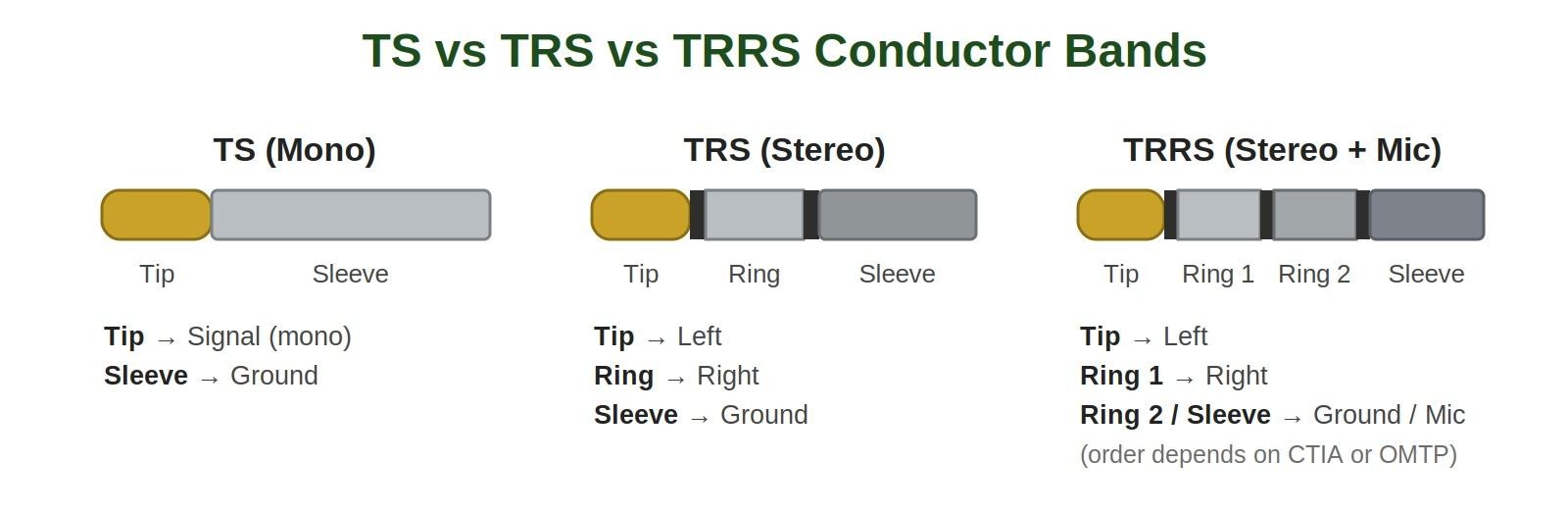
TS vs TRS vs TRRS Conductor Bands
What You Need: Tools & Materials
- Fine-tip, temperature-controlled soldering iron
- Fine-gauge solder suitable for electronics assembly
- Flux suitable for electronics soldering
- Fine tweezers
- Magnification, such as a loupe or inspection microscope
- Solder wick for removing bridges
- Isopropyl alcohol (IPA) and a suitable cleaning tool
- Multimeter with continuity mode
- The connector datasheet and PCB footprint drawing
For close audio-jack contacts, the two most useful tools are a fine tip and good flux. The tip lets you heat one connection without flooding its neighbor. Flux improves wetting, so you can make a small, controlled joint instead of adding solder to compensate for poor flow. For practical flux technique, see the guide to using solder flux for through-hole soldering.
Step-by-Step: Soldering the Jack to the Board
Confirm the pinout and footprint
Before you solder an audio jack to a PCB, check the exact connector part number and manufacturer datasheet. Identify the Tip, Ring, Sleeve, switch contacts, and mechanical mounting terminals, then compare them with the PCB footprint.
Insert and Align the Audio Jack
Insert the connector into the PCB until it sits flush and square. Make sure the mechanical tabs or mounting posts are properly seated in their designated holes.
Tack One Pin to Hold the Jack in Place
Solder one pin lightly, then inspect the connector from the top. The jack should remain flat and perpendicular to the board. If it is tilted, reheat the tack joint, reposition the connector, and let the joint solidify before continuing.
Solder the Audio Jack Contacts
Apply a small amount of flux. Heat one contact at a time with the fine tip and feed only enough solder to form a properly wetted joint. Avoid carrying a large bead of solder from one contact to the next.
Solder the Mechanical Mounting Tabs
Plug insertion creates a mechanical load at the connector, and the mounting tabs can transfer much of that force into the PCB. Solder the specified mounting connections and aim for solid, well-formed joints. For professional assembly, through-hole fill and solder-joint formation should follow the applicable process requirements, such as those defined by IPC J-STD-001. For a basic hand-soldering job, focus on forming a properly wetted, mechanically secure joint without damaging the PCB or connector.
Inspect the Solder Joints
Use magnification to inspect between adjacent contacts. Look for a thin solder filament, solder bridge, or other visible connection joining two pins. If you find a bridge, use solder wick to remove the excess, then inspect again.
A good audio jack solder joint should properly wet the terminal and PCB pad, remain mechanically secure, and show no visible cracking, solder bridge, or excessive solder buildup. Because audio-jack contacts can be closely spaced, inspect the gaps under magnification after soldering.
Clean and test
Remove flux residue as appropriate for the flux used, using IPA and a suitable lint-free swab or brush. Test the connector with the intended plug and verify both audio channels, ground, and microphone functions when applicable.
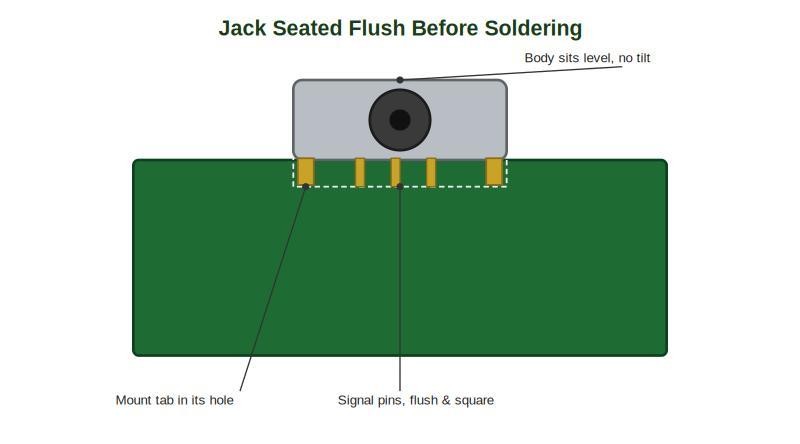
Jack Seated Flush Before Soldering
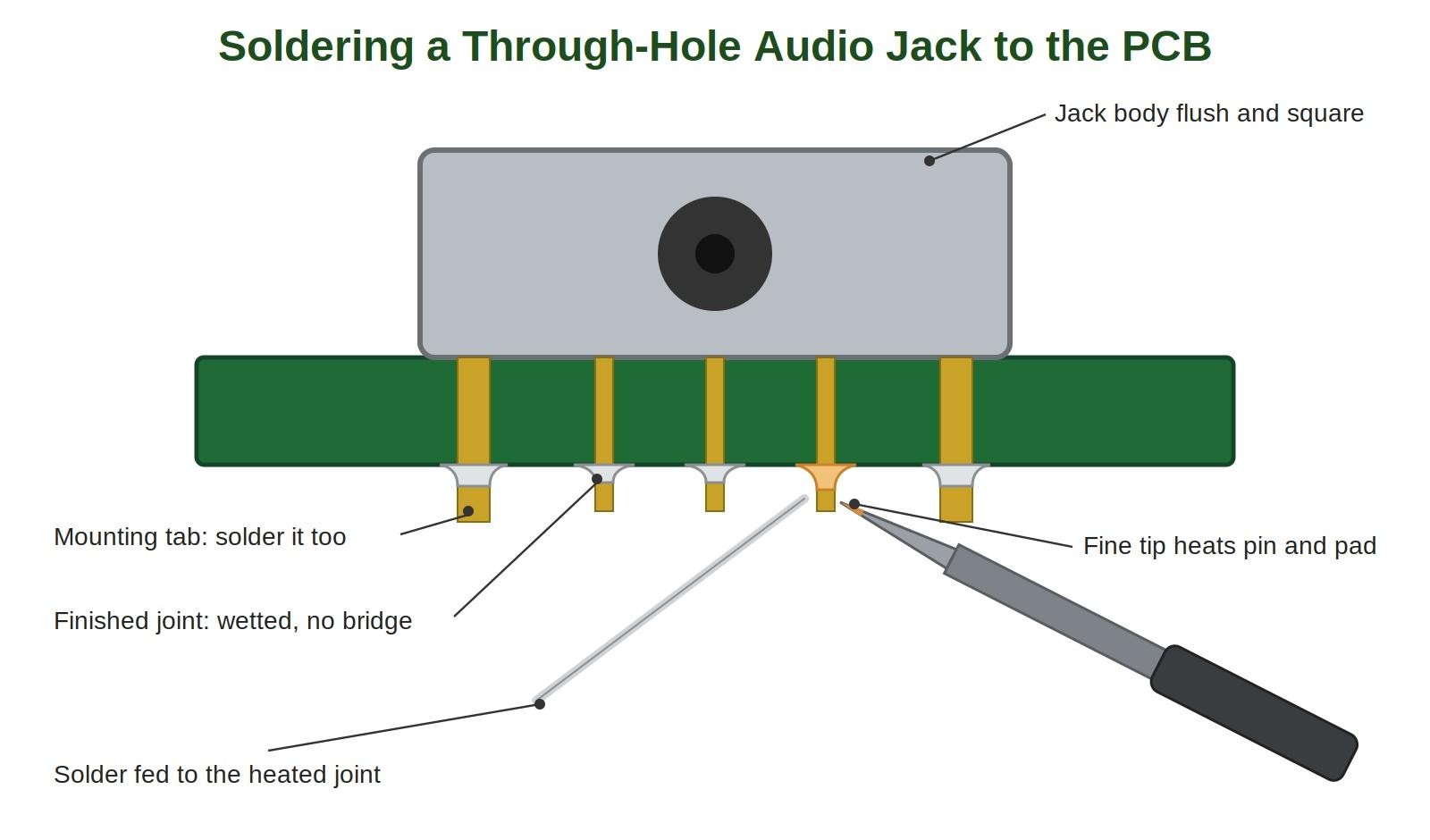
Soldering a Through-Hole Audio Jack to the PCB
How to Prevent Solder Bridges When Soldering an Audio Jack
Solder bridging is a common soldering hazard with small audio-jack contacts. Adjacent pins are close enough that a little excess solder can connect them electrically. The result may be a short, a dead channel, or another confusing audio fault.
Prevent bridges by using flux, a fine tip, and minimal solder. Work pin-by-pin rather than dragging a large solder bead across several contacts. Inspect the gaps under magnification before moving to the next stage.
If a bridge appears, do not keep adding heat and solder. Place clean solder wick over the excess, heat it briefly, and let the wick pull the unwanted solder away. Reinspect the pins afterward. For a deeper explanation of why bridges form and how to remove them, see Solder Bridging: Preventing a Common PCB Soldering Defect.
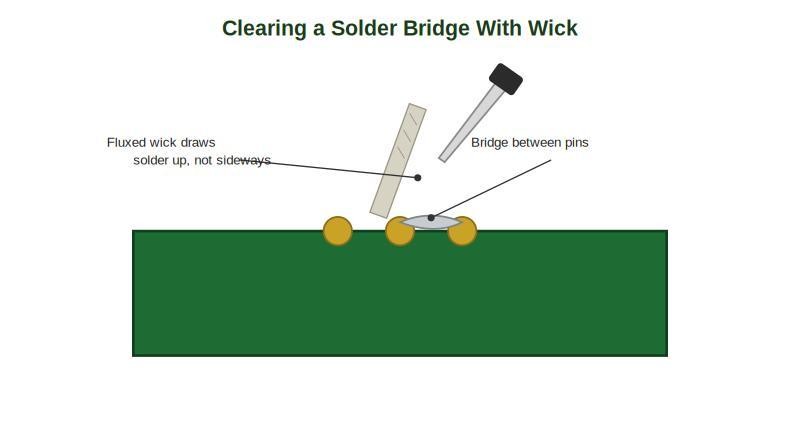
Solder Bridge Removed with Wick
SMT Audio Jacks: Solder Paste and Reflow
SMT audio jacks are commonly assembled using solder paste, component placement, and reflow. A PCB stencil is typically used to apply solder paste consistently to the SMT pads.
For hand rework or prototyping, individual SMT terminals can be soldered with a fine tip when the connector manufacturer permits it. Always check the connector datasheet for the recommended assembly process and reflow temperature limits before using reflow. Panel-mount jacks use a different connection method because their terminals are typically solder lugs rather than PCB pins. Pre-tin the lug and wire, join them briefly with heat, and use heat-shrink where appropriate. Provide strain relief so cable movement does not transfer directly to the solder joint.
For panel-mounted connectors, follow the jack's wiring diagram rather than applying a PCB Tip/Ring/Sleeve pin-number assumption.
For the general wire preparation and joining method, see How to Solder Wires to a Circuit Board Properly.
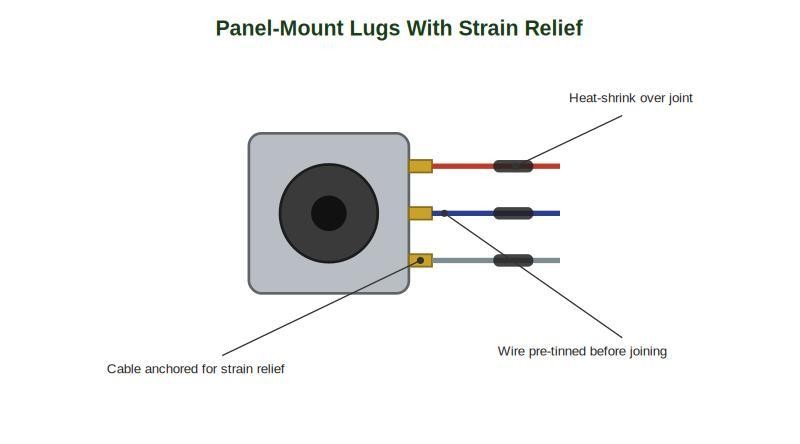
Panel Mount Lugs with Heat Shrink
Do You Need a PCB Stencil for an Audio Jack?
A through-hole audio jack usually doesn't require a PCB stencil for its hand-soldered joints. However, a stencil becomes useful when the same PCB contains SMT components that require solder paste printing.
In this mixed-assembly situation, a PCB stencil is used to apply solder paste consistently to the SMT pads. The SMT components can then be placed and reflowed, while the through-hole audio jack can be soldered separately if its construction is not suitable for reflow.
Some through-hole components can also be assembled using pin-in-paste if their construction and process limits allow it. Always check the exact jack datasheet before putting a connector through a reflow process. For the process details, see Pin-in-Paste: Through-Hole Reflow With a Stencil.
Common Audio Jack Soldering Problems (and How to Fix Them)
Problem: Solder bridges between close pins. Fix: Excess solder plus tight spacing creates a short. Add flux, use a fine tip and minimal solder, then remove the bridge with solder wick and inspect under magnification.
Problem: No sound, or only one channel. Fix: Recheck the tip, ring, sleeve, and any additional TRRS contacts against the exact datasheet. Then inspect for a bridge between adjacent conductors.
Problem: Crackling or intermittent audio. Fix: Suspect a cold or cracked signal joint. Reheat or rework the affected joint with a small amount of flux, then hold the connector and board still while the joint solidifies.
Problem: Jack loosens or rips off the board. Fix: The mechanical tabs may have been skipped or under-soldered. Solder every specified mounting tab and ensure the solder has properly wetted the lead, pad, and plated-through hole as required by the assembly design.
Problem: Mic or ground behaves oddly on a TRRS jack. Fix: A CTIA/OMTP mismatch can swap microphone and ground functions. Confirm the standard and pin map before soldering.
For the crackling/intermittent case, the cold solder joint guide provides the broader diagnosis and rework discussion.
FAQ about Soldering an Audio Jack
Q: Can I Use a Generic TS, TRS, or TRRS Pinout When Replacing a Jack?
No. Use the exact replacement part’s datasheet and PCB footprint. Connector pin numbering and switch contacts can vary even when the plug size and visible contact count look identical. This is especially important for TRRS assemblies because CTIA and OMTP assign microphone and ground differently. Before removing the old part, photograph the board and identify each pad so the replacement can be mapped confidently.
Q: What Soldering Temperature Should I Use for a 3.5mm Audio Jack?
Use the solder and flux manufacturer’s recommended process temperature rather than choosing a temperature from the connector name alone. The required setting depends on solder alloy, tip geometry, thermal mass, and the PCB. A controlled iron should heat the joint quickly without lingering on the connector. If the joint needs prolonged heating, improve tip contact and flux application before simply increasing temperature.
Q: How Do I Know if My TRRS Jack Uses CTIA or OMTP Wiring?
You generally cannot determine the wiring standard from the connector's external dimensions alone. Check the datasheet for the specific connector or verify the contact assignment with a multimeter and a known wiring reference. A CTIA/OMTP mismatch can leave the audio channels working while causing the microphone or ground connection to behave incorrectly.
Q: Is It Safe to Reflow a Through-Hole Audio Jack Instead of Hand-Soldering It?
Only if the specific jack's datasheet rates it for reflow or pin-in-paste processing — many through-hole jacks use plastic housings or other materials that may not be designed for prolonged exposure to reflow temperatures and can deform or become damaged. Hot-air rework on an already-installed jack carries the same risk if the nozzle lingers over the plastic body. When the datasheet doesn't say either way, hand-solder the jack and reflow everything else on the board.
Q: How Do I Know if an Audio Jack Solder Joint Is Good?
A good joint is clean, fully wetted, and mechanically secure without a visible connection to an adjacent pin. Inspection under magnification is useful because a bridge can be extremely thin. Also check the mechanical tabs and the connector alignment, not just the signal pins. After cleaning, test both stereo channels and gently exercise the plug while listening for intermittent operation.
Q: Can I Repair a Loose 3.5mm Jack by Adding More Solder?
Not reliably. If the connector is loose because its mounting tabs were never properly soldered, adding solder only to the signal pins does not address the mechanical load. Inspect the PCB for lifted pads or damaged traces first. If the board is intact, restore the specified mechanical joints and add appropriate strain relief for panel-mounted wiring. A damaged PCB may require a repair method beyond simple resoldering.
Conclusion: How to Solder an Audio Jack Reliably
Knowing how to solder an audio jack reliably starts before the soldering iron touches the PCB. Confirm the exact connector pinout and footprint, seat the jack flush and square, use a fine tip and flux, and control the amount of solder to avoid bridges. Then solder every specified mechanical tab so repeated plug insertion does not place unnecessary stress on the signal joints.
For a through-hole audio jack that is not rated for reflow, hand soldering is a practical assembly method. A PCB stencil is more relevant to the SMT components on the same board, where it can help apply solder paste consistently before reflow.
If your project includes a custom DAC, headphone amplifier, synthesizer, or another PCB with an audio jack, JLCPCB can support the manufacturing stage with PCB fabrication, assembly, and custom PCB stencil services.
Keep Learning
How to Tin a Soldering Iron: First Use & Re-Tinning
Key Takeaways Tin from the first heat-up: Bring the iron to roughly 315–370 °C (600–700 °F), wipe the tip on brass wool, and melt fresh flux-cored solder onto every working face until a thin mirror-bright film covers it, then wipe away the excess and lay down one more light coat. Re-tin by condition, not the clock: Keep a film of solder on the tip at all times, re-tin the moment wetting turns patchy, and lay down a generous coat before shutdown so oxidation cannot start while the iron sits idle. Never......
DC Jack Soldering: How to Solder a DC Barrel Jack / Power Connector
Key Takeaways Confirm polarity before the iron touches the board: Check the adapter label, device marking, and jack pinout for center-positive versus center-negative wiring, because reversed polarity can destroy a regulator or microcontroller instantly. Deliver enough heat for the big joints: DC jack terminals are high-mass, so use a larger chisel or bevel tip, more heat or dwell, and flux until solder fills the plated hole and leaves a shiny fillet instead of a dull, grainy surface. Build in mechanic......
How to Solder an Audio Jack to a PCB
Key Takeaways Confirm the exact pinout first: TS, TRS, and TRRS jacks differ in conductor count and PCB terminal numbering, and TRRS wiring follows CTIA or OMTP standards, so always map every pin from the manufacturer datasheet and PCB footprint before soldering. Control heat and solder: Use a fine-tip iron, flux, and a minimal amount of solder, tack one pin to keep the jack flush and square, then solder each contact pin by pin to prevent bridges between closely spaced terminals. Finish and verify: So......
How to Solder SMD LEDs: A Step-by-Step Guide for Iron, Hot Air, and Reflow
Key Takeaways Confirm polarity and orientation first: Identify the anode and cathode before applying any heat, because a reversed SMD LED will not light and correcting it costs another thermal cycle. Match the method to the job: A fine-tip iron suits one or a few LEDs, hot air is best for rework and single-part replacement, and solder paste with reflow is fastest for complete boards. Keep solder and heat minimal: A small, fully wetted fillet and short dwell times protect the LED die, phosphor, and enc......
How to Solder a Potentiometer (PCB, Panel & Guitar Pots)
Key Takeaways Identify the wiper terminal: In most potentiometers, the middle pin is the wiper. Always verify with a multimeter before soldering. Pre-tin surfaces: Tin both the terminals and wires before joining to ensure strong, clean solder joints. Control heat carefully: Use a temperature-controlled iron and keep contact time short (below 260°C for a few seconds) to avoid damaging the internal resistive track. Test after soldering: Always check continuity and sweep the shaft while measuring output ......
How to Solder QFN Components: A Step-by-Step Guide
Key Takeaways A solder paste stencil is the most reliable way to achieve consistent QFN solder joints. Always use a window-pane paste pattern on the center thermal pad instead of one large paste deposit. Control solder paste volume to prevent floating, bridging, and excessive voiding. Reflow needs a proper soak-then-reflow-then-cool profile Hand soldering is practical only for certain QFN packages and usually cannot solder the center thermal pad effectively. Because QFN solder joints are hidden beneat......