SMD MOSFET Code Guide: How to Identify, Test and Replace a MOSFET
21 min
- Common SMD MOSFET Marking Codes: Quick Reference
- How to Identify an SMD MOSFET from Its Marking
- Why the Same Code Can Mean Different Parts
- How to Test an SMD MOSFET with a Multimeter
- How to Choose an SMD MOSFET Replacement
- Common Mistakes When Identifying SMD MOSFETs
- Conclusion
- SMD MOSFET FAQ
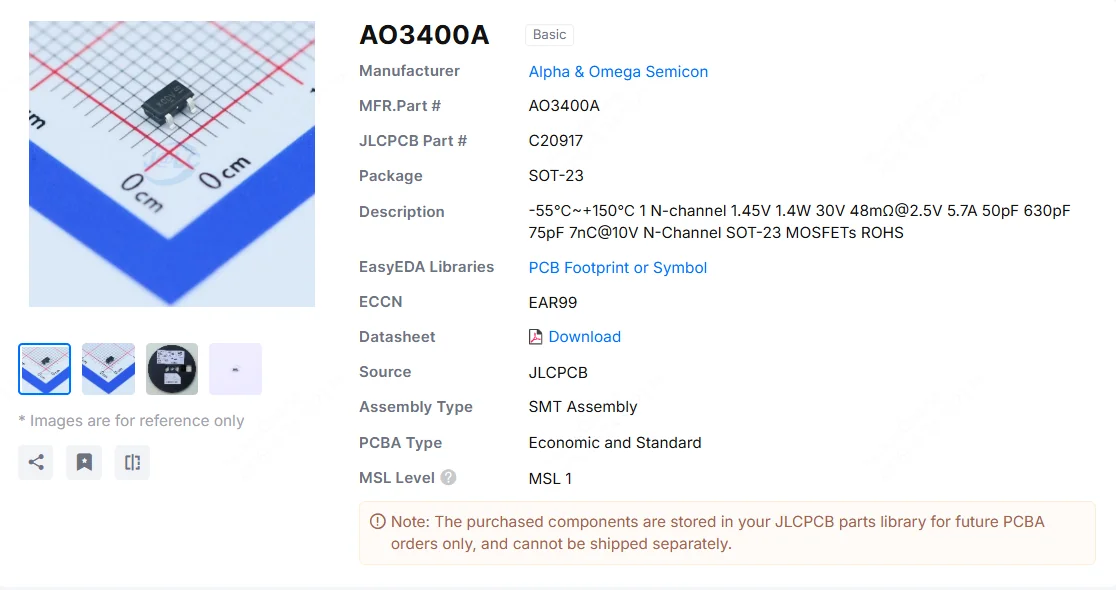
Figure: AO3400A (C20917) in the JLCPCB parts library. The listing gives RDS(on) at 2.5 V gate drive, the number that matters in the replacement example later in this guide.
An SMD MOSFET code is the two or three characters printed on top of the package, and on its own it rarely tells you which part you're holding. SMD resistors follow standard marking schemes, such as three- and four-digit codes and EIA-96. MOSFETs don't. The same short code can appear on unrelated parts from different manufacturers, and the same part number can carry different codes depending on who made it.
Quick answer: An SMD MOSFET's top marking is a short, manufacturer-specific code, not a universal part number. To identify the part, read the marking together with the manufacturer logo, the package, the surrounding circuit and the datasheet.
This guide covers narrowing a marking down to a few real candidates, checking with a multimeter whether the part has actually failed, and choosing a replacement that works in the circuit rather than just fitting the footprint. It deals with MOSFETs only; for bipolar transistors, see our SMD transistor code guide.
Common SMD MOSFET Marking Codes: Quick Reference
Each row below was checked against the manufacturer's own datasheet or marking document. Check the logo and package first (see the identification steps below), because a code match without that context is still a guess.
Common SOT-23 MOSFET Marking Codes
| Marking | Manufacturer | Part Number | Channel | VDS | ID | RDS(on) @ VGS |
|---|---|---|---|---|---|---|
| 702 | onsemi | 2N7002L | N | 60 V | 115 mA | 7.5 Ω @ 10 V |
| 12% | Nexperia | 2N7002 | N | 60 V | 300 mA | 5 Ω @ 10 V |
| SS | onsemi | BSS138 | N | 50 V | 220 mA | 3.5 Ω @ 10 V |
| PD | onsemi | BSS84LT1G | P | −50 V | −130 mA | 10 Ω @ −5 V |
| SP | onsemi | BSS84 | P | −50 V | −130 mA | 10 Ω @ −5 V |
| X0 | AOS | AO3400A | N | 30 V | 5.7 A | 32 mΩ @ 4.5 V |
| X1 | AOS | AO3401A | P | −30 V | −4.0 A | 60 mΩ @ −4.5 V |
ID is the maximum continuous drain current from each datasheet. Manufacturers rate it under different reference conditions (ambient, case or solder-point temperature), so treat that column as a rough guide. In Nexperia's 12% code, the % is a placeholder for a manufacturing-site code.
Sources: onsemi datasheets for 2N7002L, BSS138, BSS84LT1G, and BSS84; Nexperia 2N7002 datasheet; AOS AO3400A and AO3401A marking documents and AO3400A and AO3401A datasheets.
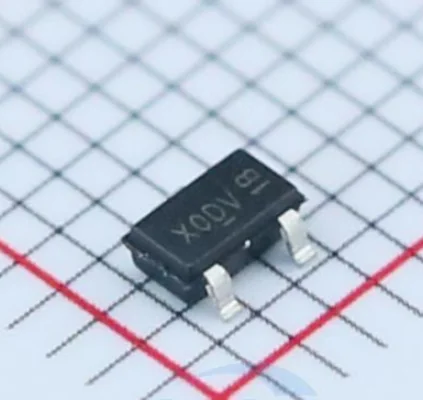
Figure: AO3400A in SOT-23 (C20917). X0 is the device code; the characters after it are year-week, assembly-location and lot codes.
Two pairs of rows deserve a closer look. Nexperia's 2N7002 and onsemi's 2N7002L are both sold as 2N7002s, with different markings and different published specifications. Both rate RDS(on) at VGS = 10 V and 500 mA, but onsemi's maximum is 7.5 Ω and Nexperia's is 5 Ω. A BOM line that just says 2N7002 doesn't tell you whose part is on the board, or which datasheet applies.
The BSS84 rows show the same thing within one company. BSS84LT1G and BSS84 are both onsemi parts with essentially the same headline ratings, yet one is marked PD and the other SP. The SP part came from Fairchild, which onsemi acquired in 2016, and kept Fairchild's code.
The code can also change with the package. Diodes Incorporated marks its SOT-323 2N7002W as K72 and its SOT-523 2N7002T as just 72, so measure the package before you trust a code match.
How to Identify an SMD MOSFET from Its Marking
Step 1: Identify the Package
Start with the package, because it rules out many wrong answers before you search anything. The common small-signal and low-power MOSFET packages are:
- SOT-23: roughly 2.9 × 1.3 mm body, three leads
- SOT-323 (SC-70): roughly 2.0 × 1.25 mm, three leads
- SOT-523: roughly 1.6 × 0.8 mm, three leads
- SOT-23-6: similar length to SOT-23 but slightly wider (about 2.9 × 1.6 mm), six leads, often a dual MOSFET
- DFN: leadless, with an exposed pad underneath; 2 × 2, 3 × 3 and 5 × 6 mm bodies are common for MOSFETs
Without a scale reference, SOT-23 and SOT-323 look nearly identical in a close-up. Put calipers on the body instead of eyeballing it.
The photo below shows four of these packages at the same scale. The first three are all 2N7002s from different manufacturers, and each carries a different code.
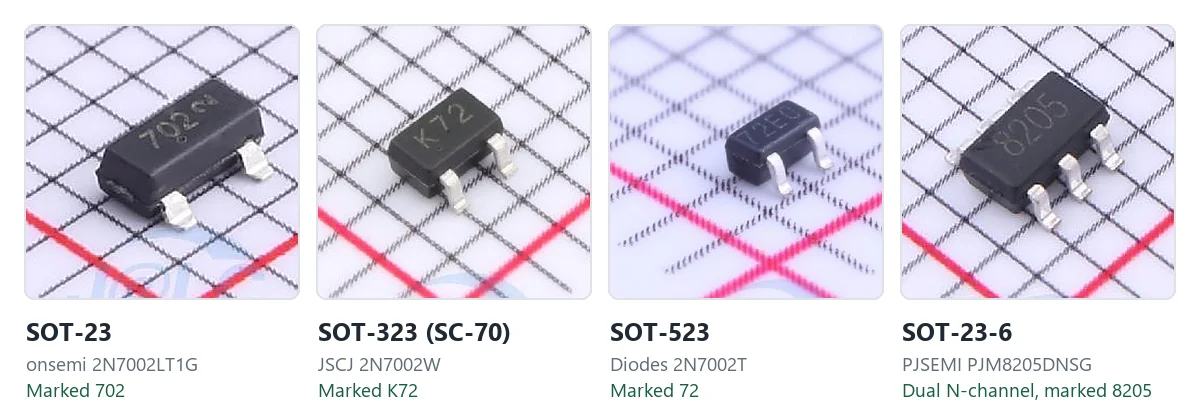
Figure: SOT-23, SOT-323, SOT-523 and SOT-23-6 MOSFETs on the same 1 mm grid, scaled to match. The first three are 2N7002s: onsemi 2N7002LT1G (C16338), JSCJ 2N7002W (C190607) and Diodes 2N7002T (C139445); the fourth is a PJSEMI 8205 dual MOSFET.
Step 2: Look for a Manufacturer Logo or Prefix
A manufacturer logo often narrows a short code to one or two candidates. Many manufacturers print a small logo or prefix character next to the code; the AOS part in the DFN photo further down carries the AOS logo beside its 7400A code. Logos are often faint, partly worn or hidden under flux residue, so clean the part and look under magnification with light at a low angle.
Once you know the manufacturer, you can search that manufacturer's own marking documentation instead of a generic database.
Step 3: Separate the Device Code from Other Markings
Not every character on the package belongs to the device code. Secondary markings may contain date, lot, assembly site, or other traceability information, and the format varies from one manufacturer to the next.
On onsemi's 2N7002L, for example, the 702 device code is followed by a date code character, and a microdot indicates a Pb-free package. onsemi also notes that the date code's orientation and position can vary with the manufacturing location. On AOS's AO3400A, X0 is followed by a year-week code, an assembly-location code and lot characters.
Position and character size aren't reliable indicators on their own, so don't assume a second line is a lot code without checking the manufacturer's marking convention. Searching a traceability code is a common reason a lookup returns nothing useful.
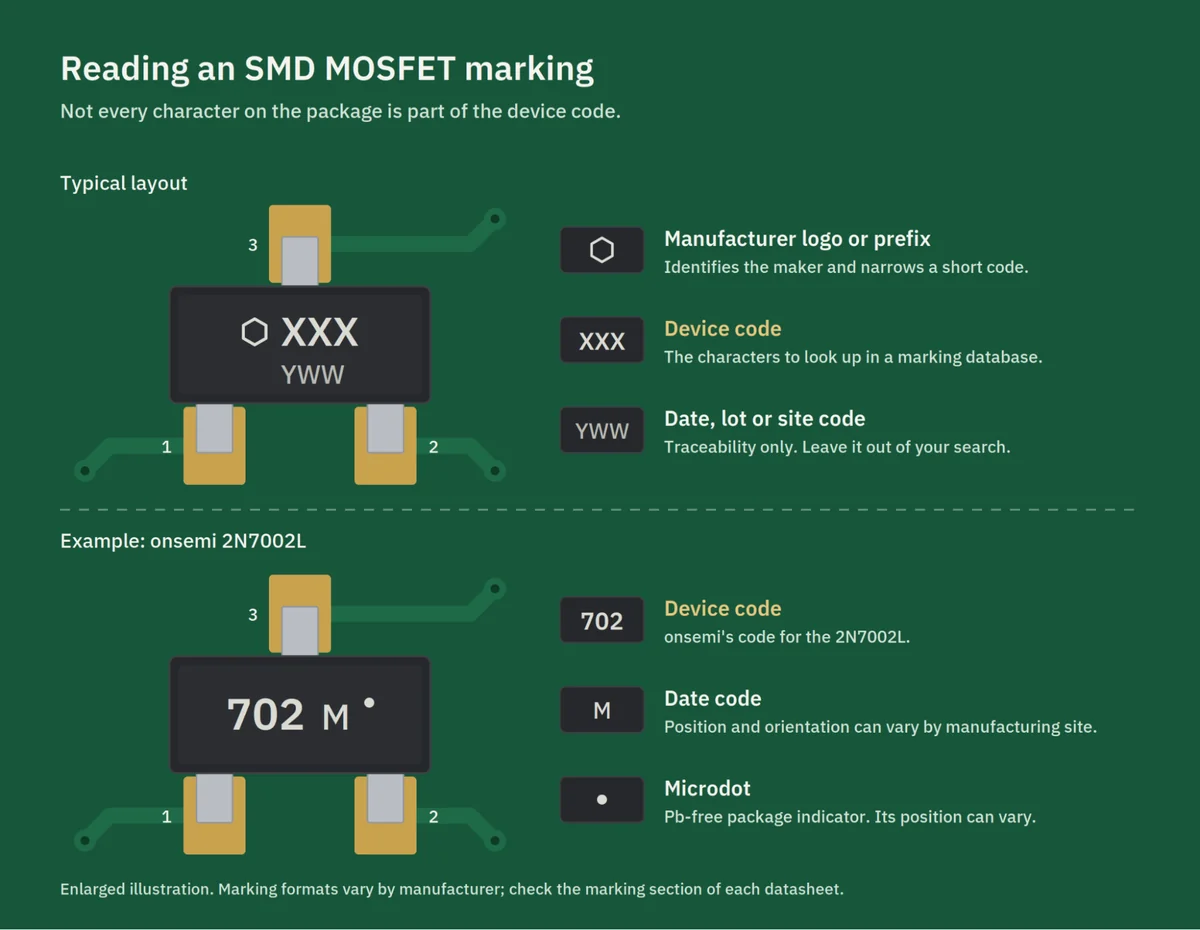
Figure: Reading a SOT-23 MOSFET marking. Only the device code goes into a search; the date code and microdot are for traceability.
Step 4: Interpret Additional Characters Carefully
An extra character after the base code can indicate a package variant, a quality grade, a production site, or a revision. What it means depends entirely on the manufacturer, and you can't work it out from the character alone. Two parts whose codes differ only by a suffix may have different ratings, so check the datasheet for the exact variant before treating one as a drop-in for the other.
Step 5: Confirm It's Actually a MOSFET
Plenty of other parts come in SOT-23: LDO regulators, bipolar transistors, voltage references and TVS diodes. The surrounding circuit is usually the fastest way to tell them apart. A small MOSFET is normally switching something, so look for a load, a power rail, an inductor or a switching node nearby. A gate resistor or a gate pull-down resistor is another useful clue. An LDO usually sits between an input capacitor and an output capacitor.
None of these is definitive, but they can save you half an hour of looking up an LDO in a MOSFET database.
Step 6: Search a Marking Database, Then Confirm with the Datasheet
With the package, logo, and clean device code in hand, SMD marking databases and manufacturer marking documents become useful. Treat whatever they return as a candidate list, then confirm against the datasheet: package drawing, pinout, and the marking section if the datasheet has one.
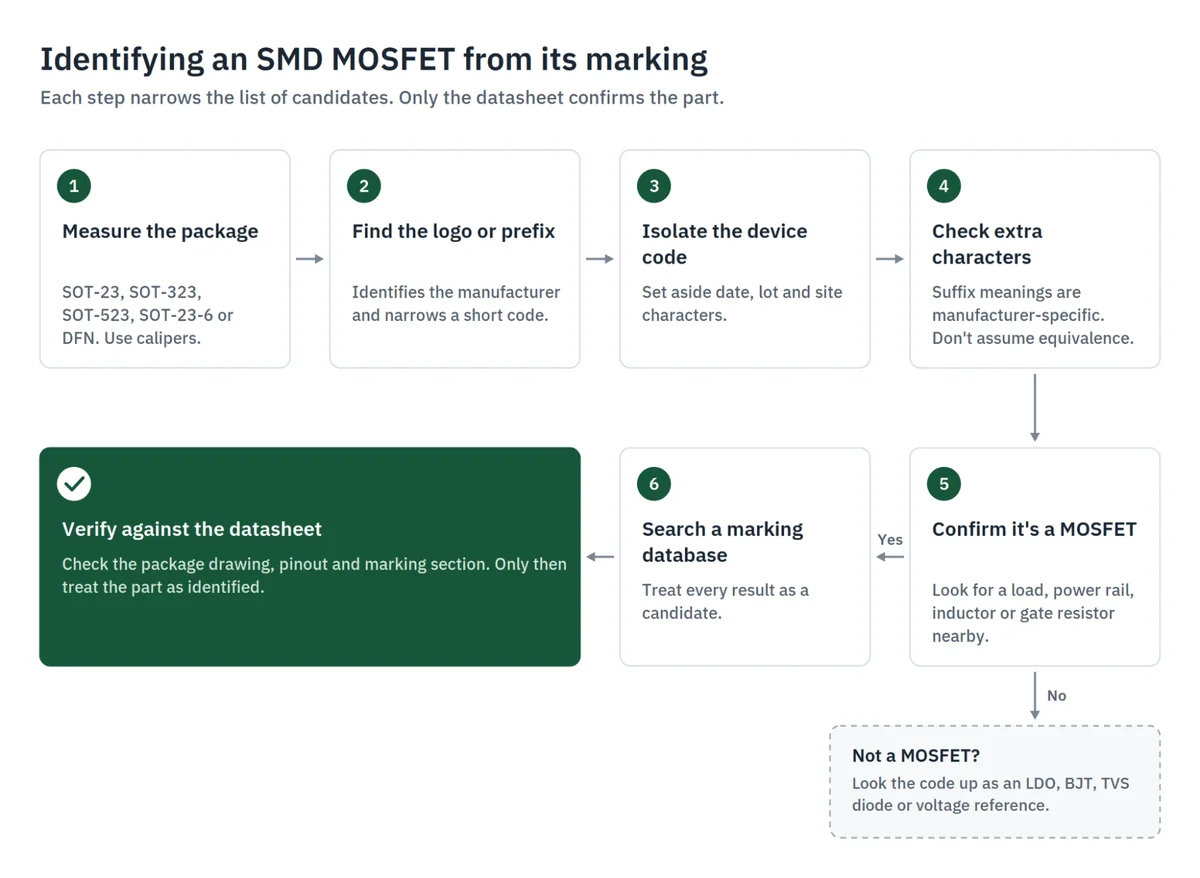
Figure: Identifying an SMD MOSFET from its marking, from package to datasheet.
Why the Same Code Can Mean Different Parts
There's no industry-wide marking standard for MOSFETs. Each manufacturer assigns its own codes, and nothing stops two companies from using the same two characters for completely different devices.
Package size makes this worse. A SOT-23 has room for three or four legible characters per line, and a SOT-523 for fewer. With that little space, codes get reused across product families, and short codes collide between manufacturers.
The reverse is also true. One part number can carry different markings depending on the manufacturer, and sometimes even within one manufacturer's catalog, as the 2N7002 and BSS84 rows above show. Second-source parts sometimes copy the original's code: the JSCJ 2N7002W in the package photo is marked K72, the same code Diodes uses on its own 2N7002W. That's convenient for purchasing, but it means the marking alone doesn't tell you whose silicon is on the board.
Codes you find associated with a part number online aren't always the original manufacturer's marking, either. AOS's own marking document for AO3400A specifies X0 as the part number code. If the part on your board carries a different code, identify its manufacturer from the logo and work from that manufacturer's datasheet.
How to Test an SMD MOSFET with a Multimeter
Before You Measure
In-circuit readings are unreliable. Parallel resistors, other semiconductors, and bulk capacitors on the same nets all show up in your measurement. If the reading matters, remove the part.
Before testing, briefly short the gate to the source. A MOSFET gate is essentially a small capacitor, and it can hold a charge from handling or from your meter's previous probe position. A charged gate can partially or fully turn the MOSFET on, whether it's N- or P-channel, causing the D-S path to show a much lower reading even on a healthy device.
The same effect works as a rough switching test on an isolated part. On an N-channel MOSFET, touch the red probe to the gate and the black probe to the source to charge the gate. Then measure with the red probe on the drain and the black probe on the source, the direction the body diode blocks. The reading should be low, and should return to open after you short G-S. On a P-channel part, reverse the probes at each step. Whether this works depends on your meter's test voltage relative to the part's gate threshold, so a part that doesn't respond isn't necessarily dead, and one that does hasn't been proven to meet its datasheet.
Diode-Mode Testing: G-S, G-D, and D-S
- D-S: The body diode conducts in one direction only, depending on polarity, and typically reads around 0.4–0.8 V; the other direction reads open (OL). A low reading in both directions on an isolated part is a strong indication of failure. A D-S short is a common failure mode after severe electrical or thermal overstress.
- G-S: A healthy, isolated MOSFET normally shows very high resistance between gate and source. Parts with integrated back-to-back gate-protection Zeners usually read the same way, because the Zener breakdown voltage is above your meter's test voltage. If you get an unexpected reading, check the datasheet's internal schematic before drawing conclusions.
- G-D: A healthy, isolated MOSFET normally shows very high resistance between gate and drain.
A persistent low-resistance G-S or G-D reading after the part is isolated from the circuit is strong evidence of gate damage. This is typical after ESD or a gate overvoltage event, and it often comes with a D-S short.
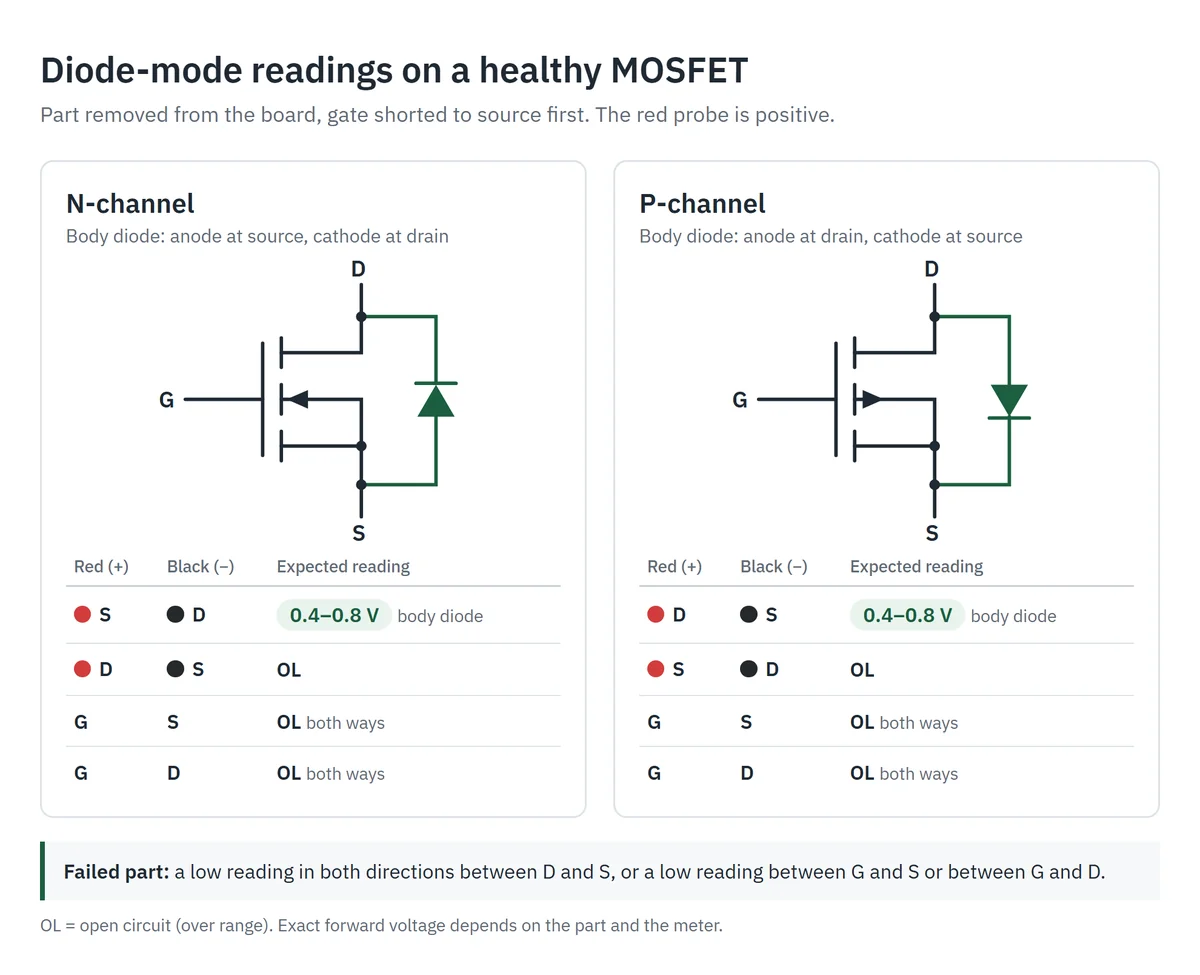
Figure: Expected diode-mode readings on a healthy, isolated MOSFET. The body diode points from source to drain in an N-channel part and from drain to source in a P-channel part.
Using the Body Diode to Determine Channel Type
Once you've confirmed the part is a MOSFET and know which pins are source and drain, the body diode tells you the channel type. In an N-channel MOSFET, the anode is at the source and the cathode is at the drain. In a P-channel part it's reversed. With the red probe on the anode you'll see the forward drop, so if red on source and black on drain reads around 0.5 V, it's N-channel.
The catch is that the diode reading alone can't tell source from drain. An N-channel part and a P-channel part with its source and drain swapped read exactly the same. Get the pinout from a candidate datasheet or from the circuit first. The source is usually the pin tied to ground or to the supply rail.
What Diode Testing Can't Tell You
A multimeter can tell you a part has failed, but it can't measure VGS(th), RDS(on) or gate charge, even on a healthy part. Those come from the datasheet if you can identify the part, or from the circuit if you can't.
How to Choose an SMD MOSFET Replacement
Start from the Circuit
When the marking is gone or the lookup leads nowhere, the circuit tells you a lot about what the part needs to do.
Trace the gate back to whatever drives it. A 3.3 V or 5 V MCU pin driving the gate directly makes a logic-level MOSFET a likely candidate, but the datasheet still has to confirm that RDS(on) is specified at the gate voltage you actually have. A dedicated gate driver running from 10–12 V opens up standard-level parts, provided the datasheet specifies RDS(on) at or below the actual drive voltage. Check the maximum VGS rating too. Some logic-level parts are rated for only ±12 V (the AO3400A is one), which leaves no margin on a 12 V driver.
The source connection gives a useful hint. A source tied to ground usually means a low-side N-channel switch. A source tied toward the positive rail usually means a high-side P-channel switch. There are common exceptions, though: high-side N-channel switches driven through a bootstrap circuit, and P-channel MOSFETs used for reverse-polarity protection, where the orientation looks backwards at first glance.
Channel Type
Match it. If there's any doubt, confirm with the body diode test once the pinout is known.
VDS Rating
Leave real margin above the highest voltage the drain will actually see, which on switched or inductive loads can sit well above the nominal supply. For inductive loads such as motors, relays, solenoids, and switching converters, also check avalanche capability and transient conditions, and whether the original design relies on an external flyback diode or snubber. A replacement with a higher VDS rating on paper can still fail if it tolerates less avalanche energy and the original part was quietly absorbing the spikes.
RDS(on) at Your Actual Gate Drive Voltage
Gate drive is where a lot of replacements go wrong. An RDS(on) figure means nothing without the VGS it was measured at. For many conventional MOSFETs the headline figure is specified at 10 V, but this varies by device.
VGS(th) doesn't answer the question either. It's the gate voltage at which drain current reaches a small test value chosen by each manufacturer, typically somewhere between 250 µA and 1 mA, and it spreads across a min–max range from part to part. VGS(th) marks where conduction begins, not a low-resistance operating point.
Example: same VDS, same package, different result
- Original: AO3400A, VDS 30 V, RDS(on) guaranteed down to VGS = 2.5 V (48 mΩ max), driven from a 3.3 V MCU pin
- Candidate: VDS 30 V, same SOT-23 package, RDS(on) specified only at VGS = 10 V
The original's RDS(on) is guaranteed at 2.5 V, below the 3.3 V drive level. The candidate's datasheet gives no guarantee at 3.3 V, so there isn't enough information to treat it as a drop-in replacement. The difference adds up quickly. At 2 A, the AO3400A's 48 mΩ maximum means under 0.2 W of conduction loss; if the candidate only reaches, say, 200 mΩ at 3.3 V, the same load dissipates 0.8 W, more than four times as much.
For a 3.3 V gate drive, look for RDS(on) explicitly specified at 2.5 V, or at another voltage at or below what your driver actually delivers.
Current and Power Dissipation
Datasheet power ratings depend on the test board. AOS rates the AO3400A at 1.4 W, for example, but that figure is measured on 1 in² of 2 oz copper and applies for up to 10 seconds. Its steady-state junction-to-ambient resistance on the same board is up to 125 °C/W, which works out to about 1 W at 25 °C ambient. A smaller or more crowded layout gets less, and if the original part ran warm on its footprint, a replacement with similar headline numbers will too.
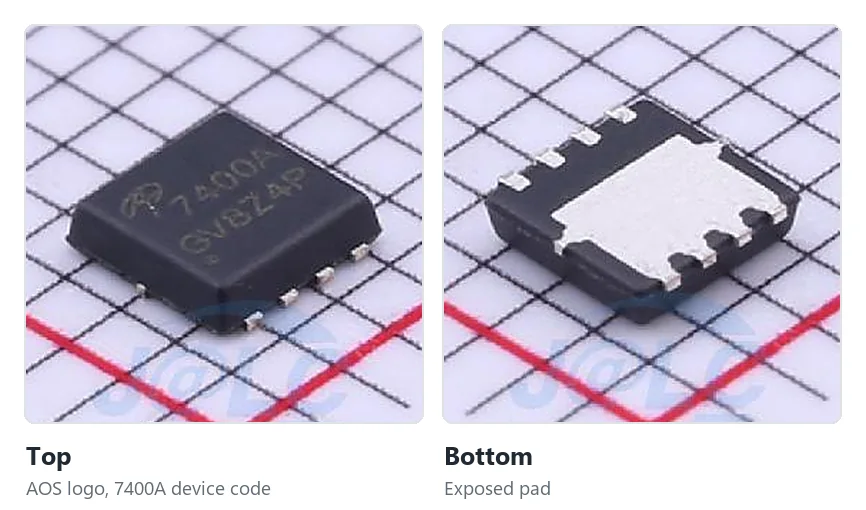
Figure: Top and bottom of an AON7400A in a DFN 3×3 package (C85734). The exposed pad only moves heat into the board if it is soldered to enough copper.
ID ratings referenced to case or solder-point temperature deserve the same caution. onsemi's 2N7002L datasheet notes that the package's power dissipation may limit continuous drain current below the rated value.
RDS(on) also rises with temperature. Nexperia's 2N7002, for example, is specified at 5 Ω maximum at 25 °C and 9.25 Ω at a junction temperature of 150 °C, and many datasheets include a normalized RDS(on)–temperature curve. A part that runs hot dissipates more, which heats it further, so when a part runs warm, estimate losses from the curve at your expected junction temperature.
For DFN and other exposed-pad packages, thermal performance depends on the pad being properly soldered and connected to copper. A voided or poorly connected thermal pad can turn an adequately rated part into an overheating one.
Package and Pinout
Single SOT-23 MOSFETs commonly use pin 1 as gate, pin 2 as source, and pin 3 as drain, but this isn't guaranteed. onsemi's own SOT-23 package outline defines several MOSFET pin styles, including gate-source-drain, gate-drain-source, drain-source-gate, and source-drain-gate. Confirm the pinout against the datasheet every time. SOT-23-6 dual MOSFETs and DFN parts vary even more, and two parts in the same package can have completely different pin assignments.
Switching Requirements
For PWM or other high-frequency switching, compare total gate charge (Qg) and gate-drain charge (Qgd). With the same driver, a part with substantially higher gate charge may switch more slowly, increasing switching loss and device temperature.
Cross-Referencing Candidates
Manufacturer cross-reference tools and parts libraries are good for building a shortlist quickly. After that, go through the checklist above against each candidate's datasheet. Cross-reference tools usually match on headline specs and package, and they don't always account for how the part is driven in your circuit.
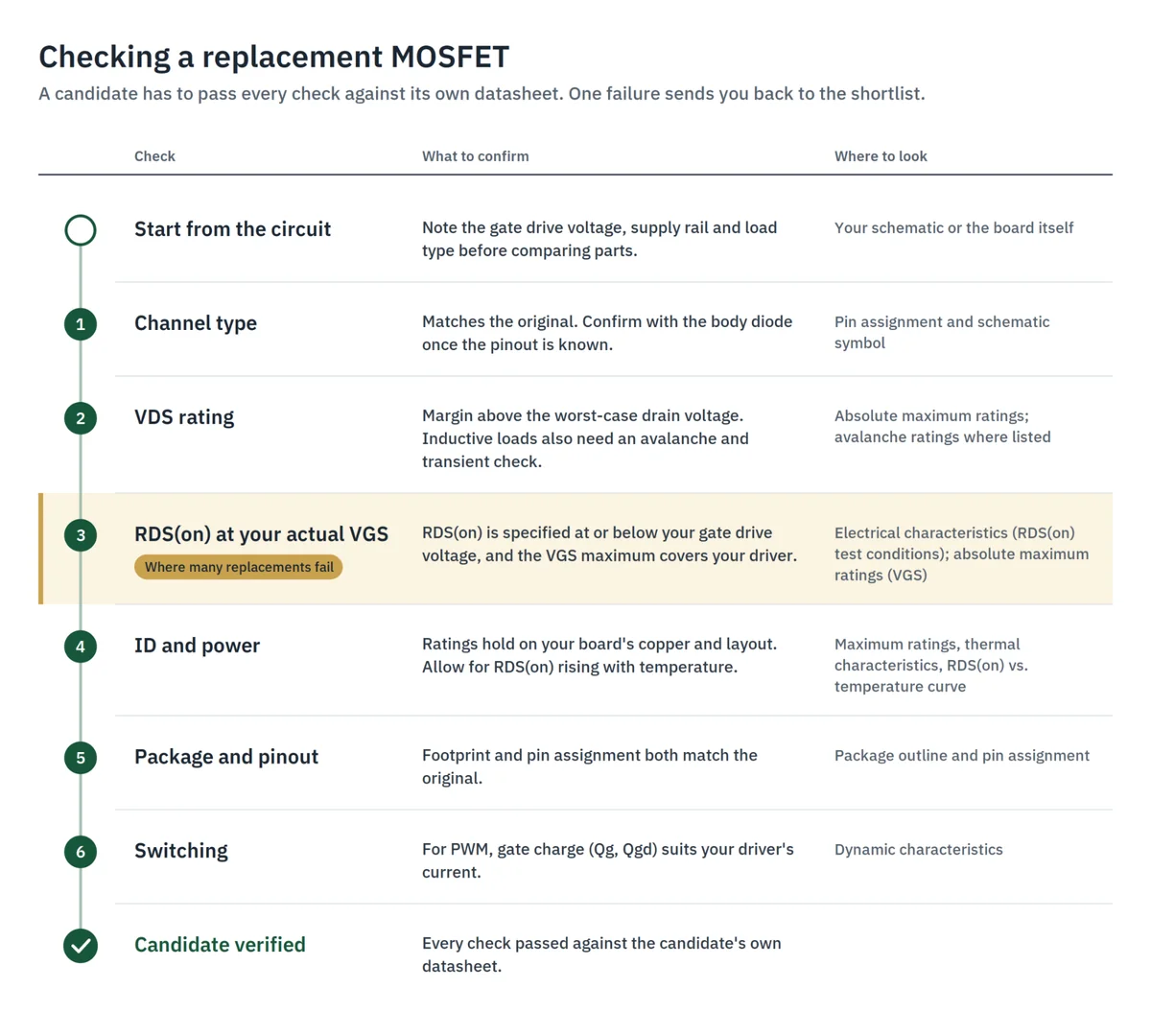
Figure: Checking a replacement candidate, from channel type to gate charge.
Common Mistakes When Identifying SMD MOSFETs
A handful of shortcuts cause most misidentified parts:
- Reading the wrong part. On a crowded board, a neighboring diode's or logic IC's code is easy to take for the MOSFET's. Confirm which package you're actually looking at.
- Searching a traceability code. Date and lot characters get searched as if they were the device code (Step 3).
- Guessing the channel from the code. The code says nothing about N or P. The body diode tells you once the pinout is known.
- Assuming a standard pinout. Pinouts vary within SOT-23, and far more across dual and DFN packages.
- Treating a suffix variant as the base part. It may carry different ratings (Step 4).
- Matching on VDS and package alone. Ignoring gate drive is the most common reason a "compatible" replacement overheats.
Conclusion
The code on an SMD MOSFET narrows the search; the logo, package, circuit and datasheet finish it. When you replace a part, check RDS(on) at the gate voltage your circuit actually delivers. That's where most "compatible" substitutes fail.
To build a shortlist, search the JLCPCB parts library by part number and compare package, ratings and stock. The AO3400A, for example, is a Basic part, so it carries no feeder loading fee on Economic PCBA. When you order PCB assembly, our engineers check your files for manufacturability before production, but whether a part suits your circuit is still a design decision, so verify each candidate against its own datasheet with the checklist above. When the BOM is ready, get an instant quote.
SMD MOSFET FAQ
Q: How do I identify an SMD MOSFET from its code?
Start with the package and any manufacturer logo, then separate the device code from date or lot markings. Search the clean code in the manufacturer's marking documentation or an SMD marking database, and treat the results as candidates. Confirm the final match against the datasheet's package drawing, pinout and marking information. Without the logo and package, a short code alone often points to several unrelated parts.
Q: Can two different MOSFETs have the same marking code?
Yes, and it happens often. There's no universal marking standard, and small packages only have room for a few characters, so codes collide between manufacturers and get reused across product families. That's why the manufacturer logo and package matter as much as the code itself.
Q: How do I tell if an SMD MOSFET is N-channel or P-channel?
If you know which pins are source and drain, use the body diode. With the part removed and the gate discharged, measure between source and drain in diode mode. A forward drop with the red probe on the source means N-channel; with the red probe on the drain, P-channel. If you don't know the pinout yet, get it from a candidate datasheet or the circuit first, because the diode reading alone can't tell source from drain.
Q: How do I test an SMD MOSFET with a multimeter?
Remove it from the board if possible, and briefly short gate to source to discharge the gate. In diode mode, D-S should show the body diode in one direction only, while G-S and G-D should normally read very high resistance. A low reading in both directions on D-S, or a persistently low reading on G-S or G-D, indicates failure. A meter can confirm failure but can't measure RDS(on) or VGS(th).
Q: What usually kills a small SMD MOSFET?
The usual causes are gate overvoltage or ESD, which damages the gate and typically leaves a low G-S reading; inductive spikes with no flyback diode or snubber, which push the part into avalanche and often end in a D-S short; and overheating from too little gate drive or too little copper. Work out which one it was before fitting a replacement, or the new part may fail the same way.
Q: Can I replace a MOSFET with one that has a different marking?
A different marking alone neither proves nor rules out compatibility. Markings are manufacturer-specific, so a perfectly suitable replacement will usually carry a different code. What matters is matching channel type, VDS, current and power rating, RDS(on) at your actual gate drive voltage, gate charge, package and pinout, all verified against the datasheet.
Q: Can a 10 V gate-drive MOSFET be driven by a 3.3 V MCU?
It depends on the datasheet. If RDS(on) is only specified at 10 V, there's no guarantee of how the part behaves at 3.3 V. It may conduct, but with much higher resistance and more heat. Look for RDS(on) specified at 2.5 V, or at another voltage at or below your actual gate drive, and check whether the MCU pin can supply enough gate current for your switching speed. If it can't, add a gate driver or choose a different part.
Search the JLCPCB parts library by part number to compare package, ratings and stock before you pick a replacement.
Basic parts such as the AO3400A carry no feeder loading fee on Economic PCBA.
Upload your Gerber, BOM and CPL on the quote page for an instant price.
Popular Articles
• SMD Resistor Package Sizes: Complete Size Chart, Footprints & How to Choose
• How to Solder SMD Components Like a Pro [2026 Updated]
• SMD Resistor Codes: How to Read 3-Digit, 4-Digit, and EIA-96 Markings
• SMD Capacitor Codes: Identification, Markings, and Polarity
• SMD Capacitor Sizes: Complete Size Chart and Selection Tips for PCB Design and Assembly
Keep Learning
SMD MOSFET Code Guide: How to Identify, Test and Replace a MOSFET
Figure: AO3400A (C20917) in the JLCPCB parts library. The listing gives RDS(on) at 2.5 V gate drive, the number that matters in the replacement example later in this guide. An SMD MOSFET code is the two or three characters printed on top of the package, and on its own it rarely tells you which part you're holding. SMD resistors follow standard marking schemes, such as three- and four-digit codes and EIA-96. MOSFETs don't. The same short code can appear on unrelated parts from different manufacturers, ......
ESP8266 vs ESP32: Which One Should You Use?
Key Takeaways ESP32: Dual-core 240 MHz CPU, Bluetooth Classic and BLE, 520 KB SRAM, and up to 34 GPIOs. ESP8266: Single-core CPU, no Bluetooth, and around 50 KB of free RAM for applications. Lifecycle status: Espressif marks the ESP8266 Not Recommended for New Designs (NRND) and names the ESP32-C2 (ESP8684) as its upgrade, although the ESP8266 remains in production with a longevity commitment. Which ESP32 to use: Choose the ESP32-C2 for simple Wi-Fi or Bluetooth LE firmware, the ESP32-C3 for more memo......
What Is a Thermistor? A Practical Guide to NTC, PTC, Applications, and Circuit Design
Key Takeaways Definition: A thermistor is a thermally sensitive resistor whose resistance changes markedly and predictably with temperature, typically by about 4.4% per °C for a standard 10 kΩ NTC (B25/50 = 3950 K) near 25 °C. NTC vs. PTC: An NTC thermistor's resistance falls as temperature rises, which suits temperature sensing and inrush current limiting; a switching PTC's resistance rises steeply above its switch temperature, which suits circuit protection. Key Specifications: An NTC thermistor is ......
What Is the ESP32-CAM, and How to Wire, Power, and Program It?
Key Takeaways Board, not chip: The ESP32-CAM is an AI-Thinker development board, not an Espressif product. It carries AI-Thinker's ESP32-S module, an OV2640 camera, PSRAM, a microSD slot, and a flash LED. No USB port: The board has no USB connector or USB-to-UART bridge, so you program it via its serial pins using a 3.3 V USB-to-serial adapter, with GPIO0 held low at reset. Few free pins: The camera, PSRAM, and microSD card occupy most GPIOs. With the microSD card unused, GPIO2, GPIO4, GPIO12, GPIO13,......
ESP32 Versions: Which One Should You Use for Your Project?
Key Takeaways Radios decide first: ESP32 versions differ mainly in their radios, CPU cores, and peripherals. Common defaults: The ESP32-C3 suits low-cost Wi-Fi and Bluetooth LE, the ESP32-S3 suits camera, display, voice, and on-device AI. Original ESP32: The chip is still in production and remains the choice for Bluetooth Classic. Versions without Wi-Fi: The ESP32-H2 targets battery-powered Thread and Zigbee devices. Chip, module, or board: Prototype on a development board, then design a module onto y......
SOIC Package: A Complete Guide to Specifications, Types, Uses, and SMT Assembly
As designs transition from legacy through-hole components to high-density Surface Mount Technology (SMT), the Small Outline Integrated Circuit (SOIC) remains the industry standard for operational amplifiers, flash memory, sensors, and microcontrollers. It reflects a well-balanced engineering design, offering a practical compromise between the miniaturisation demanded by modern consumer electronics and the ruggedness required for industrial applications. In this guide, you will learn: SOIC package dime......