What Is the ESP32? A Complete Guide to Features, Architecture, Modules, Programming, and Applications
16 min
- What is the ESP32?
- Key Features of ESP32
- ESP32 Architecture Explained
- How Does an ESP32 Work?
- ESP32 Series Overview
- Popular ESP32 Modules and Development Boards
- ESP32 Software Development Ecosystem
- Common Applications of the ESP32
- Which ESP32 is Right for Your Project?
- ESP32 vs Other Popular Microcontrollers
- ESP32 Advantages and Disadvantages
- ESP32 Hardware Design Guidelines
- FAQs about ESP32
- Conclusion
From Wi-Fi-enabled temperature sensors and wearable health monitors to industrial gateways and AI-powered cameras, the ESP32 microcontroller has become one of the world's most widely adopted wireless embedded platforms. Combining a powerful processor with integrated Wi-Fi and Bluetooth, it lets engineers build connected devices without separate networking hardware.
This guide covers ESP32 specifications, architecture, the full family of variants, development boards, programming tools, and real-world ESP32 projects in one pillar reference.
ESP32 at a Glance
- 32-bit microcontroller family by Espressif Systems
- Built-in Wi-Fi (802.11 b/g/n) and Bluetooth Classic/BLE on most variants
- Dual-core or single-core options, clock speeds up to 240 MHz
- Operates at 3.3 V, wide GPIO, and peripheral support
- Programmable with ESP-IDF, Arduino IDE, PlatformIO, MicroPython, and more
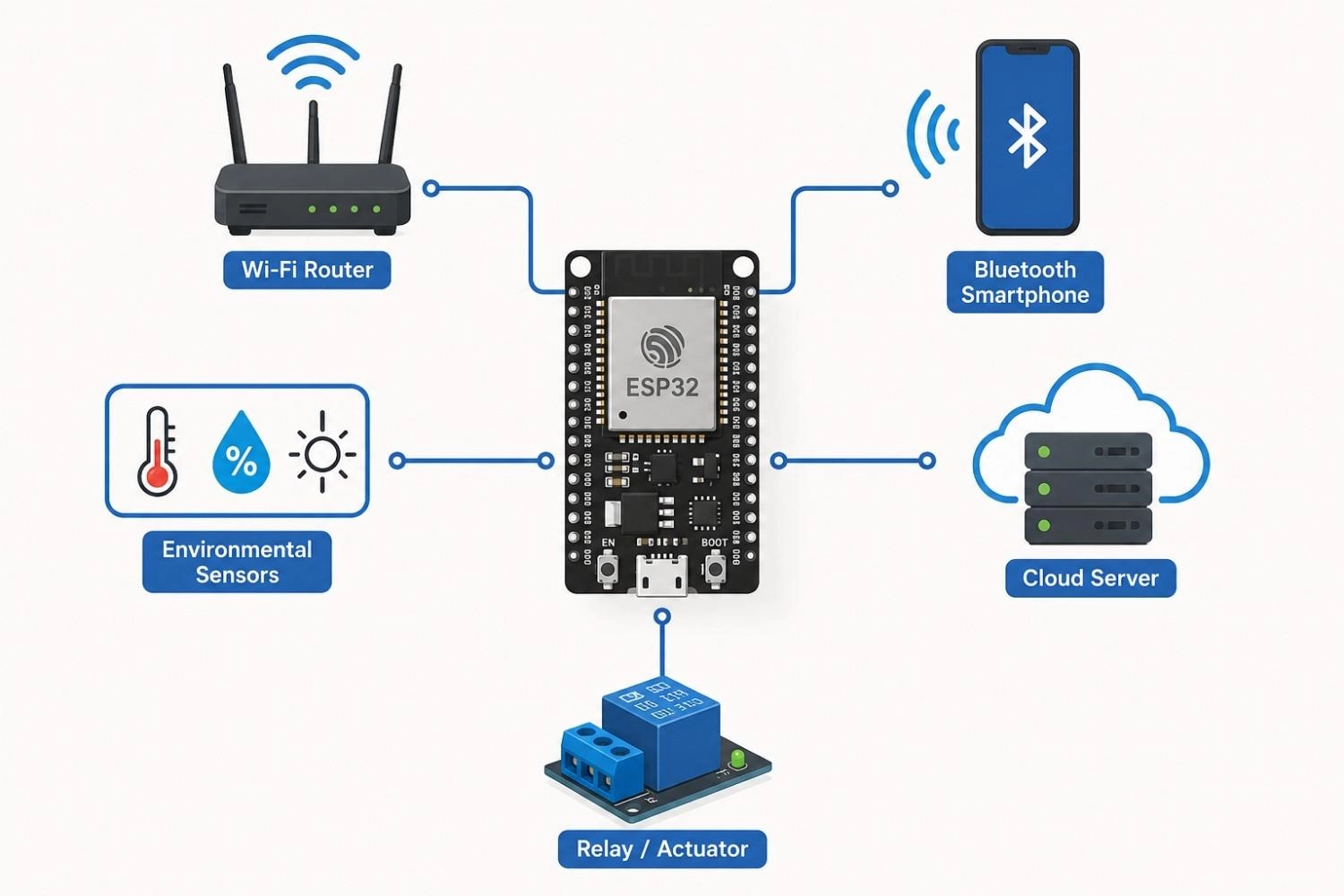
Figure: ESP32 microcontroller connected to Wi-Fi, Bluetooth, sensors, cloud, and actuators in a typical IoT setup.
What is the ESP32?
The ESP32 is a 32-bit system-on-chip (SoC) microcontroller family designed by Espressif Systems, first released in 2016 as the successor to the ESP8266.
Unlike a traditional MCU that needs an external radio chip for wireless connectivity, the ESP32 integrates Wi-Fi and Bluetooth directly on the same die as the processor, memory, and peripherals.
It is worth separating two terms that are often used interchangeably:
- ESP32 chip: the bare silicon die, rarely handled directly by most engineers.
- ESP32 module: the chip combined with flash memory, an antenna, and supporting passives. These are designed as surface-mount modules, highlighting the practical assembly differences of surface-mount vs through hole technology in modern electronics.
This distinction matters because most development boards and production designs use a module, not the raw chip.
The ESP32's mix of processing power, wireless connectivity, and low cost is the main reason it revolutionized IoT development: before it, adding Wi-Fi usually meant pairing a separate MCU with a separate radio module and writing complex glue code. The ESP32 collapsed that hardware requirement into a single part.
| Feature | ESP32 Series |
|---|---|
| CPU | Xtensa LX6 or LX7 (Xtensa-based models), RISC-V (C-series and H-series) |
| Wireless | Wi-Fi 802.11 b/g/n, Bluetooth Classic/BLE (varies by family member) |
| Operating Voltage | 3.3 V |
| Clock Speed | Up to 240 MHz, model-dependent |
| GPIO | Up to roughly 30+ usable pins, model-dependent |
| ADC | Yes, 12-bit SAR on most variants |
| DAC | Available on select models (8-bit, 2 channels) |
| USB | Native USB OTG on select models (S2, S3) |
Note
These ESP32 specifications are kept general because the ESP32 is a family, not a single part. The classic ESP32 (Xtensa, dual-core) differs from newer RISC-V variants like the ESP32-C3, so locking the whole family to one number set, including operating temperature, would be misleading.
Always confirm exact figures against the specific module's datasheet before finalizing a design.
Key Features of ESP32
Processing Performance
Most classic ESP32 chips use a dual-core Xtensa LX6 processor, though several newer family members (ESP32-C2, ESP32-C3, ESP32-H2) use a single RISC-V core instead. Clock speeds reach up to 240 MHz depending on the model, and dual-core variants can dedicate one core to wireless and network tasks while the other handles application logic, a common pattern in real-time IoT firmware.
Integrated Wireless Connectivity
- ESP32 Wi-Fi: 802.11 b/g/n on the 2.4 GHz band across most of the family, with Wi-Fi 6 support added on the ESP32-C6.
- Bluetooth Classic: included on the original ESP32 for legacy audio and serial use cases.
- ESP32 Bluetooth Low Energy (BLE): included across nearly every family member, making it the primary choice for battery-powered sensors and wearables.
Rich Peripheral Interfaces and ESP32 GPIO
The ESP32 pinout exposes a dense set of peripherals through GPIO: SPI, I2C, UART, I2S (for audio), PWM, ADC, DAC (select models), capacitive touch sensing, and CAN/TWAI on certain variants. This breadth is a major reason engineers reach for the ESP32 instead of stacking a simpler MCU with several add-on modules.
ESP32 Power Consumption and Sleep Mode
Power states include active mode, modem-sleep, light-sleep, and deep-sleep, with current draw dropping from tens of milliamps in active mode to single-digit microamps in deep-sleep. ESP32 sleep modes keep a real-time clock (RTC) domain powered through deep-sleep so the chip can wake on a timer or external interrupt, which is what makes multi-month battery operation realistic for sensor nodes.
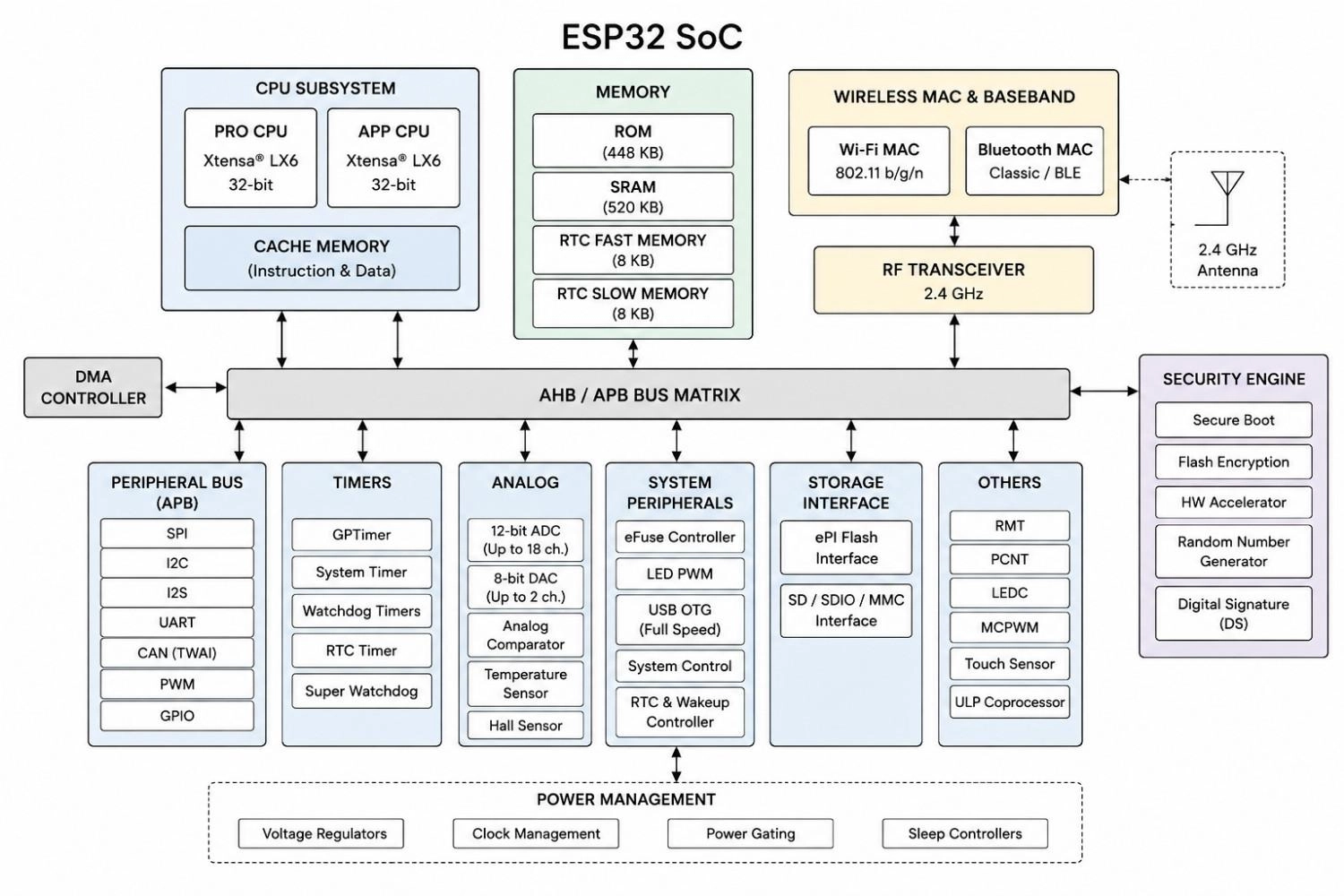
Figure: ESP32 architecture showing CPU, memory, wireless radio, and peripheral connections.
ESP32 Architecture Explained
- CPU: One or two Xtensa LX6/LX7 cores, or a RISC-V core on C-series and H-series chips, scheduled by FreeRTOS.
- Memory: On-chip ROM for boot code, SRAM for runtime data, and external flash (commonly 4, 8, or 16 MB) for the application image.
- Wireless Engine: A dedicated radio front end and baseband processor handle Wi-Fi and Bluetooth timing independently of the main CPU.
- Peripheral Controller: Routes GPIO-mapped peripherals to the CPU through an internal bus matrix, with most pins fully remappable.
- Security Features: Hardware-accelerated AES, SHA, and RSA, plus secure boot and flash encryption, protect firmware and credentials in production devices.
- ULP Coprocessor: A small, separate Ultra-Low-Power processor that samples sensors during deep-sleep, only waking the main CPU when a specific threshold condition is met.
How Does an ESP32 Work?
Every ESP32 application follows the same basic workflow: read inputs, process data, communicate with other devices, and control outputs.
Interfacing with Sensors
GPIO, ADC, I2C, and SPI peripherals let the ESP32 read temperature, motion, light, or other sensor data directly, without needing an external interface chip.
Processing Data
The CPU runs the application firmware, reading sensor values, applying local logic, and deciding what to transmit. On dual-core models, this workload is often split so the radio stack does not stall sensor readings.
Wireless Communication
Once data is ready, the integrated Wi-Fi or Bluetooth radio handles the connection to a router, gateway, or paired mobile device, completely independent of the CPU's primary timing.
Sending Data to the Cloud
Over Wi-Fi, the firmware typically publishes data via MQTT or HTTPS to a cloud service, which subsequently forwards it to a mobile app or central dashboard.
Controlling Outputs
Closing the loop, the ESP32 drives GPIO, PWM, relays, motors, LEDs, or displays in response to local sensor data or incoming cloud commands.
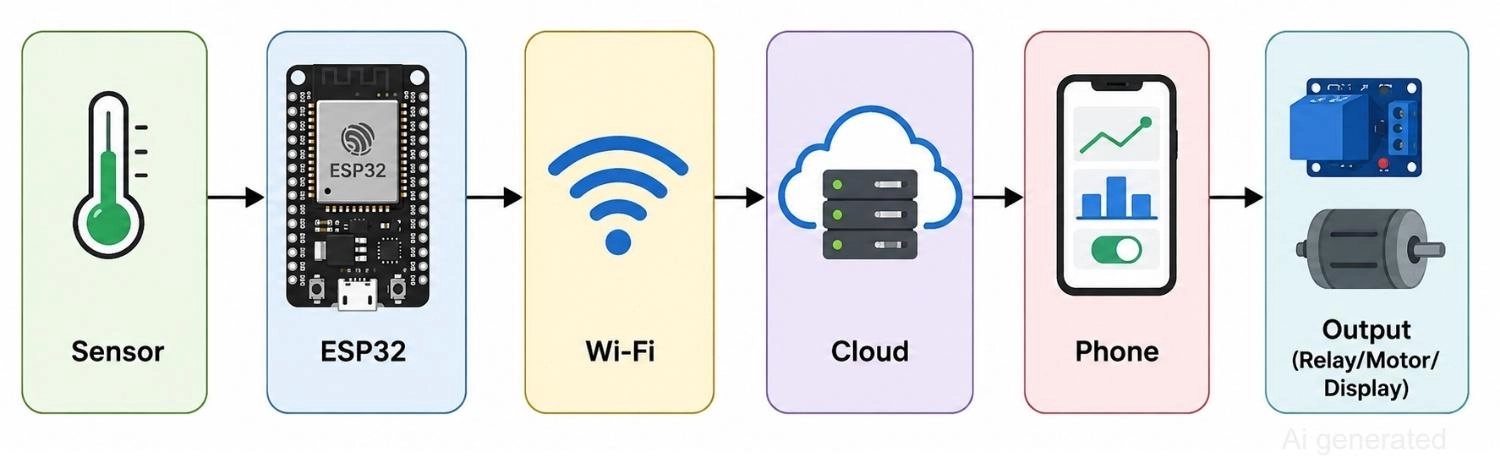
Figure: Showing data moving from a sensor through ESP32, Wi-Fi, the cloud, a phone, and back to an output device.
ESP32 Series Overview
"ESP32" is not one chip, but an entire family. Choosing the right member matches the specific hardware requirements of your project.
| Family Member | Highlights | Best For |
|---|---|---|
| ESP32 (Classic) | Dual-core Xtensa, Wi-Fi + Bluetooth Classic/BLE | General-purpose IoT |
| ESP32-S2 | Wi-Fi only, native USB OTG | USB-connected devices |
| ESP32-S3 | Dual-core Xtensa, AI/vector instructions, camera/LCD support | TinyML, vision, audio |
| ESP32-C3 | Single-core RISC-V, Wi-Fi + BLE, low cost | Budget IoT sensors |
| ESP32-C6 | RISC-V, Wi-Fi 6, Bluetooth 5.3, Thread/Zigbee (802.15.4) | Matter and smart home devices |
| ESP32-H2 | RISC-V, Thread/Zigbee, no Wi-Fi | Low-power mesh nodes |
Note
As a rule of thumb:
- Pick the classic ESP32 or ESP32-S3 when raw performance and peripheral richness matter most.
- Pick the ESP32-C3 when cost and physical footprint are your primary drivers.
- Pick the ESP32-C6 or ESP32-H2 when the project requires modern Matter, Thread, or Zigbee protocols.
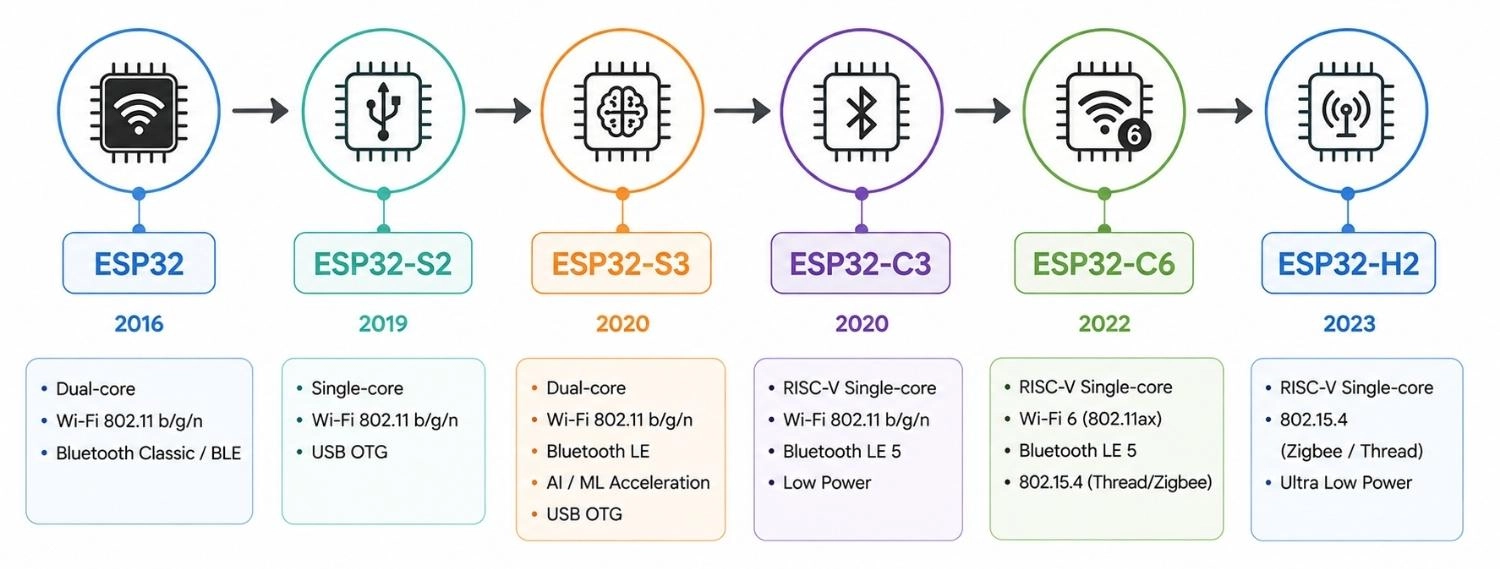
Figure: Timeline showing the ESP32 family progression from ESP32 to S2, S3, C3, C6, and H2.
Popular ESP32 Modules and Development Boards
Most engineers work with an ESP32 module or a development board rather than handling the raw IC directly.
ESP32-WROOM-32
- Most popular production module
- Integrated flash memory
- PCB trace or ceramic antenna
ESP32-WROVER
- Adds external PSRAM
- Better suited for graphics and memory-heavy AI workloads
DevKitC
- Espressif's reference development board
- Breaks out GPIO to standard headers for breadboard use. These platforms are incredibly popular because they allow fast and easy prototype PCB assembly for DIY projects before moving to a fully custom circuit board.
NodeMCU-32S
- Community-driven development board format
- Widely manufactured by third parties
ESP32-CAM
- Pairs an ESP32 with an OV2640 camera and microSD socket
- Highly popular for low-cost computer vision projects
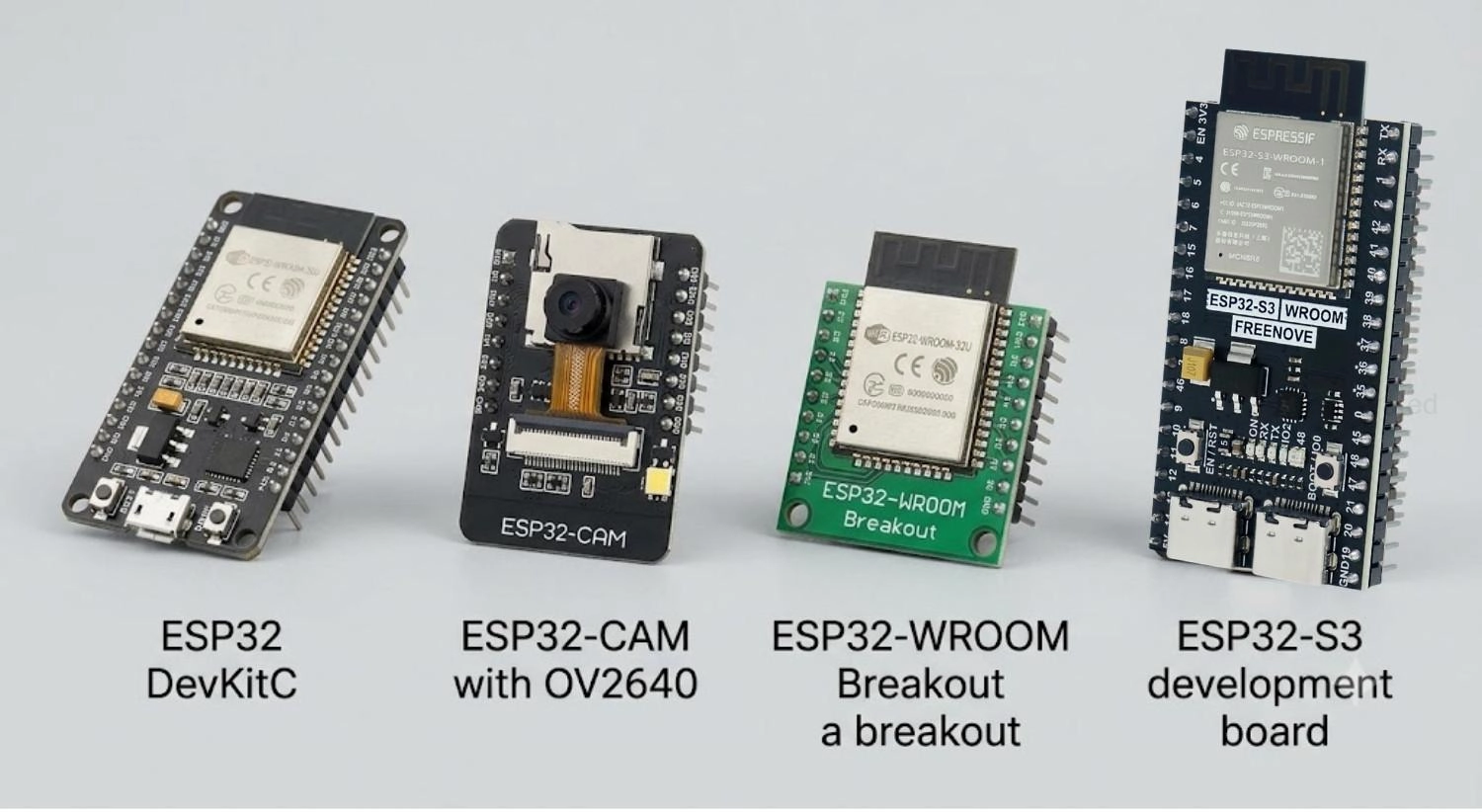
Figure: Comparison of ESP32 DevKitC, ESP32-CAM, ESP32-WROOM module, and ESP32-S3 board.
ESP32 Software Development Ecosystem
One of the ESP32's biggest advantages is a mature set of development tools that supports everyone from first-time hobbyists to commercial teams.
ESP-IDF (Official Development Framework)
ESP-IDF is Espressif's official SDK for ESP32 programming, written in C/C++ with a CMake-based build system. It gives full access to hardware features, follows a component-based architecture, and receives long-term support releases, making it the standard choice for commercial-grade products. ESP-IDF and PlatformIO both run as Visual Studio Code extensions, so engineers can handle code development without switching environments.
Arduino IDE
The Arduino core for ESP32 is built on top of ESP-IDF but wraps it in Arduino's simpler API and library ecosystem. It is the easiest entry point for beginners, and projects that start here can later migrate to pure ESP-IDF as complexity grows.
PlatformIO
PlatformIO is a robust build and dependency management system that integrates seamlessly with VS Code, supporting multiple environments, built-in debugging, and unit testing. It is favored by professional embedded developers building larger ESP32 codebases.
Real-Time Operating Systems for ESP32
FreeRTOS is built directly into ESP-IDF and runs by default on the ESP32, providing tasks, queues, semaphores, timers, and dual-core scheduling. Most ESP32 firmware, even simple Arduino sketches, runs on top of FreeRTOS without the developer needing to interact with it directly.
Zephyr RTOS is an open-source, vendor-portable RTOS that also supports the ESP32 family, common in industrial and multi-vendor IoT products where the same firmware base needs to run across MCUs from different manufacturers. Zephyr development today centers on its own specialized tooling.
| Tool | Language | Best For |
|---|---|---|
| Arduino IDE | C++ | Beginners |
| ESP-IDF | C/C++ | Professional development |
| PlatformIO | C/C++ | Large, multi-environment projects |
| MicroPython | Python | Learning and rapid prototyping |
| CircuitPython | Python | Learning electronics |
| Zephyr | C | Industrial RTOS projects |
| Rust | Rust | Memory-safe embedded development |
Table: ESP32 development tools listed with their primary language and best-fit use case.
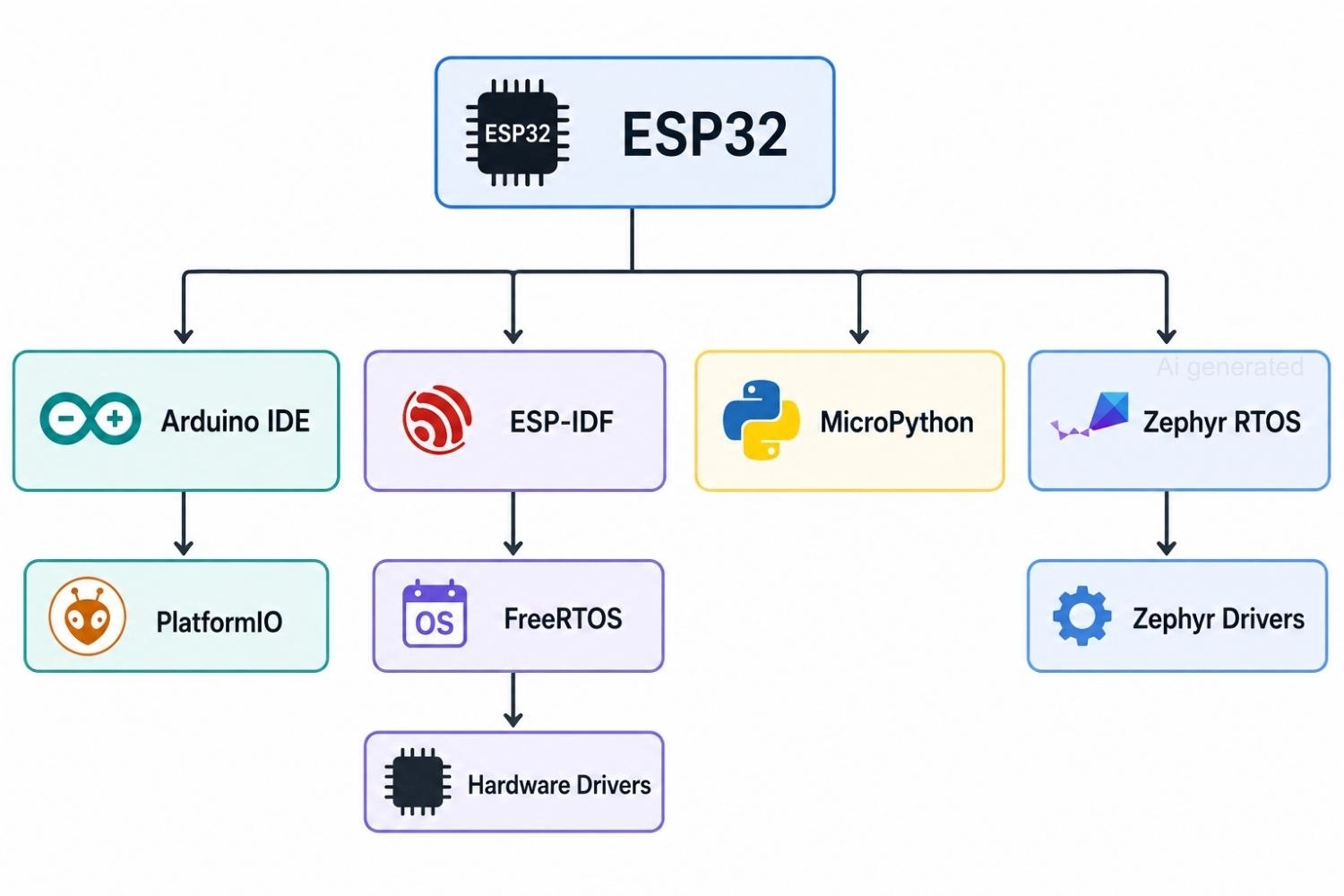
Figure: ESP32 software paths through Arduino IDE, ESP-IDF, PlatformIO, FreeRTOS, and MicroPython.
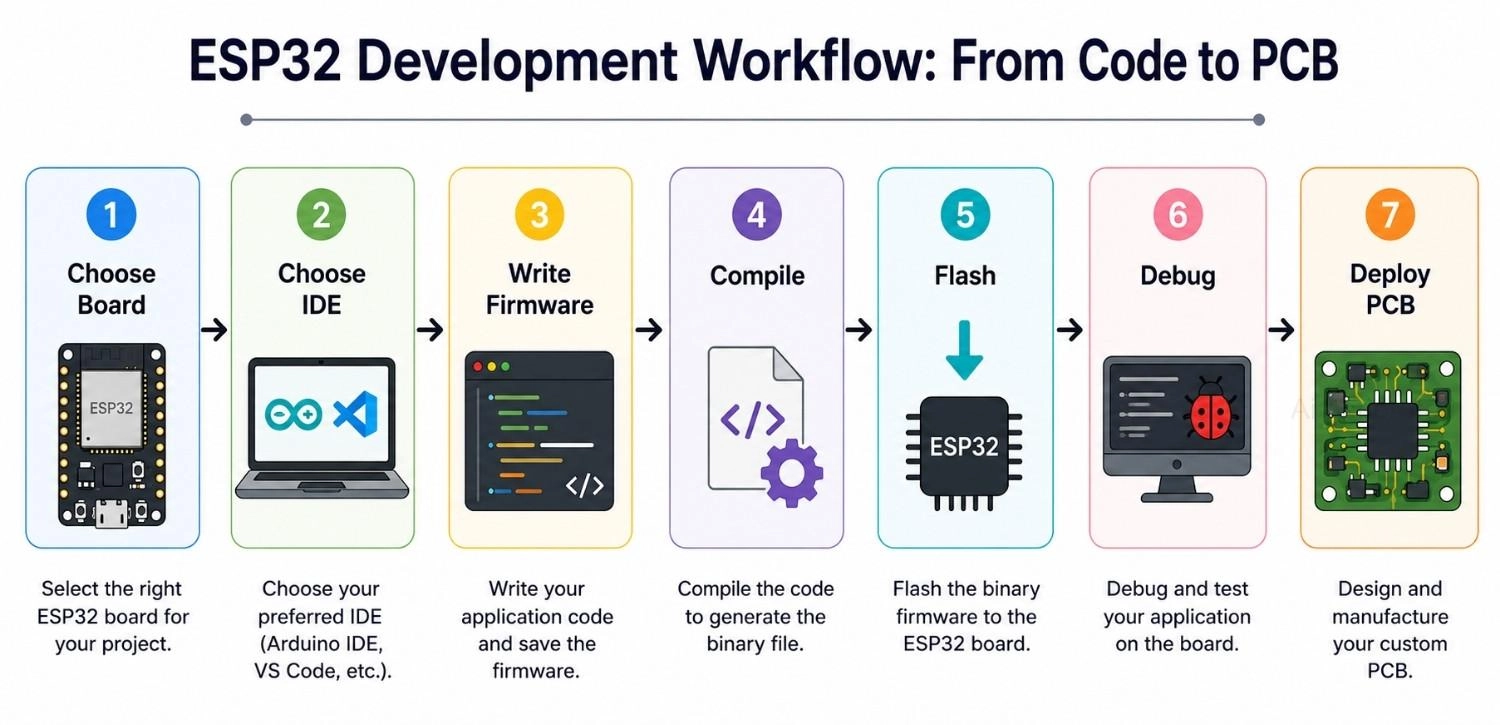
Figure: Seven-step workflow for developing an ESP32 project from choosing a board through PCB deployment.
Community and Documentation of ESP32
Documentation and community support are practical factors in platform selection. Espressif maintains official programming guides, hardware references, and design guidelines on GitHub alongside the ESP-IDF and Arduino-ESP32 repositories, backed by a massive open-source community of libraries, public code examples, and years of tutorials covering nearly every sensor and use case.
Common Applications of the ESP32
Thanks to its combination of wireless connectivity, processing performance, and extensive peripheral support, the ESP32 is used across consumer, industrial, and advanced embedded applications.
Consumer Applications of ESP32
ESP32 Smart Home and Automation
The ESP32's built-in Wi-Fi and Bluetooth make it a natural fit for home automation systems that talk directly to smartphones or cloud servers.
- Smart lighting and smart plugs
- Thermostats and environmental monitors
- Security sensors (door/window sensors)
ESP32 Wearables and Healthcare Monitoring
Low power draw and BLE make ESP32 wearable devices practical for continuous, battery-powered health tracking.
- Fitness trackers
- Heart-rate and SpO2 monitors
- Portable medical monitoring devices
ESP32 Consumer Electronics
A low bill-of-materials cost and integrated wireless reduce the part count needed for connected consumer gadgets.
- Smart appliances
- Connected toys
- Low-cost IoT gadgets
Industrial Applications of ESP32
ESP32 Industrial IoT
Multiple communication interfaces and low power consumption suit distributed industrial monitoring across a facility.
- Predictive maintenance
- Machine and vibration monitoring
- Industrial gateways
ESP32 Smart Agriculture
Wi-Fi range combined with external LoRa modules extends ESP32-based monitoring across open fields.
- Soil moisture monitoring
- Automated irrigation control
- Remote field monitoring
ESP32 Environmental and Smart City Monitoring
Compact sensor interfacing supports unattended, long-running environmental nodes in outdoor and urban deployments.
- Air quality monitoring
- Weather stations
- Smart city infrastructure sensors (lighting, parking, water levels)
Energy and Building Automation
Wireless connectivity plus ADC and digital I/O make the ESP32 suitable for monitoring and controlling building systems.
- Energy and power consumption monitoring
- HVAC and access control automation
- Building automation gateways
Advanced Applications of ESP32
ESP32 Robotics
The chip provides enough processing power for small autonomous robots while supporting wireless control and numerous sensors.
- Motor control and PWM generation
- Sensor fusion (IMU, encoders)
- Mobile and educational robots
ESP32 Edge AI
The ESP32-S3's vector instructions enable lightweight on-device inference without a cloud round-trip.
- Keyword spotting
- Simple image classification
- On-device anomaly detection
ESP32 Wireless Sensor Networks
Low-power radios and deep-sleep modes let many nodes report back to a single gateway for months on battery.
- Temperature and humidity nodes
- Occupancy sensing
- Gateway-connected sensor arrays
| Application | Typical Interfaces | Common Sensors/Devices |
|---|---|---|
| Smart Home | Wi-Fi, BLE | Relays, PIR, DHT22 |
| Industrial IoT | Wi-Fi, UART, CAN/TWAI | Pressure, vibration, current sensors |
| Robotics | PWM, UART, I2C | IMU, motors, encoders |
| Agriculture | Wi-Fi, LoRa (external) | Soil moisture, weather sensors |
| Wearables | BLE | Heart-rate, accelerometer |
| Edge AI | Camera, I2S | Microphone, camera modules |
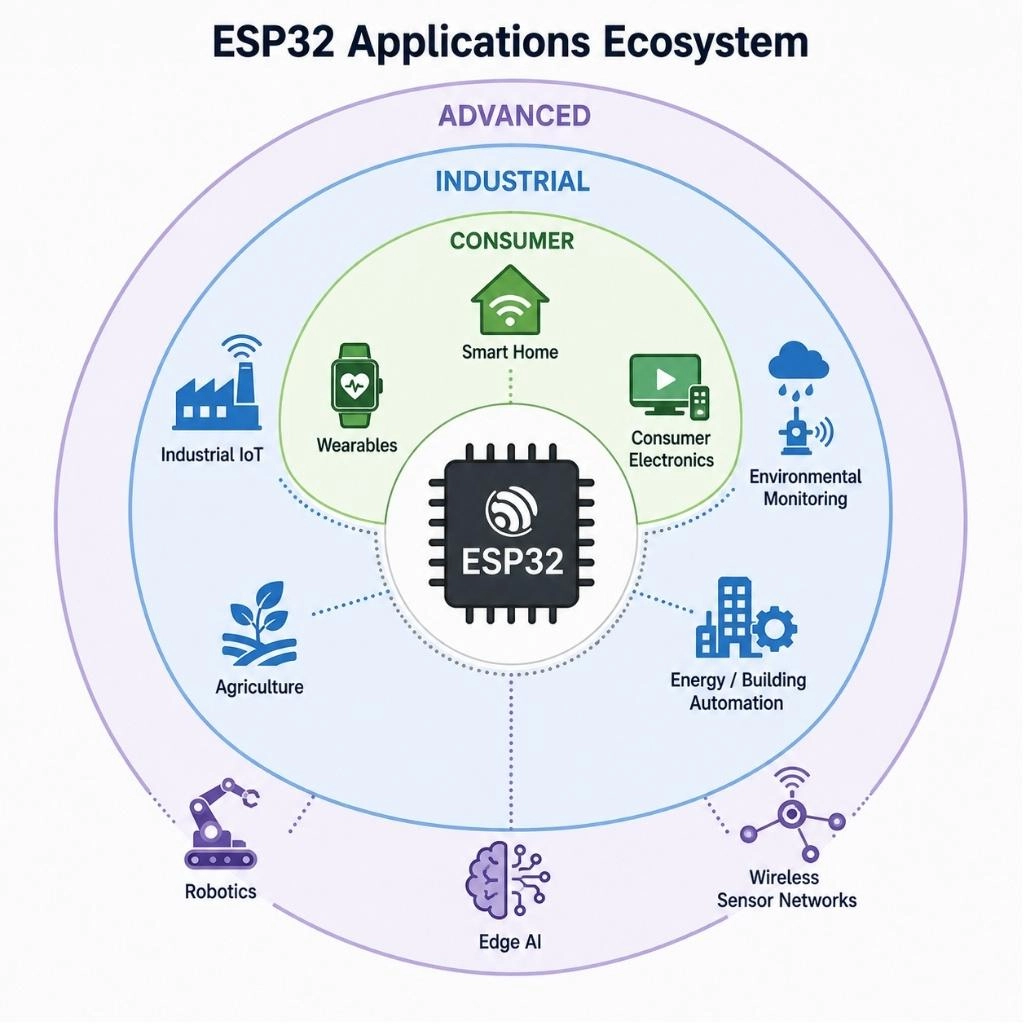
Figure: Showing ESP32 application categories grouped into consumer, industrial, and advanced domains around a central chip icon.
Which ESP32 is Right for Your Project?
| If you need... | Choose |
|---|---|
| Wi-Fi + BLE, general-purpose | ESP32 (Classic) |
| TinyML / Edge AI | ESP32-S3 |
| Ultra-low cost | ESP32-C3 |
| Zigbee / Thread, no Wi-Fi | ESP32-H2 |
| Wi-Fi 6 + Matter | ESP32-C6 |
| Native USB device | ESP32-S2 |
Read more: Beginner's Guide to Choosing an ESP32 Development Board
ESP32 vs Other Popular Microcontrollers
| Feature | ESP32 | Arduino Uno | ESP8266 | STM32 |
|---|---|---|---|---|
| Wi-Fi | Yes | No | Yes | Some models |
| Bluetooth | Yes | No | No | Some models |
| Processing Performance | Higher | Lower | Moderate | Wide range |
| GPIO Count | High | Moderate | Moderate | Varies by model |
| IoT Suitability | Excellent | Limited | Good | Excellent |
The ESP8266 remains relevant for simple, cost-sensitive Wi-Fi projects that skip Bluetooth or heavy processing.
STM32 covers a much wider performance range and suits designs where wireless is handled separately or not needed, while Arduino Uno (ATmega328P-based) fits simple, non-wireless learning projects.
When comparing platforms, looking at the technical tradeoffs of ESP32 vs Arduino reveals that processing speed and networking requirements are the true deciding factors for engineers.
ESP32 Advantages and Disadvantages
Advantages of ESP32
- Built-in Wi-Fi and Bluetooth
- Low cost relative to capability
- Large, active community
- Mature ecosystem (ESP-IDF, Arduino IDE, PlatformIO)
- Rich, flexible peripheral set
Disadvantages of ESP32
- ADC accuracy and linearity can be limited, especially near supply rails
- 3.3 V logic only, no native 5 V tolerance on most pins
- Several GPIO pins are boot-strapping pins and must be handled carefully at startup
- Wi-Fi use increases power draw, a concern for battery designs
- Multiple family variants can be confusing for first-time buyers
ESP32 Hardware Design Guidelines
Anyone moving from a development board to a production PCB should note two things:
- Boot-strapping pins (GPIO0, GPIO2, and GPIO12 on the classic ESP32) must not be pulled in unintended directions by external circuitry,
- ADC accuracy near 0 V and near the supply rail is weaker than many sensor applications assume.
Checking the official ESP32 datasheet pinout notes before finalizing ESP32 PCB design prevents both issues.
For hardware developers looking to move beyond prototyping boards, utilizing professional PCB Assembly services helps eliminate manual soldering of tight-pitch surface-mount modules.
Read more: How to Design and Assemble a Reliable ESP32 Module PCB on a 2-Layer Board
Sourcing genuine parts for these designs is simplified through the extensive JLCPCB Parts Library, where you can find compatible microcontrollers, voltage regulators, and passives.
To quickly estimate the production costs of your custom layout, you can upload your Gerber files directly to the JLCPCB Quotation Page.
FAQs about ESP32
Q: What role does the ESP32 play in advanced IoT architectures?
The ESP32 serves as a highly capable edge-computing gateway and node. Because it processes sensor telemetry locally before uploading data via Wi-Fi, it reduces cloud bandwidth demands while managing low-power sensor arrays during long-term sleep intervals.
Q: How do the wireless capabilities of the ESP32 impact standard network security?
Unlike basic 8-bit microcontrollers, the ESP32 supports robust cryptographic operations including hardware-accelerated AES, SHA, and RSA. This allows developers to establish secure transport-layer connections (HTTPS and MQTTS) directly from the device to protect credentials and payloads.
Q: Under what circumstances is the ESP32 a better choice than a traditional microprocessor?
When evaluating a microcontroller vs microprocessor for embedded design, microprocessors run full operating systems like Linux and need separate memory chips. The ESP32 is a self-contained, real-time platform that boots instantly and consumes a fraction of the power, making it superior for direct hardware control.
Q: Why do developers choose the ESP-IDF over the Arduino IDE for commercial ESP32 products?
The ESP-IDF (Espressif IoT Development Framework) offers deep access to register configurations, dual-core task scheduling via FreeRTOS, and advanced power management APIs. It is optimal for optimizing firmware footprint and ensuring long-term industrial reliability.
Q: What are the primary power supply challenges when deploying ESP32 chips in battery-powered devices?
The ESP32 draws significant current spikes (up to 250 mA or more) during Wi-Fi transmission bursts. Designing stable power delivery networks requires placing decoupling capacitors near the VDD pins to prevent voltage brownouts and unexpected resets.
Q: How can designers bypass the non-linear limitations of the ESP32 ADC?
The ESP32's internal 12-bit Analog-to-Digital Converter struggles with non-linearity near 0 V and 3.3 V. Designers typically implement multi-point calibration tables in firmware or deploy a cheap, precise external I2C ADC chip for high-precision sensor readings.
Q: What are boot-strapping pins on the ESP32, and why are they risky for PCB designers?
Boot-strapping pins (such as GPIO 0, 2, 5, 12, and 15) dictate the chip's state during power-up (such as running internal flash vs flashing new firmware). If external sensors or pull-up/pull-down resistors bias these pins incorrectly during startup, the ESP32 will fail to boot.
Conclusion
The ESP32 earns its popularity through a rare combination: affordable, genuinely powerful, and flexible across a wide range of family members and software frameworks.
Whether the goal is a weekend ESP32 project or a certified industrial product, there is an ESP32 variant and toolchain to match.
From here, the natural next steps are exploring specific applications, choosing the right family member and module, going deeper into a software framework, and designing the supporting hardware.
Popular Articles
• SMD Resistor Package Sizes: Complete Size Chart, Footprints & How to Choose
• How to Solder SMD Components Like a Pro [2026 Updated]
• SMD Resistor Codes: How to Read 3-Digit, 4-Digit, and EIA-96 Markings
• SMD Capacitor Codes: Identification, Markings, and Polarity
• SMD Capacitor Sizes: Complete Size Chart and Selection Tips for PCB Design and Assembly
Keep Learning
Ceramic Capacitor Code Guide: Values, Tolerance, and Voltage
Key Takeaways Three-Digit Rule: The first two digits represent the significant figures, while the third indicates the power-of-ten multiplier. The resulting capacitance is expressed in picofarads (pF). Common Values: Code 104 represents 100,000 pF (100 nF or 0.1 µF), while 103 represents 10,000 pF (10 nF or 0.01 µF). Tolerance Letters: Letters indicate capacitance tolerance. Common examples include J (±5%), K (±10%), and M (±20%). For small capacitance values, B, C, and D specify tolerances in pF. Vol......
What is a HDMI RF Modulator? A Complete Guide
What is an HDMI RF Modulator? An HDMI RF modulator is a device that converts high-definition multimedia interface (HDMI) signals into Radio frequency (RF) signals. This allows HDMI-compatible devices, such as Blu-ray players, gaming consoles, and streaming devices, to transmit audio and video content over coaxial cables, making them compatible with older television sets or distribution systems that use RF signals. These modulators are particularly useful in settings where legacy TV systems are still i......
SMD Inductor Code: How to Read Inductor Markings and Values
Key Takeaways Three digits are read in µH: 100 is 10 µH and 101 is 100 µH. The third digit is the number of zeros, not part of the value. R and N are decimal points: R in microhenries (4R7 = 4.7 µH), N in nanohenries (2N2 = 2.2 nH). A trailing letter is a tolerance: K is ±10% and M is ±20%. On RF inductors below about 10 nH, C and D mean ±0.2 nH and ±0.5 nH. Most small chip inductors are unmarked: identify them from the BOM or reel label first, then with an LCR meter at the right test frequency. The m......
A Complete Guide to Surface Mount Device (SMD)
Imagine holding a smartphone in your hand. Inside that sleek device lies a complex network of thousands of miniature components — resistors smaller than a grain of rice, capacitors thinner than a fingernail, and integrated circuits containing millions of transistors. Without Surface Mount Technology (SMT) and its compact Surface Mount Devices (SMDs), none of this would exist. Just a few decades ago, electronics were bulky. Radios filled desks, computers filled rooms, and assembling a circuit meant dri......
TSSOP Package Guide: Dimensions, Pitch, Footprint & SMT Soldering
Key Takeaways Lead span, not body width: Build the footprint from the lead span (6.4 mm or 8.1 mm tip to tip), not the 4.4 mm or 6.1 mm body width. MSOP vs TSSOP: Check the width in the drawing before reusing a footprint: MSOP-8 and TSSOP-8 share pitch and body length, and some vendors label a 3.0 mm-wide package TSSOP8. Mask dams: A standard TSSOP footprint leaves a 0.20 mm pad gap: enough for solder mask dams on 1 oz copper, no margin on 2 oz, and no dams on JLCPCB flex boards. Thermal pad: On HTSSO......
Understanding the Role of PCB Controllers in Electronic Design
A PCB Controller is an important part of designing and building electrical systems. It controls the functions of different mechanical parts on a printed circuit board (PCB) and makes sure they can talk to each other easily. People use PCB controllers in a lot of different situations, from home technology to factory automation. The purpose of this article is to discuss the importance of PCB controllers, including the different kinds, their uses, and the best ways to choose and use them. 1. What is a PC......