ESP32-C3 vs ESP32-S3 Explained: Performance, Features, and How to Choose the Right Chip
17 min
- ESP32-C3 vs ESP32-S3: Quick Comparison Table
- ESP32-C3 vs S3: Key Differences at a Glance
- CPU Overview: ESP32-C3 vs ESP32-S3
- Memory and PSRAM Comparison: ESP32-S3 vs ESP32-C3
- GPIO and Peripherals Comparison: ESP32-S3 vs C3
- USB Support (Serial/JTAG vs Native USB-OTG): ESP32-C3 vs ESP32-S3
- Wi-Fi and Bluetooth Comparison: ESP32-C3 vs S3
- AI, Camera, and LCD Support: ESP32-C3 vs ESP32-S3
- Power Consumption and Battery Life: ESP32-C3 vs S3
- Price and Cost Considerations: ESP32-C3 vs ESP32-S3
- ESP32-C3 vs ESP32-S3: Which One Should You Choose?
- ESP32-C3 and ESP32-S3 in PCB Design: Footprint and Manufacturing
- Conclusion: Picking the Right ESP32 for Your Project
- FAQs about ESP32-S3 and ESP32-C3
Note
Pick the ESP32-C3 for low-cost, low-power, connected sensors.
Pick the ESP32-S3 for anything involving a camera, a display, on-device AI, or USB.
If you are making a prototype that connects to the internet using WIFI or transmits data over BLE, the most popular option among designers is ESP32. The two most popular chips from the ESP32 series are: ESP32-c3 and ESP32-s3. The pain point is to choose the one as per the required application.
The ESP32-c3 vs ESP32-s3 decision trips up beginners and seasoned engineers alike, because on paper, both are 2.4 GHz Wi-Fi and Bluetooth chips that "just work." But they are built for completely different jobs.
In this guide, you will learn:
- Quick side-by-side comparison of the ESP32-C3 and ESP32-S3.
- Key hardware and architectural differences at a glance.
- CPU, memory, GPIO, USB, Wi-Fi, and Bluetooth comparisons.
- AI acceleration, camera, and display capabilities explained.
- Power consumption and battery-life considerations.
- Price differences and overall value for different applications.
- A practical framework to help you choose the right ESP32 for your project.
ESP32-C3 vs ESP32-S3: Quick Comparison Table
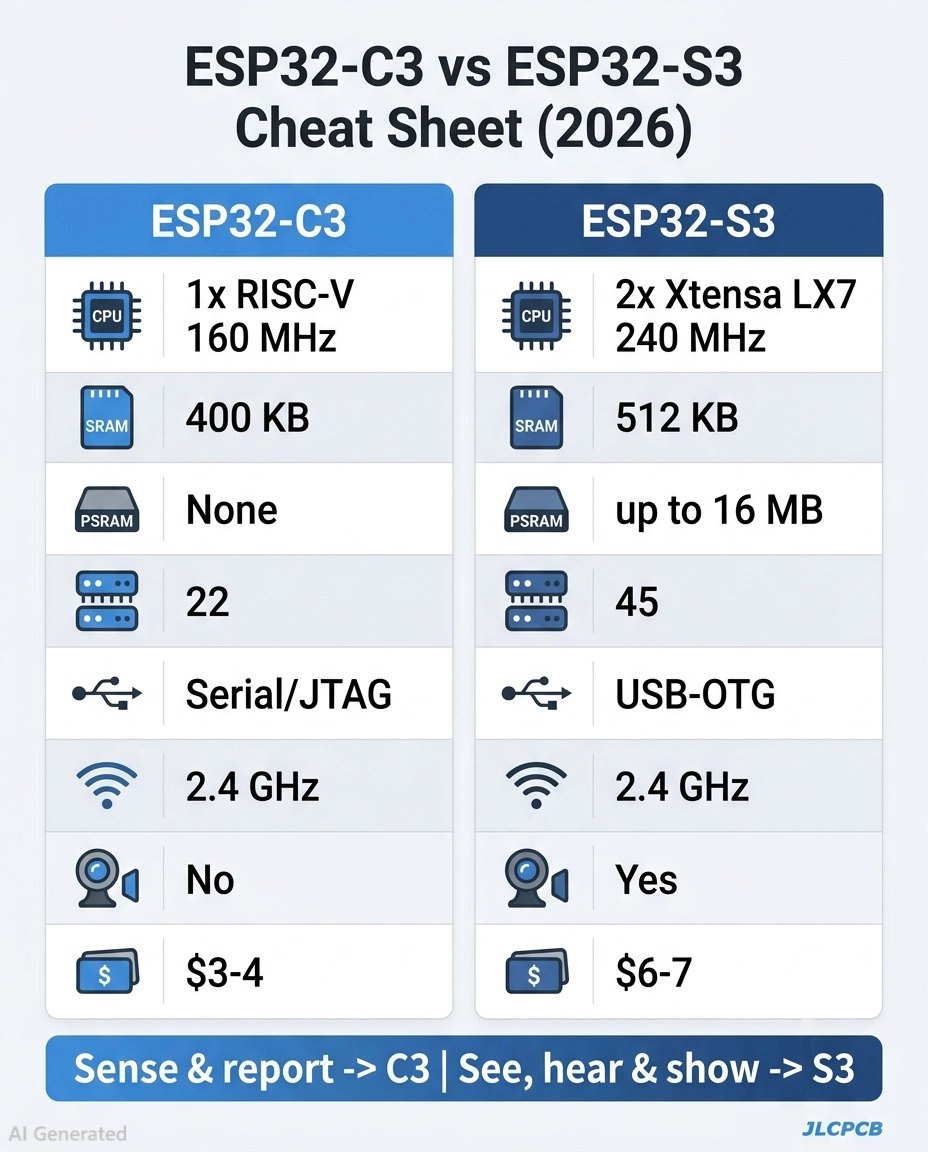
Figure: ESP32-c3 VS ESP32-s3
The table below is the authoritative spec comparison of ESP32-c3 and ESP32-s3. Every row is cross-checked against Espressif's official datasheets.
| Feature | ESP32-C3 | ESP32-S3 |
|---|---|---|
| CPU architecture | Single-core 32-bit RISC-V | Dual-core Xtensa LX7 |
| Max clock | 160 MHz | 240 MHz |
| SRAM | 400 KB | 512 KB |
| PSRAM | Not supported | Up to 16 MB (Octal SPI) |
| Flash | External, up to 16 MB | External, up to 16 MB |
| GPIO | 22 | 45 |
| USB | USB Serial/JTAG | Native USB-OTG (host + device) |
| Wi-Fi | 2.4 GHz Wi-Fi 4 (802.11 b/g/n) | 2.4 GHz Wi-Fi 4 (802.11 b/g/n) |
| Bluetooth | BLE 5.0 | BLE 5.0 |
| AI/vector | None | 128-bit SIMD vector instructions |
| Camera / LCD | None | DVP camera + LCD/RGB interfaces |
| Deep-sleep power | 5 µA | 7 µA |
| Typical price | $3 to $4 | $6 to $7 |
Note
Notice both chips share the same radio: 2.4 GHz Wi-Fi 4 and Bluetooth Low Energy 5.0. None of the chips support dual-band Wi-Fi.
ESP32-C3 vs S3: Key Differences at a Glance
First is the cores: C3 is a single-core RISC-V, and S3 is a dual-core Xtensa LX7.
Second is the memory: S3 can have external PSRAM (up to 16 MB), but the C3 cannot.
The third is interfaces: S3 offers much better support for native USB-OTG, camera, LCD, and AI vector instructions, which are missing in C3.
Here is the difference in a bullet list:
- CPU: C3 contains 1 RISC-V Core, while S3 contains 2 Xtensa LX7 Cores for true multitasking.
- Speed: 160 MHz on the C3 versus 240 MHz on the S3.
- Memory: 400 KB SRAM / 512 KB SRAM (PSRAM is S3-only).
- GPIO: 22 pins on the C3 versus 45 on the S3.
- USB - basic serial/JTAG on C3, versus full USB-OTG host and device on S3.
- Multimedia & AI: Camera, LCD, vector AI are the exclusive features of the S3.
- Cost and power: C3 is cheaper and has less idle power; S3 is more capable.
Now, let us see the comparison in detail, one by one.
CPU Overview: ESP32-C3 vs ESP32-S3
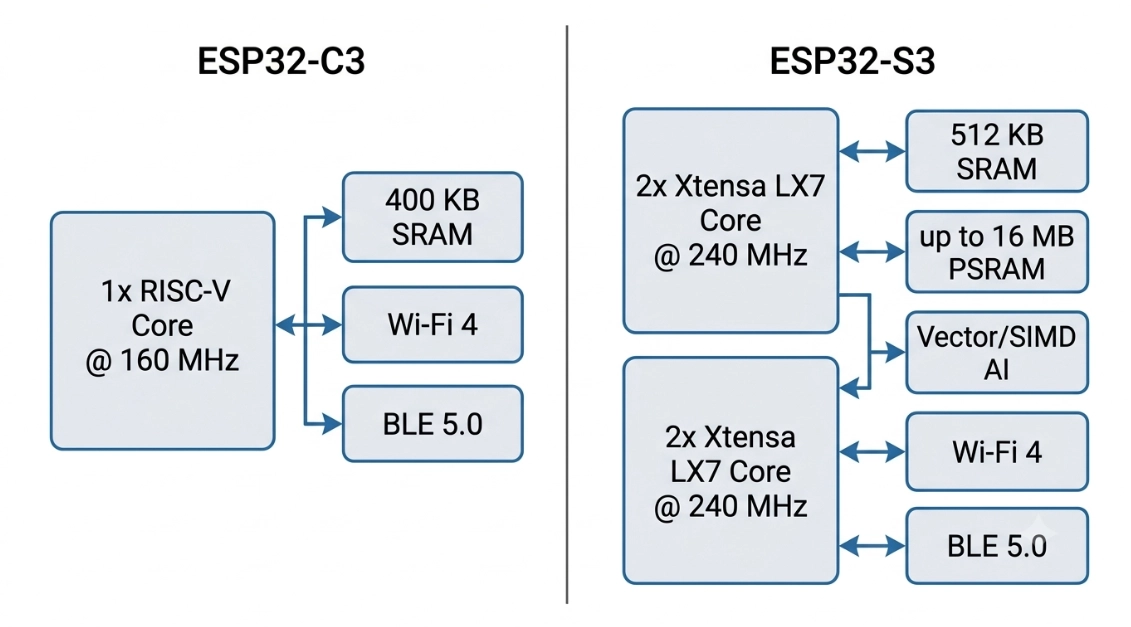
Figure: ESP32-c3 and ESP32-s3 CPU Overview
ESP32-C3: The Low-Cost RISC-V IoT Chip
ESP32-C3 is Espressif's solution to the issue of a low-cost and low-power Wi-Fi/BLE chip. It is equipped with a single RISC-V 32-bit core clocked up to 160 MHz, 400 KB of SRAM, 384 KB of ROM, and integrated 2.4 GHz Wi-Fi 4 and Bluetooth LE 5.0. No PSRAM and no native USB-OTG, which helps to keep the die and BoM small.
With that lean design, the C3 is perfect for Battery Sensors, Smart Plugs, BLE Beacons and simple connected controls. It's frequently sold as an update to the older ESP8266, with modern security features and BLE at a comparable price.
ESP32-S3: The Dual-Core AI and Multimedia Chip
The ESP32-S3 is quite a different animal. Features 2 Xtensa LX7 cores running up to 240MHz, 512KB of SRAM, and up to 16MB of external Octal PSRAM for large frame buffers and models. It has the same 2.4 GHz Wi-Fi 4 and BLE 5.0 radio as the C3.
The unique thing about the S3, in addition to the CPU, is all the other stuff: 128-bit SIMD vector instructions to speed up neural networks, native USB-OTG, LCD and RGB display interfaces, plus a DVP camera interface. It's the chip for voice assistants, camera doorbells, edge-AI gadgets and rich touch screen HMIs.
ESP32-C3 vs ESP32-S3: CPU Architecture (RISC-V vs Xtensa LX7)
The main difference between the ESP32-c3 and ESP32-s3 is the single-core RISC-V and the dual-core Xtensa LX7.
The C3 has a single open-standard RISC-V core operating at 160 MHz, sufficient for polling sensors, protocol stacks, and light control loops.
The S3 has 2 proprietary Xtensa LX7 240 MHz cores, of which one can be used for Wi-Fi and the other for your application.
This is most important when you need to do two heavyweight tasks simultaneously, like stream camera data and run a network stack, in your firmware.
On a single-core C3, those tasks time-share and can choke each other. On the dual-core S3, they run in parallel, hence the near-inevitable association of real-time multimedia work with the S3. Both employ the same Espressif toolchain and ESP-IDF framework, and differences between architectures seldom affect the high-level code. It primarily affects the number of tasks running at the same time.
Memory and PSRAM Comparison: ESP32-S3 vs ESP32-C3
For memory, the headline is PSRAM. The ESP32-C3 has 400 KB of on-chip SRAM and no PSRAM support, while the ESP32-S3 has 512 KB of SRAM and can add up to 16 MB of external Octal PSRAM. If your project needs big buffers, the S3 is the only real choice.
Do you know “Why does PSRAM matter so much?” A single VGA camera frame or a modest TensorFlow Lite model can blow past 400 KB in an instant. Without external PSRAM, the C3 simply cannot hold that data, which is the hard technical reason it is not used for cameras or on-device AI.
| Memory type | ESP32-C3 | ESP32-S3 |
|---|---|---|
| Internal SRAM | 400 KB | 512 KB |
| ROM | 384 KB | 384 KB |
| External PSRAM | None | Up to 16 MB (Octal SPI) |
| Typical flash | Up to 16 MB | Up to 16 MB |
On the C3, 400K for everyday connected devices that are moving mostly small packets is comfortable. Once images, audio buffers, or ML models come into the frame, it's the S3 with PSRAM you are looking for.
GPIO and Peripherals Comparison: ESP32-S3 vs C3
One of the most straightforward and practical distinctions is the number of pins (GPIO) each processor has: the ESP32-C3 has 22 GPIO, whereas the ESP32-S3 has 45 GPIO. That doubles the peripherals, sensors, and buses you can wire up before you run out of pins.
In a display, a camera, and a few sensors on a single board, those extra pins aren't an added luxury; they're a necessity.
- ESP32-C3 peripherals: SPI, I2C, I2S, UART, PWM, ADC, and Temperature sensor.
- ESP32-S3 peripherals: All C3 peripherals plus additional bus instances and SD/MMC host, capacitive touch with 14 pins, and camera and LCD interfaces.
USB Support (Serial/JTAG vs Native USB-OTG): ESP32-C3 vs ESP32-S3
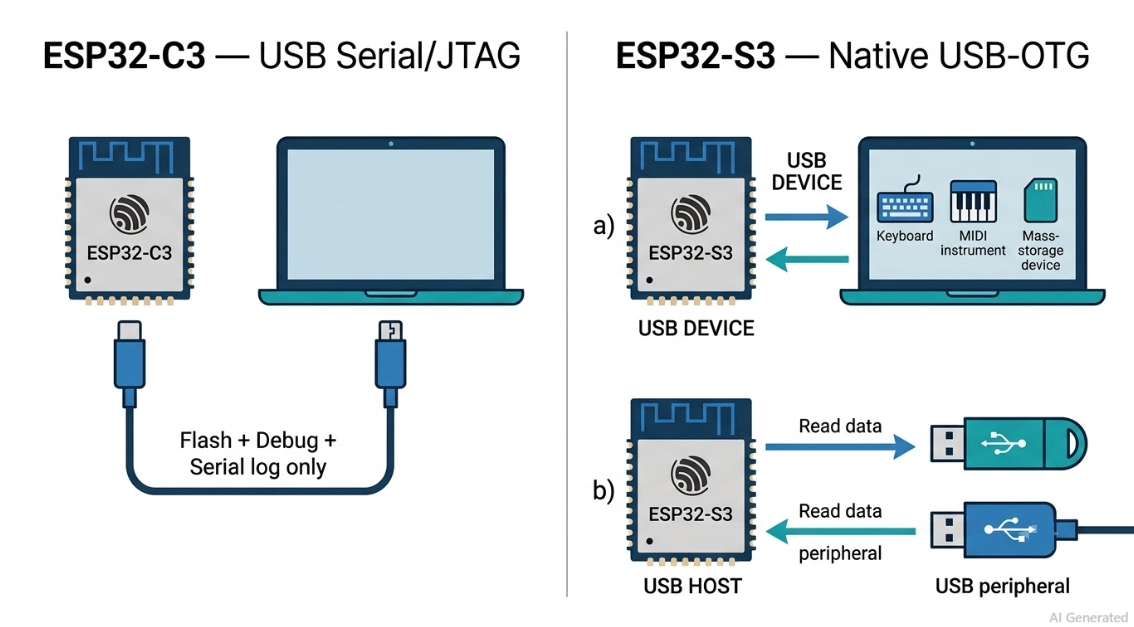
Figure: ESP32-c3 and ESP32-s3 USB port
One of the largest real-life discrepancies: let's get specific.
The ESP32-C3 has a USB Serial/JTAG controller, which is great for flashing and debugging, but is not a full USB-OTG peripheral. The ESP32-S3 supports natively USB-OTG Host/Device. The C3 can be presented to a PC as a serial port for programming and logging, and that's it.
The S3 can show up as a USB keyboard, mouse, MIDI device, or mass-storage drive and can also serve as a USB host talking to other USB devices. If your product is designed to be a USB gadget or you need to read a USB device from your product, then the S3 is the chip you should use.
So the C3 does "have" USB, but only for serial and JTAG. Full USB-OTG is a feature of S3.
Wi-Fi and Bluetooth Comparison: ESP32-C3 vs S3
The wireless capability is the same for both the ESP32-C3 and the ESP32-S3, which is 2.4 GHz Wi-Fi 4 (802.11 b/g/n) and Bluetooth Low Energy 5.0.
The Wi-Fi connectivity of the S3 is referred to as "dual-band" or "5 GHz" in some articles, but that is incorrect. None of the chips support dual-band WiFi. Both radios support BLE 5.0 with Coded PHY (Long Range) and 2 Mbps PHY (High Throughput).
So there is no real difference in connectivity, and it shouldn't be a deciding point between the two.
AI, Camera, and LCD Support: ESP32-C3 vs ESP32-S3
There is no other category that the S3 can't sweep. To support neural-network math, the ESP32-S3 adds 128-bit SIMD vector instructions, thanks to Espressif's ESP-DSP and ESP-NN libraries, and adds a DVP camera interface and LCD and RGB display interfaces. None of these are available in the ESP32-C3. This is why wake-word voice assistants, person-detection cameras, gesture recognition, and smart displays include the S3.
In theory, the C3 can be used for small classifiers, but it's not a good fit for actual multimedia AI without the vector acceleration, PSRAM, or camera interface.
- On-device AI: S3 only, via vector instructions and ESP-NN.
- Camera input (DVP): S3 only.
- LCD and RGB display output: S3 only.
- Simple sensor logic and rules: both handle this comfortably.
If your product sees, hears, or shows, choose the S3. If it just senses and reports, the C3 is enough.
Power Consumption and Battery Life: ESP32-C3 vs S3
For battery-first designs, the ESP32-C3 has the edge. Its single small RISC-V core draws less active current than the S3's dual cores, and deep-sleep current sits around 5 µA versus roughly 7 µA on the S3. Over months on a coin cell or a small lithium cell, that gap and the C3's lower active draw add up.
The S3 is not power-hungry by general standards, but two 240 MHz cores plus PSRAM will always consume more than one 160 MHz core.
The trick with either chip is aggressive use of deep sleep between wake events, which is where the C3's lower baseline shines.
| Power metric | ESP32-C3 | ESP32-S3 |
|---|---|---|
| Deep sleep | 5 µA | 7 µA |
| Active core count | 1 | 2 |
| Max clock | 160 MHz | 240 MHz |
| Best fit | Long battery life | Performance per session |
For a sensor that wakes once an hour and sends a reading, the C3 will outlast the S3 on the same battery. For a device that is awake and working, power draw matters less than the job getting done, which favors the S3.
Price and Cost Considerations: ESP32-C3 vs ESP32-S3
As expected, higher-performance ESP32 variants generally come with a higher cost. ESP32-C3 modules are typically available at a lower price point, while ESP32-S3 modules usually cost more depending on memory configuration, onboard flash, and PSRAM options.
The price of the bare ESP32 SoC varies by supplier, package type, and order volume, while modules include additional costs for memory, PCB design, RF components, and manufacturing. A few dollars may seem insignificant at prototype quantities, but the difference becomes meaningful in high-volume production.
For applications such as large-scale sensor nodes that do not require features like camera interfaces, AI acceleration, or USB OTG, the ESP32-C3 can provide a cost-effective solution while still delivering sufficient performance for many IoT applications.
If a design requires more advanced capabilities, such as camera support, AI-related processing, or additional peripherals, the higher cost of the ESP32-S3 may be justified by its expanded feature set.
When selecting ESP32 modules for production designs, engineers can check component availability and pricing through JLCPCB's Parts Library to simplify BOM management and streamline the sourcing process.
ESP32-C3 vs ESP32-S3: Which One Should You Choose?
Note
The choice is dependent on one question: Does your product need to see, hear, show, or plug? If yes, select S3. If mostly senses and connects, select the C3.
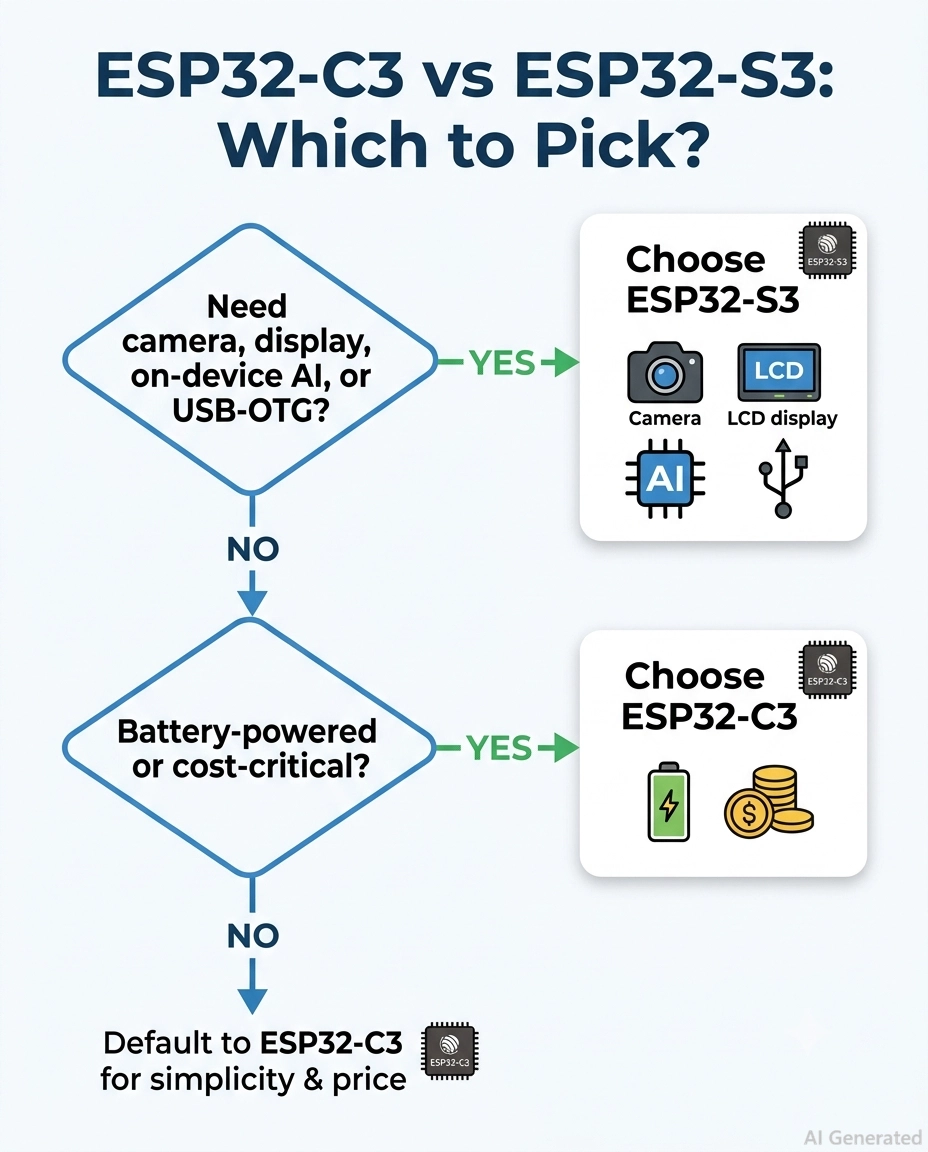
Figure: ESP32-c3 vs ESP32-s3 Selection
Choose the ESP32-C3 If:
- You're developing battery-powered sensors that must work for months.
- Your project is a BLE beacon, simple connected control, or smart plug.
- Volume is key and you're trying to keep costs per unit down.
- You're upgrading an ESP8266 design and you need BLE as well as modern security.
- No camera, on-device AI, display, or USB-OTG required.
Choose the ESP32-S3 If:
- You have a camera in your device, such as a doorbell, monitor, or scanner.
- You are using on-device AI, like wake-word or person detection.
- A color LCD, RGB display, or touchscreen HMI is required.
- Your product needs to be a USB "Host" or a USB Device (keyboard or mass storage).
- Dual-core headroom is needed to run heavy tasks in parallel.
ESP32-C3 and ESP32-S3 in PCB Design: Footprint and Manufacturing
The ESP32-C3-MINI-1 is a compact module with a smaller pin count, while the ESP32-S3-WROOM-1 is larger and denser to route out its 45 GPIO.
If you plan to swap chips mid-project, be aware that the modules are not pin-compatible, so a redesign of the footprint is required.
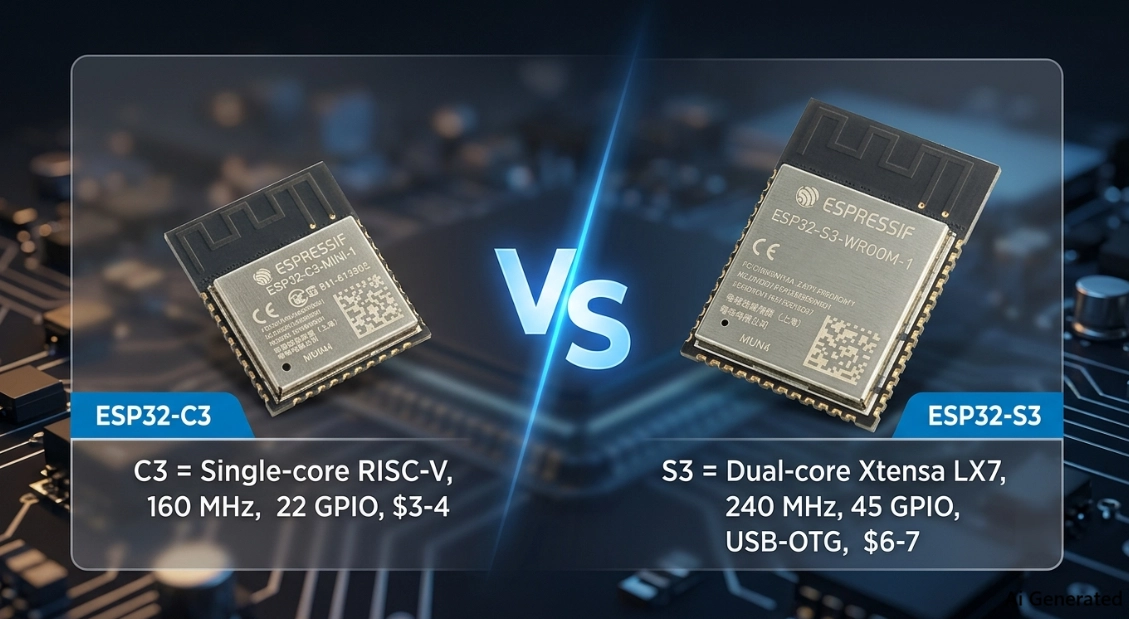
Figure: ESP32-c3 and ESP32-s3 Boards
A few PCB-design rules apply to both, and a couple are S3-specific:
- Antenna keep-out: leave the module's antenna zone free of copper, ground pour, traces, and metal on all layers, and push it to the board edge. This is the single most common cause of poor Wi-Fi range.
- Solid ground under the module: keep a continuous ground plane beneath the RF section, stitched with vias, to keep the reference clean.
- Decoupling: place bulk and high-frequency capacitors close to the 3V3 pins, since the RF transmit current spikes hard.
- PSRAM routing (S3 only): Octal PSRAM runs fast, so keep those traces short, length-matched, and referenced to ground. This is a real layout task on the S3 that simply does not exist on the C3.
- USB routing (S3 only): route the USB D+ and D- pair as a 90 Ω differential pair for reliable USB-OTG.
On the manufacturing side, both modules are standard surface-mount parts that reflow cleanly, but the denser S3 layout leaves less margin for error in stencil design and placement. Getting a Class 2 board with a proper solder-mask-defined land pattern and controlled impedance matters more on the S3.
Once your PCB design is ready, you can move from design files to a fully assembled board in one place.
Get a quick quote from JLCPCB for PCB fabrication and SMT assembly, whether your project uses the compact ESP32-C3 or the more powerful ESP32-S3.
Conclusion: Picking the Right ESP32 for Your Project
Once you remove all the spec sheets, it's really easy to choose between ESP32-c3 and ESP32-s3. The C3 is an efficient and inexpensive workhorse for battery-powered and connected sensors. It's a powerful dual-core camera, display, AI and USB platform called the S3. They have a 2.4 GHz Wi-Fi 4 and BLE 5.0 radio, so connectivity isn't the deciding factor.
So, sense and report points to the C3 and see, hear, and show points to the S3, and you'll do pretty well.
With the ESP32 family continuing to grow with new parts such as the ESP32-C6 and ESP32-P4, the "lean versus capable" dichotomy will only become more pronounced, and being able to know where to use which chip will accelerate future decisions.
Once you're ready to make that decision a reality, the journey from EasyEDA schematic to a fully assembled board is a short one.
FAQs about ESP32-S3 and ESP32-C3
Q: Is the ESP32-S3 better than the ESP32-C3?
The S3 is more capable, with dual cores, PSRAM, USB-OTG, AI vector instructions, and camera and LCD support, but "better" depends on the job. For battery sensors and low-cost connected devices, the cheaper, lower-power C3 is the better fit.
Q: Does the ESP32-C3 have USB?
Ans: Yes, but only a USB Serial/JTAG controller for flashing, logging, and debugging. It does not have native USB-OTG, so it cannot act as a USB host or emulate USB devices like a keyboard or mass-storage drive. That full USB-OTG capability is exclusive to the S3.
Q: What is the price difference between the ESP32-C3 and ESP32-S3?
The ESP32-C3 typically costs around $3 to $4 as a module, and the ESP32-S3 costs around $6 to $7, so roughly a two-dollar gap. The exact figure varies with flash size, PSRAM, and supplier.
Q: Which ESP32 is more power-efficient, the C3 or the S3?
The ESP32-C3 is more power-efficient, thanks to a single core and lower deep-sleep current of about 5 µA versus roughly 7 µA on the S3. For long battery life on a small cell, the C3 is the stronger choice.
Q: Does the ESP32-C3 support AI or a camera?
No. The C3 has no AI vector instructions, no camera (DVP) interface, and no PSRAM to hold image or model data. For on-device AI or camera work, you need the ESP32-S3.
Q: Is the ESP32-S3 dual-band or 5 GHz Wi-Fi?
No, and this is a common myth. The ESP32-S3 supports only 2.4 GHz Wi-Fi 4 (802.11 b/g/n), exactly like the C3. Neither chip offers dual-band or 5 GHz Wi-Fi.
Q: Can I port the ESP32-C3 code to the ESP32-S3?
Mostly yes, since both use the same ESP-IDF framework and Arduino core, so high-level application code ports easily. You will need to adjust pin assignments and peripheral configs, and you can add S3-only features like PSRAM, USB-OTG, and camera support.
Q: Which ESP32 is best for battery projects?
The ESP32-C3 is best for battery projects because of its lower active and deep-sleep current. Pair it with aggressive deep-sleep scheduling, and it will comfortably outlast the S3 on the same battery.
Popular Articles
• SMD Resistor Package Sizes: Complete Size Chart, Footprints & How to Choose
• How to Solder SMD Components Like a Pro [2026 Updated]
• SMD Resistor Codes: How to Read 3-Digit, 4-Digit, and EIA-96 Markings
• SMD Capacitor Codes: Identification, Markings, and Polarity
• SMD Capacitor Sizes: Complete Size Chart and Selection Tips for PCB Design and Assembly
Keep Learning
Understanding the Role of PCB Controllers in Electronic Design
A PCB Controller is an important part of designing and building electrical systems. It controls the functions of different mechanical parts on a printed circuit board (PCB) and makes sure they can talk to each other easily. People use PCB controllers in a lot of different situations, from home technology to factory automation. The purpose of this article is to discuss the importance of PCB controllers, including the different kinds, their uses, and the best ways to choose and use them. 1. What is a PC......
How Nixie Tubes Work: The Glow Behind the Glass
Let me take you in the past, when there were no LED or LCD lights for display, rather a technology that consumes a lot of power but looks awesome. Nixie tubes, a softly glowing orange digits inside a glass tube. But nowadays these have just become obsolete, for some electronics hobbyists still keep them alive as a vintage piece from history. In this article, we’ll dive into how Nixie tubes work. Moreover, we will know the technology behind them and the history that brought them from laboratory equipme......
GaN vs Silicon: Which Power Device Should You Use
Have you heard something about GaN? It is quite popular nowadays. Not because it is a different technology that saves power, but because today electronics are moving towards miniaturization. And we need small power supplies that can handle a lot more current and power and dissipate less heat. This is all possible due to GaN MOSFETs available in SMT packages out there. There are a lot of new companies that took this idea and implemented it into small mobile and laptop chargers, and generated a lot of r......
SMD Crystal & Crystal Oscillator Guide: Types, Packages, and How to Choose
Key Takeaways Crystal or oscillator: a passive crystal runs from the MCU’s oscillator and two load capacitors; an XO has its own supply and drives a clock, so use one when a clock feeds several chips. Load capacitors are not CL: with C1 = C2, each capacitor is 2 × (CL − Cstray), so a 20 pF crystal with 3 pF of stray needs about 33 pF, not 20 pF. Check ESR against the MCU: maximum ESR varies with frequency, package and model, so compare it with the MCU’s ESR or Gm_crit limit instead of assuming a typic......
What Are the Main Relay Types and Which One Should You Use?
Key Takeaways Two Main Types: Relays fall into two main categories: electromechanical relays, which use moving metal contacts to switch a circuit, and solid-state relays, which use electronic components with no moving parts. Choose Based on the Load: The load type determines which relay you need. Consider whether the load uses AC or DC, how much current it draws during normal operation and startup, and how frequently it needs to switch. Coil Behavior: A monostable relay returns to rest when its coil i......
SMD MOSFET Code Guide: How to Identify, Test and Replace a MOSFET
Figure: AO3400A (C20917) in the JLCPCB parts library. The listing gives RDS(on) at 2.5 V gate drive, the number that matters in the replacement example later in this guide. An SMD MOSFET code is the two or three characters printed on top of the package, and on its own it rarely tells you which part you're holding. SMD resistors follow standard marking schemes, such as three- and four-digit codes and EIA-96. MOSFETs don't. The same short code can appear on unrelated parts from different manufacturers, ......