How to Choose the Right STM32 Microcontroller: Compare Series, Cortex-M Cores, and Key Features
17 min
- STM32 Family Comparison: Choosing the Right Series for Your Application
- 6 Key Criteria for Choosing an STM32 Microcontroller
- Cortex-M0 vs M3 vs M4 vs M7 vs M33: Which Core Do You Need?
- STM32 Part Number Decoding
- STM32 Microcontroller Selection Example: Choosing an MCU for a Battery-Powered IoT Sensor
- Prototyping and Validating Your STM32 Selection
- Common STM32 Selection Mistakes
- FAQs about STM32 Microcontrollers
- Conclusion
STMicroelectronics ships thousands of STM32 MCU part numbers across more than a dozen series, and that variety is exactly what makes STM32 microcontroller selection difficult.
Pick the wrong family, and you pay for it later: oversized BOM cost, wasted power budget, or a board respin when a peripheral turns out to be missing.
This STM32 microcontroller selection guide breaks the decision into a five-step framework built on practical engineering criteria, not datasheet marketing copy, so you can match an ARM Cortex-M microcontroller to your embedded systems requirements with confidence.
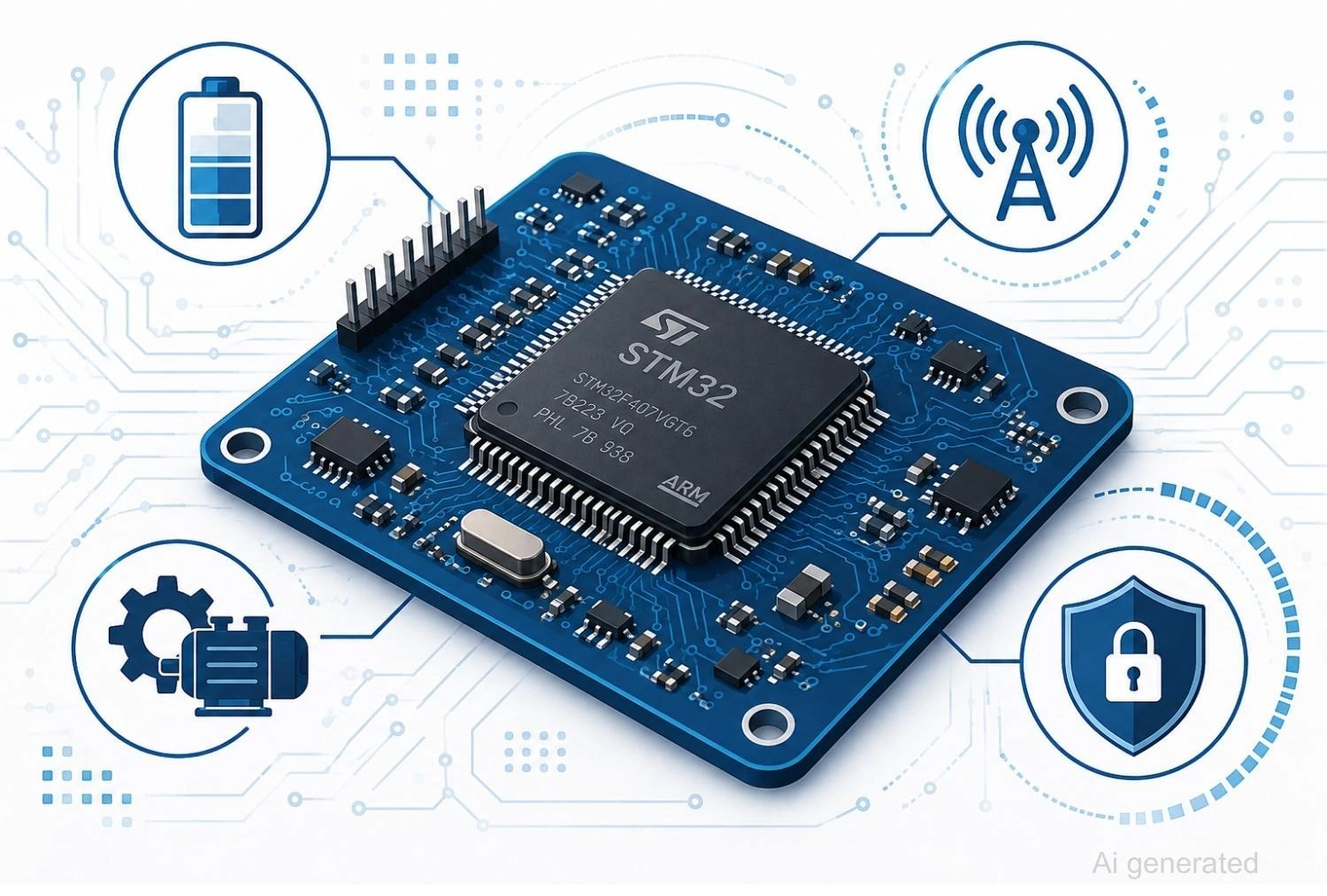
Figure: STM32 microcontroller on a circuit board surrounded by power, wireless, motor control, and security icons.
STM32 Family Comparison: Choosing the Right Series for Your Application
Every STM32 series targets a specific combination of performance, power, and cost. Knowing the series first narrows thousands of options down to a handful before you open a single datasheet.
STM32F4 remains one of the most widely used STM32 families and a common default, but for many new designs, ST recommends evaluating newer G, H, U, C, or wireless families depending on application requirements, since each generation improves on power efficiency, integration, or security over the previous one.
| Series | Core | Max Clock | Flash | RAM | Best Applications | Typical Development Board |
|---|---|---|---|---|---|---|
| STM32F4 | Cortex-M4F | 180MHz | up to 2MB | up to 384KB | General-purpose, audio, mixed-signal | NUCLEO-F446RE |
| STM32L4 | Cortex-M4F | 80MHz | up to 1MB | up to 320KB | Battery-powered devices, wearables | NUCLEO-L476RG |
| STM32G0 / G4 | Cortex-M0+ / M4F | 64MHz / 170MHz | up to 512KB | up to 128KB | Cost-sensitive mainstream, motor control | NUCLEO-G071RB / NUCLEO-G474RE |
| STM32C0 | Cortex-M0+ | 48MHz | up to 32KB | up to 6KB | 8-bit MCU replacement, ultra-low cost | NUCLEO-C031C6 |
| STM32H7 | Cortex-M7F (some variants +M4) | 600MHz | up to 2MB | up to 1MB | High-performance, graphics, DSP | NUCLEO-H743ZI |
| STM32U5 | Cortex-M33 | 160MHz | up to 4MB | up to 2.5MB | Secure, low-power connected devices | NUCLEO-U575ZI-Q |
| STM32WB | Cortex-M4 + M0+ | 64MHz / 32MHz | up to 1MB | up to 256KB | Bluetooth LE, Zigbee, Thread | NUCLEO-WB55RG |
| STM32WL | Cortex-M4 + M0+ | 48MHz | up to 256KB | up to 64KB | LoRaWAN, long-range IoT | NUCLEO-WL55JC1 |
F Series: General-Purpose Workhorse
STM32F4 pairs a Cortex-M4F core with hardware floating point and DSP instructions, useful for sensor fusion, audio, and mixed-signal work. It has the largest installed base and community of any STM32 line, which makes troubleshooting and finding reference code straightforward. For new designs, compare it against STM32G4, which offers similar peripherals on a newer process node.
L Series: Ultra-Low-Power for Battery Devices
STM32L4 targets battery-operated products with multiple low-power modes and standby current in the microamp range, while still providing a Cortex-M4F core for light signal processing. It is a strong choice for STM32 low-power MCUs in wearables, metering, and other always-on sensor nodes.
G Series: Cost-Optimized Mainstream Performance
STM32G0 (Cortex-M0+) and STM32G4 (Cortex-M4F) cover mainstream applications where BOM cost matters, but you still need genuine 32-bit performance, CAN FD on select devices, and a reasonable peripheral set.
For many new general-purpose designs, STM32G0 and STM32G4 are common alternatives to older F-series devices, though not every F-series application migrates to G-series.
C Series: Entry-Level 32-bit Replacement for 8-bit MCUs
STM32C0 is the cheapest device in the family, built specifically to displace legacy 8-bit and 16-bit MCUs. It trades Flash and RAM headroom for the lowest unit price, so it fits simple control tasks rather than memory-hungry applications.
H Series: High-Performance Computing
STM32H7 runs a Cortex-M7F core up to 600MHz. Some STM32H7 devices are dual-core (Cortex-M7 + Cortex-M4), while others are single-core, so always verify the specific device before selecting it. It suits graphics, high-speed data acquisition, and compute-heavy real-time tasks.
U Series: Secure Low-Power Applications
STM32U5 (Cortex-M33) blends low-power with TrustZone hardware security, suited to connected devices that must meet modern cybersecurity requirements while still running on a battery. It is one of the more capable options for STM32 for IoT designs that need both efficiency and isolation between secure and non-secure code.
W Series: Wireless Connectivity (BLE, Zigbee, Thread, LoRa)
STM32WB integrates Bluetooth Low Energy, Zigbee, and Thread alongside a Cortex-M4 application core, with the exact Bluetooth version and protocol stack depending on the specific device, so check the datasheet rather than assuming one spec across the whole family.
STM32WL adds long-range LoRaWAN connectivity. STM32WBA is a newer wireless line aimed at more recent Bluetooth capabilities and tighter power budgets.
Legacy Series You May Still Encounter (F0, F1, F3, F7)
Older designs and plenty of existing search traffic still reference STM32F0 (Cortex-M0, entry-level), STM32F1 (Cortex-M3, the "Blue Pill" favorite for hobbyist boards), STM32F3 (Cortex-M4F with enhanced analog peripherals), and STM32F7 (Cortex-M7F, predecessor to H7).
These remain in production and are valid for maintaining an existing product line, even though new designs typically move to a G, H, or U series equivalent.
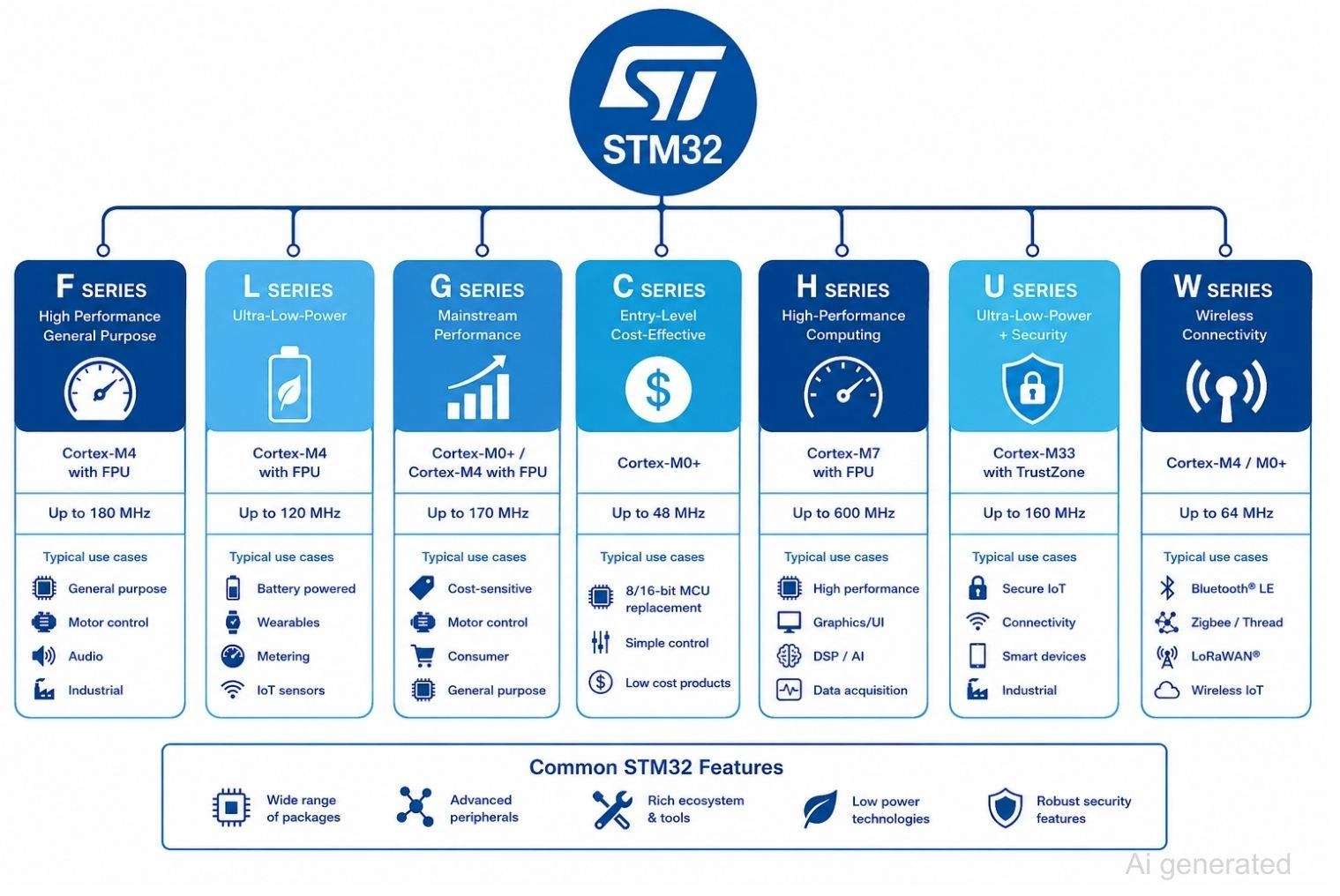
Figure: STM32 microcontroller family organized by series and Cortex-M core type.
Engineer Tip
When two series look equally capable on paper, check the STM32 development ecosystem first. A part with more reference designs and forum activity will usually save more engineering time than a marginally cheaper alternative.
6 Key Criteria for Choosing an STM32 Microcontroller
Answer these questions in order. Eliminating unsuitable MCU families early is much faster than comparing hundreds of individual part numbers one by one.
#1 Performance Needs (Clock Speed, Core Type, FPU/DSP)
Match the core to the actual workload:
- Simple GPIO control
- Sensor data acquisition
- Motor control
- Audio or signal processing
- TinyML inference, simple control, and polling need very little.
Motor control and audio benefit from a Cortex-M4's FPU and DSP instructions. Heavy real-time computation justifies a Cortex-M7.
#2 Power Consumption (Active, Sleep, Standby Current, Wake-Up Latency)
Check all four figures, not just one:
- Active current at your actual operating frequency
- Sleep current with peripherals retained
- Standby current, which can be single-digit microamps on L and U series parts
- Wake-up latency, which affects how often you can sleep without missing real-time deadlines.
Battery-powered products live or die on these numbers together, not on the headline standby figure alone.
#3 Memory
Flash and RAM Sizing Guidelines
Flash needs depend on:
- Current firmware image size
- Over-the-air(OTA) update support, which roughly doubles the Flash requirement since both the active and staged images must fit RAM needs, depends on:
- Buffers for communication or sensor data
- An RTOS such as FreeRTOS or Zephyr
- Graphics or display frame buffers
- Machine learning models for edge inference.
A practical starting point: budget 1.5 to 2 times your current firmware size in Flash, and double your RAM estimate if you expect to add any of the items above later.
Engineer Tip
Flash shortages are usually discovered early, but RAM shortages often appear much later when middleware, RTOS tasks, or communication buffers are added. Leave sufficient headroom from the start.
#4 Peripherals (UART, SPI, I2C, ADC, CAN, USB, Timers)
List every interface before searching part numbers:
- Serial buses: UART, SPI, I2C
- Analog: ADC/DAC channel count and resolution
- Timers and PWM channels for motor or lighting control
- USB host or device
- CAN or CAN FD for automotive and industrial links.
Missing one peripheral here is the most common cause of a mid-project MCU swap.
#5 Package Type and Pin Count (LQFP, QFN, BGA)
Smaller QFN packages save board space but complicate hand assembly and rework. An LQFP, detailed in this quad flat package guide, gives easier soldering and probing access.
Before selecting a package, confirm that your manufacturing partner has the required SMT placement capability, reflow process control, and inspection methods to assemble it reliably.
To support these demanding assembly requirements, JLCPCB provides advanced SMT capabilities for high-density packages, including minimum IC pin spacing down to 0.35 mm and BGA spacing down to 0.35 mm (center-to-center). With 3D AOI and X-ray inspection systems, JLCPCB verifies solder joint quality and helps ensure reliable assembly for complex PCB designs.
Once you confirm your footprint constraints, access 700k+ of in-stock components through the JLCPCB Parts Library, upload your design files, and get an instant quote!
#6 Development Ecosystem & Software Support
The STM32 development ecosystem centers on STM32CubeMX and STM32CubeIDE. Together they include:
- MCU selector that filters parts by peripheral and pin requirement
- Pin conflict checker that flags alternate-function clashes before layout
- Clock tree configuration with automatic frequency validation
- HAL (Hardware Abstraction Layer) drivers for portability
- LL (Low-Layer) drivers for performance-critical code
- Native FreeRTOS integration.
Together, these tools reduce development time and risk, regardless of which series you land on. Combined with a large community and inexpensive STM32 Nucleo boards for nearly every series, this ecosystem makes a wrong-series mistake far cheaper to fix early than late.
| Selection Factor | Key Question | Recommended Families |
|---|---|---|
| Performance | Do I need DSP/FPU or just basic control? | M0+/M3 for control, M4/M7 for DSP |
| Power | Is this battery-powered? | L, U, WB, WL series |
| Memory | Do I need OTA updates or large buffers? | H, U series for headroom |
| Peripherals | Do I need CAN FD, USB, or wireless? | G4 (CAN FD on select devices), WB/WL (wireless) |
| Package | Is board space tightly constrained? | QFN/BGA variants across series |
Cortex-M0 vs M3 vs M4 vs M7 vs M33: Which Core Do You Need?
The Cortex-M core determines raw compute capability and, increasingly, security features.
When M0/M0+ Is Enough
Cortex-M0+ handles basic control loops, simple sensor polling, and GPIO-heavy logic at the lowest cost and power.
When You Need M4 (FPU + DSP)
Cortex-M4F adds a hardware floating point unit and DSP instructions, useful for STM32 for motor control algorithms, filtering, and light signal processing without the cost of a Cortex-M7.
When You Need M7 (High-Speed Real-Time)
Cortex-M7F delivers the highest per-cycle performance in the family, suited to graphics, high-speed data acquisition, and TinyML inference at the edge.
M33 + TrustZone for Security-Critical Designs
Cortex-M33 brings TrustZone hardware isolation, available on STM32L5, STM32U5, and STM32H5, separating secure and non-secure code execution at the silicon level rather than relying on software alone.
| Core | Approx. DMIPS/MHz | FPU | DSP | TrustZone | Example Part |
|---|---|---|---|---|---|
| Cortex-M0+ | 0.95 | No | No | No | STM32G0 |
| Cortex-M3 | 1.25 | No | No | No | STM32F103 |
| Cortex-M4F | 1.25 | Yes | Yes | No | STM32F407 |
| Cortex-M7F | 2.14 | Yes | Yes | No | STM32H743 |
| Cortex-M33 | 1.5 | Yes | Yes | Yes | STM32U575 |
| If your application is... | Choose... |
|---|---|
| Simple sensor node | Cortex-M0+ |
| Motor control | Cortex-M4F |
| Audio/DSP processing | Cortex-M4F |
| TinyML / edge AI | Cortex-M7F |
| Secure IoT device | Cortex-M33 |
Table: Lookup table matching application type to recommended Cortex-M core.
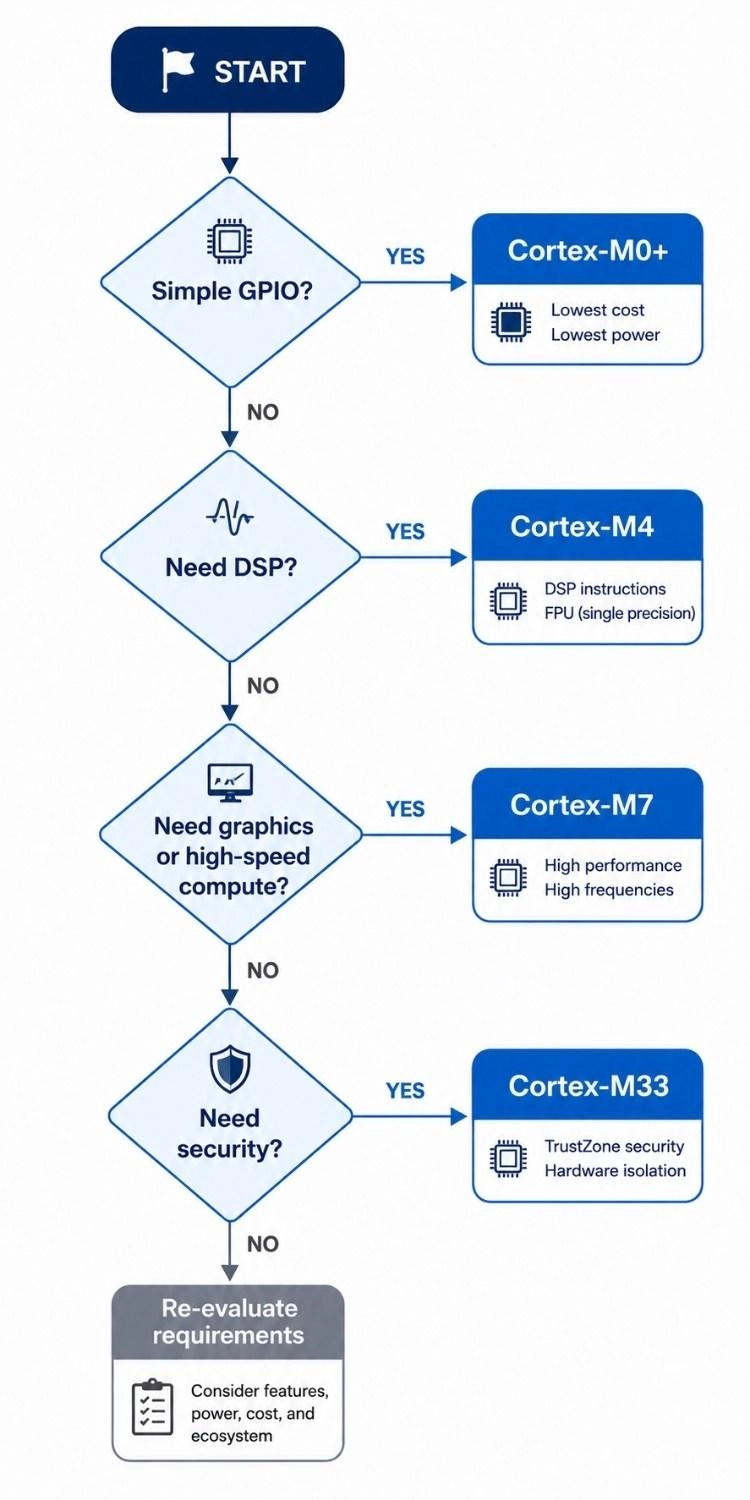
Figure: Decision flowchart for choosing a Cortex-M core based on GPIO, DSP, graphics, and security requirements.
STM32 Part Number Decoding
Read a datasheet code in 10 seconds
Take STM32F407VGT6 as an example:
- STM32: product family
- F4: series and performance line (high performance, Cortex-M4F)
- 07: specific sub-line within the F4 family
- V: pin count (100 pins)
- G: Flash size (1024KB)
- T: package type (LQFP)
- 6: temperature range (-40°C to 85°C, industrial grade)
Once you can read this string, you can compare specifications and source components directly through the JLCPCB Parts library without opening a single document.
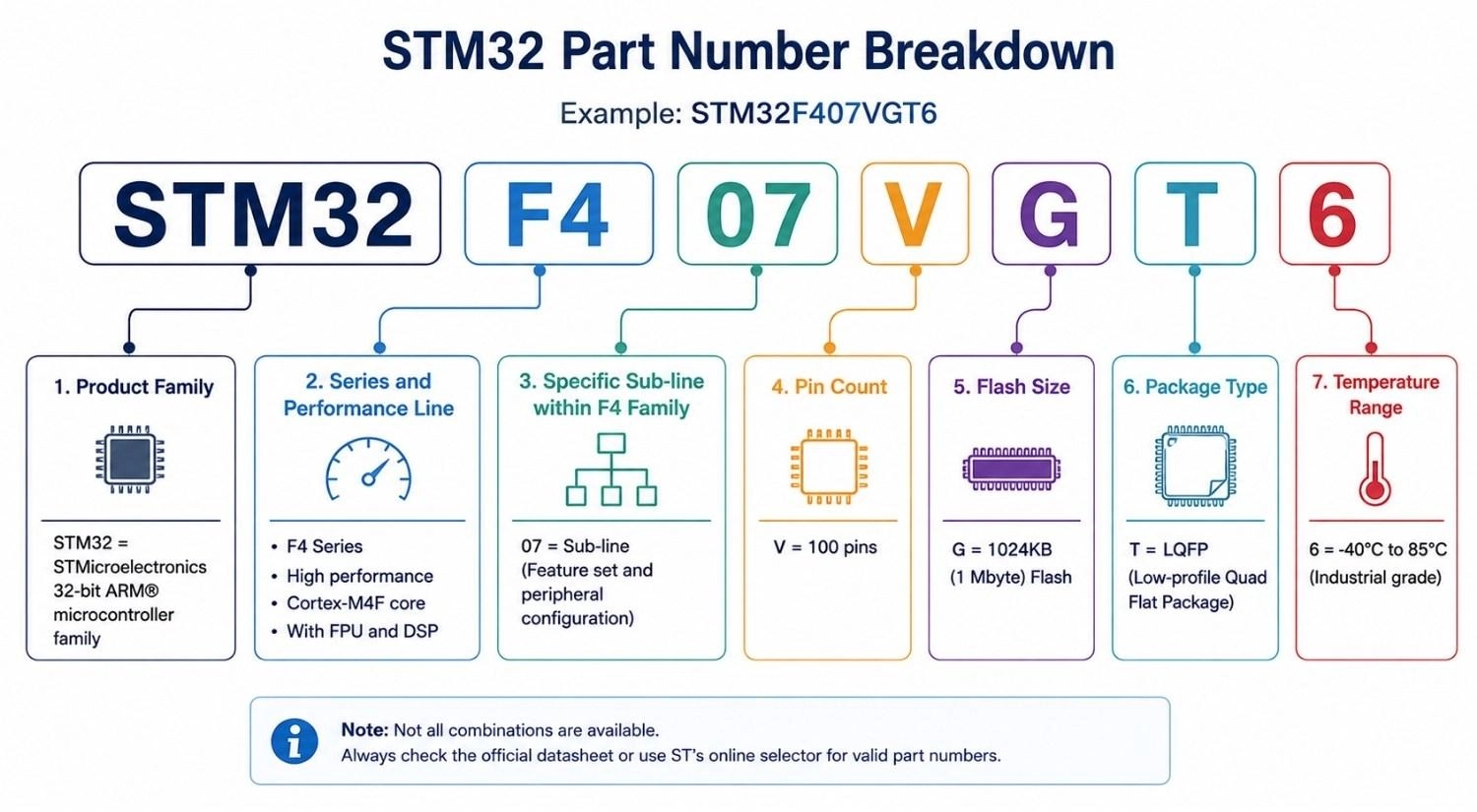
Figure: STM32 part number breakdown showing family, sub-line, pin count, Flash size, package code, and temperature grade.
Common Package Codes
Package letters are frequently confused with Flash size or temperature codes since they sit in the same string. Examples seen across the family include T (LQFP), H (BGA), U (VFQFPN/QFN), and Y (WLCSP).
These STM32 package types are not consistent across every series, so always confirm the exact mapping in the specific part's datasheet rather than assuming a letter means the same thing on a different line.
STM32 Microcontroller Selection Example: Choosing an MCU for a Battery-Powered IoT Sensor
Project Requirements
- 1-year minimum battery life on a coin cell
- Bluetooth Low Energy connectivity
- Coin-cell power budget
- Small firmware footprint, modest Flash for the protocol stack
- No DSP workload
Eliminating Unsuitable STM32 Families
The power requirement eliminates F and H series outright; both draw too much active current for a coin-cell budget. Wireless connectivity points toward the W series rather than adding an external radio module to an L or G series part.
Comparing Shortlisted STM32 MCU Options
Why not STM32L4?
STM32L4 has excellent standby current, but it has no integrated radio, so it would need an external BLE module, adding board area, a second supply rail, and extra firmware complexity.
Why not STM32G0?
STM32G0 is cheap and low-power, but the Cortex-M0+ core and lack of integrated wireless make it a worse fit than a part built specifically for this use case.
Why not a Wi-Fi MCU such as ESP32?
The ESP32 integrates Wi-Fi and Bluetooth and is a popular alternative, but its active current draw is generally higher than the STM32WB in BLE-only use cases, which matters when the entire power budget is a coin cell rated for a year of service. For a broader look at ecosystem choices, see our ESP32 vs Arduino comparison.
STM32WB55 offers a Cortex-M4 application core paired with a Cortex-M0+ radio core running the Bluetooth stack independently, freeing the application core for sensor logic.
Recommended STM32 MCU: STM32WB55
STM32WB55 is the better fit: integrated radio, sufficient Flash and RAM for the protocol stack and application code, and standby current low enough to meet the one-year coin-cell target without external wireless hardware.
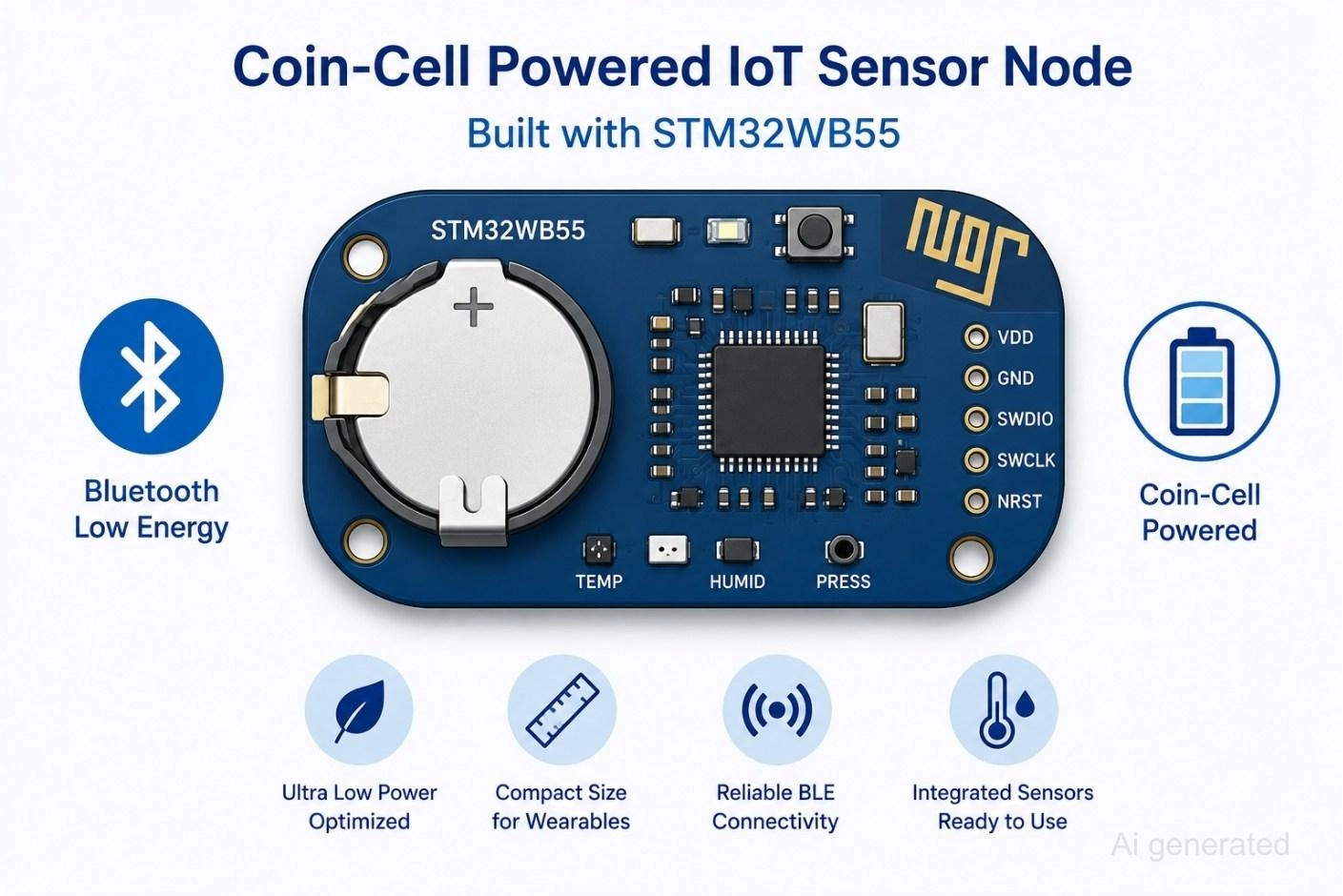
Figure: A coin-cell-powered IoT sensor board built around STM32WB55 with Bluetooth and battery icons.
Prototyping and Validating Your STM32 Selection
STM32 Nucleo vs Discovery vs Evaluation Boards
STM32 Nucleo boards are the cheapest and a good starting point for most projects.
STM32 Discovery boards add on-board sensors and displays useful for evaluating specific peripherals. Eval boards are the most complete, intended for formal design verification on critical projects such as medical devices.
Using STM32CubeMX
CubeMX covers the four tasks engineers rely on most:
- MCU selector to filter the catalog by peripheral, package, and power requirement
- Pin conflict checker to catch alternate-function clashes before layout
- Clock tree configuration with built-in frequency validation
- Code generation for HAL/LL initialization, shortening the gap between selection and a working prototype
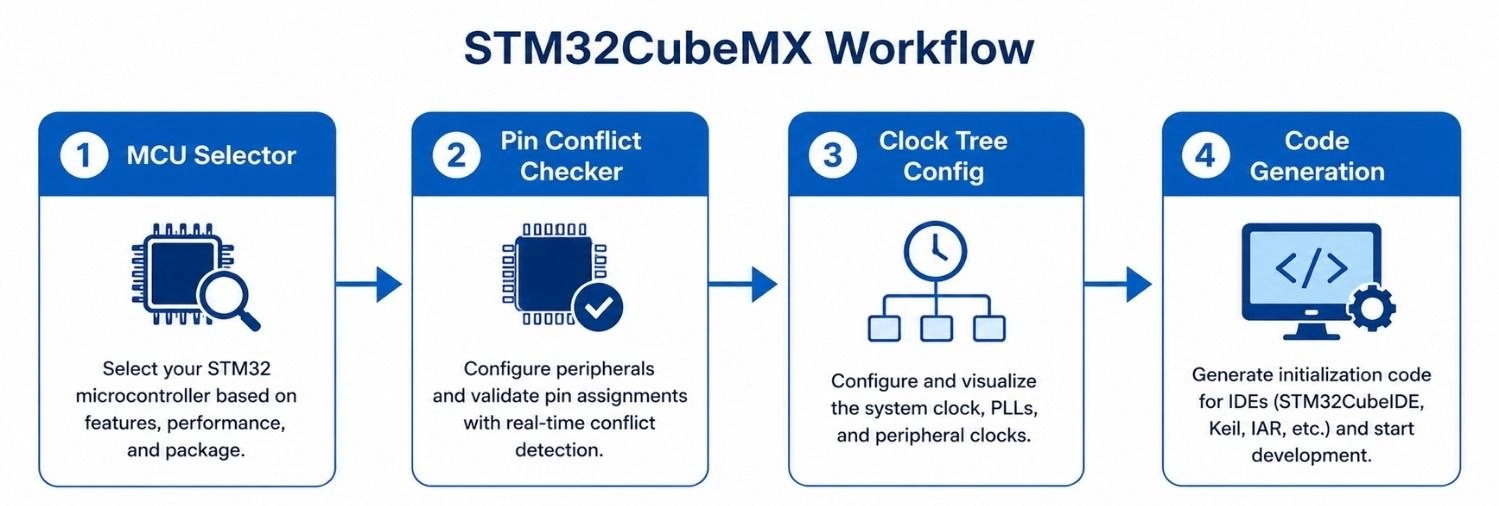
Figure: STM32CubeMX workflow showing MCU selector, pin conflict checker, clock tree configuration, and code generation in sequence.
Planning for STM32 Pin-Compatible Upgrades
Designing around a standard footprint such as LQFP64 lets you swap a lower-cost part like STM32G0 for a more capable pin-compatible part like STM32G4 later, without a board redesign.
Reading the STM32 Datasheet Before Final Selection
Before locking in a part, confirm the details that datasheets often bury below the marketing summary: Flash and RAM at the exact device variant, ADC accuracy and channel count, operating voltage range, temperature grade, and pin mapping for every peripheral you need. The STM32 datasheet and reference manual are the only sources that guarantee these numbers for the specific part, not the family.
Preparing Your STM32 PCB Design for PCB Manufacturing
Before requesting a PCB quotation and ordering your boards:
- Verify pin multiplexing covers every peripheral you assigned
- Confirm the clock source matches your timing accuracy requirements
- Check voltage domain compatibility across all connected components and refer to this guide to bypass capacitors in PCB layout to ensure stable power delivery
- Review the package footprint against your PCB fabrication tolerances
- Validate memory headroom against your firmware roadmap, not just current size
Engineer Tip
Cross-check operating voltage and temperature grade against your enclosure and power rail before finalizing the part. These two datasheet fields are easy to skip and expensive to discover wrong after the board is built.
Common STM32 Selection Mistakes
Don't:
- Choose STM32H7 "just in case" when a G or L series part would handle the workload at lower cost and power
- Size RAM for today's firmware and ignore growth from RTOS, buffers, or future features
- Forget to check the alternate-function pin conflicts before finalizing your pinout
- Select a package that your contract manufacturer cannot reliably place and reflow
- Assume every package variant of a part exposes every peripheral; some packages drop pins and the features tied to them
- Skip the STM32 longevity commitment check, risking a redesign if the part is discontinued mid-production
FAQs about STM32 Microcontrollers
Q: What is the easiest STM32 development board for beginners to prototype with?
STM32F1 and STM32F4 series development boards are highly recommended for beginners because they are supported by a massive community, feature thousands of open-source libraries, and run on affordable, plug-and-play STM32 Nucleo hardware.
Q: Which specific STM32 family provides the lowest power consumption for IoT devices?
The STM32L4 and STM32U5 series provide the industry’s leading low-power configurations, featuring multiple flexible sleep modes, ultra-low standby currents, and independent power domains designed to maximize battery life in remote applications.
Q: How do you choose between an STM32 and an ESP32 for embedded system designs?
STM32 is optimal for real-time control, deterministic performance, extensive industrial hardware peripherals, and strict low-power battery applications. In contrast, the ESP32 is a communication-focused dual-core system built primarily for high-bandwidth native Wi-Fi and Bluetooth integrations.
Q: Where can developers find the official STM32 part number decoding guidelines?
The complete part number decoding guidelines are available in the "Ordering Information" section of any standard STMicroelectronics datasheet, which maps the full alphanumeric code directly to physical package properties, flash storage capacity, operating temperature ratings, and core architectures.
Q: Which STM32 microcontrollers natively support CAN FD industrial interfaces?
Native CAN FD support is integrated directly into the hardware of select high-performance families like the STM32G4 and STM32H7, making them ideal solutions for automotive networks, robotic controllers, and harsh industrial environments.
Q: Why do engineering teams prefer the Cortex-M4 core over the Cortex-M0+ for motor control?
The Cortex-M4 core features a dedicated Hardware Floating Point Unit (FPU) and Digital Signal Processing (DSP) instruction sets. These physical silicon features allow the MCU to execute advanced field-oriented control (FOC) algorithms significantly faster than a standard Cortex-M0+ core.
Q: What is the recommended safety margin for sizing Flash memory in high-reliability projects?
A standard rule of thumb is to select an MCU with 1.5 to 2 times your current compiled firmware size. If your design roadmap includes Over-The-Air (OTA) updates, you must double this estimate to store the staging firmware image simultaneously.
Q: Is it possible to upgrade an STM32 MCU family without a complete PCB redesign?
Yes, by selecting industry-standard pin-compatible packages (such as standard LQFP64 or LQFP100 footprints). This lets developers swap standard, entry-level series like the STM32G0 directly for high-performance series like the STM32G4 on the exact same physical board layout.
Conclusion
Select the application first, then narrow the STM32 family, compare Cortex-M cores, verify peripherals and package options, and validate everything in STM32CubeMX before designing your PCB.
This sequence works whether you are building a coin-cell IoT sensor or a high-performance controller, and it scales as your project moves from an STM32 development board prototype toward production.
Popular Articles
• SMD Resistor Package Sizes: Complete Size Chart, Footprints & How to Choose
• How to Solder SMD Components Like a Pro [2026 Updated]
• SMD Resistor Codes: How to Read 3-Digit, 4-Digit, and EIA-96 Markings
• SMD Capacitor Codes: Identification, Markings, and Polarity
• SMD Capacitor Sizes: Complete Size Chart and Selection Tips for PCB Design and Assembly
Keep Learning
What Are the Main Relay Types and Which One Should You Use?
Key Takeaways Two Main Types: Relays fall into two main categories: electromechanical relays, which use moving metal contacts to switch a circuit, and solid-state relays, which use electronic components with no moving parts. Choose Based on the Load: The load type determines which relay you need. Consider whether the load uses AC or DC, how much current it draws during normal operation and startup, and how frequently it needs to switch. Coil Behavior: A monostable relay returns to rest when its coil i......
SMD MOSFET Code Guide: How to Identify, Test and Replace a MOSFET
Figure: AO3400A (C20917) in the JLCPCB parts library. The listing gives RDS(on) at 2.5 V gate drive, the number that matters in the replacement example later in this guide. An SMD MOSFET code is the two or three characters printed on top of the package, and on its own it rarely tells you which part you're holding. SMD resistors follow standard marking schemes, such as three- and four-digit codes and EIA-96. MOSFETs don't. The same short code can appear on unrelated parts from different manufacturers, ......
ESP8266 vs ESP32: Which One Should You Use?
Key Takeaways ESP32: Dual-core 240 MHz CPU, Bluetooth Classic and BLE, 520 KB SRAM, and up to 34 GPIOs. ESP8266: Single-core CPU, no Bluetooth, and around 50 KB of free RAM for applications. Lifecycle status: Espressif marks the ESP8266 Not Recommended for New Designs (NRND) and names the ESP32-C2 (ESP8684) as its upgrade, although the ESP8266 remains in production with a longevity commitment. Which ESP32 to use: Choose the ESP32-C2 for simple Wi-Fi or Bluetooth LE firmware, the ESP32-C3 for more memo......
What Is a Thermistor? A Practical Guide to NTC, PTC, Applications, and Circuit Design
Key Takeaways Definition: A thermistor is a thermally sensitive resistor whose resistance changes markedly and predictably with temperature, typically by about 4.4% per °C for a standard 10 kΩ NTC (B25/50 = 3950 K) near 25 °C. NTC vs. PTC: An NTC thermistor's resistance falls as temperature rises, which suits temperature sensing and inrush current limiting; a switching PTC's resistance rises steeply above its switch temperature, which suits circuit protection. Key Specifications: An NTC thermistor is ......
What Is the ESP32-CAM, and How to Wire, Power, and Program It?
Key Takeaways Board, not chip: The ESP32-CAM is an AI-Thinker development board, not an Espressif product. It carries AI-Thinker's ESP32-S module, an OV2640 camera, PSRAM, a microSD slot, and a flash LED. No USB port: The board has no USB connector or USB-to-UART bridge, so you program it via its serial pins using a 3.3 V USB-to-serial adapter, with GPIO0 held low at reset. Few free pins: The camera, PSRAM, and microSD card occupy most GPIOs. With the microSD card unused, GPIO2, GPIO4, GPIO12, GPIO13,......
ESP32 Versions: Which One Should You Use for Your Project?
Key Takeaways Radios decide first: ESP32 versions differ mainly in their radios, CPU cores, and peripherals. Common defaults: The ESP32-C3 suits low-cost Wi-Fi and Bluetooth LE, the ESP32-S3 suits camera, display, voice, and on-device AI. Original ESP32: The chip is still in production and remains the choice for Bluetooth Classic. Versions without Wi-Fi: The ESP32-H2 targets battery-powered Thread and Zigbee devices. Chip, module, or board: Prototype on a development board, then design a module onto y......