ESP32 vs Arduino: Differences, Performance, and How to Choose the Right Board
16 min
- What is the Difference between ESP32 and Arduino?
- When to Use ESP32 vs Arduino
- ESP32 vs Arduino for IoT Projects
- ESP32 vs Arduino Performance Comparison
- ESP32 vs Arduino for Beginners
- ESP32 vs Arduino Architecture Explained
- ESP32 vs Arduino in PCB Design and Assembly
- ESP32 and Arduino Variants Explained
- ESP32 vs Most Popular Arduino Boards
- ESP32 vs Arduino: Advantages and Disadvantages
- Common Mistakes When Choosing ESP32 or Arduino
- FAQ
- Conclusion

When deciding between ESP32 vs Arduino for your next electronics project, the right choice depends heavily on your specific engineering requirements. To put it directly: the ESP32 is the best choice for IoT, wireless connectivity, and high-performance computing, while Arduino remains the gold standard for beginners, simple hardware control, and deterministic timing.
Which is better, ESP32 or Arduino? The answer lies in your project’s demands for processing power, power consumption, and connectivity. Let's explore the core difference between ESP32 and Arduino to help you make an informed decision.
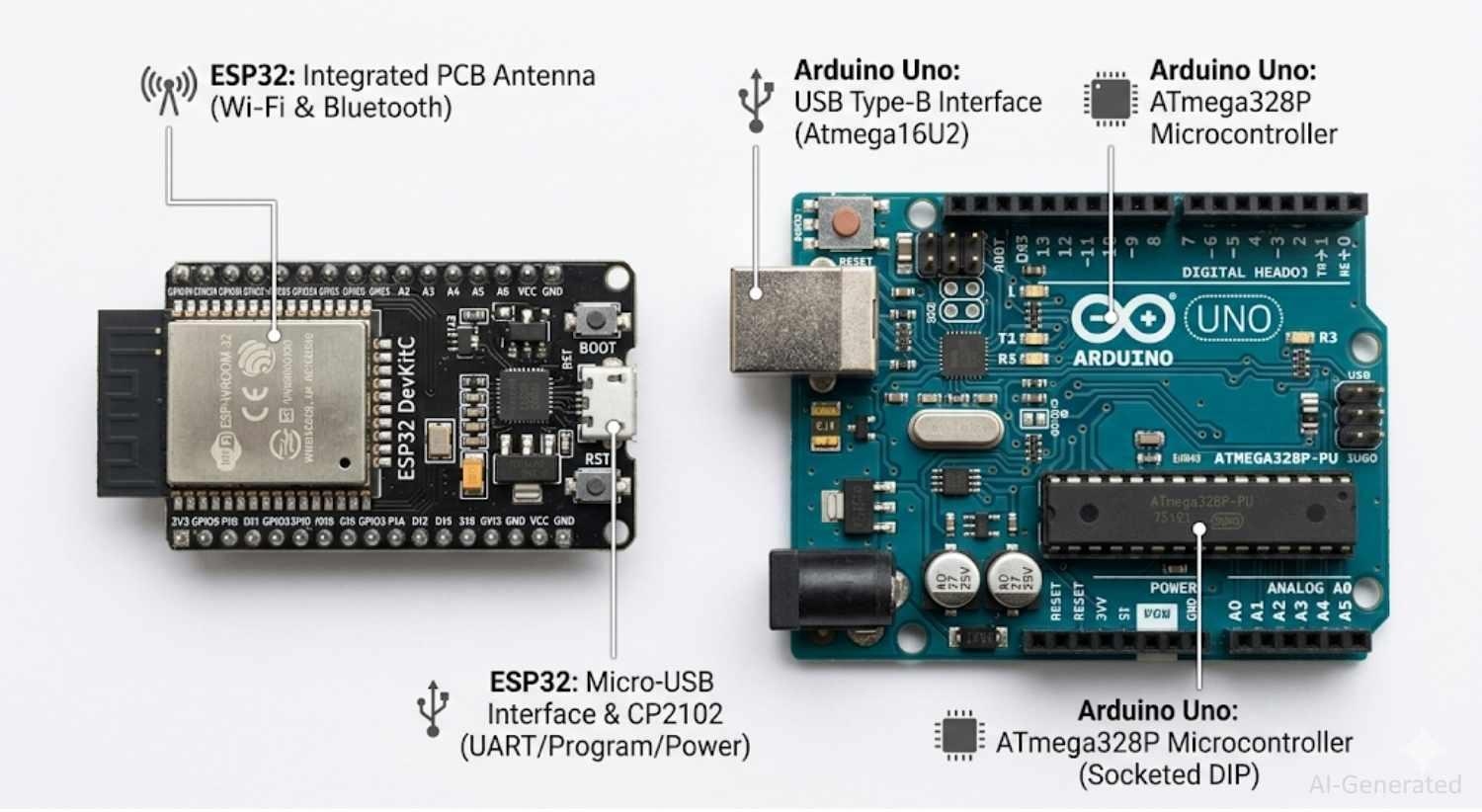
Figure: Hardware Comparison of the ESP32 development board (like the DevKitC) and an Arduino Uno Rev3.
What is the Difference between ESP32 and Arduino?
The fundamental difference lies in processing power and connectivity; the ESP32 is a powerful Wi-Fi SoC, while Arduino represents a simpler, bare-metal microcontroller ecosystem.
Understanding the hardware disparity is the first step in the ESP32 vs Arduino debate.
While an Arduino Uno is perfect for toggling relays or reading simple analog sensors, the ESP32 behaves closer to a microcomputer than a traditional microcontroller.
Below is a core comparison between the standard ESP32 module and the classic Arduino Uno Rev3, which represents the most common baseline in the differences between Arduino and ESP32.
| Feature | ESP32 | Arduino Uno (ATmega328P) |
|---|---|---|
| CPU Architecture | Xtensa Dual-Core 32-bit LX6 | 8-bit AVR RISC |
| Clock Speed | 160 MHz or 240 MHz | 16 MHz |
| RAM | 520 KB SRAM | 2 KB SRAM |
| Flash Memory | Typically 4 MB to 16 MB | 32 KB |
| Connectivity | Built-in Wi-Fi & Bluetooth (BLE) | None (Requires external shields) |
| ADC Quality | 12-bit (Often non-linear) | 10-bit (Highly stable/linear) |
| Operating Voltage | 3.3V | 5V |
| Power Consumption | High during TX; Ultra-low in Deep Sleep | Moderate baseline; Limited sleep options |
| Cost | ~$4 - $6 | ~$20 (Official), ~$5 (Clones) |
| Best Use Case | IoT, Edge AI, Multitasking | Simple automation, Beginner learning |
When to Use ESP32 vs Arduino
Choose the ESP32 for IoT, heavy processing, and wireless needs; opt for Arduino for simple, predictable hardware control and beginner projects.
Which is better, ESP32 or Arduino? It is entirely situational. Is ESP32 better than Arduino? For complex tasks, yes. However, for simple tasks like blinking LEDs or reading a single sensor, the ESP32 is often unnecessary overkill.
Use ESP32 When
- You need Wi-Fi or Bluetooth: The undisputed king for IoT projects.
- Your project requires high processing power: Parsing large JSON payloads or running encryption algorithms.
- You need multitasking: Utilizing FreeRTOS to manage multiple complex loops simultaneously.
- You are building real-time data systems: Cloud-connected dashboards streaming high-frequency data.
- You want OTA updates: Flashing new firmware over the air without a physical USB connection.
- You are building TinyML or Edge AI applications:
- Object detection using ESP32-CAM.
- Voice recognition.
- Gesture detection.
- Sensor anomaly detection.
- ESP32-S3 is specifically optimized for TinyML workloads with vector instructions.
- You prefer PlatformIO: Utilizing advanced, VS Code-based professional workflows.
- You need cloud integration: Native support for MQTT, HTTP APIs, AWS, and Firebase.
Use Arduino When
- You are building simple control systems: Basic state machines, motor drivers, or LED sequencers.
- You need deterministic timing: Stepper motor control where nanosecond precision matters without RTOS overhead.
- You are a beginner learning electronics: The simplest path to understanding GPIOs, loops, and basic circuitry.
- You require stable ADC readings: The Arduino's 10-bit ADC is highly linear, whereas the ESP32 struggles with non-linearity.
- You need 5V compatibility: Interfacing seamlessly with legacy 5V sensors, relays, and logic gates without level shifters.
- You want fast and easy prototype PCB assembly: Quickly spinning up a simple, reliable circuit without worrying about RF design.
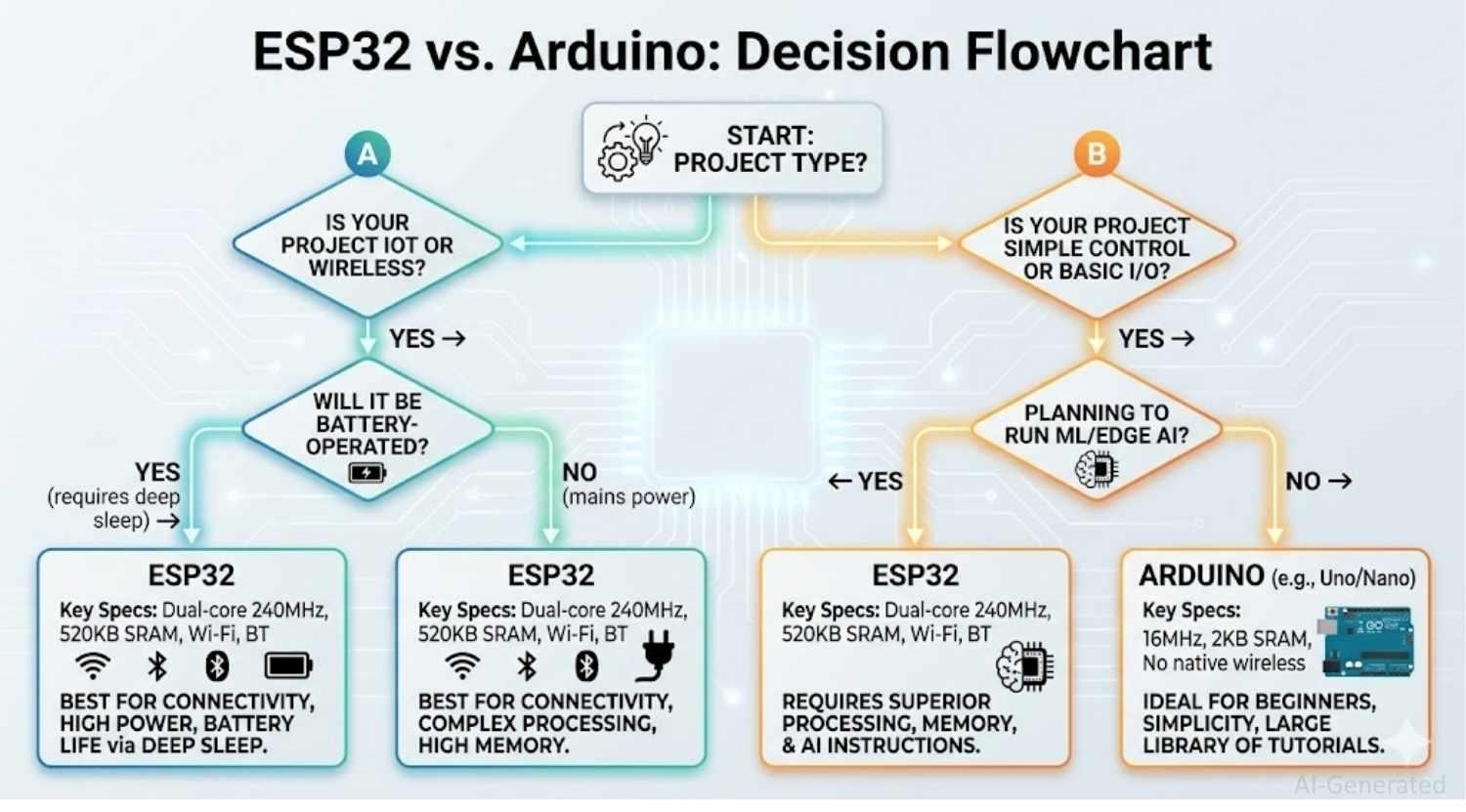
Figure: ESP32 vs Arduino Decision Flowchart
ESP32 vs Arduino for IoT Projects
With built-in Wi-Fi, Bluetooth, and ample memory for secure cloud connections, the ESP32 is the undisputed leader for IoT.
When discussing ESP32 vs Arduino for IoT, the conversation heavily favors Espressif. While you can build an IoT device with an Arduino, comparing an ESP32 vs Arduino vs Raspberry Pi usually places the ESP32 right in the sweet spot for embedded IoT.
Connectivity Requirements
- ESP32: Features built-in Wi-Fi and Bluetooth. No external modules are needed, drastically reducing your hardware footprint and point of failure.
- Arduino: Requires external modules (like the ESP8266 or Ethernet shields) communicating over UART or SPI, adding complexity and latency.
Cloud Integration
- ESP32: Powerful enough to handle secure TLS/SSL connections natively. Implementing MQTT, HTTP requests, or connecting to AWS IoT and Firebase is standard practice. Over-The-Air (OTA) updates are seamlessly supported.
- Arduino: Setting up secure connections on an 8-bit AVR is incredibly taxing on its limited memory, often requiring complex workarounds.
Real-Time Data Processing
- ESP32: With a dual-core processor, core 0 can maintain the Wi-Fi stack and MQTT connection, while core 1 handles high-speed sensor data processing in parallel.
- Arduino: Sequential processing means the board must pause sensor readings while it waits for a network response, causing data bottlenecks.
Edge AI and Vision Processing
- ESP32: Fully supports ESP32-CAM modules for basic image classification and face detection using the ESP-WHO framework. Most ESP32-based vision systems are limited to lightweight models such as face detection, person detection, or simple classification due to memory constraints. For more advanced neural networks, developers typically move to higher-end edge AI platforms. For camera-based object detection, ESP32-S3 and ESP32-CAM are significantly more practical than classic Arduino boards.
- Arduino: Standard boards have virtually no TinyML capability. For edge AI, developers must migrate to the specialized Nano 33 BLE Sense or the industrial Portenta series.
Summary: In modern embedded system design, ESP32-S3 and newer variants are increasingly used for edge AI applications such as smart cameras and voice interfaces, while Arduino remains dominant in education and deterministic control systems.
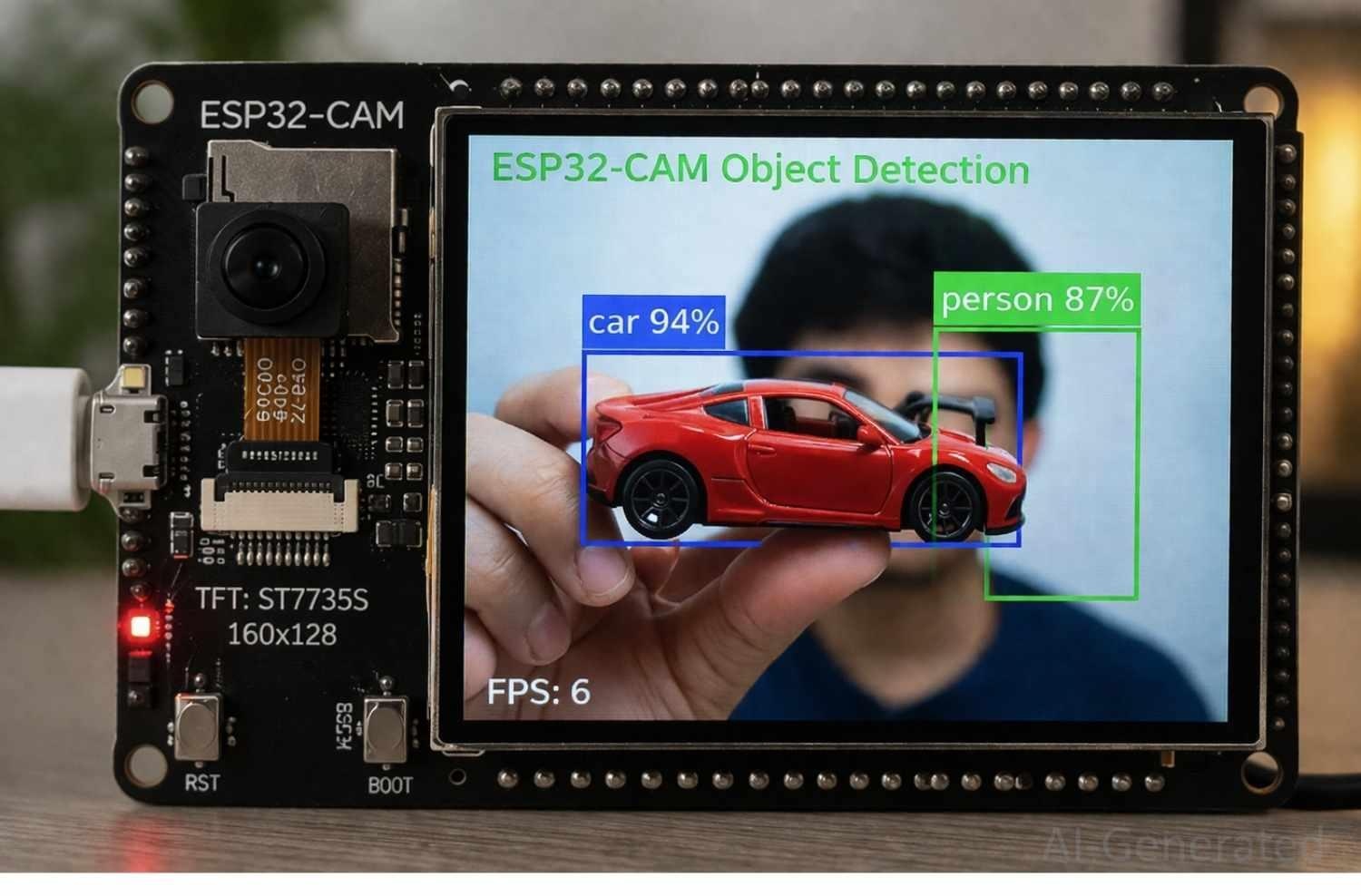
Figure: An ESP32-CAM capturing an image and detecting objects, with technical bounding boxes overlaid to highlight edge AI concepts.
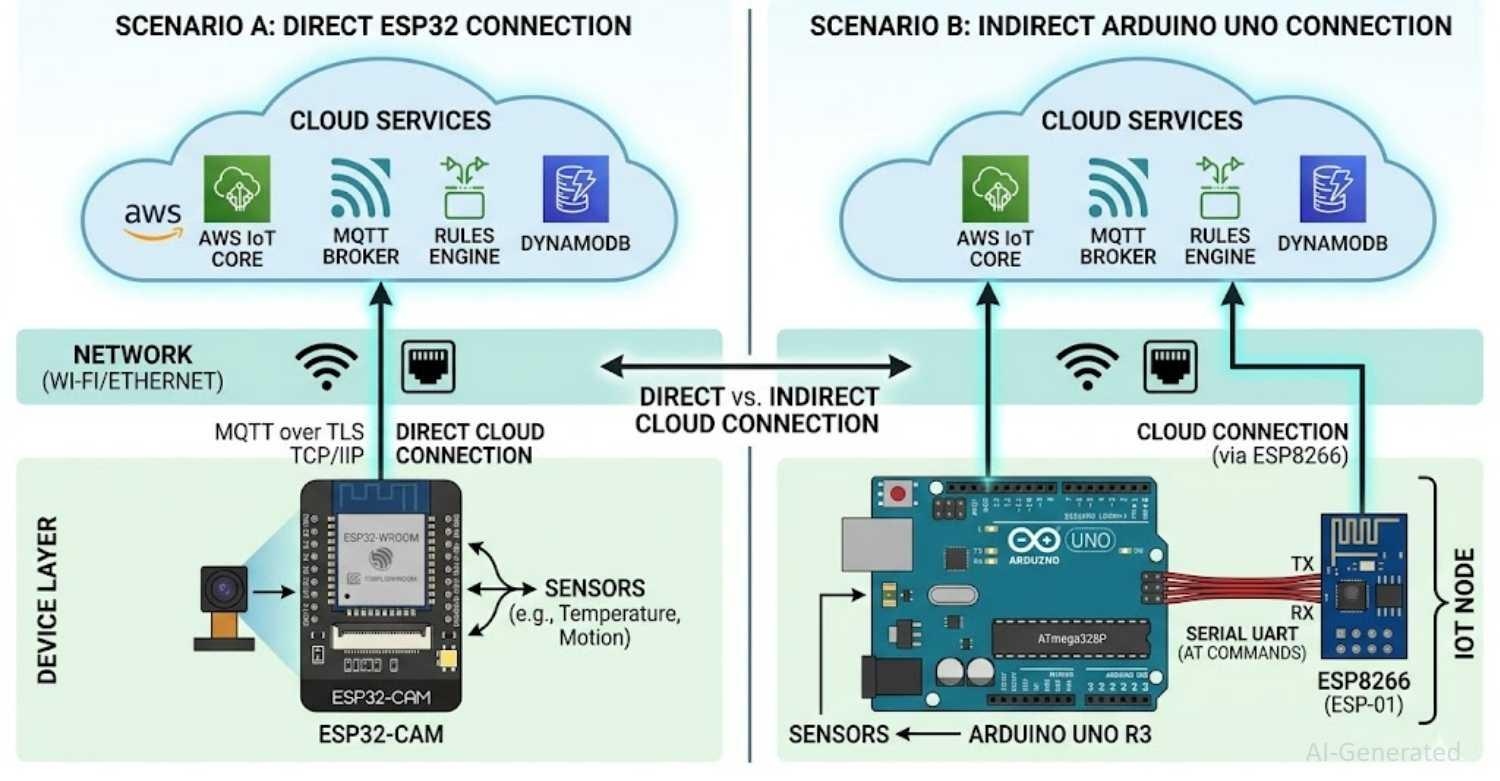
Figure: A split architecture diagram showing an ESP32 connecting directly to cloud services (MQTT/AWS), versus an Arduino Uno requiring a secondary ESP8266 module to achieve the same cloud connection.
ESP32 vs Arduino Performance Comparison
The ESP32 significantly outperforms Arduino in speed, memory, and AI tasks, but at the cost of higher power consumption.
Looking at ESP32 vs Arduino performance, the spec sheets reveal a massive gulf. If Arduino vs ESP32 speed is your primary concern, the ESP32 dominates.
Processing Power
- ESP32: Boasts a dual-core processor running at up to 240 MHz. It can perform complex math, string manipulation, and audio processing with ease.
- Arduino Uno: Relies on a single-core ATmega328P running at a modest 16 MHz.
Memory
- ESP32: Features ~520 KB of SRAM and megabytes of flash memory, providing ample room for heavy libraries, graphics buffers for displays, and large arrays.
- Arduino Uno: Limited to just 2 KB of SRAM and 32 KB of flash. Complex libraries (like advanced displays or network stacks) will quickly cause out-of-memory errors. In real-world testing, memory limitations on Arduino often become the primary bottleneck before CPU speed.
AI / ML Capability
- ESP32: Widely supports TensorFlow Lite Micro. The advanced architectures found in the ESP32-S3 and ESP32-P4 are heavily optimized for edge machine learning models.
- Arduino: Very limited AI capability on standard boards.
Power Consumption
- ESP32: Draws significantly more power during active operation (~160mA-260mA during Wi-Fi TX). However, it features an advanced Ultra-Low Power (ULP) co-processor and deep sleep modes that drop consumption into the microamp (µA) range.
- Arduino: Has a lower baseline power consumption (~20mA-50mA) but lacks the sophisticated, ultra-low deep sleep capabilities of the ESP32 out of the box.
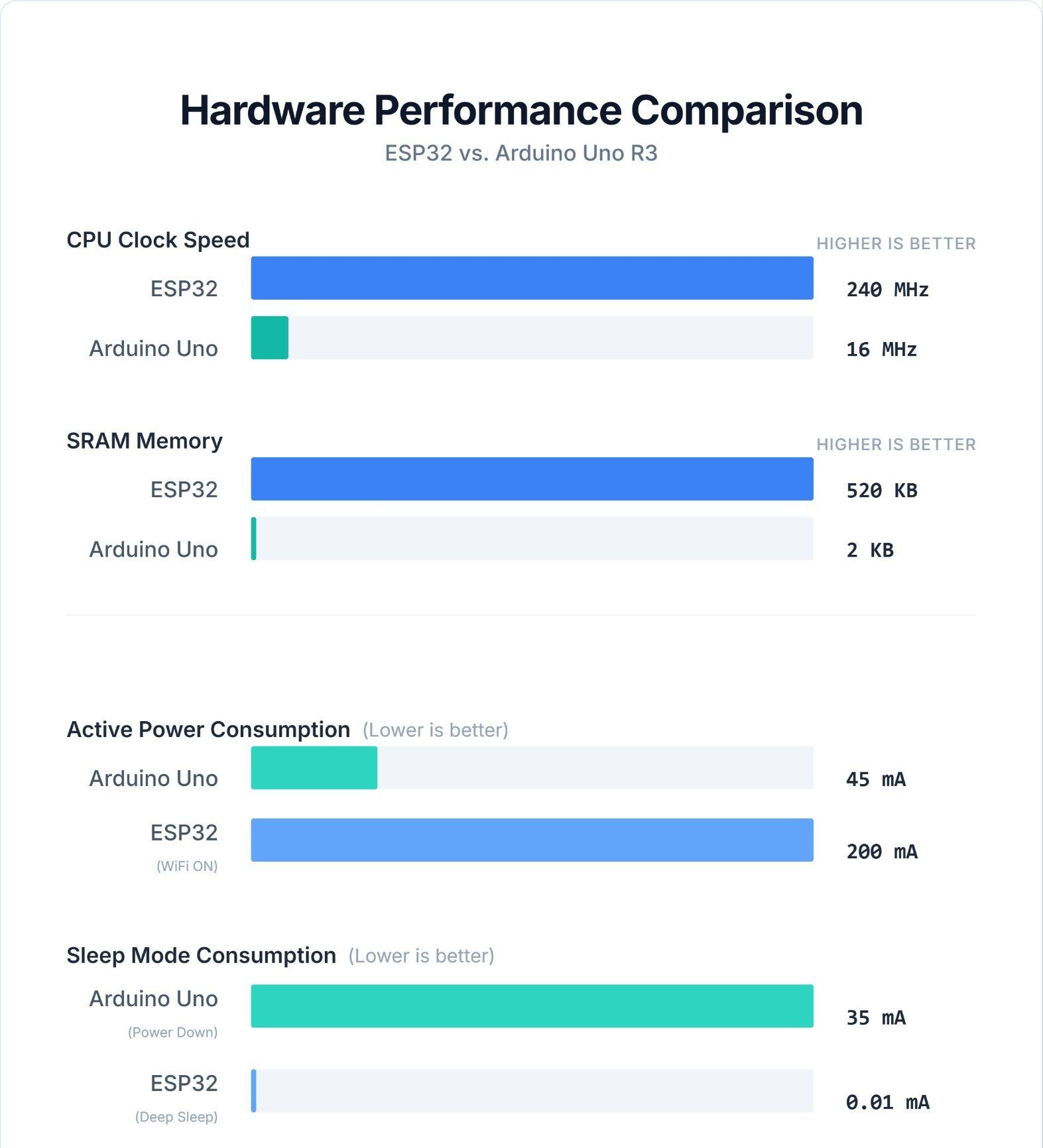
Figure: Performance Comparison Chart of the ESP32 against the Arduino Uno, while also noting power usage differences.
ESP32 vs Arduino for Beginners
Arduino remains the easiest platform to learn, though the ESP32 is highly accessible for beginners tackling modern, connected projects.
For newcomers, the esp32 vs arduino for beginners debate is a trade-off between simplicity and capability.
Learning Curve
The Arduino is historically the easiest entry point into embedded electronics. You plug it in, write a few lines of code, and an LED blinks.
The ESP32 carries a moderate complexity; users must navigate 3.3V logic levels, Wi-Fi credentials, and occasionally finicky USB-to-serial drivers. Given the wide variety of modules available, understanding how to choose an ESP32 development board is a highly recommended first step for newcomers to ensure they purchase a beginner-friendly board with an onboard USB programmer rather than a bare surface-mount chip.
Development Tools
Both platforms share the ESP32 vs Arduino code syntax via the Arduino IDE, which remains incredibly beginner-friendly. However, as projects scale, the ESP32 shines on advanced tools like PlatformIO (VS Code) and the official ESP-IDF for professional development. It also natively supports MicroPython for those who prefer scripting over C++.
Community Support
Arduino has a massive, decade-old ecosystem with a library for virtually every sensor ever made. The ESP32 community, while slightly younger, is rapidly growing and currently dominates the maker space for modern projects.
ESP32 vs Arduino Architecture Explained
The core difference between ESP32 and Arduino lies in how they execute tasks and integrate hardware. The ESP32 is a highly integrated System-on-Chip (SoC), while Arduino boards are built around standalone microcontrollers.
ESP32 Architecture
- Integrated SoC: CPU + WiFi + Bluetooth + RAM in one chip
- Dual-core processor: (up to 240 MHz)
- Runs FreeRTOS: for multitasking
- Handles networking and application logic in parallel
Arduino Architecture
- Based on standalone microcontrollers: (e.g., ATmega328P)
- Single-core execution
- Runs code sequentially: (loop() model)
- No RTOS by default
Key Engineering Differences
- Multitasking: ESP32 (FreeRTOS)
- Deterministic timing: Arduino (no OS overhead)
- Interrupt behavior: Arduino is more predictable
- Timing jitter: ESP32 may introduce latency due to the WiFi stack
In practice, Arduino is better for precise hardware control, while ESP32 is designed for connected, multi-tasking embedded systems.
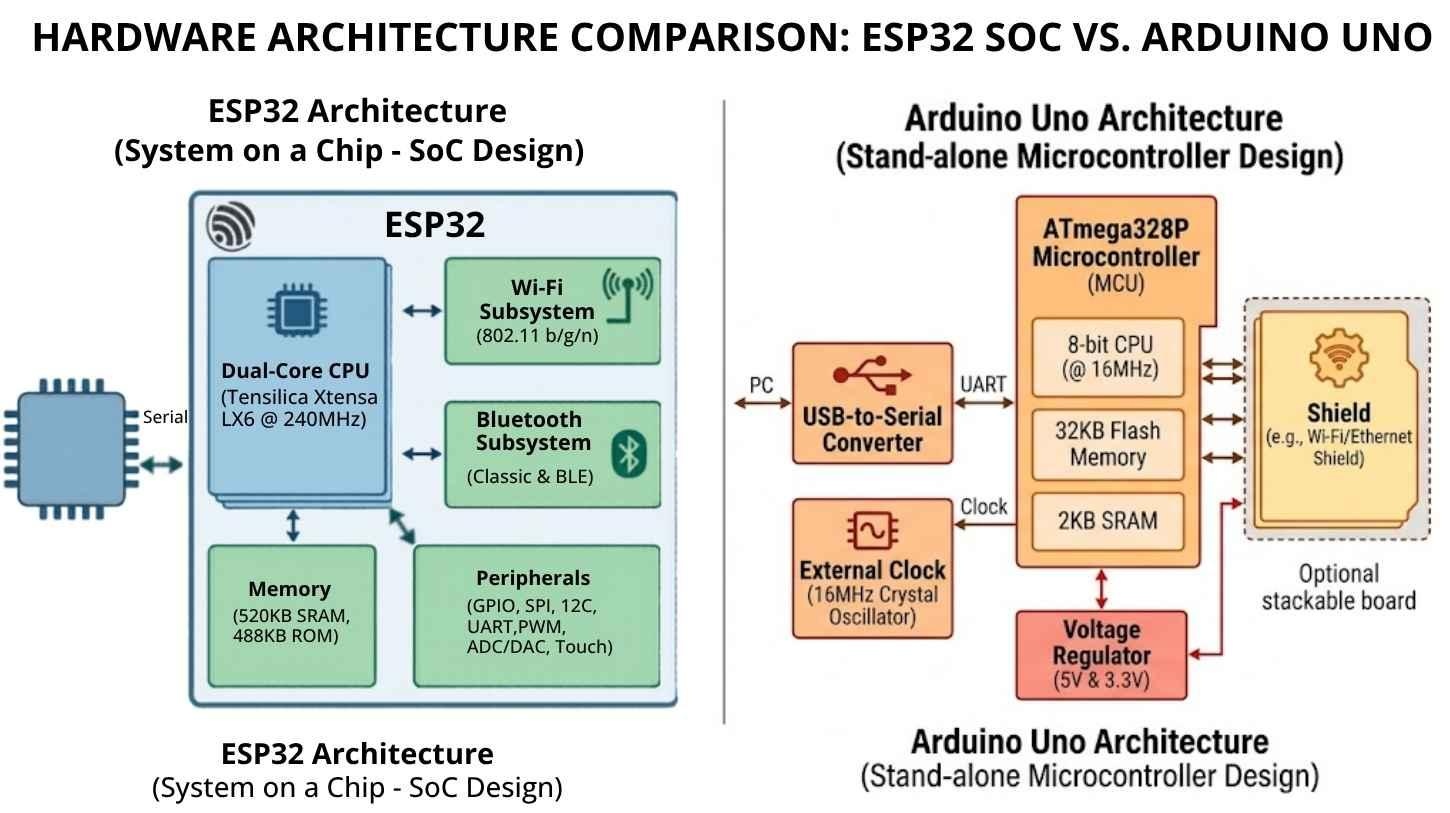
Figure: Split diagram showing ESP32 as an integrated SoC with WiFi and dual-core CPU, compared to Arduino Uno using a standalone microcontroller with external components.
ESP32 vs Arduino in PCB Design and Assembly
ESP32 modules streamline production BOMs and reduce RF certification costs, making them superior to bare Arduino chips for commercial scaling. In commercial IoT product design, ESP32 modules are widely preferred because they eliminate the need for separate RF certification.
When moving a prototype off the breadboard, the ESP32 vs Arduino PCB design paths diverge drastically, heavily impacting the ESP32 vs Arduino price at scale.
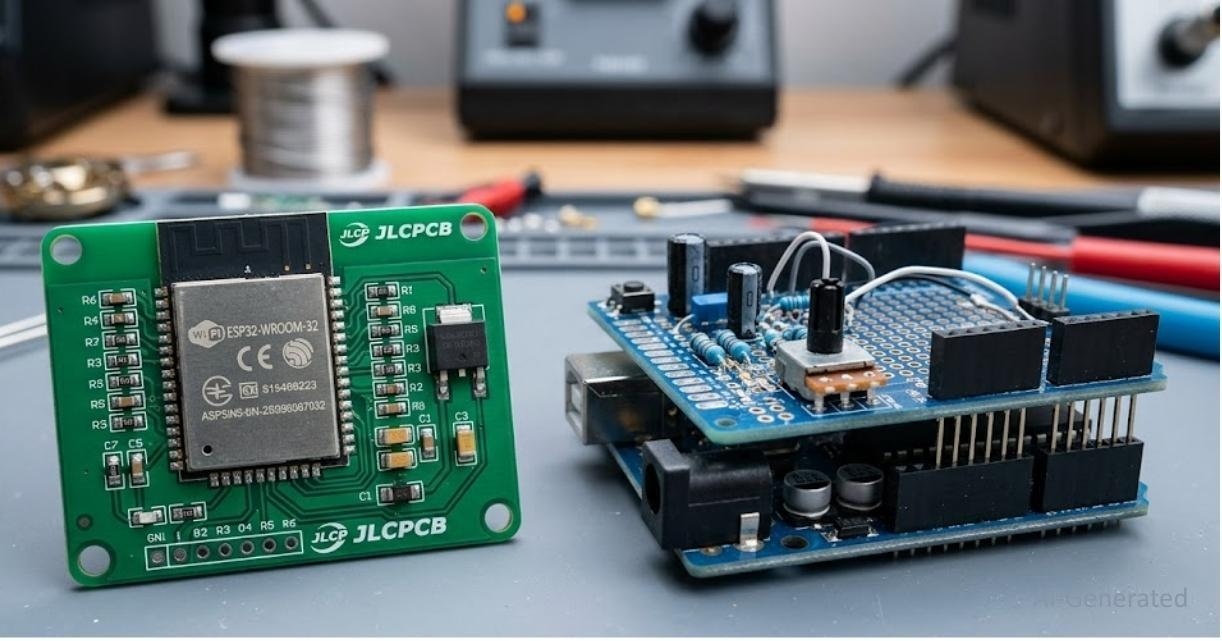
Figure: A visual showing a bare ESP32-WROOM-32 module professionally surface-mounted (SMD) on a printed circuit board, contrasted next to a bulky, traditional through-hole Arduino shield setup.
From Prototyping to Production
An Arduino Uno development board is strictly for prototyping; it is not production-friendly. To scale an Arduino project, you must integrate bare ATmega chips onto your board. Conversely, the ESP32 is primarily sold as surface-mount modules (like the ESP32-WROOM-32).
Learning how to design an ESP32 module PCB allows you to drop a fully certified wireless brain directly onto your custom board.
Component Selection and BOM Optimization
Using an ESP32 drastically reduces your Bill of Materials (BOM). Because Wi-Fi, Bluetooth, and memory are integrated into the shielded module, you eliminate the need to source external networking ICs. When sourcing components from JLCPCB Parts Library, an ESP32 design requires fewer lines on your BOM than an Arduino utilizing an external Wi-Fi shield.
Expert Notes
- Antenna Clearance: ESP32 modules require a strict keep-out zone (no copper pours) under the PCB antenna.
- Ground Planes: Solid ground planes are mandatory for ESP32 stability during RF transmissions.
- Certification: Pre-certified ESP-WROOM modules save thousands of dollars in FCC/CE RF certification compared to custom Arduino RF designs.
ESP32 and Arduino Variants Explained
ESP32 is no longer a single chip - it is a full family targeting different embedded use cases, while Arduino is an ecosystem built on multiple MCU architectures.
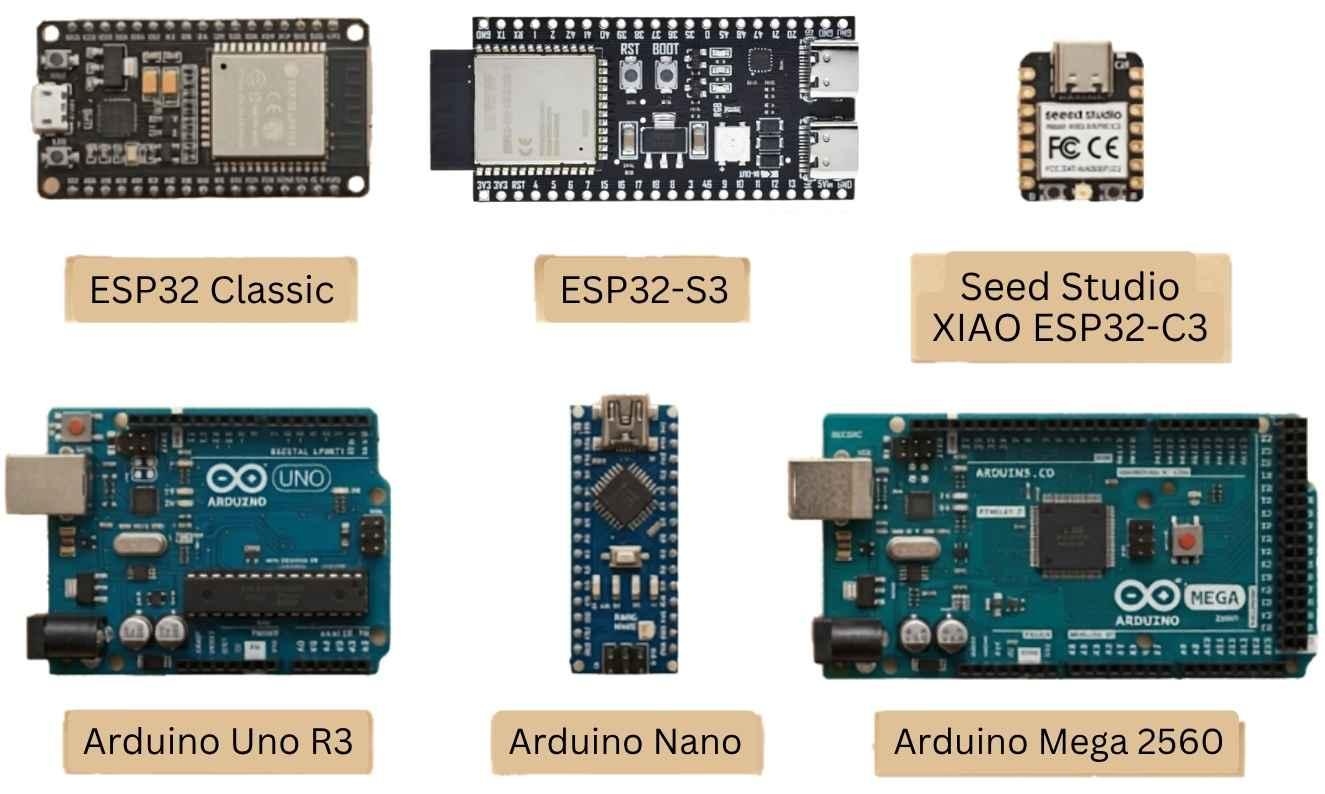
Figure: ESP32 and Arduino Real Board Families
ESP32 Variants Overview
- ESP32 (Classic): Dual-core Xtensa LX6, Wi-Fi + BLE. The standard choice for general-purpose IoT.
- ESP32-S Series (S2, S3): Focuses heavily on AI + USB. The ESP32-S3 features vector instructions for TinyML, supports camera modules natively, and is ideal for edge AI and vision processing.
- ESP32-C Series (C3, C6): Built on the RISC-V architecture, offering lower power consumption and highly cost-optimized IoT capabilities.
- ESP32-P Series (P4 – Latest): A high-performance application processor specifically designed for heavy AI workloads, HMI (Human-Machine Interface) / display systems, and advanced edge computing without native RF. Unlike classic ESP32 chips, the ESP32-P4 does not include integrated Wi-Fi/Bluetooth and is intended for high-performance local processing.
Arduino Variants Overview
- Arduino Uno (Classic): Built around the ATmega328P, relying on traditional 8-bit AVR.
- Arduino Nano / Mega: The Nano provides a compact footprint for breadboards, while the Mega offers a massive GPIO count for complex 3D printers or robotics.
- Arduino Due: Steps up to a 32-bit ARM Cortex-M3 architecture.
- Arduino Uno R4: A major performance upgrade featuring the Renesas RA4M1 (ARM Cortex-M4).
- Arduino Uno R4 WiFi: Includes the Renesas MCU but pairs it with an onboard ESP32-S3 to handle connectivity.
Note: Arduino is increasingly collaborating with modern silicon vendors, expanding beyond traditional AVR and ARM platforms to meet industrial embedded requirements.
ESP32 vs Most Popular Arduino Boards
Compare the ESP32 directly against the most common Arduino boards to find the right fit for your specific use case.
ESP32 vs Arduino Uno
The ESP32 offers built-in Wi-Fi and high performance, whereas the Uno focuses on simplicity and standard 5V logic.
ESP32 vs Arduino Nano
The Nano is extremely compact and beginner-friendly, while the ESP32 is significantly more powerful and includes wireless capabilities.
ESP32 vs Arduino Mega
The Mega provides a high GPIO count for massive I/O needs, while the ESP32 excels in raw processing and IoT integration.
ESP32 vs Arduino: Advantages and Disadvantages
The ESP32 excels in wireless performance but struggles with ADC accuracy, whereas Arduino offers simplicity and stable 5V analog control.
ESP32 Advantages:
- Built-in Wi-Fi & Bluetooth (BLE).
- Massive performance advantage (Dual-core, up to 240MHz).
- Ample memory for complex tasks and TinyML.
ESP32 Disadvantages:
- Higher power consumption during active radio transmission.
- Known ADC non-linearity issues (requires software calibration).
- Strict 3.3V logic (can damage 5V sensors without level shifting).
Arduino Advantages:
- Incredibly easy to use with a vast, stable library ecosystem.
- Highly stable and linear analog (ADC) readings.
- 5V logic compatibility simplifies basic sensor integration.
Arduino Disadvantages:
- Very limited memory and processing power.
- No built-in wireless connectivity.
- Larger physical footprint for standard boards.
Common Mistakes When Choosing ESP32 or Arduino
Is ESP32 better than Arduino? Only if applied correctly. Avoid these pitfalls when choosing ESP32 or Arduino:
- Using ESP32 for simple LED projects: This is massive overkill. An Arduino Nano or ATtiny is vastly superior for simple logic.
- Ignoring Wi-Fi power consumption: ESP32 batteries drain rapidly if deep sleep and radio management aren't coded correctly.
- Choosing based on trend: Don't pick an ESP32 just because it is popular if your project requires deterministic, microsecond timing.
- Not considering ADC accuracy: If your project relies on highly precise analog sensor data without external ADCs, the Arduino is better.
- Overlooking development complexity: Level shifting 3.3V to 5V for legacy displays can complicate your hardware design.
FAQ
Q: Can I program the ESP32 using the Arduino IDE?
Yes. By simply installing the ESP32 board manager core in the Arduino IDE, you can write and upload standard C++ code directly to almost any ESP32 development board.
Q: Will my existing Arduino code run on an ESP32?
Most basic logic and standard libraries will work out of the box. However, hardware-specific code (like AVR register manipulation, custom timers, or 5V-dependent sensor libraries) will require modification.
Q: Can I connect 5V Arduino sensors directly to an ESP32?
Generally, no. The ESP32 relies on strict 3.3V logic. Connecting a 5V sensor output directly to an ESP32 GPIO pin can permanently damage the SoC; you must use a logic level converter.
Q: Which board is better for long-term battery power?
The ESP32 is superior due to its advanced ULP (Ultra-Low Power) co-processor and deep sleep modes, which can drop current draw to ~10µA. Standard Arduinos lack this level of built-in power optimization.
Q: Do I need Wi-Fi to use the ESP32?
Not at all. While the ESP32 is famous for its wireless capabilities, you can completely disable the RF radios in your code and use it strictly as a high-performance, dual-core microcontroller.
Conclusion
In the battle of ESP32 vs Arduino, there is no universal winner-only the right tool for the job. Which should you choose? Your decision ultimately depends on connectivity, processing performance, power constraints, and hardware scalability.
If your goal is simple, deterministic hardware control, or if you are a beginner taking your first steps into embedded systems, the Arduino ecosystem remains unmatched. However, if your project demands Wi-Fi connectivity, heavy data processing, edge AI, or if you plan to scale a modern IoT prototype into high-volume PCB assembly, the ESP32 is the undisputed champion of modern embedded engineering.
Ready to turn your prototype into reality? Whether you are designing a custom ESP32 IoT board or a reliable Arduino-based controller, JLCPCB offers fast, reliable, and cost-effective PCB Assembly services. Take the next step from breadboard to production and get an instant estimate on the JLCPCB Quotation page.
Popular Articles
• SMD Resistor Package Sizes: Complete Size Chart, Footprints & How to Choose
• How to Solder SMD Components Like a Pro [2026 Updated]
• SMD Resistor Codes: How to Read 3-Digit, 4-Digit, and EIA-96 Markings
• SMD Capacitor Codes: Identification, Markings, and Polarity
• SMD Capacitor Sizes: Complete Size Chart and Selection Tips for PCB Design and Assembly
Keep Learning
SMD MOSFET Code Guide: How to Identify, Test and Replace a MOSFET
Figure: AO3400A (C20917) in the JLCPCB parts library. The listing gives RDS(on) at 2.5 V gate drive, the number that matters in the replacement example later in this guide. An SMD MOSFET code is the two or three characters printed on top of the package, and on its own it rarely tells you which part you're holding. SMD resistors follow standard marking schemes, such as three- and four-digit codes and EIA-96. MOSFETs don't. The same short code can appear on unrelated parts from different manufacturers, ......
ESP8266 vs ESP32: Which One Should You Use?
Key Takeaways ESP32: Dual-core 240 MHz CPU, Bluetooth Classic and BLE, 520 KB SRAM, and up to 34 GPIOs. ESP8266: Single-core CPU, no Bluetooth, and around 50 KB of free RAM for applications. Lifecycle status: Espressif marks the ESP8266 Not Recommended for New Designs (NRND) and names the ESP32-C2 (ESP8684) as its upgrade, although the ESP8266 remains in production with a longevity commitment. Which ESP32 to use: Choose the ESP32-C2 for simple Wi-Fi or Bluetooth LE firmware, the ESP32-C3 for more memo......
What Is a Thermistor? A Practical Guide to NTC, PTC, Applications, and Circuit Design
Key Takeaways Definition: A thermistor is a thermally sensitive resistor whose resistance changes markedly and predictably with temperature, typically by about 4.4% per °C for a standard 10 kΩ NTC (B25/50 = 3950 K) near 25 °C. NTC vs. PTC: An NTC thermistor's resistance falls as temperature rises, which suits temperature sensing and inrush current limiting; a switching PTC's resistance rises steeply above its switch temperature, which suits circuit protection. Key Specifications: An NTC thermistor is ......
What Is the ESP32-CAM, and How to Wire, Power, and Program It?
Key Takeaways Board, not chip: The ESP32-CAM is an AI-Thinker development board, not an Espressif product. It carries AI-Thinker's ESP32-S module, an OV2640 camera, PSRAM, a microSD slot, and a flash LED. No USB port: The board has no USB connector or USB-to-UART bridge, so you program it via its serial pins using a 3.3 V USB-to-serial adapter, with GPIO0 held low at reset. Few free pins: The camera, PSRAM, and microSD card occupy most GPIOs. With the microSD card unused, GPIO2, GPIO4, GPIO12, GPIO13,......
ESP32 Versions: Which One Should You Use for Your Project?
Key Takeaways Radios decide first: ESP32 versions differ mainly in their radios, CPU cores, and peripherals. Common defaults: The ESP32-C3 suits low-cost Wi-Fi and Bluetooth LE, the ESP32-S3 suits camera, display, voice, and on-device AI. Original ESP32: The chip is still in production and remains the choice for Bluetooth Classic. Versions without Wi-Fi: The ESP32-H2 targets battery-powered Thread and Zigbee devices. Chip, module, or board: Prototype on a development board, then design a module onto y......
SOIC Package: A Complete Guide to Specifications, Types, Uses, and SMT Assembly
As designs transition from legacy through-hole components to high-density Surface Mount Technology (SMT), the Small Outline Integrated Circuit (SOIC) remains the industry standard for operational amplifiers, flash memory, sensors, and microcontrollers. It reflects a well-balanced engineering design, offering a practical compromise between the miniaturisation demanded by modern consumer electronics and the ruggedness required for industrial applications. In this guide, you will learn: SOIC package dime......