ESP32 Versions: Which One Should You Use for Your Project?
12 min
- ESP32 Versions Compared: What's the Difference?
- Which ESP32 Version Should You Choose?
- Is the Original ESP32 Still a Good Choice?
- ESP32-S Series Versions: When to Choose S2, S3, or S31
- ESP32-C Series Versions: When to Choose C2, C3, C5, C6, or C61
- ESP32-H and ESP32-P Series Versions: When to Choose H2 or P4
- ESP32 Chip, Module, or Development Board: Which Should You Buy?
- ESP32 Versions in JLCPCB PCB Assembly
- Conclusion
- FAQs About ESP32 Versions
Key Takeaways
- Radios decide first: ESP32 versions differ mainly in their radios, CPU cores, and peripherals.
- Common defaults: The ESP32-C3 suits low-cost Wi-Fi and Bluetooth LE, the ESP32-S3 suits camera, display, voice, and on-device AI.
- Original ESP32: The chip is still in production and remains the choice for Bluetooth Classic.
- Versions without Wi-Fi: The ESP32-H2 targets battery-powered Thread and Zigbee devices.
- Chip, module, or board: Prototype on a development board, then design a module onto your own PCB for production.
ESP32 versions differ mainly in their radios, CPU cores, and peripherals, so the right one depends on what your product must connect to. For most new projects, the ESP32-C3, ESP32-S3, or ESP32-C6 covers the requirement.
Radio support narrows the choice first: Wi-Fi 4 or Wi-Fi 6, Bluetooth LE or Bluetooth Classic, and whether Thread or Zigbee is needed. Processing power, memory, and interfaces such as USB or a camera port then point to one version.
In this guide, you will learn:
- How the current ESP32 variants differ
- Which ESP32 version is best for each type of project
- Whether the original ESP32 is still a good choice, and which modules to avoid
- When to choose the ESP32-S, C, H, or P series
- Whether you should buy an ESP32 chip, module, or development board
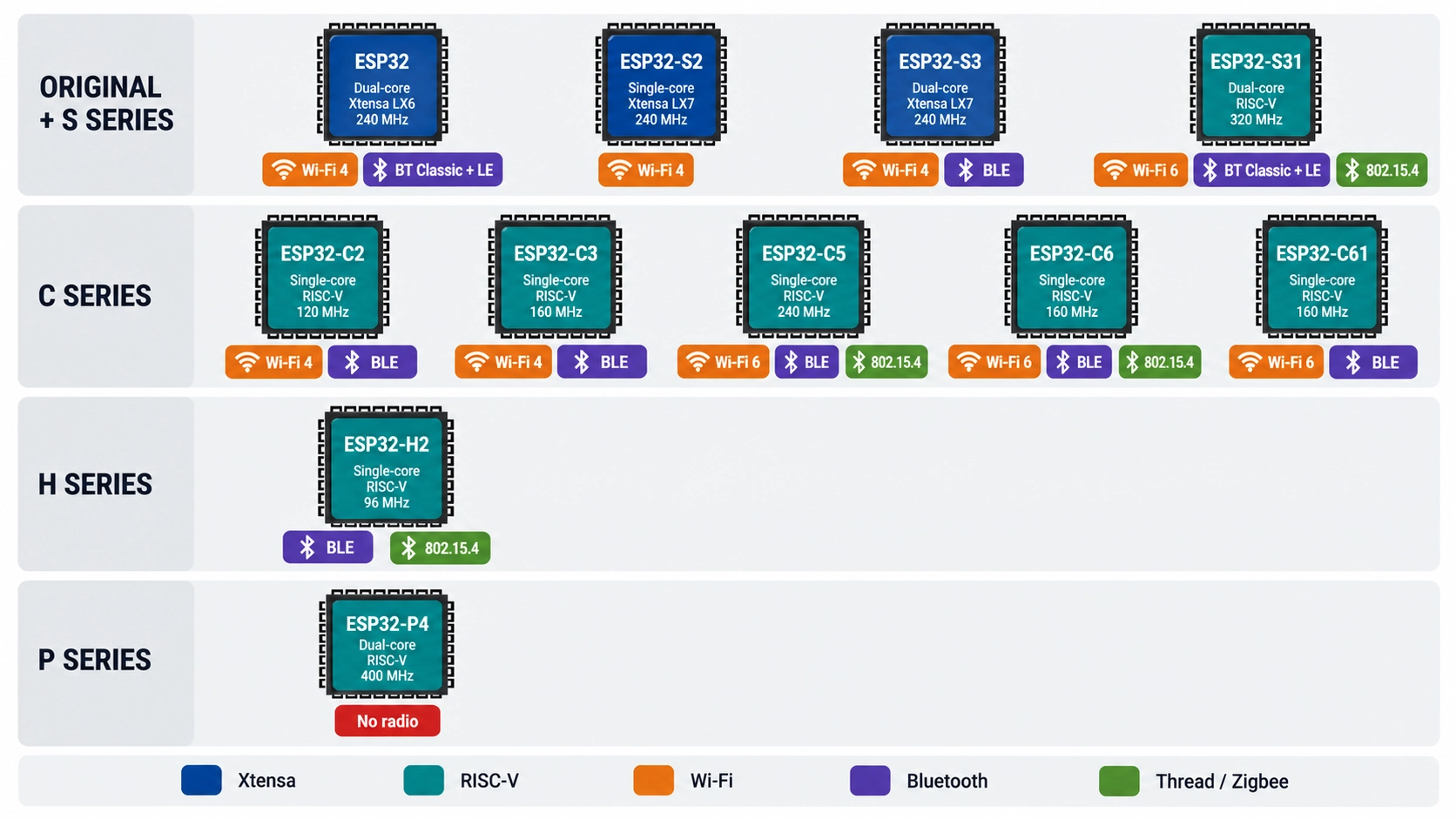
Figure: ESP32 versions grouped by series, CPU core, and radio support
ESP32 Versions Compared: What's the Difference?
The ESP32 family is Espressif's line of microcontroller SoCs, and most versions integrate Wi-Fi and Bluetooth LE on the same chip.
The versions differ in three areas: the CPU architecture (Xtensa or RISC-V), the radios, and the peripherals built around them. The radios determine which variants meet your connectivity needs, while the CPU and peripherals determine performance fit.
| Version | CPU | Wi-Fi | Bluetooth | Thread / Zigbee | Best For |
|---|---|---|---|---|---|
| ESP32 | Dual-core Xtensa LX6, 240 MHz | Wi-Fi 4, 2.4 GHz | Classic + LE | No | Bluetooth Classic, proven legacy designs |
| ESP32-S2 | Single-core Xtensa LX7, 240 MHz | Wi-Fi 4, 2.4 GHz | None | No | Wi-Fi devices with native USB, no Bluetooth |
| ESP32-S3 | Dual-core Xtensa LX7, 240 MHz | Wi-Fi 4, 2.4 GHz | LE 5 | No | Cameras, displays, voice, and edge AI |
| ESP32-S31 (newer part) | Dual-core RISC-V, 320 MHz | Wi-Fi 6, 2.4 GHz | Classic + LE 5.4 | Yes | Multi-radio hubs, audio, and human-machine interface (HMI) panels |
| ESP32-C2 | Single-core RISC-V, 120 MHz | Wi-Fi 4, 2.4 GHz | LE 5 | No | Lowest-cost simple Wi-Fi nodes |
| ESP32-C3 | Single-core RISC-V, 160 MHz | Wi-Fi 4, 2.4 GHz | LE 5 | No | Low-cost Wi-Fi and BLE devices |
| ESP32-C5 | Single-core RISC-V, 240 MHz | Wi-Fi 6, 2.4 + 5 GHz | LE 5 | Yes | Dual-band Wi-Fi in crowded networks |
| ESP32-C6 | Single-core RISC-V, 160 MHz | Wi-Fi 6, 2.4 GHz | LE 5 | Yes | Thread, Zigbee, and Matter-over-Thread devices |
| ESP32-C61 | Single-core RISC-V, 160 MHz | Wi-Fi 6, 2.4 GHz | LE 5 | No | Cost-optimized Wi-Fi 6 |
| ESP32-H2 | Single-core RISC-V, 96 MHz | None | LE 5 | Yes | Battery-powered Thread and Zigbee devices |
| ESP32-P4 | Dual-core RISC-V, 400 MHz | None | None | No | High-performance HMI, camera, and display |
Which ESP32 Version Should You Choose?
Choose the ESP32 version based on the radios your product needs, then on processing and I/O.
The ESP32-C3 is a common low-cost default. The ESP32-S3 suits compute-heavy projects, and the ESP32-C6 suits Thread and Zigbee smart-home devices.
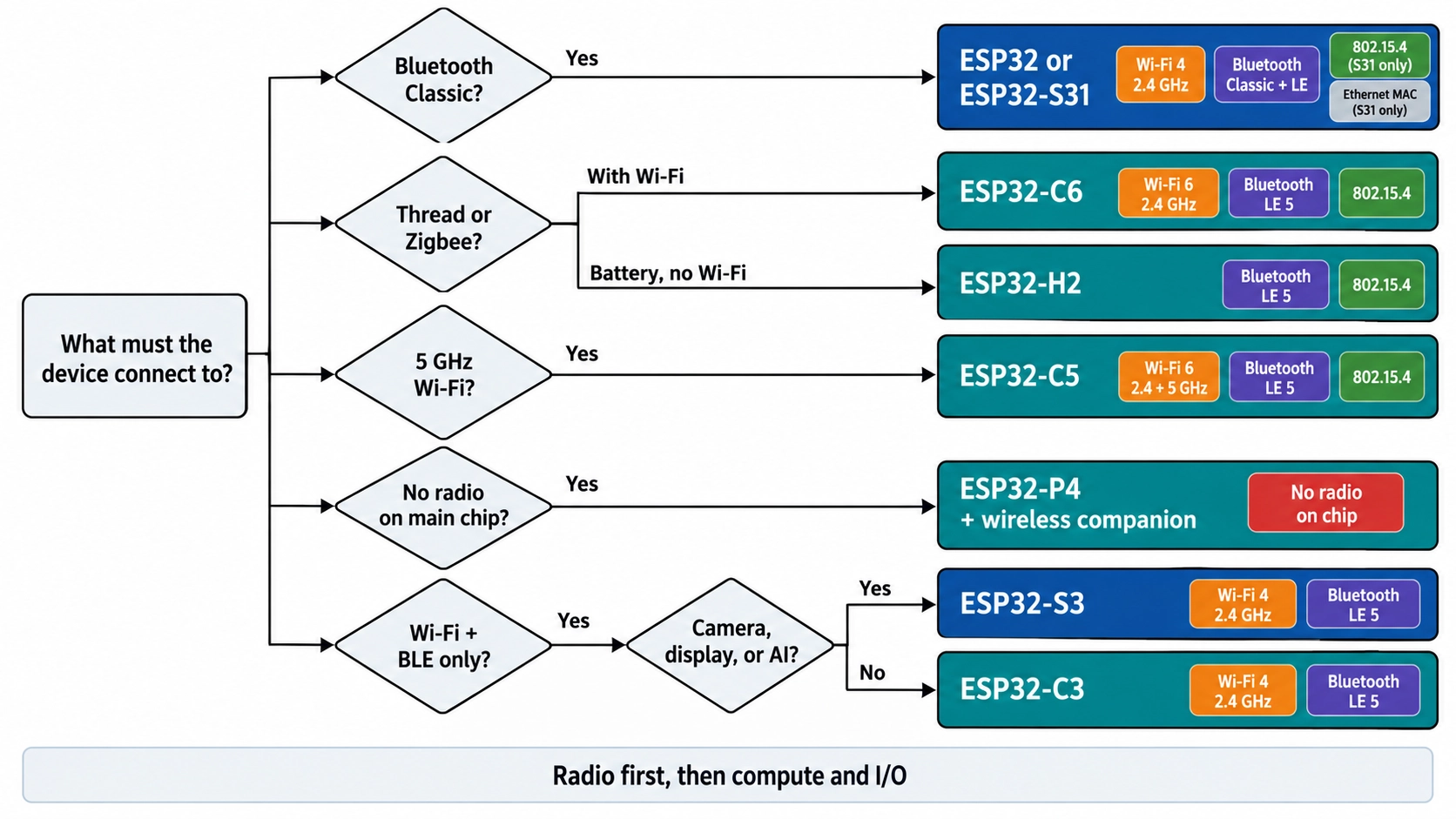
Figure: Decision flow that selects an ESP32 version from the radio and the compute requirement
The decision comes down to one question: what must the device connect to?
| Your Requirement | Choose |
|---|---|
| Low-cost Wi-Fi and Bluetooth LE | ESP32-C3 |
| Camera, display, voice, or on-device AI | ESP32-S3 |
| Thread, Zigbee, or Matter over Thread, alongside Wi-Fi | ESP32-C6 |
| Thread or Zigbee on a battery, no Wi-Fi | ESP32-H2 |
| 5 GHz Wi-Fi | ESP32-C5 |
| Wi-Fi 6 at the lowest cost | ESP32-C61 |
| Simplest, lowest-cost Wi-Fi, or an ESP8266 upgrade | ESP32-C2 |
| Bluetooth Classic, such as audio streaming | ESP32 or ESP32-S31 |
| Wi-Fi 6, Bluetooth 5.4, Thread, and a Gigabit Ethernet MAC in one chip | ESP32-S31 |
| MIPI camera or display, H.264 video, no radio on the main chip | ESP32-P4 plus a wireless companion chip |
Once the radio set is fixed, check three more things before you commit:
- GPIO count: Compact versions like the ESP32-C2 and ESP32-C3 provide fewer IO pins than the ESP32-S3 or ESP32-P4.
- Memory: Graphics, camera, and AI workloads typically need external PSRAM, so choose a version and module that support it.
- USB: The S2, S3, and P4 support USB OTG, while the C3 and C6 offer a USB Serial/JTAG interface for programming and debugging.
Is the Original ESP32 Still a Good Choice?
Yes, especially when the design requires Bluetooth Classic or depends on proven ESP32 firmware. For a new design, however, it is better to use a currently supported ESP32 module. The original ESP32 chip is still in production, but several of its early modules are now marked Not Recommended for New Designs (NRND).
Use the table below to choose a current replacement for an older or discontinued part:
| Module | Status | Current Module to Use Instead |
|---|---|---|
| ESP32-WROOM-32 | NRND | ESP32-WROOM-32E |
| ESP32-WROOM-32D | NRND | ESP32-WROOM-32E |
| ESP32-WROOM-32U | NRND | ESP32-WROOM-32UE (external antenna connector) |
| ESP32-WROVER-B / -IB | NRND | ESP32-WROVER-E / -IE (with PSRAM) |
| ESP32-SOLO-1 | NRND | A current dual-core module, such as ESP32-WROOM-32E |
- Choose the original ESP32 for: Bluetooth Classic profiles, designs that reuse existing ESP32 firmware and certification data, or a drop-in update of an existing board.
- Choose a newer version for: new designs that need only Bluetooth LE. The ESP32-C3 and ESP32-S3 add Bluetooth 5 (LE), and the S3 adds USB OTG.
The original ESP32 supports Bluetooth 4.2 for both Classic and LE. If a design needs Bluetooth 5 LE features, such as long-range (coded PHY), choose a newer version.
ESP32-S Series Versions: When to Choose S2, S3, or S31
The S series is Espressif's performance line. Choose it when the project needs USB OTG, which no C-series part offers, or the dual-core processing and higher GPIO count of the ESP32-S3 or ESP32-S31.
- ESP32-S2: A single-core Xtensa LX7 at 240 MHz with Wi-Fi 4 and USB OTG, but no Bluetooth. It suits Wi-Fi and USB devices that don't need Bluetooth.
- ESP32-S3: A dual-core Xtensa LX7 at 240 MHz with Wi-Fi 4, Bluetooth 5 (LE), and USB OTG. Its vector instructions accelerate neural-network and signal-processing workloads, and it supports octal PSRAM for camera and display buffers.
- ESP32-S31: A dual-core RISC-V at 320 MHz with 2.4 GHz Wi-Fi 6, Bluetooth 5.4 (Classic and LE), IEEE 802.15.4 (the radio standard behind Thread and Zigbee), and a Gigabit Ethernet MAC.
Choose ESP32-S3 for: Cameras, touch displays, voice control, and on-device AI, where software support and module choice are mature.
Choose ESP32-S31 for: Smart-home hubs, audio devices, and HMI panels that need Wi-Fi 6, Thread, Bluetooth Classic, and wired Ethernet.
ESP32-C Series Versions: When to Choose C2, C3, C5, C6, or C61
The C series uses single-core RISC-V CPUs and targets cost-sensitive connected devices. Within it, the radio is the main difference between versions.
| Version | Wi-Fi | Thread / Zigbee | Choose For |
|---|---|---|---|
| ESP32-C2 | Wi-Fi 4 | No | Simple Wi-Fi nodes; Espressif's upgrade path from the ESP8266 |
| ESP32-C3 | Wi-Fi 4 | No | Low-cost Wi-Fi and BLE sensors, controllers, and gateways |
| ESP32-C5 | Wi-Fi 6, 2.4 + 5 GHz | Yes | Devices that need 5 GHz Wi-Fi |
| ESP32-C6 | Wi-Fi 6, 2.4 GHz | Yes | Thread, Zigbee, and Matter-over-Thread smart-home products |
| ESP32-C61 | Wi-Fi 6, 2.4 GHz | No | Wi-Fi 6 at lower cost, with in-package PSRAM options |
- Choose ESP32-C3 for: a general Wi-Fi and Bluetooth LE product where cost matters and Wi-Fi 4 is sufficient.
- Choose ESP32-C6 for: Matter-over-Thread products, or devices that need Thread or Zigbee alongside Wi-Fi. Matter over Wi-Fi also runs on Wi-Fi versions such as the ESP32-C3 and ESP32-S3.
- Choose ESP32-C5 for: products that must connect on the 5 GHz band, where 2.4 GHz channels are congested.
Note
Selection rule: Choose the ESP32-C2 only for simple firmware, because it has less on-chip memory than the ESP32-C3.
ESP32-H and ESP32-P Series Versions: When to Choose H2 or P4
Choose an ESP32-H or ESP32-P version when the main chip does not need Wi-Fi. The H series targets low-power Thread and Zigbee. The ESP32-P4 has no radio and focuses on processing and multimedia.
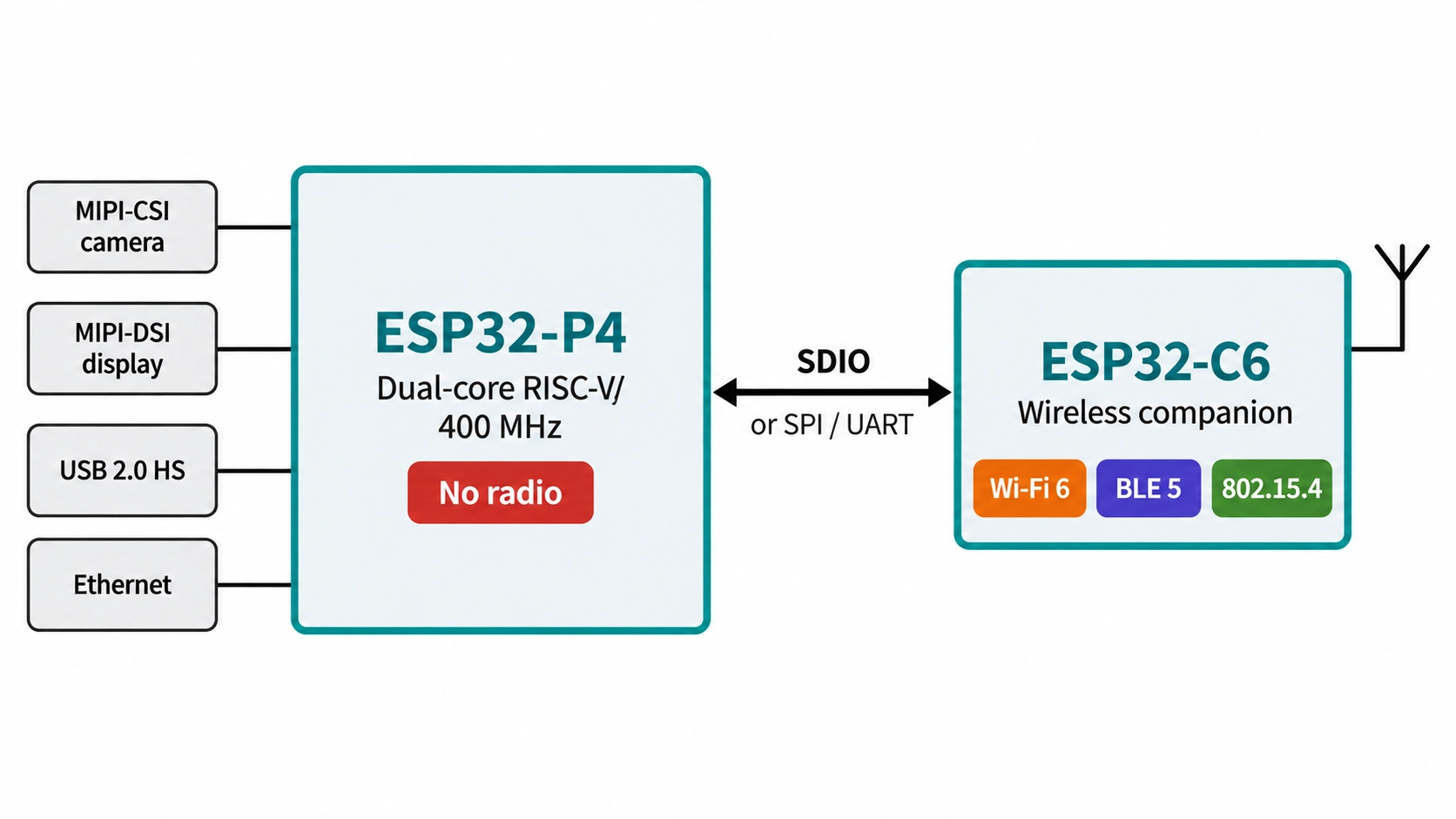
Figure: ESP32-P4 host connected to an ESP32-C6 wireless companion chip over SDIO.
- ESP32-H2: A single-core RISC-V at 96 MHz with Bluetooth 5 (LE) and IEEE 802.15.4. It suits battery-powered Thread or Zigbee end devices.
- ESP32-P4: A dual-core RISC-V at 400 MHz with MIPI-CSI with an integrated image signal processor (ISP), MIPI-DSI, H.264 encoding up to 1080p at 30 fps, USB 2.0 high-speed OTG, and an Ethernet MAC. It suits HMI panels, camera products, and video devices.
The ESP32-P4 has no Wi-Fi or Bluetooth. Espressif pairs it with an ESP32-C or ESP32-S chip as a wireless companion, connected over SPI, SDIO, or UART.
ESP32 Chip, Module, or Development Board: Which Should You Buy?
Buy a development board to prototype, and design a module onto your own PCB for production. A bare chip suits high-volume designs with in-house RF and certification expertise.
| Option | What You Get | Choose For |
|---|---|---|
| Chip (SoC) | The silicon alone, such as ESP32-S3, in a QFN package | High-volume designs with in-house RF design and certification |
| Module | Chip, flash, optional PSRAM, crystal, and RF matching under a metal shield | Most custom PCBs, from prototype to production |
| Development board | A module plus a USB connector (with a USB-to-UART bridge on many boards) | Prototyping and firmware development |
Modules typically carry radio certifications for major markets, which can shorten the certification work for the end product. A chip-down design needs its own RF matching, antenna design, and certification.
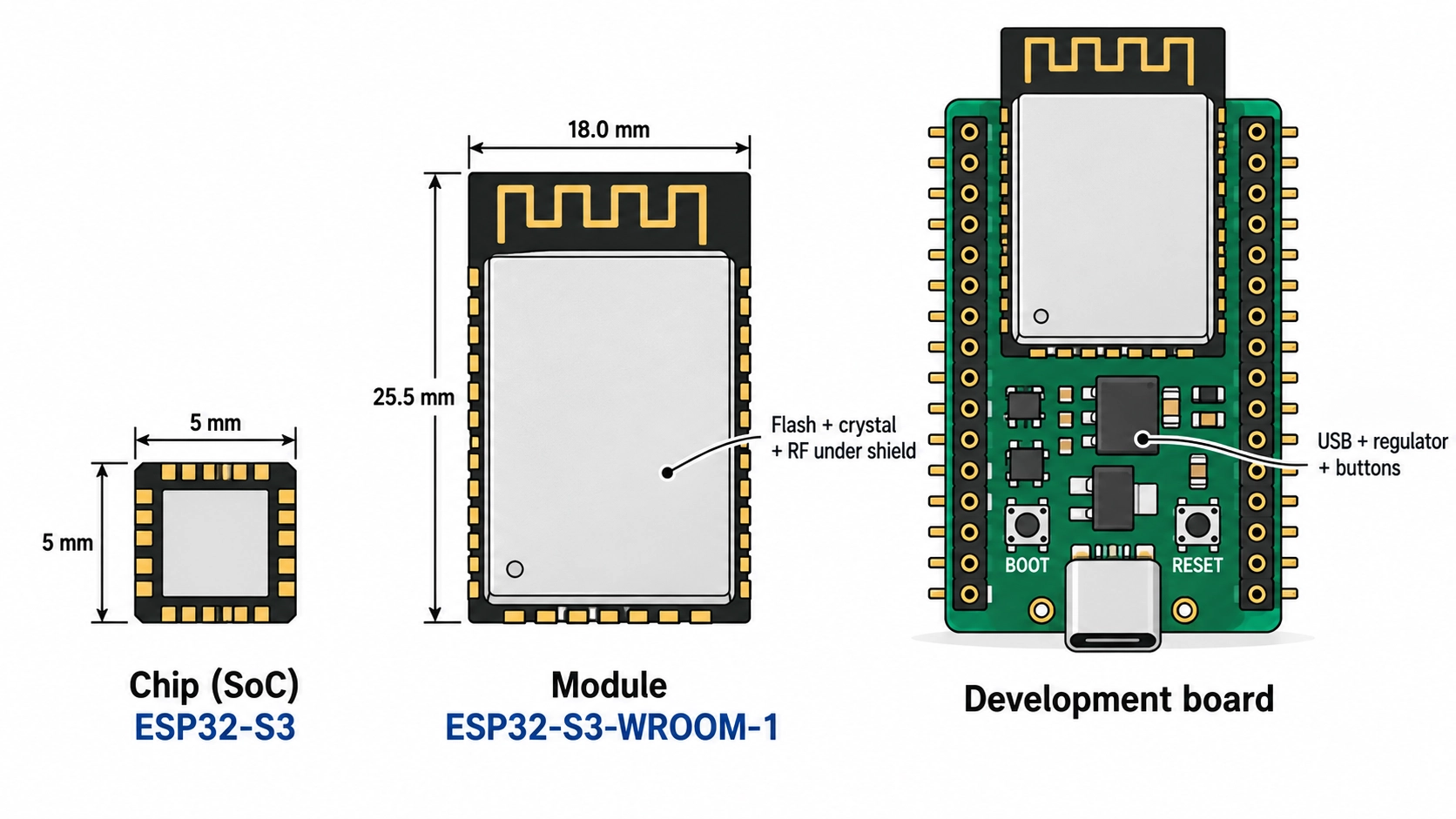
Figure: ESP32 chip, module, and development board shown side by side at matched scale.
How to Read an ESP32 Module Part Number
The module part number tells you what you are ordering. For example, ESP32-S3-WROOM-1-N16R8 breaks down as:
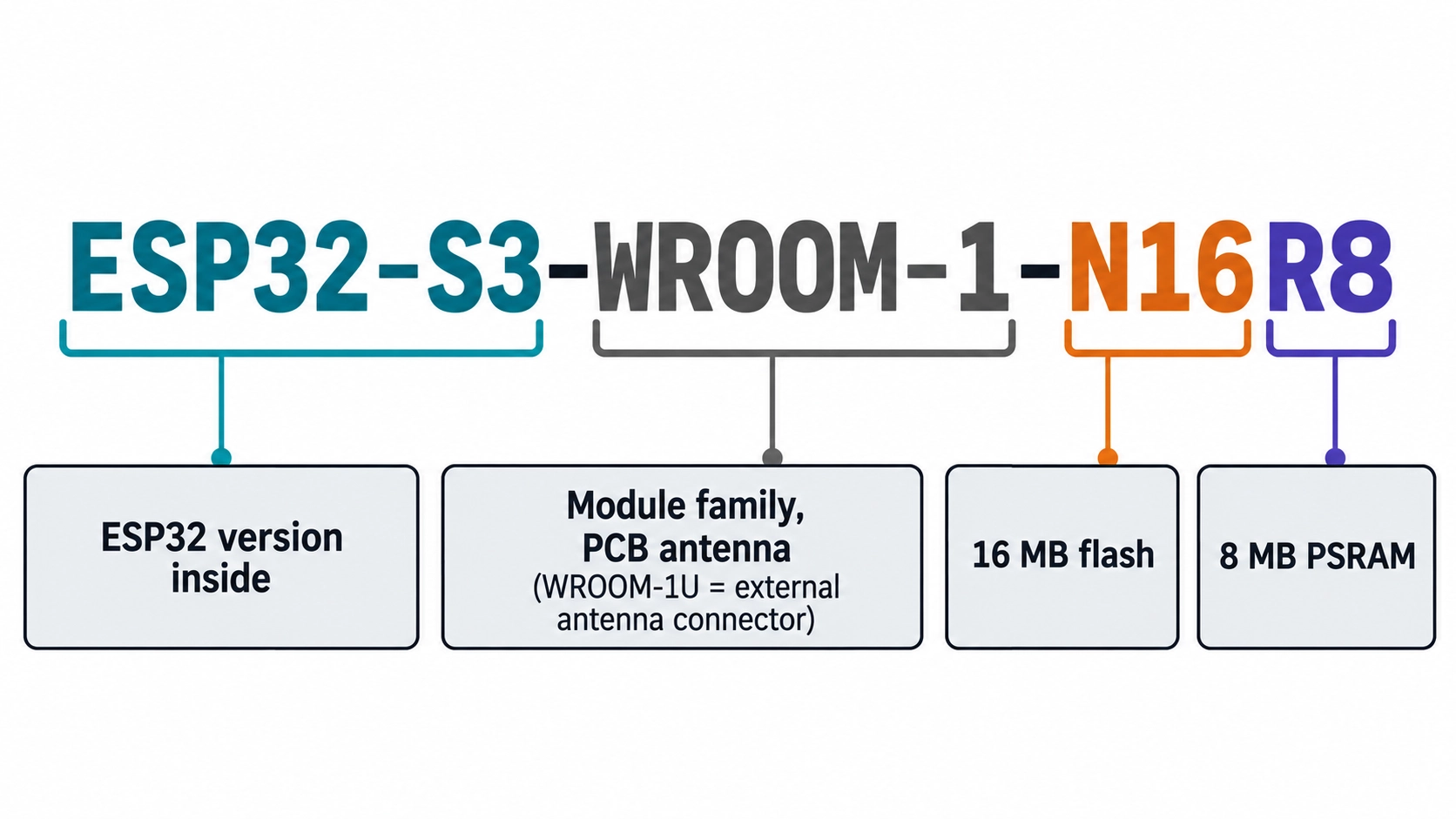
Figure: ESP32-S3-WROOM-1-N16R8 module part number decoded into version
- ESP32-S3: the ESP32 version inside the module
- WROOM-1: the module family with a PCB antenna (WROOM-1U uses an external antenna connector)
- N16: 16 MB of flash
- R8: 8 MB of PSRAM
For prototyping, the guide to choosing an ESP32 development board compares the common boards.
For a custom board, place a PCB-antenna module at the board edge and keep copper out of the antenna area defined in the module datasheet. This ESP32-S3 development board design shows the layout in practice.
ESP32 Versions in JLCPCB PCB Assembly
At JLCPCB, advanced SMT production lines and strict process control help ensure accurate placement and reliable solder joints on wireless modules and fine-pitch ICs.
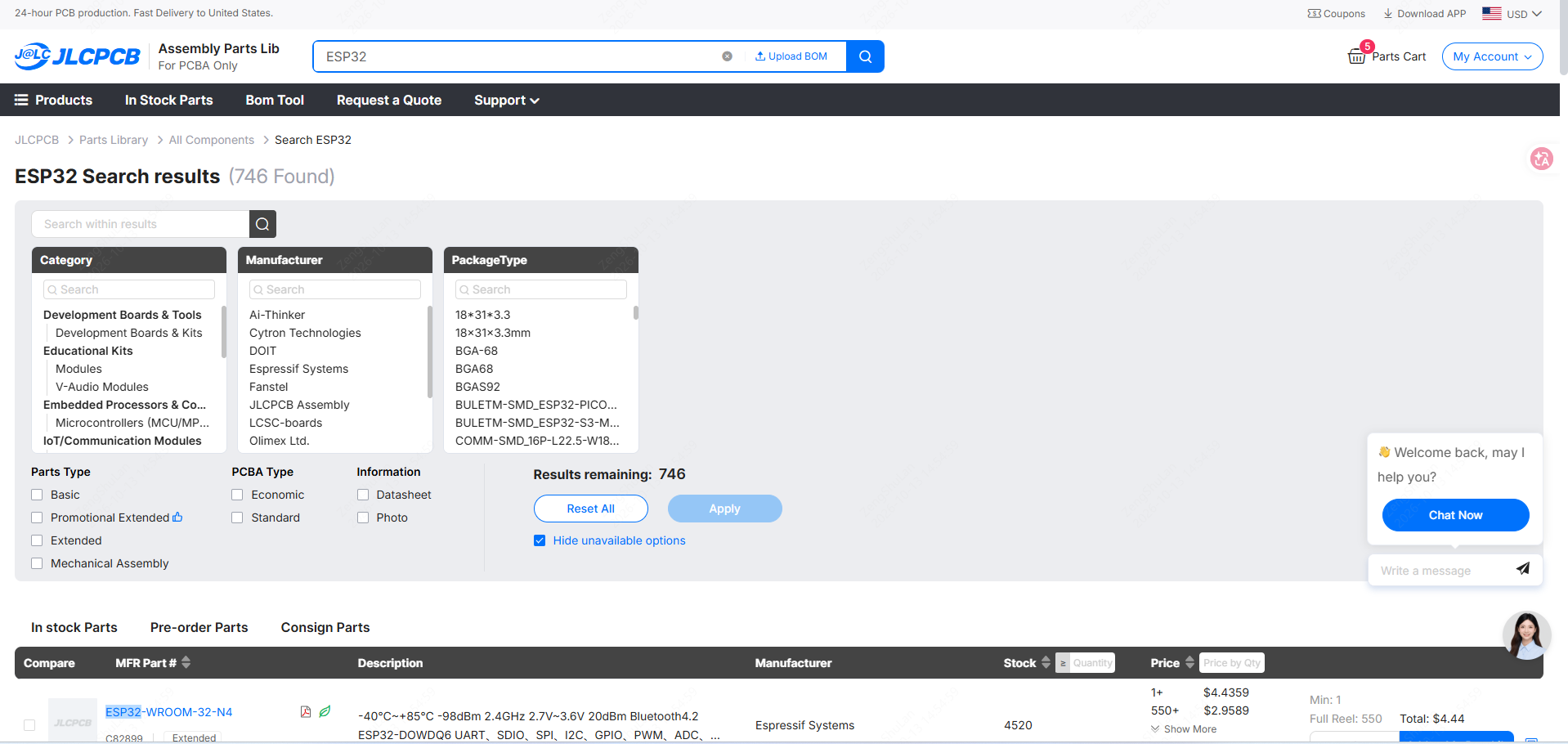
You can use the JLCPCB Parts Library to check which ESP32 chips and modules are available, along with their package and stock, before finalizing your BOM.
Conclusion
The right choice among ESP32 versions is the one whose radios, processing power, and peripherals match your product. Start with the ESP32-C3 for low-cost Wi-Fi and Bluetooth LE, the ESP32-S3 for camera, display, or AI workloads, and the ESP32-C6 for Thread, Zigbee, or Matter over Thread.
Matching the version to the requirement early helps avoid a board respin and keeps the BOM on parts recommended for new designs.
Once your design is ready, upload your files to JLCPCB to review assembly options and get an instant quote.
FAQs About ESP32 Versions
How Many ESP32 Versions Are There?
Espressif lists 14 ESP32 SoC series. Eleven are in mass production, while the ESP32-H21, ESP32-H4, and ESP32-E22 are newer parts with preview support or engineering samples.
Is the Original ESP32 Obsolete?
No. The ESP32 chip is still in production, but early modules such as ESP32-WROOM-32 and ESP32-WROOM-32D are NRND. Use current modules such as the ESP32-WROOM-32E instead.
Does the ESP32-S3 Support Bluetooth Classic?
No. The ESP32-S3 supports Bluetooth 5 (LE) only. For Bluetooth Classic, choose the original ESP32 or the ESP32-S31, which supports both Classic and LE.
Which ESP32 versions support Wi-Fi 6?
The ESP32-C5, ESP32-C6, ESP32-C61, and ESP32-S31 support Wi-Fi 6. Among production parts, the ESP32-C5 is the one that adds the 5 GHz band.
Can the ESP32-P4 Connect to Wi-Fi?
Not on its own. The ESP32-P4 has no radio, so Wi-Fi and Bluetooth are provided by a companion ESP32-C or ESP32-S chip connected over SPI, SDIO, or UART.
Popular Articles
• SMD Resistor Package Sizes: Complete Size Chart, Footprints & How to Choose
• How to Solder SMD Components Like a Pro [2026 Updated]
• SMD Resistor Codes: How to Read 3-Digit, 4-Digit, and EIA-96 Markings
• SMD Capacitor Codes: Identification, Markings, and Polarity
• SMD Capacitor Sizes: Complete Size Chart and Selection Tips for PCB Design and Assembly
Keep Learning
Ceramic Capacitor Code Guide: Values, Tolerance, and Voltage
Key Takeaways Three-Digit Rule: The first two digits represent the significant figures, while the third indicates the power-of-ten multiplier. The resulting capacitance is expressed in picofarads (pF). Common Values: Code 104 represents 100,000 pF (100 nF or 0.1 µF), while 103 represents 10,000 pF (10 nF or 0.01 µF). Tolerance Letters: Letters indicate capacitance tolerance. Common examples include J (±5%), K (±10%), and M (±20%). For small capacitance values, B, C, and D specify tolerances in pF. Vol......
What is a HDMI RF Modulator? A Complete Guide
What is an HDMI RF Modulator? An HDMI RF modulator is a device that converts high-definition multimedia interface (HDMI) signals into Radio frequency (RF) signals. This allows HDMI-compatible devices, such as Blu-ray players, gaming consoles, and streaming devices, to transmit audio and video content over coaxial cables, making them compatible with older television sets or distribution systems that use RF signals. These modulators are particularly useful in settings where legacy TV systems are still i......
SMD Inductor Code: How to Read Inductor Markings and Values
Key Takeaways Three digits are read in µH: 100 is 10 µH and 101 is 100 µH. The third digit is the number of zeros, not part of the value. R and N are decimal points: R in microhenries (4R7 = 4.7 µH), N in nanohenries (2N2 = 2.2 nH). A trailing letter is a tolerance: K is ±10% and M is ±20%. On RF inductors below about 10 nH, C and D mean ±0.2 nH and ±0.5 nH. Most small chip inductors are unmarked: identify them from the BOM or reel label first, then with an LCR meter at the right test frequency. The m......
A Complete Guide to Surface Mount Device (SMD)
Imagine holding a smartphone in your hand. Inside that sleek device lies a complex network of thousands of miniature components — resistors smaller than a grain of rice, capacitors thinner than a fingernail, and integrated circuits containing millions of transistors. Without Surface Mount Technology (SMT) and its compact Surface Mount Devices (SMDs), none of this would exist. Just a few decades ago, electronics were bulky. Radios filled desks, computers filled rooms, and assembling a circuit meant dri......
TSSOP Package Guide: Dimensions, Pitch, Footprint & SMT Soldering
Key Takeaways Lead span, not body width: Build the footprint from the lead span (6.4 mm or 8.1 mm tip to tip), not the 4.4 mm or 6.1 mm body width. MSOP vs TSSOP: Check the width in the drawing before reusing a footprint: MSOP-8 and TSSOP-8 share pitch and body length, and some vendors label a 3.0 mm-wide package TSSOP8. Mask dams: A standard TSSOP footprint leaves a 0.20 mm pad gap: enough for solder mask dams on 1 oz copper, no margin on 2 oz, and no dams on JLCPCB flex boards. Thermal pad: On HTSSO......
Understanding the Role of PCB Controllers in Electronic Design
A PCB Controller is an important part of designing and building electrical systems. It controls the functions of different mechanical parts on a printed circuit board (PCB) and makes sure they can talk to each other easily. People use PCB controllers in a lot of different situations, from home technology to factory automation. The purpose of this article is to discuss the importance of PCB controllers, including the different kinds, their uses, and the best ways to choose and use them. 1. What is a PC......