Reliable BMS Boards Start With Quality PCB Manufacturing
16 min
- Understanding the BMS Board
- Designing a BMS Board for Electrical Performance
- Preparing BMS Board Designs for Manufacturing
- Manufacturing BMS Boards for Consistent Quality
- FAQs About BMS Boards
- Conclusion
Key Takeaways
- Dual Duty: BMS PCBs handle heavy currents and millivolt sensing simultaneously, requiring strict layout isolation.
- Power & Heat: Currents over 10A need 2 oz+ copper pours with via stitching to drop resistance and heat.
- Clean Sensing: Kelvin differential routing and split grounds prevent load noise from corrupting cell voltage readings.
- Materials & Finish: High-Tg FR-4 and ENIG surface finishes ensure heat tolerance and flat mounting pads.
- DFM & Testing: Design for heavy-copper etch tolerances and verify cutoff thresholds with functional testing.
A BMS board carries the full pack current through the same copper that its protection chip reads in millivolts. That double duty separates it from an ordinary power board. It is also why fabrication quality shows up directly in how well the battery is protected. The protection IC never measures current directly. It reads a small voltage across a sense resistor or across the MOSFETs and trips when that voltage crosses a threshold, such as 150 mV.
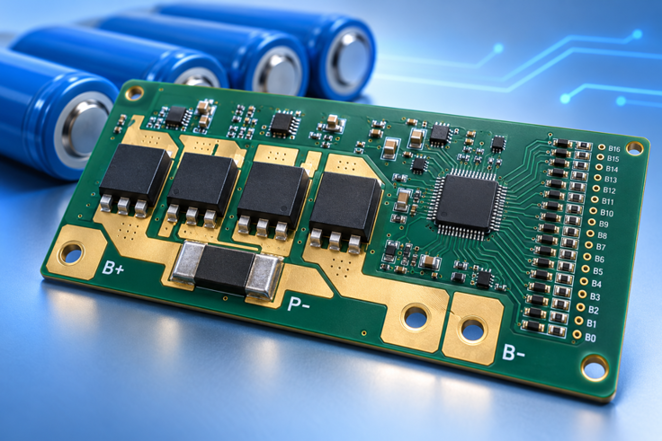
Figure 1: A multi-cell BMS board with heavy copper power paths
This guide shows you what a BMS board is, how to size its power paths, and how to route its sensing. It goes on to discuss manufacturing constraints for the design and inspection to ensure each board in a batch is like the prototype that passed inspection.
Understanding the BMS Board
A BMS board measures and can switch off. The jobs produce the copper that you draw later; the functions are first, and the layout follows.
What Is a BMS Board?
There is a BMS (battery management system) board located between the battery cells and the load. It prevents any cell from going outside of its safe operating window.
For instance, this can be two chips on a single 18650 cell, a DW01A protection IC, and a dual MOSFET, FS8205A. It expands to a monitor IC (e.g., TI BQ76952) and a microcontroller on a 16-series pack.
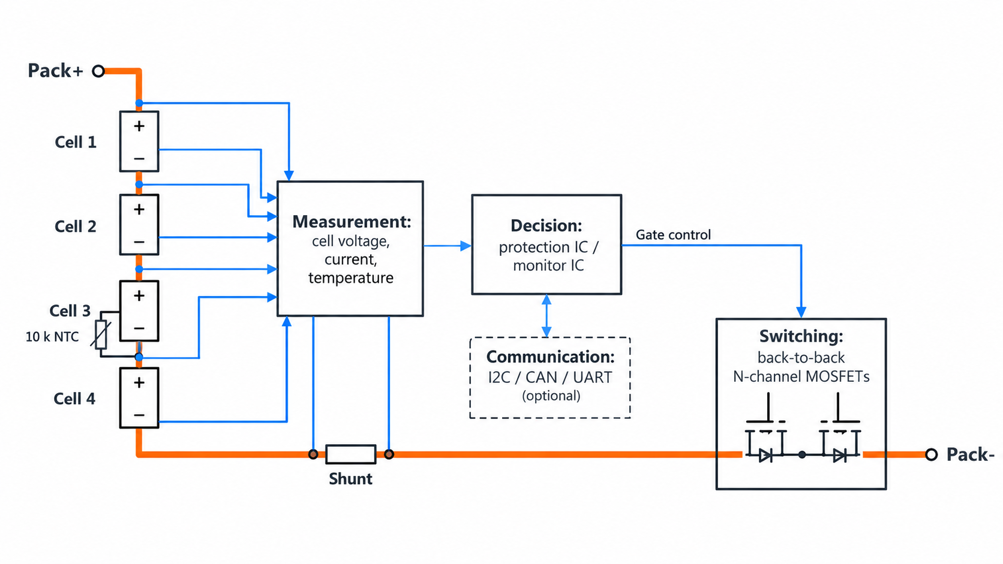
Figure 2: Block diagram of a BMS board showing measurement, decision, and switching sections
All versions have 3 building blocks: A measurement section is provided for reading the cell voltages, pack current, and temperature. Those readings are compared to limits in a decision section, and a switching section, typically two N-channel MOSFETs in series, opens the path. Smart battery BMS board: A communication port, such as I2C, CAN, or UART, is added. It also tracks the state of charge, allowing the pack to report to a charger or host. That does not change the fact that the incumbent copper must be carried; however, it does introduce digital routing.
Key Functions of a BMS Board
A BMS board has 5 functions, and each function measures a different variable, each placing a different strain on the capability of the board:
- Overcharge Protection: prevents overcharging if any battery is over the top-end voltage.
- Over-discharge protection: prevents discharge in the event of a cell dropping below its lower end of the discharge range.
- Overcurrent and short-circuit protection: disconnects the circuit if the current exceeds a predefined limit.
- Temperature protection: prevents charging or discharging when outside the safe temperature range.
- Cell balancing: balances cell voltages to prevent a single cell from limiting pack voltage.
Designing a BMS Board for Electrical Performance
BMS board design is a compromise between the ability to handle tens of amps and the need to maintain clean millivolt readings. Each of copper weight, placement, and stackup attends to part of that trade.
Power Paths, Trace Width, and Copper Thickness
Each milliohm in the power path from the pack terminal through the MOSFETs and shunt is a source of heat. A 1 oz (35 µm) copper layer measures about 0.5 mΩ per square, so a trace 10 mm (394 mil) wide and 50 mm (1,969 mil) long comes to roughly 2.5 mΩ. That trace burns off around 1W at 20A.
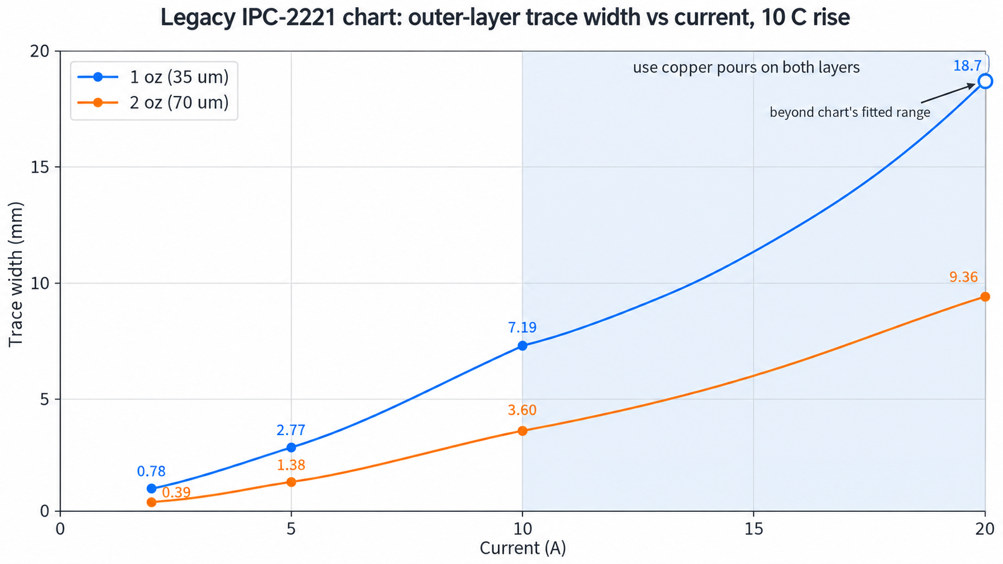
Figure 3: Trace width versus current for 1 oz and 2 oz outer copper at a 10 °C rise
The trace widths derived from the legacy IPC-2221 empirical relationship are based on the following equation for outer-layer copper:
I = 0.048 × ΔT⁰·⁴⁴ × A⁰·⁷²⁵
Where:
- I = Current through the trace (A)
- ΔT = Allowable trace temperature rise above ambient (°C)
- A = Copper trace cross-sectional area (mil²), calculated as trace width × copper thickness
For the trace-width estimates discussed here, the assumed temperature rise is ΔT = 10 °C, and the coefficient 0.048 applies to external (outer-layer) copper. IPC-2221B dropped that chart, and current capacity now sits in IPC-2152, which IPC lists as no longer maintained. The old chart oversizes conductors, so treat the table as a conservative start; its inner-layer curve gives about 2.6 times the width.
| Pack Current | 1 oz (35 µm) Width, 10 °C Rise | 2 oz (70 µm) Width, 10 °C Rise | What It Means for Your BMS Board |
|---|---|---|---|
| 2 A | 0.78 mm (31 mil) | 0.39 mm (15 mil) | Balancing or single-cell output; a normal trace works |
| 5 A | 2.77 mm (109 mil) | 1.38 mm (54 mil) | Small 2S pack; still routable as a trace |
| 10 A | 7.19 mm (283 mil) | 3.60 mm (142 mil) | Power tool or e-bike pack; switch the path to a pour |
| 20 A | 18.7 mm (737 mil), beyond the chart's fitted range | 9.36 mm (368 mil) | Pour both layers at 2 oz or heavier, or add a busbar. |
Width grows faster than current here; doubling the copper weight halves the width at the same current. Above about 10 A, the path becomes a copper pour on both layers. Vias stitch those pours together, so the two layers share the current.
Component Placement and Thermal Management
Placement begins with the power path as the MOSFETs and shunt carry the total pack current. They should be arranged in a straight line, between the input and output pads, as each deviation from the straight line introduces resistance. Two MOSFETs (2 mΩ) dissipating 3.6 W at 30 A require generous copper drain tabs. The thermal conductivity of FR-4 is about 0.3 W/mK, so only copper plating on thermal vias can help to conduct heat to the other side.
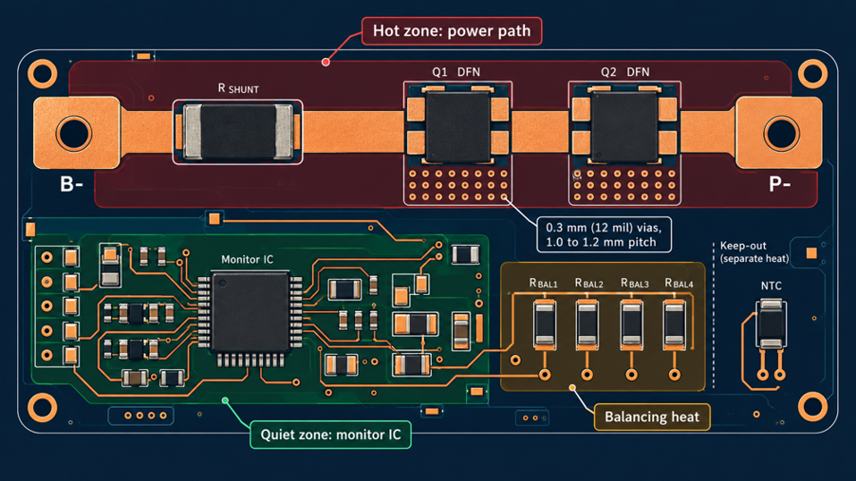
Figure 4: Thermal zoning on a BMS board with the power path
As a rule, 0.3 mm (12 mil) vias on a 1.0 to 1.2 mm (40 to 47 mil) pitch under each MOSFET pad are a good starting point. The thermistor must be mounted where the heat it would sense starts: against a cell or near the MOSFETs. The monitor IC should be placed on the quiet side of the board (opposite the switching path). Avoid placing both near the balancing resistors, as the resistors' heat will cause the sensor to show a warmer pack than it actually is.
Layer Stackup, Grounding, and Signal Routing
A single-cell protection board can be used on two layers, while a multi-cell board with a BQ76952-class monitor can use four. When using this particular stackup, parts are on top, followed by power copper, and then solid ground on layer two. The cell taps and sense lines are on layer 3 with power on the bottom. The inner ground provides each sense line with a short return path, so the ADC will not see switching noise.
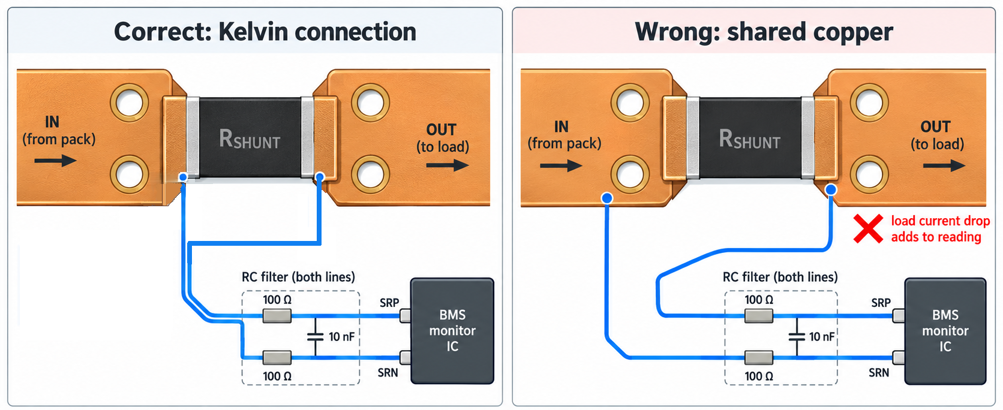
Figure 5: Kelvin sense connection from a shunt resistor
Grounding is done in two zones connected at a common point. The power ground supplies the pack current, and the measurement ground serves as a reference for the monitor IC. They meet once outside the sense resistor; therefore, the load current does not pass through the reference copper. If it did, all the cell voltages measured would change. The sense lines from the shunt should be Kelvin connections (a pair of traces from the inside of the shunt pads, not from the power copper surrounding the shunt pads). Take that pair together and close it through the RC filter to the IC. Both lines then pick up the same interference, which is canceled by the differential input.
Preparing BMS Board Designs for Manufacturing
Even a BMS board running in simulation mode will still hit a fabricator's drilling, plating, and etching limits. When designing, use the recommended value rather than the minimum to maintain batch consistency.
Via, Pad, and Feature Size Requirements
The number of vias in a BMS power path is more important than the size of the vias. A 0.3 mm (12 mil) via barrel unrolls into a copper strip about 0.94 mm (37 mil) wide. That strip is plated at ~18 µm and will rate slightly more than 1 A per 10 °C increase, so plan one via per amp when stitching pours.
| Feature | JLCPCB Minimum | Recommended for a BMS Board | Why It Matters |
|---|---|---|---|
| Trace and space, 1 oz | 0.10 mm (4 mil) | 0.20 mm (8 mil) or wider | Sense traces survive etch variation |
| Trace and space, 2 oz, 2-layer | 0.16 mm (6.5 mil) | 0.25 mm (10 mil) or wider | Thick copper loses more width at its edges |
| Via drill and pad | 0.15 / 0.25 mm (6 / 10 mil) | 0.3 / 0.6 mm (12 / 24 mil) for power stitching | A larger barrel carries more current |
| PTH annular ring | 0.20 mm (8 mil) at 1 oz; 0.254 mm (10 mil) at 2 oz | 0.25 mm (10 mil) at 1 oz; wider than 0.254 mm (10 mil) at 2 oz | The ring absorbs the drill position error |
| Solder mask bridge, 1 oz | 0.10 mm (4 mil) | Keep it between fine-pitch IC pins | Stops bridges on a 0.5 mm (20 mil) pitch TQFP |
DFM and Manufacturing Tolerances
DFM (Design for Manufacture) is the ability to draw features that a fabricator can repeat on every panel. It's the biggest problem with BMS boards, as the etching of the thick copper goes sideways along with it going down. Such a sense trace can thus look thinner on a 2oz layer.
Tolerances are important anywhere along the board where it interfaces with a mechanical part. Plated holes at JLCPCB hold +0.13/-0.08 mm (+5/-3 mil), so a 2.0 mm (79 mil) terminal pin needs a hole near 2.2 mm (87 mil). For boards 1.0 mm or thicker, a ±10% thickness deviation can be important when sliding into a board holder .
Complete these checks before ordering:
- Make sure the fabricator's rules are loaded in DRC rather than the tool defaults.
- Make sure each power pour includes the via count and the via's current requirements.
- Check that the sense traces leave the shunt from the inner pad edges.
- Check cell tap spacing for electrical voltage between adjacent traces.
- Use a Gerber/drill file viewer prior to uploading.
The PCB Design Rules Guide provides an overview of the general DRC setup. 2-4 are additional components on a board for a BMS, since a standard DRC can't distinguish between a power pour and a signal net.
Material and Surface Finish Selection
The standard FR-4 is adequate for most BMS boards, and the important property is Tg, the temperature at which the resin softens. JLCPCB's default is TG135-140; you can also choose TG155 or TG170. If the area around the MOSFET gets too hot or if it short-circuits repeatedly, a higher Tg will cause plated holes to extend less during each cycle .
The flatness of the pads is determined by surface finish. The cheap and strong HASL for a DW01A is lead-free, but the solder thickness varies. ENIG (under thin gold) is a nickel-based surface that does not develop uneven surfaces, which is helpful for a fine-pitch monitor IC and wide MOSFET pads. Although also flat, OSP's short shelf life makes it an appropriate product for boards assembled shortly after delivery.
| BMS Board Type | Typical Current | Copper and Layers | Material and Finish | What to Order |
|---|---|---|---|---|
| Single-cell 18650 protection (DW01A and FS8205A) | 2 to 3 A | 1 oz, 2 layers | FR-4 TG135, lead-free HASL | Standard options are enough |
| 3S to 4S power tool or power bank pack | 10 to 15 A | 2 oz, 2 layers | FR-4 TG155, ENIG | Pours on both layers via stitching |
| 13S to 16S e-bike or storage pack (BQ76952) | 30 A and above | 2 oz outer, 4 layers | FR-4 TG170, ENIG | Busbars or bolted terminals for the main current |
Manufacturing BMS Boards for Consistent Quality
Consistency is not only a design property but also a fabrication property. The only way to get matching boards is to remain within limits during etching, drilling, plating, and inspection using the same Gerber files.
Fabrication Accuracy and Process Control
The etching process determines the width of each trace, and on a BMS board, the width is also a measure of resistance. The etchant will eat away the copper side-to-side and down, so fabricators make the artwork slightly wider than the desired trace. When that compensation varies, the shunt connection's resistance varies from batch to batch.
Process control involves making measurements rather than relying on the machine's settings. Inner layers are examined optically after etching, prior to lamination, obscuring them. After pattern plating, AOI catches an open or narrowed trace (before the panel is scrapped). A multilayer board is also subject to the lamination risk when heavy copper is used. The inner copper is thick, and deep gaps will form between features that will need to be filled with prepreg resin during the pressing process. Otherwise, gaps are created between layers. Inner copper is as thick as 2 oz at JLCPCB, and outer copper can be as thick as 4.5 oz in 2-layer boards.
Drilling, Plating, and Dimensional Control
Vias, which are formed by drilling and plating, determine the distribution of current from power pour to power pour and hence the even spread. The holes are within approximately 3/4 mil (+/- 0.075 mm) of their drawn position. This is why the 0.25 mm (10 mil) annular ring is important; it allows for that offset without breaking out.
Then, plating is performed to deposit copper on the hole wall, with a standard thickness of 18 µm. IPC-6012F Class 3 requires an average of 25 µm (1 mil), so if a board is Class 3, it should state so. For ordinary builds, it is more economical to ask for vias, since this reduces current costs, and adding thicker barrels is just as expensive as adding vias.
Dimensional control is ±0.2 mm (8 mil) for outline in CNC routing and ±0.4 mm (16 mil) for V-cut edges. If your board is intended to mount in a slot in an enclosure, a BMS board is better routed than scored, and the V-cut panelization standards indicate where scoring is OK.
Inspection and Quality Verification
Inspection is carried out in 2 stages: the bare board and the assembled board fail in different ways. The bare board is inspected for conformance to IPC-A-600M and tested for opens and shorts against the netlist. JLCPCB here employs flying-probe testing and does not need to make a custom fixture for a prototype run.
Functional testing is the final test, since a board can pass all the other tests and still trip at the wrong current. Each cell is replaced by a programmable source, called a cell simulator, that pushes the board to each trip point, and a tester documents each trip point. If a threshold has shifted since the prototype, there is likely copper in the sense loop.
FAQs About BMS Boards
Q: Simplify Your PCB Production with JLCPCB
No. A single-cell board, such as a DW01A design, has a single voltage input, so it cannot see cells in a series string. If one cell overcharges, the board never notices, so use a 3S board that reads every cell tap.
Q: Why does my BMS board cut out under load when the cells are still charged?
Boards that sense current across their MOSFETs trip earlier as the MOSFETs warm, because their on-resistance rises with temperature. Thin wires can also pull the weakest cell below its over-discharge limit under load. Check MOSFET temperature and wiring before blaming the cells.
Q: Does every BMS board need 2 oz of copper?
No. Below about 5 A, 1 oz copper with properly sized traces runs cool and costs less. Heavier copper pays off around 10 A, where a 1-oz trace would need to be over 7 mm (276 mil) wide.
Q:Is a BMS board with a higher current rating always the safer choice?
No. A higher rating also means a higher overcurrent threshold, so the board may let your wires or cells overheat before it trips. Match the rating to the weakest part of the pack.
Q: Can a BMS board be mounted directly against the cells?
Yes, if fish paper or polyimide tape separates the copper from the cell cans. Face the MOSFET side away from the cells so their heat does not warm the pack, and keep the thermistor in contact with a cell.
Conclusion
Selecting the appropriate protection IC is not the only factor in ensuring a reliable BMS board. The PCB layout influences the accuracy and safety of the system's operation. Proper Kelvin connections and careful grounding assist the IC in accurately measuring current, and the thickness of the copper and the width of the trace contribute to heat generation in high-current paths. Firm PCB production is equally crucial, particularly when producing hundreds or thousands of boards that must function in the same way.
More cells and higher currents of battery packs make accurate sensing and reliable protection more critical. Minor layout variations and manufacturing tolerances may influence the timing of protection circuit responses. When your design is complete, JLCPCB can provide 2 oz copper, ENIG surface finish, and flying-probe testing to ensure your BMS boards meet the design requirements.

Popular Articles
• PCB Silkscreen: All You Need to Know
• The Comprehensive Guide to Circuit Symbols: Key to Understanding Electrical and Electronic Diagrams
• Design Guidelines for PCB Using FR4 Substrates
• Choosing the Best PCB Color-Enhancing Aesthetics and Functionality
• PCB Board Design: A Step-by-Step Guide for Beginners
Keep Learning
Reliable BMS Boards Start With Quality PCB Manufacturing
Key Takeaways Dual Duty: BMS PCBs handle heavy currents and millivolt sensing simultaneously, requiring strict layout isolation. Power & Heat: Currents over 10A need 2 oz+ copper pours with via stitching to drop resistance and heat. Clean Sensing: Kelvin differential routing and split grounds prevent load noise from corrupting cell voltage readings. Materials & Finish: High-Tg FR-4 and ENIG surface finishes ensure heat tolerance and flat mounting pads. DFM & Testing: Design for heavy-copper etch toler......
Relay Wiring Diagram: How to Wire the Coil, COM, NO, and NC Terminals?
Key Takeaways Two Separate Circuits: A relay has two circuits: a control circuit that energizes the coil and a separate contact circuit that switches the load. These circuits are electrically isolated from each other. Contact Connections: Connect the fused live wire to COM. Use NO if the load should normally stay off, or NC if it should normally stay on when the relay coil is not energized. Relay Configurations: SPST, SPDT, DPST, and DPDT relays use similar coil-driving circuits but differ in their co......
ESP32 Power Consumption Explained: Current Draw, Sleep Modes, and Battery Life
Key Takeaways Power consumption by mode: The ESP32 draws around 240 mA during Wi-Fi transmission, 0.8 mA in light sleep, and just 10 µA in deep sleep, based on Espressif's typical datasheet figures. Deep sleep current: The ESP32 can draw 10 µA in deep sleep, with only the RTC timer and memory remaining powered. Keeping the ULP coprocessor running increases current consumption to around 100–150 µA. Development board power consumption: A typical ESP32 development board can draw around 6.5 mA even in dee......
ESP32 Pinout Reference: Which GPIO Pins Are Safe to Use and Avoid?
Key Takeaways GPIO count: The ESP32 chip has 34 GPIOs, and the ESP32-WROOM-32E module exposes 26 of them. General-purpose pins: Fifteen module GPIOs carry no boot, flash, or input-only restrictions: GPIO4, GPIO13, GPIO14, GPIO16 to GPIO19, GPIO21 to GPIO23, GPIO25 to GPIO27, GPIO32, and GPIO33. Strapping pins: GPIO0, GPIO2, GPIO5, GPIO12, and GPIO15 are sampled at reset, so any circuit connected to them must maintain the level required by the boot mode. Input-only pins: GPIO34, GPIO35, GPIO36, and GPI......
PCB Silkscreen: All You Need to Know
Key Takeaways The PCB Silkscreen Guide demonstrates that a properly designed legend layer is essential to prevent assembly failures and ensure long-term hardware reliability. By mastering modern manufacturing methodologies like Direct Legend Printing (DLP) and aligning layouts with JLCPCB's strict DFM design rules—including the absolute 0.8 mm character height limit and the automated 0.15 mm silkscreen clipping protocol driven by solder mask precedence—engineers can seamlessly eliminate cold joints an......
A Beginner's Guide to Basic Electronic Components: Functions, Symbols & Uses
Every circuit, from a simple LED flashlight to a microcontroller board, is built from the same handful of common electronic components. This guide breaks down the ten basic electronic components you will encounter most often: What each component does How it works Key specifications Where engineers use it By the end, you will be able to recognize these electronic circuit components on a schematic, a PCB, or a parts bin, and know exactly why each one is there. These electronic components are the buildin......