Relay Wiring Diagram: How to Wire the Coil, COM, NO, and NC Terminals?
15 min
- Relay Wiring Diagram: Which Wire Goes to Each Terminal?
- Arduino Relay Wiring Diagram: UNO, 5 V Relay, and Mains Lamp
- Relay Coil Wiring: Transistor Driver, Flyback Diode, and Power Supply
- Relay Contact Wiring: Connecting COM, NO, and NC to an AC Load
- Relay Wiring Safety Rules for Mains Loads
- How to Wire a Relay Step by Step
- Relay Wiring Diagrams by Relay Types
- Relay Module Wiring Diagram
- Automotive Relay Wiring Diagram: Pins 30, 85, 86, 87, and 87a
- Conclusion
- FAQs About Relay Wiring Diagrams
Key Takeaways
- Two Separate Circuits: A relay has two circuits: a control circuit that energizes the coil and a separate contact circuit that switches the load. These circuits are electrically isolated from each other.
- Contact Connections: Connect the fused live wire to COM. Use NO if the load should normally stay off, or NC if it should normally stay on when the relay coil is not energized.
- Relay Configurations: SPST, SPDT, DPST, and DPDT relays use similar coil-driving circuits but differ in their contact arrangements. Solid-state relays (SSRs) typically use an electronic input instead of a coil.
- Mains Safety: Always fuse and switch the live wire, choose contacts rated for the load's current and startup surge, keep mains wiring separate from low-voltage circuits, and enclose all mains connections.
A relay wiring diagram shows two separate circuits. On the coil side, a low-voltage signal controls the relay through a transistor driver. On the contact side, the fused supply connects to COM, while the load connects to either NO or NC.
This guide starts with a practical example: an Arduino UNO controlling an SRD-05VDC-SL-C relay to switch a mains-powered lamp. It then explains how the wiring changes for different relay types.
In this guide, you will learn:
- Which wire goes to each relay terminal
- How to wire the coil driver, flyback diode, and contacts
- How to wire a mains load safely, step by step
- How to wire SPST, SPDT, DPST, DPDT, and SSR relays
- How to wire a relay module and an automotive relay
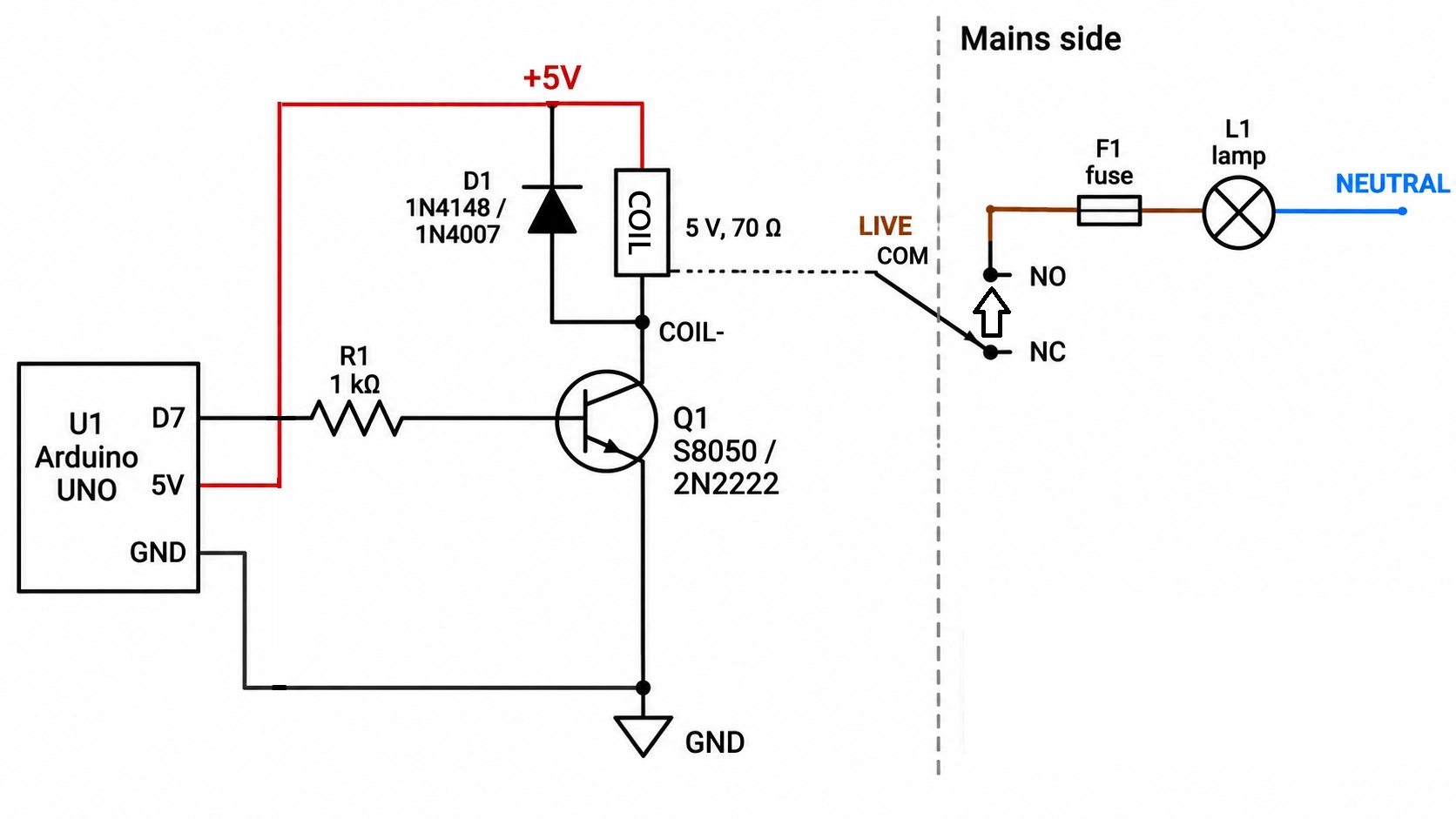
Figure: Relay wiring diagram showing an Arduino driving the coil through a transistor
Relay Wiring Diagram: Which Wire Goes to Each Terminal?
A 5-pin relay, such as the SRD-05VDC-SL-C, has two coil terminals and three contact terminals. The coil terminals connect to the low-voltage driver, while COM, NO, and NC connect to the load circuit.
Wire each terminal as follows:
- Coil terminals: Connect one to the positive coil supply, +5 V for a 5 V relay, and the other to the collector of the NPN driver transistor. A plain coil has no polarity.
- COM (common): Connect to the supply side of the load circuit: the fused live for an AC load, or the fused positive for a DC load.
- NO (normally open): Connect to the load so it turns on only when the coil is energized.
- NC (normally closed): Connects to the load and remains on until the coil is energized.
To identify the pins on an unmarked relay, use a multimeter with the coil unpowered. The meter shows continuity between COM and NC, and an open circuit between COM and NO; the coil of a 5 V SRD relay measures about 70 Ω.
The relay symbol guide covers how each of these terminals is drawn on a schematic.
Arduino Relay Wiring Diagram: UNO, 5 V Relay, and Mains Lamp
The master circuit drives an SRD-05VDC-SL-C coil from Arduino pin D7 via an NPN transistor, switching a mains lamp via the COM and NO terminals.
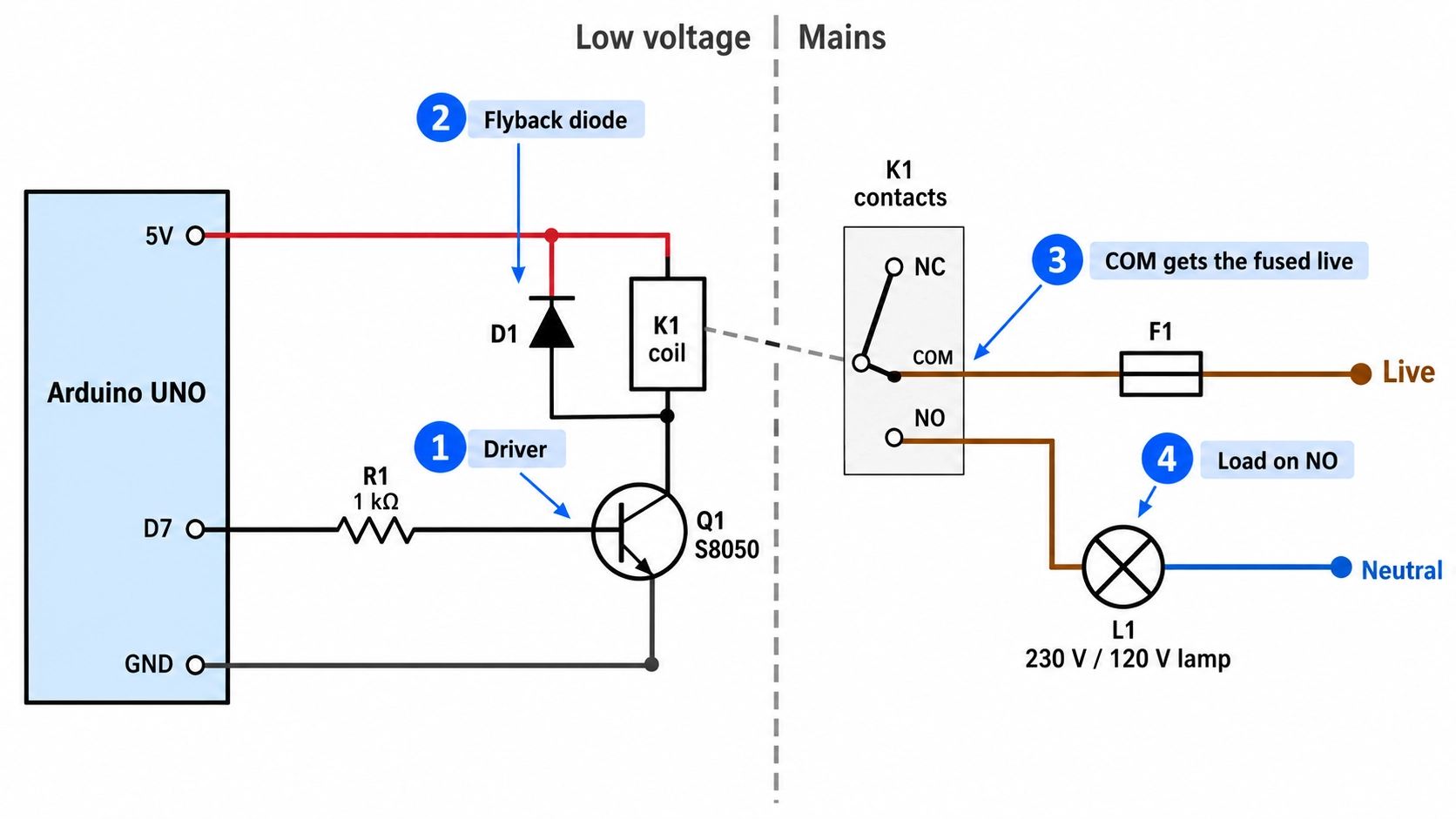
Figure: Relay wiring diagram schematic with Arduino UNO, NPN driver, flyback diode, fuse, and mains lamp.
| Ref | Part | Value or Rating | Role |
|---|---|---|---|
| U1 | Arduino UNO R3 or R4 | 5 V logic, pin D7 | Sets the relay state |
| R1 | Base resistor | 1 kΩ, 0.25 W | Limits base current to about 4.3 mA |
| Q1 | S8050 or 2N2222 NPN transistor | Collector current rating of 500 mA or more | Switches the coil current to ground |
| D1 | Flyback diode | 1N4148 or 1N4007 | Clamps the coil's turn-off voltage spike |
| K1 | SRD-05VDC-SL-C relay | 5 VDC coil, 70 Ω, 71.4 mA; 10 A version rated 10 A at 250 VAC | Switches the lamp |
| F1 | Fuse | Sized for the load and wiring, within the contact rating | Protects the live conductor |
| L1 | Lamp | 230 V or 120 V AC | The switched load |

- Once your relay wiring is finalized, turn the circuit into a custom assembled PCB.
- JLCPCB can assemble your relay, driver components, diodes, resistors, connectors, and other parts on your board, so you can move from a tested circuit design to a finished PCBA.
Relay Coil Wiring: Transistor Driver, Flyback Diode, and Power Supply
The coil side needs three parts: an NPN transistor carries the coil current, a base resistor sets its drive, and a flyback diode absorbs the turn-off voltage spike.
Why an Arduino Pin Needs a Transistor to Drive a Relay Coil
At 5 V across 70 Ω, the SRD-05VDC-SL-C coil draws 71.4 mA. Arduino rates each UNO R3 pin at 20 mA, compared with the ATmega328P's absolute maximum of 40 mA, and each UNO R4 pin at 8 mA.
Connecting the coil directly to a pin exceeds both limits and can permanently damage the pin. With an NPN transistor as a low-side switch, the transistor carries the coil current, and the pin supplies only the base current.
Relay Driver Base Resistor Calculation
Size the base resistor so the transistor saturates at the full coil current:
- Calculate the base current: (5 V − 0.7 V) / 1 kΩ ≈ 4.3 mA.
- Calculate the forced current gain: 71.4 mA / 4.3 mA ≈ 17. This is well below the minimum hFE of an S8050 or 2N2222 at this current, so the transistor saturates.
- Check the pin load: 4.3 mA is within the 8 mA rating of an UNO R4 pin and the 20 mA rating of an UNO R3 pin.
On a 3.3 V board, the same 1 kΩ resistor yields about 2.6 mA of base current, which still saturates the transistor at 71.4 mA. The 5 V coil still needs a 5 V supply.
Flyback Diode Orientation Across the Relay Coil
Place the diode directly across the coil, with the diode cathode (the banded end) on the +5 V side and the anode on the transistor collector.
When the transistor turns off, the coil's stored energy keeps current flowing. Without a diode, the collector voltage rises in a spike that can exceed the transistor's collector-emitter voltage rating. With the diode, the current circulates through the diode and the coil and then decays.
A diode fitted the wrong way round conducts from +5 V through the saturated transistor to ground, shorting the coil supply each time the relay turns on.
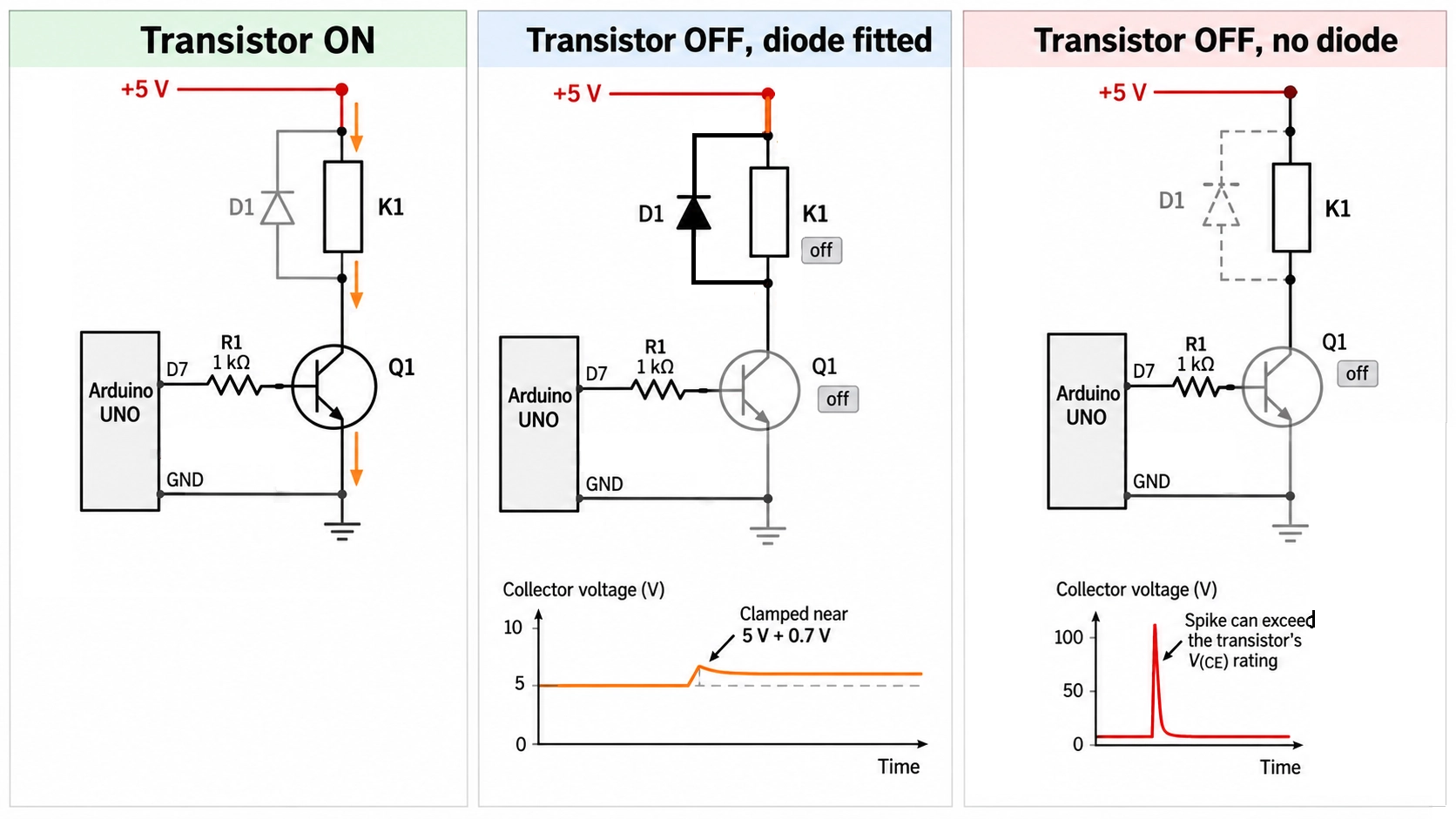
Figure: Relay coil current paths with the transistor on and off, showing flyback diode current and the spike without a diode.
Relay Contact Wiring: Connecting COM, NO, and NC to an AC Load
On the contact side, the fused live goes to COM, and the lamp connects between NO (or NC) and neutral. The neutral returns directly to the supply, so the relay switches only the live conductor.
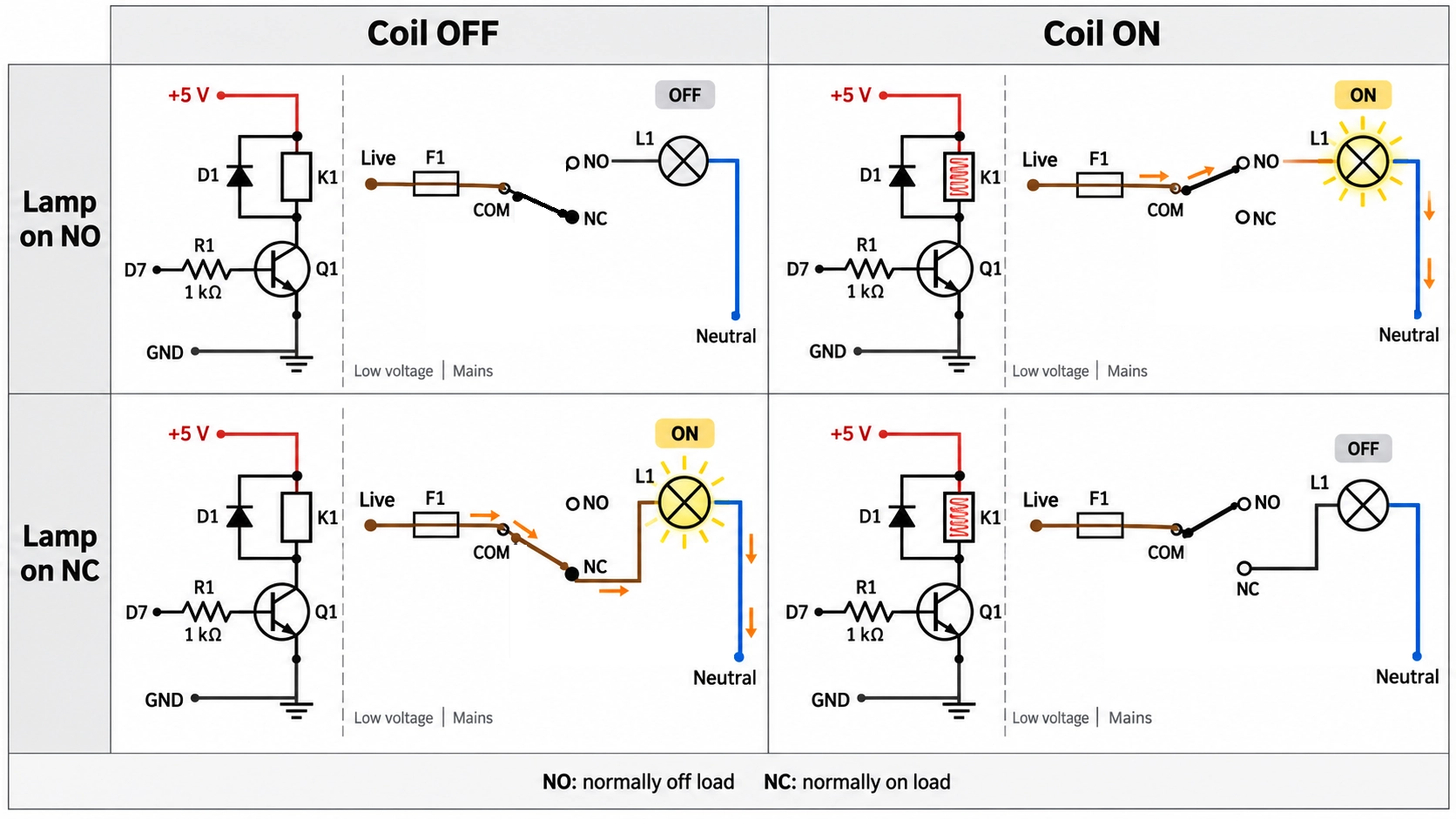
Figure: Relay NO and NC wiring grid showing the lamp on NO and on NC.
| Load Behavior | Wire the Lamp To | Coil Off | Coil On |
|---|---|---|---|
| Off until the controller turns it on | NO | Lamp off | Lamp on |
| On until the controller turns it off | NC | Lamp on | Lamp off |
- Relay NO Wiring for a Normally Off Load: Use NO for a load that should stay off if the controller resets or loses power, such as a heater, a pump, or most lighting control.
- Relay NC Wiring for a Normally Open Load: Use NC for a load that should run unless the controller turns it off, such as a ventilation fan. Move the lamp wire from NO to NC and keep the rest of the circuit unchanged.
Relay Wiring Safety Rules for Mains Loads
On a 120 V or 230 V load, switch and fuse the live conductor, derate the contacts for the load type, and separate and enclose the mains wiring. If you are not qualified for mains work, use a certified, enclosed relay product instead.
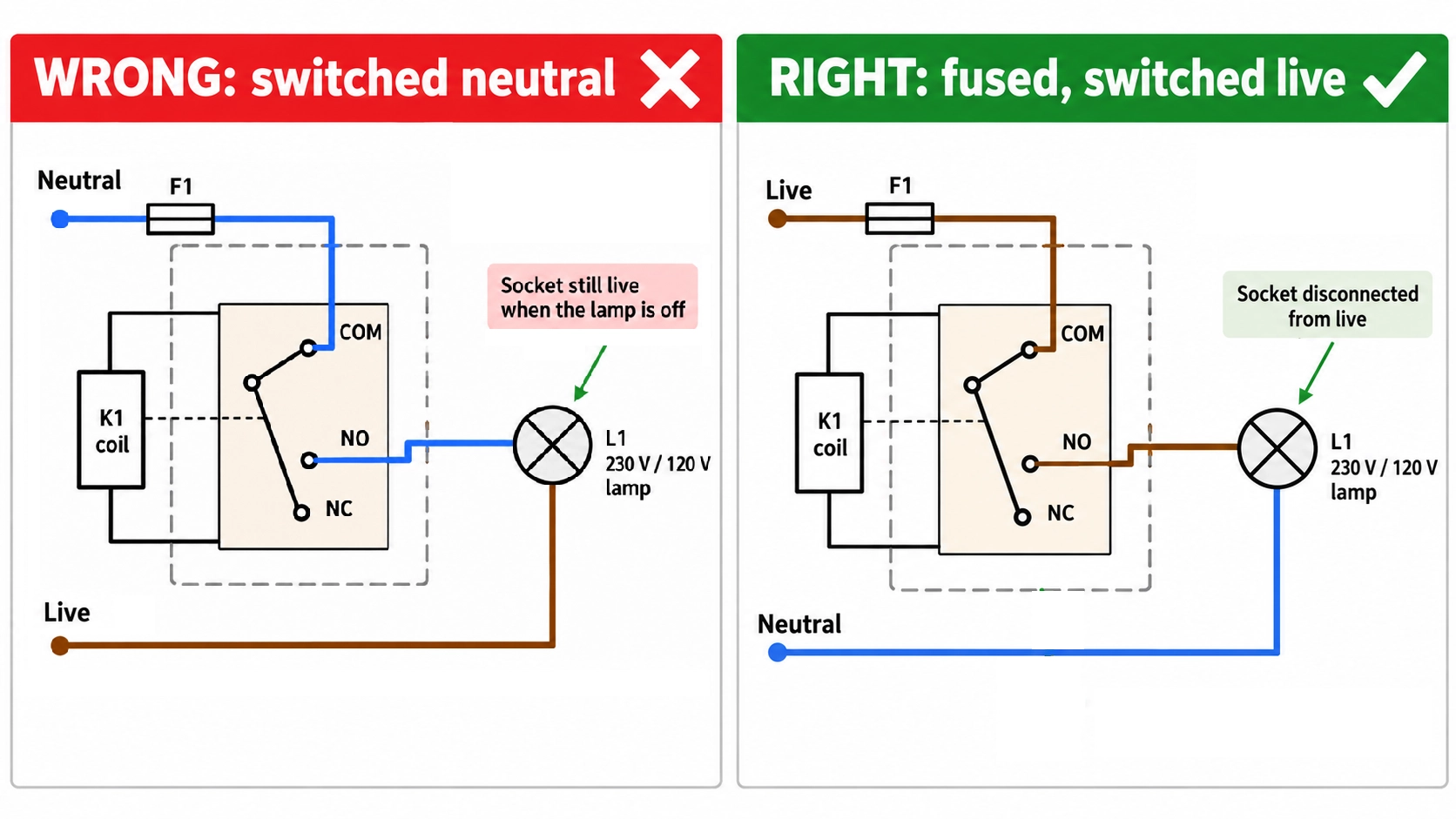
Figure: Safety comparison showing a switched neutral marked wrong and a fused, switched live marked right.
- Switch the live, not the neutral: A relay in the neutral turns the lamp off but leaves its socket live, so anyone replacing the lamp can still receive a shock.
- Fuse the live at the relay input: Size the fuse for the load and the wire gauge, and keep it within the relay's contact rating.
How to Wire a Relay Step by Step
Wire and test the coil side first, then the contact side with a low-voltage test load, and connect the mains last. This order separates coil faults from contact faults before any mains voltage is present.
- Disconnect all power: Unplug the Arduino and the mains supply.
- Fit the driver: Connect D7 through the 1 kΩ resistor to the transistor base, and connect the emitter to GND.
- Connect the coil: Wire one coil terminal to +5 V and the other to the collector.
- Fit the flyback diode: Place it across the coil, with the cathode on the +5 V side.
- Test the coil side: Upload a sketch that toggles D7 once per second. The relay should click on each change.
- Wire a test load: Connect a 12 V lamp and its own supply through COM and NO, and confirm the lamp follows the relay.
- Wire the mains load: With the mains unplugged, connect the fused live to COM, NO to the lamp, and the lamp to neutral, then close the enclosure.
- Power up and verify: Connect the mains and toggle D7 to confirm the lamp switches.
Relay Wiring Diagrams by Relay Types
Each relay type keeps the master circuit's coil side unchanged. What changes is the number of contact sets and how the load connects to them, while an SSR replaces the coil with an LED input.
| Relay Type | Contact Terminals | What Changes from the Master Circuit | Typical Load |
|---|---|---|---|
| SPST, Form A | COM, NO | No NC terminal; the load goes on NO | On/off lamp or heater |
| SPST, Form B | COM, NC | The load stays on until the coil energizes | Normally on fan |
| SPDT, Form C | COM, NO, NC | A second load on NC switches opposite to NO | Changeover between two loads |
| DPST | 2 × COM, 2 × NO | A second pole switches the neutral as well | Disconnecting both conductors |
| DPDT | 2 × COM, 2 × NO, 2 × NC | Two changeover poles, cross-wired | DC motor reversal |
| SSR | Input +/−, two output terminals | An LED input replaces the coil; the output sits in the live | Frequent, silent AC switching |
An SPST relay wires exactly like the master circuit: a Form A relay uses COM and NO, and a Form B relay uses COM and NC in place of NO. Recalculate the base resistor if the coil current of a DPST or DPDT relay differs from the specified value.
SPDT Relay Wiring Diagram: 5-Pin Changeover
The SRD-05VDC-SL-C is already an SPDT relay, so the master circuit uses two of its three contact terminals. Add a second load on NC, and the relay switches between the two. The status lamp on NC lights when the coil is off, and the main lamp on NO lights when the coil is on. Both loads share a common COM, so they both run from the supply connected to COM.
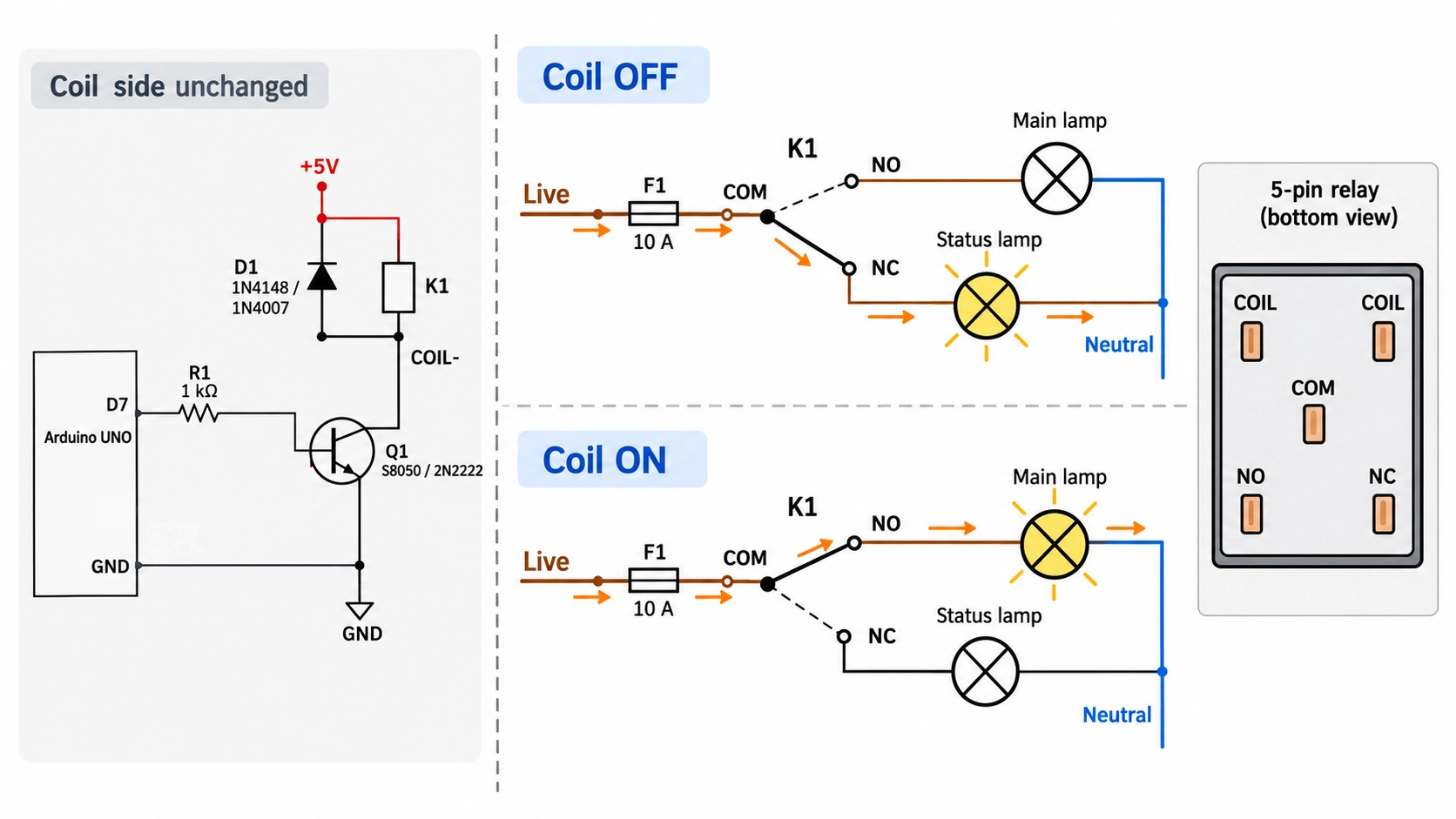
Figure: SPDT relay wiring diagram with a status lamp on NC and the main lamp on NO.
SSR Wiring Diagram: Solid-State Relay for AC Loads
A DC-input, AC-output solid-state relay (SSR) uses an LED instead of a coil, so it requires no flyback diode.
Connect D7 to input + and GND to input −, then wire the two output terminals in series with the fused live, in place of COM and NO. Check the SSR's input current on its datasheet against the pin rating. If it is higher, drive the input through the master circuit's transistor stage.
- Off-state leakage: An AC SSR passes a small current while off, up to 10 mA at 200 VAC on the Omron G3NA series, for example, which can make an LED lamp glow faintly.
- Heat: The output has an on-state voltage drop of up to 1.6 V on the same G3NA series, so a 10 A load dissipates about 16 W in the SSR. Check the datasheet value and mount the SSR on a heatsink.
- AC loads only: A triac or SCR output turns off only when the load current crosses zero, so it cannot switch off a DC load. Use a DC-output SSR for DC loads.
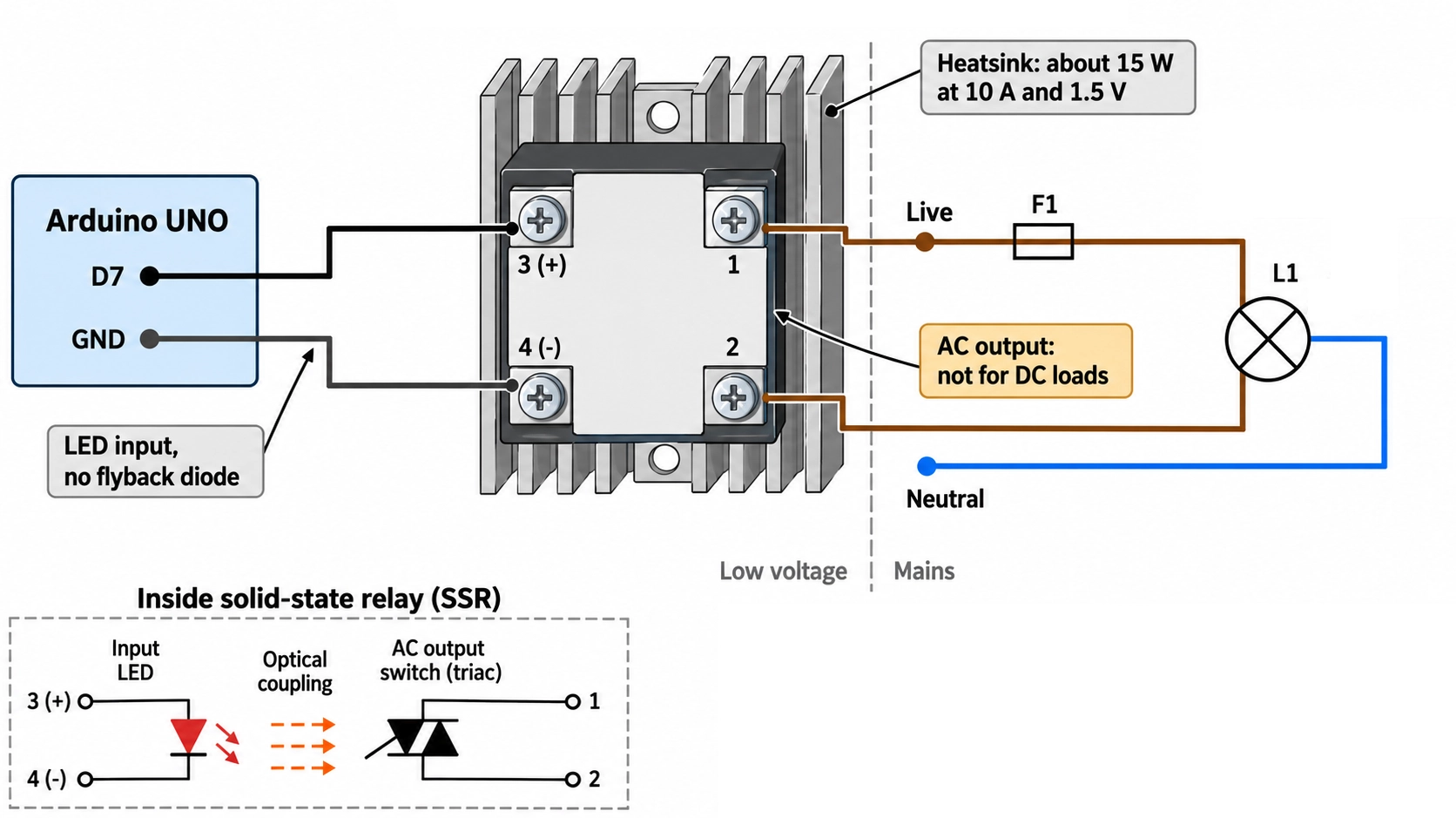
Figure: SSR wiring diagram with Arduino D7
Relay Module Wiring Diagram
A relay module carries the master circuit's coil side on its own board: the transistor, base resistor, flyback diode, indicator LED, and often an optocoupler. Wire three pins to the Arduino, and the contact side stays the same.
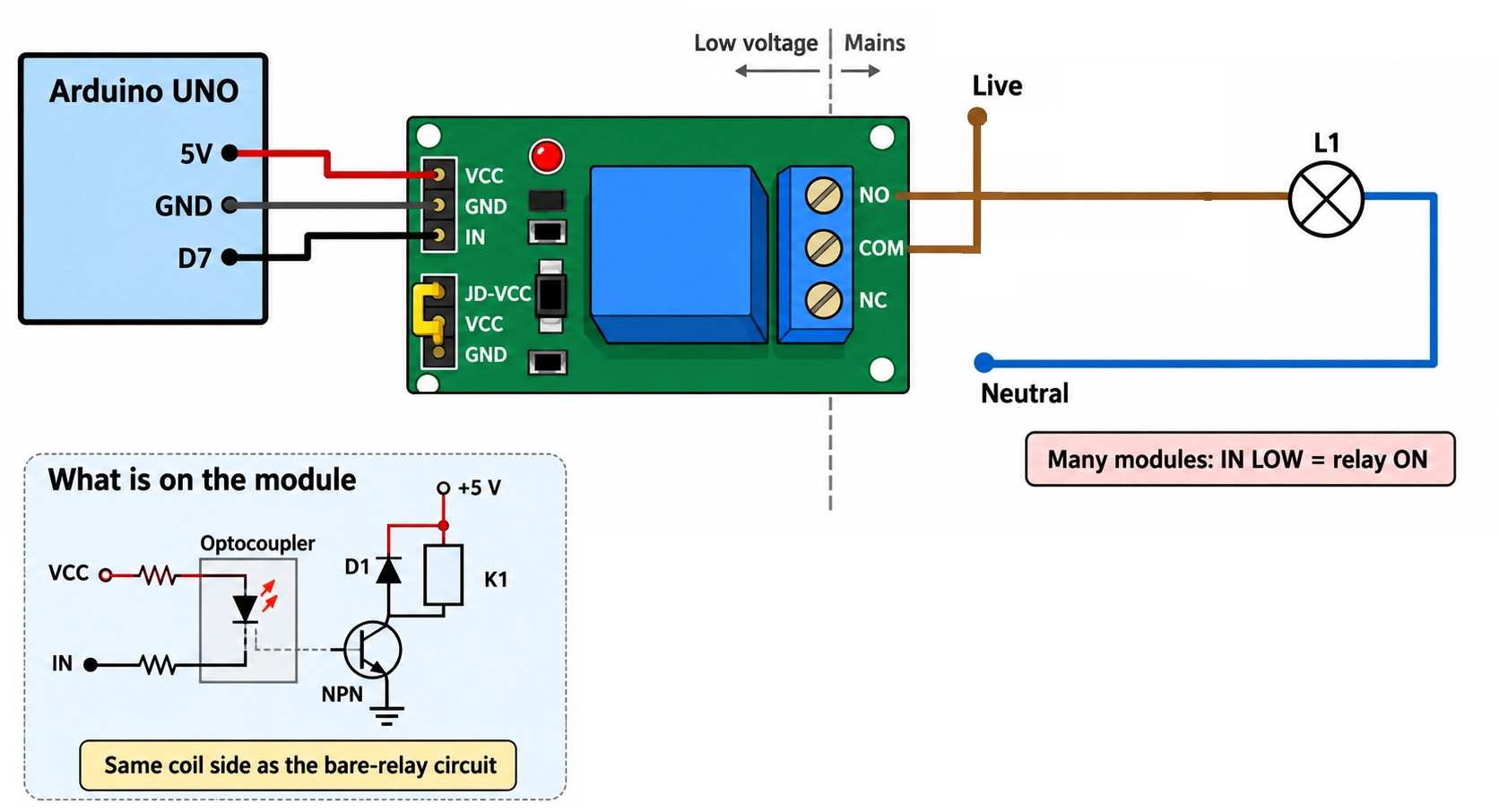
Figure: Relay module wiring diagram connected to an Arduino UNO and a lamp
Automotive Relay Wiring Diagram: Pins 30, 85, 86, 87, and 87a
A 12 V automotive relay uses terminal numbers from DIN 72552 rather than COM, NO, and NC. On a standard ISO mini relay, pin 30 is the common contact, 87 is normally open, 87a is normally closed, and 85 and 86 are the coil.
| Pin | Function | Wire It To |
|---|---|---|
| 30 | Common contact (COM) | Fused battery positive |
| 87 | Normally open contact (NO) | Load positive |
| 87a | Normally closed contact (NC), 5-pin relays only | A load that should run while the coil is off |
| 86 | Coil positive | Switched +12 V from a switch or controller |
| 85 | Coil negative | Chassis ground or a low-side driver |
A 4-pin relay omits 87a. To switch a 12 V lamp from a dashboard switch:
- Connect the battery positive through a fuse to pin 30.
- Connect pin 87 to the lamp, and the lamp's other terminal to chassis ground.
- Connect the fused +12 V through the dashboard switch to pin 86.
- Connect pin 85 to chassis ground.
Coil polarity matters on some relays. If the case diagram shows a diode across 85 and 86, wire the coil with the polarity the diagram marks, usually 86 to positive and 85 to ground, because a reversed suppression diode conducts directly across the coil supply. A coil with a suppression resistor, or with no suppression part, has no polarity.
To switch the relay from a 5 V microcontroller, keep 86 on fused +12 V and pull 85 to ground through an NPN transistor or logic-level MOSFET. Size it for the coil current on the relay datasheet. Fit a flyback diode across 85 and 86 with its cathode on 86 unless the relay already contains one, and connect the 12 V ground to the microcontroller GND.
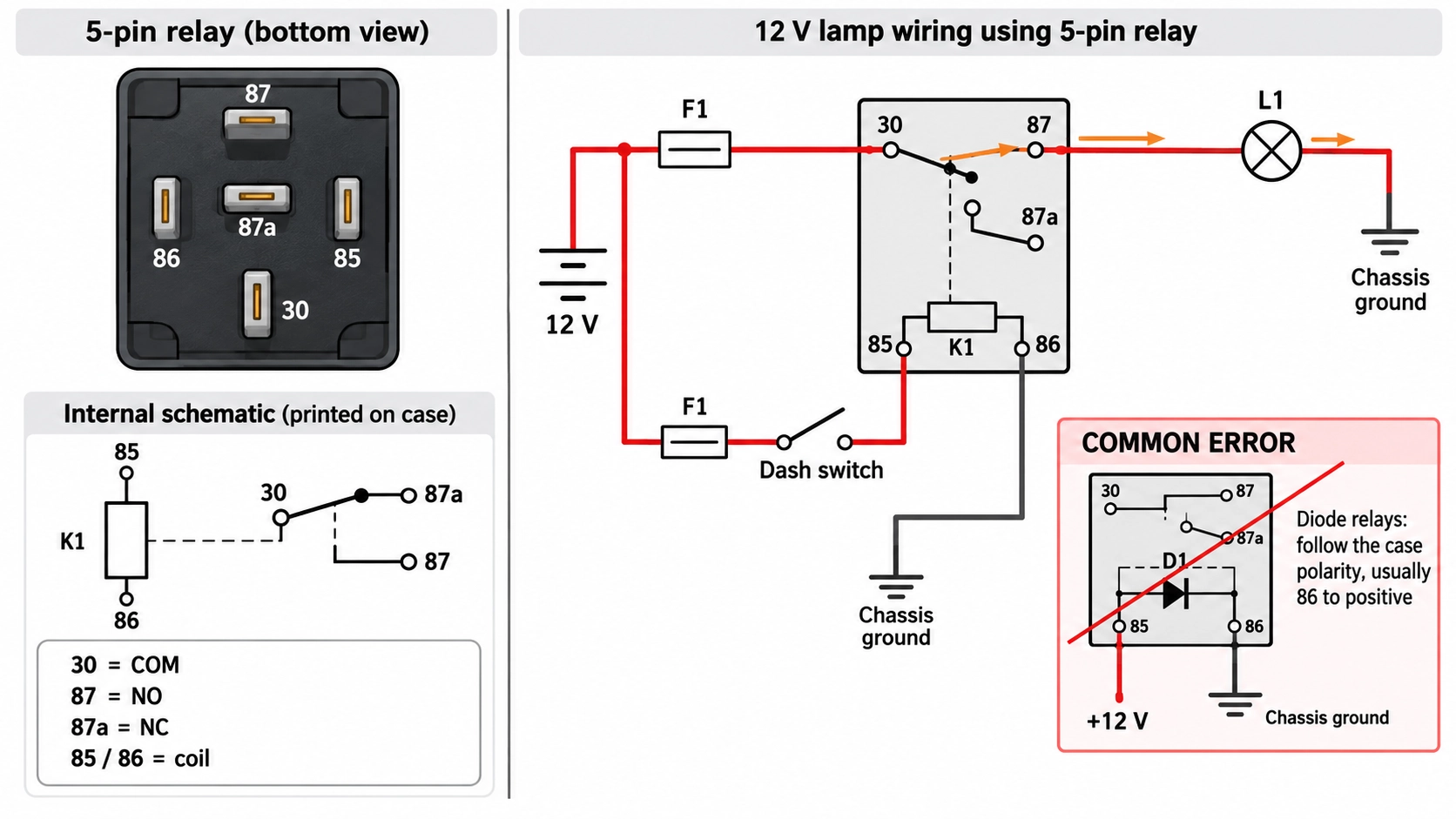
Figure: Automotive relay wiring diagram with a fused 12 V lamp circuit.
Conclusion
Understanding a relay wiring diagram starts with knowing its two separate circuits: the coil circuit, which controls the relay, and the contact circuit, which switches the load through the COM, NO, or NC terminals.
For electromechanical relays, the basic coil-driving circuit remains similar, while the contact wiring changes depending on the relay type and how you want the load to operate.
Use NO for a normally off load and NC for a normally on load. When working with mains voltage, always fuse and switch the live conductor, use a relay rated for the load, and keep all mains connections safely enclosed.
FAQs About Relay Wiring Diagrams
Q: Can I Connect a Relay Coil Directly to an Arduino Pin?
No. A 5 V SRD-05VDC-SL-C coil draws 71.4 mA, above the 20 mA rating of an UNO R3 pin and the 8 mA rating of an UNO R4 pin. Use a transistor driver or a relay module.
Q: Which Relay Terminal Does the Live Wire Go To?
COM. Connect the fused live to COM, then take the load from NO for a normally off load or from NC for a normally on load.
Q: Do I Need a Flyback Diode on a Relay Module?
Usually not. Most relay modules already include a flyback diode across each coil. A bare relay driven by a transistor needs one, with the cathode on the positive supply.
Q: Does It Matter Which Way Round Pins 85 and 86 Are Wired?
Only on some relays. A plain or resistor-suppressed coil works either way, but a relay with an internal diode needs the polarity marked on its case, usually 86 positive and 85 ground.
Q: Can a Relay Switch Both AC and DC Loads?
Yes, within separate ratings. A relay's DC rating is usually far lower than its AC rating, because a DC arc has no zero crossing to extinguish it. A triac-output AC SSR cannot switch off DC.
Popular Articles
• PCB Silkscreen: All You Need to Know
• The Comprehensive Guide to Circuit Symbols: Key to Understanding Electrical and Electronic Diagrams
• Design Guidelines for PCB Using FR4 Substrates
• Choosing the Best PCB Color-Enhancing Aesthetics and Functionality
• PCB Board Design: A Step-by-Step Guide for Beginners
Keep Learning
Relay Wiring Diagram: How to Wire the Coil, COM, NO, and NC Terminals?
Key Takeaways Two Separate Circuits: A relay has two circuits: a control circuit that energizes the coil and a separate contact circuit that switches the load. These circuits are electrically isolated from each other. Contact Connections: Connect the fused live wire to COM. Use NO if the load should normally stay off, or NC if it should normally stay on when the relay coil is not energized. Relay Configurations: SPST, SPDT, DPST, and DPDT relays use similar coil-driving circuits but differ in their co......
ESP32 Power Consumption Explained: Current Draw, Sleep Modes, and Battery Life
Key Takeaways Power consumption by mode: The ESP32 draws around 240 mA during Wi-Fi transmission, 0.8 mA in light sleep, and just 10 µA in deep sleep, based on Espressif's typical datasheet figures. Deep sleep current: The ESP32 can draw 10 µA in deep sleep, with only the RTC timer and memory remaining powered. Keeping the ULP coprocessor running increases current consumption to around 100–150 µA. Development board power consumption: A typical ESP32 development board can draw around 6.5 mA even in dee......
ESP32 Pinout Reference: Which GPIO Pins Are Safe to Use and Avoid?
Key Takeaways GPIO count: The ESP32 chip has 34 GPIOs, and the ESP32-WROOM-32E module exposes 26 of them. General-purpose pins: Fifteen module GPIOs carry no boot, flash, or input-only restrictions: GPIO4, GPIO13, GPIO14, GPIO16 to GPIO19, GPIO21 to GPIO23, GPIO25 to GPIO27, GPIO32, and GPIO33. Strapping pins: GPIO0, GPIO2, GPIO5, GPIO12, and GPIO15 are sampled at reset, so any circuit connected to them must maintain the level required by the boot mode. Input-only pins: GPIO34, GPIO35, GPIO36, and GPI......
PCB Silkscreen: All You Need to Know
Key Takeaways The PCB Silkscreen Guide demonstrates that a properly designed legend layer is essential to prevent assembly failures and ensure long-term hardware reliability. By mastering modern manufacturing methodologies like Direct Legend Printing (DLP) and aligning layouts with JLCPCB's strict DFM design rules—including the absolute 0.8 mm character height limit and the automated 0.15 mm silkscreen clipping protocol driven by solder mask precedence—engineers can seamlessly eliminate cold joints an......
A Beginner's Guide to Basic Electronic Components: Functions, Symbols & Uses
Every circuit, from a simple LED flashlight to a microcontroller board, is built from the same handful of common electronic components. This guide breaks down the ten basic electronic components you will encounter most often: What each component does How it works Key specifications Where engineers use it By the end, you will be able to recognize these electronic circuit components on a schematic, a PCB, or a parts bin, and know exactly why each one is there. These electronic components are the buildin......
How to Read and Create PCB Schematics
Key Takeaways Read Schematics: Understand symbols, net labels, and component values. Design in EasyEDA: Place components and create circuit connections. Run Design Checks: Use ERC and DRC to identify potential issues. Verify Components: Check pin assignments and PCB footprints. Prepare for Manufacturing: Validate PCB layouts and manufacturing files. Printed circuit board (PCB) design begins with a clear understanding of how the electronic circuit should function. A schematic diagram represents the cir......