Getting PCB Characteristic Impedance Right for Reliable Signals
14 min
- What Is Characteristic Impedance in a PCB?
- What Determines PCB Characteristic Impedance?
- How PCB Impedance Control Is Achieved in Manufacturing
- When Does Controlled Impedance Matter?
- FAQs About Characteristic Impedance
- Conclusion
Key Takeaways
- Impedance Defined: Characteristic impedance is set by trace geometry and the reference plane, not by copper DC resistance.
- Core Factors: Trace width, copper thickness, dielectric height, and dielectric constant determine the impedance value.
- Reference Plane: High speed traces need a continuous reference plane to prevent signal reflection.
- Factory Verification: Fabricators adjust trace width and check impedance using time domain reflectometry on test coupons.
- Design Approach: Select a standard factory stackup early to set correct trace widths before routing.
Characteristic impedance decides whether a fast edge reaches its receiver cleanly, yet a multimeter cannot measure it. A 50 Ω trace reads a small fraction of an ohm from end to end. The meter sees copper resistance, while the signal sees something else entirely. A rising edge never sees the whole trace at once. It sees only the stretch of copper it has reached so far. To move forward, it must charge the plane beneath it and build a magnetic field around the trace.
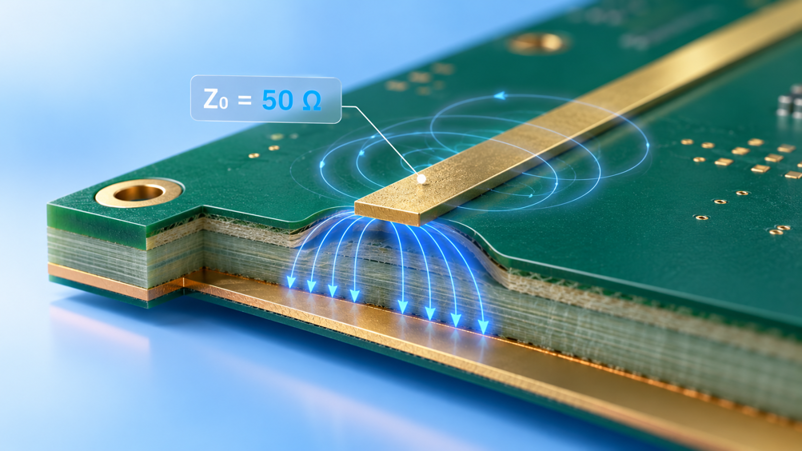
Figure 1: A controlled impedance trace and its reference plane on a multilayer PCB
That ratio between the two sets is what determines how much current the edge draws per volt. This guide discusses the nature of characteristic impedance on a PCB and what quantities determine it. It then explores how fabricators acquire and validate that value and which interfaces are truly value-laden. The result is a stackup that reaches the desired number without repeating.
What Is Characteristic Impedance in a PCB?
Characteristic impedance is not the copper's; it is the trace's and its reference plane. Hence, it can be worked out from geometry, and a gap in the plane spoils it.
How Characteristic Impedance Works in Transmission Lines
In a wave that is traveling without reflection, characteristic impedance, or Z0, is the ratio of voltage to current. On a PCB, that line is a trace and the plane underneath it. Each millimeter contributes a small series inductance and a small capacitance to the plane, and the edge responds to the ratio of these.
The full expression is Z0 = √((R + jωL) / (G + jωC))
- R is the series resistance, and G is the leakage through the dielectric.
- L and C are inductance and capacitance, all per unit length.
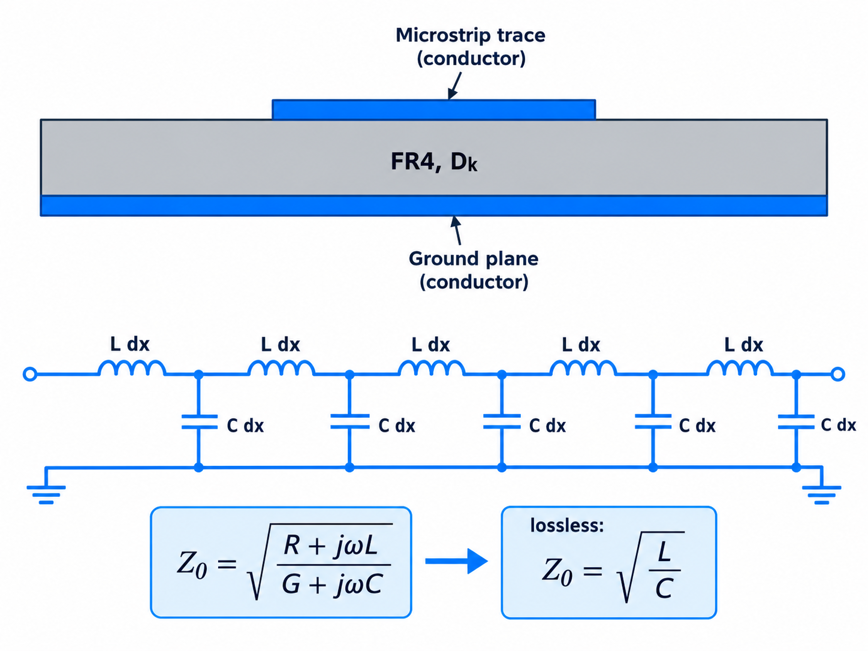
Figure 2: Distributed inductance and capacitance along a PCB trace
The formula can be simplified to Z0 = √(L/C) at the frequencies at which the impedance is important; ωL is much larger than R, and ωC is much larger than G. That way, the meter will display R, and the edge will display L and C. Only if the delay of the trace is long compared to the edge, does the trace act like a PCB transmission line. A typical working limit is one-sixth of the rise time, one way.
Why Impedance Matching Matters for Signal Integrity
Wherever the impedance changes, part of the edge reflects toward the driver.
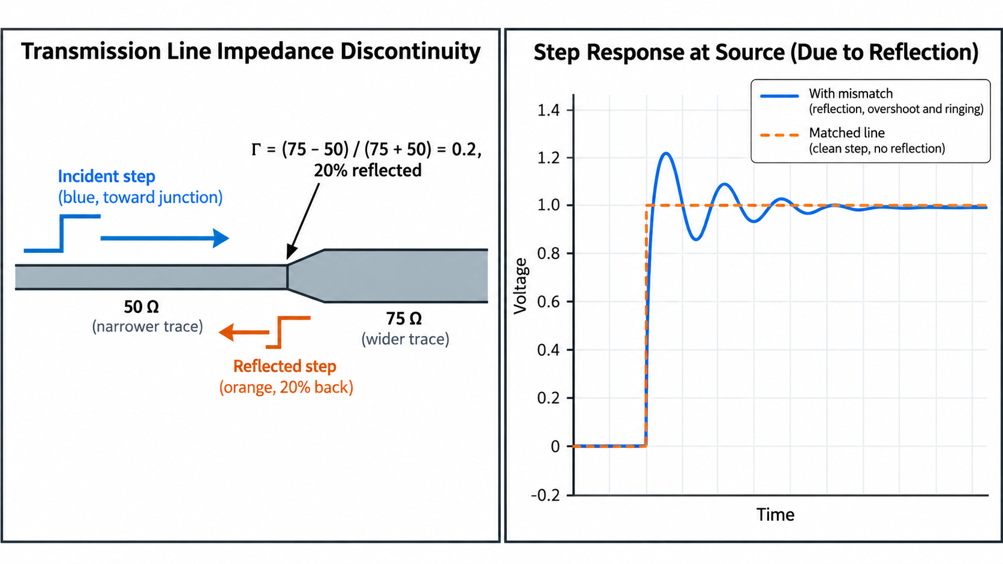
Figure 3: Reflection at a 50 Ω to 75 Ω impedance step
When a signal reaches a change in transmission-line impedance, part of the incident voltage wave may reflect toward the source. The voltage reflection coefficient gives the amplitude of this echo relative to the incident wave:
Γ = (Zₗ − Z₀) / (Zₗ + Z₀)
Where:
- Γ = Voltage reflection coefficient (dimensionless)
- Zₗ = Load impedance, or the impedance the wave encounters next (Ω)
- Z₀ = Characteristic impedance of the incoming transmission line (Ω)
For a 50 Ω trace connected to a 75 Ω section:
Γ = (75 − 50) / (75 + 50) = 25 / 125 = 0.20
Therefore, 20% of the incident voltage-wave amplitude is reflected toward the source. The positive sign indicates a non-inverted reflected voltage wave. This percentage refers to voltage amplitude, not reflected power.
What Determines PCB Characteristic Impedance?
Z0 is determined by 4 quantities on a finished board, and each of these quantities moves Z0 in a known direction. The first 3 are trace-filled, and the fourth is stackup-filled.
- The wider the trace, the less Z0 will be.
- Copper thickness: Thicker copper slightly reduces Z0.
- Dielectric constant (Dk): A larger Dk reduces Z0 and slows the edge.
- Dielectric height: An increase in the distance to the reference plane increases Z0.
Trace Geometry and Dielectric Properties
The greater the trace width, the more capacitance per unit length of trace because more copper is exposed to the plane. This results in a fall in Z0. The thicker the copper, the less the same way is pushed, since the sidewalls contribute to some extent to the coupling. Therefore, a 50 Ω trace on 1 oz copper will be drawn slightly narrower than a 50 Ω trace on 0.5 oz copper.
Dielectric Constant, Dk, is an expression of how effectively the laminate stores the electric field, relative to air. Capacitance is proportional to Dk, and Z0 is approximately inversely proportional to the square root of Dk. The range of FR4 varies from approximately 3.9 to 4.5, depending on the resin content, the type of glass, and the frequency. As the PCB dielectric constant guide shows, that will mean one drawn width will span two different FR4 grades.
For a classic closed-form estimation of a surface microstrip, it is:
- Z0 ≈ (87 / √(Dk + 1.41)) × ln(5.98h / (0.8w + t))
Here, h is one-unit dielectric height, w is trace width, and t is copper thickness, all in one unit.
PCB Stackup and Reference Planes
Dielectric height, or how far away the trace is from its plane, is the most powerful influence in the stackup. The higher the height, the greater the log, and so the greater the z0, and a thin dielectric, a narrow trace. On a two-layer board, the plane is a full core away, and a 50Ω microstrip is close to 2.8mm (110mil) wide. It shrinks to approximately 0.35 mm (14 mil) over the thin outer prepreg atop a four-layer board.
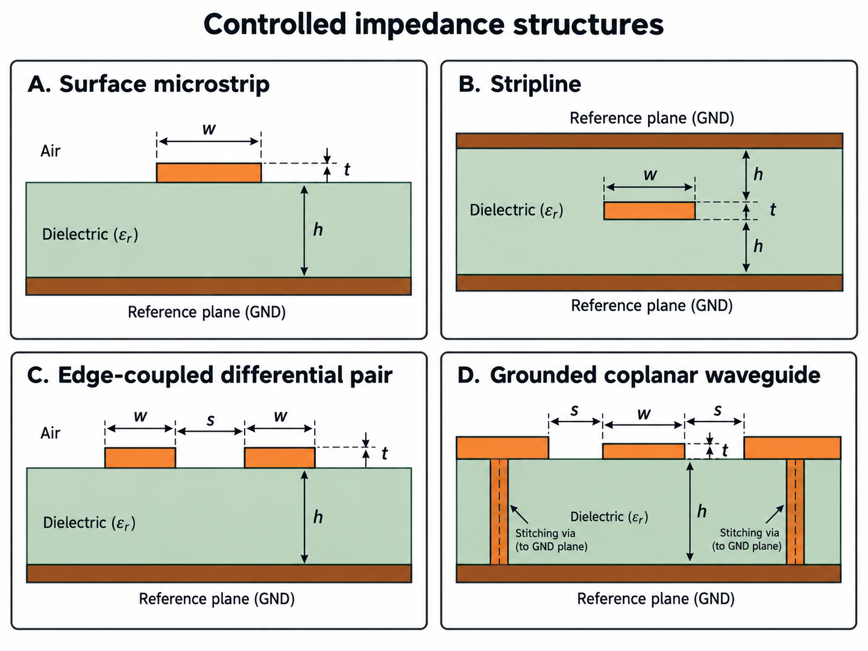
Figure 4: Cross-sections of the four common controlled impedance structures
The position of the plane is as important as the distance; an outer-layer trace has laminate below and air above, and its effective Dk is less. A stripline between two planes is completely covered by a laminate, resulting in lower impedance for the same width. Board thickness and layer count: Set your impedance options at the beginning so you can get them sorted out as you decide on your PCB thickness.
| Structure | Where It Sits | How the Field Behaves | What This Means for Your Design |
|---|---|---|---|
| Surface microstrip | Outer layer over one plane | Split between laminate and air | Easy to probe and rework, but shifted by the solder mask and plating |
| Stripline | Inner layer between two planes | Fully inside the laminate | Lower Z0 at the same width, well shielded, slower propagation |
| Edge-coupled differential pair | Two traces side by side over a plane | Shared between the pair and the plane | Width and gap are solved together and must stay constant |
| Grounded coplanar waveguide | Trace with ground copper on both sides and a plane below | Pulled in toward the side grounds | Narrow lines at 50 Ω, with the side gap as a third controlled dimension |
How PCB Impedance Control Is Achieved in Manufacturing
Impedance control is a joint responsibility of the PCBs. You tell the fabricator the target geometry, and he adjusts the width and dielectric to keep them within tolerance so the finished board meets the target.
Designing Controlled-Impedance Traces and Stackups
Controlled impedance begins at the stackup – not the trace. Start with the fabricator's normal prepreg thickness, since the calculator assumes a normal prepreg thickness and Dk. Once you have determined the widths you are going to use and need a custom stackup, you may end up paying for the lead time and, typically, the price.
- Choose the stackup from the fabricator's standard list, so dielectric heights and Dk are known.
- Assign a reference plane to every controlled layer, and keep it unbroken under the routes.
- Calculate the width and gap for each target with the fabricator's calculator or a field solver.
- Create net classes in your EDA tool, so the router holds those widths and gaps automatically.
- List every target on the fabrication drawing, with its layer, width, reference plane, and tolerance.
However, when using differential pairs, there is one additional variable: the space between the two traces. As the gap decreases, the coupling increases, and the differential impedance decreases. Thus, width and gap are always solved simultaneously. Maintain the same gap throughout the track, as this means the pair temporarily becomes a pair of single-ended lines around a pad. Length matching is part of the guide to differential pair routing practices.
Controlling Materials and Manufacturing Dimensions
The main control parameters of a fabricator are the finished trace width and the pressed dielectric thickness that control the impedance. The copper beneath the etching is undercut, so the trace is narrower at the top than at the bottom. To make up for this, the CAM engineer spreads the artwork out. In addition, prepreg resin will seep into the spaces between copper features; therefore, the dielectric under a trace depends on the surrounding copper.
| Variation on a 50 Ω Outer-Layer Trace | Estimated Change in Z0 | What Controls It |
|---|---|---|
| Finished width 10% narrower, 0.35 to 0.315 mm (14 to 12.4 mil) | About +3 Ω | Etch compensation in CAM |
| Dielectric 10% thicker, 0.21 to 0.23 mm (8.3 to 9.1 mil) | About +3 Ω | Prepreg choice and press control |
| Dk 4.4 instead of 4.2 | About -1 Ω | Laminate grade and resin content |
| Plated copper 45 µm (1.8 mil) instead of 35 µm (1.4 mil) | About -1 Ω | Outer-layer plating thickness |
| Solder mask coating the trace | A few ohms lower | Include the mask in the calculation |
JLCPCB's impedance tolerance is ±10%, and according to its capabilities page, controlled impedance is only available for 4 layers or more. The JLCPCB impedance calculator is based on the real prepreg and core thicknesses of their standard stackups.
Impedance Testing and Quality Verification
A time-domain reflectometer (TDR) is used to measure impedance. It initiates a rapid step into the line and then measures the resulting voltage. Time on the trace corresponds to distance, yielding a plot of impedance vs. position. Few fabricators question your product lines. Instead, they measure a test coupon in the border of the panel, which is also made from the same layers and pressed in the same cycle. Thus, it has the same width and dielectric errors as your boards.
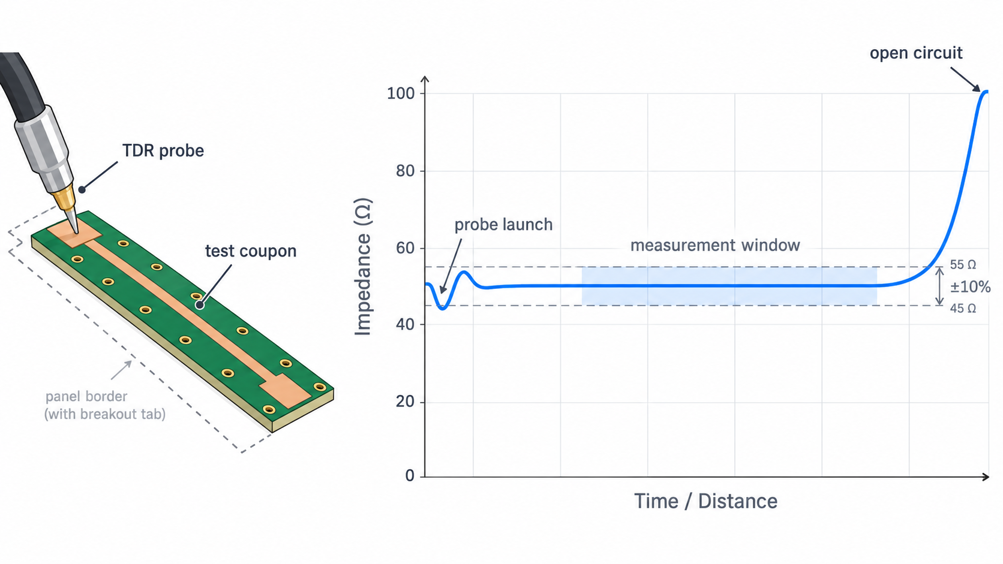
Figure 5: TDR trace of an impedance test coupon
This coupon trace, shown in a guide to PCB impedance testing using TDR, demonstrates that the reading is taken on the flat part of the trace away from the probe launch and the open far end. Passing out a coupon is proof of the process, but it is not about your layout. It does not apply to vias, connector pads, neck-downs, and plane gaps. Those features require simulation or board testing with a TDR if the link fails. Request the impedance test report from your fabricator and compare it with the impedance targets on your drawing.
When Does Controlled Impedance Matter?
When the edge is fast relative to the route, then controlled impedance is important. That's not necessarily determined by the clock frequency alone – a slow bus with sharp drivers might require it; a long, gentle I2C line might not.
High-Speed Digital Interfaces
All high-speed serial standards define a channel impedance. It is what your traces need to meet, as all the connectors, cables, and on-chip terminations are designed to that number. The targets have a small spread, meaning the stackup remains fairly simple despite the list of interfaces.
| Interface | Line Type | Target Impedance | What This Means for Your Stackup |
|---|---|---|---|
| USB 2.0 and USB 3.x | Differential pairs | 90 Ω differential | Tight pair gap, no plane splits under the pair |
| PCIe Gen4 and Gen5 add-in cards | Differential pairs | 85 Ω differential (CEM) | Lower than other pairs, so it needs its own width and gap |
| HDMI TMDS and Ethernet | Differential pairs | 100 Ω differential | The common default pair geometry on most boards |
| DDR4 data and address | Single-ended | 40 to 50 Ω | Set by the memory controller's layout guide, with length matching |
| DDR4 clock and strobe | Differential pairs | 80 to 100 Ω differential | Routed with the data group, it clocks |
RF and Other High-Frequency Applications
All antennas, SMA connectors, filters, and test equipment are built to 50 Ω single-ended; that's why the standard RF design is as it is. A trace that rolls to 60Ω in front of the connector will reflect 9% of the voltage. This reflection is directly apparent as poorer return loss and lower power at the antenna. These lines are often routed on many RF boards as grounded coplanar waveguides. The ground copper is present on both sides of the trace and is stitched to the plane below with a row of vias. The side grounds pull the field inwards, allowing the line to remain narrow enough to accommodate a small IC pad.
The via fence is also used to stop coupling with other lines, but it introduces another dimension to maintain. At frequencies above a few gigahertz, the laminate itself begins to impose limits on you. The higher the frequency, the greater the signal loss per centimeter for FR4. The Dk also varies with frequency and glass weave type, causing impedance to vary from one panel to another. Many 5.8 GHz designs thus switch to Rogers RO4350B, which has a loss tangent of only 0.0037 at 10 GHz, approximately one-fifth of that characteristic of typical FR4 designs.
FAQs About Characteristic Impedance
Q: Does characteristic impedance depend on trace length?
No. It is set by the cross-section: width, copper thickness, dielectric height, and Dk. A 10 mm trace and a 100 mm trace with the same cross-section share the same Z0. Length changes the delay and loss, which determine whether impedance matters at all.
Q: Can I get controlled impedance on a two-layer board?
Physically yes, but the plane sits a full core away. On a 1.6 mm (63 mil) board, a 50 Ω microstrip is close to 2.8 mm (110 mil) wide. A thinner board or a grounded coplanar layout brings that down. Many fabricators offer impedance control only for multilayer builds, and JLCPCB lists it as starting at four layers.
Q: Why does my TDR reading differ from the calculator?
Calculators assume rectangular traces, one Dk value, and exact dielectric heights. Real traces are trapezoidal, resin flow changes the pressed thickness, and solder mask lowers outer-layer impedance. A reading within ±10% is normal, as long as it comes from the flat middle of the TDR trace.
Q: Do 90-degree corners ruin impedance?
At most digital speeds, no. A square corner adds a little extra copper, creating a small capacitance bump. Its size scales with trace width. A 0.13 mm (5 mil) line shows no effect even at 70 GHz, while a 3 mm (120 mil) two-layer line is affected near 5 GHz. Mitered corners cost nothing to draw.
Q: Can termination resistors fix a trace with the wrong impedance?
Only partly. A termination absorbs the reflection at the end of a line, but it cannot remove reflections from discontinuities along the route. A trace that is uniformly off-target still mismatches its connector, cable, and receiver, so the stackup is the place to fix it.
Conclusion
The characteristic impedance depends on your PCB's physical design. Impedance is influenced by trace width, copper thickness, dielectric height, and dielectric constant (Dk), and a continuous reference plane ensures consistent signal behavior. If you picked your stackup early on, you should be able to determine the trace widths you need and use them as a guide throughout the layout. This means that impedance control is part of the design process, not something that needs to be corrected at the manufacturing stage.
When the rise and fall times of the signals are small, even fairly short PCB traces can act as transmission lines. This makes controlled impedance an important role in modern PCB design. With your stackup and trace width sorted, JLCPCB can produce controlled-impedance multilayer boards with an impressive ±10% tolerance. The same stackups can also ensure that your design calculations are consistent with the materials and dimensions used for your fabrication.

Popular Articles
Keep Learning
Getting PCB Characteristic Impedance Right for Reliable Signals
Key Takeaways Impedance Defined: Characteristic impedance is set by trace geometry and the reference plane, not by copper DC resistance. Core Factors: Trace width, copper thickness, dielectric height, and dielectric constant determine the impedance value. Reference Plane: High speed traces need a continuous reference plane to prevent signal reflection. Factory Verification: Fabricators adjust trace width and check impedance using time domain reflectometry on test coupons. Design Approach: Select a sta......
Stop PCB Crosstalk Before It Becomes a Signal Integrity Problem
Key Takeaways NEXT vs FEXT: NEXT saturates with trace length, while FEXT grows linearly with distance. Spacing & Stackup: Apply the 3W rule and keep traces close to reference planes. Edge Rates: Fast rise times drive crosstalk more than clock frequency. Fab Margins: Etching variations reduce gaps, requiring extra layout clearance. Verification: Use DFM checks and TDR coupons instead of basic continuity tests. PCB crosstalk is the noise one trace pushes into its neighbor, even though the two nets are e......
Navigating the Impedance Landscape: Selecting the Right Impedance for USB, Ethernet, HDMI, and SD Card Interfaces
Introduction In the realm of high-speed digital communication, choosing the right impedance is a critical aspect of successful PCB design. Impedance matching ensures optimal signal integrity, minimizes reflections, and enhances the overall performance of interfaces such as USB, Ethernet, HDMI, and SD Card. In this blog post, we'll explore the importance of impedance, the factors influencing impedance selection, and best practices for ensuring reliable data transmission in these widely used interfaces.......
A Beginners Guide to Impedance Control in PCBs
When a digital signal is transmitted from one point to another, it causes a change in the state of the signal line. This change can be understood as an electromagnetic wave moving through the circuit. Reflection occurs when this wave encounters a boundary between different mediums. At this boundary, some of the wave's energy continues as a signal, while the rest is reflected. This process repeats until the energy is either absorbed by the circuit or dissipated into the environment. For electrical engi......
What is PCB Signal Attenuation: How Signals Weaken Over Distance and How to Mitigate It
Key Takeaways Primary Causes: Signal attenuation is mainly caused by skin effect (conductor loss) and substrate energy absorption (dielectric loss). How to Mitigate: Reduce loss by using wider traces, low-loss materials, controlled impedance, and removing via stubs. JLCPCB Solutions: JLCPCB offers Rogers high-frequency laminates, High-TG FR4, precision impedance control, and backdrilling to protect signal integrity. As a signal travels from the source to the load through PCB conductors, the signal is ......
Understanding Analog and Digital Ground in PCB Design
When working on printed circuit board (PCB) design, proper grounding is crucial for ensuring signal integrity, minimizing noise, and maintaining reliable performance. Two common types of ground planes used in PCB layouts are Analog and Digital ground. In this article, we will explore the differences between analog and digital ground, their significance in PCB design, and best practices for their implementation. Analog Ground vs. Digital Ground Analog ground and digital ground have separate purposes in......