How to Desolder SMD Components: A Step-by-Step Guide
16 min
- Quick Answer: How to Desolder SMD Components
- Which SMD Desoldering Method Should You Use?
- What You Need: Tools and Materials
- Before You Start: Board Prep and Safety
- Method 1: Twin-Iron or Drag Removal for Small Chip Parts
- Method 2: Solder Wick for SMD Pads
- Method 3: Hot Air Rework for Multi-Lead Parts
- Method 4: Low-Temp Alloy — Desolder SMD Without Hot Air
- SMD Desoldering Method Comparison
- Cleaning and Preparing the Pads After Desoldering
- How to Reinstall an SMD Component After Desoldering
- Common Desoldering Problems and Fixes
- FAQ about Desoldering SMD Components
- Conclusion: How to Desolder SMD Components Without Damage
Key Takeaways
Molten joints before force: Every required solder joint must be fully liquid before the component is lifted, because pulling on a part with even one solid joint is the fastest way to rip a copper pad off the board.
Match the method to the package: Use twin-iron or wide-tip heating for small chip parts, solder wick for flat pads and footprint cleanup, hot air for SOIC, QFP, and QFN multi-lead parts, and low-temperature removal alloy when you need extra working time or have no hot air.
Flux, protection, and inspection: Apply flux before heating, shield nearby heat-sensitive parts, keep thermal exposure brief, then clean and inspect the footprint before any replacement is installed.
Unlike a through-hole component, a surface-mount device may be held down by two, eight, or dozens of tiny solder joints. If even one joint is still solid when you pull, the copper pad can come away with the component. That is why learning how to desolder SMD components is less about applying more heat and more about getting every required joint molten at the same time.
Whether you are repairing a hobby board, reworking a prototype, replacing a failed IC, or salvaging reusable parts, this guide covers four practical approaches: twin-iron removal, solder wick, hot air, and low-temperature removal alloy. With enough flux and the right method for the package, many SMD parts can be removed within seconds without damaging the PCB.
For general bench equipment and temperature guidance beyond the removal methods covered here, see the SMD Rework Guide and the SMD Soldering Tools Guide.
Quick Answer: How to Desolder SMD Components
To desolder SMD components, apply fresh flux and heat every required joint until the solder is liquid before lifting the part. Use twin irons for small chips, hot air around 300–350 °C as a typical lead-free rework starting range, or a low-temperature removal alloy that melts near 58–91 °C.
Which SMD Desoldering Method Should You Use?
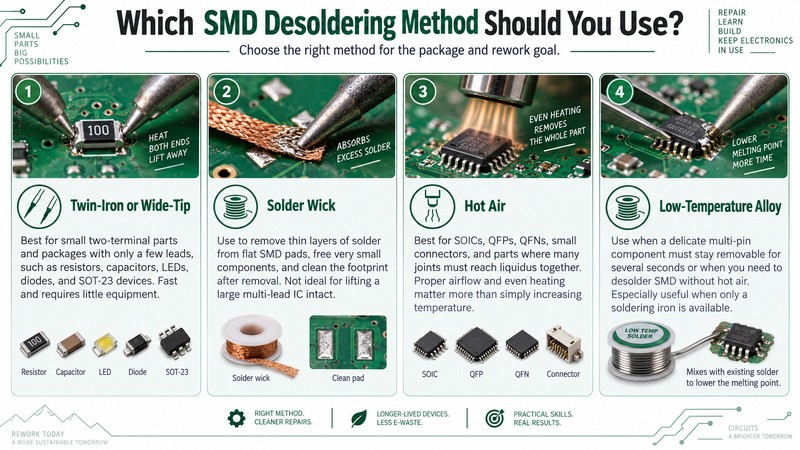
The safest way to remove SMD components depends on the package size, number of solder joints, and tools available.
Twin-Iron or Wide-Tip
Choose this for small two-terminal parts and packages with only a few leads, including resistors, capacitors, LEDs, diodes, SOT-23 devices, and similar components. It is fast and needs little equipment.
Solder Wick
Use solder wick mainly to remove thin layers of solder from flat SMD pads, free very small components, and clean the footprint after removal. It is not the preferred way to lift a large multi-lead IC intact.
Hot Air
Hot air works best for SOICs, QFPs, QFNs, small connectors, and other parts where many joints must reach liquidus together. Proper airflow and even heating are more important than simply increasing temperature.
Low-Temperature Alloy
Use low-temp alloy when a delicate multi-pin component must stay removable for several seconds or when you need to desolder SMD without hot air. It is particularly useful when only a soldering iron is available.
What You Need: Tools and Materials
Keep the following items on the bench:
- Temperature-controlled soldering iron with fine and wide chisel or hoof tips
- A second iron or SMD tweezer tips for small chip components
- Hot-air rework station with suitable nozzles
- Preheater or hot plate for thermally heavy PCBs
- 1.5–2.5 mm desoldering braid
- Manual solder sucker for suitable high-volume solder removal
- No-clean tack flux in gel or paste form
- Low-temperature removal alloy when required
- ESD-safe fine tweezers or a hemostat
- ESD wrist strap and mat
- Kapton tape for protecting nearby parts
- Isopropyl alcohol and a suitable cleaning brush
- Fresh solder for re-tinning the footprint
Flux is especially important. It improves wetting and heat transfer and helps old solder flow instead of forcing you to keep the iron on the joint longer. For more details, see the guide to using solder flux for SMD rework.
Before You Start: Board Prep and Safety
Photograph the component and surrounding PCB before touching the iron. Record IC pin 1, diode polarity, LED orientation, and any polarized capacitor markings. A clear reference photo can prevent a perfectly executed repair from becoming an installation mistake.
Use ESD protection if either the board or removed part is static-sensitive. If you intend to reuse an IC or MOSFET, handle it by the body rather than touching exposed leads unnecessarily.
Apply flux before heating. On large multilayer PCBs or footprints connected to substantial copper planes, bottom-side preheating around 100–130 °C can reduce the temperature difference the local rework tool must overcome.
Also consider moisture sensitivity. Packages that have absorbed moisture may be damaged when heated rapidly. Follow the component manufacturer's moisture-sensitivity and baking guidance when the history of an MSL-sensitive device is uncertain.
Method 1: Twin-Iron or Drag Removal for Small Chip Parts
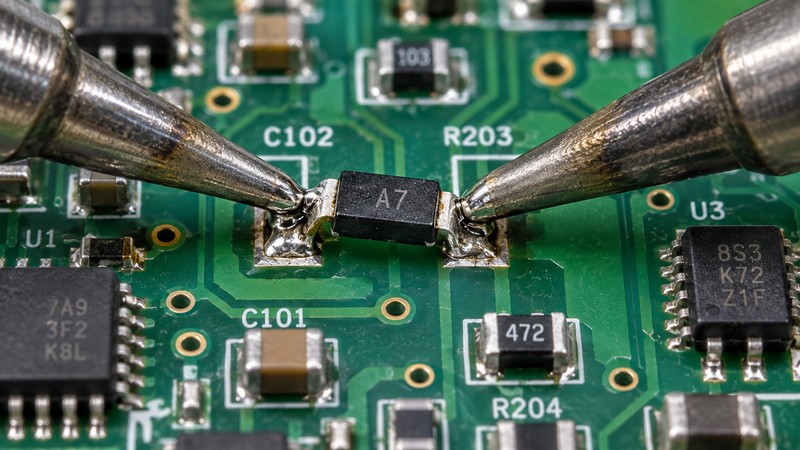
For 0402-size parts through small SOT packages, direct contact heating is often the quickest option.
- Apply flux to every joint that must be released.
- Add a small amount of fresh solder. A larger molten solder mass transfers heat more effectively than trying to heat two almost-dry joints independently.
- Touch both ends simultaneously with two irons, SMD tweezers, or an appropriately sized wide tip.
- Once both ends are visibly molten, slide or lift the component away with tweezers.
Note
Never use tweezers as a lever. If the component resists movement, one joint is probably not fully liquid. Reflux and heat again instead of pulling harder. This technique works particularly well for chip resistors, capacitors, LEDs, small diodes, SOT-23 devices, and SOT-89 packages.
Method 2: Solder Wick for SMD Pads
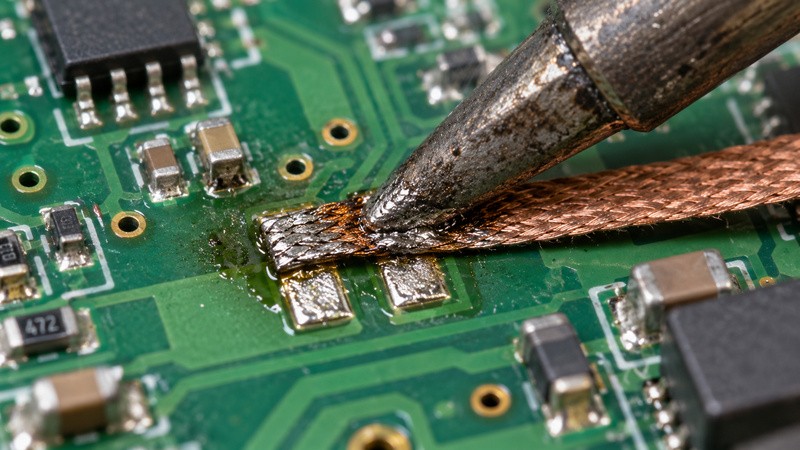
Desoldering braid removes molten solder through capillary action. For SMD work, its strength is clearing flat pads rather than removing a large solder pool.
- Apply flux to the joint and the braid. Good flux helps the solder flow into the copper braid more easily.
- Place a clean section of braid over the solder. Press it gently with the soldering iron until the solder melts and begins to wick into the braid.
- Move to a fresh section as the braid fills. Trim away saturated braid instead of continuing to heat the same section.
- For tiny two-terminal components, reduce the solder on both pads. This can make the final removal easier without forcing the part.
- For larger packages, use wick after component removal. Flatten the remaining solder on the footprint before cleaning and reinstalling the replacement.
Note
Do not press hard while wicking. Excessive mechanical force combined with heat can damage the solder mask or lift a copper pad.
Solder Wick vs. Solder Sucker
Solder wick is best suited for flat SMD pads, fine-pitch connections, and footprint cleanup because it effectively removes thin layers of residual solder. In contrast, a solder sucker is more effective for through-hole joints and larger solder deposits, where there is enough molten solder for suction to remove. The choice depends on joint geometry, as solder wick offers better control for small SMD joints, while a solder sucker works better for removing larger volumes of solder.
Method 3: Hot Air Rework for Multi-Lead Parts
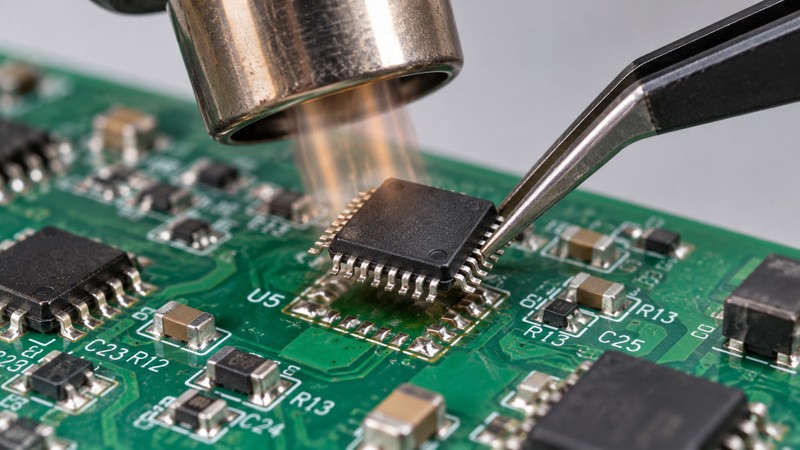
Hot air is the practical choice when an SOIC, QFP, QFN, or small connector has too many joints to heat reliably with an iron.
- Apply flux around all the leads. Protect nearby heat-sensitive components with Kapton tape when necessary.
- Choose a suitable nozzle and starting temperature. A range of about 300–350 °C can be a reasonable starting point for many lead-free rework jobs. IPC-7711/7721 provides industry guidance for controlled rework of surface-mount assemblies. Adjust the setting according to nozzle size, airflow, board mass, preheating, and package type.
- Heat the footprint evenly. Keep the nozzle moving in small circles so heat spreads across all required joints instead of concentrating on one area.
- Watch nearby components while heating. Excessive airflow can move small passives once their solder begins to reflow.
- Lift the device only when every joint is molten. Remove it straight up with tweezers or a vacuum pick. Do not twist or pry it from the footprint.
QFNs require extra patience because the large underside thermal pad can take longer to heat than the perimeter pads. Even heating is safer than concentrating extreme temperatures on one edge.
For station setup, nozzle selection, and full hot-air technique, refer to the dedicated Hot Air Surface Mount Soldering guide.
Method 4: Low-Temp Alloy — Desolder SMD Without Hot Air
Low-temperature removal alloy keeps the solder joints liquid for longer, giving you more time to remove a multi-pin component safely.
- Apply flux across all the joints that must be released.
- Melt the low-temperature removal alloy into the existing solder. Distribute it across every required lead so the alloy mixes evenly with the original solder.
- Keep all the joints molten at the same time. The mixed solder remains workable at a much lower temperature than conventional assembly solder, creating a larger removal window.
- Lift the component once complete reflow is achieved. Remove it gently with tweezers while the joints are still molten. Do not force the component if any joint has begun to solidify.
- Clean the footprint thoroughly after removal. Wick away all remaining low-temperature alloy, clean the pads, and re-tin them with the intended solder before installing the replacement.
For reference, ChipQuik specifies 58 °C (136 °F) for its leaded removal alloy and 79–91 °C (174–195 °F) for its lead-free version. By comparison, Sn63/Pb37 solder melts at about 183 °C, while SAC305 has a melting range of 217–220 °C (solidus to liquidus).
Note
Do not use the remaining low-temperature alloy as the solder for the new permanent joint. Bismuth-rich low-temperature alloys can have different mechanical properties from conventional assembly solders, including greater brittleness in some compositions.
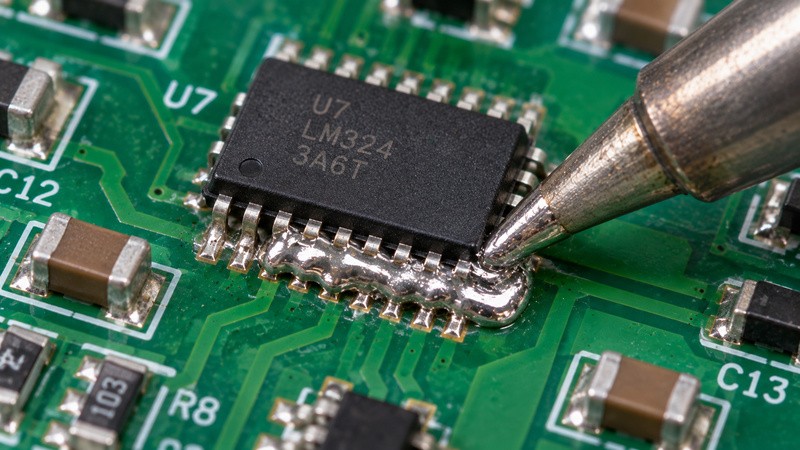
SMD Desoldering Method Comparison
| Method | Best For | Gear Needed | Skill Level | Pad-Lift Risk |
|---|---|---|---|---|
| Twin-Iron / Drag | 0402–SOT, 2–8 pins | One/two irons or SMD tweezers | Moderate | Medium if pulled early |
| Solder Wick | Tiny parts and pad cleanup | Iron, flux, braid | Beginner–Moderate | Low with gentle pressure |
| Hot Air | SOIC, QFP, QFN, connectors | Hot-air station | Moderate | Low–Medium |
| Low-Temp Alloy | Delicate multi-pin parts, no hot air | Iron, flux, removal alloy | Beginner–Moderate | Low |
Cleaning and Preparing the Pads After Desoldering
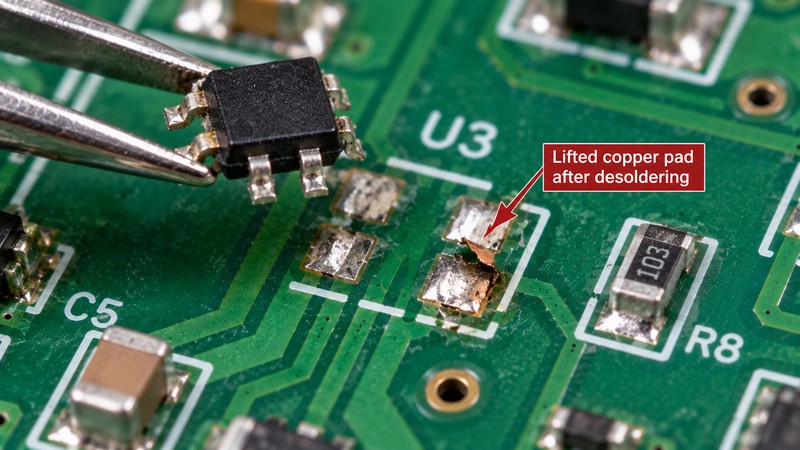
Component removal is only half of a reliable repair. Apply fresh flux and use desoldering braid to flatten excess solder without scraping the copper. Clean the footprint with IPA, then inspect it under magnification. Look for solder bridges, loose debris, damaged solder mask, missing pads, or traces that moved when the component was removed.
If a pad is lifted or a trace has broken, stop before fitting the replacement. Repair the conductor first. The PCB design guide on avoiding damaged traces and pads provides additional background on preventing this type of damage.
Once the footprint is structurally sound, lightly re-tin the pads. For fine-pitch packages, check that each pad remains distinct and that no raised solder mound prevents the replacement component from sitting flat.
How to Reinstall an SMD Component After Desoldering
The right reinstall method depends on how much of the assembly you are rebuilding.
Single Component
For one resistor, capacitor, diode, or conventional IC, hand soldering or drag soldering is normally enough. A stencil adds unnecessary setup for a single simple replacement.
Fine-Pitch or Multi-Lead Component
For dense QFP, QFN, or similar footprints, a controlled deposit of fresh solder paste can make joint volume more consistent. Paste can be applied carefully with a syringe or through a small stencil before localized reflow.
Whole-Board Rebuild
If many components are being replaced, printing solder paste across the board and performing one controlled reflow cycle is considerably more repeatable than dispensing paste individually.
The universal goal is consistent paste volume. For fine-pitch work, look for smooth aperture walls and clean paste release. As one example, JLCPCB offers electropolishing and nano-coating options, lists laser precision up to ±0.003 mm, and uses 304 stainless foil. The appropriate stencil thickness still depends on the footprints and paste-volume requirements of the board.
See the PCB reflow soldering guide and the solder-paste stencil selection guide for the full process. After installation, inspect the finished joints against the applicable workmanship requirements. IPC J-STD-001 defines materials, process requirements, and acceptance criteria used for soldered electronic assemblies.
Common Desoldering Problems and Fixes
Problem: A pad comes off with the component
Fix: The part was probably moved before every joint was fully molten or excessive force was applied. Stop, inspect the trace, repair the pad if necessary, and do not reinstall until the conductor is sound.
Problem: Nearby parts move under hot air
Fix: Reduce airflow, use a smaller nozzle, and protect nearby parts with Kapton tape. If a neighboring passive stands on one end, review the causes of PCB tombstoning.
Problem: The solder refuses to melt
Fix: Add flux and fresh compatible solder before simply increasing temperature. Extra solder can improve thermal contact and helps the joint reach a uniformly molten state.
Problem: The PCB starts discoloring or delaminating
Fix: Heat input is excessive. Preheat a high-mass board, keep the nozzle moving, and reduce local dwell time.
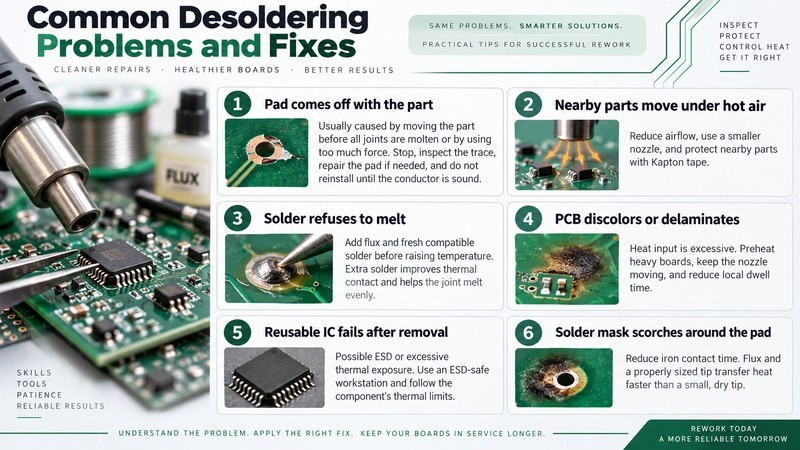
Problem: A reusable IC fails after removal
Fix: ESD or excessive thermal exposure may be responsible. Use an ESD-safe workstation and observe the component manufacturer's thermal limits.
Problem: Solder mask scorches around the pad
Fix: Reduce iron contact time. Flux and a properly sized tip transfer heat faster than dwelling with a small, dry tip.
FAQ about Desoldering SMD Components
Q: Can You Reuse an SMD Component After Desoldering?
Yes, some SMD components can be reused if removal did not exceed their mechanical, thermal, or moisture limits. Inspect the package and leads under magnification before reusing. Bent leads, package cracking, damaged terminations, overheating, or uncertain ESD exposure are reasons to replace the device instead. For critical or high-reliability hardware, a new component is usually preferable when the removed part's condition cannot be verified.
Q: Can You Desolder an SMD Component Without Flux?
It is possible, but it is usually harder and increases unnecessary thermal exposure. Flux removes surface oxides and helps molten solder wet the iron, component leads, and pads correctly. Without it, technicians often compensate with longer iron dwell or higher temperature. A small amount of fresh flux is one of the simplest ways to speed up SMD removal and reduce the temptation to force the component off the PCB.
Q: What Soldering-Iron Tip Is Best for SMD Desoldering?
Use a tip that contacts enough of the joint to transfer heat efficiently. Fine tips help with individual closely spaced leads, while a small chisel or hoof tip generally transfers heat better than a needle tip. For two-terminal components, SMD tweezer tips can heat both ends simultaneously. Select the tip size and shape according to the footprint rather than assuming the smallest available tip is always the safest choice.
Q: How Can You Tell Whether an SMD Pad Has Lifted?
Inspect the footprint under magnification after cleaning away flux and excess solder. A lifted pad may sit above the laminate, move when lightly touched, or no longer connect cleanly to its trace or via. Electrical continuity testing can help confirm damage that is difficult to see. Do not bond a replacement part onto an unstable pad and hope the solder joint will mechanically repair it.
Q: Is Hot Air Always Better Than a Soldering Iron?
No. Hot air is valuable when many joints must reflow together, but it can be unnecessary for a two-terminal resistor or SOT-23 package. An iron often gives faster, more localized control over small parts. Hot air also introduces airflow and broader heating of nearby components. Choose the tool according to the footprint rather than treating hot air as the default for every SMD repair.
Q: Can a Hot Plate Be Used for SMD Removal?
A controlled preheater or hot plate can reduce the amount of localized heat required, especially on multilayer boards with heavy copper planes. However, heating the entire PCB merely to remove one small component may expose many unrelated parts to unnecessary temperature. It is usually most useful as controlled preheat combined with an iron or hot-air tool rather than as the only removal technique.
Q: Why Does Solder Wick Sometimes Stick to the Pad?
Braid usually sticks when the solder begins to solidify before the iron and wick are lifted. Use fresh flux, ensure the braid has reached soldering temperature, and lift the iron and braid together while the solder is still molten. Never pull cold braid sideways from a PCB pad. That mechanical force can damage the copper, particularly on small or already weakened footprints.
Q: How Do You Know When to Stop Heating an SMD Part?
Stop once the required solder joints have fully flowed and the component can be lifted without force. If it still resists, reassess the footprint rather than dwelling indefinitely. A hidden thermal pad, large ground plane, insufficient preheat, or an overlooked joint may be absorbing heat. Repeated long heating cycles can damage laminate, pads, nearby components, and the device you are trying to save.
Conclusion: How to Desolder SMD Components Without Damage
The safest method depends on the package. Use twin-iron or wide-tip removal for small chips, wick for solder removal and pad cleanup, hot air for multi-lead packages, and low-temperature alloy when delicate parts or iron-only removal make extra working time useful.
Regardless of the tool, the rule for how to desolder SMD components stays the same: use flux, make sure every required joint is molten, and never substitute mechanical force for proper heating.
After removal, clean and inspect the footprint before fitting a replacement. For a single component, conventional hand soldering may be all you need. For fine-pitch repair or an entire board rebuild, controlled solder paste, an appropriate stencil, and reflow can provide more consistent joints.
Keep Learning