How to Replace an Electrolytic Capacitor Step by Step
15 min
- Quick Answer: How to Replace Electrolytic Capacitor Parts
- How to Tell an Electrolytic Capacitor Has Failed
- Tools and Materials You’ll Need
- Choosing the Right Replacement Capacitor
- Get the Polarity Right (Aluminum vs Tantalum)
- How to Desolder the Old Capacitor
- Installing and Soldering the New Capacitor
- Test the Repair Before and After Power-Up
- Common Capacitor Replacement Problems and Fixes
- FAQ about Replacing an Electrolytic Capacitor
- Conclusion: Replacing an Electrolytic Capacitor the Right Way
Key Takeaways
Match the spec, respect the polarity: Replace with the same capacitance, an equal-or-higher voltage rating, a 105 °C rating, and an equal-or-lower ESR — and remember that an aluminum electrolytic stripe marks the NEGATIVE terminal while a tantalum stripe marks the POSITIVE terminal.
Diagnose before you desolder: Visual signs such as a domed top, opened vent, or leakage combine with electrical checks like rising ESR, low capacitance, or a dead short to confirm the fault, and one failed capacitor often means others from the same batch are near end of life.
Work clean and test on both sides of power-up: Discharge the board first, desolder quickly with flux so pads do not lift, seat the new part flush with correct orientation, then re-check polarity and re-measure ESR and ripple before closing the board back up.
Electrolytic capacitors are common failure points in power supplies, audio gear, and older electronics. Sometimes a part costing around USD 0.30 brings a dead board back to life. The repair gets expensive when a pad tears off or the replacement goes in backwards.
If you need to replace electrolytic capacitor, two checks matter before the iron heats: the specifications and the polarity. This guide explains how to replace a capacitor on a circuit board: diagnose the fault, choose the part, confirm polarity, desolder, install, and test so the repair actually holds.
Quick Answer: How to Replace Electrolytic Capacitor Parts
To replace an electrolytic capacitor, first note the old part's polarity, then desolder it and clean the pads. Choose a new capacitor with the same capacitance, an equal-or-higher voltage rating, a 105 °C rating, and an equal-or-lower ESR. Match the polarity exactly — the striped side is negative on aluminum capacitors — then solder and test the board.
How to Tell an Electrolytic Capacitor Has Failed
Look for a domed top, an opened X-shaped vent, leaked electrolyte, or corrosion around the base. Brown deposits deserve inspection, although aged adhesive can resemble leakage. Bulging capacitor replacement should include checking nearby copper for damage.
Electrical failure shows up earlier and is easy to miss by eye. Rising equivalent series resistance (ESR) is usually the first measurable symptom, and an ESR meter will flag a capacitor that still looks completely normal. Low capacitance well under the rated value, or a dead short across the leads, are the other two electrical red flags worth checking with a multimeter.
Context narrows the search before you even reach for a meter. "Capacitor plague"-era boards (roughly 2002–2007) are notorious for premature failures, and on any board, capacitors near heatsinks or voltage regulators tend to fail first. Test anything in a hot spot, even if it looks fine.
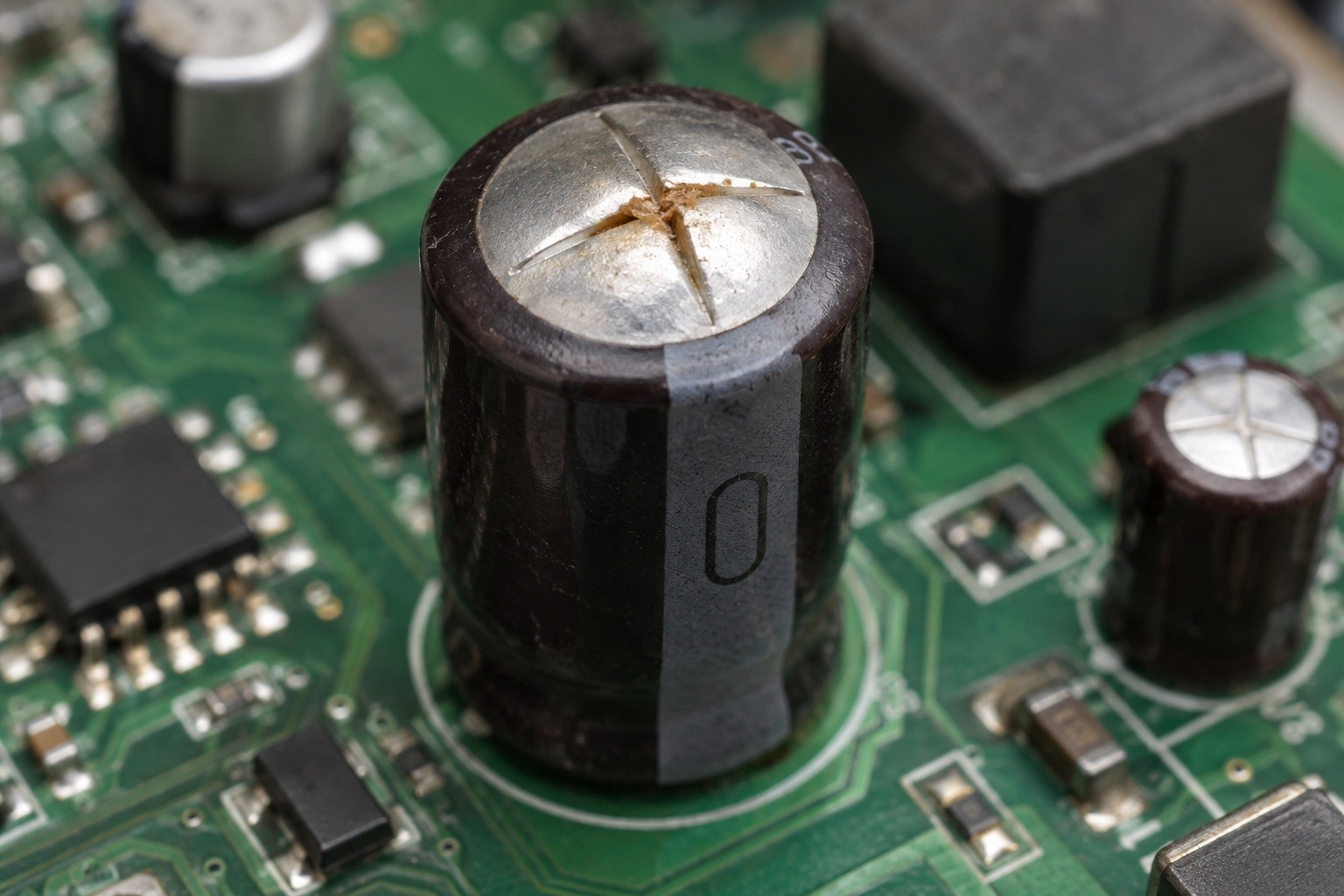
Bulging electrolytic capacitor top
Tools and Materials You’ll Need
- A temperature-controlled soldering iron, plus hot air or a twin-iron setup for SMD can-type capacitors
- Solder wick and a solder sucker (desoldering pump) for clearing through-hole pads
- No-clean flux and fresh solder — old, oxidized solder makes for messy, unreliable joints
- The correct replacement capacitor(s), matched per the spec rules below
- An ESR meter, or a multimeter with capacitance/ESR functions, to confirm the fault and verify the fix
- ESD-safe tweezers for handling small SMD parts
- Isopropyl alcohol (90%+) and a stiff brush, for cleaning flux residue and any leaked electrolyte
- Kapton tape, to shield neighboring components during hot air or twin-iron work
- Optional: a low-temperature removal alloy for stubborn SMD parts on multilayer boards where heat doesn't transfer evenly
Choosing the Right Replacement Capacitor
Getting the spec right matters as much as getting the polarity right — a part that's merely "close enough" on paper can run hot, distort audio, or let ripple back onto a supply rail. Below are the rules for a straight replacement:
- Capacitance (µF): match the original value — roughly ±20% is fine for general filtering and decoupling. Do not change the value in timing, coupling, or snubber circuits, where the exact capacitance sets circuit behavior rather than just smoothing a rail.
- Voltage: choose equal to or higher than the original, never lower. A higher-voltage part is electrically safe in the same position, though it may be physically larger.
- Temperature rating: prefer 105 °C over 85 °C when both are available. Nichicon's Application Guidelines for Aluminum Electrolytic CapacitorsSMD Capacitor Sizes: Size Chart & Selection (Technical Notes CAT.8101H, §2-9-3) states that life doubles for each 10 °C drop in operating temperature, following Arrhenius theory, applied between 40 °C and the capacitor's maximum rated temperature. Read the other way round, every 10 °C of extra heat roughly halves service life, which is why the higher-rated part lasts substantially longer in anything that runs warm.
- ESR: match the original or go lower — low-ESR series matter most in switching supplies, where ESR affects ripple and loop stability. Caveat: swapping in a very-low-ESR ceramic (MLCC) can cause anti-resonance instability in some DC-DC outputs, so that's a deliberate design change, not a drop-in swap.
- Ripple current: meet or exceed the original rating; an undersized rating shortens life through self-heating even when voltage and capacitance look fine on paper.
- Physical fit: for through-hole parts, radial lead pitch (2.5 mm vs 5 mm, for example) isn't interchangeable without bending leads; for SMD, the case size has to match the footprint. Either way, check height clearance near heatsinks or shields before you commit to a part.
| Parameter | Rule When Replacing | Why It Matters |
|---|---|---|
| Capacitance (µF) | Match the original value; ±20% is typically fine | Outside timing, coupling, or snubber circuits, small variances rarely affect the circuit; inside them, capacitance sets the actual behavior |
| Voltage (V) | Equal to or higher than the original — never lower | A voltage rating below the circuit's actual working voltage will fail quickly, sometimes violently |
| Temperature (°C) | Prefer 105°C over 85°C where either fits | Every +10°C of operating temperature roughly halves an aluminum electrolytic's service life |
| ESR (Ω) | Match or go lower | Low ESR reduces self-heating and ripple voltage, which matters most in switching supplies |
| Ripple current (A) | Meet or exceed the original rating | Undersized ripple current shortens life through internal heating, even if voltage and capacitance look fine |
| Physical fit | Match radial lead pitch (2.5 mm vs 5 mm) or SMD case size; check clearance near heatsinks | A part that doesn't fit the existing pads or enclosure forces a rework you didn't plan for |
For a 220 µF 16 V capacitor replacement, retain 220 µF and at least 16 V. For a 25 V 3300 µF capacitor replacement, retain 3300 µF and at least 25 V. Both still need compatible ESR, ripple rating, and physical fit. For a deep dive on any one of these specs, see: SMD Capacitor Sizes: Size Chart & Selection,How Engineers Choose Capacitor Voltage Ratings, andCapacitor Value Guide: Charts, Codes & Selection.
Get the Polarity Right (Aluminum vs Tantalum)
This is the single most important section in this guide, because the two most common electrolytic families use opposite conventions.
- Aluminum electrolytic: the printed stripe (often a filled half-circle or a column of minus signs) marks the NEGATIVE terminal. On through-hole parts, the longer lead is positive — but only before the leads are trimmed, so don't rely on lead length once a part has been installed. SMD can-type parts follow the same stripe-marks-negative convention on the case, but marking styles vary by manufacturer, so confirm orientation against the part's datasheet before soldering.
- Tantalum: the stripe or bar marks the POSITIVE terminal (the anode) — the exact opposite of aluminum. This reversal is the single most common cause of backwards installs on boards that mix both capacitor families.
- Consequences: a reversed aluminum capacitor can vent or rupture under pressure. A reversed tantalum capacitor is worse — it can go into thermal runaway and ignite within milliseconds of power being applied. KYOCERA AVX's tantalum and polymer capacitor application guidelines cap peak reverse voltage at 10% of the rated DC voltage (1.0 V maximum) at 25 °C, falling to 3% (0.5 V) at 85 °C and 1% (0.1 V) at 125 °C — and the standard states plainly that those figures "are not intended to cover continuous reverse operation."
Whatever the part, always align the new capacitor to the board's silkscreen "+" marking, and cross-check against the datasheet if a marking is unclear. The capacitor polarity guide gives more marking examples.
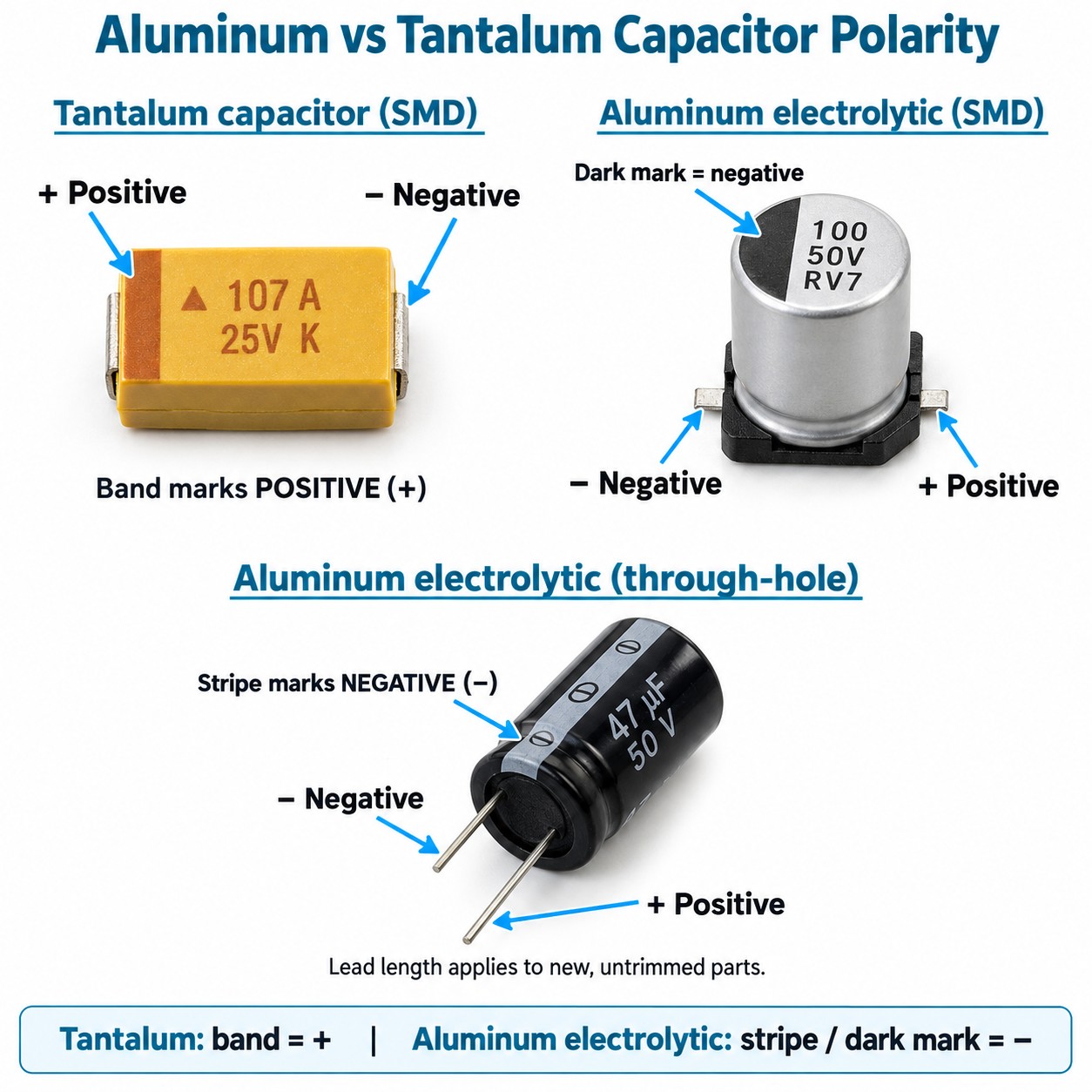
Aluminum vs tantalum capacitor polarity
How to Desolder the Old Capacitor
- Radial through-hole: alternately heat each lead while gently rocking the capacitor free, or heat both leads at once with a wide chisel tip, then clear each hole with solder wick or a solder sucker. Don't yank a half-frozen lead — that's how a pad lifts.
- SMD can-type (aluminum): melt both J-leads at the same time, either with a twin-iron setup or hot air. Keep the plastic base and any neighboring parts in mind, and wick the pads clean once you remove the can.
Work quickly and keep flux flowing. Excess dwell time can boil the electrolyte inside a capacitor you haven't even removed yet, and it stresses the board underneath. If a pad lifts, stop and repair it before installing the new part. TheSMD rework guide covers removal technique in detail.
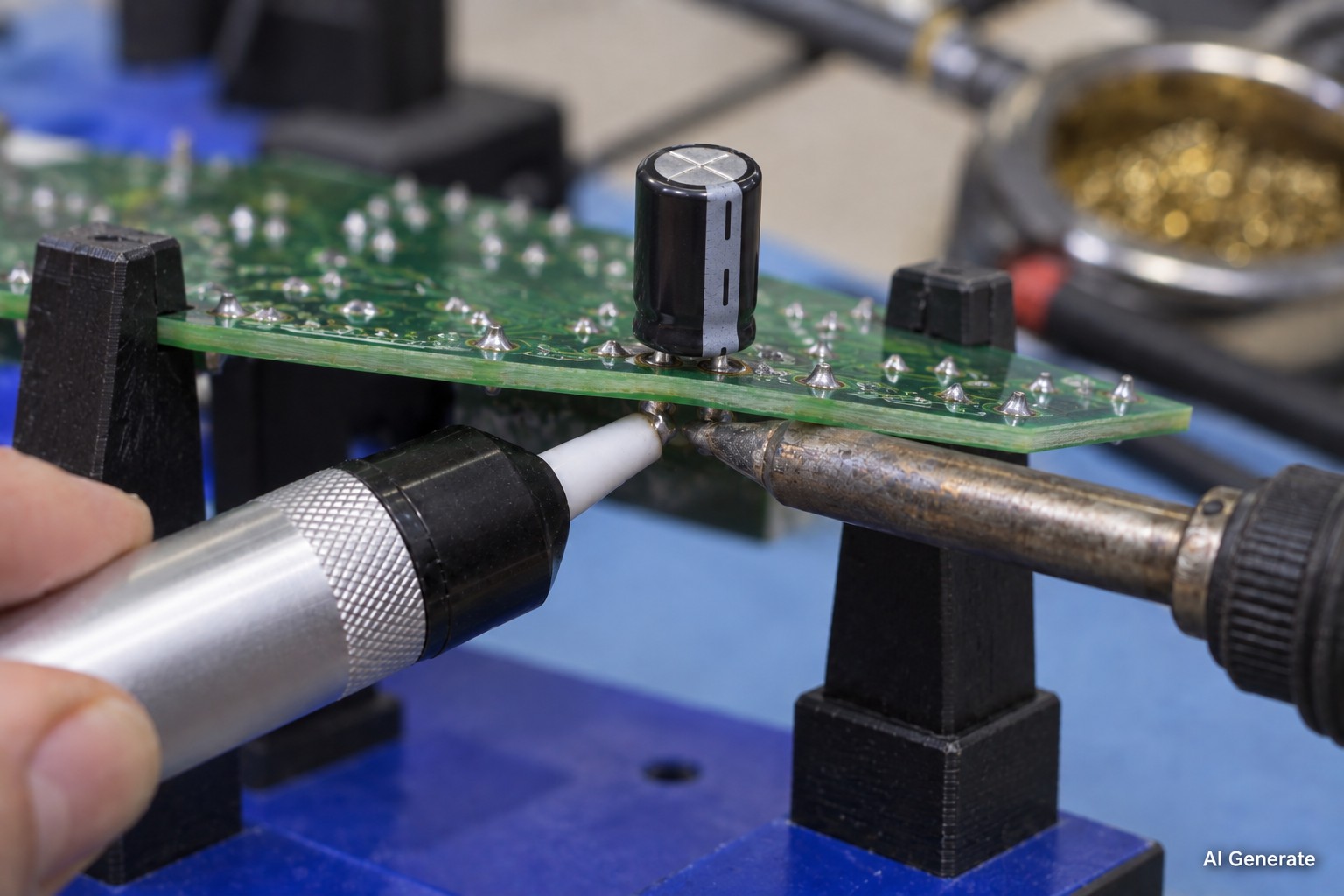
Desoldering electrolytic capacitor leads
Installing and Soldering the New Capacitor
Orient the new part's polarity to the silkscreen before you solder anything, and seat it flush against the board, checking height clearance as you go.
- Through-hole: solder both leads fully, then trim them close to the joint.
- SMD Electrolytic Capacitor Soldering: tack one end first to hold the part in place, confirm alignment, then solder the second end. Add a touch of flux for clean fillets, and inspect both joints under light before moving on —J-STD-001 is the reference standard for acceptable solder joint criteria if you want a formal checklist.
If you're reflowing SMD can-type capacitors, or rebuilding a board carrying more than a couple of bad parts, printing fresh solder paste through a stencil and reflowing gives more even, lower-stress joints than dragging paste on by hand. Even paste deposits make even joints, and a stencil with smooth aperture walls and a clean release is what gives you that consistency — JLCPCB's stencils, for instance, use nano-coating and electropolishing with laser precision to ±0.003 mm. You can check outHow to Master PCB Reflow Soldering at Home (Hot Plate + Stencil) to learn about reflow soldering.
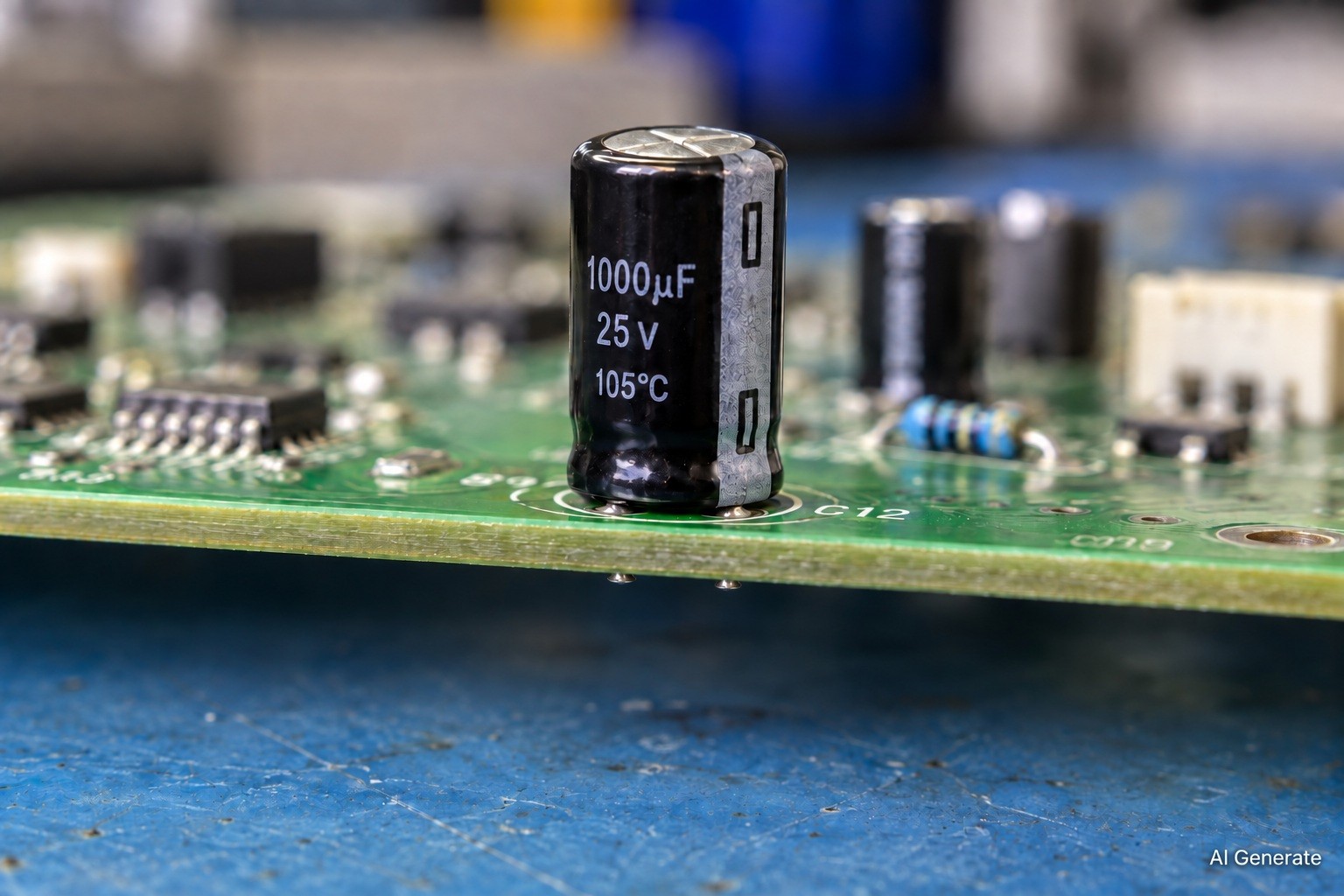
New electrolytic capacitor installed on PCB
Test the Repair Before and After Power-Up
- Before power: re-check the new capacitor's polarity against the silkscreen one more time. This is the last safety gate before you apply voltage, and it costs nothing to double-check.
- Powering up: for large power-supply capacitors, bring the board up slowly — a current-limited bench supply or a variac works well — and watch closely for heat, bulging, or an unusual smell in the first few seconds.
- After power: re-measure ESR and voltage at the capacitor to confirm the original fault is actually gone, not just quieter. A scope is worth using on power rails, since it will show whether the ripple that prompted the repair has actually cleared.
Common Capacitor Replacement Problems and Fixes
- Problem: The new capacitor was installed backwards. → Fix: Power off immediately — a reversed capacitor may already have vented, or worse. Replace it and re-verify orientation against the silkscreen "+" before trying again.
- Problem: A pad lifted while desoldering the old capacitor. → Fix: Stop before installing the new part and repair the pad first (see our guide on how to avoid damaged traces and pads) — soldering onto a lifted pad rarely holds.
- Problem: The new capacitor runs hot. → Fix: This usually points to the wrong ESR or ripple-current rating, or a part that's undervalued for the circuit. Fit a low-ESR, correctly rated 105 °C capacitor instead.
- Problem: The board still misbehaves after the swap. → Fix: Other capacitors nearby are likely degraded too, especially if they're from the same batch. Test every suspect with an ESR meter rather than assuming the one obvious part was the only problem.
- Problem: An SMD capacitor won't sit flat. → Fix: Residual solder left on the pads is the usual cause. Wick both pads level before placing the new part.
- Problem: Ripple or whistling remains on the rail after the repair. → Fix: ESR is still too high for the switching frequency involved. Move to a dedicated low-ESR series rated for that application.
FAQ about Replacing an Electrolytic Capacitor
Q: Can I replace an electrolytic capacitor with a higher voltage-rated part than the original?
Yes — a higher voltage rating is always safe electrically and often extends the part's working life, since electrolytic capacitors run cooler and last longer when the applied voltage is a smaller fraction of their rating. The only trade-off is physical size: higher-voltage electrolytics are usually taller or wider than lower-voltage ones, so confirm the new part still clears the case, heatsink, or shield before soldering it in.
Q: Can I use a ceramic capacitor (MLCC) instead of an electrolytic?
In some positions, yes, but not as a blind swap. MLCCs offer much lower ESR, which can help ripple filtering, but that same low ESR can create anti-resonance instability in certain switching-supply outputs designed around the electrolytic's damping. If you're not modifying the circuit deliberately, stick with an electrolytic replacement matched to the original spec and treat a ceramic substitution as a separate design decision.
Q: Is it safe to replace a capacitor while the board is still powered?
No — always power the board down and let large capacitors discharge before you touch them, since even a board that looks "dead" can hold a stored charge that shocks you or shorts your iron tip. Discharge suspect power-supply capacitors through a resistor rather than shorting the leads directly, then confirm near-zero voltage with a multimeter before desoldering.
Q: Do I need to clean up the leaked electrolyte before installing the new capacitor?
Yes. Dried electrolyte leaves a mildly corrosive, sometimes conductive residue that can cause leakage paths or intermittent faults even after the new part is fitted. Scrub the area with 90%+ isopropyl alcohol and a stiff brush, inspect the pads and nearby traces for corrosion, and let the board dry fully before reflowing anything nearby.
Q: Does an unused electrolytic capacitor degrade just sitting in storage?
Yes, though slowly. Electrolytic capacitors can dry out or lose capacitance over years in storage, even without ever being powered, because the electrolyte inside gradually evaporates through the seals. Well-sealed, modern parts stored in a cool, dry place hold up far better than cheap or aged stock. If a capacitor has sat unused for a decade or more, measure its capacitance and ESR before installing it rather than assuming it's still good.
Q: Is a bulging capacitor always the cause of the fault I'm troubleshooting?
Not necessarily — visible bulging confirms that particular capacitor has failed, but boards with one bad cap often have others nearing end of life, especially if they shipped from the same production batch. Test every capacitor that looks even slightly suspect with an ESR meter rather than assuming the one obvious culprit is the only problem.
Q: When does it make more sense to respin the board instead of recapping it?
Recapping makes sense when the fault is isolated to one or two capacitors on an otherwise healthy board. If you're seeing repeated failures across many units, pads and traces damaged from multiple rework attempts, or a design that's simply undersized for its ripple current, it's usually more cost-effective long-term to redesign and manufacture a fresh board than to keep patching the old one.
Q: What's the difference between "reforming" and simply replacing an old electrolytic capacitor?
Reforming is a slow, low-current process used to rebuild the internal dielectric layer of an electrolytic capacitor that's been sitting unused for years, and it's mainly relevant to vintage or long-stored equipment rather than routine repair. For a capacitor that has already failed — bulged, leaking, shorted, or out of spec — reforming won't help; replacement is the only real fix.
Conclusion: Replacing an Electrolytic Capacitor the Right Way
To replace electrolytic capacitor reliably: diagnose the failed part, match capacitance, voltage, 105 °C rating, and ESR, get the polarity right, desolder cleanly, install, and test before you close the board back up. The golden rule underneath all of it is simple — match the spec, respect the polarity. Get those two things right, and the mechanical part of the repair — desoldering, fitting, and soldering the new capacitor — is straightforward.
For anyone recapping a whole board rather than swapping one part, the natural next step is fresh paste, a good stencil, and a proper reflow — it's a cleaner result than hand-dragging paste across a dozen pads one at a time.
Keep Learning
How to Replace an Electrolytic Capacitor Step by Step
Key Takeaways Match the spec, respect the polarity: Replace with the same capacitance, an equal-or-higher voltage rating, a 105 °C rating, and an equal-or-lower ESR — and remember that an aluminum electrolytic stripe marks the NEGATIVE terminal while a tantalum stripe marks the POSITIVE terminal. Diagnose before you desolder: Visual signs such as a domed top, opened vent, or leakage combine with electrical checks like rising ESR, low capacitance, or a dead short to confirm the fault, and one failed ca......
How to Desolder SMD Components: A Step-by-Step Guide
Key Takeaways Molten joints before force: Every required solder joint must be fully liquid before the component is lifted, because pulling on a part with even one solid joint is the fastest way to rip a copper pad off the board. Match the method to the package: Use twin-iron or wide-tip heating for small chip parts, solder wick for flat pads and footprint cleanup, hot air for SOIC, QFP, and QFN multi-lead parts, and low-temperature removal alloy when you need extra working time or have no hot air. Flu......