Paste Mask vs. Solder Mask: What Each Layer Does (and Why It Matters)
11 min
- Quick Answer: Paste Mask vs. Solder Mask
- What Is a Solder Mask?
- What Is a Paste Mask (Solder Paste Layer)?
- Paste Mask vs. Solder Mask: The Key Differences
- How to Tell Them Apart in Your Gerber / EDA Files
- Why the Paste Mask Is What Your Stencil Is Made From
- Common Mistakes & Confusions (and How to Fix Them)
- FAQ about Paste Mask and Solder Mask
- Conclusion - Paste Mask vs. Solder Mask
Key Takeaways
Two layers, opposite jobs: The solder mask is the physical polymer coating that insulates copper and keeps pads solderable, while the paste mask is data-only manufacturing information that never appears on the finished board.
Opposite pad adjustments: A mask opening is drawn slightly larger than the pad (mask expansion) while a paste aperture is drawn equal to or smaller than the pad (paste reduction), and these mirror-image rules cause most of the confusion.
The paste mask is the stencil blueprint: The factory cuts stencil apertures straight from the solder paste layer, so confirm that layer exists and is filled with apertures before ordering, reduce apertures on fine-pitch and thermal pads, and check the IPC-7525 area-ratio guidance for clean release.
Open your Gerber files for the first time and you meet two layers that both call themselves a “mask”: the solder mask and the paste mask.
The names look nearly identical, so new designers mix them up all the time. Yet the paste mask vs solder mask question matters, because these two layers do almost opposite jobs.
One is a physical coating that stays on your finished board. The other never touches the board at all. It is manufacturing data that tells the factory where to place solder paste and it is the layer used to cut your SMT stencil.
By the end of this guide, you will know what each layer is, how to spot it in your files, how they change your pads in opposite ways, and which one your fab uses to make your stencil.
Quick Answer: Paste Mask vs. Solder Mask
Paste mask vs solder mask comes down to one difference: the solder mask is the physical coating (usually green) that covers copper and leaves pads open, while the paste mask—also called the solder paste layer—is data only. It defines where solder paste goes and is used to cut the SMT stencil. One protects the board; the other places paste.
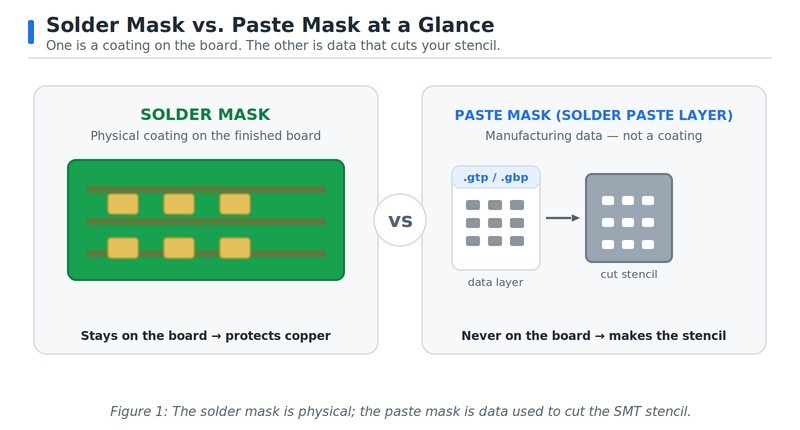
Figure 1: The solder mask is physical: the paste mask is data used to cut the SMT stencil
What Is a Solder Mask?
The solder mask is a thin polymer coating applied over the copper on a finished board. It insulates the traces, stops solder from bridging between nearby pads, and protects the copper from oxidation and handling.
Most boards use a liquid photoimageable (LPI) mask, and green is the classic color.
The solder-mask layer in your design files does not draw the coating itself. It marks the openings — the spots where the coating is cleared so pads stay solderable.
To keep the coating off the pad, each opening is usually drawn slightly larger than the pad. That adjustment is called solder mask expansion. See the PCB solder mask expansion guide for the details.
Permanent solder mask is qualified for adhesion, solvent resistance, and durability under IPC-SM-840, the industry standard for solder mask performance.
We keep this section short on purpose. For the full explainer, see What Is Solder Mask, and for layout and clearance details, see Basic Design of Solder Mask.
What Is a Paste Mask (Solder Paste Layer)?
What is a paste mask? The paste mask, also called the solder paste layer, is a data layer that marks where solder paste is deposited on your surface-mount pads.
It is not a coating, and it never appears on a bare board. You will not see it on the finished product; it exists only as manufacturing information.
Its job is to drive two related steps. It is used to cut the SMT stencil, and it guides paste printing so parts can be reflow-soldered. When the stencil prints onto the board, paste lands only where this layer allows.
Unlike mask openings, paste apertures are usually drawn equal to or smaller than the pad. That adjustment is called paste reduction, and it is the exact opposite of mask expansion. This one fact untangles most of the confusion. For how to build and optimize this layer, see Solder Paste Layer: How to Create and Optimize It.
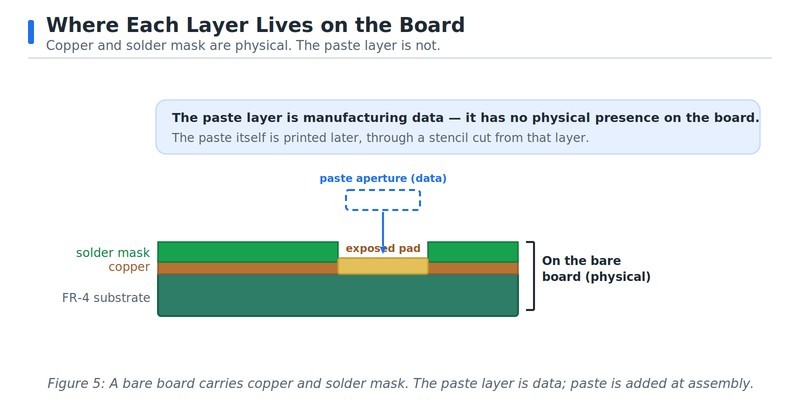
Figure 2: A bare board carries copper and solder mask. The paste layer is data: paste is added at assembly
Paste Mask vs. Solder Mask: The Key Differences
Here is the side-by-side view. The table below sums up every practical difference between the two layers.
| Attribute | Solder Mask | Paste Mask (Solder Paste Layer) |
|---|---|---|
| What it is | Physical polymer coating on the finished board | Data-only layer in your design files |
| On a bare board? | Yes — it is physically present | No — it never appears on the board |
| Purpose | Insulate copper, prevent bridging, resist oxidation | Define where solder paste is deposited |
| Opening vs. pad | Opening is larger than the pad (expansion) | Aperture equals or is smaller than the pad (reduction) |
| Typical Gerber layer | Often .gts / .gbs (conventions vary) | Often .gtp / .gbp (conventions vary) |
| Used to make | The coating openings on the board | The SMT stencil and paste-print program |
| Needed without a stencil? | Yes — nearly all boards have a solder mask | No — only needed when printing paste and reflowing SMD parts |
The two layers pull your pads in opposite directions: the mask opening grows, while the paste aperture shrinks. They also serve opposite roles. One protects the board, the other deposits paste. Once you see that mask expansion and paste reduction are mirror images, the solder mask vs solder paste confusion falls away.
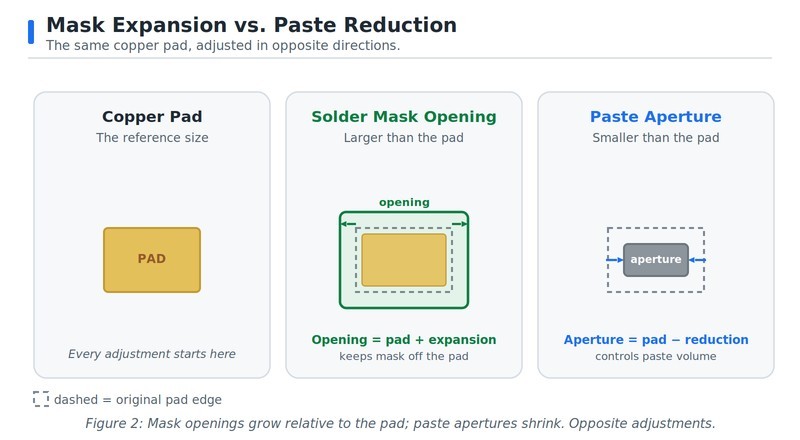
Figure 3: Mask Openings grow relative to the pad; paste apertures shrink. Opposite adjustments
How to Tell Them Apart in Your Gerber / EDA Files
Open your fabrication data in a Gerber viewer and the two layers look different right away. The solder mask layer shows an opening over every exposed pad — surface-mount and through-hole alike.
The solder paste layer shows apertures over SMD pads only. Plain through-hole pads get no paste, unless you use pin-in-paste (intrusive reflow).
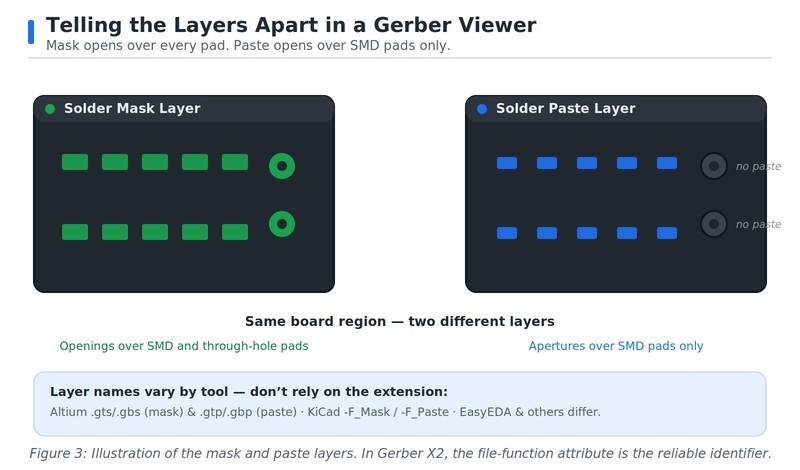
Figure 4: Illustration of the mask and paste layers. In Gerber X2, the file function attribute is the reliable identifier
Layer names and file extensions are a weak clue because conventions differ between CAD/CAM tools and are not universal. Altium-style exports often use .gts and .gbs for solder mask, plus .gtp and .gbp for paste; KiCad writes descriptive suffixes like “-F_Mask” and “-F_Paste”; EasyEDA and others use their own labels. In modern Gerber X2 files, the reliable identifier is the file-function attribute defined by the Gerber Layer Format Specification. Always defer to your CAM output and that attribute, not the extension.
Before you order a stencil, run one quick check in your Gerber viewer. Confirm that a solder paste layer exists and is filled with apertures. For step-by-step export help, see How to prepare perfect Gerber files.
Some tools do not output paste by default. If yours skipped it, enable the top and bottom solder paste layers and export again. For a full walkthrough of Gerber layers, see Gerber of PCB: a comprehensive guide.
Why the Paste Mask Is What Your Stencil Is Made From
Here is the connection that makes this whole topic matter. When you order an SMT stencil, the factory cuts its apertures straight from your solder paste (paste mask) layer.
That layer is the blueprint for the stencil. Its quality decides how much paste lands on each pad, and paste volume drives most solder-joint defects.
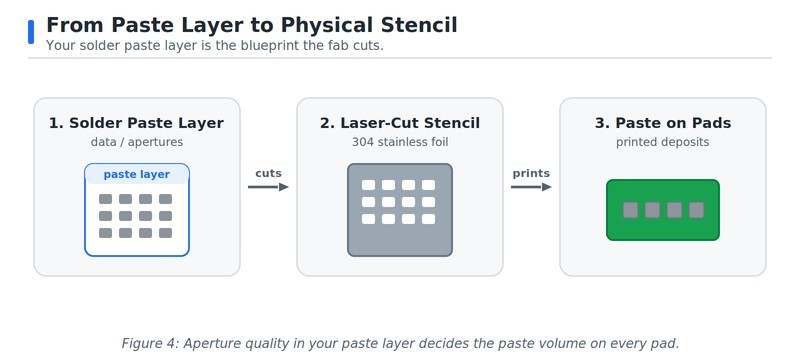
Figure 5: Aperture quality in your paste layer decides the paste volume on every pad
This is why paste reduction is not busywork. On fine-pitch parts and large thermal pads, full-size 1:1 apertures deposit too much paste. The result is bridging and solder balls.
Reducing or splitting the apertures — for example, window-paning a big ground pad — keeps the volume in check. IPC-7525 gives the aperture math, including an area-ratio guideline near 0.66 for clean paste release.
The rule of thumb is simple: a correct paste layer plus a precisely cut stencil equals clean, repeatable deposits. When you review a stencil order, look for apertures that match your design intent and the right foil thickness for your smallest parts. For a broader overview, see The essential guide to SMT stencils.
Common Mistakes & Confusions (and How to Fix Them)
A few mix-ups show up again and again. Here is how to catch and fix each one.
- Mistake: Treating the solder mask layer as the paste layer when ordering a stencil. Fix: They are different files. Send the solder paste (paste mask) layer for cutting; the mask layer defines coating openings, not apertures.
- Mistake: No paste layer in the exported Gerbers. Fix: Some tools skip paste by default. Enable the top and bottom solder paste layers, then export again before ordering.
- Mistake: Using 1:1 paste apertures on fine-pitch or thermal pads. Fix: Full-size apertures over-deposit and bridge. Apply paste reduction, and check the solder paste layer guide for ratios.
- Mistake: Confusing mask expansion with paste reduction. Fix: Mask openings grow relative to the pad; paste apertures shrink. They are opposite adjustments — never copy one to the other.
- Mistake: Expecting the paste layer to appear on the finished board. Fix: It never does. The paste mask is manufacturing data only; only the solder mask is physically on the board.
FAQ about Paste Mask and Solder Mask
Q: Paste Mask vs. Solder Mask — Which One Cuts the Stencil?
The paste mask — your solder paste layer — is the file used to cut the stencil, not the solder mask. The fab reads your paste apertures and lasers matching openings into a steel foil. The solder mask layer only defines where the board’s coating is opened, so sending it for stencil cutting would produce the wrong openings. When you order a stencil, send the top and bottom solder paste layers.
Q: Is the Paste Mask the Same as the “Stencil Layer”?
Yes — many fabs and tools call the paste mask the “stencil layer,” because it is exactly what the stencil is cut from. The names solder paste layer, paste mask, and stencil layer all point to the same data. Whatever your software labels it, this is the layer that carries your aperture shapes. If someone asks for your stencil layer, send the solder paste Gerber.
Q: What's the Difference Between Solder Paste and Solder Mask?
Solder paste and solder mask are different materials, not just different layers. Solder mask is the cured coating that stays on the board and protects the copper. Solder paste is the gray, sticky mix of tiny solder spheres and flux that is printed through the stencil onto the pads. The mask is permanent; the paste melts during reflow to form the joints.
Q: Do I Need a Paste Layer if I Hand-Solder My Board?
No — if you hand-solder with an iron and wire, you do not need a paste layer or a stencil. The paste layer only matters when you print solder paste and reflow surface-mount parts. That said, it is good practice to keep the layer in your design, so you can order a stencil later without reworking your files.
Q: Why Doesn't My Through-Hole Board Have a Paste Layer?
Because paste apertures are generated only for surface-mount pads. A purely through-hole board has no SMD pads to print paste on, so many tools produce an empty or missing paste layer. Through-hole parts are usually wave-soldered or hand-soldered instead. The exception is pin-in-paste, where you deliberately add paste apertures around through-hole pads for reflow.
Q: Can the Mask Opening and Paste Aperture Differ on the Same Pad?
Yes, and on a typical SMD pad they usually do. The solder mask opening is drawn slightly larger than the pad, while the paste aperture is the same size or smaller. They are separate layers with separate rules, so they rarely share the same outline. Seeing two different shapes over one pad is normal, not an error.
Conclusion - Paste Mask vs. Solder Mask
The paste mask vs solder mask distinction comes down to one line: the solder mask protects your board, and the paste mask defines your stencil. They do opposite jobs and adjust your pads in opposite directions — the mask opening grows, the paste aperture shrinks.
Before you order a stencil, make one check. Open your Gerbers, confirm the solder paste layer exists, and make sure its apertures match your design. That single habit prevents most first-stencil mistakes.
When your files are ready, we make the last step easy — upload your Gerbers and order a precision stencil cut straight from your solder paste layer.
Keep Learning
Paste Mask vs. Solder Mask: What Each Layer Does (and Why It Matters)
Key Takeaways Two layers, opposite jobs: The solder mask is the physical polymer coating that insulates copper and keeps pads solderable, while the paste mask is data-only manufacturing information that never appears on the finished board. Opposite pad adjustments: A mask opening is drawn slightly larger than the pad (mask expansion) while a paste aperture is drawn equal to or smaller than the pad (paste reduction), and these mirror-image rules cause most of the confusion. The paste mask is the stenci......
BGA Stencil Design: Apertures, Thickness & Tips
On a ball grid array, every solder joint hides underneath the package where you cannot see it, touch it, or easily rework it. That is exactly why BGA stencil design decides whether the board works: the paste you print is the paste you get, and a print that is slightly too heavy or too light turns into hidden bridges, voids, or starved balls that only an X-ray will reveal. Get the stencil right and the joints reflow clean the first time. Get it wrong and you are chasing intermittent faults after assemb......
Stencil Aperture Design: Geometry, Area Ratio & Tips
Key Takeaways Stencil aperture design controls paste volume, deposit shape, and print registration — it's the key controllable variable in SMT print quality. As per IPC-7525B, two math rules are non-negotiable: stencil area ratio ≥ 0.66 and stencil aspect ratio ≥ 1.5. Aperture geometry is component-dependent: 1:1 with pad for BGA, window-pane splits for QFN/BGA thermal pads, home-plate shapes for 0201/01005 chips, and modest reductions for fine-pitch QFP. Aperture reductions intentionally decrease the......
Red Glue Stencil: Types, Thickness & Ordering Guide
Key Takeaways A red glue stencil deposits adhesive dots under component bodies, not solder paste on electrical pads. Its main use is holding bottom-side SMD parts during wave soldering of through-hole leads. SMT red glue is commonly dyed red so operators can confirm each deposit during inspection. Printable adhesive families include epoxy, acrylic, and UV- or dual-cure materials. Glue stencils are commonly thicker than paste stencils because the dot must reach the component underside. A custom o......
DFN Package Guide: Footprint, Soldering & Stencil Tips
Key Takeaways What a DFN is: A DFN (Dual Flat No-Lead) package is a leadless chip-scale IC package with connection pads on two opposing sides of its underside, usually plus a central exposed thermal pad. Assembly requirements: DFN joints sit hidden under the body, so it needs reflow soldering with a stencil and X-ray or AOI inspection, not hand soldering. Design essentials: Follow IPC-7351 land patterns and IPC-7525 aperture rules, use a thinner stencil foil around 0.1-0.12 mm, and segment the thermal......
A Beginners Guide to Step-Up and Step-Down Stencils
As everyone knows, companies are moving down to 2nm, and electronics are at their peak right now. The component sizes of a PCB likewise drastically shrink during a ten-year period. From 1206, BGAs have shrunk to 0402, 0201, and even smaller. Due to the small size of the components and the requirement for high throughput, defects such as tombstoning, bridging, or poor connections may occur during the soldering process. To address these challenges, specialized stencil technologies such as step-up and st......