Microcontroller vs Microprocessor: Differences, Applications, and How to Choose
19 min
- Microcontroller vs Microprocessor: Key Differences
- When to Use a Microcontroller vs Microprocessor
- What Is a Microcontroller?
- What Is a Microprocessor?
- Microcontroller vs Microprocessor in Architecture
- Microcontroller vs Microprocessor in Embedded Systems Design
- Microcontroller vs Microprocessor in Real Applications
- Microcontroller vs Microprocessor in Performance
- Microcontroller vs Microprocessor: Cost Comparison
- Microcontroller vs Microprocessor in PCB Design and Assembly
- Common Mistakes When Choosing Between MCU and MPU
- FAQs About Microcontroller vs Microprocessor
- Conclusion
Key Takeaways
The fundamental difference between microprocessors and microcontrollers comes down to integration.
A microcontroller bundles a CPU, memory (Flash + SRAM), and peripherals (GPIO, ADC, UART, SPI, I2C, timers) into a single chip for dedicated control tasks.
A microprocessor provides only the CPU core - you must add RAM, storage, and peripherals externally,
This single architectural difference cascades into cost, power, complexity, and performance trade-offs throughout your entire design.
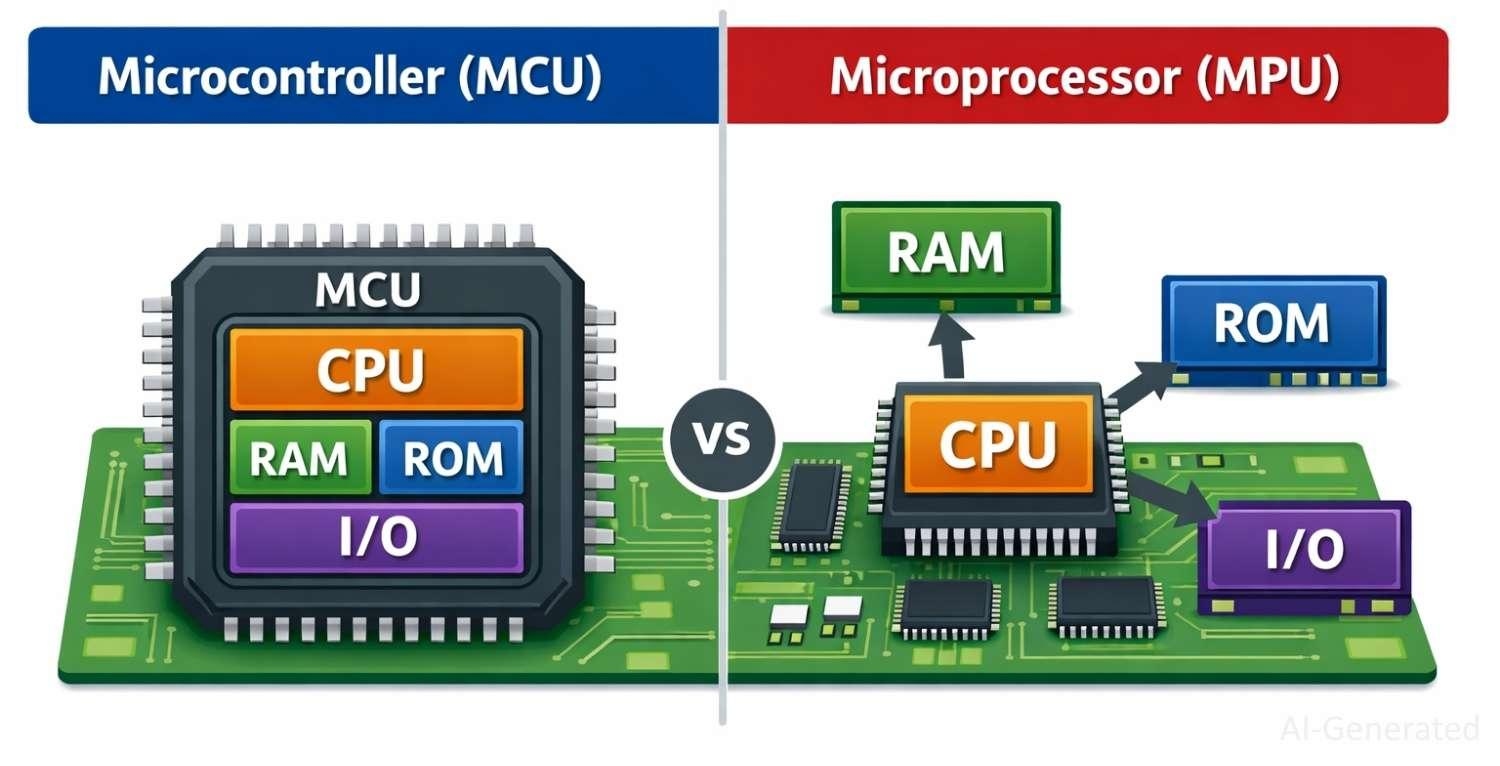
Figure: Comparing the highly integrated internal architecture of a microcontroller versus the external component dependency of a microprocessor.
Choosing between a microcontroller (MCU) and a microprocessor (MPU) is one of the most foundational decisions in embedded systems design. Get it wrong, and you'll face unnecessary cost overruns, power budget failures, or a product that can't hit its performance targets. Get it right, and your hardware sings.
This in-depth guide covers everything engineers, students, and makers need to know about the difference between microprocessor and microcontroller architectures - from silicon-level design to real-world PCB layout considerations. Whether you're building a battery-powered IoT sensor or a high-performance industrial gateway, understanding the MCU vs MPU distinction will sharpen your design decisions.
Microcontroller vs Microprocessor: Key Differences
Before diving deep, here's a high-level comparison table to orient your decision-making. This covers the most commonly searched differences between microprocessor and microcontroller characteristics:
| Feature | Microcontroller (MCU) | Microprocessor (MPU) |
|---|---|---|
| Definition | CPU + RAM + ROM + Peripherals on one chip | CPU only; external RAM, ROM, and peripherals needed |
| Full Form | MCU (Microcontroller Unit) | MPU (Microprocessor Unit) |
| Integration | High - all-in-one SoC | Low - external components required |
| Memory | On-chip Flash, SRAM, EEPROM | External RAM and storage (DDR, Flash) |
| Processing Power | Low to moderate (MHz range) | High (GHz range, multi-core) |
| Power Consumption | Very low (mA-µA) | Moderate to high (Watts) |
| Cost | $0.10 - $10 typical | $5 - $200+ typical |
| Operating System | Bare-metal or RTOS | Full OS (Linux, Windows, Android) |
| Real-Time Control | Excellent | Limited (requires RTOS/PREEMPT_RT) |
| Boot Time | Near-instant (milliseconds) | Slow (seconds to minutes) |
| Application | Embedded control, IoT, wearables | Smartphones, laptops, SBCs |
| Examples | ATmega328 (Arduino), STM32, ESP32 | Intel Core i7, Raspberry Pi CM4, Snapdragon |
| PCB Complexity | Low - minimal external components | High-DDR routing, power management ICs |
When to Use a Microcontroller vs Microprocessor
Selecting between an MCU and an MPU is not about which is "better" - it's about which is right for your specific application requirements. Here's a practical decision framework:
Use a Microcontroller When
- Your application requires deterministic, real-time control - motor control, PID loops, safety-critical systems
- Power budget is tight - battery-powered devices, wearables, remote sensors running on coin cells
- BOM cost matters - consumer electronics, high-volume production where every cent counts
- Simplicity is valued - you need a device that boots in milliseconds without an OS
- The application scope is fixed - no need to run third-party apps or complex user interfaces
- Examples include: thermostats, washing machine controllers, implantable medical devices, automotive ECUs, factory sensors
Use a Microprocessor When
- Your application demands high computational throughput - video encoding, machine learning inference, complex GUIs
- You need a general-purpose operating system - Linux, Android, Windows IoT for rich application frameworks
- Connectivity is critical - running full networking stacks, web servers, VPN clients
- Your product will run third-party or user-installable software
- Display-heavy applications - running Qt, GTK, web browsers, or multimedia playback
- Examples include: smart home hubs, industrial HMIs, single-board computers, automotive infotainment, and AI edge devices
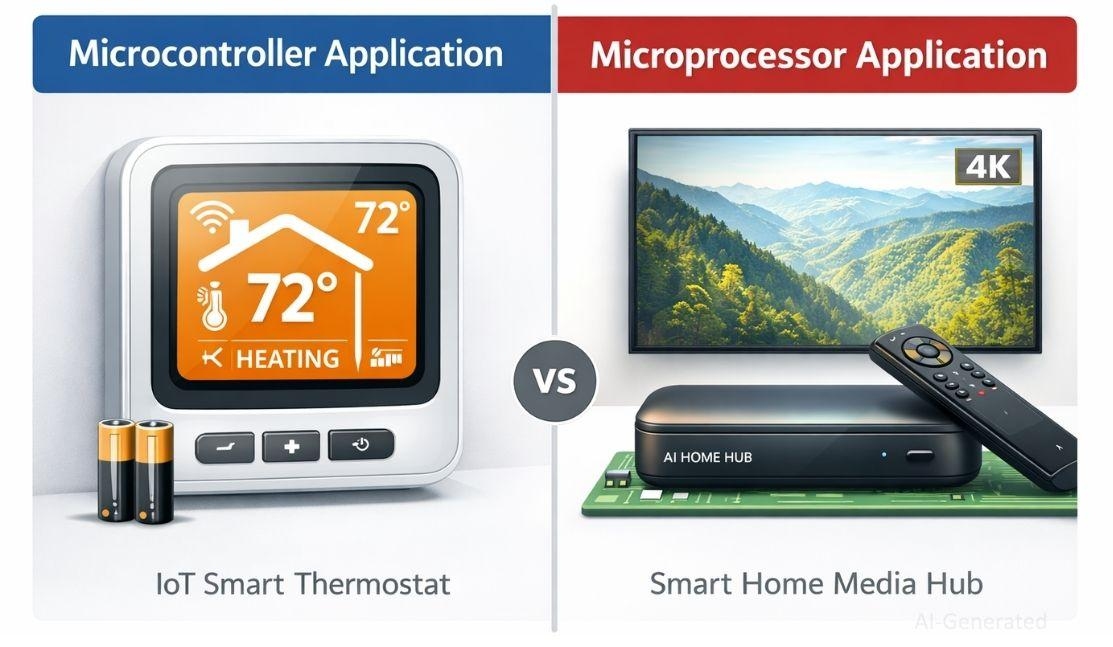
Figure: Typical applications for microcontrollers, such as IoT sensors, compared to high-performance microprocessor applications like multimedia smart home hubs.
Pro Tip
Many modern designs use both - a microprocessor handles application logic while a microcontroller manages real-time peripherals and safety functions (e.g., a Raspberry Pi paired with an STM32 for motor control).
What Is a Microcontroller?
A microcontroller (MCU) is a compact integrated circuit designed to govern a specific operation in an embedded system. It integrates all the core computing components - a processor core, program memory (Flash), data memory (SRAM), and a rich set of programmable peripherals - on a single chip. The term "microcontroller" reflects its role as a self-contained controller for specific tasks, as opposed to a general-purpose computing platform.
In contrast to microprocessors, microcontrollers execute a single program stored in internal Flash memory. They are optimized for control applications where reliability, low power, and predictable timing are more important than raw processing speed.
Key Features of Microcontrollers
- On-chip Flash memory (program storage): 4 KB to several MB depending on device
- On-chip SRAM (data memory): typically 256 bytes to several hundred KB
- Rich peripheral set: GPIO, ADC, DAC, UART, SPI, I2C, PWM, CAN, USB, Ethernet on premium devices
- Hardware timers and watchdog timer for real-time operations
- Interrupt controller for fast, deterministic response to external events
- Low-power modes: sleep, deep sleep, stop modes for energy harvesting applications
- Clock speeds: typically 8 MHz to 600 MHz for high-end ARM Cortex-M devices
- Single-supply operation: often 1.8 V to 5.5 V with internal regulators
Common Examples of Microcontrollers
- 8-bit MCUs: AVR ATmega328P (Arduino Uno), PIC16F877A, Intel 8051 - ideal for simple, low-cost applications
- 32-bit ARM Cortex-M MCUs: STM32 (STMicroelectronics), nRF52 (Nordic Semiconductor), SAMD21 (Microchip), LPC55S (NXP) - the industry workhorse for modern embedded systems
- ESP-series MCUs: ESP32, ESP8266 (Espressif), ESP32-S series, ESP32 P4 - popular for Wi-Fi/Bluetooth IoT applications
- RISC-V MCUs: GD32VF103, CH32V003 - emerging open-ISA alternatives with low costs
- High-performance MCUs: STM32H7 (480 MHz), i.MX RT (Cortex-M7, 1 GHz) - blurring the line with low-end MPUs
Advantages and Limitations of Microcontrollers
Pros
- Extremely low cost - from $0.10 per unit in volume
- Ultra-low power consumption - sub-microamp deep sleep modes
- Fast boot time - operational in milliseconds from cold start
- Simple hardware design - minimal external components
- Deterministic real-time performance without an OS
- Wide ecosystem of free development tools (GCC, LLVM, vendor IDEs)
Advantages:
Cons
- Limited processing power - not suited for intensive computation
- Limited memory - no virtual memory management
- No built-in display controller on most devices
- Firmware updates require careful design (OTA, bootloaders)
- Running a full OS is impractical on most MCUs
Limitations:
What Is a Microprocessor?
A microprocessor (MPU) is an integrated circuit containing a central processing unit (CPU) - the computation and control logic of a computer - without the on-chip memory and peripherals found in a microcontroller. Microprocessors are designed for general-purpose computing, executing complex instruction streams at high speed using external memory and support chips.
Modern microprocessors implement sophisticated architectural features: out-of-order execution, branch prediction, multi-level cache hierarchies (L1/L2/L3), superscalar pipelines, and hardware virtualization support. These features collectively deliver the raw processing power demanded by operating systems, web browsers, and AI workloads.
Key Features of Microprocessors
- High clock speeds: 1 GHz to 5+ GHz for desktop-class processors
- Multi-core architectures: 2 to 128+ cores for parallelism
- Memory Management Unit (MMU): enables virtual memory, OS-level process isolation
- Large cache memories: L1/L2/L3 caches from KB to MB range
- Floating-point unit (FPU) and SIMD extensions (SSE, AVX, NEON) for math-intensive workloads
- External memory interface: DDR3/DDR4/LPDDR4 SDRAM controllers
- PCIe, USB 3.x, SATA, HDMI, and other high-bandwidth peripheral interfaces
- Hardware security features: TrustZone, SGX, secure boot
Common Examples of Microprocessors
- x86 desktop/laptop: Intel Core i3/i5/i7/i9, AMD Ryzen 5/7/9 - the dominant architecture for personal computing
- ARM application processors: Raspberry Pi BCM2711 (Cortex-A72), NXP i.MX8, Qualcomm Snapdragon, NVIDIA Jetson Nano Quad-core (Cortex-A57), Apple M-series
- Industrial/embedded MPUs: TI AM335x (BeagleBone), NXP i.MX6, Rockchip RK3399 - Linux-capable MPUs for HMI and edge computing
- RISC-V application processors: SiFive U54, StarFive JH7110 - open-ISA MPUs gaining traction in embedded Linux
Advantages and Limitations of Microprocessors
Pros
- Massive processing power - handles complex algorithms, video, AI
- Runs full operating systems (Linux, Windows, Android, RTOS with MMU)
- Large ecosystem of software libraries and middleware
- Scalable to multi-core, multi-chip configurations
- Hardware virtualization for running multiple OS instances
Advantages:
Cons
- Higher power consumption - unsuitable for most battery-powered applications
- Requires many external components - DDR memory, PMIC, storage, pull-ups, decoupling networks
- Longer boot time - Linux boot typically takes 10-60 seconds without optimization
- Higher BOM cost - the processor alone may cost $5-$50+ in production
- PCB design complexity significantly higher - DDR length matching, controlled impedance, BGA routing
- Not suitable for hard real-time control without specialized configurations
Limitations:
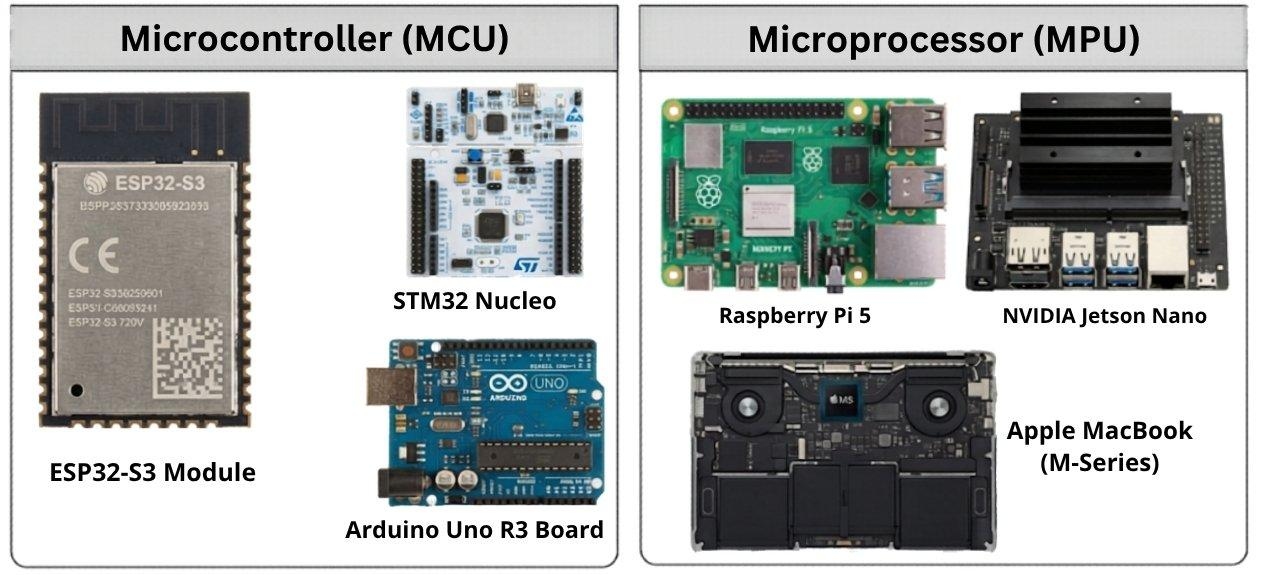
Figure: Popular microcontroller boards like Arduino, ESP32-S3, and STM32 alongside advanced microprocessor systems like the Raspberry Pi, NVIDIA Jetson Nano, and Apple
Microcontroller vs Microprocessor in Architecture
Integrated vs External Components
The defining architectural difference between microprocessor and microcontroller design is the integration level. An MCU is a true System-on-Chip (SoC) - every component required for operation is on-die. Power it up, connect a few decoupling capacitors, and it runs.
A microprocessor, by contrast, is just the CPU. To build a functional system, you must surround it with DDR SDRAM (often requiring controlled-impedance routing and length matching), a Power Management IC (PMIC) with multiple voltage rails, boot storage (eMMC, SD, NOR Flash), and peripheral ICs. The schematic for a minimum viable MPU board can easily run to 5-10 pages.
Memory Structure
MCU memory architecture: Most microcontrollers use a Harvard architecture variant - separate instruction (Flash) and data (SRAM) buses, enabling simultaneous fetch and execute. Flash is typically NOR-based, offering fast random access for code execution. SRAM is small but fast, with access times in nanoseconds. Some premium MCUs add EEPROM for wear-leveling data storage and tightly coupled memory (TCM) for zero-wait-state execution.
MPU memory architecture: Microprocessors use a von Neumann-derived architecture with a deep cache hierarchy. The MMU enables virtual memory - physical RAM is abstracted behind page tables, allowing processes to address more memory than physically exists. DDR memory access latency is hundreds of nanoseconds, mitigated by L1/L2/L3 caches. This complexity is invisible to application software but demands careful PCB design.
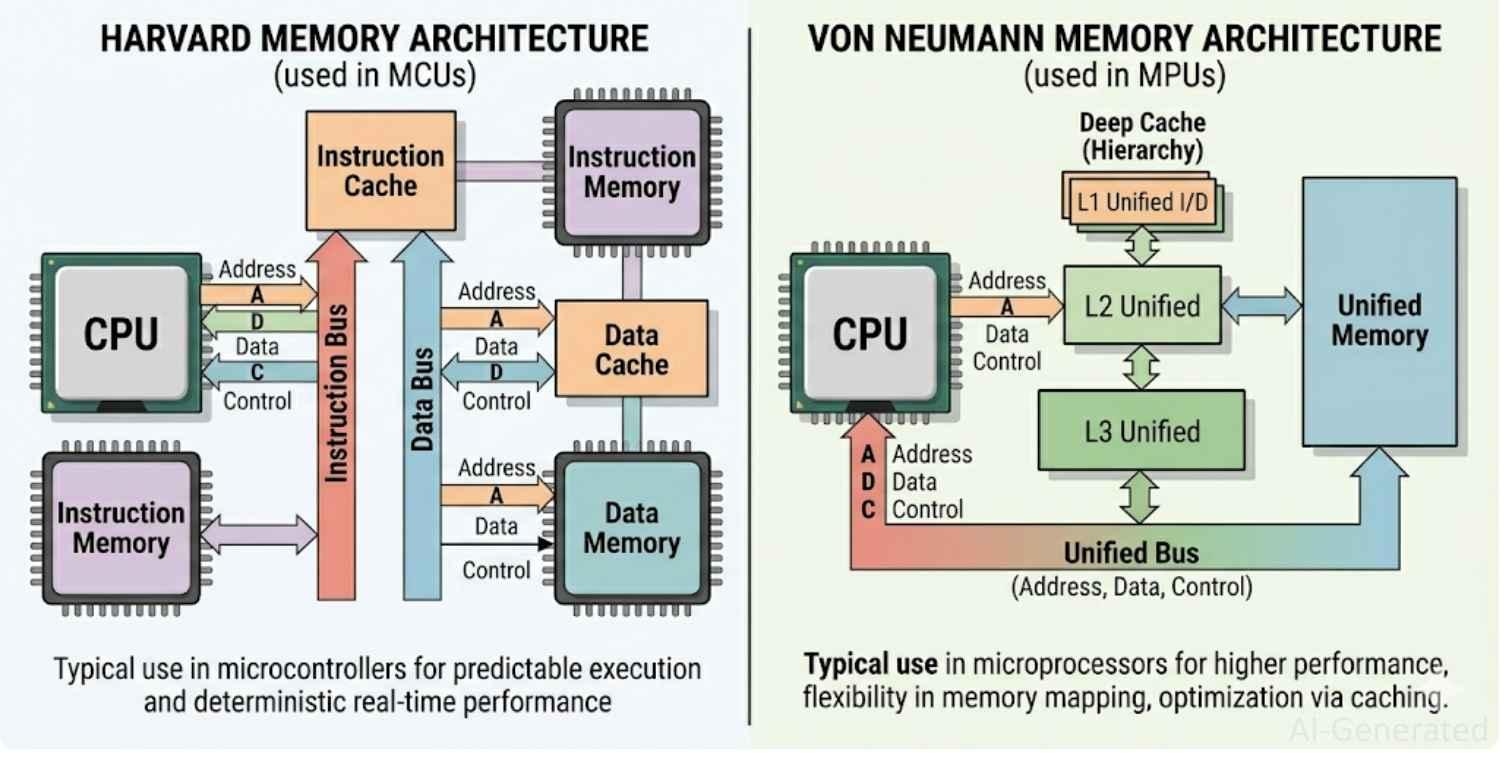
Figure: Showing the technical difference between Harvard memory structure in microcontrollers and the von Neumann memory structure in microprocessors.
Peripheral Integration
Microcontrollers typically include a comprehensive set of peripherals directly accessible via memory-mapped registers: GPIO (often dozens of pins), multi-channel ADC (12-16 bit), DAC, UART/USART, SPI (multi-master), I2C, PWM timers, RTC, CAN bus, USB full-speed/high-speed, and sometimes Ethernet MAC or radio transceivers.
Microprocessors rely almost entirely on external peripheral chips connected via high-speed buses (PCIe, USB 3.x, SDIO, I2S). The processor's own peripheral footprint is small - typically a few GPIO, I2C, SPI for configuration, and the high-bandwidth interfaces. This offloads peripheral management to dedicated ASICs or FPGAs, which is appropriate for high-performance designs but adds BOM cost and board area.
Note
This architectural difference becomes especially critical in PCB design and assembly, where MPU-based systems require significantly more complex layouts.
Microcontroller vs Microprocessor in Embedded Systems Design
From an embedded systems engineering perspective, the MCU vs MPU decision shapes every subsequent design choice. Here's how the two approaches differ across the full development stack:
- Toolchain: MCU development typically uses vendor-provided IDEs (STM32CubeIDE, MPLAB X, Arduino IDE) or GCC-based command-line toolchains with HAL libraries. MPU development targets Linux BSPs, Yocto Project, or Buildroot - demanding deeper software engineering expertise.
- RTOS: MCUs commonly run FreeRTOS, Zephyr, or bare-metal code with interrupt-driven state machines. MPUs run Linux (mainline or RTOS-patched with PREEMPT_RT), achieving soft real-time with microsecond jitter - adequate for many applications but insufficient for hard real-time.
- Security: Modern MCUs offer TrustZone-M (ARMv8-M), hardware crypto accelerators, and secure boot from OTP. MPUs offer TrustZone-A with a full Trusted Execution Environment (TEE) - more powerful, but more complex to configure securely.
- OTA updates: MCU firmware updates require a bootloader, dual-bank Flash, and careful design to avoid bricking. MPU Linux systems can use A/B partition updates (swUpdate, RAUC) with rollback - more robust but heavier infrastructure.
- Certification: MCUs dominate safety-critical markets (IEC 61508, ISO 26262, IEC 62443) because deterministic behavior is provable. MPU/Linux-based systems face significant hurdles in achieving hard safety certifications.
Microcontroller vs Microprocessor in Real Applications
Embedded Systems
Modern automobiles contain 50-100 MCUs for fuel injection, braking, and seat control. Here, MPUs and MCUs coexist: an MPU drives the infotainment display while MCUs manage critical ADAS sensors and powertrain operations.
Consumer Electronics
Smartphones use high-end MPUs for primary computing alongside a dedicated MCU sensor hub that operates while the main chip sleeps to save battery. Conversely, compact devices like earbuds and fitness trackers rely purely on MCU designs, a critical factor for space-saving wearable PCB assembly.
Industrial Automation
Factory PLCs rely on MCU hardware for strict 1-10 ms hard real-time scan cycles. Modern Industrial IoT combines both: MCU field controllers handle deterministic tasks, while MPU-based edge computers manage heavy data analytics and cloud connectivity.
Microcontroller vs Microprocessor in Performance
Processing Power
Raw throughput favors MPUs - an Intel Core i7 delivers ~500,000 DMIPS versus ~1,000 DMIPS for an STM32H7 at 480 MHz. While MPUs dominate ML inference and video encoding, MCUs win on real-time determinism. An STM32 can respond to an interrupt in under 100 ns, a reliability Linux-based MPUs struggle to match without PREEMPT_RT patches.
Power Efficiency
MCUs dominate power efficiency. Devices like the STM32L0 reach deep sleep currents below 200 nA, enabling years of coin-cell operation. In contrast, efficient MPUs (e.g., Raspberry Pi CM4) draw 500 mW to several Watts actively. This massive gap makes MCUs the only viable choice for battery-powered or energy-harvesting designs.
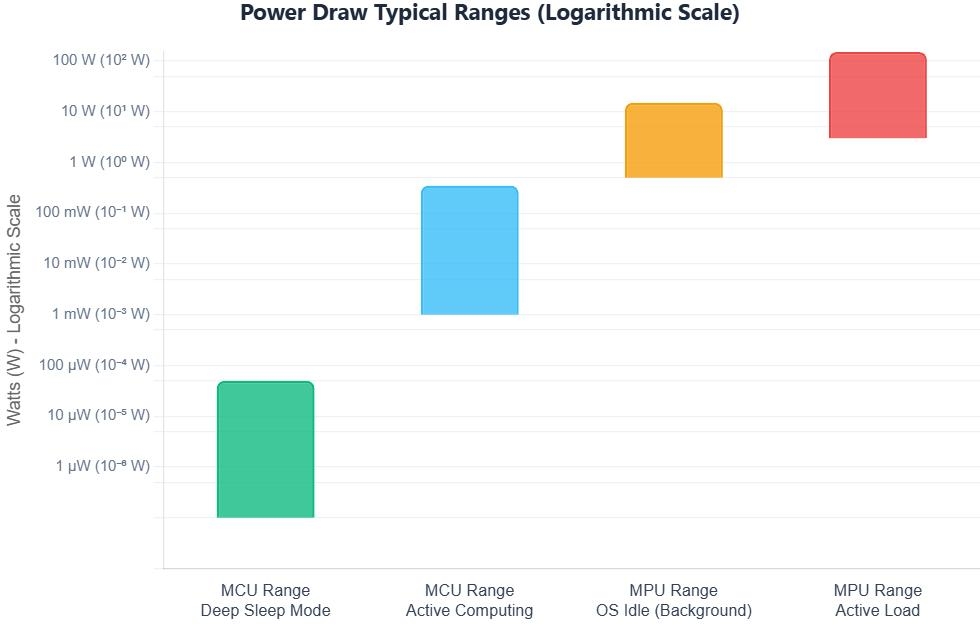
Figure: Comparing the ultra-low power consumption of microcontrollers in deep sleep against the high power demands of idle microprocessors.
Real-Time Capability
MCUs running bare-metal or an RTOS achieve near-zero jitter with sub-microsecond response times. Standard Linux-based MPUs are non-deterministic due to OS scheduling. Even with PREEMPT_RT patches lowering latency to sub-100 µs (soft real-time), they cannot replicate true bare-metal MCU determinism.
Microcontroller vs Microprocessor: Cost Comparison
Total cost of ownership (TCO) analysis consistently favors microcontrollers for control-oriented applications. Consider this cost breakdown:
| Cost Factor | Microcontroller | Microprocessor | Notes |
|---|---|---|---|
| Unit Price | $0.10 - $10 | $5 - $200+ | MCU wins for volume |
| BOM (external parts) | Minimal | High (DDR, PMIC, etc.) | MPU needs more parts |
| PCB Layers | 2-4 layers typical | 4-8+ layers typical | More layers = higher cost |
| Development Time | Fast (days-weeks) | Slow (weeks-months) | MCU faster to market |
| Software Licensing | Usually free/open | May need OS license | Linux = free; others vary |
For a high-volume consumer device (100,000+ units), switching from an MPU-based design to an equivalent MCU-based design can reduce unit BOM cost by 60-80%. For a 500,000-unit product, a $5 BOM saving equals $2.5 million in cost reduction - a compelling argument for right-sizing your processor choice.
However, microprocessors win on development cost amortization for complex software. The mature Linux ecosystem, package managers, and vast open-source middleware library mean MPU-based products can often ship with 80% of their software stack sourced from existing components - reducing engineering time for feature-rich products.
Microcontroller vs Microprocessor in PCB Design and Assembly
PCB Design Considerations for MCU vs MPU
MCU PCB design is manageable for intermediate engineers: place 100 nF + 10 µF decoupling per power pin, keep crystal traces short with a guard ring, separate analog and digital grounds, and follow the datasheet reference circuit. Two to four layers handle most MCU designs.
MPU PCB design demands advanced skills. DDR routing requires controlled impedance (50 Ω single-ended, 100 Ω differential) and strict length matching (±5-25 mil within byte lanes). HDMI, USB 3.x, and PCIe lanes need matched 100 Ω differential pairs. Power delivery must be modeled across frequency, and you'll often have to fan out complex BGA packages. Six to eight or more layers are standard.
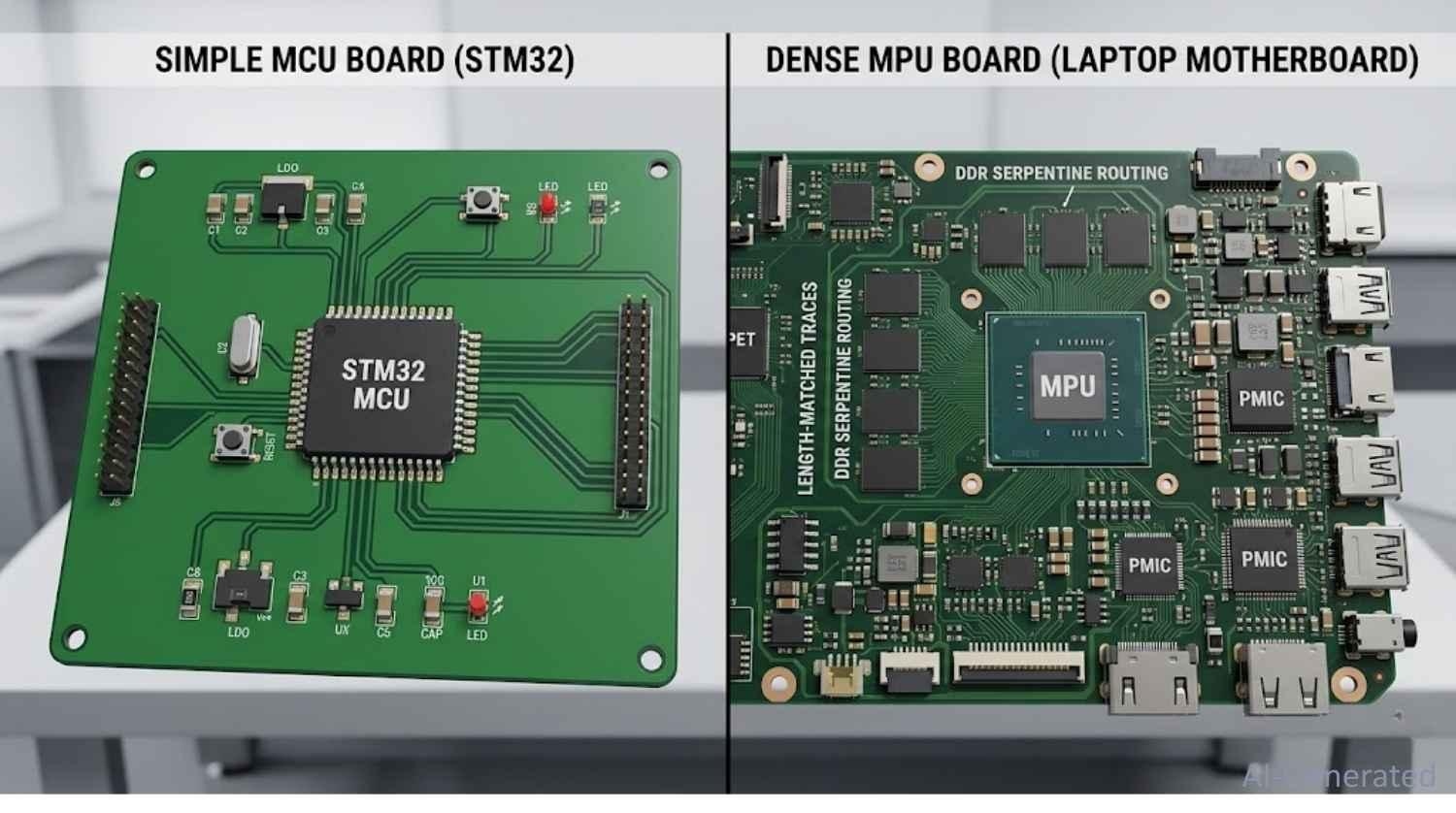
Figure: Printed circuit board comparing a simple MCU layout with a highly complex MPU board featuring BGA packaging and length-matched traces.
Component Selection and Sourcing
MCU designs are single-chip solutions - pick your STM32, nRF52, or explore how to design an ESP32-S2 module PCB, add your passives, and you are done. Many MCUs have second-source alternatives, keeping supply chain risk low.
MPU designs require simultaneously sourcing the processor, DDR memory (Samsung, Micron, SK Hynix), eMMC storage, PMIC, Ethernet PHY, and more. Any one component going out of stock can halt production. The JLCPCB Parts Library streamlines this by offering an expansive library of in-stock SMT components, mitigating supply chain hurdles for both MCUs and MPUs.
Reliable PCB Assembly for Microcontroller and Microprocessor Projects at JLCPCB
Whether you're building an MCU sensor node or an MPU edge platform, JLCPCB delivers manufacturing and comprehensive PCB Assembly from prototype to production. Sourcing and populating an MPU board yourself is incredibly difficult, making turnkey assembly invaluable.
- MCU projects: Standard 2-4 layer PCB service covers the vast majority of designs. Our component library stocks STM32, ESP32, nRF52, and AVR devices for one-stop assembly, with prototype orders shipping in as fast as 24 hours.
- MPU projects: Advanced 6-8 layer stackups with controlled impedance (±10%, IPC-2141A verified) and fine-pitch BGA assembly down to 0.4 mm ball pitch.
- PCBA service: Full SMT placement, solder paste inspection (SPI), precise reflow soldering profiling, and automated optical inspection (AOI) as standard - production-grade quality at any volume.
Use JLCPCB's free Gerber viewer and JLCDFM tool to catch pad, trace, clearance, and silkscreen issues before a single board is fabricated.
Common Mistakes When Choosing Between MCU and MPU
Overestimating Performance Needs
One of the most common and costly mistakes is reaching for a microprocessor when a microcontroller is entirely sufficient. Engineers familiar with software development often default to Linux-based systems because the tooling feels familiar. The result: a $15 module doing the job a $0.50 MCU could handle, with 10x the power draw and 100x the BOM complexity.
Before specifying an MPU, honestly answer: Does this application require an OS? Does it need to run third-party apps? Is processing load genuinely in the GHz range? If the answer to all three is no, a high-performance MCU like the STM32H7 or i.MX RT probably covers your needs at a fraction of the cost and complexity.
Ignoring Power Constraints
Power budget is frequently an afterthought in early design phases - then becomes a crisis at validation. Microprocessors in portable or battery-powered designs can drain batteries 100x faster than an equivalent MCU solution. If your product runs on batteries or harvested energy, start with a power budget analysis first. Calculate worst-case and average current draw, and verify that an MCU can meet your computational requirements within your energy envelope before considering a microprocessor.
Underestimating Design Complexity
Engineers who have designed MCU boards underestimate MPU hardware complexity at their peril. Routing DDR memory on a four-layer board, achieving FCC/CE radiated emissions compliance with a 1+ GHz clock bus, and debugging Linux BSP bring-up issues are substantially more complex challenges than a typical MCU design. If your team lacks experience with high-speed digital PCB design, factor in significant ramp-up time or external EE consultation when choosing an MPU-based platform.
Conversely, teams with strong Linux software backgrounds sometimes underestimate the firmware engineering discipline required for a well-designed MCU product - particularly around bootloader design, OTA update mechanisms, and hardware fault handling in safety-relevant applications.
FAQs About Microcontroller vs Microprocessor
Q: What is the main difference between microprocessor and microcontroller?
The main difference is integration. A microcontroller integrates CPU, memory (Flash + SRAM), and peripherals on a single chip, making it a self-contained computing system optimized for control tasks. A microprocessor contains only the CPU, requiring external RAM, storage, and peripherals - designed for general-purpose high-performance computing.
Q: Which is better: microprocessor or microcontroller?
Neither is universally better - the right choice depends entirely on your application. Microcontrollers are better for cost-sensitive, power-constrained, real-time control applications. Microprocessors are better for compute-intensive, OS-dependent, feature-rich applications. Most IoT and embedded applications benefit from microcontrollers; smartphones, laptops, and industrial PCs use microprocessors.
Q: Can a microcontroller replace a microprocessor?
In many embedded applications, a high-performance MCU (like STM32H7 or i.MX RT) can perform tasks previously requiring a microprocessor. However, MCUs cannot replace MPUs in applications requiring a full OS, gigabytes of RAM, high-resolution displays, or server-class computing. The gap narrows as MCUs grow more powerful, but fundamental architectural differences in memory management and instruction throughput persist.
Q: What are examples of microcontroller and microprocessor used together?
Common real-world examples include: automotive systems (MPU for infotainment + MCUs for powertrain/chassis ECUs), industrial robots (MPU for path planning + MCUs for servo control), smart appliances (MPU for Wi-Fi/UI + MCU for motor/sensor control), and wearables (MCU for always-on sensing + MPU for compute bursts). This heterogeneous architecture is increasingly the industry standard.
Q: What is the difference between MCU and MPU in embedded systems?
In the embedded systems context, MCU (Microcontroller Unit) and MPU (Microprocessor Unit) are often used interchangeably with microcontroller and microprocessor, respectively.
Q: Is Arduino a microcontroller or microprocessor?
Arduino boards are traditionally built around microcontrollers. The classic Arduino Uno uses the AVR ATmega328P MCU; the Arduino Mega uses the ATmega2560; the Arduino Due uses an ARM Cortex-M3-based SAM3X8E. All are true microcontrollers with on-chip Flash, SRAM, and peripherals.
Q: Is Raspberry Pi a microcontroller or microprocessor?
The Raspberry Pi uses a microprocessor (Broadcom BCM2711 quad-core ARM Cortex-A72 in the Pi 4). It requires external LPDDR4 RAM, runs a full Linux OS, and is a general-purpose single-board computer. The Raspberry Pi Pico, however, uses the RP2040 - a dual-core ARM Cortex-M0+ microcontroller - making it an MCU platform.
Conclusion
The microcontroller vs microprocessor decision shapes your entire product - BOM cost, power profile, PCB complexity, software stack, and time to market all follow from it. Choose an MCU for real-time control, low power, and cost efficiency. Choose an MPU when you need OS-level flexibility, high compute throughput, or rich multimedia. For demanding modern applications, a hybrid architecture using both is increasingly the industry standard.
Popular Articles
• SMD Resistor Package Sizes: Complete Size Chart, Footprints & How to Choose
• How to Solder SMD Components Like a Pro [2026 Updated]
• SMD Resistor Codes: How to Read 3-Digit, 4-Digit, and EIA-96 Markings
• SMD Capacitor Codes: Identification, Markings, and Polarity
• SMD Capacitor Sizes: Complete Size Chart and Selection Tips for PCB Design and Assembly
Keep Learning
What Are the Main Relay Types and Which One Should You Use?
Key Takeaways Two Main Types: Relays fall into two main categories: electromechanical relays, which use moving metal contacts to switch a circuit, and solid-state relays, which use electronic components with no moving parts. Choose Based on the Load: The load type determines which relay you need. Consider whether the load uses AC or DC, how much current it draws during normal operation and startup, and how frequently it needs to switch. Coil Behavior: A monostable relay returns to rest when its coil i......
SMD MOSFET Code Guide: How to Identify, Test and Replace a MOSFET
Figure: AO3400A (C20917) in the JLCPCB parts library. The listing gives RDS(on) at 2.5 V gate drive, the number that matters in the replacement example later in this guide. An SMD MOSFET code is the two or three characters printed on top of the package, and on its own it rarely tells you which part you're holding. SMD resistors follow standard marking schemes, such as three- and four-digit codes and EIA-96. MOSFETs don't. The same short code can appear on unrelated parts from different manufacturers, ......
ESP8266 vs ESP32: Which One Should You Use?
Key Takeaways ESP32: Dual-core 240 MHz CPU, Bluetooth Classic and BLE, 520 KB SRAM, and up to 34 GPIOs. ESP8266: Single-core CPU, no Bluetooth, and around 50 KB of free RAM for applications. Lifecycle status: Espressif marks the ESP8266 Not Recommended for New Designs (NRND) and names the ESP32-C2 (ESP8684) as its upgrade, although the ESP8266 remains in production with a longevity commitment. Which ESP32 to use: Choose the ESP32-C2 for simple Wi-Fi or Bluetooth LE firmware, the ESP32-C3 for more memo......
What Is a Thermistor? A Practical Guide to NTC, PTC, Applications, and Circuit Design
Key Takeaways Definition: A thermistor is a thermally sensitive resistor whose resistance changes markedly and predictably with temperature, typically by about 4.4% per °C for a standard 10 kΩ NTC (B25/50 = 3950 K) near 25 °C. NTC vs. PTC: An NTC thermistor's resistance falls as temperature rises, which suits temperature sensing and inrush current limiting; a switching PTC's resistance rises steeply above its switch temperature, which suits circuit protection. Key Specifications: An NTC thermistor is ......
What Is the ESP32-CAM, and How to Wire, Power, and Program It?
Key Takeaways Board, not chip: The ESP32-CAM is an AI-Thinker development board, not an Espressif product. It carries AI-Thinker's ESP32-S module, an OV2640 camera, PSRAM, a microSD slot, and a flash LED. No USB port: The board has no USB connector or USB-to-UART bridge, so you program it via its serial pins using a 3.3 V USB-to-serial adapter, with GPIO0 held low at reset. Few free pins: The camera, PSRAM, and microSD card occupy most GPIOs. With the microSD card unused, GPIO2, GPIO4, GPIO12, GPIO13,......
ESP32 Versions: Which One Should You Use for Your Project?
Key Takeaways Radios decide first: ESP32 versions differ mainly in their radios, CPU cores, and peripherals. Common defaults: The ESP32-C3 suits low-cost Wi-Fi and Bluetooth LE, the ESP32-S3 suits camera, display, voice, and on-device AI. Original ESP32: The chip is still in production and remains the choice for Bluetooth Classic. Versions without Wi-Fi: The ESP32-H2 targets battery-powered Thread and Zigbee devices. Chip, module, or board: Prototype on a development board, then design a module onto y......