ESP32 vs Raspberry Pi: Which Platform Is Better for IoT, AI, Embedded Systems, and PCB Projects?
17 min
- ESP32 vs Raspberry Pi: Quick Comparison
- ESP32 vs Raspberry Pi: Which Platform Should You Choose?
- ESP32 vs Raspberry Pi for IoT Projects
- ESP32 vs Raspberry Pi for Robotics
- ESP32 vs Raspberry Pi for AI and Machine Learning
- ESP32 vs Raspberry Pi for Hybrid IoT and Edge AI System Architecture
- ESP32 vs Raspberry Pi: Microcontroller vs Single-Board Computer
- ESP32 vs Raspberry Pi: A Deep Technical Comparison
- What Is ESP32?
- What Is Raspberry Pi?
- Choosing the Right ESP32 and Raspberry Pi Variant
- PCB Design Considerations for ESP32 and Raspberry Pi
- FAQs
- Conclusion
A battery-powered smart agriculture sensor and a vision-based industrial inspection camera both fall under the "IoT" umbrella, but their hardware requirements are entirely different. ESP32 and Raspberry Pi are frequently at the center of these hardware decisions, yet engineers often compare them as if they are direct substitutes.
In reality, one is engineered for ultra-low power and deterministic real-time control, while the other delivers Linux-based multitasking and heavy compute to the edge.
In this guide, you will learn:
- MCU vs SBC architecture differences
- ESP32 vs Raspberry Pi performance and power consumption
- ESP32 vs Raspberry Pi for IoT and robotics
- TinyML on ESP32 vs Edge AI on Raspberry Pi
- Hybrid Edge AI architectures using both platforms
- PCB design considerations for ESP32 and Raspberry Pi projects
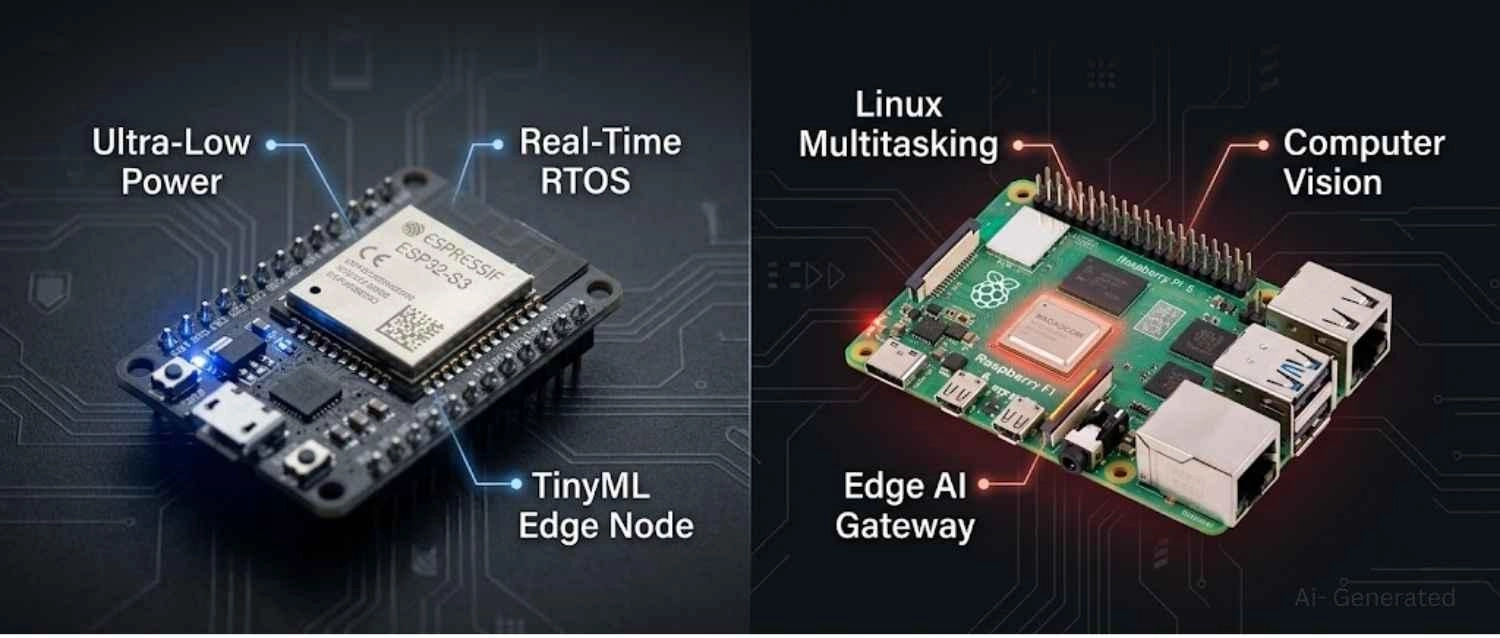
Figure: Comparison of ESP32-S3 and Raspberry Pi 5, highlighting key features.
ESP32 vs Raspberry Pi: Quick Comparison
ESP32 is the right choice for battery-powered IoT nodes, real-time sensor control, and on-device TinyML inference.
Raspberry Pi handles Linux-based multitasking, computer vision, and edge AI gateways.
In most production deployments, they work together rather than compete.
| Use Case | Best Choice |
|---|---|
| Battery-powered IoT sensor | ESP32 |
| Computer vision/ object detection | Raspberry Pi |
| TinyML on sensor node | ESP32 |
| Edge AI gateway | Raspberry Pi |
| Real-time motor / GPIO control | ESP32 |
| Linux app + web dashboard | Raspberry Pi |
| Full industrial IoT system | Both |
| Robotics | Both |
ESP32 vs Raspberry Pi: Which Platform Should You Choose?
Choose ESP32 for Low-Power IoT and TinyML
- Battery-powered IoT with months of runtime between charges
- Deterministic GPIO control and sub-millisecond interrupt response
- On-device TinyML for wake-word detection, anomaly detection, and gesture recognition
- Low unit cost and compact PCB footprint at production volume
- Wi-Fi, BLE, and ESP-NOW connectivity without Linux overhead or boot delay
Choose Raspberry Pi for Linux and Vision AI
- Linux applications, Python pipelines, or Docker-based deployments
- Computer vision with OpenCV, YOLO, or full-scale model frameworks
- TensorFlow, PyTorch, ONNX support with no model size constraints
- GUI or display-driven interfaces
- Concurrent services like web servers, databases, inference, and MQTT brokers running simultaneously
Use Both for Distributed Edge AI Systems
- Industrial IoT with local AI gateways
- Robotics, where motor control and perception live at different system layers
- Smart agriculture, environmental monitoring, or building automation at scale
- Distributed edge AI where sensor-layer classification feeds a central inference node
This isn't a compromise architecture. It's the pattern that shows up consistently in well-engineered embedded systems, with each platform handling exactly what it is suited for.
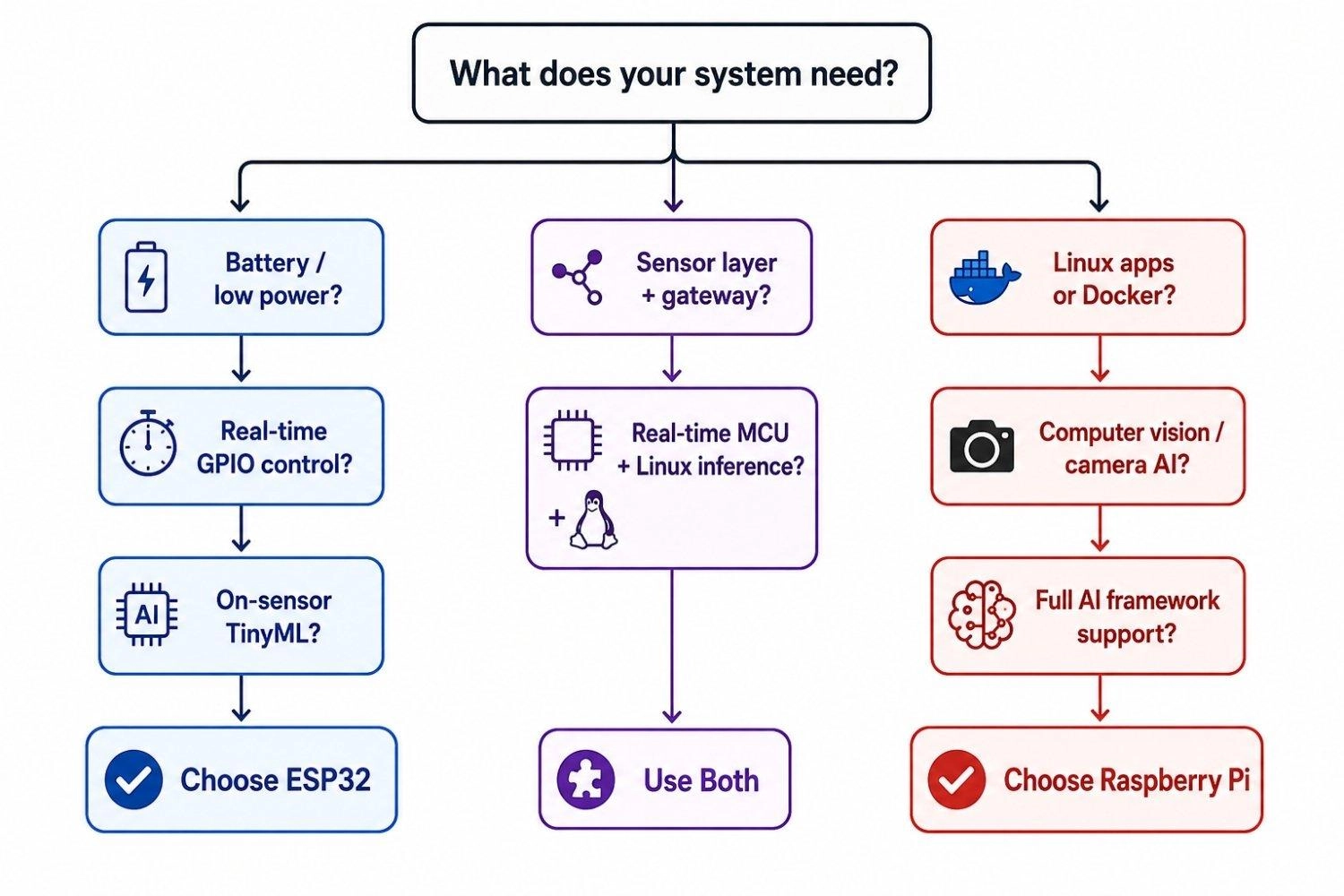
Figure: Decision flowchart for choosing between ESP32, Raspberry Pi, or a hybrid architecture based on power requirements, real-time control needs, AI workload type, and overall system complexity
ESP32 vs Raspberry Pi for IoT Projects
For field-deployed IoT, the ESP32 is decisively superior. Deep sleep capabilities, native Wi-Fi, and compact PCB footprints make it ideal for scaling sensor networks across agricultural fields or smart buildings. The Raspberry Pi consumes far too much power to serve as a standalone environmental node powered by batteries or small solar panels.
ESP32 vs Raspberry Pi for Robotics
Capable robotic platforms rarely rely on just one. The ESP32 handles the hard real-time precision tasks, such as motor encoder reading, PID control loops, and safety interrupts, where timing jitter is unacceptable. The Raspberry Pi sits a layer above, acting as the "brain" to process spatial navigation, ROS (Robot Operating System) logic, computer vision, and high-level autonomous decision-making.
ESP32 vs Raspberry Pi for AI and Machine Learning
AI and machine learning capability comparison table for ESP32-S3 vs Raspberry Pi 5.
| Feature | ESP32-S3 | Raspberry Pi 5 |
|---|---|---|
| AI category | TinyML | Edge AI |
| Typical model size | 100KB - 500KB | Tens to hundreds of MB |
| Primary frameworks | TF Lite Micro, Edge Impulse | TensorFlow Lite, PyTorch, ONNX |
| Supported workloads | Wake-word, anomaly detection, gesture | Object detection, computer vision, NLP |
| Inference power draw | Very low, under 300mW | 5W+ depending on model |
| Hardware acceleration | Vector instructions (S3) | Hailo AI HAT (optional, 26 TOPS) |
| Best deployment | Always-on sensor AI node | AI gateway, vision processing |
TinyML on ESP32
TinyML is about making local decisions at the sensor. It reduces bandwidth, latency, and power consumption by filtering data before it ever reaches the network.
- Hardware Boost: The ESP32-S3's vector instructions accelerate the SIMD operations that dominate neural network math.
- Frameworks: TensorFlow Lite Micro is the primary runtime. Edge Impulse offers a full managed pipeline from data collection through quantized model deployment.
- Practical Workloads: Keyword spotting, wake-word detection, vibration anomaly detection for predictive maintenance, and IMU-based gesture classification all run in 10-50ms depending on model complexity.
Engineering insight
TinyML on ESP32 isn't a scaled-down version of cloud AI. It's a fundamentally different approach to local decision-making that eliminates the round-trip and keeps the radio off until there's something worth transmitting.
Raspberry Pi for Edge AI and Computer Vision
The Raspberry Pi's value in AI comes from unconstrained framework support and high compute throughput:
- Native Framework Support: OpenCV, PyTorch, TensorFlow, and ONNX Runtime all run natively.
- Real-time Vision: You can pull a pre-trained YOLO model, connect a MIPI camera, and have real-time object detection running quickly.
- Hardware Acceleration: The Raspberry Pi AI Kit, pairing a Hailo-8L accelerator, delivers 26 TOPS of inference performance. This enables smooth real-time video at frame rates unworkable on an MCU.
ESP32 vs Raspberry Pi for TinyML and Edge AI Projects
- ESP32 makes sense when intelligence needs to live at the sensor. It stays always-on and battery-powered, filtering locally before deciding whether to transmit.
- Raspberry Pi makes sense when the AI workload involves vision, larger models, or multimodal data fusion. Gateways, inspection cameras, robotic perception stacks, and local inference servers all belong here.
In well-architected deployments, both layers are present: ESP32 handles first-pass classification at the node, and Raspberry Pi handles deeper analysis at the aggregation point.
ESP32 vs Raspberry Pi for Hybrid IoT and Edge AI System Architecture
ESP32 Sensor Nodes and Raspberry Pi AI Gateways
A precision agriculture deployment illustrates how these platforms form a complete data pipeline:
- Sensing and Local ML (ESP32-S3): Across the field, ESP32 nodes monitor soil moisture, temperature, and light. Each runs a small anomaly detection model locally.
- Filtering and Logging: When readings fall within expected ranges, the node simply logs the data and returns to deep sleep.
- Triggered Transmission: Only anomalies or scheduled summary transmissions trigger Wi-Fi to publish MQTT messages, keeping battery life in the multi-month range.
- Gateway Aggregation (Raspberry Pi 5): The central gateway receives these MQTT messages. It runs a Python dashboard with live field maps.
- Heavy Edge Inference: The gateway periodically processes aerial camera images via OpenCV to detect crop stress patterns that individual nodes cannot identify on their own.
Neither platform can substitute for the other here. The ESP32 nodes can't run the vision pipeline. A Pi can't survive on a field stake powered by a small solar cell. Together, the system is efficient at the sensor layer and capable at the processing layer.
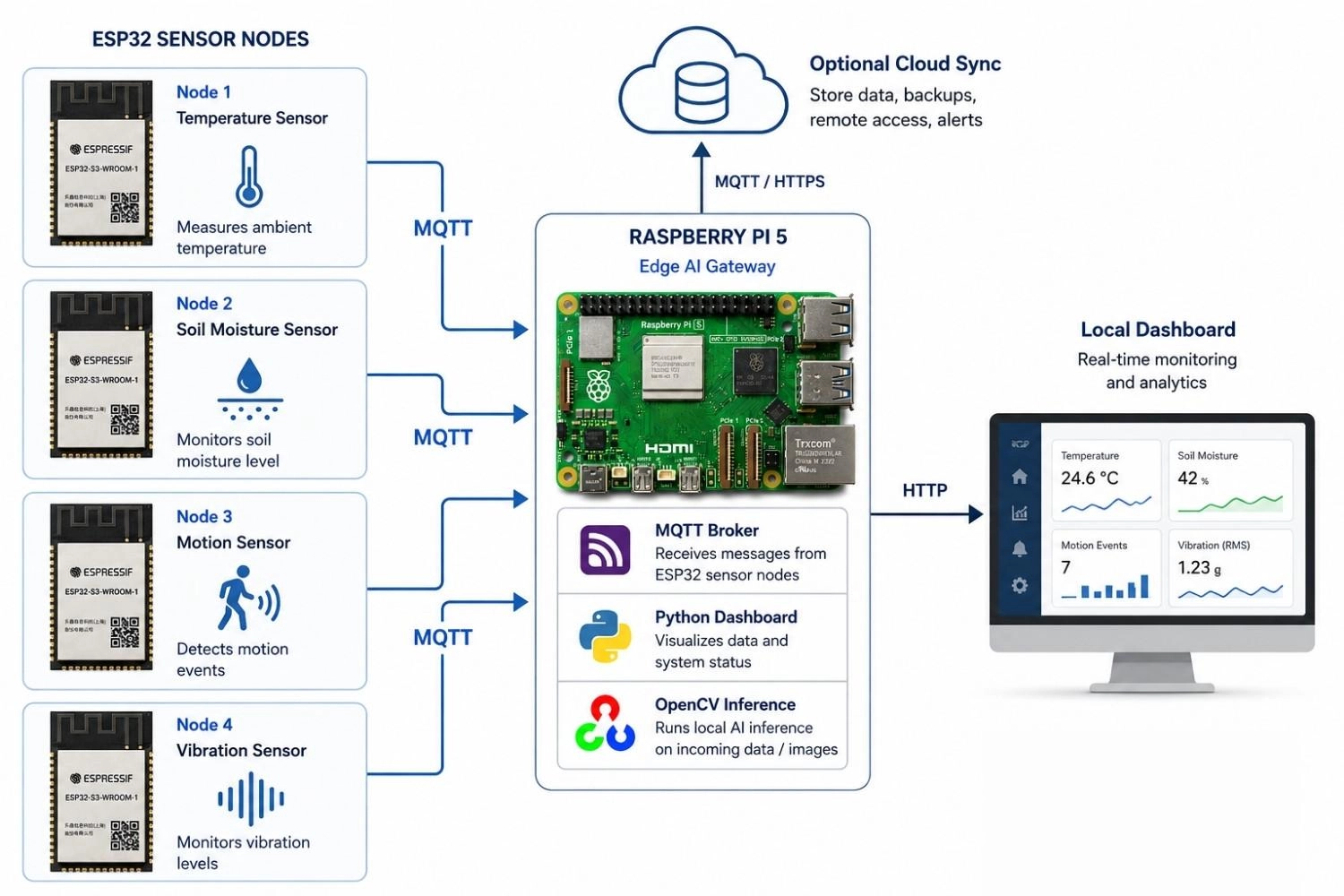
Figure: Showing ESP32 sensor nodes publishing MQTT data to a Raspberry Pi 5 edge AI gateway, which runs local inference and optionally syncs to cloud services and a local dashboard
ESP32 vs Raspberry Pi: Microcontroller vs Single-Board Computer
Why do ESP32 and Raspberry Pi serve completely different roles?
An ESP32 is a microcontroller (MCU). A Raspberry Pi is a single-board computer (SBC). That distinction isn't just categorization, as it determines how each platform behaves under real operating conditions.
Consider two scenarios:
- The Remote Sensor (MCU domain): A soil moisture sensor on a remote farm wakes every 30 minutes, takes a reading, transmits over Wi-Fi, and returns to deep sleep. It runs off a small LiPo battery for months.
- The AI Camera (SBC domain): A factory inspection camera runs object detection at 15fps, logs defects to a local database, and serves a live dashboard.
An ESP32 wakes in milliseconds. Linux takes seconds. In a battery-powered deployment, that single difference reshapes the entire system architecture.
For the sensor node, there is no Linux kernel to boot, no scheduler managing background processes, and no unnecessary peripherals burning current. GPIO interrupts are handled deterministically with sub-microsecond latency. The device reacts to the physical world in a predictable, controlled way.
For the inspection camera, none of that real-time simplicity is useful. What is needed is the ability to run OpenCV, manage a web server, write to a database, and execute inference simultaneously. That requires Linux, and Linux requires an SBC.
Key takeaway
ESP32 optimizes for deterministic low-power embedded control. Raspberry Pi optimizes for software flexibility and compute throughput. They aren't competing for the same job.
ESP32 vs Raspberry Pi: A Deep Technical Comparison
Performance, RAM, and Storage
Raw clock speed doesn't capture what matters. The real difference is how each platform sustains workloads:
- ESP32 Memory Limits: At 240 MHz, the ESP32-S3 handles sensor polling, signal filtering, BLE advertising, MQTT, and lightweight inference concurrently. However, it has no virtual memory and no GPU. It's 512KB of SRAM fills fast. External PSRAM extends capacity but adds latency compared to on-chip memory.
- Raspberry Pi Compute Heavyweight: The Pi 5 easily handles multithreaded workloads, video decoding, database writes, and model inference. The PCIe 2.0 interface completely changes storage performance, as NVMe is a fundamentally different I/O class than microSD.
- Boot Time Realities: A 20-second Linux boot is a liability for a device that cycles power to conserve energy. ESP32 is running in under 300ms, recovering instantly from power loss.
Power Consumption and Real-Time Performance
This is the clearest architectural gap between the two platforms:
- Deep Sleep Dominance: ESP32-S3 deep sleep current sits at roughly 8-10µA. A 1000mAh LiPo powering a node that wakes every 5 minutes can realistically operate for 6-12 months. No Linux SBC approaches this because the kernel alone keeps the power floor in the tens-of-milliwatts range.
- Jitter vs Determinism: Linux is not a real-time OS. A Python GPIO toggle on the Pi can jitter by hundreds of microseconds under scheduler load. FreeRTOS on the ESP32 provides interrupt latency in the single-digit microsecond range.
For anything that needs to react to the physical world in a deterministic, sub-millisecond window, FreeRTOS on ESP32 isn't just better, it is architecturally the correct choice.
Connectivity and Hardware Interfaces
Both platforms cover Wi-Fi and Bluetooth, but their integration models differ:
- ESP32 Integration Depth: The ESP32 integrates the RF frontend, baseband, and protocol stack on a single chip. The peripheral set covers SPI, I2C, UART, PWM, capacitive touch, ADC, and DAC. For most sensors, that is everything needed on a single $5 module.
- Raspberry Pi Peripheral Breadth: The Pi 5 adds Gigabit Ethernet natively, dual-band Wi-Fi, USB 3.0, and MIPI CSI/DSI connectors for cameras and displays. It is built to aggregate heavy data streams.
Note
Driving timing-sensitive GPIO protocols from Linux requires careful library choices or a dedicated co-processor. In many systems, that co-processor is an ESP32.
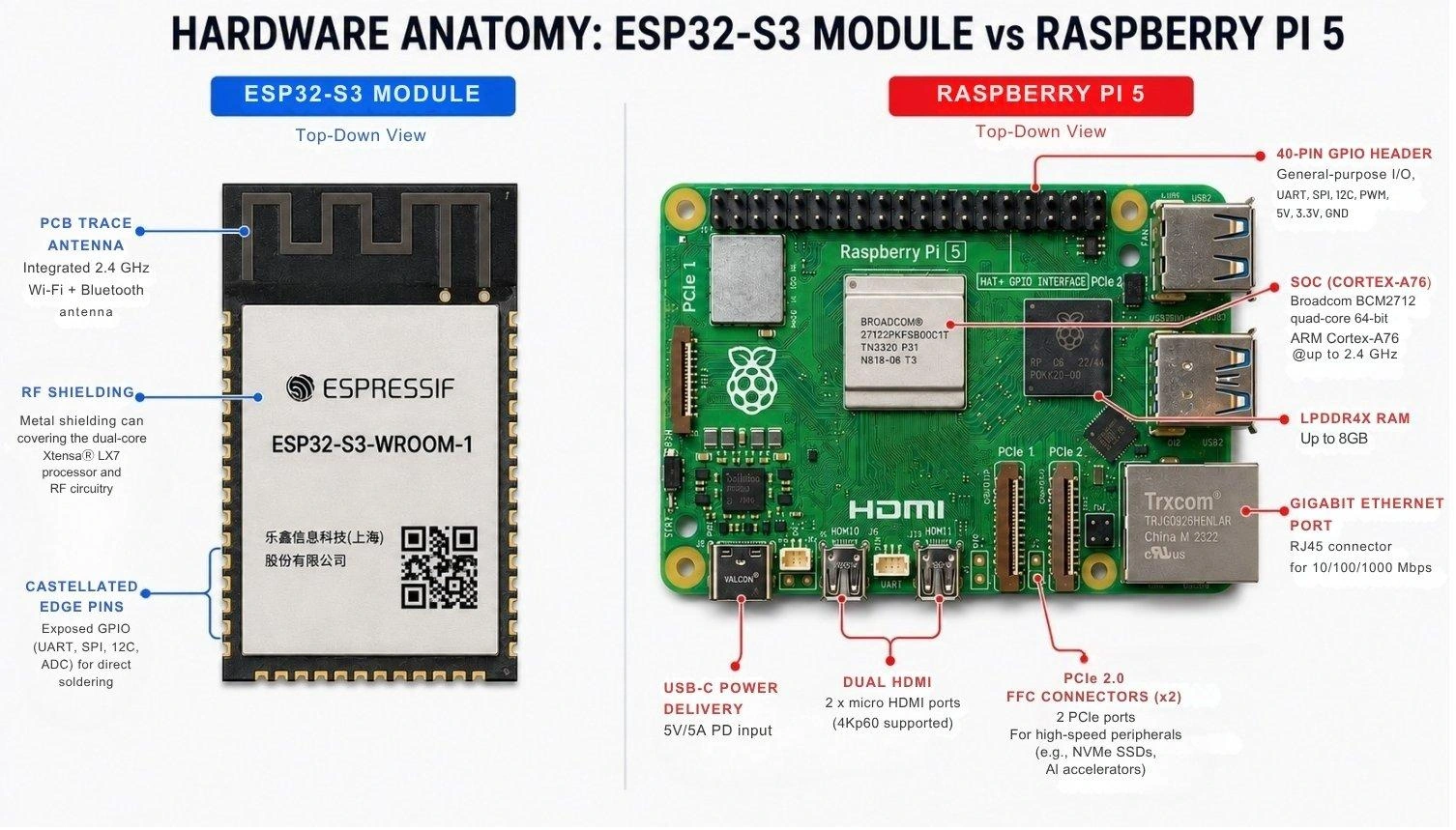
Figure: An ESP32-S3 module and Raspberry Pi 5 board, highlighting key components like antennas, processors, peripheral ports, and GPIO pins
Software Development: ESP-IDF vs Linux Ecosystem
- ESP-IDF: ESP-IDF is Espressif's production firmware framework. Featuring C/C++ with full FreeRTOS integration and direct hardware register access, it is the right choice for shipping real products.
- Linux Ecosystem: Python and Linux on the Pi remove almost all friction for AI and data development. OpenCV pipelines collapse to a few lines of code, and Docker handles dependency management. This removes friction upfront but adds ongoing maintenance overhead that bare-metal MCU firmware avoids.
What Is ESP32?
The ESP32-S3 is Espressif's current flagship for AIoT applications. Key features include:
- Processing: A dual-core Xtensa LX7 processor running at up to 240 MHz.
- Connectivity: Integrated Wi-Fi 802.11b/g/n and Bluetooth 5.0 LE natively on the chip.
- Operating System: Operates under FreeRTOS for real-time task scheduling.
- Power: Deep sleep current drops to under 10µA, making multi-month battery operation realistic.
- AI Acceleration: Vector instructions specifically accelerate neural network math, allowing tools like TensorFlow Lite Micro to run efficiently on-device.
Memory constraints become painful quickly in complex ESP32 firmware. You have to learn to work within these constraints, which forces better architectural decisions early on.
What Is Raspberry Pi?
The Raspberry Pi 5 behaves like a small desktop computer. Key features include:
- Processing: A quad-core ARM Cortex-A76 running at 2.4 GHz with up to 8GB LPDDR4X RAM.
- Operating System: Boots a full Linux distribution, typically Raspberry Pi OS.
- Ecosystem: Python, Docker, SQLite, Flask, and OpenCV are all available immediately without porting or optimization work.
- Expandability: Added PCIe 2.0 enables NVMe storage and AI accelerator HATs, making it a true edge AI node.
Production deployments must engineer around two operational realities. First, SD card corruption after unexpected power loss is a genuine failure mode. Second, Linux maintenance overhead, like OS updates, dependency conflicts, and service management, creates an ongoing cost that bare-metal MCU firmware simply doesn't carry.
Choosing the Right ESP32 and Raspberry Pi Variant
When engineering an architecture, specifying "ESP32" or "Raspberry Pi" isn't enough. Both ecosystems have evolved into specialized variants tailored for distinct deployment constraints.
Popular ESP32 Variants for IoT and TinyML
- ESP32-WROOM (Classic / ESP32-D0WD): The standard workhorse for general IoT. It is the default choice for basic Wi-Fi/BLE sensor reporting and actuator control.
- ESP32-S3: The architecture for local AI. Built with vector instructions to accelerate neural network math and supporting high-capacity PSRAM, the S3 is mandatory for TinyML workloads, wake-word detection, and complex HMI displays.
- ESP32-C3: A highly cost-effective, single-core RISC-V chip optimized for ultra-low-power edge nodes. It’s perfect for simple, battery-constrained sensors that don't need dual-core performance.
- ESP32-C6: The forward-looking choice for modern smart environments, integrating Wi-Fi 6, Zigbee, and native Thread/Matter support for mesh networking.
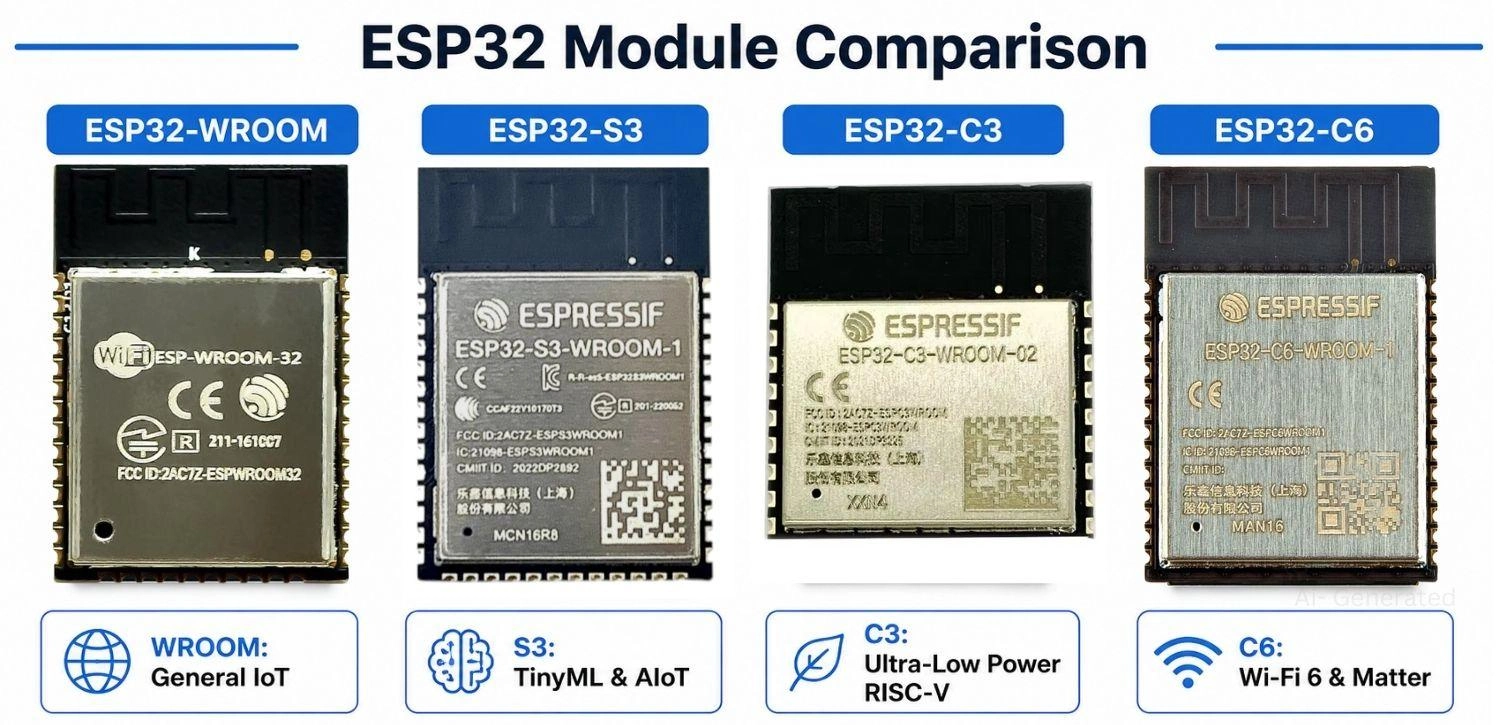
Figure: Comparison of ESP32-WROOM, ESP32-S3, ESP32-C3, and ESP32-C6 modules highlighting their primary IoT and TinyML use cases
Learn More: Beginner’s Guide to Choosing an ESP32 Development Board
Raspberry Pi Variants for Edge AI and Embedded Linux
- Raspberry Pi Zero 2 W: Brings full embedded Linux, Docker, and Python to a footprint barely larger than an MCU. It is ideal when you need software flexibility but have tight volumetric constraints (though it still cannot match MCU deep sleep).
- Raspberry Pi 5: The high-throughput edge AI gateway. Featuring a Cortex-A76 and PCIe 2.0, it supports NVMe storage and dedicated AI accelerator HATs (like Hailo), enabling real-time computer vision at high frame rates.
- Raspberry Pi Compute Module (CM4/CM5): Designed strictly for industrial integration. By stripping away consumer I/O ports, it allows engineers to design custom carrier boards with exact impedance routing, specific industrial interfaces, and robust thermal management.
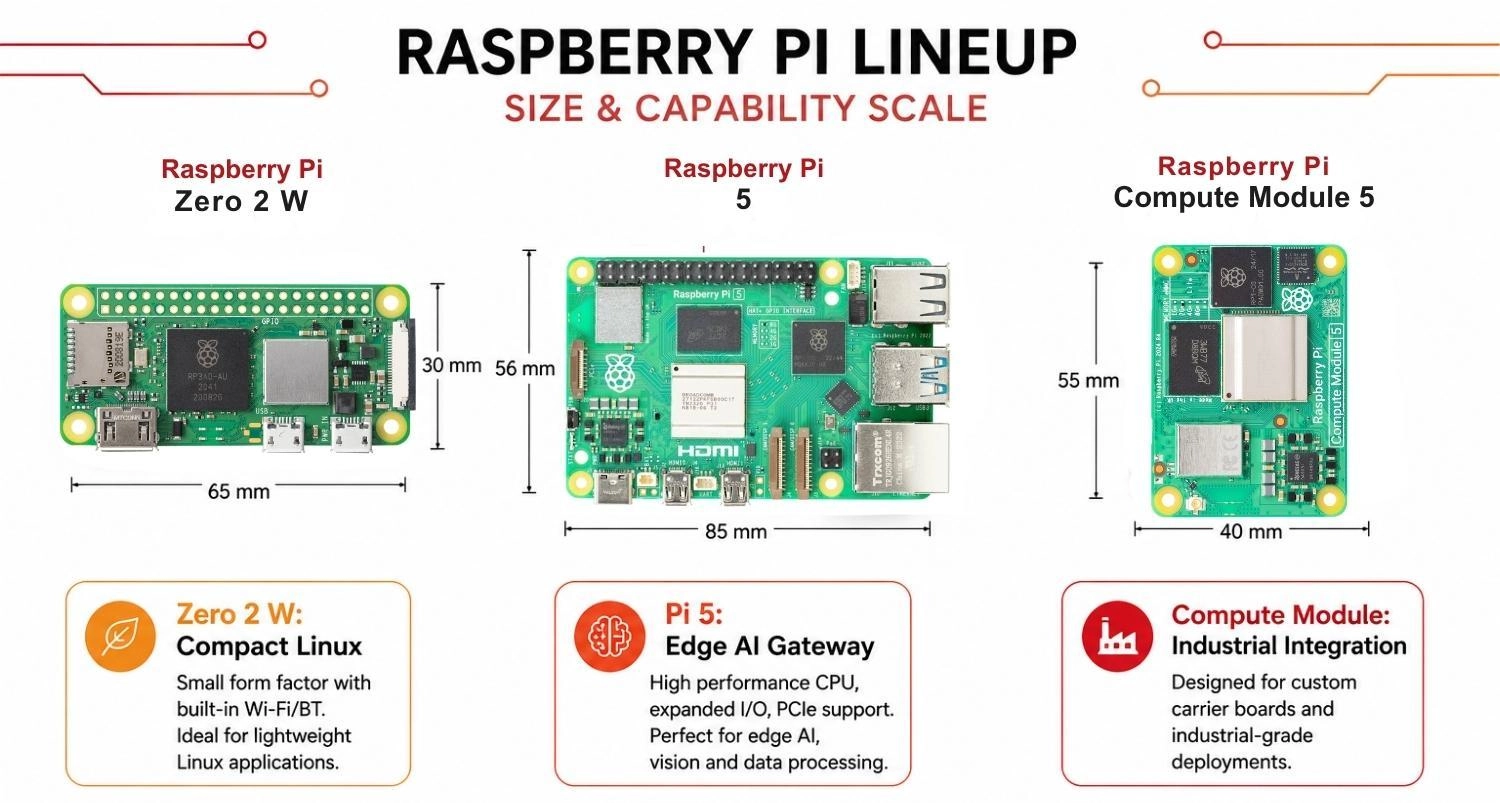
Figure: Size and capability scale comparing Raspberry Pi Zero 2 W, Raspberry Pi 5, and the Compute Module for edge AI and industrial deployments
PCB Design Considerations for ESP32 and Raspberry Pi
Once embedded systems move beyond breadboard prototyping, PCB layout quality and assembly consistency become just as important as firmware architecture. The hardware decisions made at this stage affect RF performance, power stability, and production yield in ways that are difficult to fix later.
ESP32 RF and Power Layout Tips
RF performance on custom ESP32 boards relies on strict layout discipline, primarily focusing on antenna clearance and power stability:
- Antenna keepout zones: PCB trace antennas require a copper-free keepout zone directly beneath them. Ground planes or copper pours here will severely degrade range.
- Proximity of decoupling capacitors: The RF frontend draws heavy burst current during Wi-Fi transmission. Place 100nF and 10µF decoupling capacitors within 0.5mm of the VDD and VDDA pins to prevent voltage droop.
- Uninterrupted ground planes: Maintain a solid ground plane under the digital section to improve signal integrity and RF performance.
- Isolate noisy regulators: Step-down switching regulators must have short, tight switching loops and be physically isolated from the RF circuitry.
To learn more, read: How to Design an ESP32-S2 Module PCB on a 2-Layer Board
Raspberry Pi Carrier Board Design Tips
Carrier board design for the Pi 5 is fundamentally an exercise in power delivery and thermal management:
- Robust 5V power rails: The Pi 5 draws up to 5A peak (27W). You must design a robust, low-impedance 5V rail with adequate headroom. Marginal trace widths will cause random reboots under load.
- Controlled impedance routing: High-speed interfaces like USB 3.0, PCIe, and MIPI CSI/DSI demand precisely matched-length differential pairs and controlled impedance traces.
- Mechanical protection for FFCs: Camera and display FFC connectors are fragile. Position them where cables will not experience mechanical stress during assembly.
- Proactive thermal management: The Cortex-A76 throttles heavily under sustained load. Incorporate airflow or conductive cooling paths directly into the enclosure or carrier board design from the start.
Rapid Prototyping and PCB Assembly
For both ESP32 RF designs and high-speed Raspberry Pi carrier boards, utilizing a fast and easy prototype PCB assembly pipeline is critical. JLCPCB's 4-layer stackups provide the controlled impedance performance needed for reliable production runs. Their SMT assembly service compresses the iteration cycle from Gerber files to assembled boards significantly, a meaningful advantage when validating hardware changes.
FAQs
Q: Is ESP32 better than Raspberry Pi for IoT?
For battery-operated, field-deployed nodes, yes. But where IoT requires massive data aggregation, local databases, or heavy networking, the Raspberry Pi acts as the superior gateway.
Q: Can ESP32 run AI models?
Yes. It efficiently runs quantized TinyML models (100KB-500KB) for simple anomaly detection and keyword spotting. It cannot run complex image classification or LLMs.
Q: Which is better for robotics, ESP32 or Raspberry PI?
Most platforms use both. The ESP32 handles hard real-time precision motor timing, while the Raspberry Pi acts as the "brain" for spatial navigation and ROS logic.
Q: Can ESP32 run Linux?
No. The ESP32 lacks the Memory Management Unit (MMU) and RAM required to host a Linux kernel. It is strictly designed for lightweight RTOS (like FreeRTOS) or bare-metal execution.
Q: How do ESP32 and Raspberry Pi communicate?
In wireless networks, they typically communicate using lightweight protocols like MQTT over Wi-Fi. In local, wired setups (like a robot chassis), the Pi acts as the master device communicating with the ESP32 via Serial (UART/USB), SPI, or I2C.
Q: Can I use Python on both ESP32 and Raspberry Pi platforms?
Yes, but the environments differ vastly. The Raspberry Pi runs standard CPython with full operating system access. The ESP32 runs MicroPython or CircuitPython, which are highly optimized, constrained subsets of Python designed specifically for microcontrollers.
Conclusion
The "which is better" debate misses the point, as ESP32 and Raspberry Pi occupy entirely different layers of the embedded stack. Use ESP32 for power-constrained sensor nodes, and Raspberry Pi for Linux-driven compute gateways. The best modern architectures combine both.
Whether you are routing high-speed Pi traces or optimizing an ESP32 RF layout, reliable hardware is your foundation. Accelerate your next distributed architecture with JLCPCB's prototype assembly services.
Popular Articles
• Logic Gate Symbols: The Complete Chart, Truth Tables [2026]
• How to Design and Assemble a Reliable ESP32 Module PCB on a 2-Layer Board
• How to Identify SMD LED Polarity: Markings, Testing, and PCB Tips
• The Ultimate Guide to Relay Symbol: Coil, Contacts, Diagrams, and Circuit Applications
• Power Supply Symbols Chart: A Complete Guide to AC, DC, Ground, Battery, and Source Symbols
Keep Learning
How to Read Resistor Color Code: Complete Guide with Chart and Examples
4-Band Resistor Color Code Explained A 4-band resistor color code is one of the most common methods used to indicate resistance values in electronic components. It is widely used to help engineers and hobbyists quickly determine resistance values without using a resistor color code calculator. In a standard 4-band resistor: First Band (Digit 1): Represents the first significant digit Second Band (Digit 2): Represents the second significant digit Third Band (Multiplier): Indicates the factor by which t......
Solder Paste vs Flux: What's the Difference and When Should You Use Each?
Solder paste and flux are not interchangeable. Solder paste contains solder alloy powder and flux, while flux contains no solder alloy. This difference matters when choosing materials for SMT, reflow soldering, or manual soldering. Flux removes metal oxides and prevents re-oxidation, allowing molten solder to wet copper pads and component leads properly. Solder paste combines flux with fine solder alloy powder. During reflow, the flux activates to improve wetting while the solder alloy melts to form t......
Fiducial Marks in PCB and SMT Assembly: A Complete Guide to Accuracy and Design Rules
Modern Printed Circuit Boards (PCBs) are complex, integrating high-density components like 0.4mm pitch Ball Grid Arrays (BGAs), 0201 passives, and fine-pitch Quad Flat No-Lead (QFN) packages. In this advanced manufacturing environment, achieving placement accuracy measured in micrometers is crucial. A significant challenge in automated manufacturing is how pick-and-place machines, which handle thousands of components per hour, precisely locate the PCB. A board on a conveyor system is never in the perf......
Ground Symbols Explained: Earth, Chassis, Signal, Analog, Digital Ground & More
Key Takeaways ⬇ Download the Ground Symbol Cheat Sheet (PDF) Keep all six ground symbols and their standard numbers on one page for quick reference. Four IEC 60417 symbols: IEC 60417 defines symbol 5017 for earth, 5018 for functional earth, 5019 for protective earth, and 5020 for frame/chassis. Protective earth is safety-related: IEC 60417-5019 identifies the protective earth connection and is used for safety-related protective bonding. Signal ground uses a different convention: IEEE Std 315 defines t......
How to Choose an ESP32 Development Board: A Beginner-Friendly Guide
The leap from blinking a simple LED to building a cloud-connected smart home device is a thrilling milestone for any electronics beginner. At the heart of this transition is often one undisputed champion: the ESP32. However, when you first search for an ESP32 development board, you are instantly met with a dizzying array of models, shapes, and specifications. How do you know which one is right for your first IoT (Internet of Things) project? In this beginner's guide, we will break down what makes thes......
How to Design an ESP32-S3 Development Board from Scratch: A 4-Layer PCB Design Tutorial
Designing your own ESP32-S3 development board gives you complete control over your hardware architecture while preparing your IoT projects for commercial production. Instead of relying on bulkier, off-the-shelf boards, building a custom design allows you to optimize the board space, expose only the required GPIO pins, and integrate peripherals directly onto a single substrate. In this tutorial, we will design a 4-layer ESP32-S3 development board from scratch. We will walk through the entire hardware d......