How to Identify SMD LED Polarity: Markings, Testing, and PCB Tips
11 min
- What Is SMD LED Polarity?
- SMD LED Polarity Identification Chart (Quick Reference)
- How to Identify SMD LED Polarity in Detail?
- Polarity Differences by SMD LED Package Type
- PCB Design and Assembly Tips for Correct SMD LED Polarity
- Why Reversing SMD LED Polarity on PCBs Can Damage Your Circuit?
- Common SMD LED Polarity Errors and How to Fix Them
- FAQs about SMD LED Polarity
- Conclusion

Surface-mount LED components are ubiquitous in electronics design, serving as everything from simple power indicators to complex lighting arrays. Unlike standard resistors, LEDs are polarized diodes. Identifying SMD LED polarity correctly is critical for prototype troubleshooting and high-volume PCB assembly.
A reversed LED results in no light output, broken circuit paths, and potential diode breakdown if the reverse voltage exceeds the component's maximum rating (typically 5V or less for most indicator LEDs).
This guide explains how to identify SMD LED polarity using physical markings, multimeters, standard PCB footprint indicators, and industry best practices.
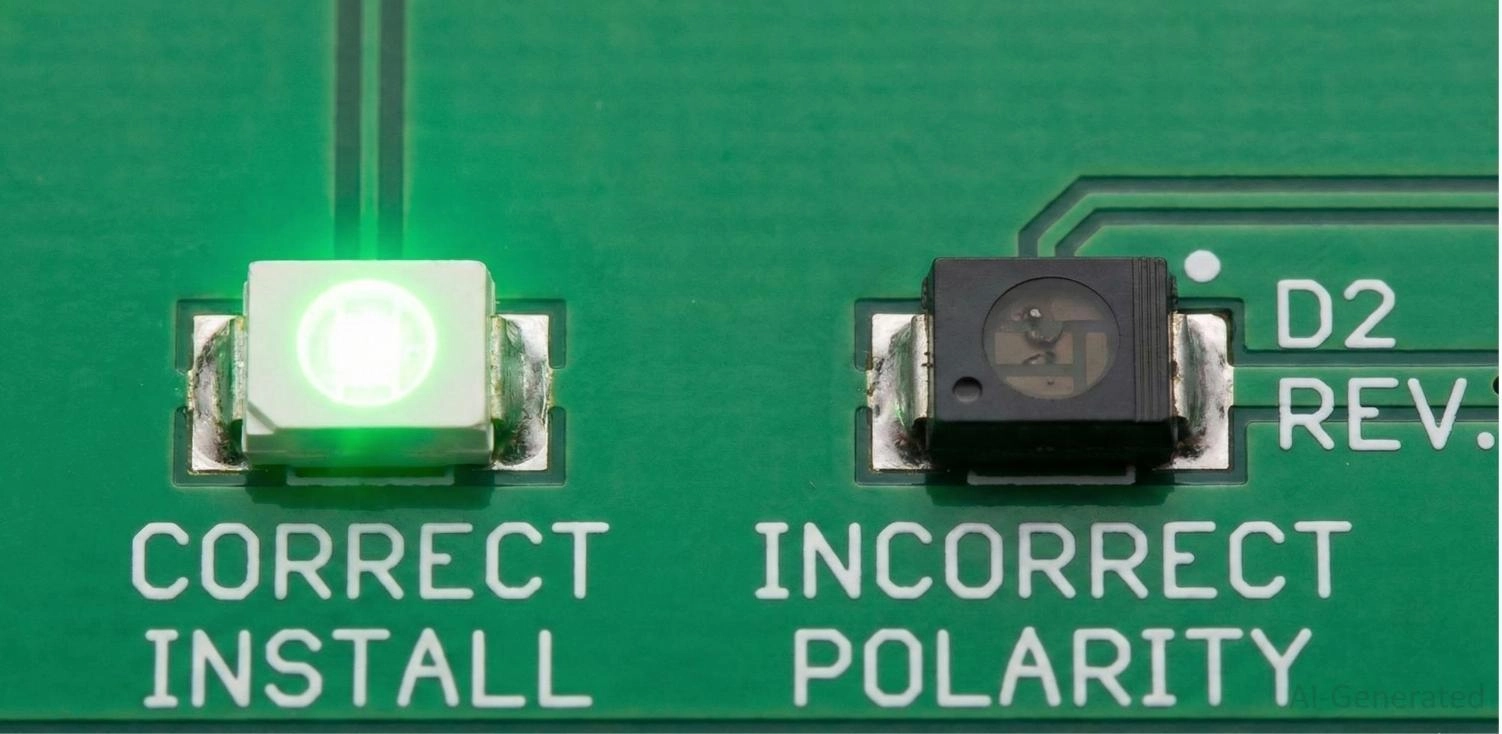
Figure: Properly installed SMD LED illuminating device compared to a non-functioning reversed SMD LED on a printed circuit board.
What Is SMD LED Polarity?
An LED is a semiconductor PN junction that allows electrical current to flow in only one specific direction.
Anode vs Cathode Explained
To understand SMD LED anode and cathode relationships, you must identify the two terminals:
● Anode (+): The positive terminal. Current enters the LED through the anode.
● Cathode (-): The negative terminal. Current exits the LED through the cathode.
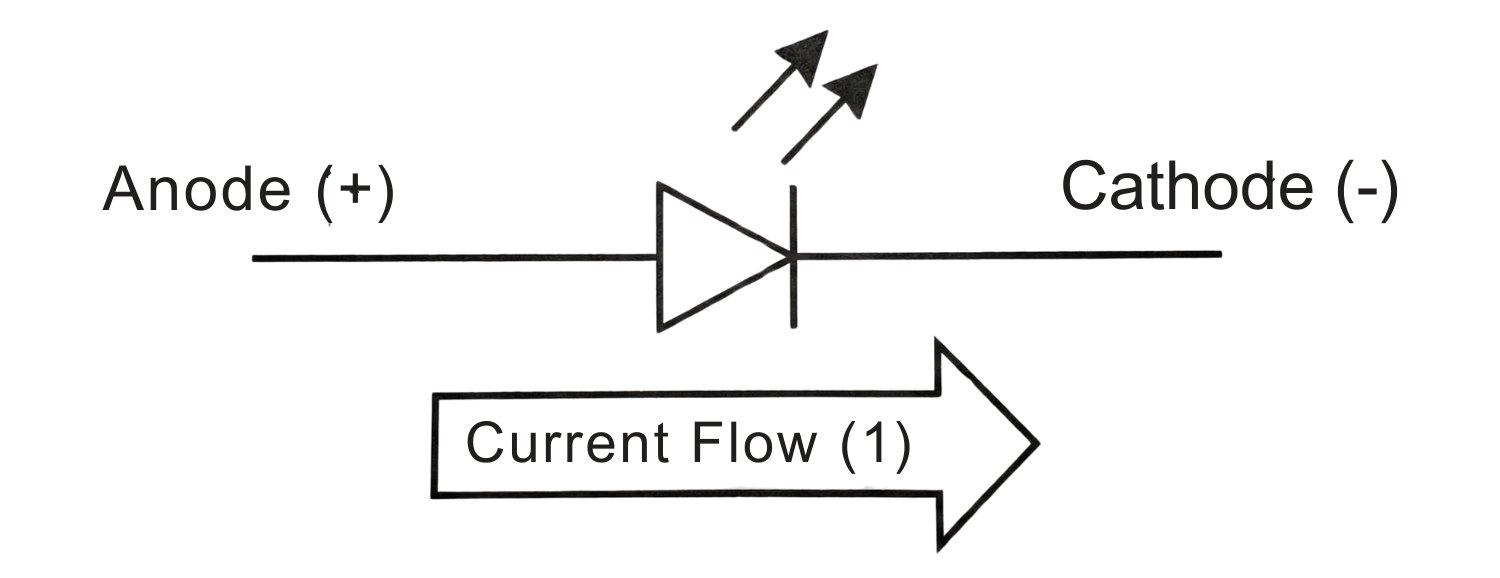
Figure: Standard LED schematic symbol highlighting the anode (positive) and cathode (negative) terminals.
How Current Flows in LEDs
For an SMD LED to emit light, it must be "forward-biased." The voltage at the anode must be higher than the cathode, exceeding the forward voltage ($V_f$) threshold (typically 1.8V–2.2V for red, and 2.8V–3.3V for blue/white). If reversed, the diode blocks current flow entirely.
SMD LED Polarity Identification Chart (Quick Reference)
Below is a quick-reference chart for common SMD LED packages and their standard polarity markings.
| Package Size (Imperial) | Metric Equivalent | Most Common Cathode (-) Marking | Top Marking Indicator |
|---|---|---|---|
| 0402 | 1005 | Green / Black dot or tiny line | Sometimes none (rely on the bottom) |
| 0603 | 1608 | T-shape or inverted "U" | Green dot or colored line |
| 0805 | 2012 | T-shape crossbar or line | Green triangle or line |
| 1206 | 3216 | T-shape, green line, or notch | Visible green band/ triangle |
| 3528 / 5050 | 3528 / 5050 | Missing corner (notch) | Notch in the plastic casing |
Pro Tip
When sourcing components, use the JLCPCB Parts Product Page to check the datasheets to verify your footprints before assembly.
How to Identify SMD LED Polarity in Detail?
As the absolute core of this guide, mastering how to identify SMD LED polarity is the single most important skill to prevent assembly failure. While component sizes and shapes vary, you can rely on these four primary methods for accurate SMD LED polarity identification.
Method 1: Polarity Markings on SMD LED Packages
The most direct method is visual inspection of the component's bottom pads. Because SMD LEDs are incredibly small, using a digital microscope or a jeweler's loupe is highly recommended. Look for a printed symbol, which is predominantly marked in green ink for high contrast against the metallic gold or silver pads:
● The T-Shape: This is the most universal marking. The horizontal top bar of the "T" represents the anode (+), while the vertical stem points directly to the cathode (-) pad.
● The Line, Band, or "U" Shape: A solid green line, a painted band, or a "U" shape clinging to one side of the bottom pad almost exclusively indicates the SMD LED cathode marking.
● The Triangle: If there is a triangle painted on the top or bottom, the narrow tip of the triangle points toward the cathode, mirroring the standard electronic diode symbol.
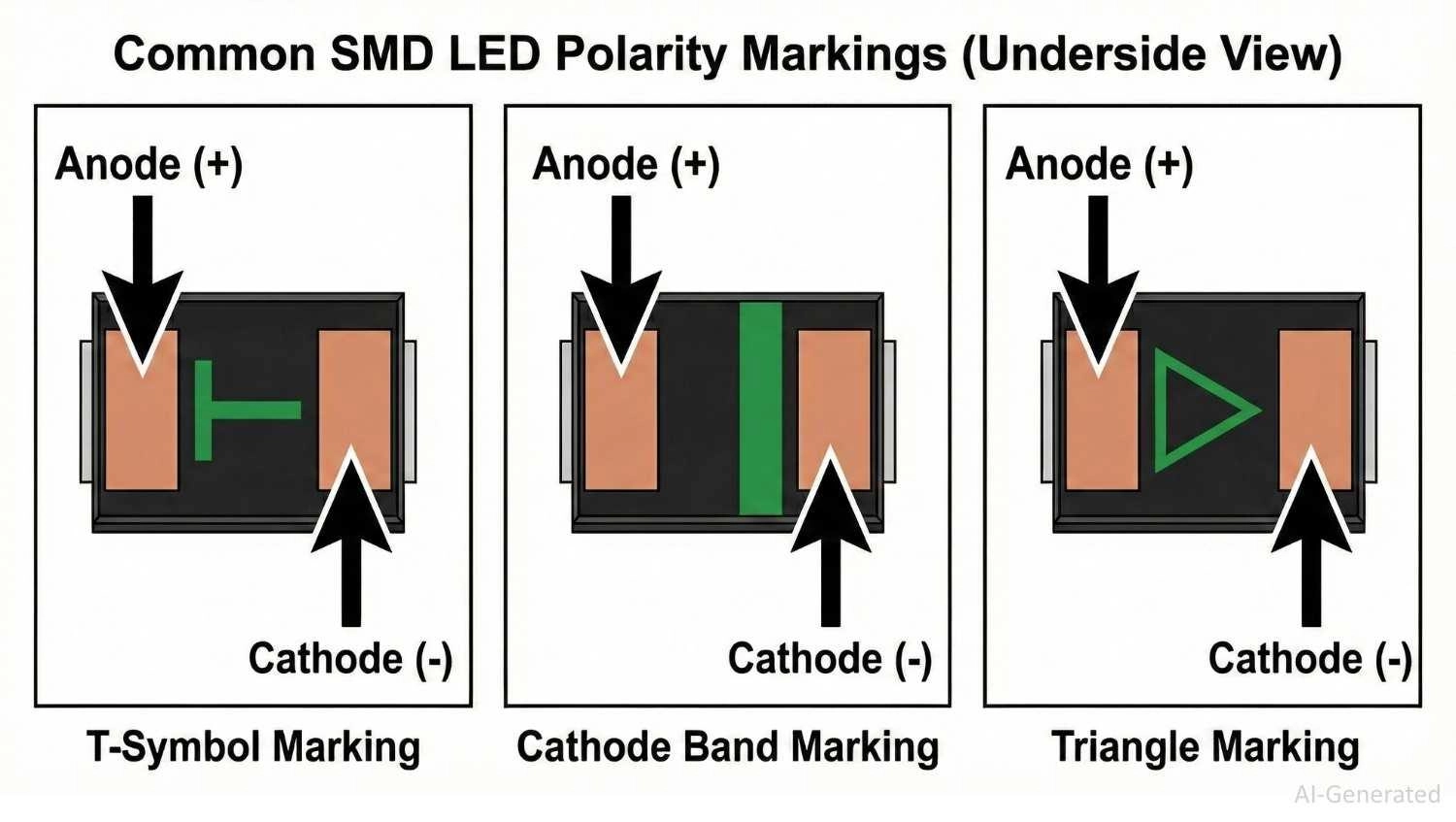
Figure: Common SMD LED polarity markings detailing the Anode (+) and Cathode (-) positions for the T-shape, solid cathode band, and triangle symbols.
Method 2: PCB Silkscreen and Footprint Indicators
Before soldering, the bare PCB provides critical orientation clues. The SMD LED polarity marking on PCB usually takes the form of a standard electronic diode symbol - a triangle pointing to a straight line. That straight line represents the cathode barrier.
Alternative silkscreen markings designed to guide assembly include:
● A thicker bounding box line is exclusively on the cathode side.
● Letters such as "C" or "K" (for Cathode) and "A" (for Anode).
● A small silkscreen dot next to Pin 1 (which usually aligns with the cathode, though datasheet verification is necessary).
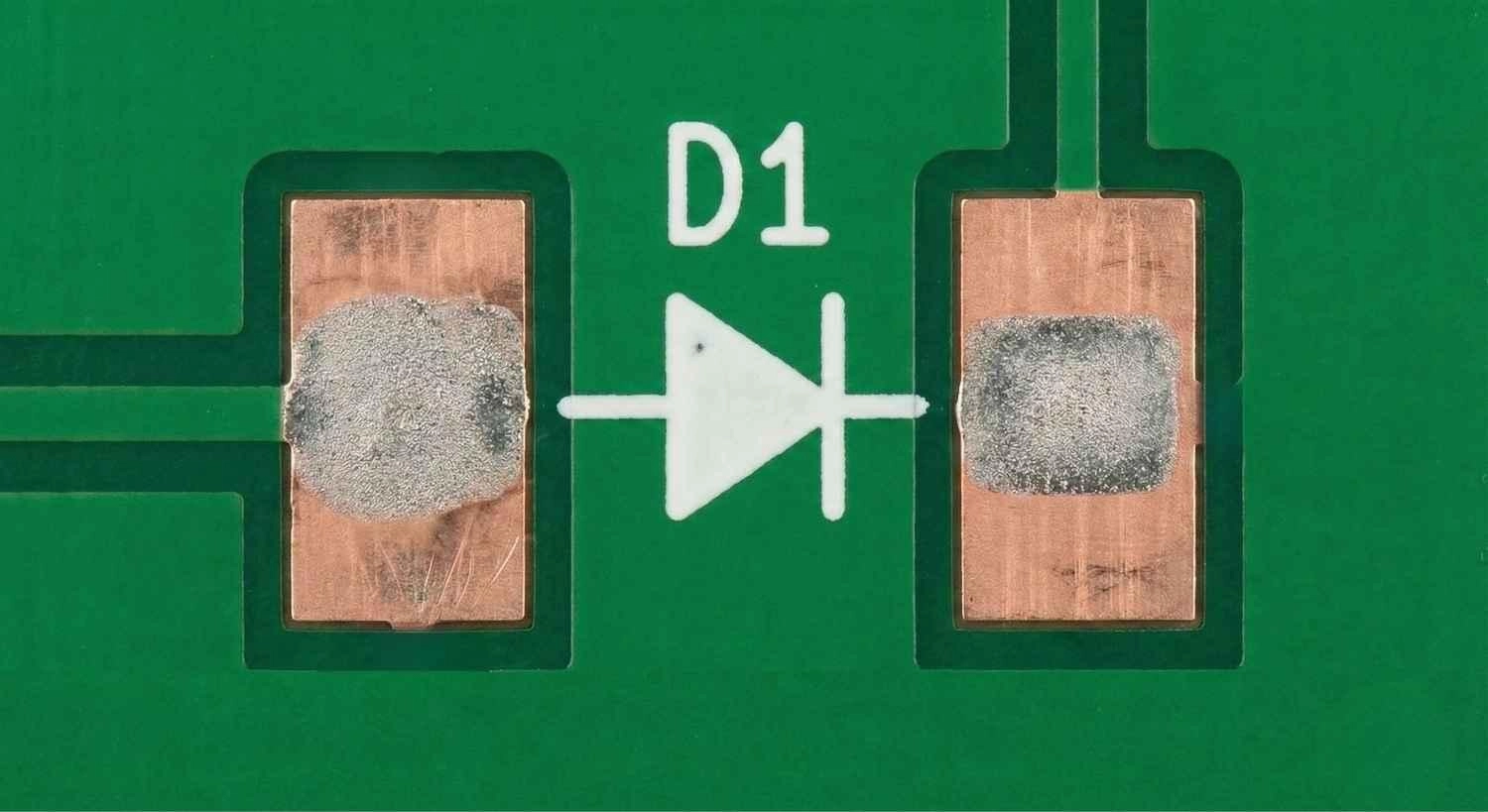
Figure: PCB silkscreen footprint for an SMD LED showing the standard diode symbol pointing toward the cathode pad.
Method 3: Using a Multimeter to Test SMD LED Polarity
When visual markings are faded, contradictory, or completely absent (as is common with microscopic 0402 packages), a digital multimeter is your definitive diagnostic tool. Here is the exact testing procedure:
1. Set the Multimeter: Turn your multimeter dial to the Diode Test mode (indicated by a small diode symbol). Do not use the continuity beeper mode.
2. Apply Probes: Place the Red probe gently on one metallic pad and the Black probe on the other.
3. Read the Screen:
○ If the meter reads "OL" (Open Loop) or "1", the diode is reverse-biased. The probes are backwards.
○ If the meter shows a voltage drop (typically between 1.8V and 3.0V, depending on the LED color) and the LED faintly illuminates, you have found the correct orientation.
4. Determine Polarity: The pad touching the Red probe is the Anode (+), and the pad touching the Black probe is the Cathode (-).
Note: Some standard multimeters only output 2.0V in diode mode, which may not be enough to illuminate blue or white LEDs (which often require ~3.0V). In these cases, look for the voltage drop reading on the screen even if there is no visible light.
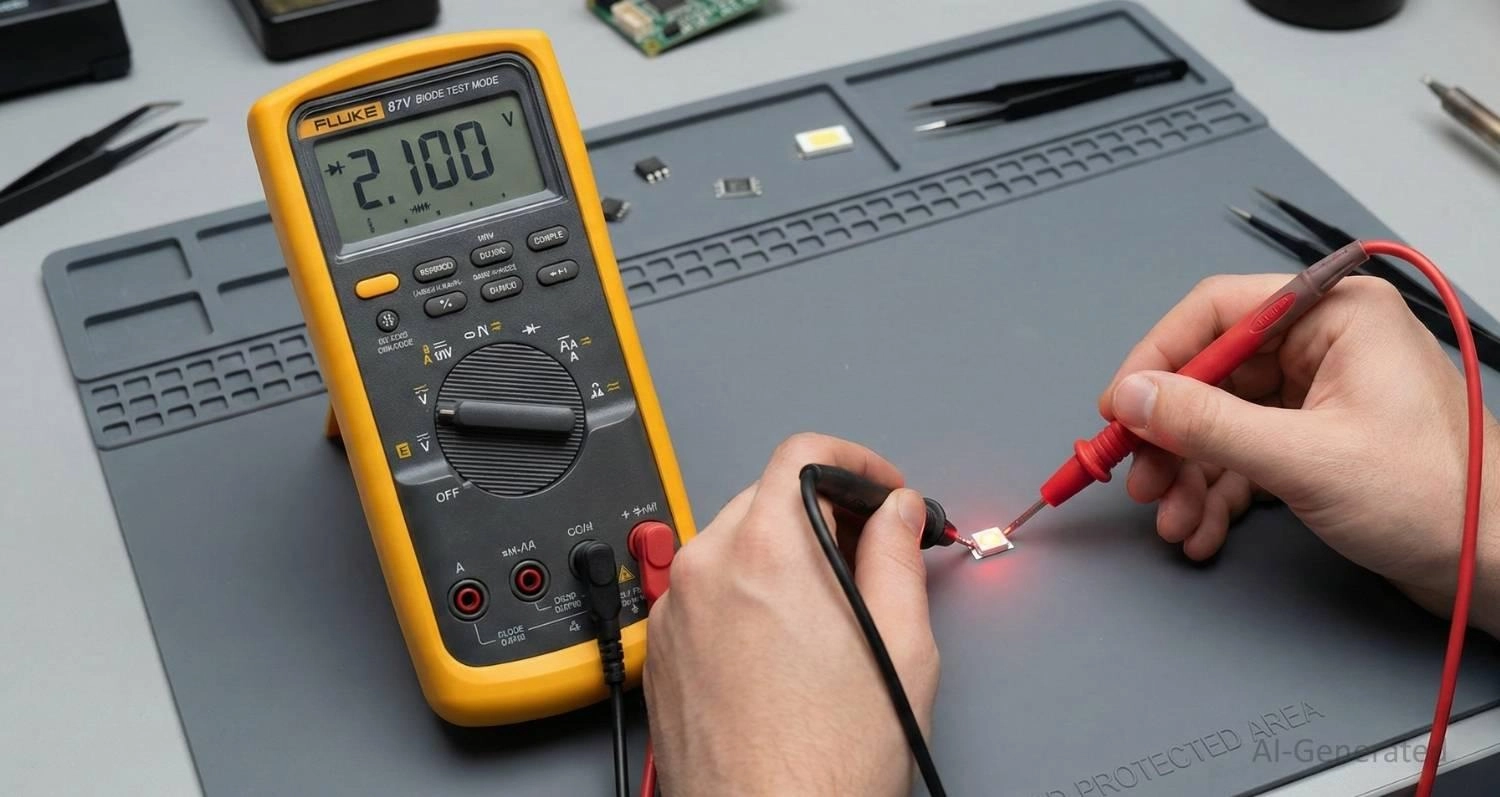
Figure: Testing SMD LED polarity with a digital multimeter in diode mode, showing the red probe on the anode and black probe on the cathode.
Method 4: Checking Datasheets and Manufacturer Guides
While industry standards exist, they are not universal laws. Some specialized components, budget LEDs, or reverse-mount LEDs will flip these conventions entirely - sometimes using the green line to denote the anode instead of the cathode.
The component's official datasheet is the ultimate source of truth. Always navigate to the "Package Dimensions," "Mechanical Data," or "Pin Configuration" sections of the PDF to verify the physical polarity mapping before committing to a full assembly run.
Polarity Differences by SMD LED Package Type
Polarity markings vary drastically depending on the physical size and power requirements.
0402 / 0603 / 0805 / 1206 LEDs
Due to their small size, packages like the 0402 often omit complex top markings, relying solely on a tiny green dot or line on the bottom cathode pad. Use a magnifier for inspection. You can learn more about handling these sizes in this guide on surface-mount devices.
High-Power SMD LEDs
High-power LEDs (e.g., Cree, Osram) feature three pads: Anode, Cathode, and a central Thermal Pad. Polarity is often denoted by an asymmetrical thermal pad, a physical notch cut into the cathode side of the lead frame, or laser-etched "+" and "-" symbols.
RGB and Multi-Chip LEDs
RGB LEDs (5050 or 3528 format) pack three diodes into one package, featuring four or six pins. They come in Common Anode or Common Cathode configurations. The key marker is a chamfered (missing) corner on the plastic housing, which usually indicates pin 1.
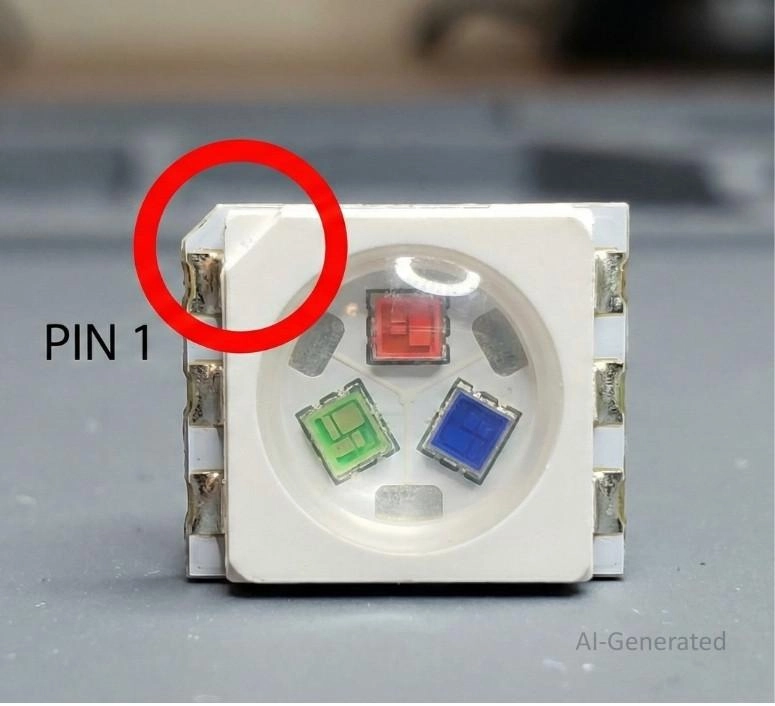
Figure: 5050 RGB SMD LED package highlighting the chamfered missing corner that indicates the starting pin.
PCB Design and Assembly Tips for Correct SMD LED Polarity
Design your PCB and assembly process so mistakes are mathematically impossible.
How to Mark SMD LED Polarity in PCB Footprints
● Include the standard diode symbol in the silkscreen layer, placed outside the component courtyard so it remains visible after soldering.
● Mark a prominent "K" or "-" near the cathode pad.
● Ensure pin 1 in your schematic symbol perfectly matches the footprint's primary polarity pin.
SMD LED Orientation in Pick-and-Place Assembly
In professional manufacturing, SMD LED orientation depends on the tape and reel packaging. The cathode is generally oriented toward the carrier tape's sprocket holes.
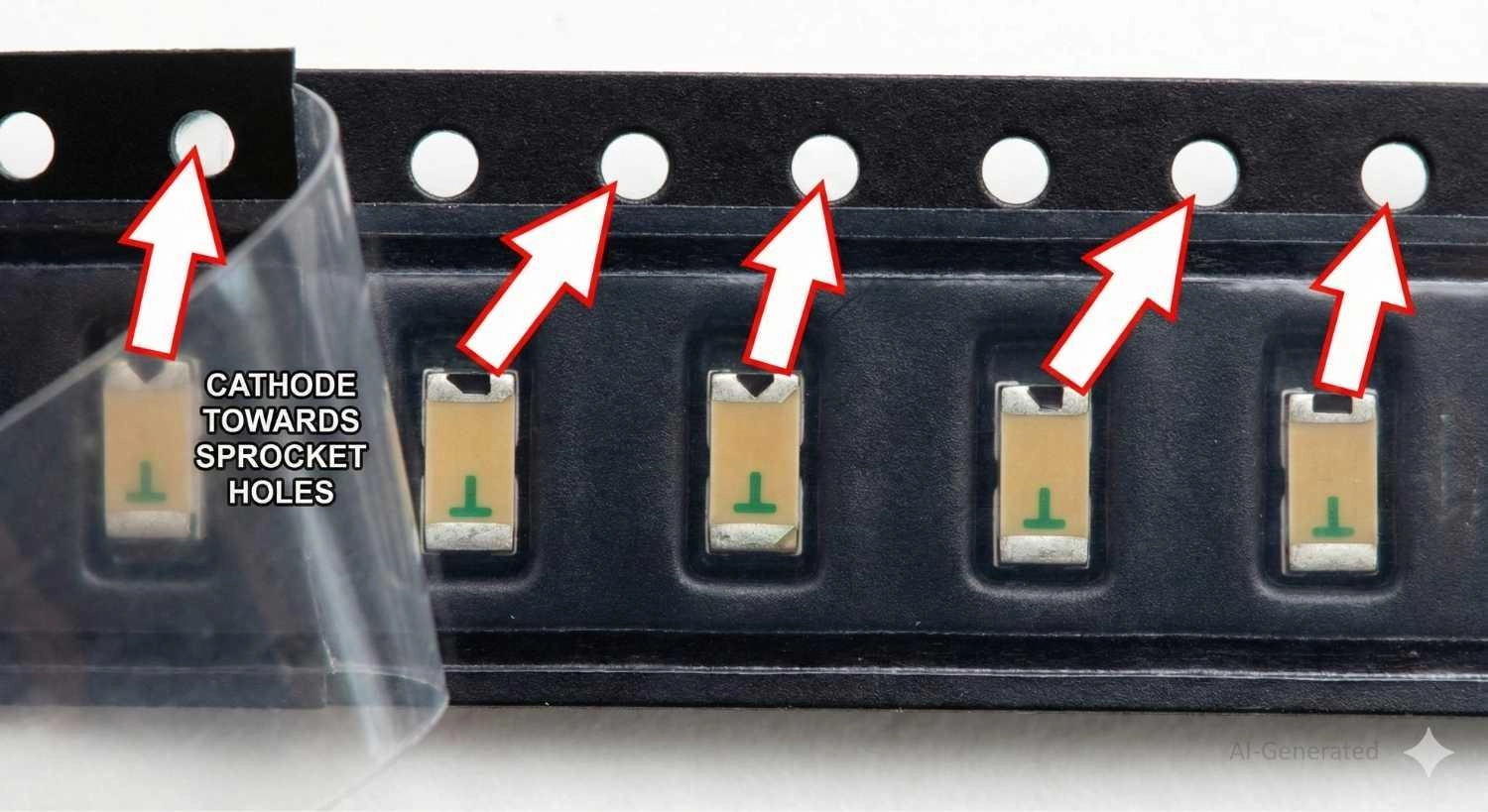
Figure: SMD LEDs inside carrier tape showing the cathode orientation aligning with the tape sprocket holes.
Manual Soldering Tips to Avoid SMD LED Polarity Errors
1. Organize LEDs on your bench with cathodes facing the same direction.
2. Apply high-quality flux.
3. Tack one pad, verify polarity with a magnifier, and solder the second pad.
Preventing SMD LED Polarity Issues in Mass Production
Ensure the rotation angles in your Centroid (Pick and Place) file align perfectly with the tape-and-reel orientation of your BOM part number. Reviewing the 3D DFM viewer on the JLCDFM Page can help catch inverted models before manufacturing.

Why Reversing SMD LED Polarity on PCBs Can Damage Your Circuit?
Reversing an LED doesn't just prevent light output; it can be destructive.
If placed in reverse polarity in a circuit exceeding the LED’s reverse breakdown voltage limit, the junction breaks down. This rush of backward current instantly burns out the diode, creating a short circuit. The shorted LED pulls excess current, permanently frying the driving microcontroller GPIO pin.
Furthermore, the rework cost and risk are high. Desoldering 0603 packages risks delaminating copper pads from the FR4 substrate. Designing robust footprints helps survive rework; learn more in this solder pad design guide.
Common SMD LED Polarity Errors and How to Fix Them
Misidentifying SMD LED Polarity Markings
● Problem: Assuming a green line always means cathode. Some obscure manufacturers use it to denote the anode.
● Fix: Always test one LED from a new batch with a multimeter before mass assembly.
Installing SMD LEDs with Wrong Polarity Orientation
● Problem: Discovering a backward LED after reflow soldering.
● Fix: Apply flux, use a hot air rework station at ~300°C with low airflow, and gently lift the component with tweezers. Let the board cool before placing a new LED.
Polarity Errors Caused by Mixed SMD LED Batches
● Problem: Loose LEDs from unverified vendors can result in mixed tape strips with alternating polarities.
● Fix: Source components from reliable distributors in continuous reels.
Incorrect PCB Footprints and SMD LED Polarity Symbols
● Problem: The CAD footprint maps schematic pins backward to the PCB footprint pads.
● Fix: Enforce strict library management. Consistently align Pin 1 to the Cathode across your CAD library.
FAQs about SMD LED Polarity
Q: Why Correct Polarity Matters in SMD LEDs?
Understanding surface mount led polarity ensures circuit safety. When installed backward, the LED blocks current. If the reverse voltage exceeds the threshold (usually ~5V), avalanche breakdown occurs.
This short-circuits the LED, potentially destroying the LED chip, the driving microcontroller pin, or the current-limiting resistor. Furthermore, reworking tiny SMD packages wastes time and risks damaging PCB pads.
Q: Which leg of an SMD LED is positive?
SMD LEDs do not have legs; they have pads. The positive pad (Anode) is generally the pad not marked by a green line, dot, or the tip of a T-shape.
Q: Is the green line on an SMD LED positive or negative?
In standard SMD LEDs, the green line, band, or dot printed on the bottom indicates the negative terminal (cathode).
Q: How do you find polarity on an SMD LED chip without a multimeter?
Flip the LED over with tweezers and look for a printed "T" shape. The top horizontal bar of the T is the anode (+), and the vertical stem points to the cathode (-). Alternatively, use a 3V coin cell battery to test orientation.
Q: Does the triangle marking on the top of an SMD LED point to the anode or the cathode?
The tip of the triangle printed on the top or bottom of an SMD LED points toward the cathode (negative) terminal, mimicking the standard diode symbol.
Q: Can a reverse-mount SMD LED have different polarity markings?
Yes. Reverse-mount LEDs sometimes have flipped polarity markings compared to standard top-emitting LEDs. Always refer to the datasheet.
Conclusion
Mastering SMD LED polarity is essential for any electronics designer. By recognizing visual markings (T-shapes, green cathode lines), utilizing multimeters in diode mode, and designing unambiguous PCB silkscreens, you can eliminate reverse-polarity errors.
When in doubt, always consult the component datasheet.
Popular Articles
• The Ultimate Guide to Relay Symbol: Coil, Contacts, Diagrams, and Circuit Applications
• Logic Gate Symbols: The Complete Chart, Truth Tables [2026]
• How to Design and Assemble a Reliable ESP32 Module PCB on a 2-Layer Board
• How to Identify SMD LED Polarity: Markings, Testing, and PCB Tips
• Power Supply Symbols Chart: A Complete Guide to AC, DC, Ground, Battery, and Source Symbols
Keep Learning
The Ultimate Guide to Relay Symbol: Coil, Contacts, Diagrams, and Circuit Applications
Think of a standard switch as a drawbridge you lift by hand. Now, imagine a relay symbol diagram as a remote-controlled drawbridge. It allows a tiny, low-power electronic signal to control a high-power electrical load from a distance safely. Understanding how to read relay symbol configurations is the absolute cornerstone of advanced circuit design. By mastering this relay schematic symbol, you move beyond basic electronics and enter the world of professional hardware logic and safe PCB design. What Y......
How to Read Resistor Color Code: Complete Guide with Chart and Examples
4-Band Resistor Color Code Explained A 4-band resistor color code is one of the most common methods used to indicate resistance values in electronic components. It is widely used to help engineers and hobbyists quickly determine resistance values without using a resistor color code calculator. In a standard 4-band resistor: First Band (Digit 1): Represents the first significant digit Second Band (Digit 2): Represents the second significant digit Third Band (Multiplier): Indicates the factor by which t......
Solder Paste vs Flux: What's the Difference and When Should You Use Each?
Solder paste and flux are not interchangeable. Solder paste contains solder alloy powder and flux, while flux contains no solder alloy. This difference matters when choosing materials for SMT, reflow soldering, or manual soldering. Flux removes metal oxides and prevents re-oxidation, allowing molten solder to wet copper pads and component leads properly. Solder paste combines flux with fine solder alloy powder. During reflow, the flux activates to improve wetting while the solder alloy melts to form t......
Fiducial Marks in PCB and SMT Assembly: A Complete Guide to Accuracy and Design Rules
Modern Printed Circuit Boards (PCBs) are complex, integrating high-density components like 0.4mm pitch Ball Grid Arrays (BGAs), 0201 passives, and fine-pitch Quad Flat No-Lead (QFN) packages. In this advanced manufacturing environment, achieving placement accuracy measured in micrometers is crucial. A significant challenge in automated manufacturing is how pick-and-place machines, which handle thousands of components per hour, precisely locate the PCB. A board on a conveyor system is never in the perf......
Ground Symbols Explained: Earth, Chassis, Signal, Analog, Digital Ground & More
Key Takeaways ⬇ Download the Ground Symbol Cheat Sheet (PDF) Keep all six ground symbols and their standard numbers on one page for quick reference. Four IEC 60417 symbols: IEC 60417 defines symbol 5017 for earth, 5018 for functional earth, 5019 for protective earth, and 5020 for frame/chassis. Protective earth is safety-related: IEC 60417-5019 identifies the protective earth connection and is used for safety-related protective bonding. Signal ground uses a different convention: IEEE Std 315 defines t......
How to Choose an ESP32 Development Board: A Beginner-Friendly Guide
The leap from blinking a simple LED to building a cloud-connected smart home device is a thrilling milestone for any electronics beginner. At the heart of this transition is often one undisputed champion: the ESP32. However, when you first search for an ESP32 development board, you are instantly met with a dizzying array of models, shapes, and specifications. How do you know which one is right for your first IoT (Internet of Things) project? In this beginner's guide, we will break down what makes thes......