PCB vs PCBA: What Are the Differences and How to Choose the Right Service for Your Project
10 min
- PCBA vs PCB: Comprehensive Comparison Table At a Glance
- Choose PCBA vs PCB Services
- Choosing a Reliable PCB/PCBA Manufacturer
- PCB vs. PCBA: The Core Relationship
- FAQs
- Conclusion
In the electronics industry, PCBs and PCBAs are frequently confused with one another, but the two represent distinct stages in the hardware production sequence. Engineers and product designers need to maintain a clear distinction between the meaning of a bare Printed Circuit Board (PCB) and a fully assembled Printed Circuit Board Assembly (PCBA).
So here’s the deal:
- A PCB is a blank board—etched copper, no components.
- A PCBA is a fully assembled board—ready to test, ready to ship.
The distinction is important—much more than one would suspect. The choice between procuring just the PCB versus an entire PCBA can affect every single element of your workflow—stack-up preference, component source availability, test coverage and cost modeling, along with logistics and yield.
If you skip planning, it's going to get expensive: a board that passes E-test on a bench could fail in the assembly line, fail due to unacceptable land patterns, thermal management, or component source differences. A quality PCBA partner will identify the design issues early on, provide alternatives and recommendations, and stabilize the production process before ramping to production.
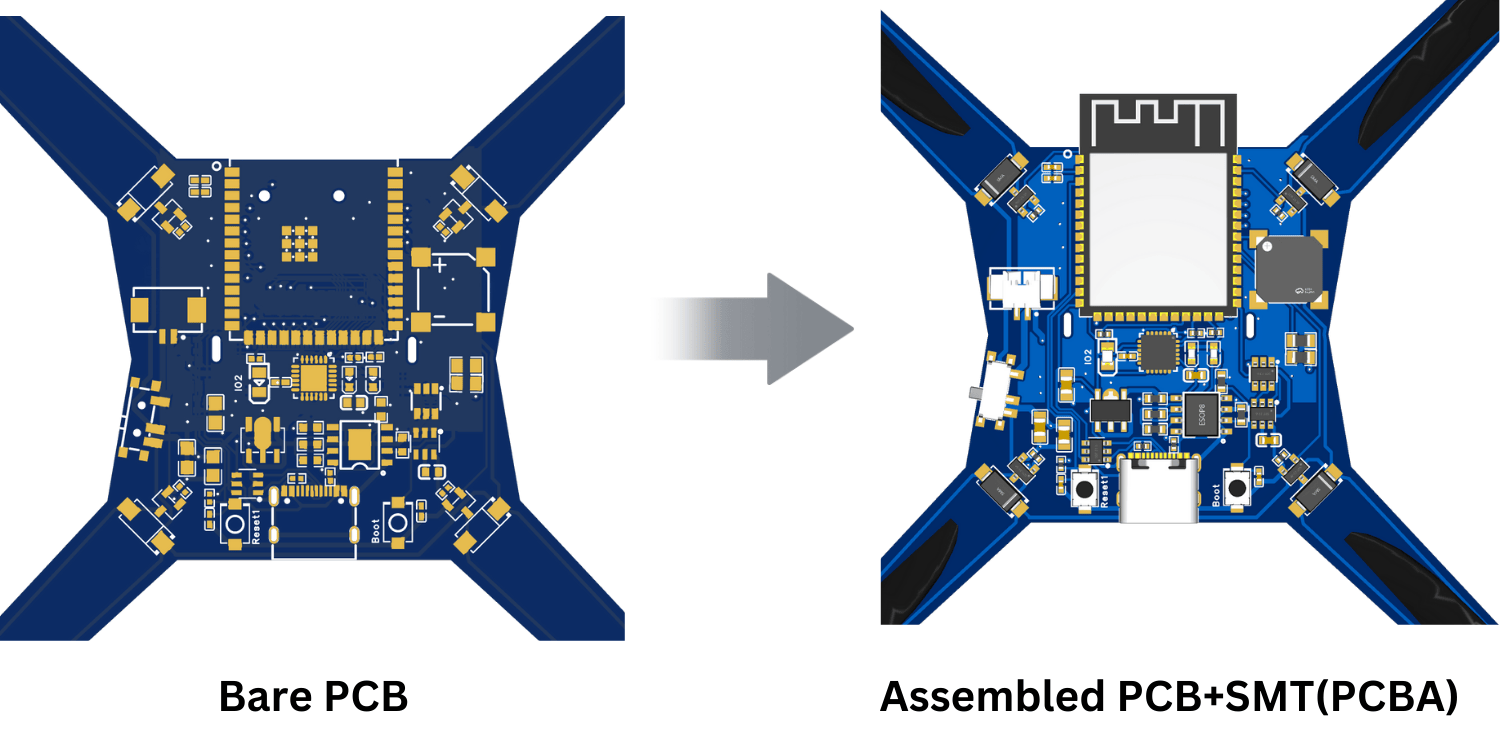
PCBA vs PCB: Comprehensive Comparison Table At a Glance
To understand the core differences between PCBA and PCB in a practical context, this table provides a direct comparison of a bare Printed Circuit Board (PCB) and a fully assembled Printed Circuit Board (PCBA) across key technical and logistical parameters.
| Category | PCB (Printed Circuit Board) | PCBA (Printed Circuit Board Assembly) |
|---|---|---|
| Definition | Fabricated laminate board with patterned copper; no components | PCB populated with SMD/THT parts, soldered, inspected, and tested |
| Function | Provides mechanical support and interconnects | Executes designed functionality as an electronic circuit |
| Composition | Core/prepreg (FR‑4, Rogers, etc.), copper, solder mask, silkscreen, surface finish | PCB + components (ICs, passives, connectors), solder joints, flux residues cleaned per spec |
| Manufacturing Flow | Imaging/etch, drilling, plating, lamination, surface finish, profiling, bare‑board test | Solder paste print → SPI → PnP → reflow (or wave/selective) → AOI/X‑ray → ICT/FCT |
| Equipment | LDI, CNC drill/router, PTH plating, AOI for bare board, flying probe test | Stencil printer, SPI, pick‑and‑place, reflow oven, wave/selective solder, AOI, AXI, ICT |
| Design Emphasis | Stack‑up, impedance, clearances, copper balancing, thermal reliefs | BOM health, component availability, land pattern, DFM/DFT, process windows |
| Testing Level | Electrical continuity/isolation (E‑test), visual inspection | AOI/AXI, ICT, flying probe, boundary‑scan, FCT, burn‑in (as needed) |
| Typical Lead Time | 1– 2 days (Achievable with JLCPCB) | 2-3 days (Achievable with JLCPCB) |
| Cost Drivers | Layer count, materials, trace/space, vias, finish (ENIG/OSP/HASL), yield | PCB cost + components + assembly steps + yield loss + testing coverage |
| Packaging/Logistics | Vacuum‑sealed, desiccant, flat stacks | Bubble wrap, palletizing, and anti-static bags. |
| Use Stage | Pre‑assembly validation, mechanical fit, basic continuity | Functional prototypes, EVT/DVT/PVT, production, service spares |
Also Read:
How to Run a Design Rule Check (DRC) for Your PCBs
What is PCB Via and Which Type Should You Choose?
Choose PCBA vs PCB Services
Understanding the technical differences between a PCB and a PCBA is the first step. The next step is applying that knowledge to make the right procurement decision. Ultimately, your selection will be driven by what your project requires in terms of stage of development, complexity, and scale.
When to Order Bare PCBs
Bare PCBs may be the appropriate choice when you plan to procure and assemble your own components. These are often preferred in the following situations:
- Manual Prototyping & R&D: For engineers who are near the beginning of their project development cycle, ordering bare boards affords the greatest amount of flexibility. This option allows for manual debugging, cycling through different strategies for components, and having the capability to change a circuit quickly without the lead time of a whole board assembly.
- Educational, or Hobbyist, Projects: For students or electronics enthusiasts who are learning soldering and building circuits, manually assembling a board is a truly valuable experience. It helps one to further understand how electronic components work together to form device functionality.
- High-security, or proprietary, Assembly: In industries such as aerospace, or medical devices, assembly may need to occur in-house on a certified and secured manufacturing line. In these cases, the overall company will procure bare board from a fabricator and then will conduct the proprietary assembly in-house.
When To Use Turnkey PCB Assembly Services
Turnkey PCB assembly service is a supplier-managed service for a PCB assembly that includes PCB fabrication, component sourcing, and assembly as a single vendor service. This is the typical process for professional product development and is generally recommended in the following situations:
- Large Scale Manufacturing: If the goal is no longer assembling a few prototypes but starting a production run of hundreds or thousands of product units, manual assembly is no longer practical or efficient. Turnkey PCB Assembly services use automated machinery to accomplish these tasks with speed, consistency, and scalability.
- Complex Designs: As electronics become more complex, they often include fine-pitch components, Ball Grid Arrays (BGAs), and 0201 packages, which make placement and soldering almost impossible by hand. Automated Surface Mount Technology (SMT) assembly is often required to achieve the precision necessary to meet the specifications of these complex designs.
- Supply Chain Management: One of the biggest benefits of a turnkey service is the huge reduction in logistical overhead. Instead of having to manage multiple vendors for boards and dozens of component distributors, it is all one point of contact. This represents the most valuable engineering time saved, decreased lead times, and decreases the risk of supply chain disruption.
To simplify the decision, consider the following matrix:
PCBA vs. PCB Services
| Scenario/Requirement | Best Choice: Bare PCB | Best Choice: Turnkey PCBA |
|---|---|---|
| Project Stage | R&D, one-off prototypes, educational projects | Small-batch production, mass production |
| Assembly Complexity | Simple designs with large, easy-to-solder THT components | Designs with fine-pitch SMDs, BGAs, or high component density |
| Supply Chain Preference | You prefer to source and manage all components yourself | You want a single vendor to handle all logistics and assembly |
Choosing a Reliable PCB/PCBA Manufacturer
The dependability and quality of your final electronic product can be guaranteed only through the capabilities of your manufacturing partner. This is a vitally important engineering decision beyond just finding the best price, as a truly dependable manufacturing partner provides a combination of demonstrated technical capabilities, proven quality certifications (ISO, UL, etc.), reliable sourcing for components, and integrated workflows to minimize friction between fabrication and assembly.
Navigating these requirements, though, can be complicated, and this is the reason an integrated one-stop manufacturing partner has become the standard in the industry for efficient product development.
JLCPCB's Integrated PCB Fabrication and Assembly Services
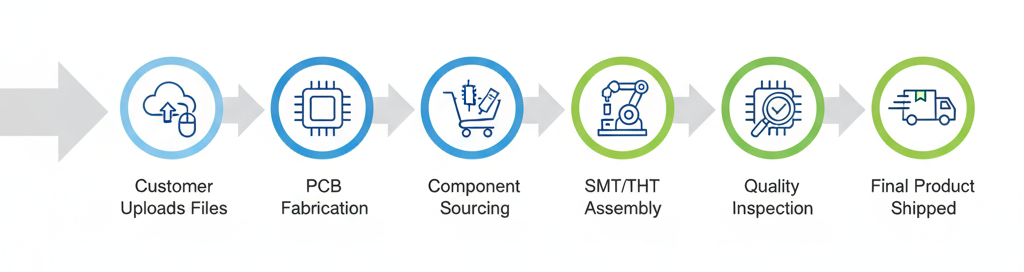
JLCPCB's one-stop turnkey PCB assembly service workflow from file upload to final shipment.
JLCPCB offers a truly one-stop solution, combining high-precision PCB fabrication with professional prototype and PCB assembly services under one roof.
From board manufacturing, global component sourcing, and final assembly to quality inspection, JLCPCB streamlines every stage of your workflow — transforming your PCB design into an assembled circuit board quickly and reliably.
As a leading PCB manufacturer, JLCPCB specializes in producing complex, multi-layer PCBs and high-quality Flexible PCBs for compact designs without sacrificing performance.
In addition to PCB fabrication and assembly, JLCPCB also provides professional PCB layout services, backed by extensive development of the EasyEDA PCB design software to help engineers and product developers bring their ideas to life more efficiently.
See More: Capabilities of JLCPCB PCBA Service
PCB vs. PCBA: The Core Relationship
The easiest way to think about the relationship is like building a house. A PCB is the foundation, frame, and pre-laid wiring paths. It’s essential, but it can’t do anything on its own. A PCBA is the finished house with the power on, plumbing working, and appliances installed—it's fully functional and ready to be used.
Their relationship is both sequential and inclusive:
- Foundation vs. Function: A PCB is the bare, non-functional foundation. A PCBA is a PCB that has been fully populated with components, bringing the circuit design to life.
- Process Flow: The process always flows in one direction: PCB fabrication to PCBA assembly. You simply can't have a PCBA without first manufacturing the bare PCB it's built on.
- Inclusivity: A PCBA includes a PCB. The final cost and complexity of a PCBA are always greater because it is the sum of the PCB + All Sourced Components + Assembly Labor.
FAQs
Q: What's the difference between a PCBA and an Integrated Circuit (IC)?
An Integrated Circuit (IC) is a single electronic component, like one brick in a building. A PCBA (Printed Circuit Board Assembly) is the complete functioning circuit board containing many components, including ICs, resistors, capacitors, connectors, and more. The IC is only one part of the overall PCBA.
Q: How does the choice between SMT and THT affect the final PCBA cost?
The cost difference mainly comes down to automation versus manual labor. SMT (Surface Mount Technology) assembly is highly automated and more cost-effective for mass production. THT (Through-Hole Technology) assembly often requires more manual soldering and labor, increasing production costs, although it can be easier for prototyping and high-strength applications.
Q: What are the three primary files needed for a turnkey PCBA order?
A turnkey PCBA order typically requires three essential manufacturing files:
- Gerber Files – The PCB manufacturing blueprint
- Bill of Materials (BOM) – The complete component list
- Centroid (Pick-and-Place) File – Component placement coordinates used by SMT machines
Q: What are common defects in PCBA and how are they tested for?
Common PCBA defects include solder bridges, open circuits, insufficient solder joints, and incorrect component placement. Manufacturers typically detect these problems using:
- AOI (Automated Optical Inspection) for visual inspection
- ICT (In-Circuit Testing) for electrical testing and fault detection
Conclusion
Understanding the key differences between a PCB and a PCBA empowers anyone involved in electronics to plan projects more effectively, create accurate budgets, and communicate with PCB manufacturers like a professional.
Knowing whether you need a bare printed circuit board or a complete turnkey PCB assembly is essential for a smooth and efficient product development process.
Popular Articles
• The Ultimate Guide to Relay Symbol: Coil, Contacts, Diagrams, and Circuit Applications
• Logic Gate Symbols: The Complete Chart, Truth Tables [2026]
• How to Design and Assemble a Reliable ESP32 Module PCB on a 2-Layer Board
• How to Identify SMD LED Polarity: Markings, Testing, and PCB Tips
• Power Supply Symbols Chart: A Complete Guide to AC, DC, Ground, Battery, and Source Symbols
Keep Learning
The Ultimate Guide to Relay Symbol: Coil, Contacts, Diagrams, and Circuit Applications
Think of a standard switch as a drawbridge you lift by hand. Now, imagine a relay symbol diagram as a remote-controlled drawbridge. It allows a tiny, low-power electronic signal to control a high-power electrical load from a distance safely. Understanding how to read relay symbol configurations is the absolute cornerstone of advanced circuit design. By mastering this relay schematic symbol, you move beyond basic electronics and enter the world of professional hardware logic and safe PCB design. What Y......
How to Read Resistor Color Code: Complete Guide with Chart and Examples
4-Band Resistor Color Code Explained A 4-band resistor color code is one of the most common methods used to indicate resistance values in electronic components. It is widely used to help engineers and hobbyists quickly determine resistance values without using a resistor color code calculator. In a standard 4-band resistor: First Band (Digit 1): Represents the first significant digit Second Band (Digit 2): Represents the second significant digit Third Band (Multiplier): Indicates the factor by which t......
Solder Paste vs Flux: What's the Difference and When Should You Use Each?
Solder paste and flux are not interchangeable. Solder paste contains solder alloy powder and flux, while flux contains no solder alloy. This difference matters when choosing materials for SMT, reflow soldering, or manual soldering. Flux removes metal oxides and prevents re-oxidation, allowing molten solder to wet copper pads and component leads properly. Solder paste combines flux with fine solder alloy powder. During reflow, the flux activates to improve wetting while the solder alloy melts to form t......
Fiducial Marks in PCB and SMT Assembly: A Complete Guide to Accuracy and Design Rules
Modern Printed Circuit Boards (PCBs) are complex, integrating high-density components like 0.4mm pitch Ball Grid Arrays (BGAs), 0201 passives, and fine-pitch Quad Flat No-Lead (QFN) packages. In this advanced manufacturing environment, achieving placement accuracy measured in micrometers is crucial. A significant challenge in automated manufacturing is how pick-and-place machines, which handle thousands of components per hour, precisely locate the PCB. A board on a conveyor system is never in the perf......
Ground Symbols Explained: Earth, Chassis, Signal, Analog, Digital Ground & More
Key Takeaways ⬇ Download the Ground Symbol Cheat Sheet (PDF) Keep all six ground symbols and their standard numbers on one page for quick reference. Four IEC 60417 symbols: IEC 60417 defines symbol 5017 for earth, 5018 for functional earth, 5019 for protective earth, and 5020 for frame/chassis. Protective earth is safety-related: IEC 60417-5019 identifies the protective earth connection and is used for safety-related protective bonding. Signal ground uses a different convention: IEEE Std 315 defines t......
How to Choose an ESP32 Development Board: A Beginner-Friendly Guide
The leap from blinking a simple LED to building a cloud-connected smart home device is a thrilling milestone for any electronics beginner. At the heart of this transition is often one undisputed champion: the ESP32. However, when you first search for an ESP32 development board, you are instantly met with a dizzying array of models, shapes, and specifications. How do you know which one is right for your first IoT (Internet of Things) project? In this beginner's guide, we will break down what makes thes......