Why PCB Headers Matter in Reliable Board Design
16 min
- What Is a PCB Header?
- What a PCB Header Does in a PCB
- Common Types of PCB Headers
- Understanding PCB Header Size and Dimensions
- PCB Header Design Considerations
- Manufacturing PCB Headers Into Reliable Boards
- FAQs About PCB Headers
- Conclusion
Key Takeaways
- Dual Function: Acts as electrical pin and mechanical anchor; exact hole sizing prevents joint strain.
- Pitch & Current: 2.54 mm pins carry ~3 A, while 1.27 mm pins handle ~1 A.
- Footprint Sizing: Size plated holes using pin diagonal dimensions (1.05–1.15 mm for 0.64 mm square pins).
- Smart Layout: Place ground pins next to signals for low noise and match cable pinout numbering.
- Assembly Rules: Use LCP for reflow and achieve $\ge$75% vertical solder barrel fill.
A PCB header is usually the cheapest connector on a board, yet it takes the most handling. Cables get plugged into it, and boards get stacked on it. People also pull on it at an angle long after assembly. Every one of those loads ends at a few solder joints, because a header does two jobs at once. Electrically, it is a row of short bare conductors carrying power and signals. Mechanically, it is an anchor. Each pin passes through a copper-plated barrel, which prevents a cable tug from tearing the pad off the laminate.
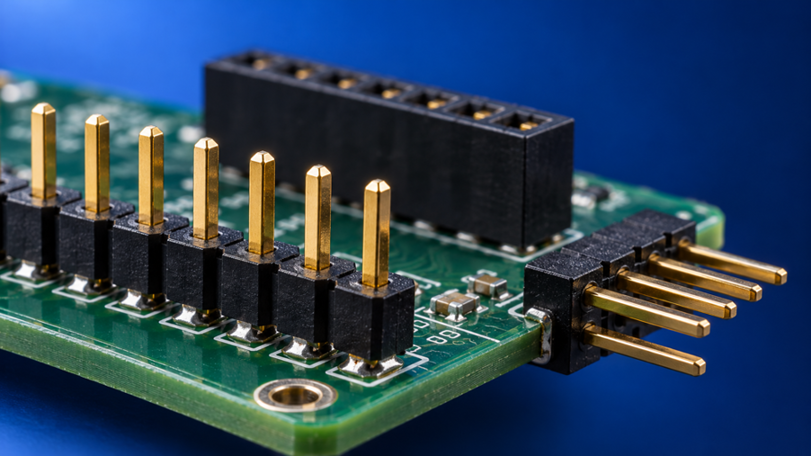
Figure 1: Straight, right-angle, and stacked PCB headers on a circuit board
So many header faults are mechanical problems that look like electrical problems, such as a joint that opens only when the cable moves. Treat the header as both a structural part and a connector, and choices about pitch, hole size, and orientation will no longer be arbitrary. This guide covers header structure, types and sizes, footprint rules, and what the fabricator must hold.
What Is a PCB Header?
A PCB header is a row of metal pins held in a plastic body and soldered to a circuit board. A mating socket, cable, or second board then plugs into it. The board side is permanent, while the mating side is meant to come apart.
PCB Header Structure and Basic Components
Every PCB header is built from the same three parts, regardless of its pitch. Each part has its own job, so each one fails in its own way:
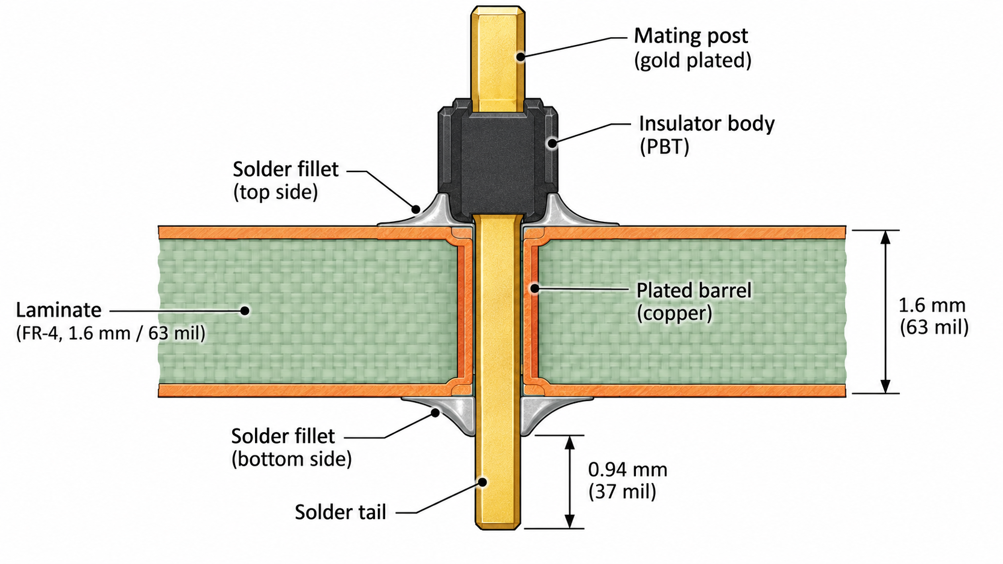
Figure 2: Cross-section of a PCB header pin soldered in a plated hole
- Contact pins carry the current, usually phosphor-bronze or brass, and are formed into a square post.
- Plating covers the contact, either tin for low cost or gold for repeated mating.
- The insulator body holds the pins at a fixed pitch, usually in PBT, nylon, or LCP.
Each pin has two ends, each with a different job. The mating post above the insulator takes the socket, while the solder tail goes into the board. Plating decides how long the post survives, because tin lasts only tens of matings, while gold lasts hundreds if it is thick enough.
The insulator fixes every pin's position, so its material limits how the header can be soldered. Standard PBT, a polyester, melts at about 223 °C, which is below a lead-free reflow peak. So a PBT header is wave- or hand-soldered, while a liquid crystal polymer (LCP) body can go through the reflow oven.
How PCB Headers Connect to a Board
PCB headers attach in three ways: through plated holes, onto surface pads, or by press-fit. Through-hole is the default, because solder locks the tail to both sides of the board. A Samtec TSW-07 tail is 2.54 mm (100 mil) long, so about 0.94 mm (37 mil) shows below a 1.6 mm (63 mil) board. So choosing your PCB thickness also decides whether the pin end shows in the fillet.
- Surface-mount headers bend each tail flat onto a pad, so they reflow with the other SMT parts. The cost is strong because each joint is a single fillet on a single pad. A side load can peel that pad off the board.
- Press-fit headers use a compliant pin slightly larger than the hole. The pin deforms as it is pressed in, forming a gas-tight joint without solder. That suits thick backplanes and automotive boards under IPC-9797, but only if the hole is right. Press-fit holes are typically held to about ±0.05 mm (2 mil), far tighter than ordinary plated holes.
What a PCB Header Does in a PCB
A PCB header carries current and signals across a joint designed to come apart. It also holds two pieces of hardware in position, and both jobs set limits.
Electrical Connections and Signal Transfer
A header pin is a short bare conductor, and heat sets its current limit. A typical 2.54 mm (100 mil) header is rated at around 3 A per pin, but that figure drops when neighboring pins carry current as well. Loaded neighbors heat each other, so a 5 A rail belongs on three pins rather than two.
Signals need a return path through the same header because the current leaving on one pin must return on another. A distant ground pin turns that loop into a small antenna and a source of crosstalk. The Raspberry Pi's 40-pin header has eight ground pins along its length, so every GPIO pin has a nearby ground pin.
Mechanical Connection and Board-to-Board Integration
A header that mates with a socket also sets the gap between two boards. A standard 2.54 mm (100 mil) socket is about 8.5 mm (335 mil) tall, with the header body on top. So, stacked boards end up roughly 11 mm (433 mil) apart, and every part beneath the top board must fit within that gap.
The header should align the boards rather than carry them, because only pin friction resists a drop or a pull. Exact pin coordinates matter too, because the Arduino Uno spaces digital pins 7 and 8 by 160 mil (4.06 mm) instead of 100 mil (2.54 mm). A shield drawn on a plain 2.54 mm grid will not fit. So copy header positions from the host board's layout files.
Common Types of PCB Headers
Three independent choices sort PCB headers. Every real part takes one answer from each, so a right-angle, dual-row socket answers all three:
- Gender: pin headers versus socket headers.
- Orientation: straight, right-angle, and other configurations.
- Row count: single-row versus multi-row headers.
Pin Headers and Socket Headers
A pin header carries exposed male posts, while a socket header carries spring contacts that grip those posts. The two are made as a pair, so a Samtec TSW pin strip mates with an SSW socket built for its 0.64 mm (25 mil) square post.
Which board gets which half is a safety-and-wear decision. Exposed posts can be shortened by a dropped tool, so the side that stays powered while unplugged should carry the socket. Socket springs also lose grip over many cycles, so unless safety decides, fit the socket to the board that is cheaper to replace.
Straight, Right-Angle, and Other Configurations
Orientation is the direction in which the mating end leaves the board. It decides where the cable or second board ends up, and four configurations cover most designs:
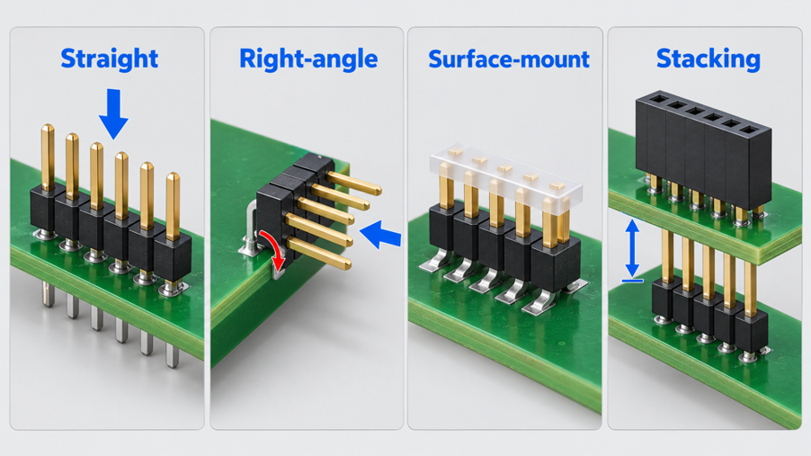
Figure 3: Straight, right-angle, surface-mount, and stacking PCB header configurations
- Straight: pins stand at 90 degrees to the board, for stacking and top-entry cables.
- Right-angle: pins bend so the mating face points toward the board edge.
- Surface-mount: tails lie flat on pads and reflow with the SMT parts.
- Stacking: a socket with long tails that plug into the board below.
Straight headers are the default because plugging force pushes down and loads every joint evenly. Right-angle headers keep the stack flat, but mating force then acts as a lever on the joints. An overhanging right-angle body also cannot sit on the edge of a V-cut panel, so it needs a routed edge.
Single-Row and Multi-Row Headers
Single-row headers put every pin in one line, while multi-row headers add rows at the same pitch. A 2 x 20 header, the Raspberry Pi GPIO layout, fits 40 contacts in half the length of a single row.
A second row forces inner-row traces to escape between the outer pads. At 2.54 mm (100 mil) pitch, standard 1.7 mm (67 mil) pads leave about 0.84 mm (33 mil) between them. That gap holds a comfortable trace, so dense dual-row headers route signals to the other layer via vias.
Understanding PCB Header Size and Dimensions
PCB header size comes down to pin spacing, pin count, and height above the board. Settle pitch first, because it fixes the mating part, the hole size, and the current per pin.
Pin Spacing and Pitch
Pitch is the center-to-center distance between neighboring pins, and a header only mates with a socket of the same pitch. The 2.54 mm (100 mil) standard matches the old DIP grid and remains the prototyping default. Finer pitches save space, but the pin shrinks as well, so current and robustness decline together.
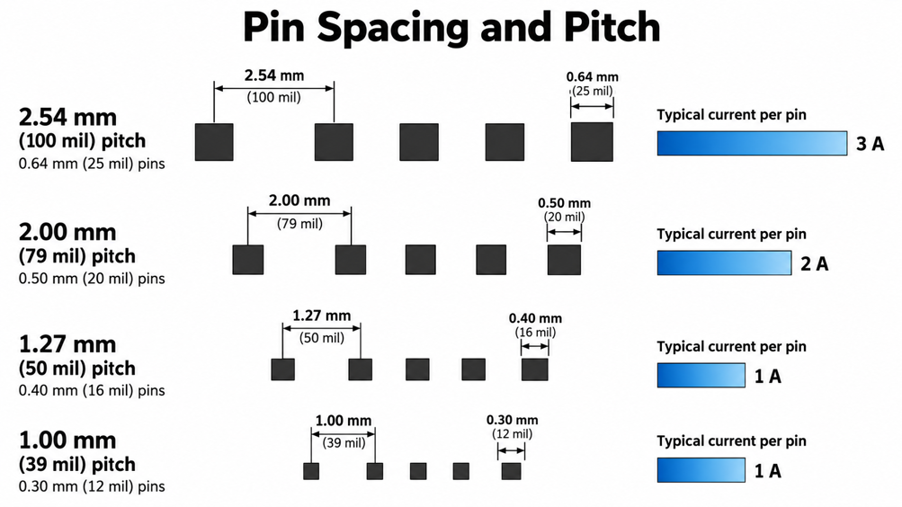
Figure 4: PCB header pitch comparison from 2.54 mm to 1.00 mm
| Pitch | Square Pin Size | Typical Current per Pin | Where It Fits Best |
|---|---|---|---|
| 2.54 mm (100 mil) | 0.64 mm (25 mil) | About 3 A | Prototypes, Arduino, and Raspberry Pi boards |
| 2.00 mm (79 mil) | 0.50 mm (20 mil) | About 2 A | Compact modules where 2.54 mm is too wide |
| 1.27 mm (50 mil) | 0.40 mm (16 mil) | About 1 A | Debug ports and dense board-to-board links |
| 1.00 mm (39 mil) | 0.30 mm (12 mil) | About 1 A | Space-limited boards, mostly surface-mount |
Current falls faster than pitch, because a 1.27 mm pin has about 40% of the cross-section of a 2.54 mm pin. So fine-pitch power rails need extra pins, which eats into the space the finer pitch saved.
Pin Count, Height, and Overall Dimensions
Pin count sets the header length, which is the number of positions per row times the pitch. Break-away strips snap cleanly between positions, so the count is easy to trim. Plan spare positions early, though, because adding a pin later means a new footprint.
Height above the board is the insulator plus the exposed post, about 8.4 mm (330 mil) for a TSW-07 strip. Add the mating socket or cable housing, since the mated height must clear the enclosure lid. Overall dimensions include the plastic outside the pin field. A socket or shrouded box header is wider than its pins, and a right-angle body reaches toward the edge. So the keep-out area must follow the datasheet outline, not the pads.
PCB Header Design Considerations
A PCB header is chosen for its job first and drawn on the board second. Most header problems come from reversing that order, so selection deserves the same care as layout.
Choosing the Right Header for the PCB
Choosing a PCB header starts with how often it is mated and what it connects to. Those two factors determine plating, keying, and retention, so a factory-only port can be a bare strip, while a user cable needs a latching housing.
| Application | Header Choice | Why It Fits |
|---|---|---|
| SWD debug port | 2 x 5, 1.27 mm (50 mil) SMT, such as Samtec FTSH-105-01-L-DV-007-K | ARM Cortex 10-pin pinout, pin 7 omitted as a key |
| Board stacking or HAT | 2 x 20, 2.54 mm (100 mil) header and socket | Standard 40-pin interface, about 11 mm (433 mil) spacing |
| Ribbon cable | Shrouded 2 x 5, 2.54 mm (100 mil) box header | Shroud slot blocks reverse insertion |
| Sensor or fan harness | Molex KK 254 friction-lock header | Ramp lock resists pull and polarises the housing |
Footprint, Hole, and Layout Requirements
A through-hole header footprint is a row of round pads with pin 1 drawn square, a convention that KiCad's library rules enforce. Mark pin 1 in the PCB silkscreen too, outside the body outline, because the square pad disappears under the plastic. A 0.64 mm (25 mil) post is 0.9 mm (36 mil) across the corners, and IPC-2222 adds 0.15 to 0.25 mm depending on density level. So a 2.54 mm header wants a finished hole of about 1.05 to 1.15 mm (41 to 45 mil).
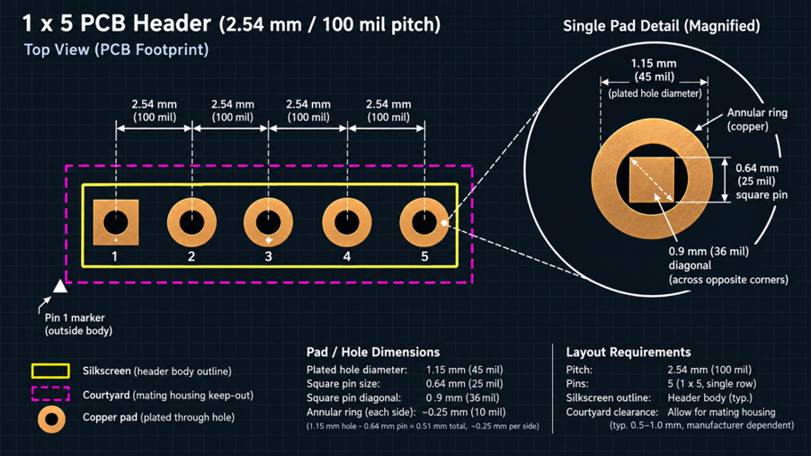
Figure 5: PCB header footprint with a square pin 1 pad and diagonal-sized holes
Layout clearance must cover the mating housing and the fingers that reach it, not just the pads. Keep tall parts out of that space, and apply the usual PCB design rules around it. Even experienced designers make these header mistakes:
- Mixing up dual-row pin numbering swaps signals: ribbon cables number pins in a zigzag, while DIP-style symbols run down one row, so match the symbol to the cable.
- Drawing a stacking socket on the top layer when it mounts underneath reverses the pin order, so place it on the bottom layer.
- Ignoring the cable housing lets a tall part block the latch, so draw the housing on a mechanical layer.
Manufacturing PCB Headers Into Reliable Boards
A header footprint works only if the fabricator drills holes within the window that your pins need. The assembler then has to get solder up the barrel, and both steps can be checked.
Hole and Pad Accuracy for Header Assembly
The finished hole size is never exact, so the fabricator's tolerance must fit within your drawn clearance. JLCPCB holds plated holes to +0.13/-0.08 mm (+5/-3 mil), and its capability page sets the recommended ring by layer count and copper weight. The minus side of that tolerance is what squeezes a header pin.
| Pitch | Pin Diagonal | Library Hole / Pad | Smallest Finished Hole | Annular Ring Check |
|---|---|---|---|---|
| 2.54 mm (100 mil) | 0.905 mm (35.6 mil) | 1.0 / 1.7 mm (39 / 67 mil) | 0.92 mm (36.2 mil) | 0.35 mm (14 mil), comfortable |
| 2.00 mm (79 mil) | 0.707 mm (27.8 mil) | 0.8 / 1.35 mm (31 / 53 mil) | 0.72 mm (28.3 mil) | 0.28 mm (11 mil), passes |
| 1.27 mm (50 mil) | 0.566 mm (22.3 mil) | 0.65 / 1.0 mm (26 / 39 mil) | 0.57 mm (22.4 mil) | 0.18 mm (7 mil), below recommendation |
The 1.27 mm row fails differently, because its ring sits below the ring JLCPCB recommends. A 1.1 mm (43 mil) pad lifts the ring to 0.23 mm (9 mil), but leaves only 0.17 mm (7 mil) of copper between pads. Otherwise, a surface-mount 1.27 mm header avoids the drilled ring entirely.
PCB Quality Control and Inspection
Header quality control runs on the bare board and then on the assembly, because solder cannot fix a wrong hole. The checks follow the build order:
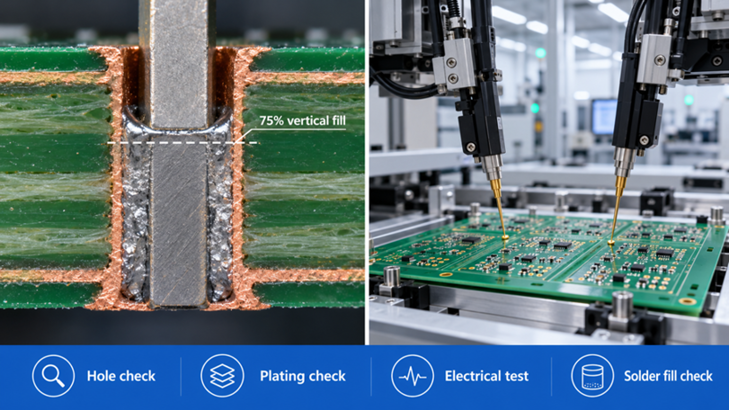
Figure 6: Inspection of a soldered PCB header joint with barrel fill measurement
- Hole check: finished holes are measured against the drill file.
- Plating check: cross-sections confirm barrel copper, with an average of at least 20 µm (0.8 mil) on boards ordered to IPC-6012 Class 2.
- Electrical test: a flying probe checks every net for opens and shorts.
- Solder fill check: each joint requires at least 75% vertical fill per IPC-A-610 Class 2 or 3, with a Class 2 exception for certain pins on heat-sinking planes.
- Seating check: the body sits flat, and the pins stand square.
JLCPCB electrically tests its double-sided and multilayer boards and its assembly service, wave or selective soldering of through-hole headers with SMT parts. Pick the stocked headers from the parts library, then order the assembly on the quote page so the headers arrive fitted.
FAQs About PCB Headers
Q: Can I plug a gold-plated header into a tin-plated socket?
It works at first, but connector makers advise against mating gold to tin. Small movements, called fretting, move tin onto the harder gold, where it oxidizes and contact resistance increases. Order both halves with the same plating.
Q: Are 2.5 mm and 2.54 mm pitch headers interchangeable?
Only over a few positions. A 2.5 mm (98 mil) part, such as a JST XH housing, is 0.04 mm (1.6 mil) shorter per position, so across 10 positions, the error amounts to 0.36 mm (14 mil). The end pins then bind, so match the pitch exactly.
Q: How do I cut a female socket strip to length?
Cut through the position next to the last one you need, because a socket strip has no break line. The cut destroys that contact, so budget one sacrificed position per cut. Then sand the cut end flat so the housing sits square.
Q: How do I keep a header straight while hand-soldering it?
Solder one end pin only, then check that the body sits flat and square. Reheating a single joint is easy, but straightening a soldered row is not. Plugging the header into its mating socket during soldering also holds the pins at pitch.
Q: Is it safe to unplug a powered board from a pin header?
Not without precautions, because a plain header has pins of equal length. Ground is not guaranteed to connect first, so a circuit can see supply through its I/O pins before ground arrives. For hot-plug use, choose a connector with a longer ground contact.
Conclusion
Choosing the right PCB header involves more than matching the number of pins and connector size. A PCB header provides both an electrical connection and mechanical support, making proper selection and installation essential for long-term reliability. Important factors include pin pitch, current-carrying capacity, hole dimensions, and solder joint quality.
As electronic devices become smaller, compact 1.27 mm pitch and surface-mount headers are increasingly used alongside traditional 2.54 mm connectors. However, their smaller dimensions require greater precision during PCB layout, manufacturing, and assembly. JLCPCB publishes hole tolerances and offers through-hole assembly services, helping designers manufacture reliable PCB header connections.
Popular Articles
• The Hardware Development Process: From Concept to a Finished Electronic Product
• Understanding the Basics of Electronic Devices and Circuits
• Understanding Digital Circuit Timing: Setup Time, Hold Time, Contamination Delay & Clock Skew
• PCBs Explained: A Simple Guide to Printed Circuit Boards
• Guide to the Top 10 Commonly Used Electronic Components
Keep Learning
Why PCB Headers Matter in Reliable Board Design
Key Takeaways Dual Function: Acts as electrical pin and mechanical anchor; exact hole sizing prevents joint strain. Pitch & Current: 2.54 mm pins carry ~3 A, while 1.27 mm pins handle ~1 A. Footprint Sizing: Size plated holes using pin diagonal dimensions (1.05–1.15 mm for 0.64 mm square pins). Smart Layout: Place ground pins next to signals for low noise and match cable pinout numbering. Assembly Rules: Use LCP for reflow and achieve $\ge$75% vertical solder barrel fill. A PCB header is usually the c......
The Hardware Development Process: From Concept to a Finished Electronic Product
Key Takeaways A structured hardware development process turns concepts into functional products through key development stages. Proper PCB design balances performance, manufacturability, and reliability. Early manufacturing considerations help reduce risks and improve prototype success. A reliable PCB partner enables smoother transitions from design to production. Every electronic device you have ever used began as a single idea. A desk lamp that brightens with a tap, a wireless earbud, a controller i......
A Beginner's Guide to Printed Circuit Board Repair: Common Issues, Methods, and Solutions
Key Takeaways Understand PCB structures, components, and common failure causes to identify repair challenges effectively. Follow a systematic PCB repair process, from fault diagnosis and component replacement to testing and verification. Know when PCB repair is practical and when remanufacturing a new PCB provides a more reliable solution. A printed circuit board (PCB) is a critical part of almost every electronic device. When a board fails, the problem may come from damaged components, broken copper ......
Demystifying Bare PCB Quality for Reliability-Critical Applications
Key Takeaways Early Defect Catching: Catching faults at the bare board stage costs only the PCB, avoiding wasted components and rework later. Perfboard Risks: Zero PCBs lack reference planes and plated holes, causing signal noise above 10–20 MHz and pad lifting. Critical Material Specs: Reliability depends on hole barrel copper (20–25 µm), Tg, Td, and CTI ratings matching your operating environment. Finish & Shelf Life: HASL and ENIG last ~12 months, while OSP and Immersion Silver/Tin expire in ~6 mon......
A Comprehensive Guide to Capacitor ESR: What It Is, Good Values, and How to Measure It
Key Takeaways Definition: Capacitor ESR (equivalent series resistance) is the single resistance that represents the losses inside a real capacitor, from its electrodes, terminations, electrolyte, and dielectric. Why It Matters: Ripple current flowing through the ESR produces a ripple-voltage step on the supply rail and I²R heating in the capacitor, which limits the capacitor's ripple-current rating and service life. Conditions Matter: ESR varies with frequency, temperature, capacitance, case size, and......
Understanding IPC-6012 Standards for High-Reliability Rigid PCB Fabrication
Key Takeaways IPC-6012 vs. IPC-A-600: IPC-6012 is the binding specification, while IPC-A-600 is only for visual reference. Class 2 vs. Class 3: Class 3 requires thicker copper (25μm vs. 20μm) and zero plating voids. Coupon Verification: Quality is tested by microsectioning panel coupons after thermal stress. Upfront Callout: Specify the class on drawings upfront; boards cannot be upgraded later. IPC-6012 is the line on your fabrication drawing that decides what your supplier is allowed to ship. Most d......