Solder Paste Printing Machine Guide: Selection, Settings & Stencil Optimization
15 min
- What a Solder Paste Printing Machine Does, and Where It Fits
- Types of Solder Paste Printing Machines
- How to Choose the Right Machine for Your Operation
- Critical Print Settings That Determine Quality
- How the Stencil Sets the Ceiling on Print Quality
- Why Choose JLCPCB for SMT Stencils
- Maintenance, Common Issues, and Machine Life
- FAQs About Solder Paste Printing Machines
- Conclusion: Choosing the Right Solder Paste Printing Machine
Key Takeaways at a Glance
- A solder paste printing machine forces paste through stencil apertures onto PCB pads, setting the volume and registration that every later stage depends on.
- Printing is where most SMT defects begin — industry studies commonly attribute more than half of assembly defects to the paste-print stage.
- Manual printers fit prototypes and low volume, semi-automatic suits mid-volume EMS work, and fully automatic inline systems handle continuous, high-throughput production.
- Typical industrial settings run a squeegee pressure of about 0.18–0.23 kg/cm, print speed of 20–100 mm/s, and separation speed of 1–3 mm/s.
- Automatic platforms reach roughly ±5 µm print repeatability with sub-10-second cycles.
- The stencil, not the machine, sets the ceiling on paste release and fine-pitch repeatability.
- JLCPCB laser-cuts 304 HTA stencils to ±0.003 mm with as fast as a 12-hour turnaround.
Every SMT line lives or dies at the print stage. Before a single component is placed, the solder paste printing machine has already fixed how much paste lands on each pad, how squarely it sits, and how repeatably that happens from panel to panel. Pick-and-place accuracy and reflow tuning cannot recover a bad print, which makes the printer one of the highest-leverage decisions on the line. This guide covers how to choose a machine, the settings that actually move yield, how the stencil sets the ceiling on print quality, and the maintenance that keeps output stable.
This guide focuses on decisions and operations: the machine types and how to choose between them, the process settings that determine print quality, how to pair the right stencil, and maintenance practice. It assumes you already understand the basic hardware.
If you are newer to stencil-printer hardware and want the fundamentals first — core components, operating principle, and machine anatomy — start with the JLCPCB primer, Understanding SMT Stencil Printers for Accurate PCB Solder Paste Printing, then come back here.
What a Solder Paste Printing Machine Does, and Where It Fits
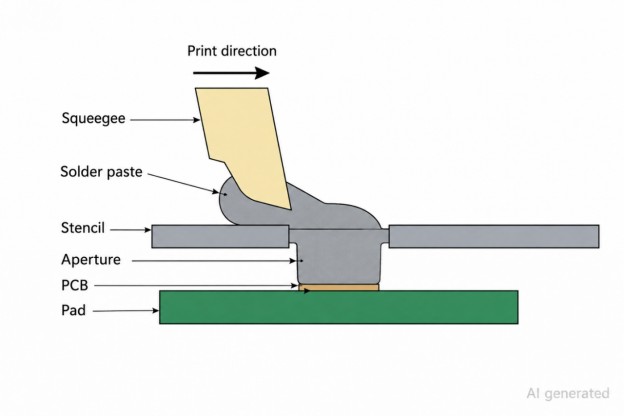
A solder paste printing machine transfers a controlled volume of paste through the openings in a stencil onto the pads of a bare PCB, after which the board moves on to placement, reflow, and inspection. It is the first active step in the SMT flow, and everything downstream inherits whatever it produces.
The machine’s real job is control over three things: paste thickness, deposit geometry, and positional registration. When any of them drift, the consequences surface later — misregistration pulls deposits off-pad, too much paste bridges adjacent terminals, and too little leaves starved joints that open up after reflow.
Because printing sits at the front of the line, its cycle time and stability also govern throughput; a fast placement machine still stalls if the printer is slow or inconsistent. That is why many lines run solder-paste inspection (SPI) immediately after printing, catching volume and registration errors before a single part is placed.
Types of Solder Paste Printing Machines
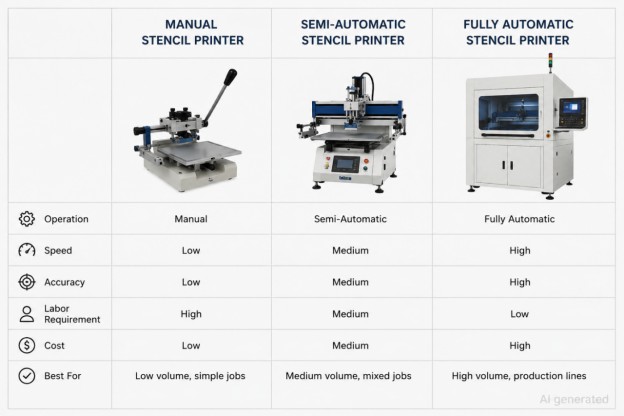
Solder paste printing machines are grouped by how much of the print cycle is automated, and the right class depends mainly on your production volume and the pitch density you need to hold. The table below summarizes where each type fits before we look at them individually.
| Type | Typical price | Monthly volume | Alignment | Repeatability | Best for |
|---|---|---|---|---|---|
| Manual | Under $5,000 | Below ~100 boards | Operator / mechanical | Operator-dependent | Prototypes, labs, R&D |
| Semi-automatic | ~$5,000–30,000 | ~100–1,000 boards | Pneumatic + optional vision | Moderate | Small to mid-size EMS, mixed work |
| Fully automatic (inline) | $30,000 to several hundred thousand | 1,000+ boards | Machine vision | ~±5 µm | High-volume continuous lines |
Manual Solder Paste Printing Machines
A manual printer relies on a mechanical stencil holder and an operator-driven squeegee. These bench-top units dominate prototype labs and university benches because they cost little — usually under $5,000 — need almost no infrastructure, and set up in minutes. The trade-off is repeatability: the operator sets pressure, alignment, and speed by hand, so fine-pitch work below 0.5 mm becomes hard to hold consistently. For experimental revisions and small validation batches, that flexibility is often worth more than precision.
Semi-Automatic Solder Paste Printing Machines
Semi-automatic systems keep manual board loading but add pneumatic print control, and often optional vision alignment, which steadies pressure across the stencil and tightens registration on medium-density boards. Pricing typically runs $5,000–30,000. EMS shops building roughly 100–1,000 boards a month gravitate here: the footprint stays small, maintenance stays simple, and vision-assisted alignment is usually enough for QFN and fine-pitch parts.
Fully Automatic Solder Paste Printing Machines
A fully automatic printer adds conveyor transport, programmable parameters, and machine-vision alignment for continuous, hands-off flow. Industrial units start around $30,000 and can reach several hundred thousand. In return they deliver roughly ±5 µm repeatability, sub-10-second cycles, and often an integrated SPI module that monitors every print in real time. Changeovers need trained staff and process verification, but for continuous throughput the reduced operator dependency pays for itself.
Inline vs. Stand-Alone Configurations
The last distinction is integration. Inline printers connect directly to conveyorized placement and reflow, so panels move automatically between stages — the norm in high-throughput plants. Stand-alone printers sit beside the line and rely on operators to move boards between stations; they cost less and suit prototype and low-volume work.
How to Choose the Right Machine for Your Operation
Choosing a printer comes down to matching machine class to how much you build and how demanding your boards are. Get it wrong in either direction and you pay for it: undersized equipment forces manual workarounds and print variation, while oversized equipment ties up capital and maintenance you never use.
Match the Machine to Production Volume
Production scale is the first filter. Below about 100 boards a month, a manual printer is usually enough. Between 100 and 1,000, semi-automatic equipment earns its keep. Sustained high volume needs automatic, inline infrastructure. Because printers are long-term capital, size them against a realistic production forecast rather than today's peak.
Match the Machine to Board Complexity
Board geometry is the second filter. Fine-pitch BGAs and dense placements need optical alignment and stable stencil registration to hold position, while larger-pitch QFN and 0402 work tolerates mechanical alignment. Prototype labs often value flexibility over speed and can stay with simpler equipment even for demanding boards, as long as the operator compensates.
Key Specifications to Compare
When comparing models, weigh print area (your maximum board size), repeatability (alignment precision over many cycles), and cycle time (its ceiling on throughput). Squeegee type matters too: metal blades hold pressure evenly across fine-pitch apertures, while polyurethane suits coarser work. If yield visibility is a priority, look for built-in or inline SPI, which flags insufficient paste and bridging before placement begins.
Total Cost of Ownership Extends Beyond the Sticker Price
Finally, look past the purchase price. Stencils, cleaning chemistry, squeegee replacement, calibration, and downtime all add up over a machine’s life, and stencil-related yield loss is the line item procurement most often underestimates — a cheap stencil with a rough finish can cost more in cleaning and rejects than it ever saved. Evaluate the machine and its stencil supply together, not in isolation.
Critical Print Settings That Determine Quality
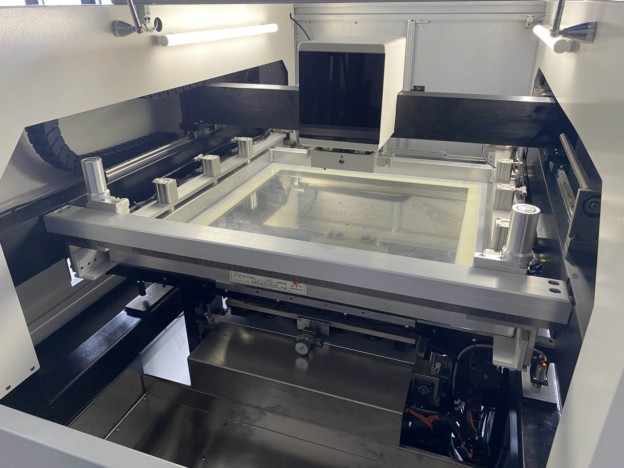
Once the machine is chosen, day-to-day print quality lives in a handful of parameters. Each one shifts paste volume, aperture fill, and transfer efficiency, and they interact — change one and you usually have to revalidate the others.
Squeegee Pressure, Speed, and Angle
Squeegee pressure controls how completely paste fills the apertures. Too little leaves them under-filled; too much scrapes paste under the stencil and wears the surface. Most industrial printing sits around 0.18–0.23 kg/cm, with print speed between 20 and 100 mm/s and slower passes reserved for fine-pitch lead-free paste. Blade angle changes how the paste rolls ahead of the squeegee, and lower angles push more paste downward into the apertures.
Print Gap, Separation Speed, and Snap-Off
Fine-pitch work almost always uses contact (zero-gap) printing, which fills apertures more stably for lead-free paste. What matters most is separation speed — how quickly the stencil lifts away — usually held between 1 and 3 mm/s. Lift too fast and paste smears under the stencil and loses edge definition; older machines may also need snap-off tuning under high foil tension.
Vision Alignment and Fiducial Recognition
On dense boards, machine vision reads the fiducials before each print to lock in registration, and higher-resolution cameras noticeably improve BGA positioning. At 0.4 mm BGA pitch, even a small alignment error is enough to ruin joint geometry after reflow, so contaminated or low-contrast fiducials are a real yield risk — keep them clean and recalibrate on schedule.
Under-Stencil Wiping Cycle
The stencil underside collects flux and paste and has to be wiped clean on a cycle, typically a dry-then-wet vacuum sequence. Fine-pitch production may need a wipe every 5–10 prints, while coarser work tolerates longer gaps. IPA or a dedicated cleaner clears the residue that otherwise causes bridging and smearing, and nano-coated stencils meaningfully stretch the interval between wipes.
Paste Working Life and Replenishment
Lead-free paste degrades while it sits on the stencil: viscosity drifts, apertures start to clog, and deposits fall short. Working life is usually four to eight hours, so lines set fixed kneading and replenishment intervals. Ambient temperature and humidity shift paste rheology as well, which is why print behavior can change across shifts unless the environment is controlled.
How the Stencil Sets the Ceiling on Print Quality
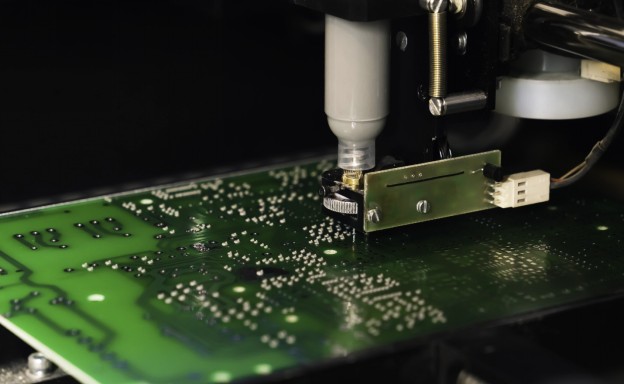
A printer can only be as good as the stencil it drives. The machine controls motion and parameters; the stencil decides paste volume, deposit shape, and how cleanly paste releases from each aperture. This is the single biggest reason two shops with identical printers get different yields — and why over-investing in the machine while cutting corners on the stencil is a false economy.
Three stencil properties do the work. Foil thickness sets the solder volume per pad, aperture geometry sets the deposit’s shape and edge definition, and aperture-wall finish governs release. Rough walls trap paste on the downstroke, so the deposit comes up short no matter how precise the machine is, and poor foil flatness compounds the problem by breaking clean contact with the board. None of these can be dialed back in through machine calibration.
For automatic lines the bar is higher still. Flatness and foil tension have to stay stable through thousands of squeegee passes, or apertures drift out of position as cycles compound below the ten-second mark. That is why industrial stencils are typically 304 HTA stainless, laser-cut for tight aperture geometry, and often electropolished or nano-coated to smooth the walls and cut paste adhesion during continuous runs. The practical takeaway is simple: specify the stencil with the same rigor you apply to the machine, because on fine-pitch boards aperture finish and flatness are what separate a print that passes SPI from one that quietly fails in solder-joint reliability. Our guide on how to choose a solder paste stencil walks through thickness, finish, and area ratio in detail.
Why Choose JLCPCB for SMT Stencils
If the stencil sets the ceiling, sourcing it well matters as much as buying the right machine. JLCPCB builds its stencil service around how modern lines actually run — fast, low-commitment, and precise enough for automatic equipment.
- Procurement without friction: from $3 per stencil, a one-piece minimum, instant online quoting on file upload, and as fast as a 12-hour turnaround shipped to 180+ countries — so a worn or revised stencil is a next-day swap, not a multi-week scramble.
- Precision automatic printers demand: 304 HTA stainless laser-cut to ±0.003 mm, with the flatness and tension stability high-speed inline printing needs.
- Options for real production: framed or frameless, electropolishing, nano-coating, step stencils for mixed-thickness boards, SMD glue stencils, and half-etched fiducials.
- Engineering built in: a design-for-manufacturing check flags area-ratio and fine-pitch risks against IPC guidance before the stencil is cut — corrections that take minutes instead of costing scrapped boards later.
Choose from Framed/Frameless, Electropolishing, Nano-coating, Step-Stencils, SMD Glue Stencil and more. Starting at $3. No MOQ. 12-Hour production.
Get $11 Coupon Now >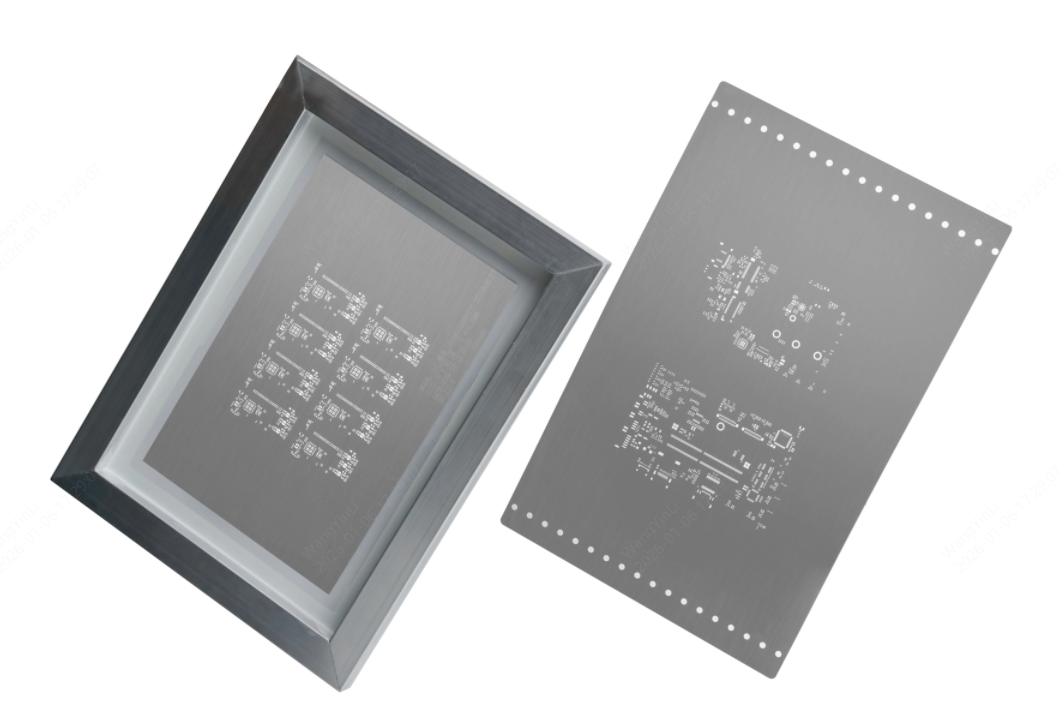
Maintenance, Common Issues, and Machine Life
A printer holds its accuracy only with disciplined upkeep. Wear in the squeegee, apertures, and alignment modules slowly widens print deviation, and contamination quietly changes paste transfer, so a simple maintenance rhythm prevents most unplanned downtime.
Daily, Weekly, and Monthly Routine
Daily work is light — wipe down the machine, check the paste level, and inspect the squeegee. Weekly, clean the stencil underside and check the sensors. Monthly, verify conveyor alignment and recalibrate the optics. The point of the schedule is to catch mechanical wear and contamination before they turn into positional drift and inconsistent deposits. Stencil quality feeds directly into this workload, too: rough or contaminated foils force more frequent under-stencil wiping, while electropolished or nano-coated stencils stretch cleaning intervals and lift effective cycle time.
Common Operational Issues and Quick Diagnostics
Most print problems trace back to a short list of causes:
- Misregistration usually means fiducial-recognition errors or contaminated optics.
- Inconsistent print volume points to worn squeegees or aged paste.
- Paste smearing under the stencil is typically separation speed set too high.
- Squeegee chatter signals blade wear or unstable pressure.
- Uneven deposition across a panel often comes from poor stencil flatness.
Logging these against the process makes root-cause analysis far quicker when a defect repeats, and good maintenance records steadily improve long-term equipment reliability. For a deeper look at diagnosing print issues, see our solder paste printing defects guide.
FAQs About Solder Paste Printing Machines
How much does a solder paste printing machine cost?
It spans a wide range. Manual bench-top printers generally run under $5,000, semi-automatic systems fall between roughly $5,000 and $30,000, and fully automatic inline machines start around $30,000 and can reach several hundred thousand for high-speed industrial lines. Match the tier to your monthly volume rather than buying on price alone.
What is the difference between screen printing and stencil printing?
In SMT the terms are often used loosely, but they are not identical. Screen printing pushes paste through a woven mesh screen and suits coarser deposits, while stencil printing uses a laser-cut metal foil with precise apertures and is the standard for fine-pitch SMT because it controls paste volume and edge definition far better. In practice, modern solder paste printing machines are stencil printers.
Can a manual solder paste printer handle BGA or fine-pitch boards?
It can, within limits. Manual printers can print larger-pitch BGAs and QFNs for prototypes, but holding registration at 0.4 mm pitch and below is difficult by hand, and repeatability suffers across a batch. For consistent fine-pitch results, a vision-assisted semi-automatic or automatic printer is the safer choice.
How often should SPI be used?
For fine-pitch and high-density production, run solder-paste inspection on every board, or at a high sampling rate, so volume and registration errors are caught before placement. Lower-risk, coarse-pitch runs can sample less frequently. Inline SPI earns its place most clearly on high-speed automatic lines, where a drifting print compounds quickly.
Which squeegee material fits fine-pitch SMT production?
Metal blades hold pressure evenly across fine-pitch and high-density apertures and give stable edge definition, so they are preferred for fine-pitch BGA work. Polyurethane blades are fine for coarser-pitch production with lower precision demands.
How often does a solder paste stencil need replacing?
It depends on print volume, cleaning intensity, and surface treatment. A well-handled framed industrial stencil often lasts many thousands of cycles; aperture wear, foil deformation, or lost flatness are the signals that it has reached end of life.
Conclusion: Choosing the Right Solder Paste Printing Machine
The solder paste printing machine sets the starting condition for everything that follows in SMT, so choose it around throughput, board density, and process complexity rather than price. Manual printers stay practical for prototypes and low volume, while automatic inline systems win on repeatability and speed once volume climbs. Whatever the tier, remember that the stencil sets the ceiling on what the machine can achieve — pairing a capable printer with a precise, well-finished stencil is what turns stable settings into stable yield.
When you need that stencil, JLCPCB manufactures prototype-to-production foils with instant online quoting and as fast as a 12-hour turnaround. Full specifications and stencil options remain available through the JLCPCB stencil product page.
Keep Learning
Low-Temperature Solder Paste: A Practical Sn-Bi Guide
Key Takeaways Sn42Bi58 is the mainstream low-temp alloy and melts at 138 C. Typical reflow peak is 165 to 180 C, about 25 to 30 C above the melt. It protects heat-sensitive components and reduces warpage on large, thin boards. It enables step soldering, because 165 to 180 C will not remelt SAC305 joints. Bismuth joints are more brittle than SAC305, so avoid drop-critical products. Never mix Sn-Bi with leaded (Sn-Pb) solder. Bi, Sn and Pb form a ternary eutectic that melts near 95 C. Some parts and som......
Pin-in-Paste: Through-Hole Reflow With a Stencil
Key Takeaways One Reflow Process: Pin-in-paste combines SMT and through-hole soldering into a single reflow pass, eliminating the need for separate wave, selective, or hand-soldering steps when the board has only a few through-hole components. Paste Volume Is Critical: Solder paste is roughly 50% flux by volume, so you need to print about twice the solder volume the finished joint requires. Stencil design—overprint apertures and step-up zones—makes or breaks the process. Target 75% Barrel Fill: Per IP......
Mixed Technology PCB Assembly: Combining SMT and THT on One Board
As technologies become increasingly more complex, the demand for sophisticated printed circuit boards continues to rise. In the electronics industry, the two most prevalent PCB Assembly technologies are SMT and THT, which differ mainly in the manner at which the components are attached. SMT places the components on the surface of the board whereas THT makes use of drilled holes to solder components. While these technologies individually cater to specific applications, advancements in the electronics i......
Moisture Sensitivity Level (MSL): Baking Guide
Key Takeaways Moisture Sensitivity Level (MSL) is a 1-6 classification under IPC/JEDEC J-STD-020 that indicates how quickly a non-hermetic surface-mount package can absorb enough moisture to become vulnerable during reflow. MSL 1 has unlimited floor life at its reference condition, while MSL 6 requires baking before use and reflow within the time printed on the caution label. The floor-life clock begins when the moisture barrier bag is opened and exposure to factory air starts. Baking according to IPC......
Understanding SMT Stencil Printers for Accurate PCB Solder Paste Printing
Stencil printing is a critical process in SMT (Surface Mount Technology) assembly, significantly impacting the quality and reliability of solder joints on PCBs. The crucial machine for implementing this is the SMT Stencil Printer, which applies an appropriate measure of solder paste to each pad of the PCB board before it goes to the placement of components. For those of you looking to work out what a stencil printer is and why it matters in manufacturing, you've come to the right place. This is the ba......
Surface Mount Stencil: A Practical Guide for SMT Printing and Solder Paste Application
It starts with a slim piece of metal, slipped in early during assembly. Before any part lands in place, before heat ever touches the board, that layer shapes the flow. Where the paste spreads comes down to its design. How thick it is, how it's cut - those details decide what sticks and what washes away. For engineers looking for reliable stencils, JLCPCB provides high-precision SMT stencils that integrate seamlessly with PCB production workflows. Down goes solder paste, slipping through narrow cuts in......