Turn Your Raspberry Pi Pico into a Professional JTAG Programmer with DirtyJTAG & OpenFPGALoader
5 min
- Project Overview
- Why OpenFPGALoader + DirtyJTAG Wins
- How It Works: Pico as DirtyJTAG Adapter
- Step-by-Step Setup on Windows (Exact Commands from the Project)
- Custom FPGA Board + JLCPCB PCBA
- Real-World Testing: Two Lattice ECP5 Demos
- Real-World Testing: Two Lattice ECP5 Demos
- How to Build Your Own Pico JTAG Programmer + Custom FPGA Board
- Final Thoughts
- FAQs
In the world of FPGA development, having a reliable, low-cost JTAG programmer used to mean either buying expensive vendor cables or adding high-cost FTDI chips to every board. Maker Khaled Magdy changed that by turning a $4 Raspberry Pi Pico into a fully functional JTAG adapter using DirtyJTAG firmware and OpenFPGALoader — then had his custom FPGA boards professionally assembled by JLCPCB.
The entire solution is 100% open-source. You can download the firmware, follow the Windows installation steps, and order your own custom FPGA PCBs with JLCPCB PCBA in minutes.
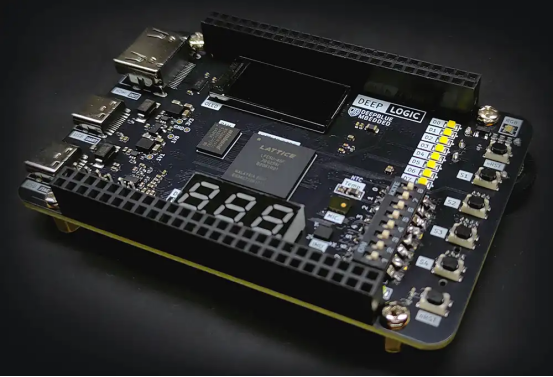
Project Overview
This setup lets you program almost any FPGA (Lattice ECP5, iCE40, Artix-7, Gowin, Efinix, and more) using a single $4 Pi Pico as your JTAG cable. No more carrying multiple vendor programmers. The same USB port even provides UART debugging.
Author Khaled Magdy explains: “I’ve been using FTDI solutions for years. Recently I decided to give open-source a try — and the cost savings plus universal support made it an easy choice for all my future custom FPGA designs.”
Why OpenFPGALoader + DirtyJTAG Wins
· Cost Optimization: Replace a $9 FTDI chip with a $1 MCU. Same USB-JTAG + USB-UART functionality.
· Universal Support: Works with Xilinx, Altera, Lattice, Gowin, Efinix and more.
· Open-Source Toolchain Friendly: Perfect with Yosys/nextpnr — no vendor tools required.
How It Works: Pico as DirtyJTAG Adapter
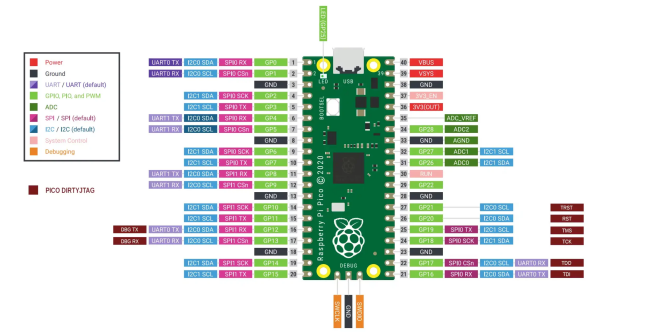
The Pico-DirtyJTAG firmware uses the RP2040’s PIO to emulate a full JTAG interface. Default pinout is simple:
| Signal | GPIO | Pico Pin |
| TDI | 16 | 21 |
| TDO | 17 | 22 |
| TCK | 18 | 24 |
| TMS | 19 | 25 |
| RST | 20 | 26 |
| TRST | 21 | 27 |
Flash the UF2 file once, install the WinUSB driver with Zadig, and you’re ready.
Step-by-Step Setup on Windows (Exact Commands from the Project)
1. Download & build Pico-DirtyJTAG in VS Code → flash UF2 to Pico.
2. Install MSYS2.
3. Run: pacman -S mingw-w64-ucrt-x86_64-openFPGALoader
4. Open MSYS2 UCRT64 terminal and verify: openFPGALoader -V
5. Use Zadig to switch Pico to WinUSB driver.
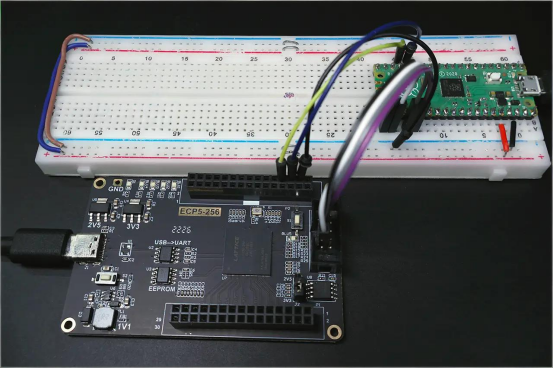
6. Connect JTAG pins to your FPGA.
7. Detect: openFPGALoader -c dirtyJtag --detect
Load bitstream to SRAM:
openFPGALoader -c dirtyjtag --bitstream MyDesign.bitFlash to external SPI FLASH:
openFPGALoader -c dirtyjtag -f MyDesign.bit --write-flash
Custom FPGA Board + JLCPCB PCBA
Khaled designed a full custom Lattice ECP5 board and used JLCPCB for fabrication and assembly. The process was exactly the same as any JLCPCB project:
1. Upload Gerber files and choose 2-layer options.
2. Upload BOM + CPL files — JLCPCB auto-matches components from its library.
3. Review 3D preview and place the order (use coupon for extra savings).
4. Boards arrived in days, fully assembled and ready for testing.
“JLCPCB made professional-grade FPGA hardware accessible and affordable,” Khaled noted. “The quality exceeded expectations — perfect for integrating my new DirtyJTAG solution.”
Real-World Testing: Two Lattice ECP5 Demos
GPIO Demo: Button controls one LED, others stay OFF after power cycle — bitstream loaded permanently to SPI FLASH via OpenFPGALoader.
UART Demo: Loopback test between FPGA and Pico (USB CDC) — proves both JTAG programming and serial debugging work on the same USB port.Both demos ran flawlessly after JLCPCB assembly.
“JLCPCB made professional-grade FPGA hardware accessible and affordable,” Khaled noted. “The quality exceeded expectations — perfect for integrating my new DirtyJTAG solution.”
Real-World Testing: Two Lattice ECP5 Demos
GPIO Demo: Button controls one LED, others stay OFF after power cycle — bitstream loaded permanently to SPI FLASH via OpenFPGALoader.
UART Demo: Loopback test between FPGA and Pico (USB CDC) — proves both JTAG programming and serial debugging work on the same USB port.Both demos ran flawlessly after JLCPCB assembly.
How to Build Your Own Pico JTAG Programmer + Custom FPGA Board
Download Pico-DirtyJTAG and OpenFPGALoader from GitHub.
Flash firmware to any Pi Pico.
Follow the Windows steps above (5 minutes).
Design your FPGA PCB in KiCad or Lattice Diamond.
Upload Gerber/BOM/CPL to jlcpcb.com → enable PCBA.
Receive factory-assembled boards and start programming instantly!
Project Specifications
· Programmer: Raspberry Pi Pico (RP2040) + DirtyJTAG firmware
· Tool: OpenFPGALoader (supports 20+ FPGA families)
· Cost: ~$4 total for JTAG cable
· Features: SRAM + SPI FLASH programming, USB-UART bridge
· Compatible FPGAs: Lattice ECP5, iCE40, Artix-7, Gowin, etc.
· License: Fully open-source
Final Thoughts
This project proves that professional FPGA development no longer needs expensive tools. With a $4 Pico, open-source software, and JLCPCB’s reliable PCBA service, anyone can build and program custom FPGA hardware at hobbyist prices.
Whether you’re creating your first FPGA board or scaling to production, this combination is the perfect starting point.
Ready to build your next FPGA project?
Get an instant quote for PCB + PCBA at JLCPCB today!
All files are free to download and use. Go create something amazing — you can do it
FAQs
Q1: Why use DirtyJTAG instead of FTDI?
Saves ~$8 per board while providing the same JTAG + UART functionality on one USB port.
Q2: Which FPGAs are supported?
Lattice ECP5, iCE40, Xilinx Artix-7/Spartan, Gowin, Efinix and many more — full list in OpenFPGALoader wiki.
Q3: Can I flash bitstream to external SPI FLASH?
Yes! Use openFPGALoader -c dirtyjtag -f file.bit --write-flash.
Q4: Is the firmware open-source and free?
100% — both Pico-DirtyJTAG and OpenFPGALoader are open-source with complete GitHub repos.
Popular Articles
• PiBrick Pocket-CM5: A Compact Raspberry Pi CM5 Handheld PC Built with JLCPCB
• From Membrane Frustration to Custom Mechanical Mastery: Taifur's V3 Full Keyboard Project
• Turn Your Raspberry Pi Pico into a Professional JTAG Programmer with DirtyJTAG & OpenFPGALoader
• Premium Portable Speaker Built with 8-Layer PCBs, DSP & Smart Amps
• ESP32 Smart Control Board for Realistic RC Model Automation
Keep Learning
Athena: Building a High-Performance 6-Layer PCB for Rocket Avionics
Key Takeaways Athena is an open-source flight computer with a triple-MCU architecture, redundant sensors, and multiple communication interfaces on a compact 6-layer PCB. The 80 × 140 mm board integrates three STM32 MCUs, three IMUs, barometers, GNSS, LoRa, Bluetooth, CAN, USB, flash storage, SD card, and power management. The 6-layer PCB provides routing capacity, organized power distribution, signal organization, and compact functional integration for this complex design. The project demonstrates how......
PiBrick Pocket-CM5: A Compact Raspberry Pi CM5 Handheld PC Built with JLCPCB
Key Takeaways The piBrick Pocket-CM5 is a fully functional, smartphone-sized Raspberry Pi CM5 handheld PC with a physical QWERTY keyboard, AMOLED display, and M.2 NVMe SSD The project utilizes JLCPCB's 4-layer PCB fabrication with controlled impedance (90-ohm for USB, 100-ohm for PCIe/MIPI DSI) to maintain signal integrity Designed using EasyEDA and fabricated by JLCPCB, the project was submitted to the EasyEDA Spark program, successfully securing parts and materials sponsorship for its development. J......
Designing a Precision 72-LED Wearable Watch: Building a 40mm Round PCB with JLCPCB SMT Assembly
Key Takeaways This case study explores the design and fabrication of a 72-LED wearable watch built on a precision 40mm round PCB. Learn how JLCPCB SMT assembly eliminated hand-soldering 70+ 0603 LEDs, how ENIG surface finish ensures reliability in wearable applications, and how a clever panelization strategy with mouse-bite breakaway tabs enabled automated assembly of a circular board. The project demonstrates a complete workflow from EasyEDA schematic capture to firmware optimization and commercial-g......
From Membrane Frustration to Custom Mechanical Mastery: Taifur's V3 Full Keyboard Project
Note Motivation: Replaced a dust-prone membrane keyboard with a durable, custom DIY alternative. Specs: 87-key TKL layout powered by Raspberry Pi Pico (RP2040), featuring hot-swap support, QMK, OLED, and an encoder. Design: A unique 3-layer PCB stack featuring symmetrical routing, an exposed controller, and visible "diode art". Support: Designed using EasyEDA and fabricated by JLCPcB, the project was submitted to the EasyEDA Spark program successfully securing parts and materials sponsorship for its d......
ESP32 Smart Control Board for Realistic RC Model Automation
Key Takeaways This project demonstrates how a well-designed custom PCB, manufactured and assembled through JLCPCB, can democratize advanced electronics for hobbyists. Key lessons include: Prioritizing compact, high-density layouts while respecting DFM rules. Leveraging professional SMT assembly for complex boards. Designing with clear labeling and modularity for user-friendliness. Choosing a manufacturing partner whose capabilities match your project's needs for consistent results. Project Overview: B......
Premium Portable Speaker Built with 8-Layer PCBs, DSP & Smart Amps
Project Background and Introduction When you unbox a beautifully crafted portable speaker that delivers rich, room-filling sound with crisp highs, deep bass, and intelligent audio processing, it’s easy to imagine it came from a big-name factory. But behind this elegant Harman/Kardon-inspired design lies the story of an innovative maker who turned a personal passion project into a fully functional, high-performance audio system—entirely prototyped and produced with JLCPCB’s PCB and PCBA services. This ......