How to Reduce Prototype PCB Assembly Cost (With Real Quotes)
18 min
- Choose Parts Your Assembler Already Stocks
- Reduce Unique Part Numbers, Not Just Part Count
- Check Which Assembly Tier Your Design Needs
- Keep the Board Single-Sided and All-SMT
- Check Your Files Before You Order
- Match Quantity and Panelization to Prototype Volume
- Cost Traps After You Submit
- FAQs
- Before You Order: A Checklist
Key takeaways
- Use parts your assembler already stocks wherever the design allows.
- Cut the number of unique part numbers. Loading fees are charged per BOM line.
- Check whether any design choice pushes the order into a more expensive assembly tier.
- Keep the board single-sided where you can. A through-hole connector adds only a few dollars.
- Before panelizing, check what the panel type does to the rest of the order.
- Freeze the Gerbers before you submit. After you order, any file change creates a new order, and none is possible once the PCB is in production.
Two assembled boards of the open-source design we use as a test board in this guide cost about $140 each. Fifty cost $37 each. Most of that gap comes from one number: $167 of fixed cost that the order pays once, whether it’s for 2 boards or 50. It covers PCB engineering, machine setup, the solder paste stencil, and a loading charge for each unique part that wasn’t already on the machines. The loading charges alone came to $132 for 43 parts.
That means prototype PCB assembly cost is largely decided before you reach the order page, when you choose parts during schematic capture and decide in layout what goes where.
The PCBA cost logic below applies to most assembly services. The examples use JLCPCB’s published fees and real quotes. Fees elsewhere will differ, but the trade-offs work the same way. For a line-by-line explanation of each fee, see our PCBA cost breakdown.
Our test board is piBrick Pocket-CM5 by Ahmad Amarullah, an open-source, smartphone-sized handheld computer published on OSHWLab. It’s single-sided and all-SMT, and you can run the same project through the quote page yourself.
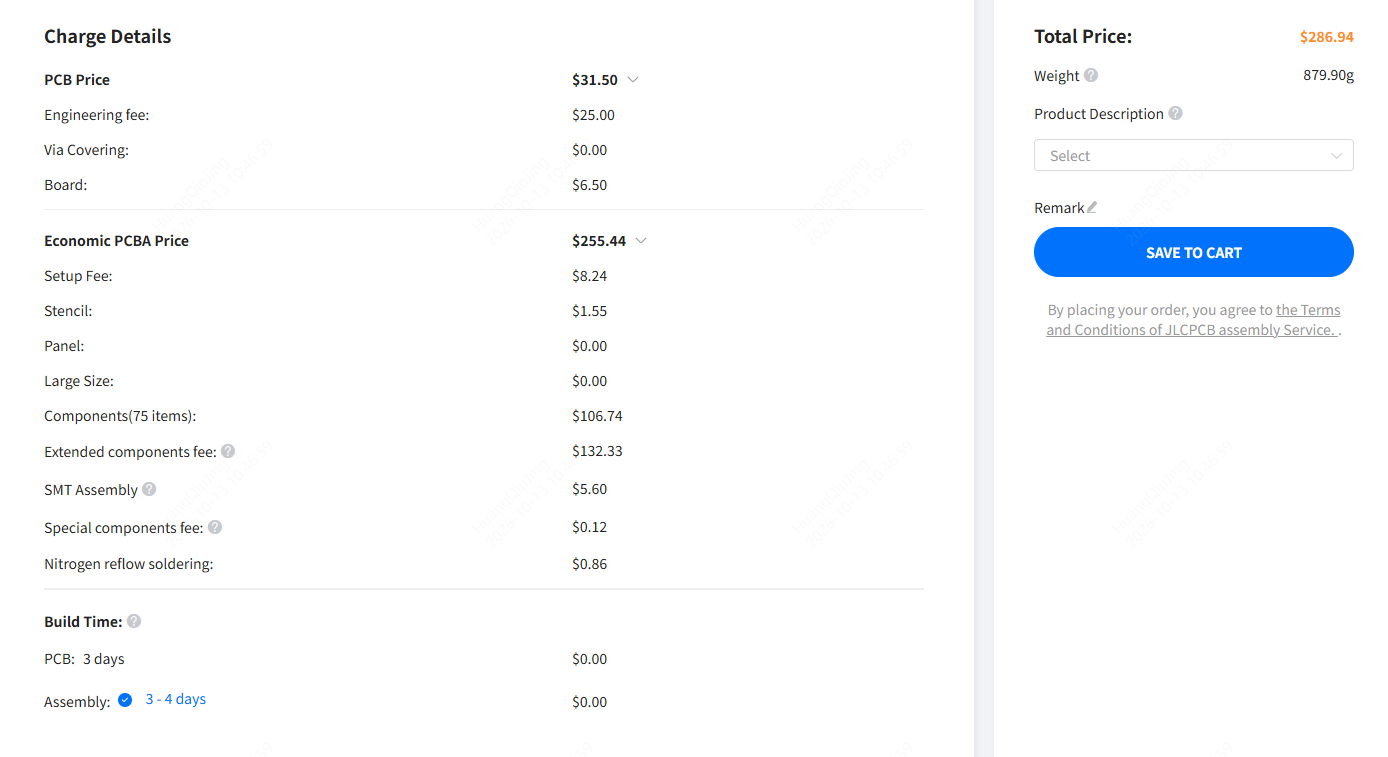
Figure: Price breakdown of a two-board Economic PCBA order for the test board, quoted October 13, 2026
Choose Parts Your Assembler Already Stocks
Most assembly services keep a library of common parts on their pick-and-place machines, mostly passives, diodes, and small transistors. Anything outside that library has to be loaded onto a feeder for your job, and the loading charge is normally per unique part number. On the test board, 43 of the 75 BOM lines carried that charge. Parts the assembler doesn't stock at all also have to be bought in, which adds cost and lead time (covered further down).
On JLCPCB, the stocked set is the Basic parts library, and everything else is an Extended part. With Economic PCBA, Basic parts load free, and so do Preferred Extended parts , a group of former Basic parts that are now loaded by hand like other Extended parts. Every other unique Extended part carries a $3.07 loading fee. Standard PCBA charges a loading fee on every unique part, Basic or Extended.
The charge applies per part number, per order, regardless of quantity. On the test board’s Economic order, those 43 parts added $132.01, more than sixteen times the setup fee, and the same amount again on the next revision.
The cheapest time to act is during schematic capture. Once footprints are placed and routed, swapping a part means reworking the layout, so non-stocked parts tend to stay. EasyEDA shows the JLCPCB library type as you place parts. With other EDA tools, keep the parts library open alongside the schematic.
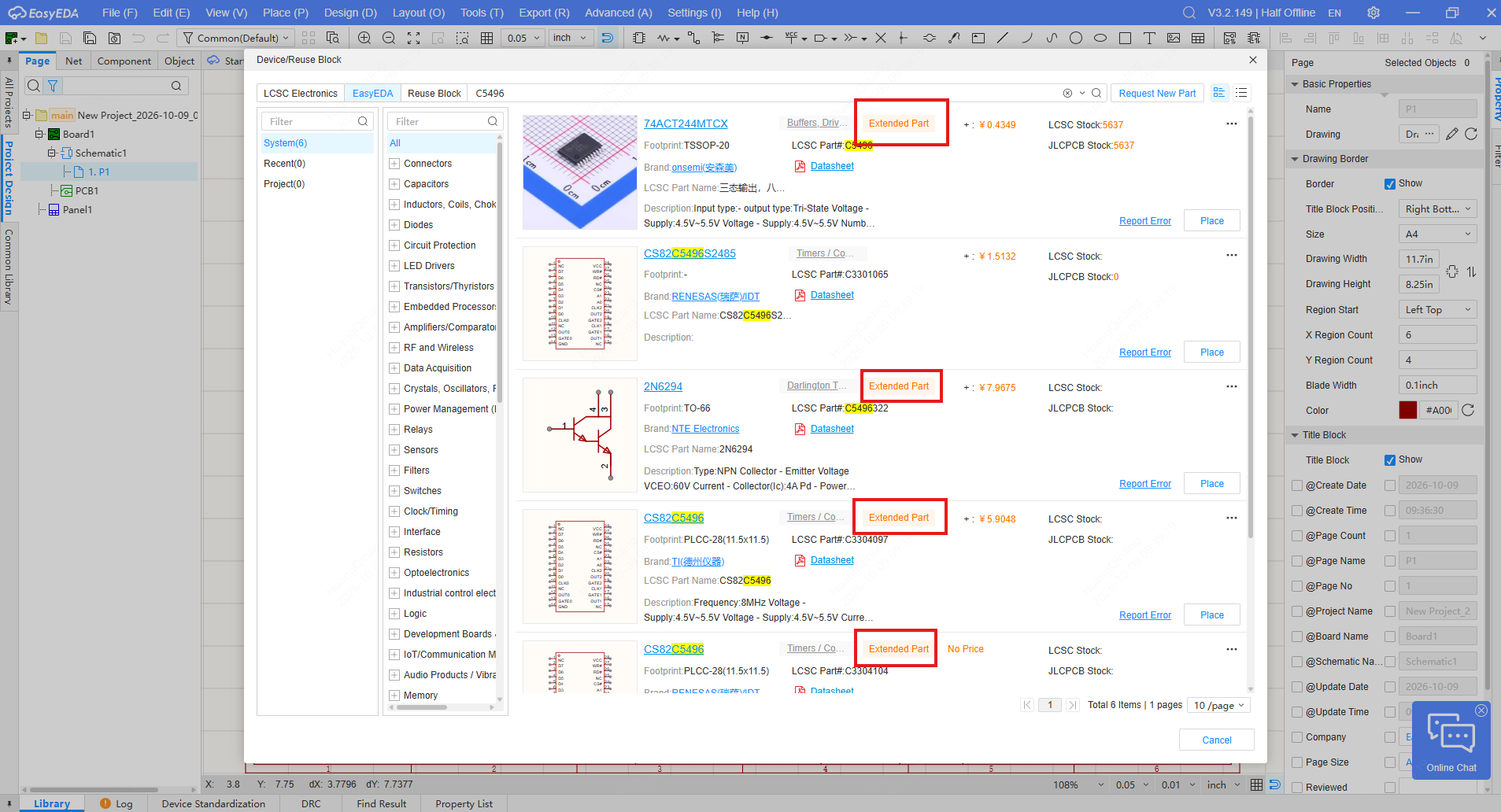
Figure: EasyEDA's part search marks each JLCPCB part as Basic or Extended
Package choice often decides it. A value stocked as a Basic part in 0402 or 0603 may not be stocked in 0201. A single 0201 part also takes a JLCPCB order out of Economic PCBA, which supports 0402 and larger.
For example, a 10 kΩ resistor is a Basic part in 0402 (C25744) and 0603 (C25804), but the 0201 version (C4332048) is an Extended part and is listed for Standard PCBA only.
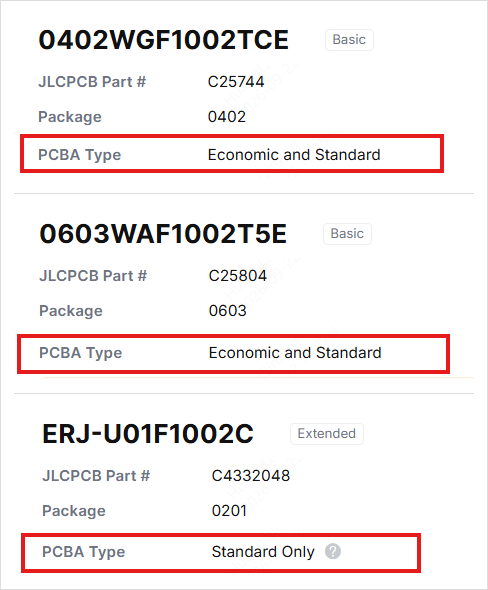
Figure: The same 10 kΩ resistor in three packages. C25744 (0402) and C25804 (0603) are Basic parts available for Economic and Standard PCBA; C4332048 (0201) is an Extended part for Standard PCBA only
Your MCU, sensor, or PMIC usually won’t be a stocked part, and there’s no way around that. Resistors and capacitors usually can be.
Reduce Unique Part Numbers, Not Just Part Count
Because loading is charged per part number, three different non-stocked capacitors cost more to set up than thirty of the same one. At prototype volume, BOM line count drives setup cost far more than component count. Which lines matter depends on the tier: on Economic PCBA, only Extended lines carry a fee, while on Standard PCBA, every line does.
Decoupling is the first place to look: 100 nF parts from two different manufacturers, or a 220 nF on a supply pin where the datasheet only asks for 100 nF. Pull-ups and pull-downs on enable and GPIO lines rarely care whether they're 4.7 kΩ or 10 kΩ; I²C pull-ups and reset delay circuits are the exceptions. LED current-limiting resistors can usually share one value. If the design mixes 1% and 5% resistors of the same value, using the 1% part throughout removes a line, provided the 1% part is also stocked.
Leave calculated values alone: regulator feedback dividers, filter and timing components, current-sense resistors. Consolidate the rest, the values someone picked out of habit. Fewer lines also mean fewer chances of a stock shortage, a substitution query, or a BOM/CPL mismatch.
Check Which Assembly Tier Your Design Needs
Where an assembler offers a low-cost tier for simple prototypes, the tier your design falls into can outweigh every other fee on a small order.
JLCPCB offers Economic PCBA and Standard PCBA. Their fixed costs compare as follows:
| Fee | Economic PCBA | Standard PCBA |
|---|---|---|
| Setup | $8.18 | $25.56 single-sided, $51.12 double-sided |
| Stencil | $1.53 | $8.21 single-sided, $16.42 double-sided |
| Handling | None | Only when the design also qualifies for Economic (see below) |
| Feeder loading | $3.07 per unique Extended part (Basic and Preferred Extended parts are free) | $1.53 per unique part, Basic or Extended |
| Build time | 1–3 days | 4 days or more |
Prices from JLCPCB's PCBA pricing page on October 9, 2026, and build times from its PCBA capabilities page. Prices vary slightly with exchange rates. The quote page shows the actual build time for each order: our test board quoted 3–4 days on both Economic and Standard, with a paid 2–3 day option on Standard.
The handling fee means Standard never comes out cheaper than Economic on the same design. When an order qualifies for both tiers, the Standard total has to be at least $14.93 higher; if it isn’t, the shortfall is added as a handling fee. Standard can only cost less when the order uses something Economic doesn’t support, such as V-cut panels (covered under panelization below).
Several design choices move an order into Standard PCBA. According to JLCPCB's PCBA capabilities, any of the following requires it:
- Components on both sides of the board
- Packages smaller than 0402, such as 0201
- IC pin pitch below 0.4 mm, or BGA pitch below 0.5 mm
- More than 50 boards (or more than 30 for some thickness, color, and finish combinations)
- V-cut panels (Economic accepts single boards and mouse-bite panels)
- Board thickness outside 0.8–1.6 mm, or a layer count other than 2, 4 or 6
- Gold fingers, castellated holes or edge plating
- Special stack-ups, or a thickness, solder mask color, and surface finish combination outside the Economic options
Standard PCBA also requires edge rails and fiducials, and boards smaller than 70 × 70 mm must be panelized or given rails to reach that size.
Some of these are the right call for a production design. For a first prototype, ask whether that 0201 resistor or V-cut panel is doing anything Economic PCBA couldn't. Inspection differs too: Standard PCBA includes solder paste inspection (SPI), and Economic doesn’t.
Keep the Board Single-Sided and All-SMT
How through-hole parts are charged
A common assumption is that one through-hole connector sends the whole board to manual assembly. At most services, it doesn't. SMT parts are still placed and reflowed automatically, and through-hole parts are soldered in a separate step, by hand or by selective or wave soldering, usually priced per joint.
Both JLCPCB tiers accept through-hole parts, as long as the part is listed for through-hole assembly in the parts library, charged at about $0.0164 per joint plus a $3.58 hand-soldering labor fee per order. A 2×10 header is 20 joints, so five boards come to 100 joints: roughly $1.60 plus the labor fee. Shell tabs count too. A USB-C receptacle with through-hole tabs adds joints even when its signal pins are surface-mount.
So a through-hole connector adds a few dollars to a prototype order, most of it fixed labor, and about one extra day of build time. Where an SMD version does the job, use it: pin headers, USB-C receptacles, terminal blocks, and board-to-board connectors all come in SMD.
Where the connector sees frequent mating or cable strain, keep the through-hole part. SMD pads under repeated stress can lift off the board. You can also leave it unselected in the parts list when you place the order and hand-solder it yourself.
Double-sided assembly
A second populated side means a second pass of paste printing, placement, and reflow, usually with its own stencil. JLCPCB only offers double-sided placement with Standard PCBA, so a design that would otherwise qualify for Economic takes on the full Standard fee structure in the table above, along with a longer build time.
This includes through-hole parts: keep them on the same side as the SMT parts, since a through-hole part on the bottom can also make the board double-sided. Attrition is also calculated separately for each side, so a part used on both sides carries two allowances. Before committing parts to the bottom side, quote a slightly larger single-sided version. On small boards, the extra area often costs less.
Check Your Files Before You Order
A DFM check on the Gerbers catches fabrication issues such as spacing violations, insufficient annular rings, and solder mask slivers before they turn into a respin. Many manufacturers offer one free; JLCPCB's is JLCDFM.
For assembly, the issues that hold orders usually sit elsewhere, in how the BOM, the placement file (CPL, or centroid file), and the footprints line up. The ones we see most often:
- Rotation offsets. EDA tools define zero orientation differently, so a correct layout can export a CPL with ICs or diodes rotated 90° or 180°.
- Footprint and part mismatches. The BOM part has a different package or pinout from the footprint. SOT-23 is the classic case, with several pin assignments in the same package.
- Designators that don't match between the BOM and the CPL.
- Missing or ambiguous polarity marks on diodes, LEDs, and electrolytic capacitors.
When engineers find one of these, the order waits for your reply, so a query that arrives overnight can cost a full day. Whether the circuit itself is correct remains your responsibility.
The placement preview on the order page is generated automatically and is for reference only. Assembly follows the production file, which JLCPCB’s engineers prepare from your files and the board’s silkscreen. For $0.45, Confirm Parts Placement lets you review that file before assembly starts: check pin 1 on every IC, diode, and connector against the silkscreen, and the polarity of diodes, LEDs, and electrolytic capacitors.
Match Quantity and Panelization to Prototype Volume
Quantity and cost per board
Fixed costs (PCB engineering, setup, stencil, and a loading fee for each unique Extended part) are paid once per order, so cost per board falls steeply at first. Parts pricing breaks can keep it falling at higher quantities, as they did on our test board. Economic PCBA covers 2 to 50 pieces for the most common specs (some thickness, color, and finish combinations cap at 30), so all the quotes below are Economic:
| Quantity | Total price | Price per board |
|---|---|---|
| 2 | $280.97 | $140.49 |
| 5 | $474.83 | $94.97 |
| 10 | $593.66 | $59.37 |
| 20 | $992.49 | $49.62 |
| 50 | $1,867.77 | $37.36 |
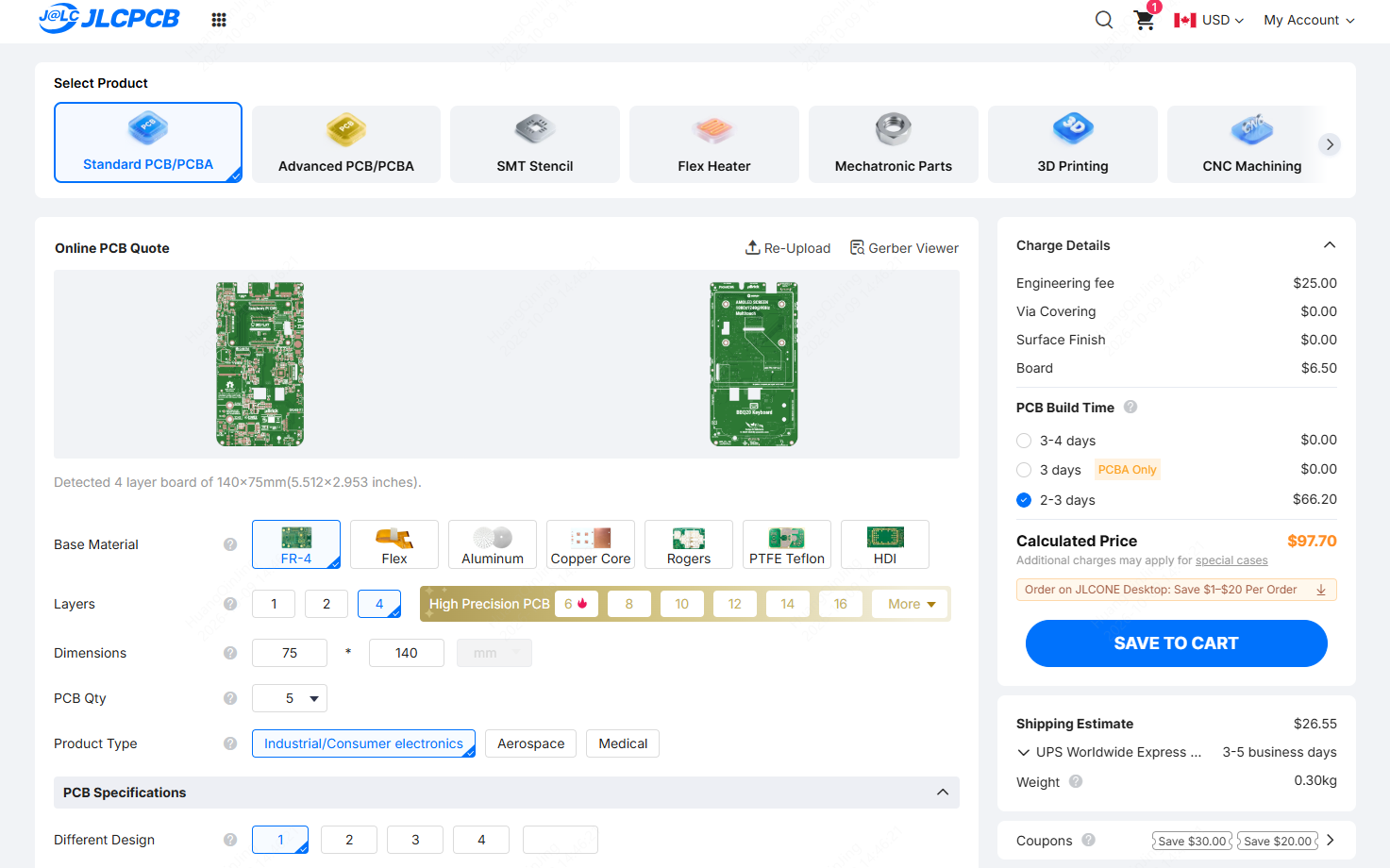
Figure: The test board on the PCB quote page, detected as a 4-layer, 140 × 75 mm board
Test board: 140 × 75 mm, 4 layers, 75 BOM lines, single-sided, quoted October 9, 2026. Totals include PCB fabrication, assembly, and parts, excluding shipping. The two-board price breakdown at the top of this guide was quoted on October 13 and came to $286.94; prices move slightly with exchange rates and parts pricing.
JLCPCB fabricates at least 5 bare boards per order but can assemble as few as 2 of them, as in the two-board quotes above. If you'll need boards for a second test round or for teammates, adding them now usually costs less than paying setup again on a second order.
On Standard PCBA, $4.93 keeps the stencil for three months, so a repeat build of the same design doesn’t pay for a new one. Economic PCBA has no storage option, but its stencil is only $1.53.
PCB panelization at prototype quantities
Panelizing usually saves money at production volume. At prototype quantities, it depends on what the panel does to the rest of the order.
How the panel is made decides the tier. Economic PCBA accepts single boards and mouse-bite panels up to 250 × 250 mm. A V-cut panel moves the whole order to Standard PCBA, with its higher setup and stencil fees.
Standard PCBA also sets a minimum assembly charge of $0.48 per board on bulk orders: if the calculated assembly fee comes in lower, the difference is added as a surcharge. That's why panels pay off for small boards with few joints.
On our test design, 2×1 V-cut panels made with Panel by JLCPCB (Standard PCBA, because of the V-cut) cost $12.89 more than single boards on Economic at 10 boards, and $14.87 less at 50, breaking even at around 30 boards. The panel itself added a little PCB cost.
The saving came from the tier. Loading all 75 unique parts on Standard costs about $115, against $132.01 for the 43 Extended parts on Economic, and Standard’s assembly rate drops at higher volume. Standard’s setup and stencil fees add about $24 per order, though, so it takes volume to come out ahead. If you're near the break-even point, quote both ways.
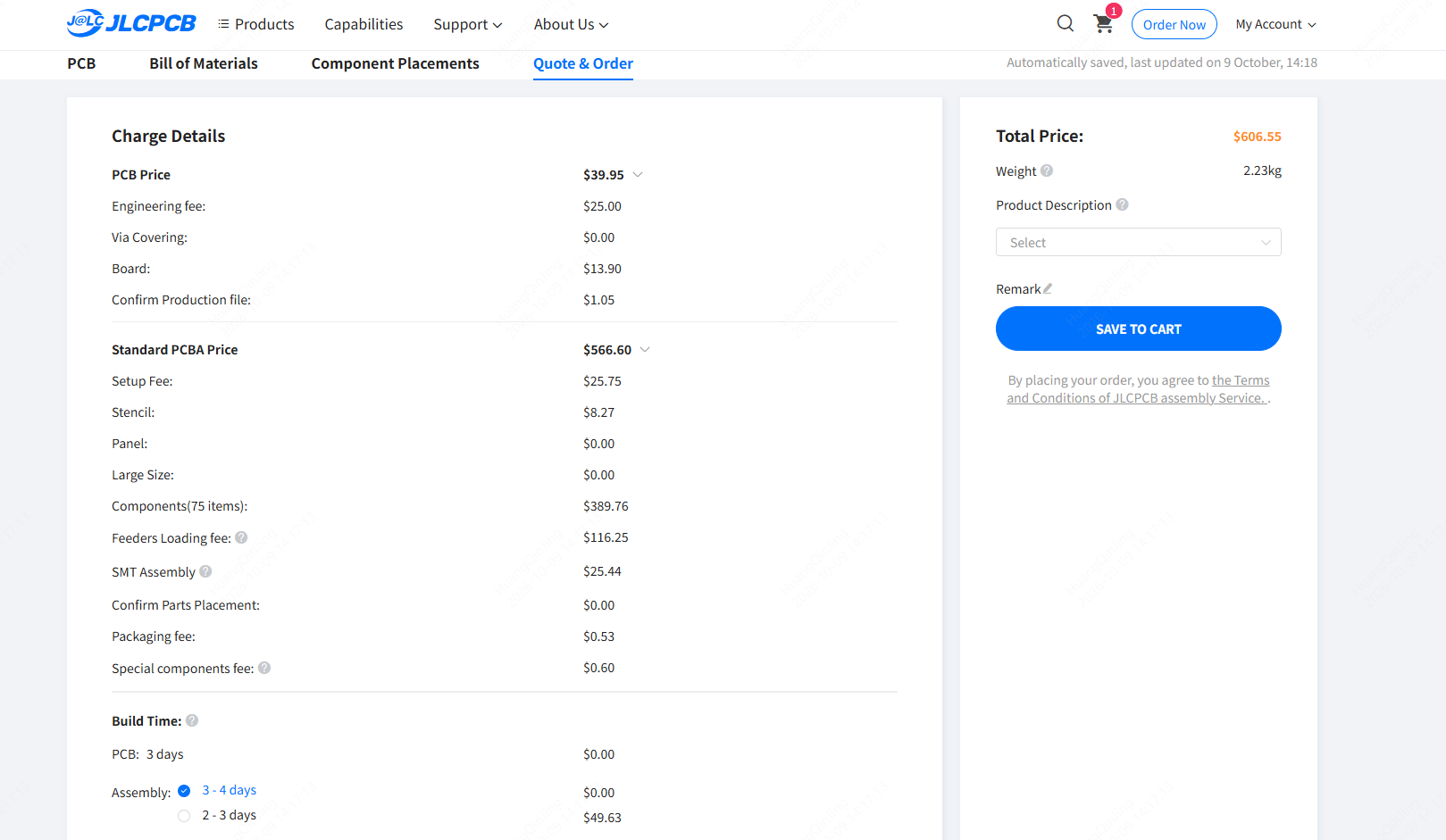
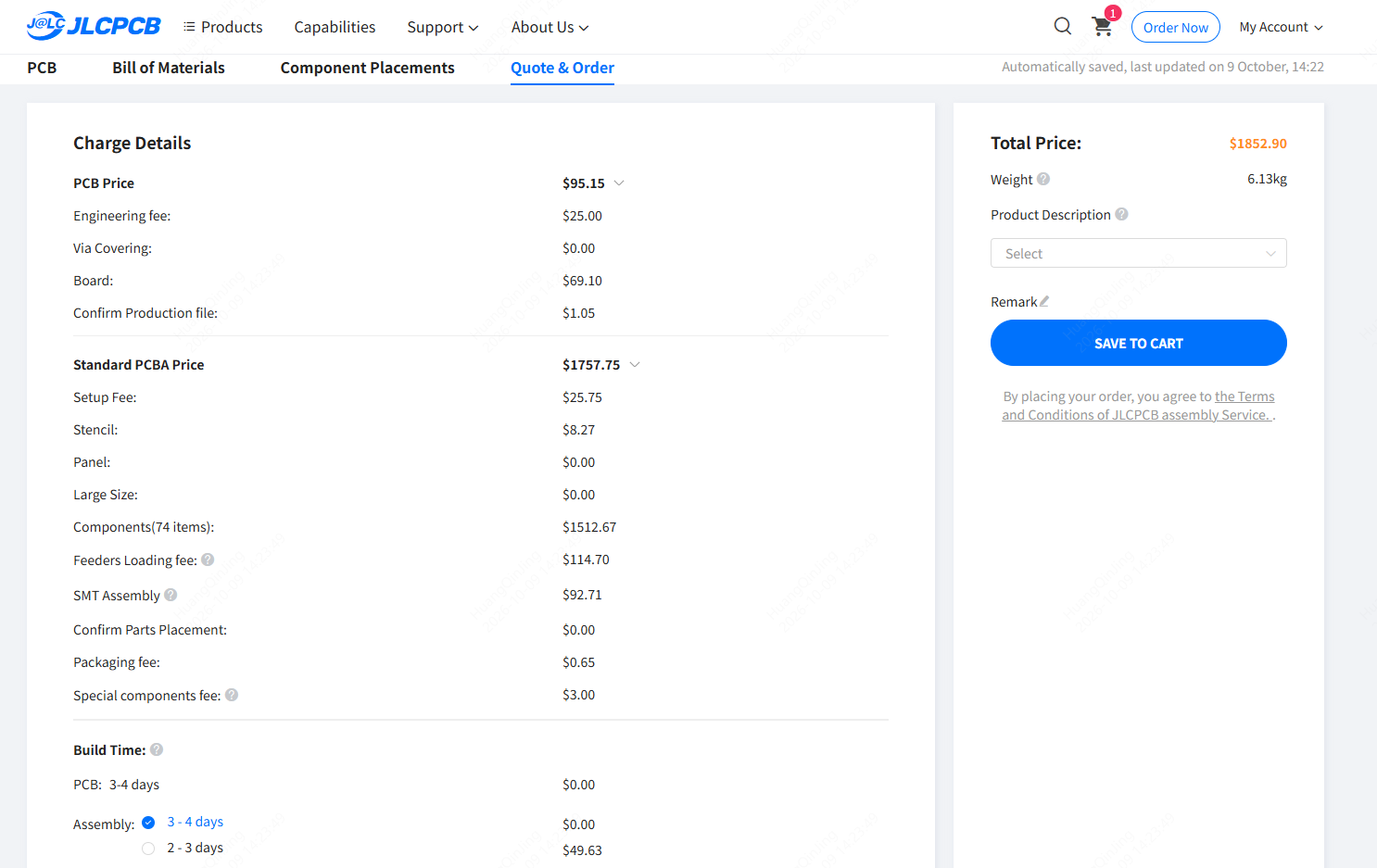
Figure: Standard PCBA quotes for the test board in 2×1 V-cut panels made with Panel by JLCPCB, at 10 boards (top) and 50 boards (bottom)
If you do panelize, note that PCBA quantity counts panels, not boards. For 50 boards in 2×1 panels, we entered 25, and misreading this field is an easy way to order the wrong quantity.
Cost Traps After You Submit
Changing files after ordering
You don’t need to cancel and reorder to fix your files, as long as the PCB hasn’t gone into production. Contact support by email or live chat to enable file replacement, then upload the corrected files from your order history. The replacement creates a new order, and if you had already paid, the original is refunded to your JLCPCB account balance.
Once the order enters production, even at the PCB stage, files and components can no longer be changed, so finalize the board before you submit. A wrong resistor value caught before then is a quick BOM fix. A wrong trace found after production starts means paying for another board.
Parts that aren't in stock
Parts your assembler doesn’t stock are bought from distributors, subject to minimum order quantities and an attrition allowance for feeder setup losses. Ten pieces on the board can mean paying for several hundred, or a full reel.
At JLCPCB, parts that aren’t in stock can be bought for you through Global Sourcing. The system calculates the attrition allowance, and the BOM matching step shows how many of each part will be purchased. Anything left over stays in your private parts library for later PCBA orders, but it can’t be shipped to you separately.
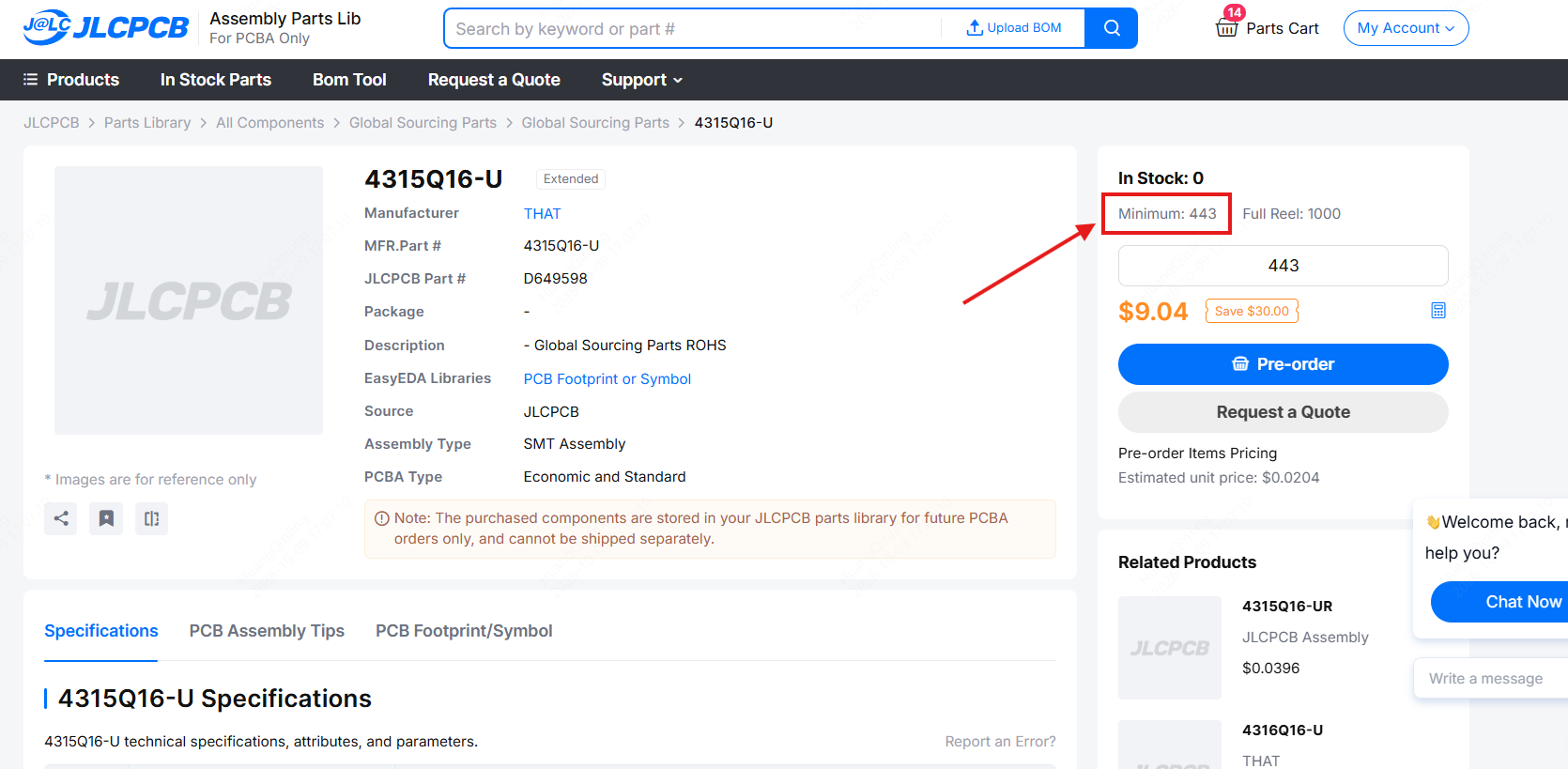
Figure: A Global Sourcing part with a minimum order of 443. Even if the board uses ten, the order buys 443.
Sourced parts also have to arrive before assembly starts. On a tight schedule, choose in-stock parts at the schematic stage.
FAQs
Q: How much does PCB assembly cost for a prototype?
Mostly, it depends on the parts. Our test board, a 4-layer, 140 × 75 mm design with 75 BOM lines, came to $140.49 per board for 2 boards and $37.36 per board for 50 on JLCPCB’s Economic PCBA in October 2026. Those totals include the PCB and all parts, but not shipping. A board built mostly from Basic parts costs much less to set up: on the test board, Extended part loading fees were nearly 80% of the fixed cost.
Q: Why is PCB assembly so expensive for small quantities?
Much of the cost is fixed per order. Setup, stencil, and feeder loading fees don’t change with quantity, so on a small order they’re spread across very few boards. On JLCPCB’s Economic PCBA, setup and stencil alone come to $9.71, and each unique Extended part adds $3.07. On our test board, fixed costs came to about $167.
Q: Is it cheaper to panelize PCBs for assembly?
Not always at prototype quantities. It depends on how the panel is made. On JLCPCB, a mouse-bite panel stays within Economic PCBA, but a V-cut panel moves the order to Standard PCBA and its higher fixed fees. Panels save the most on small boards with few joints, which would otherwise pay Standard’s $0.48 minimum assembly charge per board.
Q: Does one through-hole part increase assembly cost?
Yes, by a few dollars on a typical prototype order. SMT parts are still assembled automatically, and through-hole parts add a separate soldering step priced per joint, plus a labor fee per order. They don’t carry a feeder loading fee. On JLCPCB, a 20-pin header on five boards adds about $5 and roughly one day of build time.
Q: Does double-sided PCB assembly cost more?
Yes. The second side needs its own printing, placement, and reflow pass, usually with a separate stencil. On JLCPCB, it also requires Standard PCBA, where double-sided setup is $51.12 and the stencil $16.42, compared with $8.18 and $1.53 on Economic. Through-hole parts on the bottom side count too. A part used on both sides also pays the attrition allowance twice.
Q: What is a feeder loading fee in PCB assembly?
It’s a charge for loading a part the assembler doesn’t keep on its machines onto a feeder for your job, normally per unique part number per order. On JLCPCB’s Economic PCBA, it’s $3.07 per unique Extended part. Basic parts, which stay loaded on the machines, are free, and so are Preferred Extended parts. Standard PCBA charges $1.53 for every unique part, Basic or Extended, so a BOM with many Extended parts can cost less to load on Standard. For a design that also qualifies for Economic, though, the Standard total still comes out at least $14.93 higher, because of the handling fee. Through-hole parts aren’t charged.
Before You Order: A Checklist
Almost everything in this guide takes minutes at the schematic or layout stage and much longer to fix afterward.
- Parts checked against the assembler’s stocked library during schematic capture
- Non-critical values consolidated, and Extended parts kept to a minimum
- Design within Economic PCBA’s limits, unless volume or a V-cut panel makes Standard cheaper (on JLCPCB: single-sided, 0402 and larger, 2–50 pieces for common specs, no V-cut panels)
- All parts on one side, through-hole parts included, if board size allows
- SMD substitutes used where they don’t compromise mechanical strength
- Gerbers checked with a DFM tool
- Confirm Parts Placement selected, with rotation and pin 1 checked in the production file
- Files final before you submit the order
- Quantity set with the next test round in mind
- Panel method checked before panelizing
- Non-stocked parts, their MOQs and lead times reviewed
To apply this to your own design, check part availability in the JLCPCB parts library, run a free JLCDFM check, and compare Economic and Standard pricing on the quote page.
Keep Learning
The Definitive Guide to Reducing PCB Assembly Costs and Enhancing Efficiency
In today's fiercely competitive market for electrical devices, lowering PCB assembly costs is crucial to maintaining competitiveness and staying ahead of the competition. This comprehensive article provides valuable suggestions to help you effectively reduce PCB assembly expenses while improving your bottom line. By implementing these tactics, you can streamline your assembly procedures, minimize costs, enhance overall productivity, and achieve cost-effectiveness without compromising quality. Factors ......
How to Reduce Prototype PCB Assembly Cost (With Real Quotes)
Key takeaways Use parts your assembler already stocks wherever the design allows. Cut the number of unique part numbers. Loading fees are charged per BOM line. Check whether any design choice pushes the order into a more expensive assembly tier. Keep the board single-sided where you can. A through-hole connector adds only a few dollars. Before panelizing, check what the panel type does to the rest of the order. Freeze the Gerbers before you submit. After you order, any file change creates a new order,......
What Constitutes the Cost of PCBA? How to Calculate and Reduce PCBA Cost
The final PCBA cost is not just a dollar amount, but rather a collection of interconnected inputs and variables. Engineers, hardware developers, and makers must have a thorough understanding of these variables to design a product that is both functional and economical. A smart decision in board material or even a minor change in your BOM can have a significant potential impact on PCBA costs. By the end of this article, you will be confident to intelligently assess the key drivers of your custom PCBA c......