PCB Connector Types Explained: Categories, Comparison, Applications and How to Choose the Right One
14 min
- What Are PCB Connectors?
- PCB Connector Types by Connection Method: The Three Main Categories
- PCB Connector Types by Mounting Method
- Common PCB Connector Types Explained
- PCB Connector Types Comparison Table
- How to Choose the Right PCB Connector Type
- SMT vs THT PCB Connectors: Assembly Considerations and Best Practices
- Conclusion
- FAQs About PCB Connector Types
PCB connectors are essential components for connecting circuit boards with external devices, cables, or other PCBs. Choosing the right connector type affects signal reliability, mechanical stability, and overall product performance. Factors such as current rating, frequency requirements, pitch size, and mounting method should be considered during selection.
In this guide, you will learn:
- The major types of PCB connectors and their applications.
- How different connector types compare.
- How to select the right connector for your design.
- Key PCB assembly considerations from a manufacturer's perspective.
What Are PCB Connectors?
PCB connectors are electromechanical components that create a detachable electrical link between the main board and another board or device.
They are plug-and-play devices, which let power and signals cross from one assembly to another without permanent soldering. In this way, the parts can be joined, separated, and serviced. Every one of the PCB connector types in this guide performs that same core job with a different mechanical form.
A connector has two parts: one is fixed to the board, and the second part that plugs into it is the mating half, carried on a cable or a second board. Inside the connector, spring contacts press against mating pins to keep contact resistance as low as possible.
Get that contact right, and the connection is invisible to your circuit. Get it wrong, and you see voltage drop, heating, and intermittent faults.
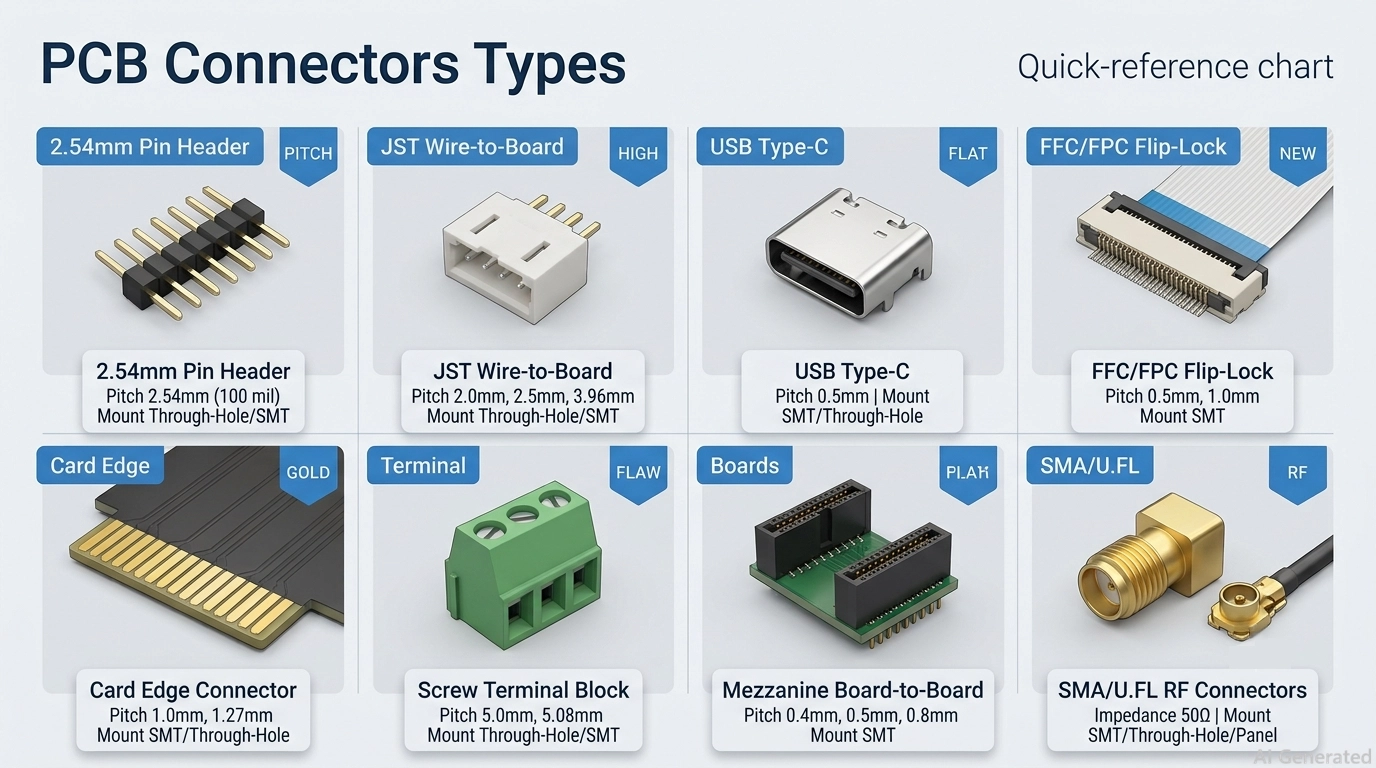
Figure 1. Types of PCB Connectors - Quick Reference Chart
PCB Connector Types by Connection Method: The Three Main Categories
The simplest approach to categorizing the type of PCB connector is by its associated connections. There are three major families of connectors for a board: board-to-board, wire-to-board, and input/output.
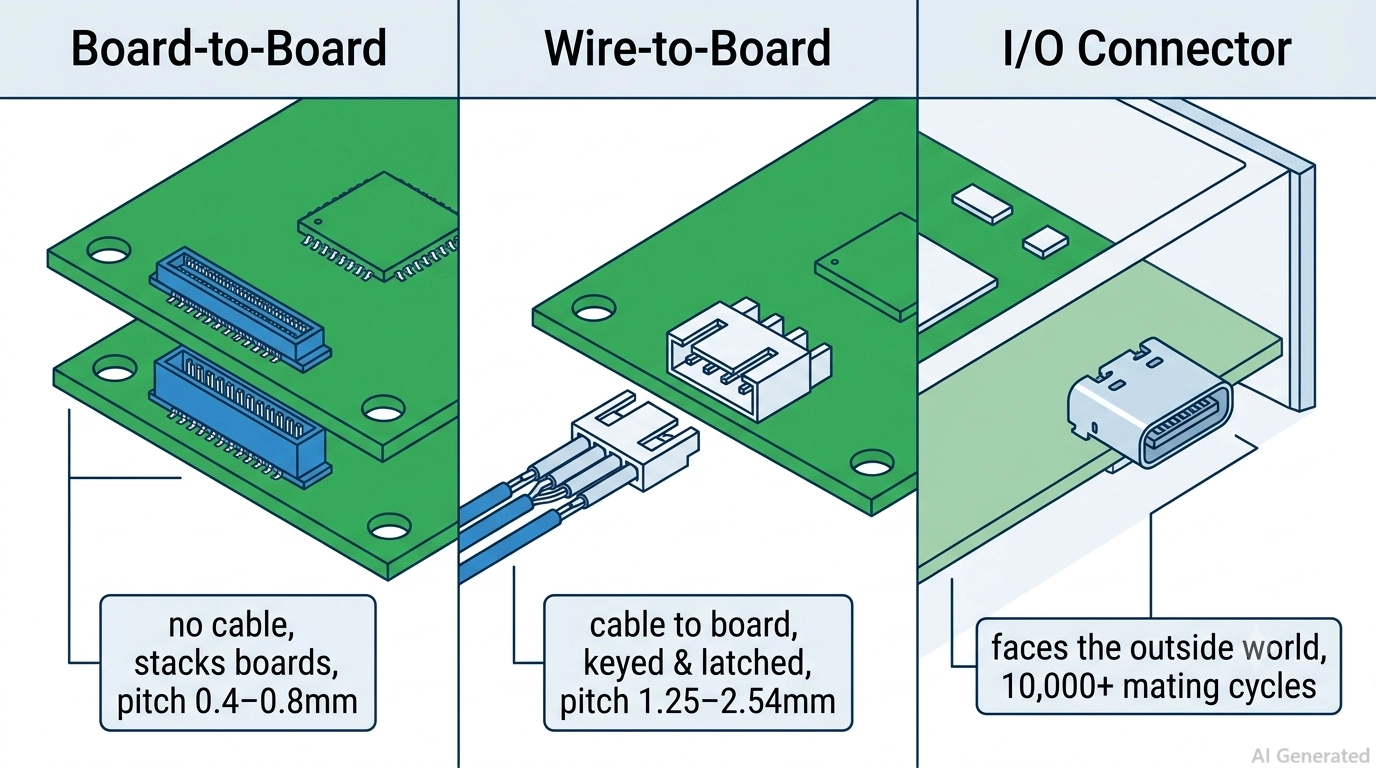
Figure 2. Board-to-Board, Wire-to-Board and I/O-Connector
Board-to-Board Connectors
Connect two PCBs directly without using cables or wires. They are used in stacking or linking PCBs in a small area, e.g., the main board and daughter board. The classic example is that of mezzanine connectors that set a fixed stack height between parallel boards.
In the real world, an example of mezzanine connectors with fine pitch is Hirose's DF40 series with 0.4mm pitch, commonly employed in phones and cameras. The common BTB pitch range is 0.4mm to 2.54mm. Fine-pitch BTB connectors are widely used in compact consumer electronics where space is limited.
Wire-to-Board Connectors
Wire-to-Board (WTB) connectors connect a cable to a circuit board, allowing the routing of a power or signal from an off-board source like a battery, motor, or sensor harness.
One side connects to wires through crimp terminals, while the PCB side is mounted using through-hole or surface-mount soldering.
A popular example is the JST XH series that uses a 2.5mm pitch WTB connector, which is used in many hobby and consumer products. The typical size range for WTB is from 1.0mm to 3.96mm, with 2.0mm and 2.54mm as common workhorses.
I/O Connectors
Input/output (I/O) connectors transport signals or power to the outside world. The ports that a user will interact with: USB, HDMI, Ethernet (RJ45), and barrel jacks.
A USB Type-C receptacle, for example, is a common option that includes power delivery and high-speed data transfer in a single reversible port. An external specification defines these connectors, and the pitch varies widely from standard to standard. So, you choose them based on the interface that they serve, not just their pitch.
PCB Connector Types by Mounting Method
The second axis of classification of the types of PCB connectors is the manner in which they connect to the board. The mounting method determines your mounting process, reliability, and cost. There are three types of installation: through-hole, surface-mount, or press-fit.
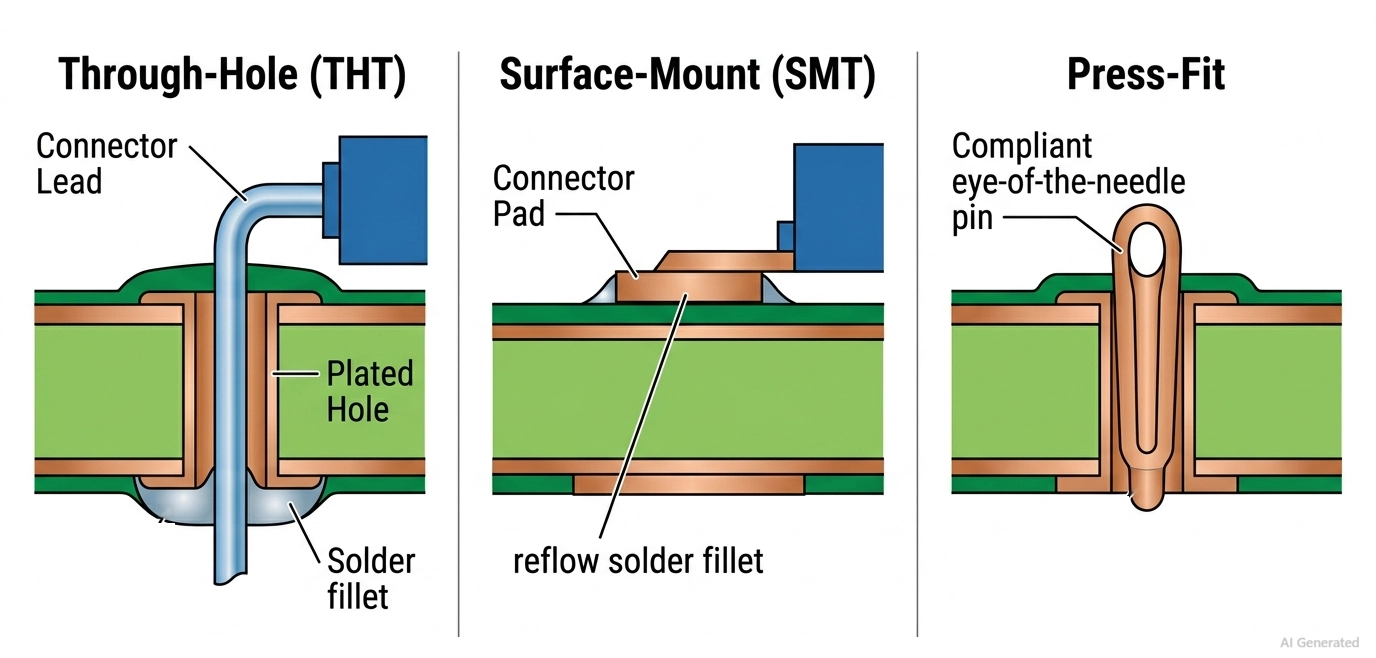
Figure 3. Through-Hole, Surface-Mount and Press-Fit Type PCB Connectors
Through-Hole (THT) Connectors
Through-hole connectors feature leads that pass through plated-through holes (PTH) in the PCB and are soldered on the opposite side using hand soldering, wave soldering, or selective soldering.
The combination of the connector leads, plated barrels, and solder joints provides strong mechanical anchorage, giving THT connectors excellent resistance to pulling and vibration. This makes them ideal for power connectors, terminal blocks, and frequently handled I/O ports. However, THT connectors require drilled holes, which occupy PCB routing space and make them less suitable for high-density, high-speed automated assembly compared with SMT connectors.
Surface-Mount (SMT) Connectors
Surface-mount connectors are soldered to pads on the surface of the board, and do not require plated through-hole leads for electrical connections. So, they can be picked and placed by a pick-and-place machine and soldered in the same reflow pass as the other parts of the board. This makes it a natural choice for high-volume, automated PCB assembly or for fine-pitch parts where it is hard to drill holes, as SMT connectors are used.
The defect of SMT connectors is that SMT joints are not as strong as through-hole barrels. Many connectors that are subject to mechanical stress will have board locks, hold-downs, or reinforcing tabs to provide extra support.
Press-Fit Connectors
Press-fit connectors are a compliant pin (usually eye-of-the-needle design) pressed into a plated through-hole to create a gas-tight electrical connection, without any solder whatsoever. This is appropriate for backplanes and connectors with many pins that need in-field replacement, and eliminates solder-induced thermal stress.
Press-fit requires control of hole size and plating, so it is generally more used in boards used in industrial, automotive, or telecom hardware than in consumer boards with low cost.
Common PCB Connector Types Explained
The following sections cover common PCB connector families, their typical applications, and key selection considerations.
Many of these part families can be browsed and sourced directly from the JLCPCB Parts Library when it's time to design them in.
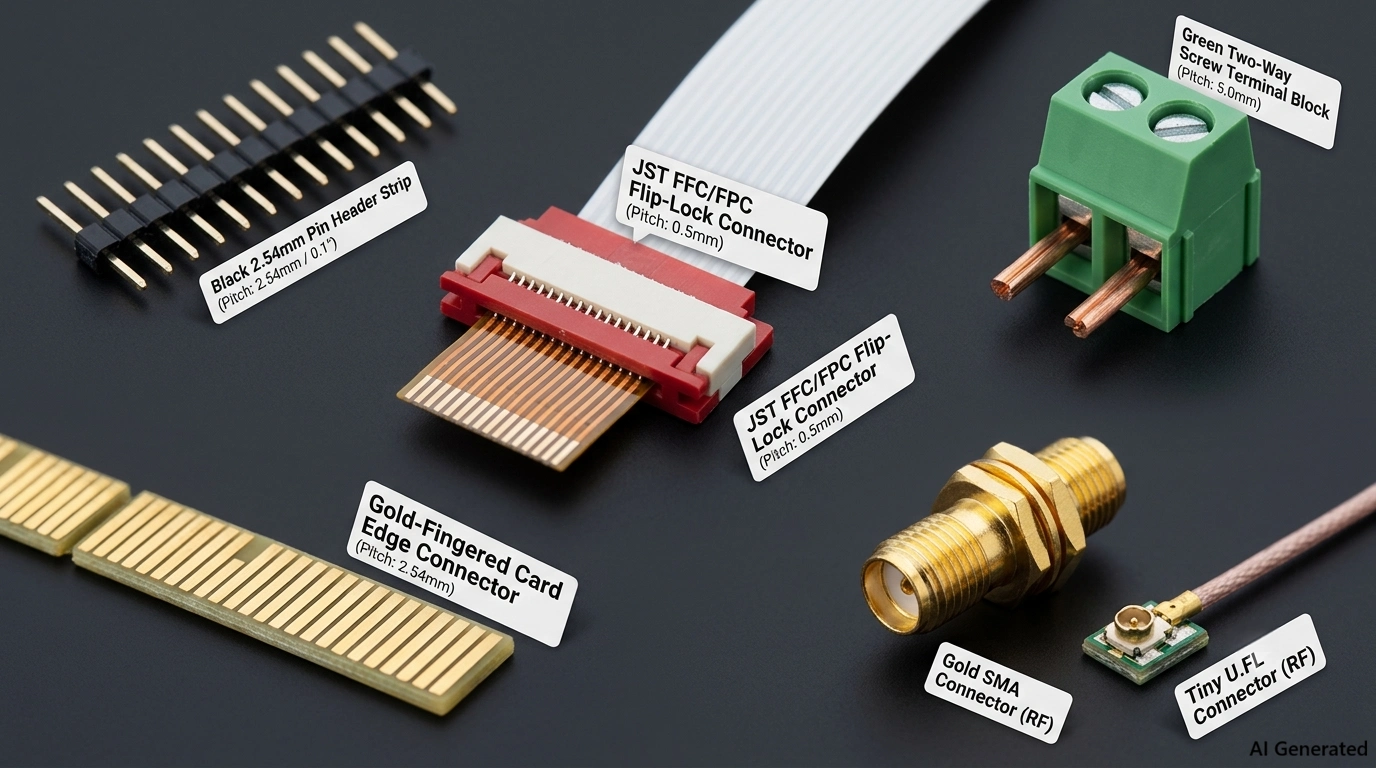
Figure 4. Pin header, FPC, Edge, RF and Co-axial PCB Connectors
Pin Header and Socket Connectors
Pin headers consist of rows of metal pins mounted on a plastic base, which are paired with female headers or socket connectors.
The most widely used and most versatile connector in electronics, for jumpers, stacking boards, module interfaces, and programming ports.
The standard pitch is 2.54mm (0.1in), but 2.00mm and 1.27mm are available for closer spacing. They're low-cost, through-hole or SMT, and perfect for prototyping, breakouts, or anywhere you need a quick and easy disconnectable link.
FFC/FPC Connectors
Flexible flat cable (FFC) and flexible printed circuit (FPC) connectors accept a thin ribbon cable or a flex circuit into a low-profile latch or slider on the board. They excel in applications that require space and flexibility, such as laptop monitors, camera modules, and printer heads.
The pitch is very small, typically 1.0mm, 0.5mm, and even 0.3mm, and the cable is inserted flat instead of vertically. Any moving or folding connection in an enclosed environment with limited space is the best use.
Edge Connectors
Edge connectors use the PCB edge itself as the mating interface. The board edge contains gold-plated contact fingers that mate with a dedicated edge connector socket, enabling electrical connections without adding a separate connector component to the PCB.
This design reduces component count and cost, which is why it is widely used in applications such as memory modules (DIMMs), expansion cards (PCIe), and other removable PCB assemblies. Common edge connector pitches range from approximately 0.8 mm to 2.54 mm, depending on the application and industry standard. They are ideal for plug-in cards that need to be installed and removed repeatedly.
Terminal Block Connectors
Terminal blocks are used to connect and secure wires by clamping stripped wire ends or terminated wires with screw clamps, spring cages, or push-in mechanisms. Compared with many signal connectors, terminal blocks are designed to handle higher currents and larger wire gauges, making them widely used in power distribution, industrial control systems, and field wiring applications where manual installation and maintenance are required.
Common terminal block pitches include 3.5 mm, 5.08 mm, and 7.62 mm, depending on the current rating and application requirements. They are ideal for applications that use larger-gauge power wires and require reliable, serviceable connections in the field.
RF and Coaxial Connectors
High-frequency signals are carried by RF and coaxial connectors and typically have a controlled impedance of 50 or 75 ohms and are shielded coaxial, which keeps the signal clean.
Frequently used types are SMA, U.FL (IPEX), and BNC (for antennas, Wi-Fi and Bluetooth modules, GPS, and test equipment). Unlike many board connectors, RF connectors are defined by interface standards and impedance characteristics rather than pin pitch. Best use is any antenna feed or RF signal path where losses and reflections are to be minimized.
PCB Connector Types Comparison Table
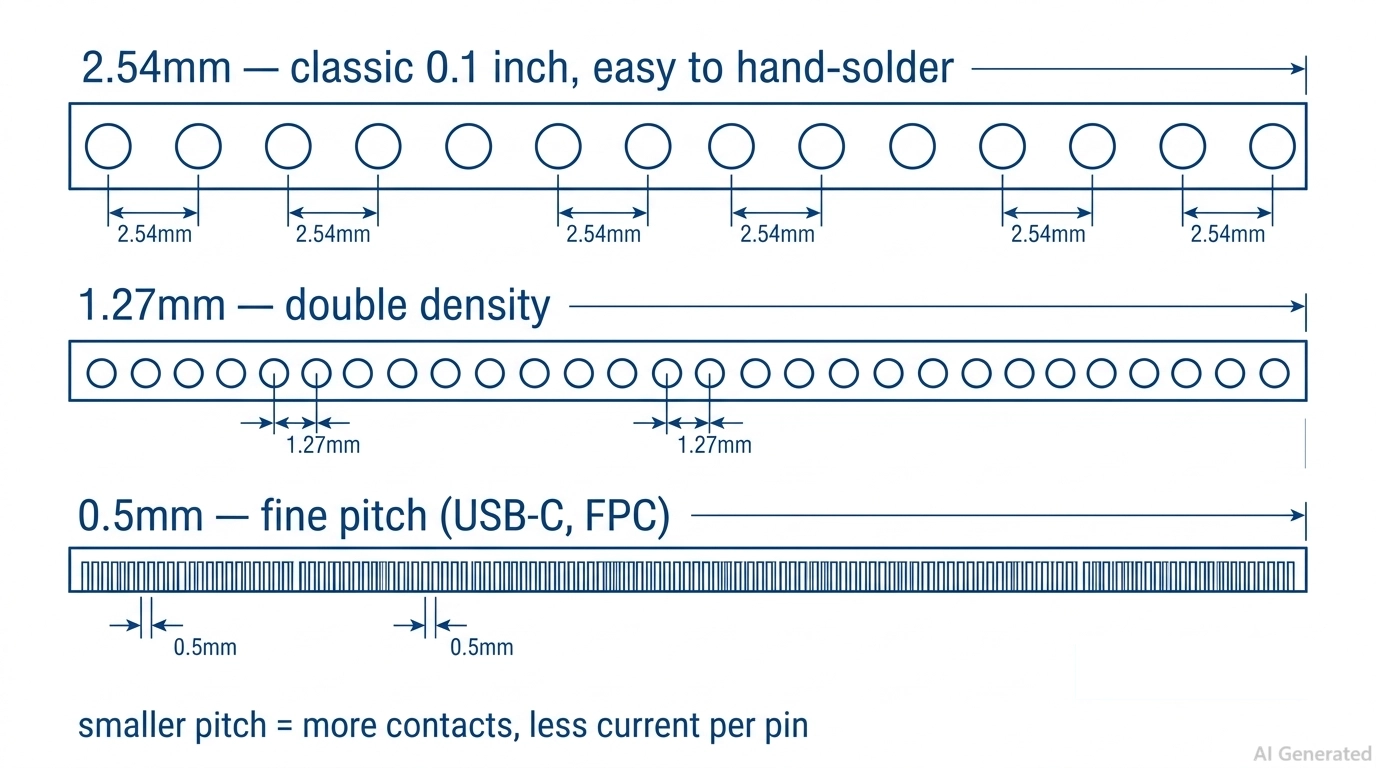
Figure 5. PCB Connector Pitch
This is the quickest comparison of the main PCB connectors side by side. Look to shortlist a family and then cross-check the exact numbers with the actual part datasheet; ranges can vary from manufacturer to manufacturer and series to series.
| Type | Mount | Typical Pitch | Current Rating | Mating Cycles | Best Use |
|---|---|---|---|---|---|
| Pin Header / Socket | THT or SMT | 2.54mm, 2.0mm, 1.27mm | 1A to 3A per pin | 25 to 100 | Prototyping, jumpers, board stacking |
| Board-to-Board (Mezzanine) | SMT | 0.4mm to 2.54mm | 0.5A to 2A per pin | 20 to 50 | Stacking boards in tight spaces |
| Wire-to-Board (e.g., JST) | THT or SMT | 1.0mm to 3.96mm | 1A to 5A per pin | 20 to 50 | Battery, motor, sensor cables |
| FFC / FPC | SMT | 0.3mm to 1.0mm | 0.5A per contact | 10 to 30 | Displays, cameras, flex links |
| Edge Connector | Edge (card slot) | 0.8mm to 2.54mm | 1A to 3A per contact | 50 to 100+ | Memory, expansion cards |
| Terminal Block | THT | 3.5mm to 7.62mm | 10A to 41A | 100 to 500+ | Power and field wiring |
| RF / Coaxial (SMA, U.FL) | THT or SMT | Impedance-defined | Signal level | 30 to 500 | Antennas, RF signal paths |
| I/O (USB, HDMI, RJ45) | THT or SMT | Standard-defined | Per standard | 1,500 to 10,000 | External ports and interfaces |
How to Choose the Right PCB Connector Type
Selecting a PCB connector is a process of narrowing down requirements based on electrical, mechanical, and environmental constraints.
Go through these four steps sequentially, and you'll find that you'll be able to reduce a large catalog of parts to just a few that make sense, and then select one based on price and availability.
- Always verify current and voltage ratings first: Check that the connector's rated current per contact and rated voltage are greater than your worst-case load, with margin. This is the process to prevent boards from overheating.
- Define the pitch, footprint, and mechanical dimensions: Choose the appropriate pitch for your board density and ability to assemble, and check the mated height, footprint, and orientation.
- Count the number of mating cycles you need: Select the durability of the connector based on the frequency of plugging and unplugging the connection during the connector's lifetime.
- Consider environmental conditions: Check operating temperature range, vibration resistance, moisture exposure, and IP protection requirements.
SMT vs THT PCB Connectors: Assembly Considerations and Best Practices
Connector selection does not end with choosing the right electrical specifications. The mounting method also affects PCB assembly cost, manufacturability, and mechanical reliability.
SMT connectors are generally well suited for automated PCB assembly. Many can be placed using pick-and-place equipment and soldered together with other surface-mount components during reflow, reducing additional assembly steps in high-volume production.
THT connectors use leads that pass through drilled PCB holes and typically require wave soldering, selective soldering, or manual soldering. They provide stronger mechanical retention for applications exposed to higher mechanical stress, but may require additional manufacturing steps.
Before ordering a connector, verify:
- Is the connector available and compatible with your manufacturer's assembly process?
- Does the footprint match the PCB layout and recommended land pattern?
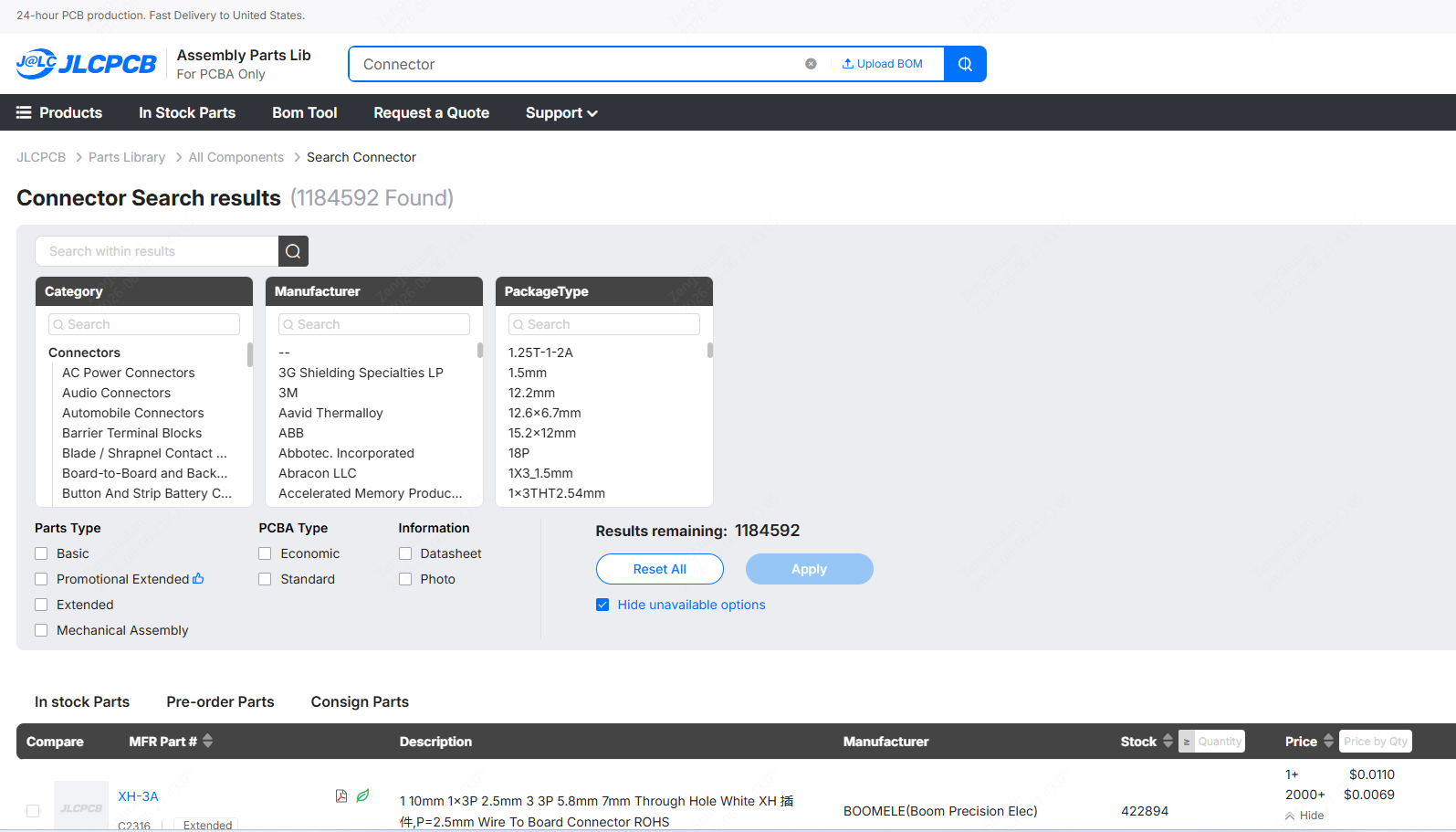
Many commonly used connector parts can be found in the JLCPCB Parts Library. Once your design is ready, you can upload your files and check PCB assembly requirements and cost before production.
Conclusion
When looking at the multitude of PCB connectors, there are two dimensions to consider: what they connect to (board-to-board, wire-to-board, or I/O) and how they mount (through-hole, surface-mount, or press-fit). From there, you become clear on the particular families, headers, FFC/FPC, edge connectors, terminal blocks, and RF connectors.
Select by determining current and voltage, determining pitch, determining mating cycles, and confirming footprint and process before building.
Even knowing these kinds of PCB connectors is not enough; you still need to ensure that the connector is manufacturable and properly positioned on your board. Once your design is complete, check the parts in the JLCPCB Parts Library and receive an instant quote to manufacture and assemble your connectorized design with confidence.
FAQs About PCB Connector Types
Q: What are the three main types of PCB connectors?
The three main types are board-to-board (BTB) connectors that join two PCBs directly, wire-to-board (WTB) connectors that link a cable to a board, and I/O connectors that carry power or signals between the board and the outside world.
Q: What is the difference between board-to-board and wire-to-board connectors?
A board-to-board connector joins two circuit boards directly with no cable in between, often to stack boards in a compact space. A wire-to-board connector joins a cable to a PCB, so one half terminates onto the wire, and the other is soldered to the board.
Q: What is connector pitch, and why does it matter?
Pitch is the center-to-center distance between adjacent contacts. It sets both board density and assembly difficulty. A coarse 2.54mm pitch is easy to hand-solder and ideal for prototypes; 1.27mm doubles the density, and a fine 0.5mm pitch packs contacts tightly.
Q: What are mating cycles, and how many do I need?
A mating cycle is one full insert-and-remove of the connector, and every connector is rated for a finite number of cycles before its contacts wear out. A permanent internal link may need only 10 to 30 cycles, while an external port a user plugs in daily needs thousands, which is why USB is rated to about 10,000 cycles.
Q: What is the most common PCB connector?
The 2.54mm (0.1 inch) pin header and its matching socket are the most common PCB connectors. They are cheap, widely available in both through-hole and surface-mount versions, and used everywhere for jumpers.
Q: What is an FFC/FPC connector used for?
FFC (flexible flat cable) and FPC (flexible printed circuit) connectors accept a thin ribbon cable or flex circuit into a low-profile latch on the board. They are used where space is tight, and the connection must bend, such as laptop displays, camera modules, and printer heads.
Q: What does the IP rating on a connector mean?
An IP (ingress protection) rating tells you how well a connector resists dust and water. The first digit rates solids, and the second rates liquids. IP67, for example, means fully dust-tight and able to survive brief immersion in water.
Q: How do I choose the right current and voltage rating for a connector?
Size the connector for your worst-case peak load, not the average, and keep headroom. Confirm the rated current per contact and the voltage rating both exceed your load; if one contact cannot carry enough current, split the load across several pins in parallel.
Popular Articles
• SMD Resistor Package Sizes: Complete Size Chart, Footprints & How to Choose
• How to Solder SMD Components Like a Pro [2026 Updated]
• SMD Resistor Codes: How to Read 3-Digit, 4-Digit, and EIA-96 Markings
• SMD Capacitor Codes: Identification, Markings, and Polarity
• SMD Capacitor Sizes: Complete Size Chart and Selection Tips for PCB Design and Assembly
Keep Learning
What is a HDMI RF Modulator? A Complete Guide
What is an HDMI RF Modulator? An HDMI RF modulator is a device that converts high-definition multimedia interface (HDMI) signals into Radio frequency (RF) signals. This allows HDMI-compatible devices, such as Blu-ray players, gaming consoles, and streaming devices, to transmit audio and video content over coaxial cables, making them compatible with older television sets or distribution systems that use RF signals. These modulators are particularly useful in settings where legacy TV systems are still i......
SMD Inductor Code: How to Read Inductor Markings and Values
Key Takeaways Three digits are read in µH: 100 is 10 µH and 101 is 100 µH. The third digit is the number of zeros, not part of the value. R and N are decimal points: R in microhenries (4R7 = 4.7 µH), N in nanohenries (2N2 = 2.2 nH). A trailing letter is a tolerance: K is ±10% and M is ±20%. On RF inductors below about 10 nH, C and D mean ±0.2 nH and ±0.5 nH. Most small chip inductors are unmarked: identify them from the BOM or reel label first, then with an LCR meter at the right test frequency. The m......
A Complete Guide to Surface Mount Device (SMD)
Imagine holding a smartphone in your hand. Inside that sleek device lies a complex network of thousands of miniature components — resistors smaller than a grain of rice, capacitors thinner than a fingernail, and integrated circuits containing millions of transistors. Without Surface Mount Technology (SMT) and its compact Surface Mount Devices (SMDs), none of this would exist. Just a few decades ago, electronics were bulky. Radios filled desks, computers filled rooms, and assembling a circuit meant dri......
TSSOP Package Guide: Dimensions, Pitch, Footprint & SMT Soldering
Key Takeaways Lead span, not body width: Build the footprint from the lead span (6.4 mm or 8.1 mm tip to tip), not the 4.4 mm or 6.1 mm body width. MSOP vs TSSOP: Check the width in the drawing before reusing a footprint: MSOP-8 and TSSOP-8 share pitch and body length, and some vendors label a 3.0 mm-wide package TSSOP8. Mask dams: A standard TSSOP footprint leaves a 0.20 mm pad gap: enough for solder mask dams on 1 oz copper, no margin on 2 oz, and no dams on JLCPCB flex boards. Thermal pad: On HTSSO......
Understanding the Role of PCB Controllers in Electronic Design
A PCB Controller is an important part of designing and building electrical systems. It controls the functions of different mechanical parts on a printed circuit board (PCB) and makes sure they can talk to each other easily. People use PCB controllers in a lot of different situations, from home technology to factory automation. The purpose of this article is to discuss the importance of PCB controllers, including the different kinds, their uses, and the best ways to choose and use them. 1. What is a PC......
How Nixie Tubes Work: The Glow Behind the Glass
Let me take you in the past, when there were no LED or LCD lights for display, rather a technology that consumes a lot of power but looks awesome. Nixie tubes, a softly glowing orange digits inside a glass tube. But nowadays these have just become obsolete, for some electronics hobbyists still keep them alive as a vintage piece from history. In this article, we’ll dive into how Nixie tubes work. Moreover, we will know the technology behind them and the history that brought them from laboratory equipme......