Border Layer Thickness: Impact on PCB Dimensions and V-Grooves
7 min
- Example Scenario
- Handling Shapes and Grooves
- Why Centerline Referencing Ensures Manufacturing Consistency
- FAQ about Border Layer Thickness
- Conclusion
Key Takeaways
The line width of the Border Layer has no impact on final PCB dimensions or V-groove (V-cut) characteristics. At JLCPCB, all routing and scoring operations reference the centerline of the Mechanical Layer outline, ensuring consistent board size with ±0.1mm precision and uniform 25° V-cuts regardless of whether you use 0.1mm or 1.0mm lines. Understanding this centerline principle allows designers to focus on visibility and clarity in EDA tools while achieving reliable, high-precision manufacturing results every time.
When it comes to designing a PCB, understanding the implications of border layer (board outline) thickness is essential for accurate fabrication and panelization. In this blog post, we will examine a practical example with different line widths on the Border Layer (0.1mm vs 1.0mm) to clarify their effects on final board dimensions and V-cut (V-groove) processing during panelization. We will also cover key JLCPCB manufacturing considerations to help you avoid common DFM issues.
Example Scenario
Imagine we have a PCB design with two different line widths on the border layer: 0.1mm and 1.0mm, respectively. Now let's address the following questions:
Will the dimensions of the final board be different?
No. The thickness (line width) of the border lines does not directly impact the overall dimensions of the board. At JLCPCB, all routing and cutting operations reference the centerline of the border lines defined on the Mechanical Layer (typically Mechanical 1/GM1). Whether your border line is 0.1mm or 1.0mm wide, the final board outline remains consistent.
Typical Dimension Tolerances at JLCPCB:
· CNC Routing: ±0.1mm (Precision) / ±0.2mm (Regular)
· V-scoring: ±0.4mm (slightly larger due to material expansion during separation)
This centerline-based approach ensures high precision and repeatability across different design tools.
During panelization, will the V-grooves be cut according to the thickness of the border layer?
No. V-grooves (V-cuts) are processed according to JLCPCB’s predefined specifications and are completely independent of the border line width. The V-cut is performed along the centerline with a standard 25° angle, typically leaving about 1/3 of the board thickness as connecting material for easy manual or roller separation.
Key JLCPCB V-Cut Specifications:
| Parameter | Specification | Notes |
|---|---|---|
| V-Cut Angle | 25 degrees | Double-sided V-cut |
| Min Panel Size | 70mm x 70mm | Both length and width |
| Min Connecting Edge | 3mm (≥5mm for ≤0.8mm thick) | Rectangular boards |
| Copper Clearance to Centerline | ≥0.4mm | To prevent copper exposure |
| Not Supported | 0.4mm board thickness | - |
| Dimension Tolerance | ±0.4mm | Due to separation |
V-cuts must be straight horizontal or vertical lines that span the entire panel. This standardization guarantees uniform groove depth and strength regardless of your design’s border line width.
Handling Shapes and Grooves
To gain a comprehensive understanding, let's also discuss how shapes and grooves are handled in such a scenario.
Shapes drawn inside the board:
When designing shapes within the board, such as cutouts or internal features, they are typically routed based on the centerline of the line. The actual width of the shape will be determined by the routing tool, irrespective of the border line's width.
Why Centerline Referencing Ensures Manufacturing Consistency
Beyond the direct impact on dimensions and V-grooves, understanding the centerline referencing principle is crucial for achieving consistent results across different PCB designs and panelization methods. At JLCPCB, the fabrication system interprets all Mechanical Layer border lines by their geometric center. This means that even if you intentionally draw a very thick 1.0mm border line for better visibility in your EDA software, the actual CNC routing tool or V-scoring blade will always follow the exact center path.
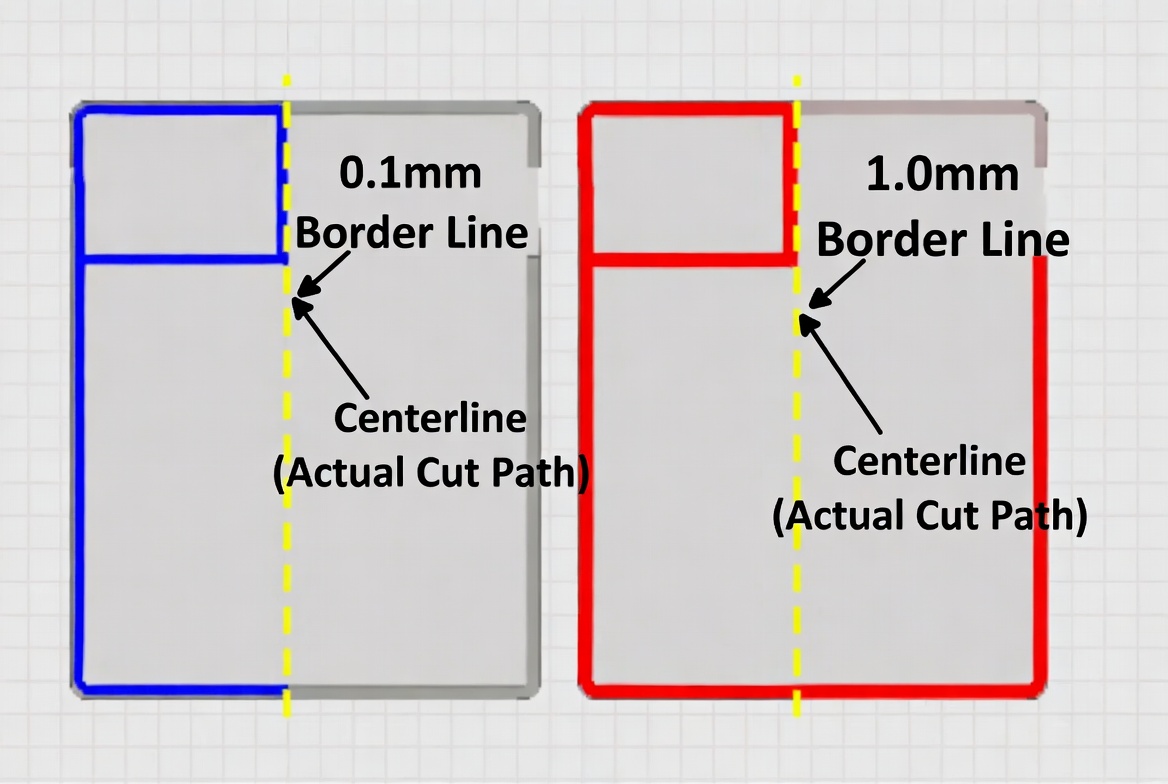
approach offers several key advantages
- Dimensional Stability: Final board size remains identical regardless of line width, with standard CNC routing tolerance controlled within ±0.1mm (precision) to ±0.2mm (regular).
- V-Cut Reliability: The 25° V-scoring process maintains uniform remaining thickness (approximately 1/3 of total board thickness), ensuring boards separate cleanly without cracking or leaving excessive material.
- Error Reduction: It eliminates ambiguity caused by varying design habits across KiCad, Altium, or Eagle, preventing common panelization issues such as misaligned grooves or oversized boards.
Practical Design Recommendations
When working with border layers, we recommend:
1. Set line width between 0.1mm and 0.5mm for optimal visibility without cluttering the view.
2. Always place the primary board outline on Mechanical Layer 1 (GM1), as it receives processing priority.
3. Maintain at least 0.4mm copper clearance from the centerline of any V-cut to avoid burrs or short circuits after separation.
4. For high-precision applications (e.g., RF or tight-tolerance mechanical assemblies), consider adding alignment marks near the border to further verify post-fabrication dimensions.
By following these centerline-based practices, engineers can confidently use different line widths during the design phase without worrying about downstream manufacturing variations. This standardized method is one of the reasons JLCPCB can deliver consistent quality even for complex multi-board panels.
Solid lines used to depict grooves:
For solid shapes, including filled polygons or copper pours, they are manufactured based on the actual width of the drawn shape. The thickness of the border layer does not influence the dimensions of internal solid shapes on the PCB.
FAQ about Border Layer Thickness
Q: Does changing the border layer line width affect the final PCB dimensions?
No. At JLCPCB, all cutting operations (CNC routing and V-scoring) are based on the centerline of the border lines on the Mechanical Layer. Whether your line width is 0.1mm or 1.0mm, the final board size remains exactly the same.
Q: Will different border line widths result in different V-groove (V-cut) depths or thicknesses?
No. V-cuts are processed according to JLCPCB’s standardized specifications (25° angle, ~1/3 board thickness remaining) and are completely independent of your border line width.
Q: Which Mechanical Layer should I use for the board outline?
We strongly recommend using Mechanical Layer 1 (GM1) for the primary board outline. This layer has processing priority and helps avoid manufacturing confusion.
Q: What is the recommended border line width for best results?
A line width between 0.1mm and 0.5mm is ideal. It provides good visibility in your design software without cluttering the layout. Thicker lines (e.g. 1.0mm) are fine for visibility but offer no manufacturing advantage.
Q: What is the copper clearance requirement near V-cuts?
Please keep copper at least 0.4mm away from the centerline of any V-cut. This prevents burrs, short circuits, or exposed copper after board separation.
Q: Can I mix different border line widths in the same design or panel?
Yes, you can. As long as the centerlines are consistent, JLCPCB’s manufacturing system will produce accurate and uniform results. Different widths are only for your design visibility and will not affect the final product.
Conclusion
In this example, we have explored the impact of different line widths on the border layer of a PCB design. We have learned that the thickness of the border line does not affect the board dimensions, as all cuts are referenced to the centerline of the border lines. Additionally, V-grooves are cut according to predefined specifications, independent of the border layer thickness.
Understanding these concepts is crucial for designing PCBs accurately. By considering the relationship between border layer thickness, board dimensions, and V-grooves, you can ensure the desired outcomes in your PCB fabrication process. JLCPCB hope this example has shed light on the topic. If you have any further questions or need assistance with your PCB design, feel free to reach out to us.
Keep Learning
How Laser-Made PCBs Are Used in Rapid Prototyping
Key Takeaways Speed & Precision: Digital lasers enable 24-hour quick-turn HDI and FPC prototyping without mechanical tooling. LDI Patterning: Replaces physical photo-films to deliver precise circuit traces down to 2/2 mil. HDI Microvias: UV/CO2 lasers drill 0.075–0.15 mm blind vias (1:1 aspect ratio) for 1+N+1 to 3+N+3 stackups. Laser Profiling & Stencils: Achieves ±0.05 mm FPC cut accuracy and ±0.003 mm LPKF stencil aperture precision. Laser DFM: Maintain ≥ 0.30 mm copper clearance on FPCs and ≥ 0.07......
A Beginners Guide to Tented vs Untented Vias
Via’s are important, If working at high speed design and HDI boards then they become super important. Choosing a type of via during PCB manufacturing matters. Via’s are basically joining two or more layer traces together. Shape, size and track length guidelines became more interesting at high frequency and high speed signals. Today in this article we will explore a fabrication side, the decision to use tented or untented vias. This beginner-friendly guide explains what tented vias are, the differences......
Understanding SMT PCB Boards Technology: An Essential Component of Modern Electronics
Surface Mount Technology (SMT) has changed manufacturing of modern electronics. It has made designs and assembly methods more efficient. Many modern electronics depend on SMT PCB boards, which make it possible for circuit designs to be small and efficient. This is what today's technology needs. This article discuss about many types of SMT PCB boards, their uses, and the best methods for designing and assembling them. 1. What is an SMT PCB Board? Printed circuit boards called SMT PCB boards, use surfac......
How to Choose the Right Prepreg Material for Reliable Multilayer PCB
Have you ever wondered what makes all those copper layers stick to a cross-section of a multilayer PCB? Prepreg material is the answer, and it is of much more importance than most engineers think it is. Choose the prepreg selection wrong, and you are predetermined to delamination, impedance drift, and long-term reliability problems. Prepreg is not only glue. It is a designed composite that determines your dielectric separation, dictates your impedance, affects signal loss, and determines your board be......
Via Filling Explained: Key Techniques, Benefits, and Solutions for High-Performance PCBs
Key Takeaways Via filling completely fills plated through-holes and microvias with epoxy or conductive copper paste, followed by planarization and copper capping (POFV). It eliminates voids, solder wicking, and thermal/mechanical issues while enabling reliable via-in-pad designs. Benefits include superior heat dissipation (up to 8 W/m·K), better signal integrity, higher mechanical strength, and improved assembly yields. JLCPCB provides free non-conductive filling + POFV on 6+ layer boards. Ideal for H......
How Fiducial Markers Guarantee Perfect Alignment in Professional PCB Fabrication
Today, the most sophisticated pick-and-place machine can place a 0.5 mm pitch QFP on its footprint, board after board, thousands of times, and never miss. It is not only a matter of expensive cameras or high-quality servos, but it begins with a little, very small copper dot, simply hanging there in the corner of your PCB. That dot represents a fiducial marker, and without it, even the smoothest SMT line would be laying components in the dark. The unrecognized heroes of automated assembly are the fiduc......